Code Splitting Strategies
Route-level, component-level, and vendor splitting — how next/dynamic and React.lazy work, webpack magic comments for chunk naming and prefetch, loading.tsx integration, and when splitting hurts more than it helps.
Overview
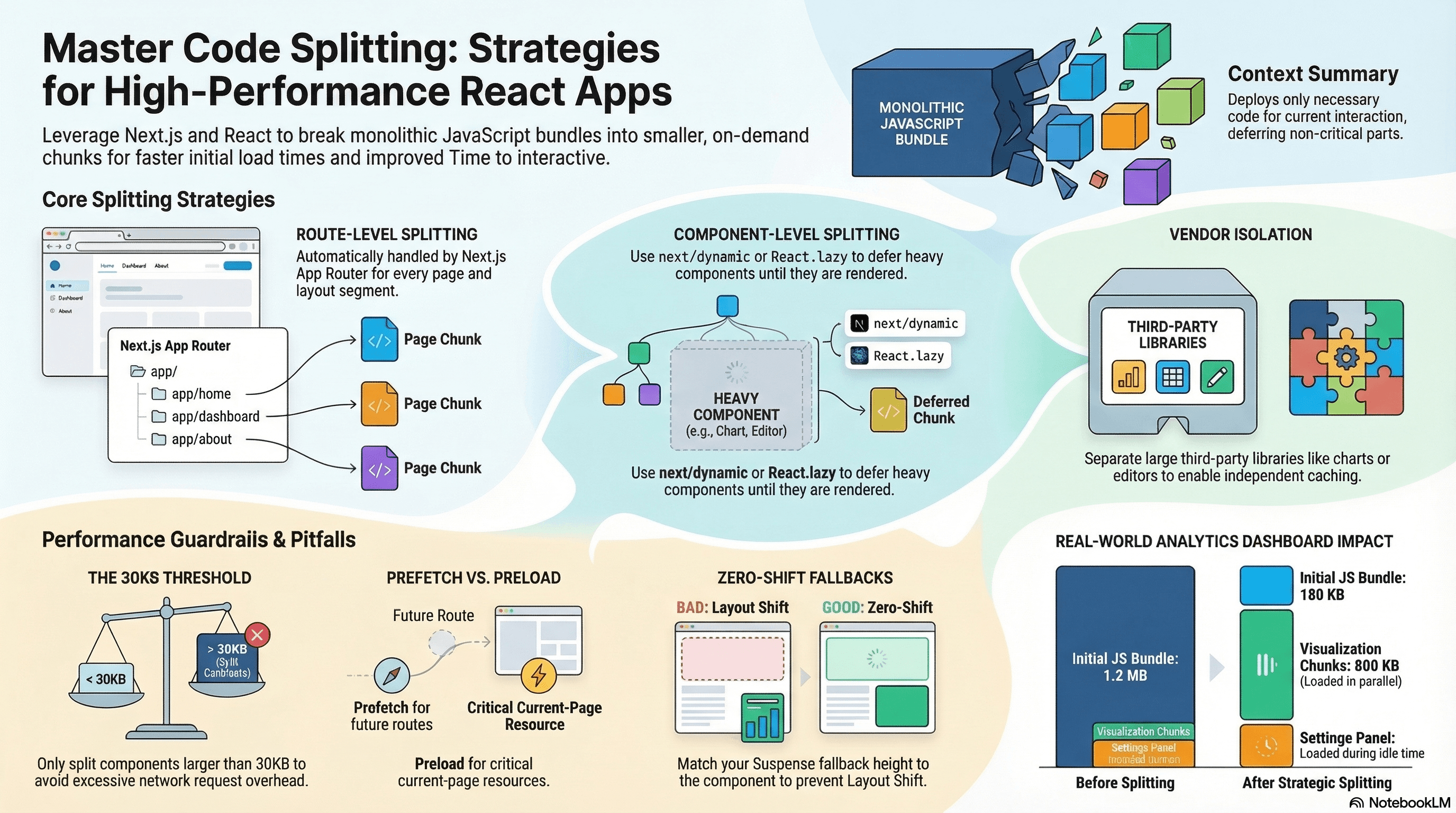
Code splitting breaks your JavaScript bundle into smaller chunks loaded on demand instead of all at once. Instead of shipping one massive bundle, you deliver only the code needed for the current page or interaction — deferring everything else until it's actually required.
This matters because JavaScript is the most expensive resource per byte on the web. A 500KB bundle must be downloaded, parsed, and compiled before users can interact with your page. Splitting lets you pay that cost incrementally, only for code users actually reach.
In Next.js App Router, route-level splitting is automatic — each segment in app/ gets its own chunk. Within a route, you control component-level and vendor splitting manually.
How It Works
When you write a dynamic import(), the bundler treats the imported module as a separate chunk — its own hashed file that's fetched only when that import() executes at runtime. The bundler also analyzes the import graph to create shared chunks for modules used across multiple splits, avoiding code duplication.
Three splitting strategies:
Route-level — Automatic in Next.js App Router. Each page.tsx and layout.tsx is its own entry point with its own chunk.
Component-level — You explicitly split a heavy component with next/dynamic or React.lazy + Suspense. The component's code loads only when it renders.
Vendor splitting — Isolate large third-party libraries (chart libraries, rich text editors, date pickers) so they don't block the initial render and can be cached independently.
Code Examples
next/dynamic — Component-Level Splitting
// app/dashboard/page.tsx
import dynamic from "next/dynamic";

// ChartWidget and all its dependencies are excluded from the initial bundle.
// They load only when ChartWidget renders — typically after the page is interactive.
const ChartWidget = dynamic(() => import("@/components/ChartWidget"), {
  loading: () => (
    // Shown while the chunk is downloading — must match the rendered size
    // to avoid layout shift (CLS impact)
    <div className="h-64 w-full animate-pulse rounded-lg bg-muted" />
  ),
  ssr: false, // Recharts uses browser APIs — skip server rendering
});

// RichTextEditor is heavy (~200KB) and only shown in edit mode
const RichTextEditor = dynamic(() => import("@/components/RichTextEditor"), {
  ssr: false,
});

export default function DashboardPage() {
  return (
    <main>
      <h1>Dashboard</h1>
      <ChartWidget /> {/* chunk loads when this renders */}
    </main>
  );
}
React.lazy + Suspense — Standard React Splitting
React.lazy is the React-native equivalent of next/dynamic. Use it in Client Components or anywhere outside the App Router's dynamic() wrapper:
// components/ReportView.tsx
"use client";

import { lazy, Suspense, useState } from "react";

// lazy() creates a lazily-loaded component
// The import() fires only when LazyPDFViewer renders for the first time
const LazyPDFViewer = lazy(() => import("./PDFViewer"));

export function ReportView({ reportUrl }: { reportUrl: string }) {
  const [showPDF, setShowPDF] = useState(false);

  return (
    <section>
      <button onClick={() => setShowPDF(true)}>View PDF</button>

      {showPDF && (
        // Suspense required — shows fallback while the chunk loads
        <Suspense
          fallback={
            <div className="flex h-96 items-center justify-center">
              <span className="text-sm text-muted-foreground">
                Loading viewer…
              </span>
            </div>
          }
        >
          <LazyPDFViewer url={reportUrl} />
        </Suspense>
      )}
    </section>
  );
}
Webpack Magic Comments — Naming Chunks and Controlling Prefetch
Magic comments in import() statements control how Webpack names, prefetches, and preloads chunks:
// Named chunk — appears in the bundle as "chart-widget.js" instead of a hash
// Makes it easier to identify in bundle analysis and network panels
const ChartWidget = dynamic(
  () =>
    import(/* webpackChunkName: "chart-widget" */ "@/components/ChartWidget"),
);

// webpackPrefetch: true — tells the browser to fetch this chunk when idle
// after the current page is fully loaded. Uses <link rel="prefetch">.
// Best for: routes the user is likely to navigate to next.
const SettingsPanel = dynamic(
  () =>
    import(
      /* webpackChunkName: "settings-panel" */
      /* webpackPrefetch: true */
      "@/components/SettingsPanel"
    ),
);

// webpackPreload: true — fetches the chunk in parallel with the current chunk
// Uses <link rel="preload">. Higher priority than prefetch.
// Best for: components needed immediately after the parent renders.
// ⚠️ Use sparingly — preload competes with critical resources.
const CriticalModal = dynamic(
  () =>
    import(
      /* webpackChunkName: "critical-modal" */
      /* webpackPreload: true */
      "@/components/CriticalModal"
    ),
);
webpackPrefetch generates <link rel="prefetch"> in the HTML. The browser fetches the chunk at idle priority and caches it — so when the user navigates or triggers the component, the chunk is already available. This is the safest way to warm the chunk cache without competing with critical resources.
loading.tsx — Route-Level Loading UI in Next.js App Router
In Next.js App Router, loading.tsx is the route-level equivalent of a Suspense fallback. It automatically wraps the page segment in a <Suspense> boundary:
// app/dashboard/loading.tsx
// Shown while app/dashboard/page.tsx and its data are loading
// Also shown when the dashboard chunk is being downloaded on first visit

export default function DashboardLoading() {
  return (
    <div className="space-y-4 p-6">
      {/* Skeleton that matches the actual layout to prevent layout shift */}
      <div className="h-8 w-48 animate-pulse rounded bg-muted" />
      <div className="grid grid-cols-3 gap-4">
        {Array.from({ length: 3 }).map((_, i) => (
          <div key={i} className="h-32 animate-pulse rounded-lg bg-muted" />
        ))}
      </div>
    </div>
  );
}
// app/dashboard/page.tsx — async data fetching triggers the loading.tsx boundary
export default async function DashboardPage() {
// This await triggers loading.tsx while the data resolves
const metrics = await fetchDashboardMetrics();
return <DashboardContent metrics={metrics} />;
}Vendor Splitting — Isolating Heavy Libraries
// app/editor/page.tsx
import dynamic from "next/dynamic";

// Monaco Editor is ~2MB — isolate it as its own chunk
// It's cached separately from app code, so app updates don't bust the editor cache
const MonacoEditor = dynamic(
  () =>
    import(
      /* webpackChunkName: "vendor-monaco" */
      "@/components/MonacoWrapper"
    ),
  {
    ssr: false,
    loading: () => <div className="h-96 animate-pulse bg-muted" />,
  },
);

// In next.config.ts — explicit vendor chunk configuration
// Forces specific packages into a named vendor chunk
// next.config.ts — manual chunk splitting via webpack config
import type { NextConfig } from "next";
const nextConfig: NextConfig = {
webpack(config) {
config.optimization.splitChunks = {
chunks: "all",
cacheGroups: {
// Isolate React and React DOM — stable, rarely updated, large
reactVendor: {
test: /[\\/]node_modules[\\/](react|react-dom)[\\/]/,
name: "vendor-react",
chunks: "all",
priority: 40,
},
// Isolate charting libraries together
charts: {
test: /[\\/]node_modules[\\/](recharts|d3|victory)[\\/]/,
name: "vendor-charts",
chunks: "all",
priority: 30,
},
// Default vendor chunk for everything else in node_modules
defaultVendors: {
test: /[\\/]node_modules[\\/]/,
name: "vendor",
chunks: "all",
priority: 20,
reuseExistingChunk: true,
},
},
};
return config;
},
};
export default nextConfig;Named Re-exports for Granular Splitting
Instead of importing from a barrel, use named component files as explicit split points:
// ❌ Barrel import — entire @/components/* in the same chunk
import { Button, Modal, DataTable, Chart, Editor } from "@/components";

// ✅ Lazy imports for heavy components — each gets its own chunk
import { Button } from "@/components/Button"; // small, always needed — static
const Modal = dynamic(() => import("@/components/Modal"));
const DataTable = dynamic(() => import("@/components/DataTable"));
const Chart = dynamic(() => import("@/components/Chart"));
const Editor = dynamic(() => import("@/components/Editor"));
Over-Splitting Anti-Pattern
Every chunk adds a network round-trip (at minimum an HTTP/2 stream). Splitting too aggressively — creating dozens of tiny chunks — produces more overhead than it saves:
// ❌ Over-splitting — splitting a 2KB component adds more overhead than it saves
const SmallButton = dynamic(() => import("@/components/SmallButton"));
const TinyBadge = dynamic(() => import("@/components/TinyBadge"));
const MicroIcon = dynamic(() => import("@/components/MicroIcon"));
// Each of these is a network request for <5KB — worse than just including them

// ✅ Split only components above a meaningful size threshold (typically 30KB+)
// or components that are rarely shown (modals, drawers, off-screen panels)
const RichTextEditor = dynamic(() => import("@/components/RichTextEditor")); // 180KB ✓
const PDFExporter = dynamic(() => import("@/components/PDFExporter")); // 90KB  ✓
The heuristic: split if the component is large (>30KB) or rarely rendered (hidden behind an interaction, shown to <20% of users). Keep everything else in the initial bundle.
Real-World Use Case
SaaS analytics dashboard. The page has: a static header, three small stat cards, and three heavy visualization components (time-series chart, geographic heatmap, data table). The stat cards always render — keep them in the initial bundle. The visualizations render after the page — split them with next/dynamic. The geographic library (@deck.gl) is only used in one chart — isolated as its own vendor chunk. The settings panel (rarely opened) uses webpackPrefetch: true — it's downloaded during idle time after the page loads so that when the user opens it, it's instant. Result: initial JS drops from 1.2MB to 180KB, the three visualization chunks (totalling 800KB) load in parallel after interaction, and the settings chunk loads at idle with no user-perceived latency.
Common Mistakes / Gotchas
1. Splitting components smaller than ~30KB. The chunk request overhead exceeds the size savings. Measure before splitting.
2. Missing ssr: false for browser-only libraries. Chart libraries, canvas-based tools, and editors that use window or document will throw on the server. Always check if the library requires ssr: false.
3. Misusing webpackPreload. webpackPreload tells the browser to load the chunk immediately in parallel with the current chunk — at high priority. Unlike webpackPrefetch, it competes with critical resources (LCP image, main CSS). Reserve it for chunks genuinely needed within the current page load, not for speculative future-page hints.
4. Forgetting the Suspense fallback height. A fallback <div> with no height causes CLS (Cumulative Layout Shift) when the real component loads and the layout expands. Match the fallback's dimensions to the expected rendered component size.
5. Dynamic imports in loops. Calling dynamic() inside a loop or render creates a new dynamic component on every render — disabling the caching that makes dynamic imports efficient. Call dynamic() at module scope, outside any function.
Summary
Code splitting reduces Time to Interactive by deferring non-critical JavaScript. next/dynamic and React.lazy are the tools — dynamic() is the App Router wrapper with SSR control; lazy() is the React primitive for client-only splitting. Webpack magic comments (webpackChunkName, webpackPrefetch, webpackPreload) control chunk naming and browser-level prefetching. loading.tsx provides route-level Suspense boundaries in the App Router. Split components above ~30KB or those rarely rendered — avoid splitting small components where network overhead exceeds size savings. Name your vendor chunks explicitly so cached third-party code survives app updates.
Interview Questions
Q1. How does a dynamic import() produce a separate chunk and when does that chunk load?
When the bundler (Webpack, Turbopack) encounters import('./Component'), it creates a new entry in the module graph with the imported module as a separate chunk — its own hashed output file. The chunk is not fetched as part of the initial bundle. At runtime, when the import() call is evaluated (e.g., when a component renders or a user clicks a button), the browser fetches the chunk file over the network, evaluates it, and resolves the Promise. With HTTP/2, chunk fetching is multiplexed — multiple chunks can load in parallel over the same connection without head-of-line blocking.
Q2. What is the difference between webpackPrefetch and webpackPreload?
webpackPrefetch: true generates a <link rel="prefetch"> for the chunk. The browser fetches it at idle priority after the current page has fully loaded — intended for resources needed on the next navigation. It doesn't compete with critical resources. webpackPreload: true generates <link rel="preload"> and instructs the browser to fetch the chunk at high priority in parallel with the current page's resources — intended for resources needed within the current page load. Prefetch is the safe default for speculative loading; preload can hurt LCP if it competes with critical path resources. In Next.js, <Link> handles prefetch automatically for routes — you rarely need either manually.
Q3. When should you use next/dynamic vs React.lazy?
Use next/dynamic when you need SSR control (ssr: false to skip server rendering for browser-only libraries), a loading state during SSR (the loading option renders on the server while the real component loads on the client), or when working with App Router conventions where dynamic integrates cleanly with server/client boundaries. Use React.lazy in standard React code outside Next.js, or when you need to compose lazy loading with explicit Suspense boundaries inside Client Components. Both ultimately use import() internally — next/dynamic adds Next.js-specific SSR behavior on top.
Q4. What is loading.tsx in Next.js App Router and how does it differ from a manual Suspense boundary?
loading.tsx is a file-system convention. Placing it in a route segment directory automatically wraps the page.tsx in that segment in a <Suspense> boundary — the loading.tsx export is the fallback. The wrapping happens at the framework level: Next.js streams the loading UI immediately (before data resolves) and replaces it with the page content when the server render completes. A manual <Suspense> boundary gives you granular control over which part of a page suspends — you can have multiple boundaries per page at different nesting levels. loading.tsx is coarser — it covers the entire route segment. The practical split: use loading.tsx for page-level loading states, manual Suspense for component-level.
Q5. How do you prevent layout shift (CLS) when using dynamic imports?
CLS occurs when the lazy-loaded component renders at a different size than its placeholder. Solutions: (1) give the loading fallback the same height and layout as the real component — use a skeleton with h-64 matching the component's rendered height; (2) use CSS to reserve space for the component before it loads (min-height, aspect ratio containers); (3) for charts, pass explicit width and height props so the container doesn't expand after the chart renders; (4) avoid dynamic imports for above-the-fold content — anything in the initial viewport should be in the initial bundle to avoid a load-then-render sequence that shifts content.
Q6. What are the signs that a codebase is over-split and how do you fix it?
Over-splitting signs: the network waterfall shows many small chunk requests (5-20KB each) firing sequentially after the initial load, the total number of chunks exceeds ~30 for a page, or Time to Interactive increases despite smaller initial bundle size (many sequential chunk fetches block interactivity). Root causes: dynamic imports applied to components too small to justify the round-trip overhead, splitting components that always render together (they could be combined), or per-component lazy loading of an entire UI section. Fixes: consolidate related small components into one dynamic chunk (dynamic(() => import('./SmallSection') where SmallSection contains multiple components), set a size threshold (only split > 30KB), and use the network waterfall in Chrome DevTools to identify sequential chunk loads that block rendering.
Tree Shaking Internals
How bundlers use static analysis of ES module imports to eliminate dead code, what prevents tree shaking, the PURE annotation, Turbopack vs Webpack differences, and how to verify it's working.
Bundle Analysis & Dependency Auditing
Using @next/bundle-analyzer, source-map-explorer, and size-limit to find bundle bloat — plus npm audit, knip, and npm ls to manage dependency security, duplicates, and dead weight.