Monorepo Tooling
Structuring and scaling a monorepo with pnpm workspaces and Turborepo — the workspace:* protocol, pnpm catalogs, Turborepo task pipelines, --affected filtering, remote cache self-hosting, and the most common configuration mistakes.
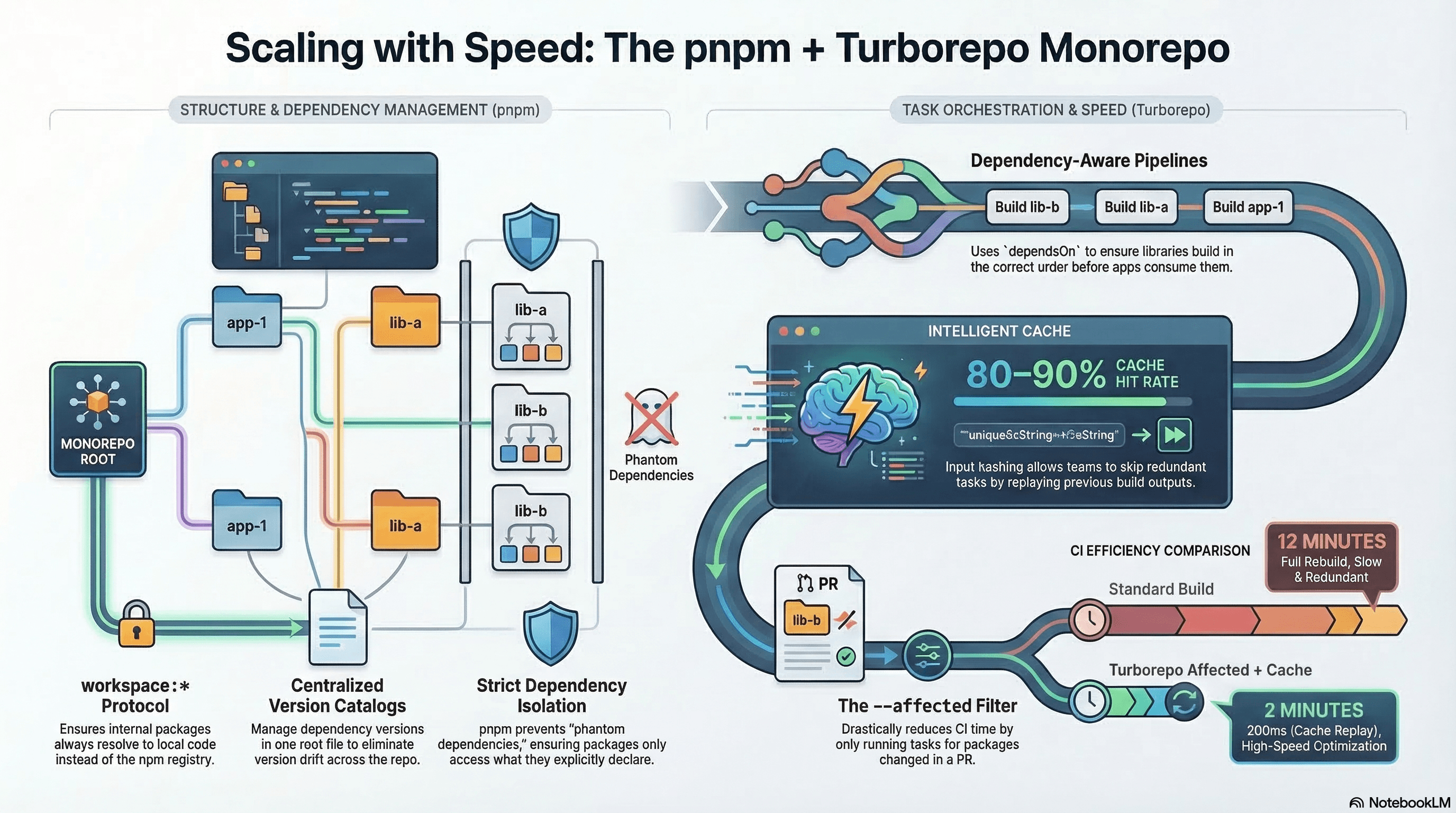
Overview
A monorepo is a single repository that houses multiple related packages or applications. Instead of maintaining separate repos for a web app, mobile app, and shared libraries, you keep them together — sharing code, tooling, and dependencies without publishing anything to npm.
Two tools handle this cleanly:
- pnpm workspaces — links local packages together, enforces strict dependency isolation, and prevents phantom dependencies.
- Turborepo — an intelligent task runner on top of workspaces with dependency-aware ordering, input hashing, parallel execution, and a shared remote cache.
Together they let codebases scale across teams without turning every build command into a 10-minute wait.
How It Works
Workspaces
When pnpm-workspace.yaml lists directories, pnpm scans them, treats each package.json as a workspace package, and symlinks them into the root node_modules. Packages reference each other by name — import { Button } from "@acme/ui" — and pnpm resolves to the local symlink instead of npm.
root/
├── apps/
│   ├── web/           # Next.js storefront
│   ├── admin/         # Next.js admin dashboard
│   └── docs/          # Documentation site
├── packages/
│   ├── ui/            # Shared React component library
│   ├── api-client/    # Typed fetch wrapper
│   └── config/        # Shared ESLint / TypeScript / Tailwind configs
├── pnpm-workspace.yaml
├── package.json       # Repo root — scripts + devDeps
└── turbo.json         # Turborepo pipeline
Turborepo's Task Graph
Turborepo reads every package.json in the workspace, builds a dependency graph from the dependencies/devDependencies fields, and uses turbo.json to define how tasks relate to each other. When you run turbo build:
- Resolves the package dependency graph
- Runs tasks in topological order —
@acme/uibuilds before@acme/webdepends on it - Hashes all inputs (source files, env vars, lockfile, task config) per package
- Replays cached output instantly when the hash matches
- Runs independent tasks in parallel
The cache key is deterministic: the same inputs always produce the same output, regardless of which machine runs the build.
Code Examples
Root package.json and pnpm-workspace.yaml
# pnpm-workspace.yaml
packages:
  - "apps/*"
  - "packages/*"
// package.json (repo root)
{
"name": "acme-monorepo",
"private": true,
"scripts": {
"build": "turbo build",
"dev": "turbo dev",
"lint": "turbo lint",
"type-check": "turbo type-check",
"test": "turbo test",
"format": "prettier --write \"**/*.{ts,tsx,mdx,json}\""
},
"devDependencies": {
"turbo": "^2.0.0",
"prettier": "^3.0.0"
}
}pnpm is the recommended package manager for monorepos. Unlike npm hoisting,
pnpm's symlink strategy prevents phantom dependencies — packages can only
import what they explicitly declare in their own package.json.
workspace:* Protocol — Linking Local Packages
The workspace:* version specifier tells pnpm to resolve the dependency to the local workspace version rather than npm. This is the correct protocol for internal packages:
// apps/web/package.json
{
  "name": "@acme/web",
  "dependencies": {
    "@acme/ui": "workspace:*", // always the current local version
    "@acme/api-client": "workspace:*",
    "next": "^15.0.0",
    "react": "^19.0.0",
    "react-dom": "^19.0.0"
  }
}
workspace:* means "use whatever version is in the workspace" — as the package evolves, consumers automatically pick up changes without version bumps. When publishing packages externally (to npm), pnpm publish automatically replaces workspace:* with the concrete resolved version in the published package.json.
workspace:^ and workspace:~ are also valid — they specify a semver range within the workspace, useful when you want consumers to pin to compatible versions after publishing.
pnpm catalog — Centralized Dependency Versions
pnpm 9+ supports catalogs — a way to declare shared dependency versions once at the workspace root instead of repeating them across every package.json:
# pnpm-workspace.yaml
packages:
  - "apps/*"
  - "packages/*"

# catalog: field defines pinned versions for the entire workspace
catalog:
  react: "^19.0.0"
  react-dom: "^19.0.0"
  typescript: "^5.5.0"
  tailwindcss: "^3.4.0"
  "@types/react": "^19.0.0"
  "@types/react-dom": "^19.0.0"
  zod: "^3.23.0"
  next: "^15.0.0"
// apps/web/package.json — reference catalog versions
{
"name": "@acme/web",
"dependencies": {
"@acme/ui": "workspace:*",
"next": "catalog:", // ← resolves to "^15.0.0" from the catalog
"react": "catalog:",
"react-dom": "catalog:",
"zod": "catalog:"
},
"devDependencies": {
"typescript": "catalog:",
"@types/react": "catalog:",
"tailwindcss": "catalog:"
}
}Benefits: bump a dependency version in one place (pnpm-workspace.yaml) and it's updated across the entire monorepo. Eliminates version drift where apps/web uses zod@3.21 while apps/admin uses zod@3.23.
turbo.json — Full Pipeline Configuration
// turbo.json
{
  "$schema": "https://turbo.build/schema.json",
  "ui": "tui",
  "tasks": {
    "build": {
      // ^build: run the "build" task of all upstream workspace dependencies first
      // Without the caret: "build" in the same package runs first (rarely what you want)
      "dependsOn": ["^build"],
      "inputs": ["$TURBO_DEFAULT$", ".env*"],
      "outputs": [".next/**", "!.next/cache/**", "dist/**"]
    },
    "dev": {
      "cache": false, // dev servers are non-deterministic — never cache
      "persistent": true // marks as a long-running task (doesn't block other tasks)
    },
    "lint": {
      // Lint after all deps are built — ensures import resolution works correctly
      "dependsOn": ["^build"]
    },
    "type-check": {
      "dependsOn": ["^build"]
    },
    "test": {
      "dependsOn": ["^build"],
      "inputs": ["$TURBO_DEFAULT$"],
      "outputs": ["coverage/**"]
    }
  }
}
Filtering Tasks — Run Only What Changed
# Build only @acme/web and its workspace dependencies
pnpm turbo build --filter=@acme/web

# Build everything that has changed since the last commit on main
# --affected computes the diff and only runs tasks for changed packages + their consumers
pnpm turbo build --affected

# Equivalent explicit form: changed since origin/main branch
pnpm turbo build --filter=...[origin/main]

# Build @acme/web and all packages it depends on (upstream deps)
pnpm turbo build --filter=@acme/web...

# Build all packages that depend on @acme/ui (downstream consumers)
pnpm turbo build --filter=...@acme/ui

# Combine: build everything affected by changes in packages/*
pnpm turbo build --filter=...[origin/main] --filter=!@acme/docs
--affected is the most useful flag for CI — it skips tasks for packages whose inputs haven't changed, using Turborepo's hash comparison against the base branch.
Task Graph Visualization
Turborepo can generate a visual dependency graph for any task — essential for debugging unexpected build orders:
# Generate the task dependency graph for the build task
pnpm turbo build --graph

# Output as a specific format (svg, png, pdf, json, mermaid, dot)
pnpm turbo build --graph=graph.svg

# Open the interactive local UI (Turborepo 2.x)
pnpm turbo build --ui=tui
The graph shows: which packages run in parallel, which are sequentially ordered, and which have cache hits (shown as replayed nodes). If a package is building unexpectedly early or late, the graph reveals the dependsOn chain causing it.
Remote Cache — Setup and Self-Hosting
Turborepo's remote cache lets the entire team and CI share the same task cache. A build one developer ran locally won't be re-run on another machine or in CI.
Vercel Remote Cache (default, zero config):
# Authenticate with Vercel
pnpm dlx turbo login
pnpm dlx turbo link

# After linking, turbo automatically reads/writes the remote cache on every run
pnpm turbo build
# "cache miss, executing" on first run
# "cache hit, replaying output" on subsequent runs with identical inputs
Self-hosted Remote Cache with ducktape or turborepo-remote-cache:
# Self-host with the community turborepo-remote-cache server
# (Docker image: ducktape-run/turborepo-remote-cache)
docker run -p 3000:3000 \
  -e TURBO_TOKEN=your-secret-token \
  -e STORAGE_PROVIDER=local \
  -e STORAGE_PATH=/cache \
  -v /data/turbo-cache:/cache \
  ghcr.io/ducktape-run/turborepo-remote-cache
# Point Turborepo at the self-hosted cache server
TURBO_API="http://cache.internal:3000" \
TURBO_TOKEN="your-secret-token" \
TURBO_TEAM="acme" \
pnpm turbo build// turbo.json — alternatively configure the remote cache here
{
"$schema": "https://turbo.build/schema.json",
"remoteCache": {
"enabled": true,
"signature": true // verify cache artifact signatures (tamper detection)
}
}Shared Package — Source-First with transpilePackages
For internal packages shipping TypeScript source (no separate build step), Next.js must be told to transpile them:
// packages/ui/package.json
{
  "name": "@acme/ui",
  "private": true,
  "exports": {
    ".": { "import": "./src/index.ts" }
  },
  "peerDependencies": {
    "react": "^19.0.0" // peer dep, not regular dep — avoids duplicate React instances
  }
}
// apps/web/next.config.ts
import type { NextConfig } from "next";
const config: NextConfig = {
// Tell Next.js to process TypeScript/JSX in these workspace packages
transpilePackages: ["@acme/ui", "@acme/api-client"],
};
export default config;Without transpilePackages, Next.js won't process TypeScript or JSX inside
packages/ — you'll get a SyntaxError at runtime. Alternatively, pre-build
packages with tsup or tsdown and export compiled JS with declaration
files.
Shared TypeScript and ESLint Configs
// packages/config/tsconfig/base.json
{
  "$schema": "https://json.schemastore.org/tsconfig",
  "compilerOptions": {
    "target": "ES2022",
    "module": "ESNext",
    "moduleResolution": "Bundler",
    "strict": true,
    "skipLibCheck": true,
    "isolatedModules": true
  },
  "exclude": ["node_modules"]
}
// apps/web/tsconfig.json
{
"extends": "@acme/config/tsconfig/base.json",
"compilerOptions": {
"plugins": [{ "name": "next" }],
"paths": { "@/*": ["./src/*"] }
},
"include": ["next-env.d.ts", "**/*.ts", "**/*.tsx"]
}// packages/config/eslint/base.js
import js from "@eslint/js";
import tseslint from "typescript-eslint";
export default tseslint.config(
js.configs.recommended,
...tseslint.configs.recommended,
{
rules: {
"@typescript-eslint/no-unused-vars": "error",
"@typescript-eslint/no-explicit-any": "warn",
},
},
);Real-World Use Case
An e-commerce platform has three surfaces: a customer-facing Next.js storefront (apps/web), an internal admin dashboard (apps/admin), and a documentation site (apps/docs). All three share @acme/ui (components), @acme/api-client (typed fetch wrapper), and @acme/config (ESLint/TS configs).
In CI, the PR pipeline runs turbo build --affected. A developer changes one component in @acme/ui. Turborepo determines the affected graph: @acme/ui → @acme/web, @acme/admin, @acme/docs. All three rebuild. @acme/api-client is unaffected and hits the remote cache — its build replays in 200ms instead of 45 seconds. Total CI time: 2 minutes instead of 12. With the Vercel remote cache, a build one developer ran on their laptop is replayed in CI without recomputing — the cache hit rate approaches 80–90% on active branches.
Common Mistakes / Gotchas
1. dependsOn: ["build"] vs dependsOn: ["^build"]. Without the caret, "build" means "run this package's own build script first." With the caret ("^build"), it means "run the build task of every upstream dependency first." Almost always you want the caret for build and lint — omitting it causes apps to build before their shared packages, resulting in stale type imports.
2. Caching dev tasks. Dev servers are long-running and non-deterministic. Failing to set "cache": false and "persistent": true causes Turborepo to attempt caching a task that never exits — confusing behavior in the task UI and potentially blocking other tasks.
3. Installing dependencies in the wrong place. Runtime dependencies of a specific app (next, react) belong in that app's package.json. Repo-level tooling (turbo, prettier) belongs in the root. Putting app dependencies in the root inflates the dep tree and prevents per-app version flexibility.
4. Using "react" as a regular dependency in shared packages. Shared packages should list React as a peerDependency — consuming apps provide their own React instance. Using a regular "dependencies" entry can result in two React instances in the bundle, breaking all hooks.
5. Not using workspace:* for internal package references. Using a hardcoded version like "@acme/ui": "0.0.1" means consumers won't automatically pick up local changes — pnpm may resolve to the npm registry version if one exists, or the version pinned in the lockfile. Always use workspace:* for internal packages.
Summary
pnpm workspaces link local packages together and enforce strict dependency isolation. The workspace:* protocol ensures internal packages always resolve to the local version. pnpm catalogs centralize version management — a single version bump in pnpm-workspace.yaml propagates across the entire repo. Turborepo's task graph runs tasks in dependency order, caches outputs by input hash, and parallelizes independent work. --affected filtering skips tasks for unchanged packages — the most impactful CI optimization in a large monorepo. Remote caching (Vercel-hosted or self-hosted) shares the cache across the team and CI, turning repeated builds into sub-second cache replays. The most common mistakes involve incorrect dependsOn configuration, caching long-running dev tasks, and installing shared framework packages as regular dependencies instead of peer dependencies.
Interview Questions
Q1. What is the workspace:* protocol in pnpm and why should you use it instead of a version number?
workspace:* is a pnpm-specific version specifier that resolves an internal package reference to the local workspace version at whatever version it currently is — bypassing the npm registry. Using a hardcoded version like "@acme/ui": "1.2.3" creates a fragile reference: if the local package's version in package.json doesn't exactly match, pnpm may fall back to the npm registry or the lockfile's cached resolution, meaning local changes aren't picked up. workspace:* always uses the live local code. When running pnpm publish, the specifier is automatically replaced with the concrete resolved version in the published artifact — so external consumers see a normal version number while internal packages benefit from the live link during development.
Q2. What does ^build in Turborepo's dependsOn mean and why is it almost always the right choice for build tasks?
"dependsOn": ["^build"] means: "before running this task, run the build task of every workspace package that this package declares as a dependency." The caret (^) is the "upstream dependencies" sigil. Without it, "dependsOn": ["build"] means "run this package's own build task first" — a self-reference that doesn't enforce ordering relative to dependencies. For a monorepo where apps/web imports from packages/ui, you need @acme/ui to be built before @acme/web starts building. Without ^build in web's build task configuration, Turborepo may run both in parallel — web builds against stale or missing build artifacts from ui, causing import errors or TypeScript failures.
Q3. What is pnpm catalog and what problem does it solve?
pnpm catalogs (introduced in pnpm 9) let you declare canonical dependency versions in pnpm-workspace.yaml once and reference them across all package.json files with "catalog:". Without catalogs, the same dependency (e.g., zod, tailwindcss, typescript) is declared with potentially different version ranges in every app and package — drift accumulates as different developers update different entries. With catalogs, there's one authoritative version per dependency. Bumping zod from 3.21 to 3.23 means editing one line in pnpm-workspace.yaml instead of finding and updating every package.json that mentions it. This eliminates version drift and ensures the entire monorepo stays on consistent dependency versions.
Q4. How does Turborepo's --affected flag work and what makes it efficient in CI?
--affected computes which workspace packages have changed since a base reference (typically the target branch in a PR) by diffing the git commit graph. It then walks the dependency graph to find all packages that are downstream consumers of changed packages — because a change to @acme/ui could break @acme/web, @acme/admin, and any other consumer. Only those packages (and their tasks) are executed; unchanged packages with valid cache entries are replayed instantly. In a 20-package monorepo where a PR touches one package, --affected might run tasks for 3–4 packages instead of all 20 — a 5–6x reduction in CI work. Combined with the remote cache, even the affected packages often hit cache if another developer or a previous CI run already built the same input hash.
Q5. What is Turborepo remote caching and what are the tradeoffs between Vercel-hosted and self-hosted?
Turborepo remote caching stores task output artifacts (build outputs, test results, lint reports) in a central server keyed by the input hash. Any machine — developer laptop, CI runner, teammate's computer — that runs a task with the same inputs retrieves the cached output instead of recomputing. Vercel-hosted cache is zero-config after turbo login && turbo link, has global CDN distribution, and is free up to usage limits — the right choice for most teams. Self-hosted (via turborepo-remote-cache or ducktape) gives full data control (useful for compliance requirements like no external network access in CI), no usage limits, and integrates with existing internal infrastructure. The tradeoff: self-hosted requires you to operate the cache server, handle storage scaling, and manage authentication tokens.
Q6. Why should shared packages declare React as a peerDependency instead of a regular dependency?
If @acme/ui lists react in dependencies, pnpm installs its own copy of React inside packages/ui/node_modules. When apps/web imports from @acme/ui, the component code runs with @acme/ui's React instance while the app runs with apps/web's React instance. React's internal state (hooks, Context) is stored per-instance — two instances means hooks in @acme/ui components can't find the state registered by the app's React reconciler. The result is the "Invalid hook call" error. Declaring react as a peerDependency says "I need React to be provided by my consumer" — pnpm uses the app's single React instance for everything. The app then lists React in its own dependencies, making it the sole provider.
Preload, Prefetch & Priority Hints
The full set of browser resource hints — preload, prefetch, preconnect, dns-prefetch, modulepreload — plus fetchpriority on images, Next.js Script loading strategies, and the Speculation Rules API for instant page navigations.
Overview
Caching at every layer of the stack — HTTP headers, CDN edges, service workers, and client-side storage APIs.