HTTP Caching Strategies
Cache-Control directives, ETag conditional requests, stale-while-revalidate and stale-if-error, Vary headers, s-maxage vs max-age, and Next.js fetch caching — with the exact combinations that prevent stale-data bugs.
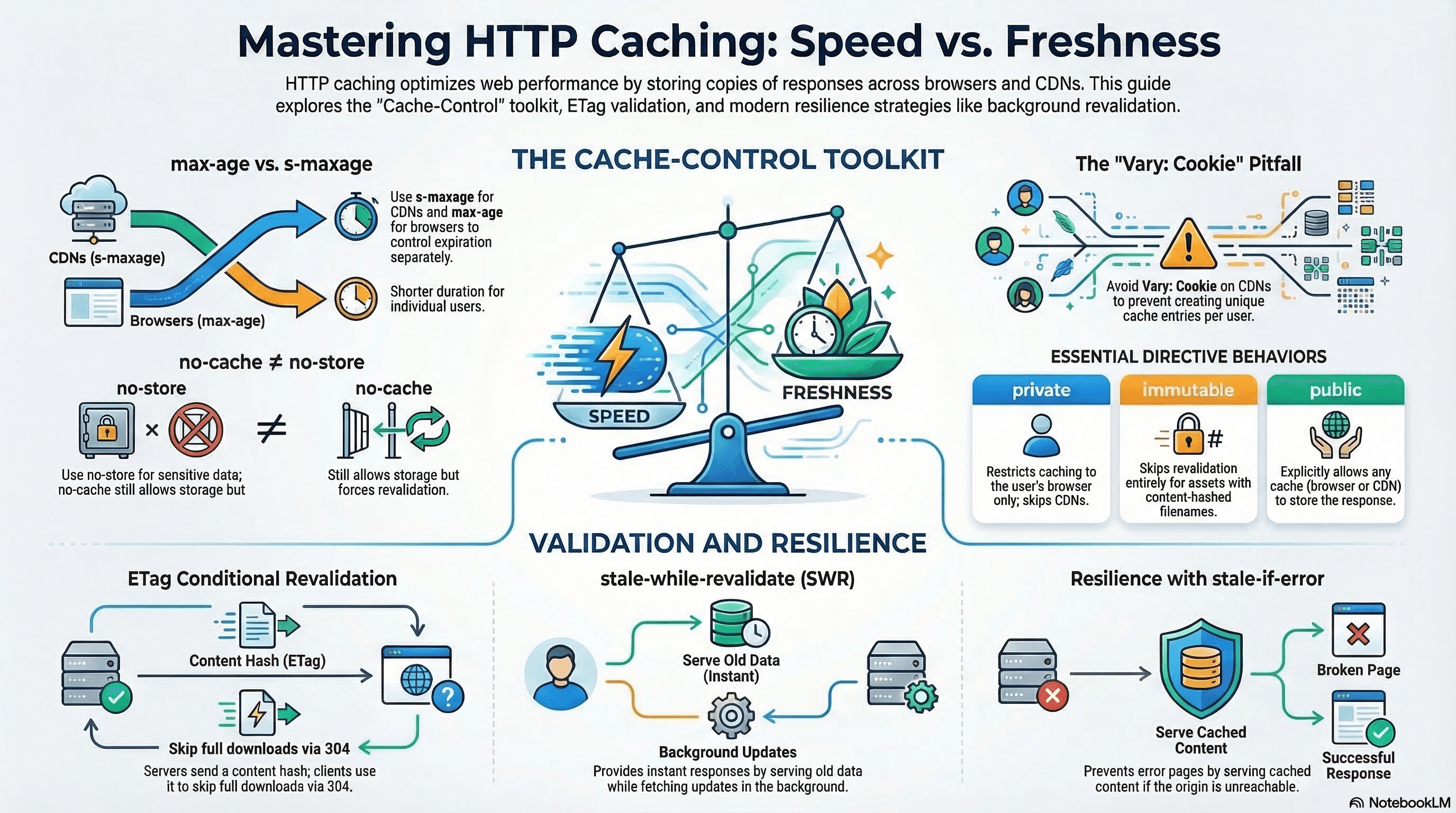
Overview
HTTP caching eliminates redundant network requests by letting browsers, CDNs, and proxies store copies of responses. Used correctly it reduces server load and dramatically improves perceived performance. Used incorrectly it serves stale data silently — sometimes for days.
Three mechanisms sit at the core of modern HTTP caching: Cache-Control instructs every cache in the chain how long and how to store a response. ETag lets clients validate freshness without re-downloading the full payload. stale-while-revalidate serves cached data immediately while refreshing in the background.
Understanding how they compose — and where each breaks — is the difference between a fast, correct application and a hard-to-reproduce staleness bug.
How It Works
Cache-Control Directives
Cache-Control is a response header whose directives control every cache in the request chain — browser cache, service worker cache, CDN, and reverse proxies.
| Directive | Meaning |
|---|---|
max-age=N | Cache for N seconds in all caches (browser + CDN) |
s-maxage=N | Cache for N seconds in shared caches only (CDN); overrides max-age for CDNs |
no-cache | Store it, but revalidate before every use (sends conditional request) |
no-store | Never store this response — not in browser, CDN, or proxy |
private | Only the browser may cache it — CDNs must not |
public | Any cache may store it |
immutable | The resource will never change — skip revalidation entirely during max-age |
stale-while-revalidate=N | Serve stale for N extra seconds while refreshing in background |
stale-if-error=N | Serve stale for N seconds if the origin returns 5xx or is unreachable |
must-revalidate | Once stale, must revalidate — never serve stale (overrides SWR) |
max-age vs s-maxage — Split Caching Policy
max-age applies to every cache in the chain. s-maxage applies only to shared caches (CDNs, reverse proxies) — overriding max-age for them while leaving browser behavior unchanged:
Cache-Control: public, max-age=60, s-maxage=3600- Browser: caches for 60 seconds (user gets a revalidation request after 1 minute)
- CDN: caches for 1 hour (high cache-hit ratio at the edge)
This is the correct pattern for pages where CDN caching duration should exceed browser caching duration.
ETag — Conditional Revalidation
The server sends an ETag (a hash of the response body) with the response:
ETag: "d8e8fca2dc0f896fd7cb4cb0031ba249"On subsequent requests, the browser sends it back via If-None-Match:
If-None-Match: "d8e8fca2dc0f896fd7cb4cb0031ba249"If unchanged: 304 Not Modified — no body, minimal bandwidth. If changed: full 200 with new ETag.
ETags must be deterministic. The same resource content must always produce the same ETag. A hash of the response body is correct; a timestamp or random value is wrong — every request gets a new ETag and revalidation is never skipped.
stale-while-revalidate — Background Refresh
Cache-Control: public, max-age=60, stale-while-revalidate=300- For the first 60s: serve from cache (fresh, no network request)
- For seconds 61–360: serve stale immediately, revalidate in the background
- After 360s: must wait for a fresh response
The user always gets an instant response. The freshness cost is that they may see data up to 5 minutes old during the stale window. This is acceptable for product listings, blog posts, navigation menus — wrong for live stock prices, inventory, or pricing that must be accurate.
stale-if-error — Resilience Under Origin Failure
Cache-Control: public, max-age=60, stale-while-revalidate=300, stale-if-error=86400If the origin returns 5xx or is unreachable, serve the cached response for up to 24 hours rather than showing an error page. Combined with stale-while-revalidate, this creates a highly resilient caching layer: users see fast responses under normal conditions and graceful degradation during outages.
Code Examples
Setting Cache-Control in Next.js Route Handlers
// app/api/products/route.ts
import { NextResponse } from "next/server";

export async function GET() {
  const products = await db.product.findMany({ where: { active: true } });

  return NextResponse.json(products, {
    headers: {
      // Browser: 60s fresh. CDN: 1h fresh. Up to 5m stale while revalidating.
      // Serve stale for 24h on origin errors — prevents error pages during outages.
      "Cache-Control":
        "public, max-age=60, s-maxage=3600, stale-while-revalidate=300, stale-if-error=86400",
      // Cache-Tag for CDN tag-based purging (Cloudflare/Fastly)
      "Cache-Tag": "products",
    },
  });
}
Immutable Assets — Skip All Revalidation
Content-hashed filenames never change — the filename itself changes when content changes. Revalidation is pointless:
Cache-Control: public, max-age=31536000, immutableNext.js sets this automatically for /_next/static/ files. Replicate it for any asset whose filename includes a content hash:
// app/api/asset/route.ts — serving a versioned asset
return new Response(assetBuffer, {
  headers: {
    "Cache-Control": "public, max-age=31536000, immutable",
    "Content-Type": "application/javascript",
  },
});
Never use immutable on resources served at a stable URL that may be updated
(e.g., /logo.png). immutable tells browsers to never check for updates
during max-age. Use it only with content-hashed URLs.
The Vary Header — Correct Cache Keying
Without Vary, a CDN stores one cached response per URL. If your responses differ by Accept-Encoding, Accept-Language, or cookies, the CDN may serve the wrong variant:
// app/api/products/route.ts
return NextResponse.json(products, {
  headers: {
    "Cache-Control": "public, s-maxage=3600",
    // Tell CDNs to key the cache by encoding AND language
    // Each unique combination gets its own cache entry
    Vary: "Accept-Encoding, Accept-Language",
  },
});
Vary: Authorization or Vary: Cookie effectively disables CDN caching —
CDNs treat each unique header value as a separate cache entry, and
personalized headers are unique per user. For authenticated responses, use
Cache-Control: private and handle caching entirely in the browser or an
app-level cache.
Next.js fetch Cache Options
Inside Server Components and Route Handlers, Next.js extends fetch with caching options:
// app/products/page.tsx

// 1. Time-based revalidation — cache and refresh at most every 60s
const products = await fetch("https://api.example.com/products", {
  next: { revalidate: 60 },
}).then((r) => r.json());

// 2. Tag-based — cache indefinitely, purge via revalidateTag("products")
const featured = await fetch("https://api.example.com/featured", {
  next: { tags: ["products", "featured"] },
}).then((r) => r.json());

// 3. No store — never cache this response (e.g., real-time data)
const livePrice = await fetch("https://api.example.com/price", {
  cache: "no-store",
}).then((r) => r.json());

// 4. Force cache — always use cached version, never revalidate (build-time data)
const config = await fetch("https://api.example.com/site-config", {
  cache: "force-cache",
}).then((r) => r.json());
React cache() — Request-Level Deduplication
cache() from React deduplicates fetch calls within a single render pass. If multiple Server Components on the same page call getProduct(id) with the same argument, only one fetch fires:
// lib/data.ts
import { cache } from "react";

// cache() memoizes by argument for the duration of a single request
export const getProduct = cache(async (id: string) => {
  const res = await fetch(`https://api.example.com/products/${id}`, {
    next: { tags: [`product-${id}`] },
  });
  if (!res.ok) throw new Error("Product not found");
  return res.json();
});
// app/products/[id]/page.tsx — two Server Components both call getProduct(id)
// Only one HTTP request fires thanks to cache()
import { getProduct } from "@/lib/data";
export async function generateMetadata({ params }) {
const product = await getProduct(params.id); // fetch 1
return { title: product.name };
}
export default async function ProductPage({ params }) {
const product = await getProduct(params.id); // deduped — no second fetch
return <ProductDetail product={product} />;
}cache() is request-scoped — it deduplicates within one server render, not across requests. For cross-request caching, use unstable_cache or fetch with next: { revalidate }.
No-Store for Sensitive Data
Authenticated endpoints must never be stored in any cache:
// app/api/user/profile/route.ts
export async function GET(request: Request) {
  const session = await getSession(request);
  if (!session) return new Response("Unauthorized", { status: 401 });

  const profile = await db.user.findUnique({ where: { id: session.userId } });

  return NextResponse.json(profile, {
    headers: {
      // no-store: never stored anywhere. private: belt-and-suspenders.
      "Cache-Control": "no-store, private",
    },
  });
}
no-cache does not mean "don't cache." It means "store it, but revalidate
before every use." For sensitive data — session info, personal data, payment
details — always use no-store.
Real-World Use Case
E-commerce product listing. Products change infrequently (pricing updates a few times a day, inventory less often). The CDN caches the response for 1 hour (s-maxage=3600); browsers cache for 60 seconds. stale-while-revalidate=300 means users never see a spinner when the browser cache expires — they get the stale response instantly while the browser refreshes in the background. stale-if-error=86400 means that if the API goes down for maintenance, users can still browse from cache for 24 hours. Product detail pages add ETags for bandwidth efficiency — unchanged products return 304 Not Modified. Authenticated cart and checkout endpoints use no-store — they're never cached anywhere.
Common Mistakes / Gotchas
1. no-cache ≠ "don't cache." no-cache stores the response and revalidates before every use. no-store never stores it. For truly sensitive data, use no-store.
2. Unstable ETags. ETags generated from timestamps or random values produce a new value on every request — the browser always gets a full 200 instead of 304. Hash the response body.
3. max-age applies to CDNs too. If you set max-age=86400 without s-maxage, your CDN will cache for 24 hours — even after a deploy. Use s-maxage for CDN TTL and max-age for browser TTL separately.
4. Vary: Cookie disabling CDN caching. Cookies are unique per user — Vary: Cookie creates a unique cache entry per user, effectively disabling CDN caching. Use private for personalized responses instead.
5. immutable on non-versioned URLs. Setting immutable on /logo.png tells browsers they will never need to check for an update. If you update the logo, users who cached the old version will never see the new one during the max-age window.
Summary
Cache-Control is the primary caching instruction — its directives control every cache in the request chain. Use s-maxage to split CDN and browser TTLs. ETag enables conditional revalidation — the server sends a hash; the client sends it back; a 304 skips the download if unchanged. stale-while-revalidate eliminates revalidation latency by serving stale instantly while refreshing in the background. stale-if-error provides resilience during origin failures. The Vary header keys the cache by request headers — avoid Vary: Cookie or Vary: Authorization on CDN-cached responses. React's cache() deduplicates within a single render; Next.js fetch caching persists across requests. Sensitive responses must use Cache-Control: no-store, private.
Interview Questions
Q1. What is the difference between Cache-Control: no-cache and no-store?
no-cache means "you may store this response, but you must revalidate it with the origin before serving it." The browser sends a conditional request (If-None-Match or If-Modified-Since) and only uses the cached copy if the origin confirms it's still current with a 304. no-store means "never store this response anywhere, under any circumstances." It can't be written to browser cache, CDN, or any intermediate proxy. For sensitive data — session tokens, personal information, payment details — no-store is the correct directive. no-cache alone does not prevent storage, meaning the response could theoretically be served from a shared cache if the conditional request fails.
Q2. What is s-maxage and when should you use it instead of max-age?
s-maxage applies to shared caches only — CDNs, reverse proxies — and overrides max-age for them. Browser caches ignore s-maxage and use max-age. This lets you set different caching durations: Cache-Control: public, max-age=60, s-maxage=3600 tells browsers to cache for 60 seconds (frequent revalidation, users see fresh data) while telling the CDN to cache for an hour (high cache-hit ratio, low origin traffic). If you set only max-age=3600, the CDN and browser both cache for an hour — which means a deploy doesn't reach browsers for an hour. Splitting them via s-maxage gives you CDN efficiency without sacrificing browser freshness.
Q3. What does stale-while-revalidate do and what are its limits?
stale-while-revalidate=N tells caches: "after max-age expires, you may serve the stale response for N more seconds, but trigger a background revalidation request simultaneously." The user gets an instant response (no latency spike when the cache expires) while the cache silently refreshes. The limit is staleness: during the stale window, users see data that's up to max-age + stale-while-revalidate seconds old. This is acceptable for slowly-changing content (blog posts, product catalogs, navigation). It's wrong for highly time-sensitive data — stock prices, live scores, inventory that sells out — where serving even 30-second-old data causes correctness problems.
Q4. How does React's cache() differ from Next.js fetch caching?
React's cache() deduplicates function calls within a single server render pass — it's request-scoped memoization. If getProduct("abc") is called by three different Server Components during the same request, the wrapped function executes once and all three get the same result. The cache is discarded after the request completes. Next.js fetch caching (with next: { revalidate } or next: { tags }) persists the response in the Data Cache across requests and across deploys until the TTL expires or revalidateTag is called. Use cache() to prevent redundant calls within a request; use fetch with next options to persist data across requests.
Q5. Why does Vary: Cookie effectively disable CDN caching?
CDNs use the URL plus the Vary header fields as the cache key. Vary: Cookie means "store a separate cache entry for every unique Cookie value." Since cookies are user-specific (session tokens, user IDs, preferences), every user has a unique cookie — every user gets their own cache entry that no other user can benefit from. The CDN becomes a per-user pass-through, and its only effect is adding latency. For personalized responses that depend on cookies, use Cache-Control: private so only the user's browser caches it, and route the response around the CDN's cache layer entirely.
Q6. What is stale-if-error and when is it valuable?
stale-if-error=N instructs caches to serve a stale response for N seconds if the origin returns a server error (5xx) or is unreachable. Without it, when your API goes down, every cache miss results in an error page — even if you have a perfectly good cached response from 5 minutes ago. With stale-if-error=86400, an origin outage lasting up to 24 hours still serves users a (slightly stale) successful response. It's particularly valuable for static-ish content like product pages, documentation, and marketing pages — where users seeing data that's a few hours old is far better than seeing a 503. Don't use it for checkout, payment, or any operation where acting on stale data causes financial or correctness harm.
Overview
Caching at every layer of the stack — HTTP headers, CDN edges, service workers, and client-side storage APIs.
Cache Invalidation Strategies
TTL, tag-based on-demand, and event-driven invalidation — plus Next.js 15's use cache directive, cacheTag/cacheLife, thundering herd prevention, and the business logic behind choosing the right strategy.