Service Worker Lifecycle Traps
The Service Worker lifecycle phases and their failure modes — plus Workbox caching strategies, navigation preload, Periodic Background Sync, and the prompt-to-reload update pattern.
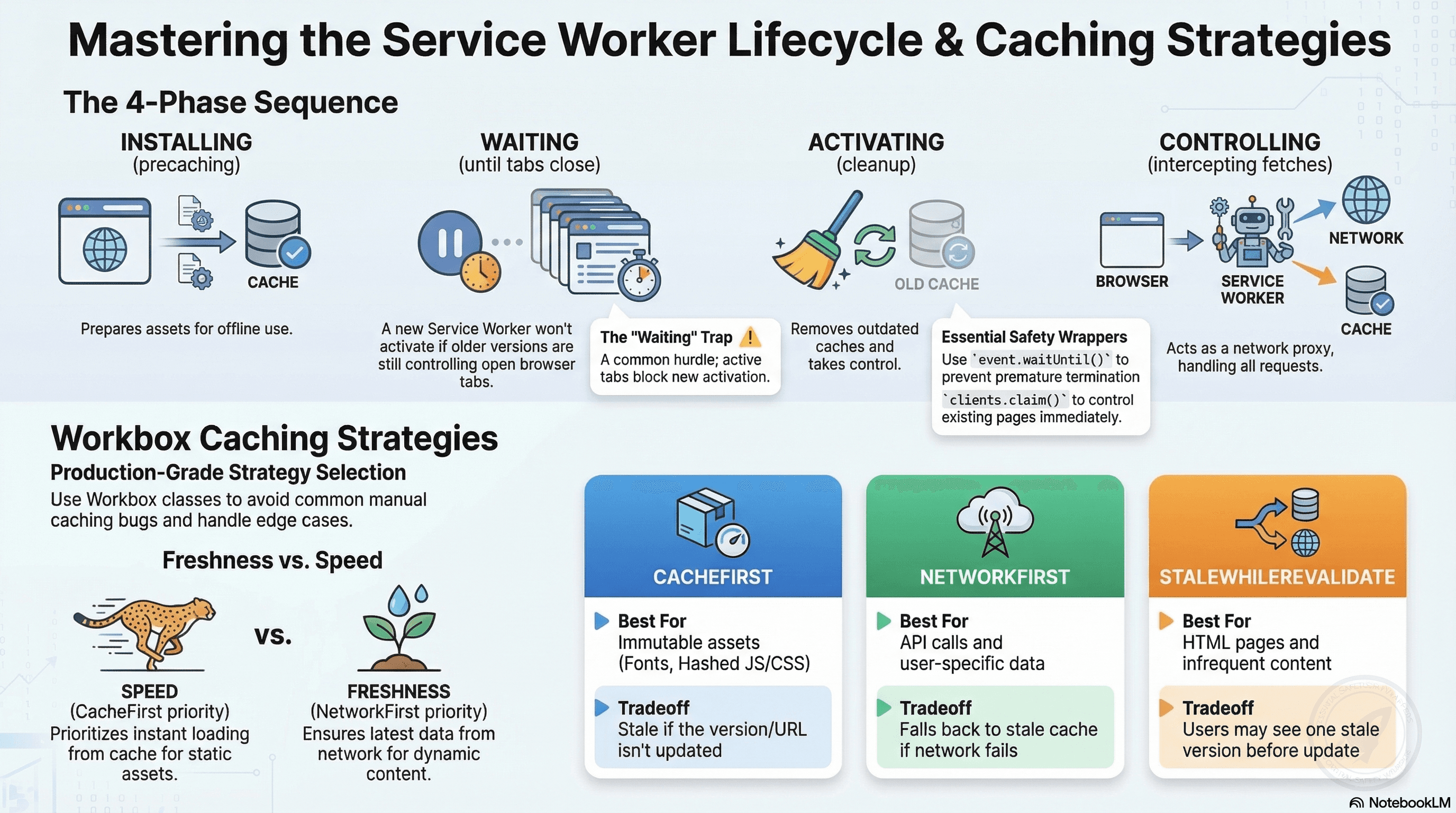
Overview
Service Workers are a browser-managed proxy between your web app and the network. They enable offline support, background sync, push notifications, and custom caching strategies. But their lifecycle is notoriously tricky — misunderstanding the install → waiting → activate → controlling flow is the root cause of most "why isn't my update showing up?" issues.
This doc covers the exact lifecycle sequence, every phase's failure modes, Workbox strategy classes as the production-grade way to implement caching, and advanced patterns like navigation preload and Periodic Background Sync.
How It Works
When a browser registers a Service Worker, it goes through four lifecycle phases:
- Installing — The browser downloads and parses the SW script. The
installevent fires. This is where you precache assets. - Waiting — If an older SW still controls open tabs, the new one waits. It will not activate until all tabs using the old SW are closed.
- Activating — The new SW takes control. The
activateevent fires. Clean up old caches here. - Controlling — The SW intercepts
fetchevents for all pages within its scope.
The critical trap: a newly installed SW does not immediately control the page that registered it. It waits until the old SW is no longer in use. Users who have the app open in multiple tabs will not get the new SW until they close all tabs.
Register SW
    ↓
[installing]  ← install event (precache here)
    ↓
[waiting]     ← blocked if old SW controls open tabs
    ↓
[activating]  ← activate event (clean old caches here)
    ↓
[controlling] ← fetch events intercepted
Code Examples
Minimal Correct Service Worker
// public/sw.js

const CACHE_VERSION = "v3"; // increment on every deploy
const CACHE_NAME = `app-cache-${CACHE_VERSION}`;

const PRECACHE_URLS = [
  "/",
  "/index.html",
  "/offline.html",
  // Add critical CSS and JS here — only assets needed for offline shell
];

// TRAP 1: not using event.waitUntil() — the browser can kill the SW mid-operation
self.addEventListener("install", (event) => {
  event.waitUntil(
    caches.open(CACHE_NAME).then((cache) => cache.addAll(PRECACHE_URLS)),
    // Tell this SW to become active immediately — see skipWaiting section
    // .then(() => self.skipWaiting())
  );
});

self.addEventListener("activate", (event) => {
  event.waitUntil(
    caches
      .keys()
      .then((cacheNames) =>
        Promise.all(
          cacheNames
            .filter((name) => name !== CACHE_NAME) // delete all old versions
            .map((name) => caches.delete(name)),
        ),
      )
      // TRAP 2: without clients.claim(), SW doesn't control already-open pages
      .then(() => self.clients.claim()),
  );
});

self.addEventListener("fetch", (event) => {
  // TRAP 3: SWs intercept ALL fetches including analytics, OAuth — guard scope
  if (!event.request.url.startsWith(self.location.origin)) return;
  if (event.request.method !== "GET") return;

  event.respondWith(
    caches
      .match(event.request)
      .then(
        (cached) =>
          cached ??
          fetch(event.request).catch(() => caches.match("/offline.html")),
      ),
  );
});
skipWaiting — The Safe Update Pattern
Calling self.skipWaiting() forces the waiting SW to activate immediately. The risk: it activates mid-session — the page loaded its HTML under the old SW but scripts are now served by the new one. If the new SW uses a different cache name, the old assets are gone and fetches fail.
The correct pattern: prompt the user before skipping waiting:
// src/registerSW.ts
export async function registerServiceWorker() {
  if (!("serviceWorker" in navigator)) return;

  const registration = await navigator.serviceWorker.register("/sw.js", {
    scope: "/",
  });

  registration.addEventListener("updatefound", () => {
    const newWorker = registration.installing;

    newWorker?.addEventListener("statechange", () => {
      if (
        newWorker.state === "installed" &&
        navigator.serviceWorker.controller
      ) {
        // New version installed but waiting — notify the user
        showUpdateBanner(() => {
          // User confirmed — tell the waiting SW to skip
          newWorker.postMessage({ type: "SKIP_WAITING" });
        });
      }
    });
  });

  // When the SW activates after skipWaiting, reload the page
  navigator.serviceWorker.addEventListener("controllerchange", () => {
    window.location.reload();
  });
}

function showUpdateBanner(onConfirm: () => void) {
  // In practice: render a toast notification or modal
  if (window.confirm("New version available. Refresh to update?")) {
    onConfirm();
  }
}
// public/sw.js — listen for the message
self.addEventListener("message", (event) => {
if (event.data?.type === "SKIP_WAITING") {
self.skipWaiting(); // only fires when user confirmed
}
});Workbox — Production-Grade Caching Strategies
Writing cache strategies from scratch is error-prone. Workbox provides well-tested strategy classes that cover every common pattern:
npm install workbox-strategies workbox-routing workbox-precaching workbox-expiration// public/sw.js — Workbox-powered service worker
import { registerRoute, setDefaultHandler } from "workbox-routing";
import {
CacheFirst,
NetworkFirst,
NetworkOnly,
StaleWhileRevalidate,
} from "workbox-strategies";
import { ExpirationPlugin } from "workbox-expiration";
import { precacheAndRoute } from "workbox-precaching";
// Precache: inject the build manifest from vite-plugin-pwa or next-pwa
// WB_MANIFEST is replaced at build time with hashed asset entries
precacheAndRoute(self.__WB_MANIFEST ?? []);
// 1. CacheFirst — static assets with content-hash in URL
// Network is checked only if cache misses. Best for: fonts, hashed JS/CSS.
registerRoute(
({ request }) => request.destination === "font",
new CacheFirst({
cacheName: "fonts",
plugins: [
new ExpirationPlugin({
maxEntries: 20,
maxAgeSeconds: 365 * 24 * 60 * 60, // 1 year
}),
],
}),
);
// 2. NetworkFirst — API responses where freshness matters most
// Returns network response if reachable; falls back to cache on failure.
// Best for: REST API calls, dynamic page data.
registerRoute(
({ url }) => url.pathname.startsWith("/api/"),
new NetworkFirst({
cacheName: "api-responses",
networkTimeoutSeconds: 3, // fall back to cache after 3s network timeout
plugins: [
new ExpirationPlugin({
maxEntries: 50,
maxAgeSeconds: 5 * 60, // cache stale API responses for 5 minutes max
}),
],
}),
);
// 3. StaleWhileRevalidate — navigation and HTML pages
// Returns cached version immediately, updates cache in background.
// Best for: HTML pages, navigation requests, infrequently-updated content.
registerRoute(
({ request }) => request.mode === "navigate",
new StaleWhileRevalidate({
cacheName: "pages",
plugins: [
new ExpirationPlugin({ maxEntries: 30, maxAgeSeconds: 24 * 60 * 60 }),
],
}),
);
// 4. NetworkOnly — requests that must never be cached
// Best for: POST/PUT/DELETE mutations, checkout, authentication.
registerRoute(
({ request }) =>
request.method !== "GET" ||
request.url.includes("/api/checkout") ||
request.url.includes("/api/auth"),
new NetworkOnly(),
);
// Default fallback for any unmatched GET
setDefaultHandler(new NetworkFirst({ cacheName: "default" }));Strategy decision guide:
| Strategy | Best for | Tradeoff |
|---|---|---|
CacheFirst | Immutable assets (fonts, hashed JS/CSS) | Stale if not versioned |
NetworkFirst | API calls, user-specific data | Network failure falls back to potentially stale cache |
StaleWhileRevalidate | HTML pages, infrequent-change content | User may see 1 version stale |
NetworkOnly | Mutations, auth, checkout | No offline support |
CacheOnly | Offline-only app shell | No network update path |
Navigation Preload — Faster Navigation in Controlled Pages
By default, navigation requests (clicking a link) must wait for the SW to boot before being intercepted. Navigation preload fires the network request in parallel with the SW startup:
// public/sw.js
import { enable as enableNavigationPreload } from "workbox-navigation-preload";

// Call during activate — enables the preload request to fire in parallel with SW boot
self.addEventListener("activate", (event) => {
  event.waitUntil(
    Promise.all([enableNavigationPreload(), self.clients.claim()]),
  );
});

// Use the preloaded response in the fetch handler
registerRoute(
  ({ request }) => request.mode === "navigate",
  async ({ event }) => {
    try {
      // preloadResponse is the navigation preload request result — already in flight
      const preloadResponse = await event.preloadResponse;
      if (preloadResponse) return preloadResponse;

      // Fall back to network if preload wasn't available
      return await fetch(event.request);
    } catch {
      // Both preload and network failed — serve offline page
      return caches.match("/offline.html");
    }
  },
);
Navigation preload reduces the "SW startup time" cost from ~50ms to ~0ms for navigation requests — meaningful on low-end devices where SW startup takes longer.
Periodic Background Sync — Update Cache Without User Interaction
Periodic Background Sync lets a SW refresh its cache periodically even when the app isn't open — keeping content fresh for the next time the user opens the app:
// src/registerSW.ts — request periodic sync permission
export async function registerPeriodicSync() {
  const registration = await navigator.serviceWorker.ready;

  if ("periodicSync" in registration) {
    const status = await navigator.permissions.query({
      name: "periodic-background-sync" as PermissionName,
    });

    if (status.state === "granted") {
      await (registration as any).periodicSync.register("refresh-news", {
        minInterval: 24 * 60 * 60 * 1000, // at most once per day
      });
    }
  }
}
// public/sw.js — handle the periodic sync event
self.addEventListener("periodicsync", (event) => {
if (event.tag === "refresh-news") {
event.waitUntil(refreshNewsCache());
}
});
async function refreshNewsCache() {
const cache = await caches.open("news");
const response = await fetch("/api/news/latest");
if (response.ok) {
await cache.put("/api/news/latest", response);
}
}Periodic Background Sync requires explicit browser permission and is currently
Chrome/Edge-only. Always check "periodicSync" in registration before
registering. For broader compatibility, use Background Sync (triggered on
reconnect) instead of Periodic Sync.
Real-World Use Case
News PWA with offline reading. On install, Workbox precaches the app shell (HTML, CSS, core JS). Navigation requests use StaleWhileRevalidate — users who open the app offline see the last-visited pages immediately. Article content uses NetworkFirst — fresh content when online, cached content when offline. Static assets (fonts, images) use CacheFirst with a 1-year expiry — they never change. Periodic Background Sync refreshes the news feed overnight so users who open the app in the morning see today's headlines from cache, not yesterday's. A post-deploy SW version bump and the prompt-to-reload pattern ensure users always get the latest app without version mismatches between old HTML and new scripts.
Common Mistakes / Gotchas
1. Not wrapping async work in event.waitUntil(). The browser can kill a SW at any time. Work in install/activate not wrapped in waitUntil may be interrupted mid-execution, leaving caches partially populated.
2. Forgetting self.clients.claim(). After activation, the new SW doesn't automatically control pages that opened under the old SW. Without clients.claim(), your fetch handler doesn't run for existing tabs until the next navigation.
3. Using skipWaiting() unconditionally in install. This forces the new SW to activate immediately mid-session — the page loaded its HTML under the old SW, but scripts now come from the new one. If the new SW's cache name changed, cached assets are missing. Only call skipWaiting in response to an explicit user prompt.
4. Intercepting third-party requests. fetch in a SW intercepts everything — analytics pings, OAuth redirects, CDN assets. Always guard with if (!event.request.url.startsWith(self.location.origin)) return;.
5. Not versioning cache names. If you always use "app-cache", the activate cleanup logic can't identify stale caches. Increment a version suffix ("app-cache-v3") on every deploy.
Summary
The Service Worker lifecycle has four phases — installing, waiting, activating, controlling — each with well-known failure modes. Always wrap async install and activate work in event.waitUntil. Call clients.claim() in activate so the new SW controls open pages immediately. Use skipWaiting only in response to a user prompt to avoid version mismatches mid-session. Workbox strategy classes (CacheFirst, NetworkFirst, StaleWhileRevalidate, NetworkOnly) are the production-grade way to implement caching — writing strategies from scratch replicates bugs Workbox has already fixed. Navigation preload eliminates SW startup overhead for navigation requests. Periodic Background Sync keeps content fresh without user interaction on supported browsers.
Interview Questions
Q1. Why does a newly installed Service Worker wait before activating and how do you control this behavior?
When a new SW installs while an old SW is still controlling open tabs, the new SW enters the "waiting" state. It waits because two different SW versions controlling pages simultaneously creates version mismatches — HTML loaded under the old SW might expect old asset cache keys that the new SW has already cleaned up. The browser's safety mechanism: wait until all old-SW-controlled tabs are closed, then activate. You can bypass waiting with self.skipWaiting(), but this should only happen in response to a user confirmation (e.g., a "New version available — reload?" banner). Calling it unconditionally in install risks activating mid-session, causing the new SW to intercept requests for a page that loaded under the old SW — potentially resulting in missing cached assets and broken navigations.
Q2. What does event.waitUntil() do and what happens if you omit it?
event.waitUntil(promise) tells the browser "don't terminate this Service Worker until this Promise settles." Without it, the browser considers the install or activate event handler complete as soon as the synchronous code finishes — then it's free to kill the SW to reclaim resources. Any async work (opening caches, fetching precache URLs, deleting old caches) that wasn't wrapped in waitUntil may be interrupted mid-execution. The result: partially-populated caches, stale caches not cleaned up, and a SW that appears to have installed successfully but serves broken or incomplete cached content.
Q3. What is the difference between Workbox's CacheFirst and NetworkFirst strategies and when do you use each?
CacheFirst checks the cache first — if found, returns immediately without touching the network. If not found, fetches from network and caches the response. Use it for immutable or very-long-lived assets: content-hashed JS/CSS bundles, fonts, images where a stale copy is fine indefinitely (because the URL changes when content changes). NetworkFirst tries the network first — if successful, caches and returns the response. If the network fails (offline, timeout), falls back to cache. Use it for API responses and dynamic content where freshness is important but offline fallback is desirable. The key distinction: CacheFirst is "I trust the cache;" NetworkFirst is "prefer fresh, accept stale offline."
Q4. What is self.clients.claim() and why is it needed?
After a SW activates, it doesn't automatically take control of pages that were loaded while the old SW was active. Those pages remain controlled by the old SW for their entire lifetime. self.clients.claim() in the activate handler tells the newly active SW to immediately take control of all in-scope pages, including ones already open. Without it, the new SW's fetch handler doesn't run for those pages — they continue using the old SW's caching behavior (or no caching if there was no previous SW). This matters for correctness: you want clients.claim() so pages loaded immediately after the SW installs (e.g., during the first visit) get the new caching behavior right away, not only after the next navigation.
Q5. What is navigation preload and when is it worth enabling?
By default, when a user clicks a link, the browser must boot the SW before it can handle the navigation request — even if the SW is just going to forward the request to the network anyway. This "SW startup latency" adds 20–100ms on fast hardware and up to 200ms+ on low-end devices. Navigation preload fires the navigation network request in parallel with the SW startup — by the time the SW is ready to handle fetch, the network response may already be in-flight or complete. Enable it in the activate handler via workbox-navigation-preload or self.registration.navigationPreload.enable(). Check event.preloadResponse in your navigation fetch handler before falling back to fetch. It's most impactful on slow devices and when the SW startup cost is a measurable contributor to navigation latency.
Q6. How should you handle Service Worker updates in a Next.js App Router application?
Next.js doesn't ship a SW by default — you add one via next-pwa or a custom public/sw.js. The update flow: detect updatefound on the SW registration, watch for the new worker's statechange to "installed", check that a controller already exists (meaning this is an update, not a first install), then show a user-facing prompt ("New version available — reload?"). When the user confirms, postMessage({ type: "SKIP_WAITING" }) to the waiting worker; the worker calls self.skipWaiting(); the SW activates and calls clients.claim(); a controllerchange event fires on navigator.serviceWorker in the page; the page reloads to load under the new SW. Don't auto-reload without user consent — unexpected reloads during checkout or form submission are user-hostile.
CDN Cache Purging
How CDNs cache at the edge, URL/tag/wildcard purging strategies, Cloudflare and Fastly APIs, origin shields and request coalescing for stampede prevention, Vercel Edge Network specifics, and tying purge calls to your deploy pipeline.
IndexedDB
The browser's structured storage database — transactions, indexes, cursors, the idb wrapper, storage estimation, OPFS comparison, and a complete guide to choosing between localStorage, sessionStorage, Cache API, and IndexedDB.