IndexedDB
The browser's structured storage database — transactions, indexes, cursors, the idb wrapper, storage estimation, OPFS comparison, and a complete guide to choosing between localStorage, sessionStorage, Cache API, and IndexedDB.
Overview
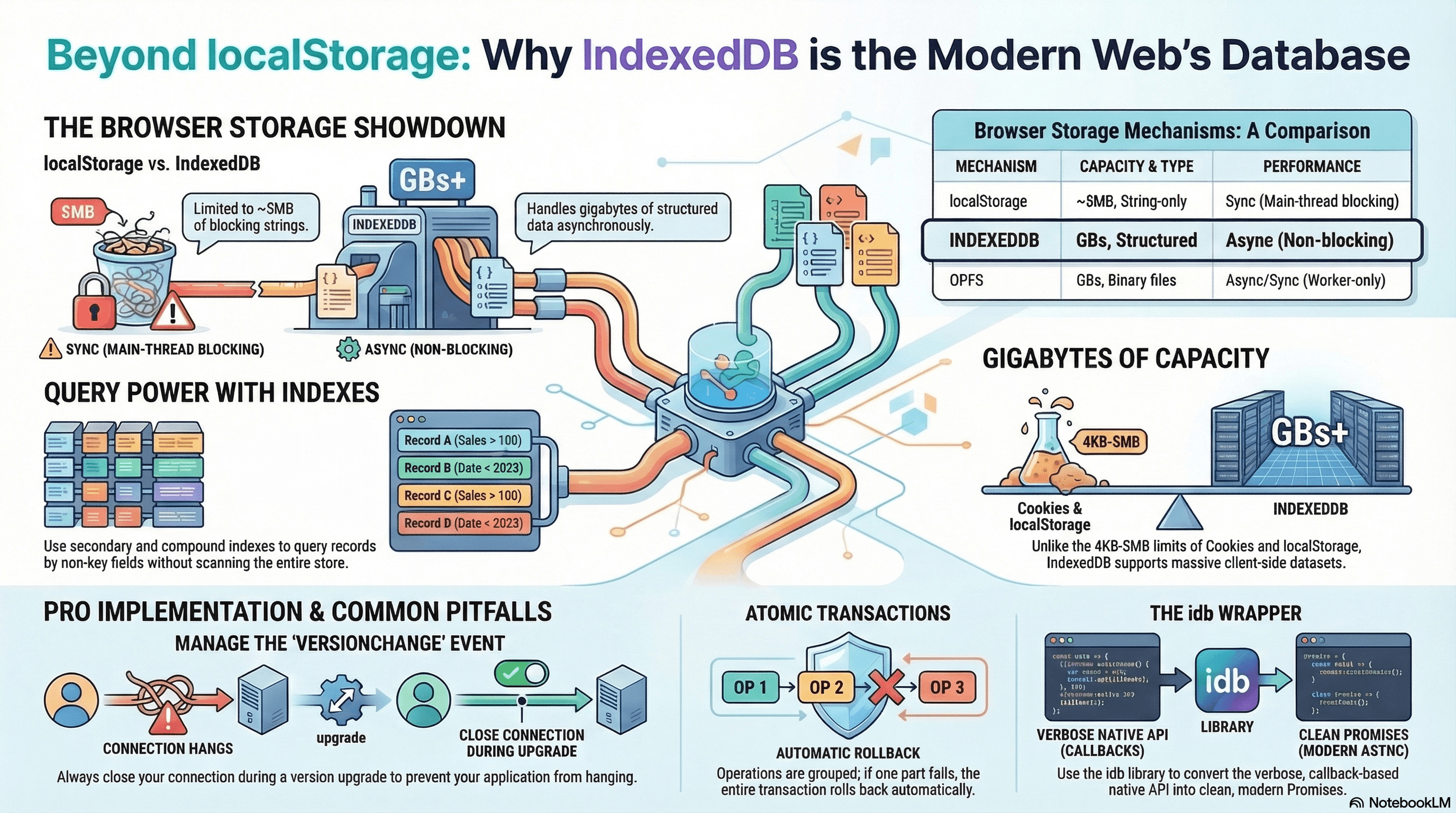
IndexedDB is the browser's built-in structured database. It supports large datasets, complex queries, transactions, secondary indexes, and — critically — asynchronous operations that don't block the main thread. It's the right tool when you need to store more than a few kilobytes of structured data on the client.
Most developers reach for localStorage out of habit. For anything beyond simple key-value preferences, IndexedDB is the correct choice — and the idb wrapper makes the API approachable.
How It Works
IndexedDB organizes data into object stores (analogous to SQL tables) within a named database. Each store holds records keyed by a keyPath field or an auto-incremented ID. Reads and writes happen inside transactions — each transaction is scoped to one or more object stores and has a mode (readonly or readwrite).
Indexes let you query by non-key fields. Without an index, finding all orders for user "abc" requires a full store scan. With an index on userId, the query resolves to a direct lookup.
All IndexedDB operations are async — they don't block the main thread. The native API is callback-based and verbose; the idb library wraps it in Promises.
Storage Mechanism Comparison
| Mechanism | Storage | Sync | Structured data | Queryable | Survives close |
|---|---|---|---|---|---|
localStorage | ~5MB | ✅ Sync | ❌ (strings only) | ❌ | ✅ |
sessionStorage | ~5MB | ✅ Sync | ❌ | ❌ | ❌ (tab-scoped) |
| IndexedDB | GBs | ❌ Async | ✅ | ✅ | ✅ |
| Cache API | GBs | ❌ Async | Request/Response only | ❌ | ✅ |
| OPFS | GBs | Async + sync (worker) | Binary files | ❌ | ✅ |
| Cookie | ~4KB | ✅ Sync | ❌ | ❌ | Configurable |
When to use each:
localStorage: simple string preferences, feature flags, non-sensitive UI state under 5KBsessionStorage: temporary state scoped to one tab (wizard steps, unsaved draft)- IndexedDB: structured app data, offline queues, large datasets, anything relational
- Cache API: HTTP response/request pairs for service worker caching strategies
- OPFS (Origin Private File System): large binary files (SQLite databases, video files, user uploads) — accessible synchronously from workers
Code Examples
Opening a Database with idb
npm install idb// lib/db/index.ts
import { openDB, type IDBPDatabase } from "idb";
// Define the database schema with TypeScript interfaces
interface AppDB {
notes: {
key: string;
value: {
id: string;
title: string;
content: string;
userId: string;
updatedAt: number;
synced: boolean;
};
// Indexes for this store
indexes: {
"by-userId": string;
"by-updatedAt": number;
"by-synced": number; // 0 = false, 1 = true (IndexedDB doesn't index booleans well)
};
};
pendingWrites: {
key: string;
value: {
id: string;
type: "note:create" | "note:update" | "note:delete";
payload: unknown;
createdAt: number;
};
indexes: { "by-createdAt": number };
};
}
let dbInstance: IDBPDatabase<AppDB> | null = null;
// Singleton — open once, reuse the connection
export async function getDB(): Promise<IDBPDatabase<AppDB>> {
if (dbInstance) return dbInstance;
dbInstance = await openDB<AppDB>("app-db", 2, {
upgrade(db, oldVersion, newVersion) {
// Version 1: notes store with userId index
if (oldVersion < 1) {
const notesStore = db.createObjectStore("notes", { keyPath: "id" });
notesStore.createIndex("by-userId", "userId");
notesStore.createIndex("by-updatedAt", "updatedAt");
}
// Version 2: synced index + pendingWrites store (added later)
if (oldVersion < 2) {
const notesStore = db.transaction.objectStore("notes");
notesStore.createIndex("by-synced", "synced");
const writesStore = db.createObjectStore("pendingWrites", {
keyPath: "id",
});
writesStore.createIndex("by-createdAt", "createdAt");
}
},
// Another tab has a newer version open — prompt to reload
blocked(currentVersion, blockedVersion) {
console.warn(
`DB upgrade blocked: v${currentVersion} → v${blockedVersion}`,
);
if (confirm("Please close other tabs to update the app.")) {
window.location.reload();
}
},
// Another tab opened a newer version — close our connection so it can upgrade
blocking(currentVersion, blockedVersion) {
console.warn(`This tab is blocking DB upgrade to v${blockedVersion}`);
dbInstance?.close();
dbInstance = null;
window.location.reload();
},
});
return dbInstance;
}Basic CRUD Operations
// lib/db/notes.ts
import { getDB } from "./index";

export async function saveNote(note: {
  id: string;
  title: string;
  content: string;
  userId: string;
}) {
  const db = await getDB();
  await db.put("notes", {
    ...note,
    updatedAt: Date.now(),
    synced: false,
  });
}

export async function getNoteById(id: string) {
  const db = await getDB();
  return db.get("notes", id);
}

export async function deleteNote(id: string) {
  const db = await getDB();
  await db.delete("notes", id);
}

// Read all notes for a user — uses the by-userId index
export async function getNotesByUser(userId: string) {
  const db = await getDB();
  return db.getAllFromIndex("notes", "by-userId", userId);
}
Transactions — Atomic Multi-Store Writes
Transactions guarantee atomicity: if any operation fails, all operations in the transaction are rolled back:
// lib/db/sync.ts
import { getDB } from "./index";

// Create a note AND queue a pending write — both or neither
export async function createNoteWithQueue(note: {
  id: string;
  title: string;
  content: string;
  userId: string;
}) {
  const db = await getDB();

  // Open a readwrite transaction spanning both stores
  const tx = db.transaction(["notes", "pendingWrites"], "readwrite");

  await Promise.all([
    tx.objectStore("notes").put({
      ...note,
      updatedAt: Date.now(),
      synced: false,
    }),
    tx.objectStore("pendingWrites").put({
      id: crypto.randomUUID(),
      type: "note:create",
      payload: note,
      createdAt: Date.now(),
    }),
    tx.done, // wait for the transaction to commit
  ]);
}
Transactions auto-commit when all requests are resolved and no new requests
are added within the same microtask. Never await something unrelated to
IndexedDB (like fetch) inside a transaction — the transaction will
auto-commit before you add the next request, throwing
TransactionInactiveError.
Compound Indexes — Multi-Field Queries
A compound index lets you query by multiple fields simultaneously:
// During upgrade — create a compound index
notesStore.createIndex("by-user-and-updated", ["userId", "updatedAt"]);
// Query: notes for userId="abc" sorted by updatedAt (newest first)
export async function getRecentNotesByUser(userId: string) {
const db = await getDB();
const index = db
.transaction("notes", "readonly")
.objectStore("notes")
.index("by-user-and-updated");
// IDBKeyRange.bound with compound key: [userId, 0] to [userId, Infinity]
const range = IDBKeyRange.bound([userId, 0], [userId, Infinity]);
const results = await index.getAll(range);
// IndexedDB returns ascending — reverse for newest-first
return results.reverse();
}Cursor-Based Pagination
For large stores, getAll() loads everything into memory. Cursors page through records efficiently:
// lib/db/pagination.ts
import { getDB } from "./index";

export async function getPaginatedNotes(
  userId: string,
  cursor: IDBValidKey | null, // the last key seen (for keyset pagination)
  limit: number = 20,
): Promise<{ notes: unknown[]; nextCursor: IDBValidKey | null }> {
  const db = await getDB();
  const store = db.transaction("notes").objectStore("notes");
  const index = store.index("by-userId");

  const range = cursor
    ? IDBKeyRange.lowerBound(cursor, true) // exclusive: items after last key
    : IDBKeyRange.only(userId);

  const notes: unknown[] = [];
  let nextCursor: IDBValidKey | null = null;

  let dbCursor = await index.openCursor(range);

  while (dbCursor && notes.length < limit) {
    notes.push(dbCursor.value);
    dbCursor = await dbCursor.continue();
  }

  if (dbCursor) nextCursor = dbCursor.key;

  return { notes, nextCursor };
}
Storage Estimation — Check Available Quota
// lib/storage.ts
export async function getStorageEstimate() {
  if (!("storage" in navigator && "estimate" in navigator.storage)) {
    return null;
  }

  const { usage, quota } = await navigator.storage.estimate();
  const usageMB = Math.round((usage ?? 0) / 1024 / 1024);
  const quotaMB = Math.round((quota ?? 0) / 1024 / 1024);
  const percent = quota ? Math.round(((usage ?? 0) / quota) * 100) : 0;

  return { usageMB, quotaMB, percent };
}

export async function requestPersistentStorage(): Promise<boolean> {
  // Persistent storage survives browser cache clearing
  // Browsers may grant it automatically for installed PWAs
  if (!("storage" in navigator && "persist" in navigator.storage)) {
    return false;
  }

  const persisted = await navigator.storage.persist();
  return persisted;
}
Without persistent storage, browsers may evict IndexedDB data under storage
pressure (especially in private/incognito mode). Call
navigator.storage.persist() to request that your origin's data survive
browser cleanup. Installed PWAs typically get persistence automatically.
Handling Quota Errors
export async function safeSaveNote(note: Parameters<typeof saveNote>[0]) {
  try {
    await saveNote(note);
  } catch (err) {
    if (err instanceof DOMException && err.name === "QuotaExceededError") {
      // Warn the user — don't silently discard the save
      console.error("Storage quota exceeded.");
      notifyUser("Storage is full. Please clear some space to continue.");
    } else {
      throw err; // re-throw unexpected errors
    }
  }
}
Real-World Use Case
Note-taking PWA (local-first architecture). Every note save writes to IndexedDB immediately — the UI updates without a network round-trip. A background sync loop reads unsynced notes (by-synced index where synced = false), posts them to the API, and marks them as synced on success. The pendingWrites store persists failed writes through page reloads — the Background Sync API in the service worker flushes the queue on reconnect even if the tab is closed. navigator.storage.estimate() shows a storage usage indicator in the settings panel. navigator.storage.persist() is called on first use so the data survives browser cache cleanup.
Common Mistakes / Gotchas
1. Blocking the versionchange event. If one tab has the DB open and another tab opens a newer version, the older tab receives a versionchange event. Without handling it (closing the connection), the upgrade is blocked indefinitely — the new tab's openDB hangs. Handle it by closing the connection and prompting the user to reload.
2. Awaiting non-IDB Promises inside transactions. Transactions auto-commit when the microtask queue drains with no pending IDB requests. await fetch(...) inside a transaction drains the queue — the transaction commits before your next put or get call, throwing TransactionInactiveError. Fetch your data before opening the transaction.
3. Storing non-structured-clone-able values. IndexedDB uses the Structured Clone Algorithm — functions, DOM nodes, class instances with methods, undefined as object values cannot be stored. Serialize class instances to plain objects before storing.
4. Re-opening the DB on every operation. Opening an IndexedDB connection is relatively expensive. Always reuse a singleton connection (getDB() pattern with a module-level variable) rather than calling openDB() inside every function.
5. Not handling quota errors. Writes fail silently in production if storage is exhausted — especially in private/incognito mode where quotas are very small. Always wrap writes in try/catch and surface quota errors to the user.
Summary
IndexedDB is the correct browser storage for structured, large, or queryable client-side data. The native API is verbose and callback-driven — use the idb wrapper for Promises and TypeScript support. Transactions span multiple object stores and are atomic; never await unrelated Promises inside a transaction. Secondary indexes enable efficient queries by non-key fields; compound indexes support multi-field queries. Cursor-based pagination handles large stores without loading everything into memory. navigator.storage.estimate() checks available quota; navigator.storage.persist() protects data from eviction. OPFS is the right tool for large binary files (SQLite, video) where IndexedDB's structured-clone overhead would be prohibitive.
Interview Questions
Q1. What is an IndexedDB transaction, and what happens if you await fetch() inside one?
An IndexedDB transaction groups one or more read/write operations into an atomic unit — either all succeed or all are rolled back. Transactions auto-commit when the JavaScript engine finishes executing code and the microtask queue drains with no pending IDB requests. await fetch(url) inside a transaction suspends execution and drains the microtask queue while waiting for the network. When the transaction sees no pending IDB requests, it auto-commits. When the fetch resolves and you attempt another put or get, the transaction has already committed — the request throws TransactionInactiveError. The fix: complete all data fetching before opening the transaction, then batch all IDB operations within the synchronous scope of the transaction.
Q2. What is the versionchange event in IndexedDB and why must you handle it?
When a database is opened with a new higher version number (e.g., a new tab opens a v3 database while another tab holds a v2 connection open), IndexedDB fires a versionchange event on all existing connections. If those connections don't close in response, the upgrade transaction is blocked indefinitely — openDB in the new tab never resolves, and the user experiences a hung application. Handle it with the blocking callback in openDB: close the current connection (db.close()) and prompt the user to reload. Also handle blocked to detect when your own upgrade is being blocked by another tab.
Q3. What is the difference between readonly and readwrite transaction modes and which should you default to?
readonly transactions allow only get operations and can run in parallel — multiple readonly transactions can read the same store simultaneously without blocking each other. readwrite transactions lock the store for the duration of the transaction — other write transactions queue behind it. Default to readonly for any operation that doesn't modify data: it doesn't block concurrent reads and has lower overhead. Use readwrite only when you need to write. Choosing readwrite for a read-only operation unnecessarily serializes concurrent reads against a write lock.
Q4. When would you use OPFS (Origin Private File System) instead of IndexedDB?
OPFS is designed for large binary files where structured-clone serialization would be wasteful — SQLite database files, large video/audio assets, user-uploaded binaries. It provides a synchronous file access API from web workers (createSyncAccessHandle()), which is essential for SQLite-over-WASM — SQLite expects synchronous I/O that IndexedDB's async API can't provide. IndexedDB serializes values through the Structured Clone Algorithm on every read/write — efficient for JSON-sized records but costly for multi-megabyte binary blobs. OPFS writes raw bytes to a file, matching the semantics of filesystem I/O. For structured app data (user records, notes, cached API responses), use IndexedDB. For SQLite databases, large binary files, or any use case requiring synchronous file I/O from a worker, use OPFS.
Q5. What are compound indexes in IndexedDB and when do you need them?
A compound index is an index on an array of fields — e.g., ["userId", "updatedAt"]. It lets you efficiently query records where both fields match a range — e.g., "all notes by userId 'abc', sorted by updatedAt." Without a compound index, you'd need to fetch all notes for the user (via a single-field userId index) and then sort in JavaScript. With the compound index, the range query IDBKeyRange.bound(["abc", 0], ["abc", Infinity]) returns only the user's notes in updatedAt order directly from the index — no JavaScript sorting needed. Use compound indexes when you have queries that filter by one field and sort or range-query by another.
Q6. How does localStorage compare to IndexedDB and when is each appropriate?
localStorage is synchronous — reads and writes block the main thread — and limited to ~5MB of string-only data. It's appropriate for small amounts of non-sensitive UI state: last-selected tab, color theme preference, a feature flag. Reading from localStorage inside a React render cycle or component mount is generally fine because the data is tiny and the operation is instant. IndexedDB is asynchronous, can store gigabytes of structured data, supports indexed queries, and handles concurrent reads without blocking the thread. Use it for any structured data with non-trivial size — user notes, cached API responses, an offline write queue, or anything requiring queries beyond simple key lookup. The synchronous simplicity of localStorage is its only advantage; for almost any real application data, IndexedDB is the correct choice.
Service Worker Lifecycle Traps
The Service Worker lifecycle phases and their failure modes — plus Workbox caching strategies, navigation preload, Periodic Background Sync, and the prompt-to-reload update pattern.
Overview
The network layer between your frontend and the server — HTTP evolution, browser security policies, authentication flows, API design paradigms, and client-side resilience patterns.