Error Boundaries
How React Error Boundaries isolate render-phase failures to a subtree, the Next.js error.tsx and global-error.tsx file conventions, error.digest for server error tracing, and what error boundaries cannot catch.
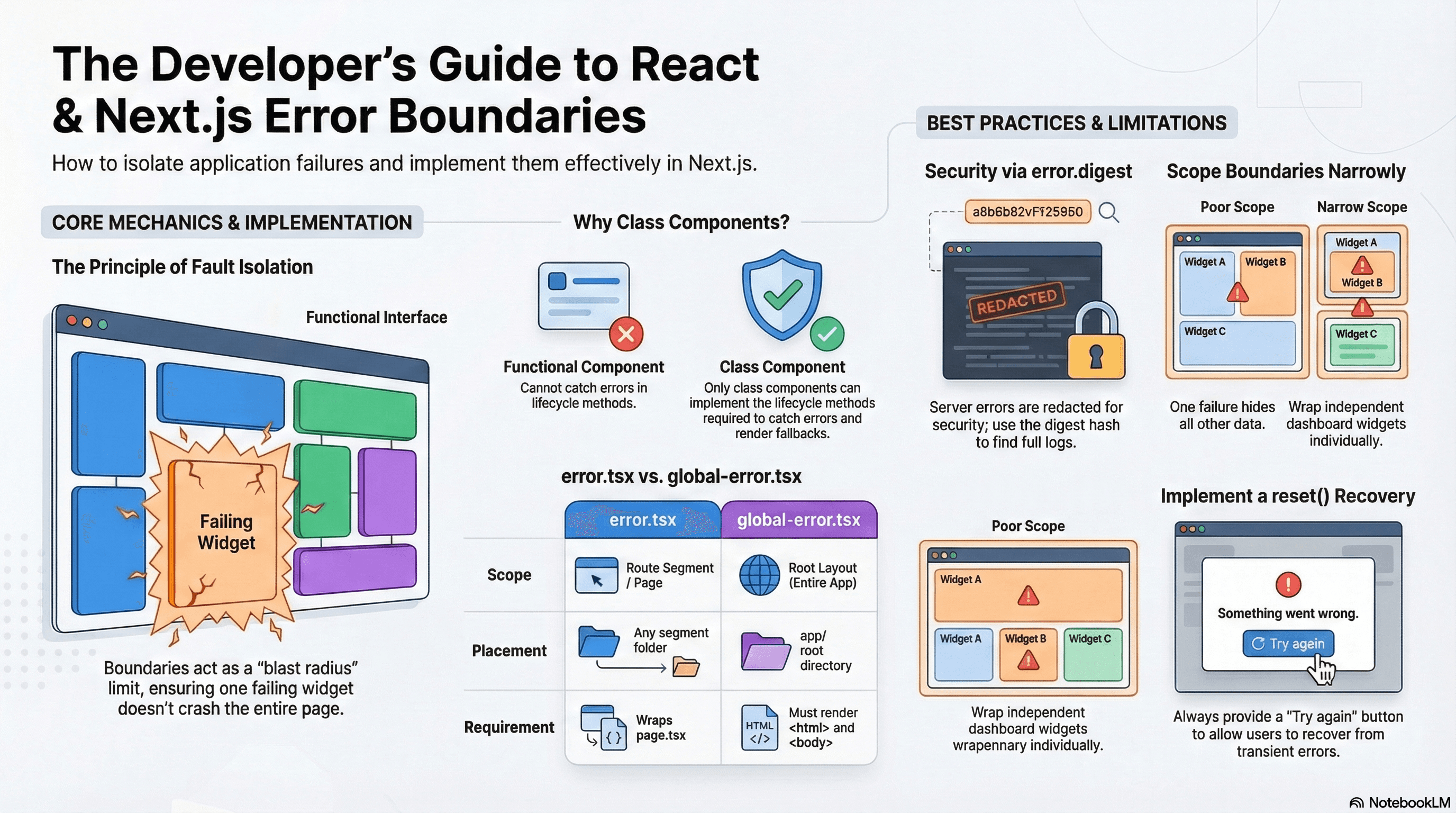
Overview
An error boundary is a React component that catches JavaScript errors thrown during rendering in its subtree and renders a fallback UI instead of crashing the entire application. Without boundaries, a single component throwing an unhandled error propagates up to the root and crashes the whole page.
Error boundaries implement the principle of fault isolation: a checkout widget failing shouldn't bring down the navigation, the cart, and every other component on the page. Each boundary is a blast radius limit.
In Next.js App Router, the error.tsx file convention gives you automatic error boundaries at the route segment level without writing class components yourself. global-error.tsx handles failures at the root layout level — the last line of defense when everything else has failed.
How It Works
Why Error Boundaries Require Class Components
Error boundaries must be class components — they're the only React components that can implement componentDidCatch and getDerivedStateFromError, the two lifecycle methods that make boundary behavior possible.
getDerivedStateFromError(error)— a static method that receives the thrown error and returns new state. React calls this during the render phase. Return{ hasError: true }to trigger the fallback render.componentDidCatch(error, info)— called after the component has rendered the fallback.info.componentStackcontains a string trace of the component tree that led to the error. Use this for logging. UnlikegetDerivedStateFromError, this is where side effects are permitted.
// components/error-boundary.tsx — reusable class component wrapper
"use client"; // Required: Error boundaries use lifecycle methods, must be Client Components

import { Component, type ErrorInfo, type ReactNode } from "react";

interface Props {
  fallback: ReactNode | ((error: Error, reset: () => void) => ReactNode);
  children: ReactNode;
  onError?: (error: Error, info: ErrorInfo) => void;
}

interface State {
  hasError: boolean;
  error: Error | null;
}

export class ErrorBoundary extends Component<Props, State> {
  constructor(props: Props) {
    super(props);
    this.state = { hasError: false, error: null };
  }

  // Called during render — update state to show fallback
  static getDerivedStateFromError(error: Error): State {
    return { hasError: true, error };
  }

  // Called after render — safe for side effects like logging
  componentDidCatch(error: Error, info: ErrorInfo) {
    this.props.onError?.(error, info);
    // info.componentStack: full component tree trace
    console.error("ErrorBoundary caught:", error, info.componentStack);
  }

  reset = () => {
    this.setState({ hasError: false, error: null });
  };

  render() {
    if (this.state.hasError && this.state.error) {
      const { fallback } = this.props;
      if (typeof fallback === "function") {
        return fallback(this.state.error, this.reset);
      }
      return fallback;
    }
    return this.props.children;
  }
}
Next.js Automatic Error Boundaries
Next.js generates error boundaries automatically from error.tsx files. Each error.tsx creates a boundary that wraps the page.tsx in the same directory. The boundary does not wrap layout.tsx — to catch layout errors, you need the error boundary one level up or global-error.tsx.
app/
  layout.tsx          ← NOT protected by error.tsx at this level
  error.tsx           ← wraps page.tsx (root segment)
  dashboard/
    layout.tsx        ← NOT protected by dashboard/error.tsx
    page.tsx          ← protected by dashboard/error.tsx
    error.tsx         ← boundary for dashboard segment
    analytics/
      page.tsx        ← protected by dashboard/error.tsx (inherits)
      error.tsx       ← tighter boundary for analytics only
Server Component Error Redaction
When a Server Component throws, Next.js redacts the error message on the client for security — the raw error message often contains database query strings, internal paths, or secrets. The client-visible error is a generic message. The error.digest property is a hash that links the client-visible error to the full server-side stack trace in your server logs.
Code Examples
error.tsx — Segment-Level Error Boundary
// app/dashboard/error.tsx
"use client"; // Required — error boundaries must be Client Components

import { useEffect } from "react";

interface Props {
  error: Error & { digest?: string }; // digest is Next.js-specific — present for server errors
  reset: () => void; // retry the segment — re-renders the page.tsx
}

export default function DashboardError({ error, reset }: Props) {
  useEffect(() => {
    // Log to your error tracking service.
    // error.message is generic on client (server errors are redacted for security).
    // error.digest correlates this client event to the full server-side stack trace.
    console.error("Dashboard error:", {
      message: error.message,
      digest: error.digest, // use this to find the full error in server logs
    });

    // Example: send to Sentry or Datadog
    // captureException(error, { extra: { digest: error.digest } });
  }, [error]);

  return (
    <div className="flex flex-col items-center gap-4 py-12 text-center">
      <div className="text-4xl">⚠️</div>
      <h2 className="text-xl font-semibold">Something went wrong</h2>
      <p className="max-w-sm text-muted-foreground text-sm">
        The dashboard failed to load. Our team has been notified.
      </p>

      {/* reset() re-renders the failed segment — attempts recovery without a full page reload */}
      <button
        onClick={reset}
        className="rounded-lg bg-primary px-4 py-2 text-sm text-primary-foreground"
      >
        Try again
      </button>

      {/* Show digest in development for debugging — hide in production */}
      {process.env.NODE_ENV === "development" && error.digest && (
        <p className="font-mono text-xs text-muted-foreground">
          Error ID: {error.digest}
        </p>
      )}
    </div>
  );
}
global-error.tsx — Root-Level Last Resort
global-error.tsx wraps the root layout and is the only error boundary that can catch errors thrown in app/layout.tsx. Because the root layout is the outermost shell, global-error.tsx must render its own <html> and <body> tags:
// app/global-error.tsx
"use client";

// global-error.tsx must render its own html and body tags because
// it replaces the root layout when an error is caught there.
export default function GlobalError({
  error,
  reset,
}: {
  error: Error & { digest?: string };
  reset: () => void;
}) {
  return (
    <html lang="en">
      <body>
        <div className="flex min-h-screen flex-col items-center justify-center gap-6 p-8 text-center">
          <h1 className="text-2xl font-bold">Application Error</h1>
          <p className="max-w-md text-muted-foreground">
            A critical error occurred. This has been reported to our team.
          </p>
          <div className="flex gap-3">
            <button
              onClick={reset}
              className="rounded-lg bg-primary px-5 py-2.5 text-sm text-primary-foreground"
            >
              Try again
            </button>
            <a
              href="/"
              className="rounded-lg border border-border px-5 py-2.5 text-sm"
            >
              Return home
            </a>
          </div>
          {error.digest && (
            <p className="font-mono text-xs text-muted-foreground">
              Reference: {error.digest}
            </p>
          )}
        </div>
      </body>
    </html>
  );
}
Reusable ErrorBoundary with Granular Scoping
// app/checkout/page.tsx — granular error isolation per widget
import { Suspense } from "react";
import { ErrorBoundary } from "@/components/error-boundary";
import { PaymentForm } from "@/components/payment-form";
import { OrderSummary } from "@/components/order-summary";
import { ShippingInfo } from "@/components/shipping-info";
import { Skeleton } from "@/components/ui/skeleton";
import * as Sentry from "@sentry/nextjs";

export default function CheckoutPage() {
  return (
    <div className="grid grid-cols-2 gap-8 max-w-5xl mx-auto px-4 py-12">
      {/*
        PaymentForm failure: show inline error, don't crash OrderSummary.
        User can still see their order while the payment section fails.
      */}
      <ErrorBoundary
        onError={(error, info) =>
          Sentry.captureException(error, {
            extra: { componentStack: info.componentStack },
          })
        }
        fallback={(error, reset) => (
          <div className="rounded-xl border border-destructive/20 bg-destructive/5 p-6">
            <h3 className="font-semibold text-destructive">
              Payment service error
            </h3>
            <p className="mt-1 text-sm text-muted-foreground">
              We're having trouble loading the payment form.
            </p>
            <button
              onClick={reset}
              className="mt-4 text-sm text-primary underline"
            >
              Retry
            </button>
          </div>
        )}
      >
        <Suspense fallback={<Skeleton className="h-64 w-full rounded-xl" />}>
          <PaymentForm />
        </Suspense>
      </ErrorBoundary>

      {/*
        OrderSummary failure: isolated from PaymentForm
        Checkout can proceed even if the summary widget breaks
      */}
      <ErrorBoundary
        fallback={
          <p className="text-sm text-muted-foreground">
            Order summary unavailable.
          </p>
        }
      >
        <Suspense fallback={<Skeleton className="h-80 w-full rounded-xl" />}>
          <OrderSummary />
        </Suspense>
      </ErrorBoundary>
    </div>
  );
}
What Error Boundaries Cannot Catch
Error boundaries only catch errors thrown during React's render phase. They do not catch:
// ❌ Event handler errors — not caught by error boundaries
export function SubmitButton() {
  async function handleSubmit() {
    try {
      await submitOrder(); // if this throws, it's NOT caught by the boundary
    } catch (error) {
      // Must catch manually inside the handler
      setErrorMessage("Submission failed. Please try again.");
    }
  }
  return <button onClick={handleSubmit}>Submit</button>;
}

// ❌ Async errors in useEffect — not caught by error boundaries
useEffect(() => {
  fetchData()
    .then(setData)
    .catch((err) => {
      // Must catch here — error boundary won't see this
      setHasError(true);
    });
}, []);

// ❌ Errors in server-side code thrown during RSC rendering
// (Next.js handles these separately, not via React error boundaries)

// ✅ Error boundaries DO catch:
// - Errors thrown during the render function execution
// - Errors thrown in child component constructors
// - Errors thrown in getDerivedStateFromProps
notFound() vs Throwing Errors
// app/products/[slug]/page.tsx
import { notFound } from "next/navigation";
import { db } from "@/lib/db";

export default async function ProductPage({ params }: Props) {
  const { slug } = await params;
  const product = await db
    .query("SELECT * FROM products WHERE slug = $1", [slug])
    .then((r) => r.rows[0]);

  // notFound() throws a special internal error that Next.js routes to
  // the nearest not-found.tsx — appropriate for "resource doesn't exist"
  if (!product) notFound();

  // Throwing a generic Error routes to the nearest error.tsx —
  // appropriate for unexpected failures (DB down, invalid data shape, etc.)
  if (!product.isPublished && !isAdmin()) {
    throw new Error("Product not accessible");
  }

  return <ProductDetail product={product} />;
}
// app/products/not-found.tsx — renders for notFound() calls
export default function ProductNotFound() {
return (
<div className="flex flex-col items-center gap-4 py-24 text-center">
<h1 className="text-2xl font-bold">Product Not Found</h1>
<p className="text-muted-foreground">
This product may have been removed or the URL is incorrect.
</p>
<a href="/products" className="text-primary hover:underline">
Browse all products
</a>
</div>
);
}Real-World Use Case
SaaS analytics dashboard. The dashboard renders six independent widgets: revenue chart, user activity heatmap, conversion funnel, top pages table, geographic distribution map, and a real-time events feed.
Each widget calls a different data source. On the first day of the month, the revenue chart's aggregation query times out. Without error boundaries, the entire dashboard crashes — every widget disappears behind a full-page error.
With individual <ErrorBoundary> wrappers around each widget: the revenue chart shows "Revenue data unavailable — retry" while the other five widgets render normally. The error.digest from the revenue chart error is logged with onError. The on-call engineer correlates the digest to the server log, finds the timed-out aggregation query, and fixes the index. The dashboard never goes fully offline.
Common Mistakes / Gotchas
1. Forgetting 'use client' on error.tsx.
Error boundaries require class component lifecycle methods — they're inherently client-side. Next.js throws a build error if error.tsx lacks 'use client'. This is the single most common mistake when setting up error boundaries for the first time.
2. Expecting error boundaries to catch async event handler errors.
Errors thrown inside onClick, onSubmit, or useEffect callbacks are not render-phase errors and don't propagate through React's boundary mechanism. Handle them with try/catch and local state.
3. Placing error.tsx to protect layout.tsx.
error.tsx protects the page.tsx in the same directory — not its sibling layout.tsx. If layout.tsx throws, the error boundary for it must be one level up, or use global-error.tsx for the root layout. This surprises developers who expect the boundary to protect everything in its directory.
4. Not using error.digest for server error correlation.
When a Server Component throws, the client receives a redacted message for security. Without logging error.digest, you have no way to find the actual server-side error — you only know "something failed." Log the digest immediately in componentDidCatch or the onError callback and correlate it with your server logs.
5. Using a single global boundary for the entire application. One boundary means any error crashes the full page. Scope boundaries as narrowly as practical — per feature, per widget, per section — to preserve the working parts of the UI. The checkout page should still work if the recommendations widget fails.
6. Not implementing reset() recovery.
Without a retry mechanism, a transient failure (network hiccup, momentary API timeout) permanently shows the error fallback until the user manually refreshes. Always wire up the reset prop to a "Try again" button. reset() retries the failed segment without a full page reload.
Summary
Error boundaries catch JavaScript errors thrown during the render phase in a React subtree and render a fallback UI. They must be class components — only getDerivedStateFromError and componentDidCatch are available for this purpose. In Next.js App Router, error.tsx creates automatic boundaries per route segment, global-error.tsx catches root layout failures, and not-found.tsx handles notFound() — a distinct signal for missing resources vs unexpected failures. Server Component errors are redacted on the client for security; error.digest links the client-visible event to the full server-side stack trace in your logs. Error boundaries do not catch async errors in event handlers or effects — those require explicit try/catch. Scope boundaries narrowly and always implement a reset() retry path for transient failures.
Interview Questions
Q1. Why must error boundaries be class components?
Error boundaries require two lifecycle methods that have no function component equivalents: getDerivedStateFromError, which runs during the render phase to update state and trigger the fallback render, and componentDidCatch, which runs after the fallback renders and is safe for side effects like logging. These methods were designed specifically for the class component lifecycle model. The React team has acknowledged the limitation and there are open proposals for a hook-based equivalent, but as of React 19 they remain class-component-only. In practice, you write one class component ErrorBoundary once and use it everywhere — most consumption happens through wrapper components or Next.js's error.tsx convention.
Q2. What is error.digest and why does it exist?
When a Server Component throws an error, Next.js intentionally strips the error message before sending it to the client. This is a security measure — raw server error messages often contain database query strings, internal file paths, environment variable names, or sensitive data that should never reach the browser. error.digest is a short hash that uniquely identifies the specific server-side error occurrence. The client-visible error.digest maps to the full error details in your server logs. By logging the digest in your error boundary's reporting (Sentry, Datadog, etc.), you can trace any client-reported error to its exact server-side cause, including the full stack trace, without exposing those details in the browser.
Q3. What is the difference between error.tsx and global-error.tsx in Next.js?
error.tsx creates an error boundary that wraps the page.tsx in the same route segment. It does not protect the layout.tsx at the same level — a layout error requires a boundary one level up. global-error.tsx is placed in the app/ root and wraps the root layout.tsx — it's the only boundary that can catch errors from the outermost layout. Because it replaces the root layout when triggered, global-error.tsx must render its own <html> and <body> tags. Use global-error.tsx as a last resort for catastrophic failures; prefer narrow error.tsx files at specific segments to preserve as much of the working UI as possible when individual sections fail.
Q4. What render-phase errors do error boundaries catch vs not catch?
Error boundaries catch: errors thrown during the render function of any child component, errors thrown in getDerivedStateFromProps of child components, and errors thrown in child component constructors. They do not catch: errors thrown inside event handlers (onClick, onChange, etc.), errors thrown inside useEffect or useLayoutEffect callbacks, errors thrown by async functions that aren't awaited in render, and errors in server-side code during RSC rendering (Next.js handles those separately). The boundary mechanism only activates when React's reconciler propagates an error up the component tree during rendering.
Q5. When should you use notFound() instead of throwing an Error?
notFound() is semantically appropriate when a specific resource doesn't exist at a well-known URL — a product slug that's not in the database, a user profile that doesn't exist, a blog post that's been deleted. It throws a special internal error that Next.js routes to the nearest not-found.tsx and sets the HTTP status to 404. Throwing a generic Error is appropriate for unexpected failures — a database connection timing out, a third-party API returning an invalid response, or a data integrity violation. The distinction matters for SEO (404 vs 500 status), user messaging (clear "not found" vs generic "something went wrong"), and monitoring (expected 404s should not page your on-call).
Q6. How would you structure error boundaries for a dashboard with six independent widgets?
Wrap each widget independently in its own <ErrorBoundary> with a widget-specific fallback — a compact error message with a retry button that fits within the widget's allocated space. This contains the blast radius: one widget failing doesn't affect the others. Each boundary's onError callback sends the error and error.digest (if available) to your error tracking service. The reset callback retries that specific widget. At the page level, have error.tsx as a final fallback if the entire page template fails. Don't rely solely on error.tsx for the page — a single segment-level boundary means all six widgets disappear when any one fails, defeating the purpose of the isolated widget architecture.
Suspense Boundaries
How React Suspense boundaries declaratively handle async loading states, how they coordinate with streaming SSR, the use() hook for Client Components, and how to prevent fetch waterfalls with parallel Suspense trees.
Compound Components
How to build flexible, composable APIs using React Context and implicit state sharing — the pattern behind tabs, accordions, and every serious UI component library.