Server Components
How React Server Components run exclusively on the server, the RSC payload format, server/client composition rules, data fetching patterns, and when to reach for use client.
Overview
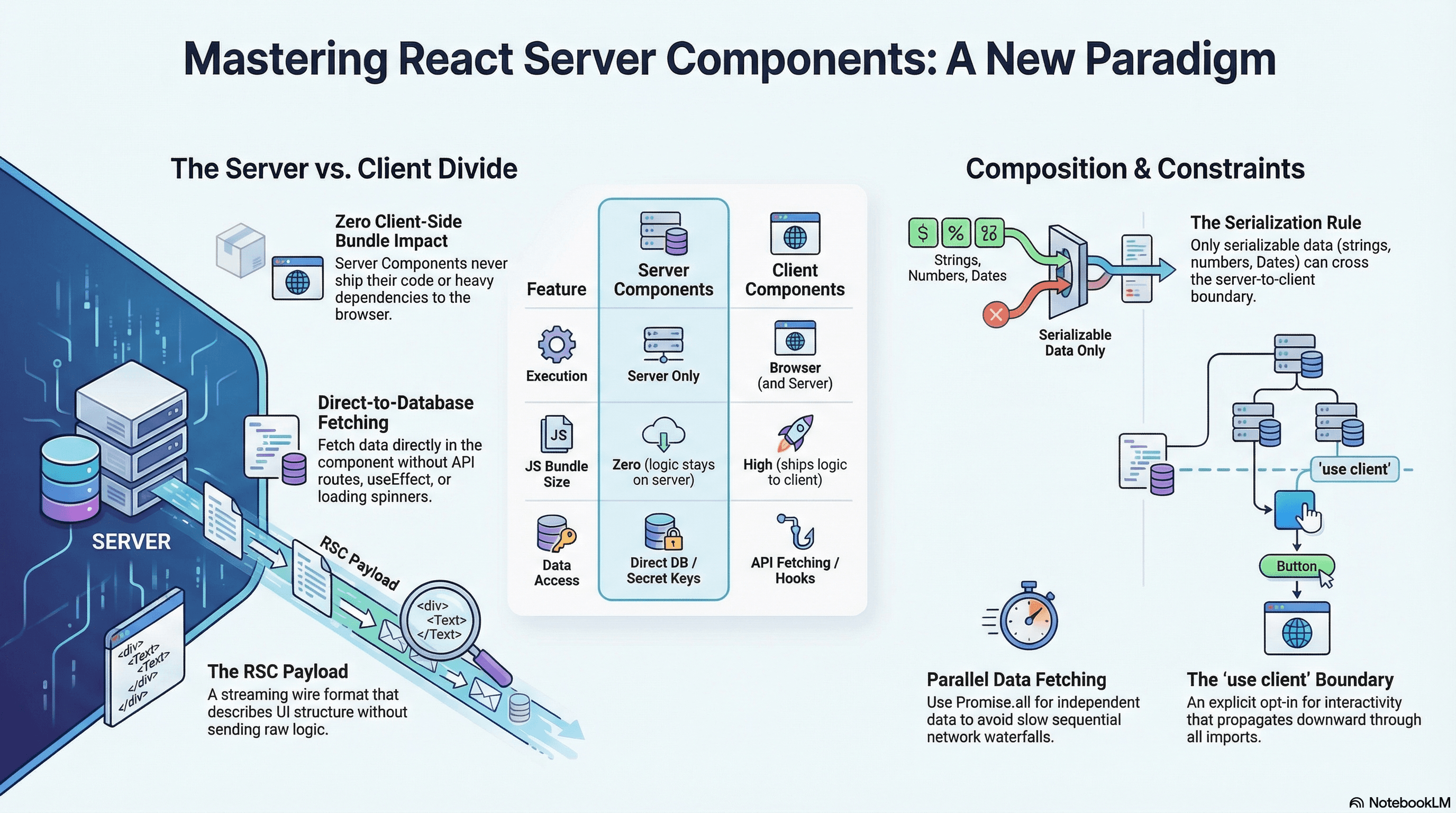
React Server Components (RSC) are components that execute only on the server. They never ship their component code or their imported dependencies to the browser. The browser receives the output — a serialized description of the UI — not the logic that produced it.
This has two concrete benefits. First, server-only concerns (database clients, secret API keys, heavy parsing libraries) never touch the client bundle. Second, data fetching moves into the component itself — no useEffect, no API route in between, no client-side loading state for the initial render.
In Next.js App Router, every component is a Server Component by default. 'use client' is the explicit opt-in for interactivity. This is the inversion from the Pages Router mental model, where everything was client code by default.
How It Works
The RSC Payload
When a Server Component renders, React doesn't produce HTML directly. It produces the RSC Payload — a serialized, streaming representation of the rendered UI. It describes component trees, their props, and Client Component references as opaque placeholders. Next.js combines this payload with streaming to progressively send UI to the browser.
The RSC payload is not JSON — it's a custom wire format that supports:
- Component tree structure with Client Components represented as references to their bundle chunks
- Streaming chunks: each async
<Suspense>boundary sends its payload as it resolves - Reuse on client-side navigations: the router requests fresh RSC payloads for new routes without a full page reload, preserving client-side state outside the navigated subtree
The Server/Client Boundary
Server Component (default — no directive needed)
  ├── Can: async/await at the component level
  ├── Can: import server-only modules (DB, secrets, file system)
  ├── Can: render Server and Client Components
  ├── Can: pass serializable data as props to Client Components
  ├── Can: pass Server Component output as children to Client Components
  └── Cannot: useState, useEffect, browser APIs, event handlers

Client Component ('use client' directive)
  ├── Can: useState, useEffect, useRef, all React hooks
  ├── Can: event handlers, browser APIs
  ├── Can: render Client Components
  ├── Can: receive Server Component output via children/props
  └── Cannot: import Server Components directly
              Cannot: use async/await at the component level
'use client' marks a module boundary. Every component imported transitively from that module is also a Client Component. The directive propagates downward through imports — push it as deep in the tree as possible.
Serialization Constraints
Props passed from Server Components to Client Components must be serializable through the RSC wire format:
- ✅ Strings, numbers, booleans, null, undefined
- ✅ Plain objects and arrays of serializable values
- ✅ Dates (serialized as ISO string, reconstructed on client)
- ✅
React.ReactNode— pre-rendered Server Component output - ❌ Functions — not serializable
- ❌ Class instances with methods
- ❌ Maps, Sets, WeakRefs
- ❌ Promises (as direct props — use the
use()hook pattern for Client Components)
The server-only package adds a build-time guard that throws a compile error if a protected module is ever imported in a Client Component boundary:
// lib/db.ts
import "server-only"; // build error if imported in a Client Component

import { Pool } from "pg";

export const db = new Pool({
  connectionString: process.env.DATABASE_URL, // never reaches client bundle
});
Code Examples
Basic Server Component with Database Access
// app/products/page.tsx
// No directive — Server Component by default

import { db } from "@/lib/db";
import { ProductCard } from "@/components/product-card"; // also a Server Component

export default async function ProductsPage() {
  // Direct DB query — no API route, no credentials in client bundle
  const result = await db.query(
    "SELECT id, name, price_cents, slug, image_url FROM products ORDER BY created_at DESC LIMIT 20",
  );

  return (
    <main className="grid grid-cols-3 gap-6 p-8">
      {result.rows.map((product) => (
        <ProductCard key={product.id} product={product} />
      ))}
    </main>
  );
}
// components/product-card.tsx — Server Component
// formatCurrency, image processing — none of this ships to the browser
import Image from "next/image";
interface Product {
id: string;
name: string;
price_cents: number;
slug: string;
image_url: string;
}
export function ProductCard({ product }: { product: Product }) {
const price = new Intl.NumberFormat("en-US", {
style: "currency",
currency: "USD",
}).format(product.price_cents / 100);
return (
<article className="rounded-xl border border-border overflow-hidden bg-surface">
<Image
src={product.image_url}
alt={product.name}
width={400}
height={300}
className="object-cover w-full"
/>
<div className="p-4">
<h2 className="font-semibold text-lg">{product.name}</h2>
<p className="text-muted-foreground mt-1">{price}</p>
</div>
</article>
);
}Composing Server and Client Components
// app/products/[slug]/page.tsx — Server Component
import { db } from "@/lib/db";
import { notFound } from "next/navigation";
import { AddToCartButton } from "@/components/add-to-cart-button"; // Client
import { ProductGallery } from "@/components/product-gallery"; // Client
import { RelatedProducts } from "@/components/related-products"; // Server

interface Props {
  params: Promise<{ slug: string }>;
}

export default async function ProductPage({ params }: Props) {
  const { slug } = await params;

  const result = await db.query("SELECT * FROM products WHERE slug = $1", [
    slug,
  ]);
  const product = result.rows[0];

  // notFound() throws — Next.js renders the nearest not-found.tsx
  if (!product) notFound();

  return (
    <div className="max-w-6xl mx-auto px-4 py-12 grid grid-cols-2 gap-12">
      {/*
        Client Component — receives image URLs (strings, serializable).
        Handles swipe/click interaction on the client.
      */}
      <ProductGallery images={product.image_urls} alt={product.name} />

      <div>
        <h1 className="text-3xl font-bold">{product.name}</h1>
        <p className="text-muted-foreground mt-2">{product.description}</p>
        <p className="text-2xl font-semibold mt-4">
          ${(product.price_cents / 100).toFixed(2)}
        </p>
        {/*
          Client Component — only receives ID and name (serializable).
          Manages its own loading state and cart interaction.
        */}
        <AddToCartButton productId={product.id} productName={product.name} />
      </div>

      <div className="col-span-2">
        {/* Server Component — fetches its own data independently */}
        <RelatedProducts
          categoryId={product.category_id}
          currentId={product.id}
        />
      </div>
    </div>
  );
}
// components/add-to-cart-button.tsx
"use client";
import { useState } from "react";
interface Props {
productId: string;
productName: string;
}
export function AddToCartButton({ productId, productName }: Props) {
const [isPending, setIsPending] = useState(false);
const [added, setAdded] = useState(false);
async function handleAdd() {
setIsPending(true);
try {
await fetch("/api/cart/add", {
method: "POST",
headers: { "Content-Type": "application/json" },
body: JSON.stringify({ productId }),
});
setAdded(true);
} finally {
setIsPending(false);
}
}
return (
<button
onClick={handleAdd}
disabled={isPending || added}
className="mt-6 w-full rounded-lg bg-primary px-6 py-3 text-primary-foreground font-medium disabled:opacity-60 transition-opacity"
>
{added ? `${productName} added!` : isPending ? "Adding…" : "Add to Cart"}
</button>
);
}The Children Pattern — Server Components Inside Client Wrappers
// ❌ Cannot import a Server Component inside a Client Component
"use client";
import { ProductDetails } from "./product-details"; // Server Component — build error

export function AnimatedShell({ slug }: { slug: string }) {
  return <ProductDetails slug={slug} />; // ERROR: Server Component in client module
}
// ✅ Pass Server Component output as children from a Server Component parent
// components/animated-shell.tsx — Client Component wrapper
"use client";
import { motion } from "framer-motion";
export function AnimatedShell({ children }: { children: React.ReactNode }) {
// children is the pre-rendered Server Component output — an opaque React node.
// AnimatedShell receives the result, not the server-side code that produced it.
return (
<motion.div
initial={{ opacity: 0, y: 8 }}
animate={{ opacity: 1, y: 0 }}
transition={{ duration: 0.3, ease: "easeOut" }}
>
{children}
</motion.div>
);
}
// app/products/[slug]/page.tsx — Server Component parent does the composition
import { AnimatedShell } from "@/components/animated-shell"; // Client
import { ProductDetails } from "@/components/product-details"; // Server
export default async function Page({ params }: Props) {
const { slug } = await (params as Props["params"]);
return (
<AnimatedShell>
{/* ProductDetails fetches its own data on the server.
AnimatedShell only sees the rendered output. */}
<ProductDetails slug={slug} />
</AnimatedShell>
);
}Parallel Data Fetching and Request-Scoped Caching
// ❌ Sequential awaits — each fetch waits for the previous
async function SlowDashboardPage() {
  const user = await fetchCurrentUser(); // 200ms
  const orders = await fetchOrders(); // 300ms — starts after user
  const reviews = await fetchReviews(); // 150ms — starts after orders
  // Total: ~650ms
}

// ✅ Promise.all — all fetches in-flight simultaneously
async function FastDashboardPage() {
  const [user, orders, reviews] = await Promise.all([
    fetchCurrentUser(), // 200ms ─┐
    fetchOrders(), // 300ms  ├─ all in-flight simultaneously
    fetchReviews(), // 150ms ─┘
  ]);
  // Total: ~300ms (the slowest one)
}
// lib/data.ts — request-scoped memoization with React cache()
import { cache } from "react";
import "server-only";
import { db } from "@/lib/db";
import { getSession } from "@/lib/auth";
// cache() deduplicates calls within a single request.
// If Header and Sidebar both call getCurrentUser(),
// the DB query runs exactly once.
export const getCurrentUser = cache(async () => {
const session = await getSession();
if (!session?.userId) return null;
const result = await db.query(
"SELECT id, name, email, role FROM users WHERE id = $1",
[session.userId],
);
return result.rows[0] ?? null;
});
// The cached result resets between requests — this is per-request memoization,
// not a persistent cache.// Both components call getCurrentUser() — DB query runs once per request
// components/header.tsx
export async function Header() {
const user = await getCurrentUser();
return <nav className="...">Hello, {user?.name ?? "Guest"}</nav>;
}
// components/sidebar.tsx
export async function Sidebar() {
const user = await getCurrentUser();
if (!user) return null;
return <aside data-role={user.role}>{/* ... */}</aside>;
}use cache — Component-Level Persistent Caching (Next.js 15+)
// app/blog/page.tsx
"use cache"; // Cache this component's output across requests

import { cacheTag, cacheLife } from "next/cache";
import { db } from "@/lib/db";

export default async function BlogPage() {
  cacheTag("blog-posts"); // Tag for on-demand invalidation
  cacheLife({ max: 3600, stale: 86400 }); // 1h fresh, 24h stale-while-revalidate

  const posts = await db.query(
    "SELECT id, title, slug, published_at FROM posts ORDER BY published_at DESC",
  );

  return (
    <main>
      {posts.rows.map((post) => (
        <article key={post.id}>
          <h2>
            <a href={`/blog/${post.slug}`}>{post.title}</a>
          </h2>
        </article>
      ))}
    </main>
  );
}
// Invalidate on-demand when content changes
// app/api/posts/route.ts
import { revalidateTag } from "next/cache";
export async function POST(request: Request) {
const { title, content } = await request.json();
await db.query("INSERT INTO posts (title, content) VALUES ($1, $2)", [
title,
content,
]);
// All cached components tagged "blog-posts" are invalidated
revalidateTag("blog-posts");
return Response.json({ ok: true });
}Real-World Use Case
E-commerce product detail page. Without RSC: a Client Component page uses useEffect to fetch product data from an API route. The user sees a spinner until data resolves. The API route proxies a database call — two network hops between component and data.
With RSC: the page is a Server Component that queries the database directly with Promise.all to fetch product, inventory, and reviews in parallel. The user receives complete HTML with all product information — no spinner, no waterfall, no client-side data fetching logic. Only AddToCartButton (loading state) and ProductGallery (image interaction) are Client Components. The ORM, database credentials, and product fetching logic never reach the browser. The client bundle is only the two small interactive components.
Common Mistakes / Gotchas
1. Adding 'use client' to every component out of habit.
Reflexive 'use client' from the Pages Router era defeats RSC. If a component has no useState, useEffect, or browser APIs, it should be a Server Component. Use the Next.js bundle analyzer (@next/bundle-analyzer) to audit what's in your client bundle.
2. Passing non-serializable props across the boundary. Functions and class instances cannot cross the wire. If you need a callback in a Client Component, define it inside the Client Component — event handlers belong there. If you need derived data, compute it on the server and pass the serializable result.
3. Importing a Server Component from a Client Component.
This errors at build time or silently converts the Server Component to a Client Component. Always compose via children from a parent Server Component.
4. Sequential awaits for independent data.
Two await calls for unrelated data are always sequential. Use Promise.all. On three 300ms fetches, sequential costs 900ms; parallel costs 300ms.
5. Forgetting server-only on sensitive utility files.
Without the guard, a developer can accidentally import a DB client or secret into a Client Component — the build doesn't catch it. Add import "server-only" to any module that must never reach the browser.
6. Confusing notFound() with error throwing.
notFound() renders the nearest not-found.tsx — appropriate for missing resources (404). Throwing an Error renders the nearest error.tsx — appropriate for unexpected failures. Use them for their distinct semantics.
Summary
React Server Components execute only on the server and ship zero component JavaScript to the browser — only their serialized output (the RSC payload). Next.js App Router makes Server Components the default; 'use client' is the explicit opt-in for interactivity. Props crossing the server/client boundary must be serializable — functions, class instances, and Maps are not. Compose Server and Client Components using the children prop pattern from a Server Component parent: the client wrapper receives pre-rendered server output as an opaque node. Use Promise.all for parallel data fetching and React's cache() to deduplicate the same fetch across multiple components in a single request. server-only is a build-time guard that prevents sensitive server utilities from ever reaching the client bundle.
Interview Questions
Q1. What is the RSC payload and how does it differ from HTML?
The RSC payload is a streaming, serialized wire format that describes a rendered React component tree — not raw HTML. It includes component tree structure with Client Component references as placeholders (the actual JS is in the bundle, not the payload), and streaming chunks that flush as each async Suspense boundary resolves. Unlike HTML, the RSC payload is consumed by React's runtime to hydrate and update the tree without a full page reload. On client-side navigation in Next.js, the browser requests a fresh RSC payload — not a new HTML page — which lets the router update only the changed subtree while preserving client-side state (scroll position, open modals, input values) in unchanged parts of the tree.
Q2. Why can't you import a Server Component inside a Client Component?
'use client' marks a module as the root of a client bundle. Everything imported from that module — and everything those imports import — is compiled into the client bundle. Server Components contain server-only code (DB queries, secrets, Node.js APIs) that cannot run in the browser. If importing Server Components from Client Components were allowed, server-only code would be pulled into the client bundle, breaking at runtime or exposing secrets. The solution is to compose via children: the Server Component parent renders both the Server and Client components, passing the Server Component's output (a pre-rendered React node) to the Client Component as children or a prop. The client wrapper receives the rendered result, not the server-side code.
Q3. What does React's cache() do and why is it important for Server Components?
cache() wraps an async function and memoizes its result for the duration of a single server request. If two Server Components both call getCurrentUser() and the function is wrapped with cache(), the underlying function runs once — subsequent calls within the same request return the memoized result. This is essential because Server Components fetch data directly without a shared global store, so the same data can be requested independently from multiple components. Without cache(), each component runs its own query — three components needing the current user means three separate database queries per request. The cache resets between requests — it's per-request memoization, not a persistent cache.
Q4. What serialization constraints apply to props crossing the server/client boundary?
Only values serializable through the RSC wire format can cross the boundary: strings, numbers, booleans, null, undefined, plain objects, arrays of serializable values, Dates (serialized and reconstructed), and React nodes (pre-rendered server output). Functions, class instances with methods, Promises (as direct props), Maps, Sets, and WeakRefs cannot be serialized. The constraint exists because props must traverse the RSC wire format from server to client. For callbacks, define them inside the Client Component — event handlers belong in client code. For data derived from non-serializable objects, derive the serializable result on the server and pass that.
Q5. When should you use sequential awaits vs Promise.all in a Server Component?
Sequential await is appropriate only when fetch B genuinely depends on the result of fetch A — you need the user ID from fetch A to query their orders in fetch B. For all other cases, Promise.all is strictly better: total wait time equals the slowest fetch instead of the sum of all fetches. Three independent 300ms fetches: sequential costs 900ms, parallel costs 300ms. For even better streaming behavior, push independent fetches into separate async Server Component children and wrap each in <Suspense> — they fetch in parallel and stream to the browser independently, letting the user see each section as it resolves.
Q6. What is server-only and when should you add it to a module?
server-only is an npm package that makes a module unsafefor import in Client Components. import "server-only" at the top of a file adds a build-time guard — if that module is ever imported in a Client Component boundary, the build throws an error with a clear message. Without it, a developer can accidentally import a database client, secret environment variable access, or a Node.js-using utility into a Client Component, which gets bundled for the browser and either breaks at runtime or exposes secrets in the JavaScript payload. Add import "server-only" to: database client files, files that read process.env secrets, server-side utilities that use fs, crypto, or Node.js APIs, and any function that communicates with external APIs using private keys.
Overview
Patterns and mechanisms for structuring the UI layer — from RSC composition and Suspense to compound components, headless patterns, and portal layering.
Suspense Boundaries
How React Suspense boundaries declaratively handle async loading states, how they coordinate with streaming SSR, the use() hook for Client Components, and how to prevent fetch waterfalls with parallel Suspense trees.