Headless UI Pattern
How to separate component behavior, keyboard navigation, and accessibility from markup entirely — building reusable logic that any consumer can render however they need.
Overview
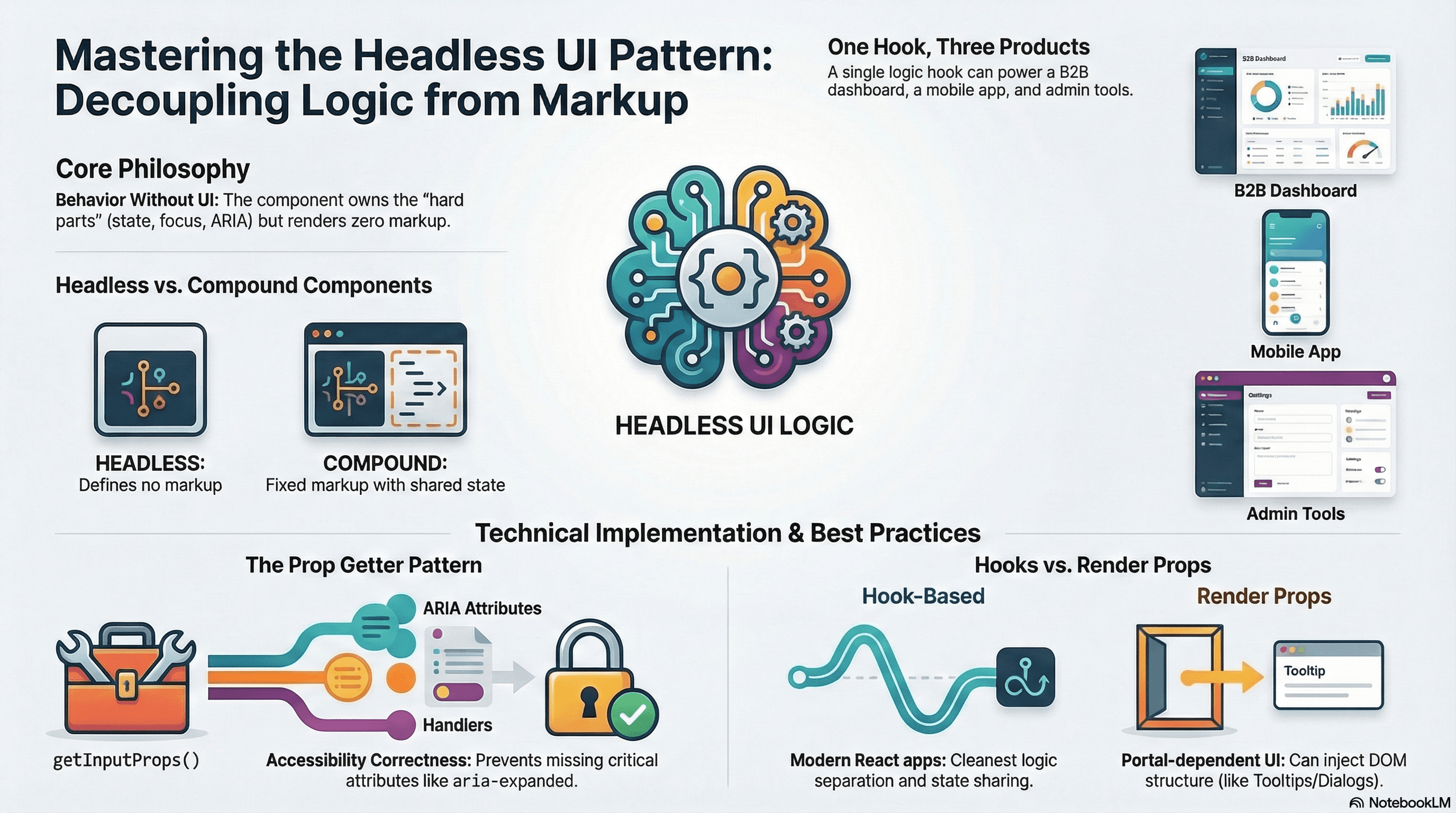
A headless component owns all the hard parts of a UI widget — state management, keyboard navigation, focus handling, and ARIA attributes — but renders nothing itself. The consumer provides the markup and styles. The headless component makes everything work.
This is the architectural philosophy behind Radix UI, React Aria, Headless UI by Tailwind, Downshift, and React Table. Each library solves a genuinely difficult problem (an accessible combobox, a sortable data table, a focus-trapped dialog) and exposes the solution as pure behavior, decoupled from any visual opinion.
The contrast with compound components matters. A compound component shares state across cooperating markup it defines — <Tabs.Trigger> renders a <button>. A headless component defines no markup at all. The consumer owns every element. This makes headless components the right choice when visual rendering must vary across products or teams, but the logic must be consistent everywhere.
How It Works
Two Forms: Hook-Based vs Render Props
Hook-based headless (the modern approach) — the component exposes a custom hook. The hook returns state values, event handlers, and pre-built prop getter functions (getInputProps, getMenuProps, getItemProps). The consumer spreads those props onto whatever elements they choose:
const { isOpen, getInputProps, getMenuProps, getItemProps } =
  useCombobox(options);

return (
  <div>
    <input {...getInputProps()} />
    <ul {...getMenuProps()}>
      {filteredItems.map((item, i) => (
        <li {...getItemProps(item, i)} key={item.id}>
          {item.label}
        </li>
      ))}
    </ul>
  </div>
);
Render prop headless (older, still useful in specific cases) — the component wraps its children in a function call, passing state and handlers as arguments. The use case where render props still win: when the headless component needs to inject DOM structure (a portal) as part of its own output alongside the logic — something a hook alone can't do cleanly.
Prop Getters
The prop getter pattern is the core API design. Instead of exposing state and asking consumers to manually wire ARIA attributes and event handlers, the hook returns functions that produce a complete prop object:
// Consumer uses it:
<input {...getInputProps()} />

// What getInputProps() returns — all of this is invisible to the consumer:
{
  role: "combobox",
  "aria-autocomplete": "list",
  "aria-expanded": isOpen,
  "aria-activedescendant": highlightedIndex >= 0 ? `item-${highlightedIndex}` : undefined,
  "aria-controls": listId,
  value: inputValue,
  onChange: handleChange,
  onKeyDown: handleKeyDown,
  onFocus: handleFocus,
  onBlur: handleBlur,
}
This guarantees correct ARIA wiring every time. The consumer can't accidentally forget aria-expanded or wire the wrong event handler to the wrong element. The hook owns the correctness contract.
Code Examples
useDisclosure — Basic Headless Hook
The simplest case: a hook that manages open/closed state and returns props for the trigger and panel:
// hooks/use-disclosure.ts
import { useState, useId, useCallback, type RefObject } from "react";

interface UseDisclosureOptions {
  defaultOpen?: boolean;
  onOpen?: () => void;
  onClose?: () => void;
}

interface UseDisclosureReturn {
  isOpen: boolean;
  open: () => void;
  close: () => void;
  toggle: () => void;
  getTriggerProps: () => {
    onClick: () => void;
    "aria-expanded": boolean;
    "aria-controls": string;
  };
  getPanelProps: () => {
    id: string;
    role: "region";
    hidden: boolean;
  };
}

export function useDisclosure({
  defaultOpen = false,
  onOpen,
  onClose,
}: UseDisclosureOptions = {}): UseDisclosureReturn {
  const [isOpen, setIsOpen] = useState(defaultOpen);
  const panelId = useId();

  const open = useCallback(() => {
    setIsOpen(true);
    onOpen?.();
  }, [onOpen]);

  const close = useCallback(() => {
    setIsOpen(false);
    onClose?.();
  }, [onClose]);

  const toggle = useCallback(() => {
    setIsOpen((prev) => {
      const next = !prev;
      next ? onOpen?.() : onClose?.();
      return next;
    });
  }, [onOpen, onClose]);

  return {
    isOpen,
    open,
    close,
    toggle,
    getTriggerProps: () => ({
      onClick: toggle,
      "aria-expanded": isOpen,
      "aria-controls": panelId,
    }),
    getPanelProps: () => ({
      id: panelId,
      role: "region" as const,
      hidden: !isOpen,
    }),
  };
}
// Usage 1: dropdown menu
"use client";
import { useDisclosure } from "@/hooks/use-disclosure";
export function UserMenu({ user }: { user: { name: string; email: string } }) {
const { isOpen, getTriggerProps, getPanelProps } = useDisclosure();
return (
<div className="relative">
<button
className="flex items-center gap-2 rounded-full focus-visible:outline-none focus-visible:ring-2 focus-visible:ring-ring"
{...getTriggerProps()}
>
<img
src={`https://api.dicebear.com/7.x/initials/svg?seed=${user.name}`}
alt={user.name}
className="h-8 w-8 rounded-full"
/>
<span className="text-sm font-medium">{user.name}</span>
</button>
<div
className={`absolute right-0 top-full mt-2 w-56 rounded-xl border border-border bg-background p-1 shadow-lg`}
{...getPanelProps()}
>
<p className="px-3 py-2 text-xs text-muted-foreground">{user.email}</p>
<hr className="my-1 border-border" />
<a
href="/settings"
className="block rounded-lg px-3 py-2 text-sm hover:bg-muted"
>
Settings
</a>
<button className="block w-full rounded-lg px-3 py-2 text-left text-sm text-destructive hover:bg-destructive/10">
Sign out
</button>
</div>
</div>
);
}
// Usage 2: exact same hook, completely different markup
export function FilterPanel({ children }: { children: React.ReactNode }) {
const { isOpen, getTriggerProps, getPanelProps } = useDisclosure();
return (
<aside className="rounded-xl border border-border">
<button
className="flex w-full items-center justify-between p-4 text-sm font-medium"
{...getTriggerProps()}
>
Filters
<span aria-hidden="true">{isOpen ? "▲" : "▼"}</span>
</button>
<div className="px-4 pb-4" {...getPanelProps()}>
{children}
</div>
</aside>
);
}useCombobox — Full Accessible Combobox Hook
// hooks/use-combobox.ts
"use client";

import { useState, useId, useRef, useCallback } from "react";

interface UseComboboxOptions<T> {
  items: T[];
  itemToString: (item: T) => string;
  onSelect?: (item: T) => void;
  filterItems?: (items: T[], inputValue: string) => T[];
}

interface UseComboboxReturn<T> {
  isOpen: boolean;
  inputValue: string;
  filteredItems: T[];
  highlightedIndex: number;
  selectedItem: T | null;
  getInputProps: () => React.InputHTMLAttributes<HTMLInputElement> & {
    "aria-activedescendant"?: string;
  };
  getMenuProps: () => React.HTMLAttributes<HTMLUListElement>;
  getItemProps: (
    item: T,
    index: number,
  ) => React.LiHTMLAttributes<HTMLLIElement> & { id: string };
  getToggleButtonProps: () => React.ButtonHTMLAttributes<HTMLButtonElement>;
}

export function useCombobox<T>({
  items,
  itemToString,
  onSelect,
  filterItems,
}: UseComboboxOptions<T>): UseComboboxReturn<T> {
  const [isOpen, setIsOpen] = useState(false);
  const [inputValue, setInputValue] = useState("");
  const [highlightedIndex, setHighlightedIndex] = useState(-1);
  const [selectedItem, setSelectedItem] = useState<T | null>(null);

  const inputId = useId();
  const listId = useId();
  const labelId = useId();
  const itemIdPrefix = useId();

  const defaultFilter = useCallback(
    (items: T[], value: string) =>
      items.filter((item) =>
        itemToString(item).toLowerCase().includes(value.toLowerCase()),
      ),
    [itemToString],
  );

  const filter = filterItems ?? defaultFilter;
  const filteredItems = filter(items, inputValue);

  function selectItem(item: T) {
    setSelectedItem(item);
    setInputValue(itemToString(item));
    setIsOpen(false);
    setHighlightedIndex(-1);
    onSelect?.(item);
  }

  function handleKeyDown(e: React.KeyboardEvent<HTMLInputElement>) {
    switch (e.key) {
      case "ArrowDown":
        e.preventDefault();
        setIsOpen(true);
        setHighlightedIndex((i) => Math.min(i + 1, filteredItems.length - 1));
        break;
      case "ArrowUp":
        e.preventDefault();
        setHighlightedIndex((i) => Math.max(i - 1, -1));
        break;
      case "Enter":
        e.preventDefault();
        if (highlightedIndex >= 0 && filteredItems[highlightedIndex]) {
          selectItem(filteredItems[highlightedIndex]);
        }
        break;
      case "Escape":
        setIsOpen(false);
        setHighlightedIndex(-1);
        break;
      case "Tab":
        setIsOpen(false);
        break;
    }
  }

  return {
    isOpen,
    inputValue,
    filteredItems,
    highlightedIndex,
    selectedItem,

    getInputProps: () => ({
      id: inputId,
      role: "combobox",
      "aria-autocomplete": "list",
      "aria-expanded": isOpen,
      "aria-haspopup": "listbox",
      "aria-controls": isOpen ? listId : undefined,
      "aria-activedescendant":
        isOpen && highlightedIndex >= 0
          ? `${itemIdPrefix}-${highlightedIndex}`
          : undefined,
      value: inputValue,
      onChange: (e: React.ChangeEvent<HTMLInputElement>) => {
        setInputValue(e.target.value);
        setIsOpen(true);
        setHighlightedIndex(-1);
      },
      onFocus: () => setIsOpen(true),
      onBlur: () => setTimeout(() => setIsOpen(false), 150),
      onKeyDown: handleKeyDown,
    }),

    getMenuProps: () => ({
      id: listId,
      role: "listbox",
      "aria-label": "Suggestions",
    }),

    getItemProps: (item: T, index: number) => ({
      id: `${itemIdPrefix}-${index}`,
      role: "option",
      "aria-selected": index === highlightedIndex,
      // onMouseDown: prevent input blur before click registers
      onMouseDown: (e: React.MouseEvent) => e.preventDefault(),
      onClick: () => selectItem(item),
    }),

    getToggleButtonProps: () => ({
      "aria-label": isOpen ? "Close suggestions" : "Open suggestions",
      "aria-expanded": isOpen,
      "aria-controls": listId,
      onClick: () => setIsOpen((o) => !o),
      tabIndex: -1, // toggle button doesn't need to be in tab order
    }),
  };
}
// components/country-selector.tsx — consumer owns every pixel
"use client";
import { useCombobox } from "@/hooks/use-combobox";
const countries = [
{ code: "US", name: "United States" },
{ code: "IN", name: "India" },
{ code: "DE", name: "Germany" },
{ code: "JP", name: "Japan" },
{ code: "BR", name: "Brazil" },
{ code: "AU", name: "Australia" },
{ code: "CA", name: "Canada" },
];
export function CountrySelector({
onSelect,
}: {
onSelect?: (code: string) => void;
}) {
const {
isOpen,
filteredItems,
highlightedIndex,
getInputProps,
getMenuProps,
getItemProps,
getToggleButtonProps,
} = useCombobox({
items: countries,
itemToString: (c) => c.name,
onSelect: (c) => onSelect?.(c.code),
});
return (
<div className="relative w-80">
<label
htmlFor="country-input"
className="mb-1.5 block text-sm font-medium"
>
Country
</label>
<div className="flex items-center rounded-lg border border-input bg-background focus-within:ring-2 focus-within:ring-ring">
<input
id="country-input"
className="flex-1 bg-transparent px-3 py-2 text-sm outline-none"
placeholder="Search countries…"
{...getInputProps()}
/>
<button
className="px-2 text-muted-foreground hover:text-foreground"
{...getToggleButtonProps()}
>
{isOpen ? "▲" : "▼"}
</button>
</div>
{isOpen && filteredItems.length > 0 && (
<ul
className="absolute z-10 mt-1 max-h-60 w-full overflow-y-auto rounded-lg border border-border bg-background py-1 shadow-lg"
{...getMenuProps()}
>
{filteredItems.map((country, index) => (
<li
key={country.code}
className={`cursor-pointer px-3 py-2 text-sm ${
index === highlightedIndex
? "bg-primary text-primary-foreground"
: "hover:bg-muted"
}`}
{...getItemProps(country, index)}
>
{country.name}
</li>
))}
</ul>
)}
{isOpen && filteredItems.length === 0 && (
<div className="absolute z-10 mt-1 w-full rounded-lg border border-border bg-background py-3 px-3 text-sm text-muted-foreground shadow-lg">
No countries found.
</div>
)}
</div>
);
}Testing Headless Behavior
Headless hooks are straightforward to test because behavior is decoupled from rendering:
// hooks/use-combobox.test.ts
import { renderHook, act } from "@testing-library/react";
import { useCombobox } from "./use-combobox";

const countries = [
  { code: "US", name: "United States" },
  { code: "IN", name: "India" },
  { code: "DE", name: "Germany" },
];

describe("useCombobox", () => {
  it("filters items when input value changes", () => {
    const { result } = renderHook(() =>
      useCombobox({ items: countries, itemToString: (c) => c.name }),
    );

    act(() => {
      // Simulate input change via the prop getter's onChange
      result.current.getInputProps().onChange({
        target: { value: "ind" },
      } as React.ChangeEvent<HTMLInputElement>);
    });

    // Only India should be in filteredItems
    expect(result.current.filteredItems).toEqual([
      { code: "IN", name: "India" },
    ]);
    expect(result.current.isOpen).toBe(true);
  });

  it("selects an item on Enter key", () => {
    const onSelect = jest.fn();
    const { result } = renderHook(() =>
      useCombobox({ items: countries, itemToString: (c) => c.name, onSelect }),
    );

    act(() => {
      // Open and highlight first item
      result.current.getInputProps().onFocus!(
        {} as React.FocusEvent<HTMLInputElement>,
      );
      result.current.getInputProps().onKeyDown!({
        key: "ArrowDown",
        preventDefault: jest.fn(),
      } as unknown as React.KeyboardEvent<HTMLInputElement>);
    });

    act(() => {
      result.current.getInputProps().onKeyDown!({
        key: "Enter",
        preventDefault: jest.fn(),
      } as unknown as React.KeyboardEvent<HTMLInputElement>);
    });

    expect(onSelect).toHaveBeenCalledWith(countries[0]);
    expect(result.current.isOpen).toBe(false);
    expect(result.current.inputValue).toBe("United States");
  });

  it("returns correct ARIA attributes", () => {
    const { result } = renderHook(() =>
      useCombobox({ items: countries, itemToString: (c) => c.name }),
    );

    const inputProps = result.current.getInputProps();
    expect(inputProps.role).toBe("combobox");
    expect(inputProps["aria-expanded"]).toBe(false);
    expect(inputProps["aria-autocomplete"]).toBe("list");
  });
});
ARIA Live Regions for Dynamic Announcements
Headless components that update content dynamically need to announce changes to screen readers via ARIA live regions:
// components/live-announcement.tsx — used inside headless combobox
"use client";

import { useEffect, useRef } from "react";

interface LiveAnnouncementProps {
  message: string;
  politeness?: "polite" | "assertive";
}

export function LiveAnnouncement({
  message,
  politeness = "polite",
}: LiveAnnouncementProps) {
  const ref = useRef<HTMLDivElement>(null);

  useEffect(() => {
    // Setting textContent triggers screen readers to announce the change
    if (ref.current) {
      ref.current.textContent = "";
      // Small timeout ensures the clear happens before the new message
      setTimeout(() => {
        if (ref.current) ref.current.textContent = message;
      }, 50);
    }
  }, [message]);

  return (
    <div
      ref={ref}
      role="status"
      aria-live={politeness}
      aria-atomic="true"
      // Visually hidden but present in the accessibility tree
      className="sr-only"
    />
  );
}

// Usage inside a headless combobox:
// Announce the number of results when the filter changes
<LiveAnnouncement
  message={
    filteredItems.length === 0
      ? "No results found"
      : `${filteredItems.length} result${filteredItems.length === 1 ? "" : "s"} available`
  }
/>;
Real-World Use Case
Multi-product design system. Three products — a B2B analytics dashboard, a consumer mobile web app, and an internal admin tool — all need an accessible searchable <Select> component with keyboard navigation, grouped options, and full ARIA compliance.
The B2B dashboard uses a dense compact design with small text. The consumer app needs large touch targets and a bottom-sheet on mobile. The admin tool uses a legacy CSS framework.
Without the headless pattern: each team builds their own Select with different keyboard behavior, different ARIA implementations, and different levels of accessibility correctness. Three components, three bugs, three maintenance burdens.
With a shared useCombobox hook: one implementation of keyboard navigation, ARIA wiring, and filtering logic. Each team builds their own visual implementation on top of it — completely different markup, completely different styles. The behavior is correct and consistent across all three products.
Common Mistakes / Gotchas
1. Exposing raw state instead of prop getters.
Exposing { isOpen, setIsOpen, highlightedIndex, setHighlightedIndex } puts the burden of correct ARIA wiring on every consumer. Consumers will forget aria-expanded, wire events to the wrong elements, or implement keyboard handling inconsistently. Prop getters (getInputProps(), getMenuProps()) bundle everything a consumer needs for correct behavior — the hook owns the correctness contract.
2. Forgetting onMouseDown: e.preventDefault() on list items.
When a user clicks a list item, the sequence is: mousedown (blur fires on the input) → click on the item. The onBlur handler on the input typically closes the menu (with a setTimeout) before the onClick on the item can fire. onMouseDown: e.preventDefault() prevents the input from losing focus during the click sequence, allowing the item's onClick to fire before the menu closes.
3. Not announcing dynamic content changes to screen readers.
A visual combobox showing "3 results" gives sighted users immediate feedback. Screen reader users receive nothing unless you use an ARIA live region to announce the change. Add a visually hidden role="status" element that updates when the result count changes.
4. Using display: none vs hidden attribute for toggled content.
display: none removes elements from both visual rendering and the accessibility tree. The hidden HTML attribute does the same but more semantically. For content that should be keyboard-reachable when open (listbox options), ensure it's not hidden when the menu is open. For content that should be fully inaccessible when closed, both work — but hidden is more semantic.
5. Testing only the component, not the hook.
If the hook is tested in isolation with renderHook, behavior tests (keyboard navigation, filtering, selection) run without a DOM and are much faster. Testing the component tests visual integration. Do both — hook tests for behavior correctness, component tests for visual integration. Don't rely only on component tests that are slower and harder to assert on ARIA.
Summary
Headless components own behavior, accessibility wiring, and keyboard navigation without rendering any markup. The hook-based form returns prop getter functions that produce complete, correct ARIA prop objects — consumers spread them onto whatever elements they choose. This guarantees consistent, accessible behavior across any visual implementation. The render prop form remains appropriate when the headless component needs to inject DOM structure (like a portal) alongside its logic. Test hooks in isolation with renderHook for fast behavior tests; test components for visual integration. ARIA live regions bridge the gap between dynamic content updates and screen reader announcements.
Interview Questions
Q1. What is the headless component pattern and how does it differ from compound components?
Headless components separate behavior from rendering entirely — the component or hook owns all state, keyboard navigation, and ARIA logic, but renders nothing. The consumer provides 100% of the markup and styles. Compound components share state across cooperating markup that the component does define — <Tabs.Trigger> renders a <button>, <Tabs.Panel> renders a <div>. The choice between them is about rendering ownership: if the same accessibility behavior needs to render in radically different visual forms across teams or products, headless is the right choice. If the visual structure is fixed and only styling varies, compound components are simpler and sufficient.
Q2. What is a prop getter and why is it the preferred API for headless hooks?
A prop getter is a function that returns a complete prop object for a specific element — for example, getInputProps() returns all of role, aria-expanded, aria-controls, value, onChange, onKeyDown, and onBlur needed for a correct combobox input. The consumer spreads the result: <input {...getInputProps()} />. This pattern guarantees correctness: the consumer cannot accidentally omit aria-expanded or wire the wrong event handler, because the hook provides all necessary props in one call. The alternative — exposing raw state and expecting consumers to wire things correctly — creates opportunities for accessibility errors in every consumer implementation.
Q3. Why is onMouseDown: e.preventDefault() important in combobox list items?
Clicking a list item triggers events in this order: mousedown (on the item) → blur (on the input) → mouseup (on the item) → click (on the item). The input's onBlur handler typically closes the menu — often with a setTimeout(() => setIsOpen(false), 150). If onMouseDown doesn't call e.preventDefault(), the input blurs during the mousedown phase, the close timeout is set, and by the time the click event fires on the item, the menu is closed and the item's onClick handler may not trigger. e.preventDefault() on mousedown prevents the blur, keeping the input focused long enough for the item's click to fire and select the item.
Q4. How do you announce dynamic content changes from a headless component to screen readers?
Visually dynamic updates (filtering a list from 20 items to 3) are invisible to screen readers unless announced via an ARIA live region. A live region is a DOM element with role="status" (or aria-live="polite") and aria-atomic="true". When its textContent changes, screen readers announce the new content at their next opportunity (polite) or immediately (assertive). In a headless combobox, add a visually hidden live region that updates when filteredItems.length changes: "3 results available." The visually-hidden CSS (position: absolute; width: 1px; height: 1px; overflow: hidden; clip: rect(0,0,0,0)) keeps it out of visual layout without removing it from the accessibility tree.
Q5. How do you test a headless hook effectively?
Use renderHook from @testing-library/react to test the hook in isolation — no component mounting needed. Test: initial state matches options; state changes correctly on simulated events (call the onChange function from the prop getter with a simulated event object); keyboard navigation moves highlightedIndex correctly; selection calls onSelect with the right item and closes the menu; escape key closes without selecting; aria-expanded and aria-activedescendant return the correct values based on state. These tests are faster than component tests, don't depend on rendered markup, and directly verify the behavioral contract that every consumer relies on.
Q6. When would you choose a render prop form over a hook for a headless component?
Render props are appropriate when the headless component needs to control DOM structure alongside the logic — specifically when it needs to render a portal as part of its own output. A Tooltip headless component, for example, needs to: (1) manage visibility state and ARIA attributes (which a hook can do), and (2) render the tooltip panel into document.body via createPortal to escape stacking contexts. A hook cannot return a portal render — it can only return values. The render prop form lets the component render both the logic-enhanced trigger element and the portal in a single coherent unit. This is the specific case where render props still outperform hooks.
Compound Components
How to build flexible, composable APIs using React Context and implicit state sharing — the pattern behind tabs, accordions, and every serious UI component library.
Portal & Layering Architecture
How to build a robust z-index system for tooltips, modals, toasts, and dropdowns using React portals, the native dialog element, stacking contexts, and the inert attribute.