Async / Await & Error Handling
How async/await works under the hood, the full range of error handling patterns, common failure modes in async code, and how to write async functions that fail predictably.
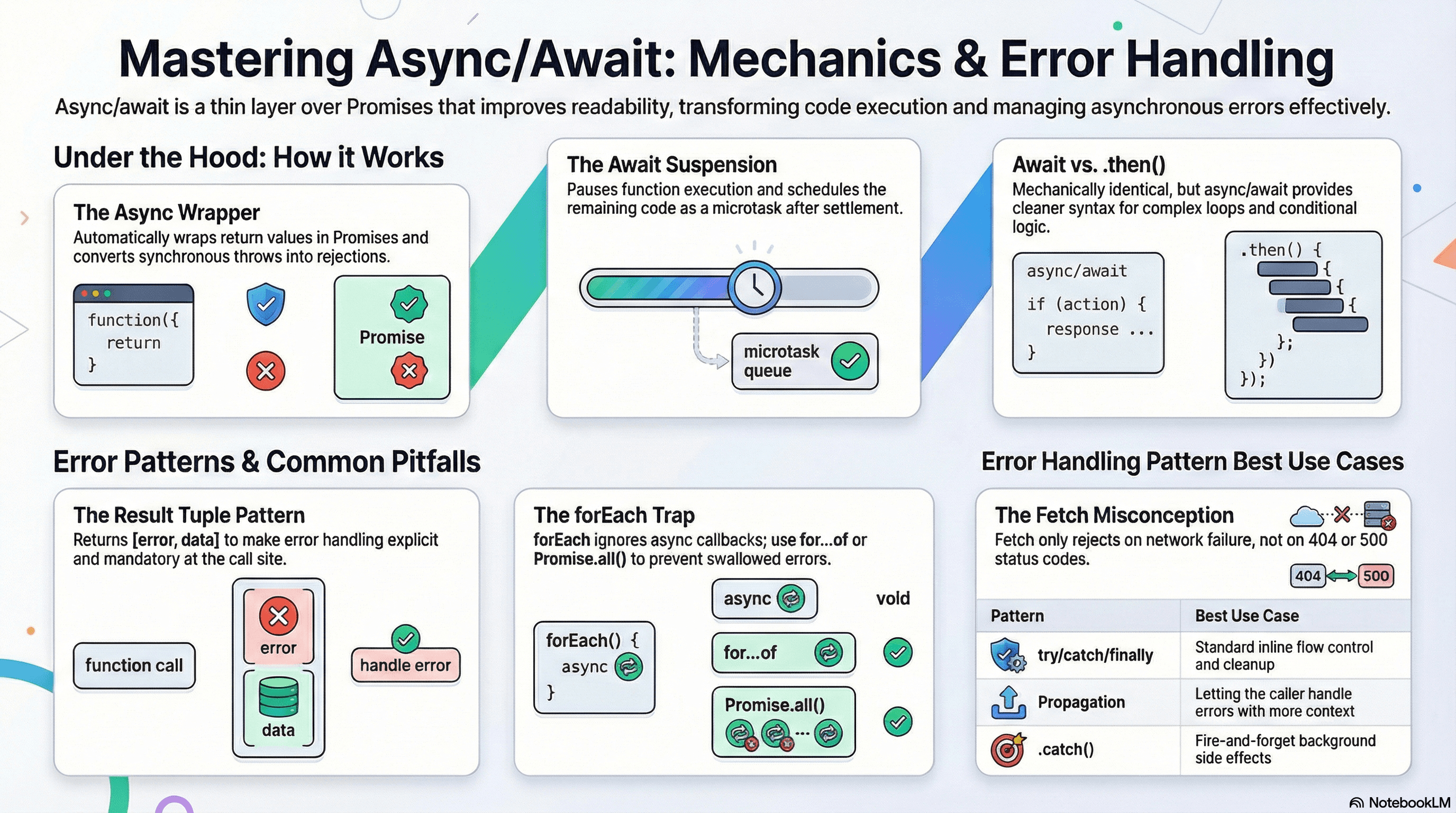
Overview
async/await is the dominant way to write asynchronous JavaScript today — but it's a thin layer of syntax over Promises, and most of the mistakes developers make with it come from treating it as something new rather than understanding what it compiles to.
This article covers two things in depth: how async/await actually works under the hood, and how to handle errors correctly across the full range of situations you'll encounter — single operations, parallel operations, async loops, and module-level async code.
If you've read the previous articles in this section, you already know that await continuations are microtasks and that Promises propagate rejections through chains. This article applies that knowledge directly to the patterns you write every day.
How It Works
What async Does to a Function
Marking a function async does exactly two things:
- Wraps the return value in a
Promise.resolve()— even if you return a plain value - Converts synchronous throws into rejected Promises — even errors thrown before any
await
// These two are equivalent
async function getScore(): Promise<number> {
  return 42;
}
function getScorePromise(): Promise<number> {
  return Promise.resolve(42);
}

// And these two are equivalent
async function failAsync(): Promise<never> {
  throw new Error("something went wrong");
}
function failPromise(): Promise<never> {
  return Promise.reject(new Error("something went wrong"));
}
This means an async function never throws synchronously to its caller — it always returns a Promise, and the caller must handle rejections via await or .catch().
async function riskyParse(json: string): Promise<unknown> {
  // This throw happens synchronously inside the function body,
  // but the caller receives a rejected Promise — not a thrown exception
  return JSON.parse(json);
}

// ❌ This try/catch will NOT catch the rejection
try {
  riskyParse("invalid json"); // no await — returns a pending Promise
} catch (e) {
  console.error("never reaches here");
}

// ✅ Correct — await so the rejection surfaces as a catchable throw
try {
  await riskyParse("invalid json");
} catch (e) {
  console.error("caught:", e);
}
What await Does
await suspends the execution of the current async function and schedules its continuation as a microtask once the awaited Promise settles. The JavaScript engine is free to execute other code while the function is suspended.
async function loadDashboard(userId: string): Promise<void> {
  console.log("A — sync, runs immediately");

  const user = await fetchUser(userId); // suspends here

  // Everything below runs as a microtask continuation
  // No macrotask can interleave between these lines
  console.log("B — microtask, runs after fetchUser resolves");

  const orders = await fetchOrders(user.id); // suspends again

  console.log("C — microtask, runs after fetchOrders resolves");
}

console.log("before call");
loadDashboard("user_1"); // begins synchronously up to the first await
console.log("after call — loadDashboard is suspended, not done");

// Output:
// before call
// A — sync, runs immediately
// after call — loadDashboard is suspended, not done
// B — microtask, runs after fetchUser resolves
// C — microtask, runs after fetchOrders resolves
You can await any value — not just Promises. Non-Promise values are wrapped in Promise.resolve() and resolve immediately as a microtask. This is valid but rarely useful.
await vs .then() — They're the Same Thing
Every await expression can be mechanically translated to .then():
// With await
async function getUser(id: string) {
  const response = await fetch(`/api/users/${id}`);
  const user = await response.json();
  return user;
}

// Equivalent with .then()
function getUser(id: string) {
  return fetch(`/api/users/${id}`)
    .then((response) => response.json())
    .then((user) => user);
}
The reason async/await is preferred is readability — especially for error handling, loops, and conditional logic, where .then() chains become hard to follow.
Error Handling Patterns
Pattern 1: try/catch/finally — Standard Flow Control
The most readable pattern for operations where you need to handle errors inline:
// lib/user-service.ts

interface User {
  id: string;
  name: string;
  email: string;
}

async function updateUserEmail(
  userId: string,
  newEmail: string,
): Promise<User> {
  let response: Response;

  try {
    response = await fetch(`/api/users/${userId}`, {
      method: "PATCH",
      headers: { "Content-Type": "application/json" },
      body: JSON.stringify({ email: newEmail }),
    });

    if (!response.ok) {
      // Throw a typed error so callers can distinguish HTTP failures
      // from network failures
      throw new Error(`HTTP ${response.status}: ${response.statusText}`);
    }

    return (await response.json()) as User;
  } catch (error) {
    // Re-throw with context so the call stack tells a useful story
    throw new Error(
      `Failed to update email for user ${userId}: ${(error as Error).message}`,
    );
  } finally {
    // finally always runs — even if try throws or catch re-throws
    // Use it for cleanup: releasing locks, hiding loading states, closing connections
    console.log(`updateUserEmail completed for ${userId}`);
  }
}
Pattern 2: Propagation — Let Errors Bubble Up
Not every function needs to handle its own errors. Often the right move is to let rejections propagate to the caller, which has more context about how to handle them.
// lib/product-service.ts

async function fetchProduct(slug: string) {
  const res = await fetch(`/api/products/${slug}`);

  // Don't swallow this error — let it propagate.
  // The calling page component or error boundary will handle it.
  if (!res.ok) throw new Error(`Product not found: ${slug} (${res.status})`);

  return res.json();
}

// app/products/[slug]/page.tsx
// Next.js catches thrown errors from Server Components and renders the
// nearest error.tsx boundary automatically — no try/catch needed here
export default async function ProductPage({
  params,
}: {
  params: { slug: string };
}) {
  const product = await fetchProduct(params.slug); // throws → error boundary
  return <ProductView product={product} />;
}
In Next.js App Router Server Components, throwing an error inside an async
Server Component triggers the nearest error.tsx boundary automatically.
Wrapping every data fetch in a try/catch is not always necessary — it
depends on whether you want local error handling or boundary-level handling.
Pattern 3: Result Tuple — Go-Style Error Handling
For utility functions called frequently, wrapping results in a [error, data] tuple avoids nested try/catch and makes error paths explicit at the call site:
// lib/utils/safe-fetch.ts

type Success<T> = [null, T];
type Failure = [Error, null];
type Result<T> = Success<T> | Failure;

async function safeFetch<T>(
  url: string,
  options?: RequestInit,
): Promise<Result<T>> {
  try {
    const res = await fetch(url, options);
    if (!res.ok) throw new Error(`HTTP ${res.status}`);
    const data = (await res.json()) as T;
    return [null, data];
  } catch (error) {
    return [error instanceof Error ? error : new Error(String(error)), null];
  }
}

// Usage — no try/catch at the call site
async function loadUserProfile(userId: string) {
  const [error, user] = await safeFetch<User>(`/api/users/${userId}`);

  if (error) {
    console.error("Profile load failed:", error.message);
    return null;
  }

  return user; // TypeScript knows user is non-null here
}
This pattern is popular in codebases that prefer explicit error handling over exception propagation. The tradeoff: you must check the error at every call site — easy to forget, but also impossible to silently ignore.
Pattern 4: Error Handling in Parallel Operations
When using Promise.all, a single rejection rejects the entire operation. Wrap individual Promises if you need per-operation error handling:
// lib/batch-loader.ts

interface Product {
  id: string;
  name: string;
  price: number;
}

async function loadProductBatch(
  ids: string[],
): Promise<{ loaded: Product[]; failed: string[] }> {
  const results = await Promise.allSettled(
    ids.map(async (id) => {
      const res = await fetch(`/api/products/${id}`);
      if (!res.ok)
        throw new Error(`Failed to load product ${id}: ${res.status}`);
      return res.json() as Promise<Product>;
    }),
  );

  const loaded: Product[] = [];
  const failed: string[] = [];

  results.forEach((result, index) => {
    if (result.status === "fulfilled") {
      loaded.push(result.value);
    } else {
      console.error(result.reason.message);
      failed.push(ids[index]);
    }
  });

  return { loaded, failed };
}
Pattern 5: Error Handling in async Loops
await inside loops is a common source of subtle bugs — especially when you want parallel behavior but accidentally write sequential code:
// ❌ Sequential — each request waits for the previous one to complete
async function loadUsersSequential(ids: string[]): Promise<User[]> {
  const users: User[] = [];
  for (const id of ids) {
    const user = await fetchUser(id); // blocks the loop on each iteration
    users.push(user);
  }
  return users;
}

// ✅ Parallel — all requests fire simultaneously
async function loadUsersParallel(ids: string[]): Promise<User[]> {
  return Promise.all(ids.map((id) => fetchUser(id)));
}

// ✅ Parallel with concurrency limit — avoids overwhelming the server
async function loadUsersWithLimit(
  ids: string[],
  concurrency = 5,
): Promise<User[]> {
  const results: User[] = [];

  for (let i = 0; i < ids.length; i += concurrency) {
    const batch = ids.slice(i, i + concurrency);
    const batchResults = await Promise.all(batch.map((id) => fetchUser(id)));
    results.push(...batchResults);
  }

  return results;
}
forEach does not work with async/await. An async callback passed to
forEach returns a Promise that forEach ignores — it does not await it. Use
for...of for sequential async iteration, or Promise.all with .map() for
parallel async iteration.
// ❌ forEach silently ignores the returned Promises — none are awaited
userIds.forEach(async (id) => {
  await processUser(id); // fires but nothing waits for it
});

// ✅ for...of correctly sequences async work
for (const id of userIds) {
  await processUser(id);
}

// ✅ Promise.all correctly parallelizes async work
await Promise.all(userIds.map((id) => processUser(id)));
Pattern 6: Top-Level await and Module-Level Async
In ES modules (and Next.js Server Components), await can be used at the top level — outside any async function. This is useful for initializing resources at module load time:
// lib/db.ts (ES module)

// Top-level await — the module will not finish loading until this resolves.
// Any module that imports from this file will wait for this to complete.
const db = await initializeDatabaseConnection({
  host: process.env.DB_HOST!,
  port: Number(process.env.DB_PORT),
});

export { db };
// app/dashboard/page.tsx — Next.js Server Component
// await at the top level of an async component function is idiomatic here
export default async function DashboardPage() {
// This is "top-level await" within the component scope
const data = await fetchDashboardData();
return <Dashboard data={data} />;
}Top-level await in a shared module blocks all importers of that module
until the awaited Promise resolves. If the awaited operation fails or hangs,
the entire module graph fails to initialize. Handle errors carefully and set
timeouts on any top-level awaits that depend on external services.
Real-World Use Case
An API route handler in Next.js that fetches user data, updates a record, and sends a confirmation email — where the email is best-effort and should never fail the request:
// app/api/users/[id]/route.ts

import { NextRequest, NextResponse } from "next/server";

export async function PATCH(
  req: NextRequest,
  { params }: { params: { id: string } },
) {
  let body: { email?: string; name?: string };

  // Parse the request body — bad JSON should return 400, not 500
  try {
    body = await req.json();
  } catch {
    return NextResponse.json({ error: "Invalid JSON body" }, { status: 400 });
  }

  try {
    // Update the user record — failure here returns 500
    const updatedUser = await updateUser(params.id, body);

    // Send confirmation email — failure here is logged but does not
    // affect the response. The update already succeeded.
    sendConfirmationEmail(updatedUser.email).catch((err) => {
      console.error("Confirmation email failed (non-fatal):", err.message);
    });

    return NextResponse.json(updatedUser);
  } catch (error) {
    const message = error instanceof Error ? error.message : "Unknown error";
    console.error(`PATCH /api/users/${params.id} failed:`, message);
    return NextResponse.json({ error: "Update failed" }, { status: 500 });
  }
}
Notice the email send uses .catch() without await — deliberately fire-and-forget with explicit error logging. This is a case where not awaiting is the right choice, not a bug.
Common Mistakes / Gotchas
1. Not awaiting an async function and missing the rejection.
Calling an async function without await gives you a pending Promise. If it rejects, the rejection is unhandled — in Node.js this triggers unhandledRejection, in browsers it logs a warning and may crash the tab in future specs.
// ❌ Rejection is silently unhandled
sendWelcomeEmail(user.email);

// ✅ Option A — await it (rejection propagates)
await sendWelcomeEmail(user.email);

// ✅ Option B — fire-and-forget with explicit error handling
sendWelcomeEmail(user.email).catch((err) =>
  console.error("Welcome email failed:", err.message),
);
2. Using async functions inside forEach.
forEach was not designed for async. It calls the callback, receives a Promise back, and ignores it. None of the Promises are awaited and errors are swallowed. Use for...of or Promise.all with .map().
3. Catching errors too broadly and losing type information.
In TypeScript, the error in a catch block is typed as unknown. Accessing error.message directly is a type error. Always narrow:
catch (error) {
  // ❌ TypeScript error — error is unknown
  console.error(error.message);

  // ✅ Narrow to Error first
  const message = error instanceof Error ? error.message : String(error);
  console.error(message);
}
4. Returning inside finally suppresses the original error.
A return statement in a finally block replaces the thrown error. The original exception is permanently lost:
async function doWork() {
  try {
    throw new Error("original error");
  } finally {
    return "cleanup value"; // ❌ Silently swallows the thrown error
  }
}

const result = await doWork(); // "cleanup value" — no error thrown
Only use finally for side effects (cleanup, logging). Never return from it.
5. Mixing async/await and .then() chains inconsistently.
Both are valid but mixing them in the same function makes flow hard to follow and error boundaries unpredictable. Pick one style per function — prefer async/await for readability except in short utility transforms where .then() is more concise.
6. Using await inside try without checking the response status.
Fetching a URL that returns a 404 or 500 does not cause fetch to reject. fetch only rejects on network errors. You must explicitly check response.ok or response.status and throw if the status indicates failure.
// ❌ A 404 response doesn't throw — data will be an error HTML page
const response = await fetch("/api/products/missing-slug");
const data = await response.json(); // parses the 404 HTML as JSON — throws confusingly

// ✅ Check status before parsing
const response = await fetch("/api/products/missing-slug");
if (!response.ok) throw new Error(`Product not found: ${response.status}`);
const data = await response.json();
Summary
async functions always return a Promise and convert synchronous throws into rejections — they never throw to their caller directly. await suspends the current function and schedules its continuation as a microtask when the awaited Promise settles. Error handling has four main patterns: try/catch/finally for inline control flow, propagation for letting boundaries handle failures, result tuples for explicit error handling at every call site, and .catch() for fire-and-forget side effects. The most common bugs in async code are: not awaiting a function call and missing its rejection, using async inside forEach which ignores all returned Promises, not checking response.ok after fetch (which only rejects on network failure), and returning from finally which silently suppresses the original error.
Interview Questions
Q1. What does the async keyword actually do to a function?
It does two things. First, it wraps whatever the function returns in Promise.resolve() — so even if you return 42, the caller receives Promise<number>. Second, it converts any synchronous throw inside the function into a rejected Promise. This means an async function never throws synchronously to its caller — it always returns a Promise, and the caller must use await or .catch() to observe rejections.
Q2. Why doesn't async/await work correctly with forEach?
forEach calls its callback synchronously and ignores the return value. When the callback is async, it returns a Promise on each call — but forEach discards those Promises without awaiting them. The loop finishes immediately, the async operations run in the background, and any errors they throw are unhandled. Use for...of to process items sequentially with await, or Promise.all(array.map(async fn)) to process them in parallel.
Q3. Does fetch reject when the server returns a 404 or 500?
No. fetch only rejects on network-level failures — DNS resolution failure, connection refused, no internet. HTTP error status codes like 404, 500, or 401 resolve the Promise successfully with a Response object. You must check response.ok (which is true for 200–299) or inspect response.status directly and throw manually if the status indicates failure.
Q4. What happens if you return a value from a finally block?
The return in finally replaces any value returned from try and — critically — suppresses any error thrown in try or catch. The original error is permanently lost and the function resolves with the finally return value. finally should only contain side effects: cleanup, logging, releasing resources. Never return from it.
Q5. What is the difference between await promise and promise.then(fn)?
Mechanically they are equivalent — both schedule the continuation as a microtask when the Promise settles. The difference is syntactic and ergonomic. async/await allows you to write async code that reads like synchronous code, makes try/catch work naturally for error handling, and avoids callback nesting for complex flows. .then() is more concise for simple transforms and useful in contexts where async functions cannot be used. In practice, prefer async/await for readability and reserve .then() for short, standalone Promise chains.
Q6. What is the result tuple pattern and when would you use it?
The result tuple pattern wraps an async operation and returns [error, data] instead of throwing — similar to Go's error handling convention. It makes error handling mandatory and visible at every call site rather than relying on try/catch propagation. It works well for utility functions called in many places where you want the caller to explicitly decide what to do with failures. The tradeoff is that you must check the error at every call site — which is more verbose but prevents errors from being silently swallowed through propagation chains.
Promise Combinators
How Promise.all, Promise.allSettled, Promise.any, and Promise.race work, when to use each, and how errors propagate differently through every combinator.
AbortController & Streaming Fetch
How to cancel in-flight fetch requests with AbortController, read streaming HTTP responses with ReadableStream, and build production patterns like cancellable search and AI token streaming.