Concurrency vs Parallelism
The precise difference between concurrency and parallelism in JavaScript, why the distinction matters for architecture decisions, and how Web Workers bring true parallelism to the browser.
Overview
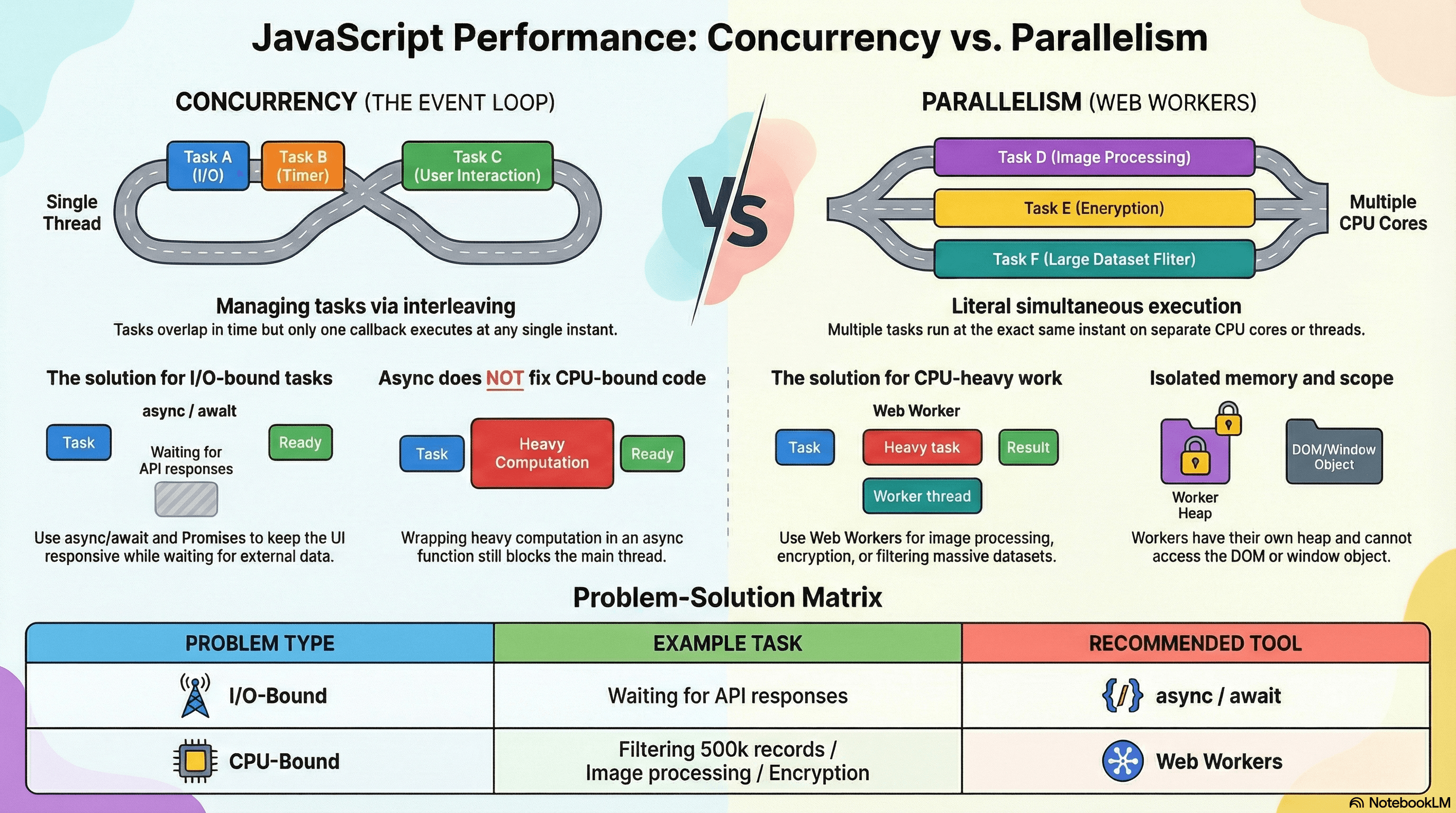
Concurrency and parallelism are two of the most consistently misused terms in JavaScript discussions. Developers often use them interchangeably — but they describe fundamentally different things, and confusing them leads to real architectural mistakes: choosing the wrong tool for a performance problem, misunderstanding what async/await can and can't do, and not knowing when a Web Worker is actually necessary.
JavaScript is a concurrent but not parallel language by default. Understanding what that means precisely — and where the boundary is — is what this article is about. By the end, you'll be able to look at any async or performance problem and immediately know which category it falls into and what the correct solution is.
This article ties together everything from the previous articles in this section. The event loop, microtask scheduling, task starvation, and AbortController all operate within the concurrency model. Web Workers are where parallelism enters the picture.
How It Works
Concurrency — Structure, Not Simultaneous Execution
Concurrency is about the structure of a program — how it's designed to handle multiple tasks that are in progress at the same time. It does not require those tasks to literally execute at the same moment.
A concurrent system interleaves work. It starts task A, pauses it, makes progress on task B, pauses that, returns to task A, and so on. The tasks overlap in time — but not in execution. Only one thing runs at any given instant.
JavaScript's event loop is a concurrency mechanism. When you await a fetch request, the engine suspends your function and runs other code while the network response arrives. Multiple async operations are "in progress" simultaneously in the sense that they're all waiting — but only one JavaScript callback is ever executing at a time.
Concurrency (JavaScript event loop):

Time →  ──────────────────────────────────────────────►
        [Fetch A starts]
                 [Fetch B starts]
                 [JS runs other code while both are pending]
                          [Fetch B callback runs]
                                   [Fetch A callback runs]

One thread. Tasks overlap in time, not in execution.
Parallelism — Literal Simultaneous Execution
Parallelism is about execution — multiple tasks running at the exact same instant on separate CPU cores or threads. True parallelism requires multiple execution contexts.
JavaScript on its own cannot achieve parallelism. The JS engine has one call stack and one thread. No matter how many Promises you create or how deeply you nest async operations, only one JavaScript expression evaluates at a time.
Web Workers break this constraint. A Worker runs in a completely separate thread — its own call stack, its own memory heap, its own event loop. Main thread and Worker thread can execute JavaScript simultaneously.
Parallelism (Web Workers):

Time →  ──────────────────────────────────────────────►
Main:   [JS runs]  [JS runs]  [JS runs]  [processes result]
Worker: [heavy computation........running simultaneously]

Two threads. Literal simultaneous execution on separate cores.
Why This Distinction Matters
The practical consequence is straightforward:
- Async/await, Promises, and the event loop solve concurrency problems — keeping the UI responsive while waiting for I/O (network, disk, timers). They don't make CPU-bound work faster. They just let other work happen while you wait.
- Web Workers solve parallelism problems — offloading CPU-bound computation so it doesn't block the main thread at all. A Worker genuinely runs in parallel.
Knowing which category your problem falls into tells you which tool to reach for.
| Problem Type | Example | Solution |
|---|---|---|
| I/O-bound | Waiting for API response | async/await, Promises |
| I/O-bound | Multiple simultaneous requests | Promise.all |
| CPU-bound | Filtering 500k records | Web Worker |
| CPU-bound | Image processing, encryption | Web Worker |
| CPU-bound, interruptible | Re-rendering large list | startTransition, useDeferredValue |
| CPU-bound, must stay on main | DOM manipulation | Chunk with setTimeout yielding |
Code Examples
Example 1: Concurrency — I/O Overlap with Promise.all
Three independent API calls overlap in time. The total wait is the duration of the slowest call, not the sum of all three. This is concurrency — all three are pending simultaneously, but JavaScript processes their callbacks one at a time.
// lib/dashboard.ts

async function loadDashboard(userId: string) {
  console.time("dashboard load");

  // All three fetch requests fire simultaneously.
  // JavaScript doesn't execute their responses simultaneously —
  // it processes each callback when its Promise resolves.
  const [user, orders, activity] = await Promise.all([
    fetch(`/api/users/${userId}`).then((r) => r.json()), // ~120ms
    fetch(`/api/orders?user=${userId}`).then((r) => r.json()), // ~200ms
    fetch(`/api/activity/${userId}`).then((r) => r.json()), // ~80ms
  ]);

  // Total wait: ~200ms (slowest), not 400ms (sum)
  console.timeEnd("dashboard load");

  return { user, orders, activity };
}
This is NOT parallelism. The browser's networking stack handles the HTTP connections (it does have threads internally), but the JavaScript callbacks that process responses execute one at a time on the single JS thread.
Example 2: Why Async Doesn't Help CPU-Bound Work
A common misconception: "I'll just make my expensive function async and it won't block the UI." This does not work. async only helps when you're waiting for something external. Pure computation runs synchronously regardless of whether it's inside an async function.
// ❌ Common misconception — this STILL blocks the main thread
async function filterLargeDataset(
  records: Record<string, unknown>[],
  predicate: (r: Record<string, unknown>) => boolean,
): Promise<Record<string, unknown>[]> {
  // The filter runs synchronously. The async wrapper does nothing
  // for CPU-bound work — there's no I/O to await, so the engine
  // never yields the thread. The UI freezes for the full duration.
  return records.filter(predicate);
}

// Calling this and awaiting it still blocks for the full computation time
const results = await filterLargeDataset(millionRecords, isActive);
// ↑ main thread locked for ~800ms — UI frozen, input unresponsive
The fix for genuinely CPU-bound work is either chunking (for work that can tolerate being split across frames) or a Web Worker (for work that must complete as fast as possible).
Example 3: True Parallelism with a Web Worker
A Web Worker runs in a separate thread. The main thread and Worker execute simultaneously — the main thread stays completely responsive while the Worker crunches numbers.
// workers/data-processor.worker.ts
// This file runs in a Worker thread — completely separate from the main thread

self.onmessage = function (event: MessageEvent<{ records: unknown[] }>) {
  const { records } = event.data;

  // This computation runs on a Worker thread — main thread is unaffected
  const processed = records
    .filter((r: any) => r.isActive)
    .map((r: any) => ({
      id: r.id,
      name: r.name.trim(),
      score: calculateScore(r),
    }));

  // Send the result back to the main thread
  self.postMessage({ processed });
};

function calculateScore(record: any): number {
  // Simulate CPU-intensive scoring logic
  let score = 0;
  for (let i = 0; i < record.metrics.length; i++) {
    score += record.metrics[i] * Math.log(i + 2);
  }
  return Math.round(score * 100) / 100;
}
// lib/use-worker-processing.ts
// Main thread — stays completely responsive during Worker computation
export function processWithWorker(
records: unknown[],
): Promise<{ processed: unknown[] }> {
return new Promise((resolve, reject) => {
// Each Worker instance is independent — create one per task
const worker = new Worker(
new URL("../workers/data-processor.worker.ts", import.meta.url),
);
worker.onmessage = (event: MessageEvent<{ processed: unknown[] }>) => {
resolve(event.data);
worker.terminate(); // Always clean up — Workers consume OS threads
};
worker.onerror = (error) => {
reject(new Error(`Worker failed: ${error.message}`));
worker.terminate();
};
// Data is copied to the Worker via structured clone — not shared
// Large data transfers can use Transferable objects to avoid copying
worker.postMessage({ records });
});
}// components/DataTable.tsx
"use client";
import { useState } from "react";
import { processWithWorker } from "@/lib/use-worker-processing";
export function DataTable({ rawRecords }: { rawRecords: unknown[] }) {
const [processed, setProcessed] = useState<unknown[]>([]);
const [isProcessing, setIsProcessing] = useState(false);
async function handleProcess() {
setIsProcessing(true);
// Main thread is free during this await — the Worker runs in parallel
const { processed } = await processWithWorker(rawRecords);
setProcessed(processed);
setIsProcessing(false);
}
return (
<div>
<button onClick={handleProcess} disabled={isProcessing}>
{isProcessing ? "Processing in Worker..." : "Process Data"}
</button>
{/* UI remains fully interactive while Worker runs */}
<p>Records processed: {processed.length}</p>
</div>
);
}Example 4: Worker with Transferable Objects
Passing large data to a Worker involves a structured clone — expensive for large ArrayBuffers. Transferable objects move memory ownership instead of copying:
// lib/image-worker.ts

export async function processImageInWorker(
  imageBuffer: ArrayBuffer,
): Promise<ArrayBuffer> {
  return new Promise((resolve, reject) => {
    const worker = new Worker(
      new URL("../workers/image-processor.worker.ts", import.meta.url),
    );

    worker.onmessage = (e: MessageEvent<{ result: ArrayBuffer }>) => {
      resolve(e.data.result);
      worker.terminate();
    };

    worker.onerror = (e) => {
      reject(new Error(e.message));
      worker.terminate();
    };

    // Transfer ownership of the ArrayBuffer to the Worker instead of copying.
    // After this call, imageBuffer is detached in the main thread — attempting
    // to access it here will throw. The Worker now owns the memory.
    worker.postMessage({ imageBuffer }, [imageBuffer]);
  });
}
Transferable objects (like ArrayBuffer, MessagePort, ImageBitmap) are
moved to the Worker rather than copied. This makes large data transfers
essentially free — O(1) instead of O(n). After transfer, the original
reference in the main thread becomes detached and unusable.
Example 5: Worker Pool for Repeated Tasks
Creating a new Worker for every task has overhead. For repeated CPU-bound operations, maintain a pool:
// lib/worker-pool.ts

export class WorkerPool {
  private workers: Worker[] = [];
  private queue: Array<{
    data: unknown;
    resolve: (value: unknown) => void;
    reject: (reason: unknown) => void;
  }> = [];
  private idle: Worker[] = [];

  constructor(workerUrl: URL, size = navigator.hardwareConcurrency || 4) {
    for (let i = 0; i < size; i++) {
      const worker = new Worker(workerUrl);

      worker.onmessage = (e) => {
        // Worker finished — return it to the idle pool
        this.idle.push(worker);
        this.dispatch(); // process next queued item if any
      };

      this.workers.push(worker);
      this.idle.push(worker);
    }
  }

  run(data: unknown): Promise<unknown> {
    return new Promise((resolve, reject) => {
      this.queue.push({ data, resolve, reject });
      this.dispatch();
    });
  }

  private dispatch() {
    if (this.queue.length === 0 || this.idle.length === 0) return;

    const worker = this.idle.pop()!;
    const task = this.queue.shift()!;

    worker.onmessage = (e) => {
      task.resolve(e.data);
      this.idle.push(worker);
      this.dispatch();
    };

    worker.onerror = (e) => {
      task.reject(new Error(e.message));
      this.idle.push(worker);
      this.dispatch();
    };

    worker.postMessage(task.data);
  }

  terminate() {
    this.workers.forEach((w) => w.terminate());
  }
}
Size your pool to navigator.hardwareConcurrency — the number of logical CPU
cores available. Creating more Workers than cores means threads compete for
CPU time and you lose the parallelism benefit.
Real-World Use Cases
Image processing in a photo editor. Applying filters, resizing, or encoding images involves pure CPU work on pixel arrays. Doing this on the main thread freezes the UI. Moving it to a Worker with ArrayBuffer transfers keeps the canvas interactive while the processing runs in parallel.
Large dataset filtering and sorting in a data grid. A financial dashboard displaying 100,000 rows needs to filter, sort, and aggregate on demand. startTransition helps with React's rendering priority, but the actual JavaScript computation still runs on the main thread. Moving the computation to a Worker means the filter completes faster (parallel execution) AND the UI stays interactive (main thread is free).
Cryptography and hashing. Operations like bcrypt, SHA-256, or RSA key generation are intentionally expensive. Running them on the main thread can take hundreds of milliseconds. A Worker offloads this without impacting UI responsiveness.
Code compilation and linting in browser-based IDEs. Tools like CodeSandbox and StackBlitz run TypeScript compilation, ESLint, and Prettier in Workers. This is why you can type freely in the editor while diagnostics update asynchronously — the compilation is genuinely running in parallel.
Common Mistakes / Gotchas
1. Thinking async/await makes CPU-bound work non-blocking.
This is the most common misconception in JavaScript performance. async and await only yield the thread when there's actual I/O to wait for. A synchronous computation wrapped in an async function still blocks the main thread for its full duration. If your profiler shows a long task, making the function async won't fix it.
2. Creating a new Worker for every task. Workers have startup overhead — spawning a new OS thread, initializing the JS engine, loading the script. For high-frequency tasks (e.g., processing every frame), create a pool of Workers at startup and reuse them. Terminate only when the feature is unmounted.
3. Not terminating Workers after use.
Each Worker holds an OS thread. Unreferenced Workers that are never terminated continue to consume thread resources. Always call worker.terminate() when the Worker's task is complete and it won't be reused.
4. Assuming shared memory is the default.
By default, data passed to Workers via postMessage is copied using the structured clone algorithm. Workers do not share heap memory with the main thread. This isolation is a feature — it prevents race conditions — but it means large data transfers can be expensive unless you use Transferable objects.
5. Expecting Workers to access the DOM.
Workers have no access to window, document, or any DOM API. They run in a completely separate global scope (DedicatedWorkerGlobalScope). If you need to update the DOM based on Worker results, send a message back to the main thread and update the DOM there.
6. Conflating Node.js worker_threads with browser Web Workers.
Node.js has its own parallelism primitive — worker_threads from the node:worker_threads module. The API is similar but not identical: Node workers can share memory via SharedArrayBuffer more easily, have access to Node APIs, and don't have the browser's same-origin restrictions. The concepts are the same; the implementations are different.
Summary
Concurrency is about structure — multiple tasks making progress over time by interleaving on a single thread. JavaScript's event loop is a concurrency mechanism: it lets I/O operations overlap in time without requiring multiple threads. Parallelism is about simultaneous execution — multiple tasks running at the exact same instant on separate threads or cores. JavaScript cannot achieve true parallelism on its own. Web Workers introduce real parallelism by running JavaScript on a dedicated OS thread, completely separate from the main thread, communicating only via message passing. The practical rule: reach for async/await and Promises when your bottleneck is waiting for I/O; reach for Web Workers when your bottleneck is CPU computation. Making a CPU-bound function async does not make it non-blocking — that is the single most important thing to take away from this article.
Interview Questions
Q1. What is the difference between concurrency and parallelism?
Concurrency is about the structure of a program — handling multiple tasks that are in progress at the same time by interleaving their execution on a single thread. Only one task runs at any given instant, but they overlap in time. Parallelism is about simultaneous execution — multiple tasks literally running at the same moment on separate CPU cores or threads. JavaScript is concurrent by default (via the event loop) but not parallel. Web Workers add true parallelism by running JavaScript on a separate OS thread.
Q2. Does using async/await make CPU-bound code non-blocking?
No. async/await only yields the thread when there's actual I/O to await — a network response, a timer, a file read. Inside an async function, synchronous JavaScript still executes on the main thread without yielding. Wrapping a records.filter() or a heavy computation in an async function does nothing to prevent it from blocking the UI. The fix for CPU-bound blocking is either chunking the work across frames using setTimeout yielding, or moving the computation to a Web Worker.
Q3. How do Web Workers communicate with the main thread and what are the data transfer constraints?
Workers communicate via postMessage and onmessage. By default, data is copied using the structured clone algorithm — both sides have independent copies of the data. For large binary data (ArrayBuffer, ImageBitmap), you can use Transferable objects which move ownership to the receiver in O(1) time, making the original reference in the sender's scope detached and unusable. Workers cannot access the DOM, window, or document — they have their own global scope. To update the DOM based on Worker output, post a message back to the main thread.
Q4. When would you use startTransition vs a Web Worker for a performance problem?
startTransition is for making React renders interruptible — it tells React to prioritize user input over a state update's re-render. The JavaScript computation itself still runs on the main thread. Use it when the bottleneck is React's rendering work and the computation is relatively light. Use a Web Worker when the bottleneck is the JavaScript computation itself — heavy filtering, sorting, image processing, cryptography. If the computation takes more than ~50ms (one long task threshold), it belongs in a Worker, not in startTransition.
Q5. Why should you use a Worker pool instead of creating a new Worker per task?
Creating a Worker has startup overhead: the browser must spawn an OS thread, initialize a new JavaScript engine context, and load and parse the Worker script. For one-off tasks this is acceptable. For tasks that repeat frequently — processing every user input, handling every animation frame — this overhead adds up. A pool creates a fixed set of Workers at startup and reuses them across tasks, paying the initialization cost once. Size the pool to navigator.hardwareConcurrency to match the number of available CPU cores.
Q6. Can two Web Workers share memory directly?
Not by default — each Worker has its own isolated heap and all postMessage transfers are copies. However, SharedArrayBuffer allows multiple Workers (and the main thread) to read and write the same block of memory simultaneously. Because of this, SharedArrayBuffer requires cross-origin isolation headers (Cross-Origin-Opener-Policy: same-origin and Cross-Origin-Embedder-Policy: require-corp) to be enabled, and concurrent access must be coordinated using Atomics to prevent race conditions. In practice, shared memory is only worth the complexity for very high-throughput data pipelines — most Worker use cases are fine with message passing.
AbortController & Streaming Fetch
How to cancel in-flight fetch requests with AbortController, read streaming HTTP responses with ReadableStream, and build production patterns like cancellable search and AI token streaming.
Web Workers vs Service Workers
How Web Workers enable off-main-thread computation via structured cloning and SharedArrayBuffer, while Service Workers act as programmable network proxies with their own install/activate/fetch lifecycle, caching strategies, and scope rules — two fundamentally different threading primitives for different categories of problems.