Web Workers vs Service Workers
How Web Workers enable off-main-thread computation via structured cloning and SharedArrayBuffer, while Service Workers act as programmable network proxies with their own install/activate/fetch lifecycle, caching strategies, and scope rules — two fundamentally different threading primitives for different categories of problems.
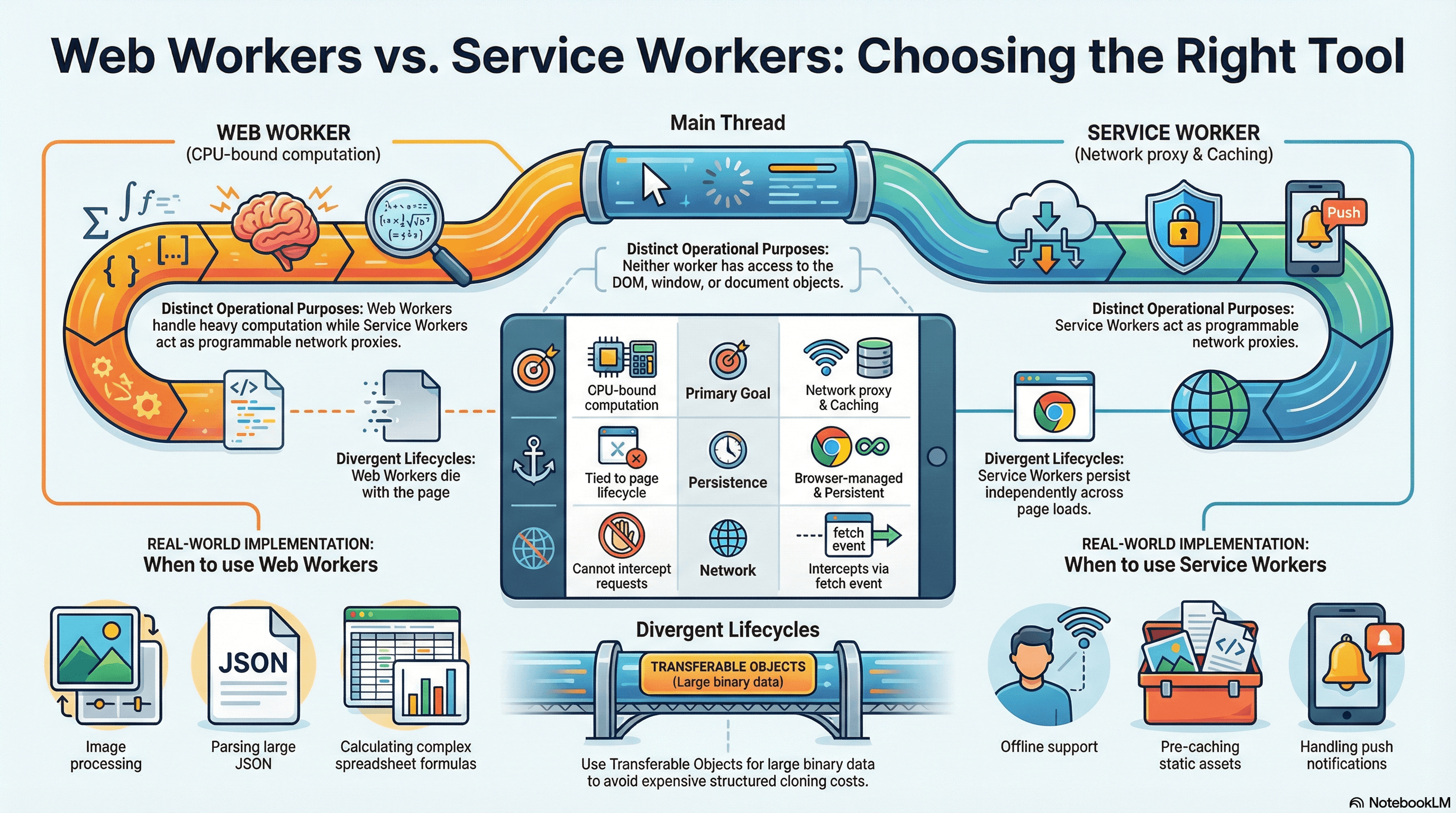
Overview
JavaScript runs on a single thread. Every function call, every DOM mutation, every layout calculation, and every paint operation competes for time on that one thread. When a long task exceeds the browser's 50ms budget (the threshold Chrome uses for Interaction to Next Paint scoring), the UI becomes unresponsive — clicks don't register, animations stutter, and input feels laggy. The main thread is the bottleneck for everything users perceive as "fast" or "slow."
Web Workers and Service Workers both move JavaScript execution off the main thread, but they solve fundamentally different categories of problems. A Web Worker gives you a dedicated OS thread for CPU-bound computation — parsing large JSON payloads, running algorithms, processing image data — so the main thread stays free for rendering and user interaction. A Service Worker acts as a programmable network proxy that sits between your application and the network, intercepting fetch requests, managing cache storage, enabling offline experiences, and handling push notifications. It has its own lifecycle, persists across page loads, and the browser controls when it wakes up and when it terminates.
The confusion between these two primitives leads to real mistakes: developers reaching for a Service Worker when they need parallel computation, or trying to use a Web Worker for offline caching. Understanding the precise boundary — what each can do, what each cannot access, and how each communicates with the main thread — is essential for making the right architectural choice.
| Feature | Web Worker | Service Worker |
|---|---|---|
| Primary purpose | CPU-bound computation | Network proxy, caching, offline |
| Runs off main thread | Yes | Yes |
| DOM access | No | No |
| Intercepts network requests | No | Yes (fetch event) |
| Lifecycle | Tied to the page that created it | Independent of any page, browser-managed |
| Persistence | Lives until terminated or page closes | Persists across navigations and page closes |
| Number per origin | Unlimited (dedicated), one per URL (shared) | One active per scope |
| Available APIs | fetch, IndexedDB, WebSocket, crypto | fetch, CacheStorage, IndexedDB |
| Communication | postMessage (structured clone or transfer) | postMessage, FetchEvent.respondWith() |
How It Works
Web Worker Threading Model
When you instantiate a new Worker('worker.js'), the browser spawns a separate OS thread with its own JavaScript execution context. This thread has its own global scope — DedicatedWorkerGlobalScope for dedicated workers, SharedWorkerGlobalScope for shared workers — with no access to window, document, or any DOM API.
Dedicated Workers are the most common type. Each dedicated worker is owned by a single page (or more precisely, a single browsing context). When the page closes, the worker is terminated. You create one with new Worker() and communicate via postMessage.
Shared Workers can be accessed by multiple pages, iframes, or even other workers from the same origin. They use MessagePort for communication and persist as long as at least one connection remains open. Shared workers are useful for coordinating state across multiple tabs — for example, a single WebSocket connection shared across all open tabs of a chat application. In practice, shared workers see limited adoption because their debugging story is poor and their behavior across browser restarts is inconsistent.
Despite having no DOM access, workers have access to a substantial set of APIs: fetch, XMLHttpRequest, IndexedDB, WebSocket, crypto.subtle, TextEncoder/TextDecoder, setTimeout/setInterval, importScripts (for classic workers), and ES module import (for module workers). They can even spawn sub-workers.
Structured Clone Algorithm
Communication between the main thread and a worker happens through postMessage. The data you pass is serialized using the structured clone algorithm, which creates a deep copy. This is more capable than JSON.stringify — it handles Map, Set, Date, RegExp, ArrayBuffer, Blob, File, ImageData, and circular references. But it cannot clone functions, DOM nodes, Error objects (in some engines), or objects with prototype chains (methods are stripped).
The performance cost of structured cloning is proportional to the size and complexity of the data. For a 10MB ArrayBuffer, the clone copies every byte. For deeply nested objects with hundreds of thousands of keys, serialization can take milliseconds — time spent on the main thread before the worker even begins its work. This is why transferable objects exist.
Transferable Objects
Certain object types can be transferred instead of cloned. A transfer moves ownership of the underlying memory from one context to another in O(1) time — no bytes are copied. After transfer, the original reference in the sender becomes detached (zero-length for ArrayBuffer, unusable for others).
The transferable types are: ArrayBuffer, MessagePort, ReadableStream, WritableStream, TransformStream, AudioData, ImageBitmap, VideoFrame, and OffscreenCanvas.
// Transfer moves the ArrayBuffer — no copy, O(1) regardless of size
const buffer = new ArrayBuffer(50_000_000); // 50MB
worker.postMessage({ buffer }, { transfer: [buffer] });

// After transfer, the original is neutered
console.log(buffer.byteLength); // 0 — ownership moved to worker
Use transfer when you are passing large binary data and the sender does not need the data after sending. Use structured clone when both sides need their own copy, or when the data is small enough that the copy cost is negligible (under ~100KB as a rough heuristic).
SharedArrayBuffer and Atomics
SharedArrayBuffer is fundamentally different from both cloning and transferring. It provides true shared memory — both the main thread and the worker read and write the same block of memory simultaneously, with no copying and no ownership transfer.
Because multiple threads can access the same memory concurrently, you need synchronization primitives to prevent race conditions. The Atomics object provides these:
Atomics.load()/Atomics.store()— atomic read/write operationsAtomics.compareExchange()— compare-and-swap (the foundation of lock-free algorithms)Atomics.wait()— blocks the calling thread until a condition is met (not available on the main thread)Atomics.notify()— wakes threads blocked onAtomics.wait()Atomics.add(),Atomics.sub(),Atomics.and(),Atomics.or(),Atomics.xor()— atomic arithmetic
// Shared memory between main thread and worker
const sharedBuffer = new SharedArrayBuffer(1024);
const sharedArray = new Int32Array(sharedBuffer);

// Main thread: send the shared buffer (NOT transferred — both sides access it)
worker.postMessage({ sharedBuffer });

// Worker side: atomic increment to avoid race conditions
// Without Atomics, two threads incrementing simultaneously can lose updates
Atomics.add(sharedArray, 0, 1); // atomically increment index 0 by 1

// Worker can block until main thread signals
Atomics.wait(sharedArray, 1, 0); // block until index 1 is no longer 0

// Main thread signals the worker to proceed
Atomics.store(sharedArray, 1, 1); // set index 1 to 1
Atomics.notify(sharedArray, 1, 1); // wake one waiting thread
SharedArrayBuffer requires cross-origin isolation headers to be enabled.
Your server must send Cross-Origin-Opener-Policy: same-origin and
Cross-Origin-Embedder-Policy: require-corp on the document response. These
headers exist because of Spectre-class CPU vulnerabilities — without isolation,
a malicious cross-origin iframe could use SharedArrayBuffer with
high-resolution timers to read memory from other origins. Without these
headers, SharedArrayBuffer is undefined in the global scope and any code
relying on it will fail silently.
Service Worker Lifecycle
A Service Worker has a strict lifecycle managed entirely by the browser. Understanding this lifecycle is essential because it explains behavior that otherwise seems unpredictable — why a new deployment doesn't take effect immediately, why fetch events stop firing, and why your worker appears to "disappear."
1. Registration — Your page calls navigator.serviceWorker.register('/sw.js'). The browser downloads the script and begins installation. Registration itself is idempotent — calling it multiple times with the same URL is harmless.
2. Install — The install event fires when the browser detects a new or updated SW script. This is the place to pre-cache static assets using CacheStorage. The install phase blocks on event.waitUntil() — if the promise you pass rejects, installation fails and the SW is discarded.
3. Waiting — After installation, the new SW enters a waiting state if there is already an active SW controlling clients (open tabs). The waiting state exists for safety: if you deployed a new SW with a different caching strategy, activating it immediately could break tabs that were loaded with assets from the old cache. The new SW waits until all tabs controlled by the old SW are closed.
4. Activate — Once no clients are controlled by the old SW, the new SW activates. The activate event is the place to clean up old caches. Like install, it respects event.waitUntil().
5. Idle / Fetch / Terminate — After activation, the SW is "active" but the browser controls when it actually runs. It wakes up on events (fetch, push, sync, message) and the browser terminates it after roughly 30 seconds of inactivity to conserve memory. You cannot rely on global variables persisting between events — the SW may have been terminated and restarted.
Registration → Install → Waiting → Activate → Idle
                                        ↓
                              [fetch event] → runs handler → Idle
                              [push event]  → runs handler → Idle
                              [~30s idle]   → Terminated
                              [new event]   → Restarted → runs handler → Idle
skipWaiting and clients.claim
You can bypass the waiting state with self.skipWaiting() called during the install event. This forces the new SW to activate immediately, even if old tabs are still open. Combined with self.clients.claim() in the activate event, the new SW takes control of all open pages immediately.
This is convenient for development and for non-breaking updates, but it is a trade-off: if your new SW changes caching behavior, existing pages may start receiving different cached responses mid-session, which can cause inconsistencies. Use skipWaiting when the update is backward-compatible; avoid it when the cache format or routing logic has changed significantly.
Update Detection
The browser checks for SW updates automatically on navigation (if more than 24 hours have passed since the last check) and when you call registration.update() manually. The check performs a byte-level diff of the SW script — if even one byte differs, it triggers a new install. The updatefound event on the registration object fires when a new SW is found, which you can use to prompt users about available updates.
Service Worker Caching Strategies
The power of Service Workers lies in their ability to intercept every network request from controlled pages and decide how to respond. Five canonical caching strategies cover virtually all use cases:
Cache-First — Check the cache first; only go to the network if the cache misses. Best for static assets that rarely change (fonts, images, CSS/JS with hashed filenames). Fastest response time for cached resources.
Network-First — Try the network first; fall back to the cache if the network fails. Best for content that should always be fresh but must work offline (API responses, article content). Slower on cache hit than cache-first, but ensures freshness.
Stale-While-Revalidate — Serve from cache immediately (for speed), then fetch from the network in the background and update the cache for next time. Best for resources where slight staleness is acceptable (user avatars, non-critical API data). The user sees fast responses and gets fresh data on the next request.
Cache-Only — Only serve from the cache; never go to the network. Used for pre-cached resources in fully offline apps where you control all content at install time.
Network-Only — Always go to the network; never cache. Used for requests that must never be stale (authentication endpoints, real-time data, analytics pings).
Service Worker Scope
A Service Worker's scope determines which pages it can control. By default, the scope is the directory where the SW file is served from. A SW at /app/sw.js can only control pages under /app/. A SW at /sw.js (the root) can control all pages on the origin.
This is why you place sw.js in the root of your public directory. If your build system outputs the SW to a subdirectory, you can extend its scope with the Service-Worker-Allowed HTTP header on the SW file's response — but you cannot exceed the origin boundary.
# SW file location determines default scope:
/sw.js           → controls /*
/app/sw.js       → controls /app/*
/assets/sw.js    → controls /assets/* (probably not what you want)

# Extending scope via response header:
Service-Worker-Allowed: /
# Now /app/sw.js can control /*
Service Workers require a secure context. They only register on https://
origins or localhost during development. On plain http://, registration
silently fails. This requirement exists because a SW intercepts all network
requests — on an insecure connection, an attacker could inject a malicious SW
and permanently compromise the origin's network behavior.
Code Examples
Web Worker with Transferable Objects — Image Processing
This example transfers an OffscreenCanvas to a worker for image manipulation. The canvas is moved (not copied) to the worker thread, processed there, and the resulting pixel data is transferred back.
workers/image-processor.worker.ts
// Worker thread — receives an OffscreenCanvas, applies a grayscale filter,
// and transfers the processed pixel data back to the main thread

self.onmessage = async (event: MessageEvent<{ canvas: OffscreenCanvas; width: number; height: number }>) => {
  const { canvas, width, height } = event.data;
  const ctx = canvas.getContext("2d")!;

  // Draw something or receive image data — here we assume the canvas
  // already has content transferred from the main thread
  const imageData = ctx.getImageData(0, 0, width, height);
  const pixels = imageData.data;

  // CPU-intensive pixel manipulation runs on the worker thread,
  // keeping the main thread free for user interactions
  for (let i = 0; i < pixels.length; i += 4) {
    const avg = (pixels[i] + pixels[i + 1] + pixels[i + 2]) / 3;
    pixels[i] = avg;     // R
    pixels[i + 1] = avg; // G
    pixels[i + 2] = avg; // B
    // pixels[i + 3] is alpha — leave unchanged
  }

  ctx.putImageData(imageData, 0, 0);

  // Transfer the underlying ArrayBuffer back — zero-copy return
  const processed = ctx.getImageData(0, 0, width, height);
  self.postMessage(
    { pixels: processed.data.buffer, width, height },
    { transfer: [processed.data.buffer] },
  );
};
components/ImageFilter.tsx
"use client";

import { useRef, useCallback } from "react";

export function ImageFilter({ src }: { src: string }) {
  const canvasRef = useRef<HTMLCanvasElement>(null);

  const applyGrayscale = useCallback(async () => {
    const canvas = canvasRef.current;
    if (!canvas) return;

    const ctx = canvas.getContext("2d")!;
    const img = new Image();
    img.src = src;
    await new Promise((resolve) => (img.onload = resolve));

    canvas.width = img.width;
    canvas.height = img.height;
    ctx.drawImage(img, 0, 0);

    // Create an OffscreenCanvas and transfer it to the worker.
    // After transfer, the main thread cannot draw on this canvas —
    // the worker owns it exclusively.
    const offscreen = canvas.transferControlToOffscreen();

    const worker = new Worker(
      new URL("../workers/image-processor.worker.ts", import.meta.url),
    );

    worker.postMessage(
      { canvas: offscreen, width: img.width, height: img.height },
      { transfer: [offscreen] }, // zero-copy transfer of canvas ownership
    );

    worker.onmessage = (e: MessageEvent<{ pixels: ArrayBuffer; width: number; height: number }>) => {
      const { pixels, width, height } = e.data;
      const imageData = new ImageData(
        new Uint8ClampedArray(pixels),
        width,
        height,
      );
      // The worker transferred the buffer back — we can draw the result
      const displayCtx = canvasRef.current?.getContext("2d");
      displayCtx?.putImageData(imageData, 0, 0);
      worker.terminate();
    };

    worker.onerror = (err) => {
      console.error("Image processing worker failed:", err);
      worker.terminate();
    };
  }, [src]);

  return (
    <div>
      <canvas ref={canvasRef} />
      <button onClick={applyGrayscale}>Apply Grayscale</button>
    </div>
  );
}
Comlink for Ergonomic Worker Communication
Raw postMessage communication is tedious and error-prone — you end up writing switch statements on message types, manually managing request/response correlation, and losing type safety. Comlink wraps a worker as an async proxy object, turning postMessage into transparent RPC calls.
workers/math.worker.ts
import * as Comlink from "comlink";

// Define the worker's API as a plain object or class.
// Comlink handles serialization, message routing, and response correlation.
const mathService = {
  // Each method becomes an async call from the main thread's perspective
  fibonacci(n: number): number {
    if (n <= 1) return n;
    let a = 0, b = 1;
    for (let i = 2; i <= n; i++) {
      [a, b] = [b, a + b];
    }
    return b;
  },

  // Comlink supports transferable objects via Comlink.transfer()
  processBuffer(buffer: ArrayBuffer): ArrayBuffer {
    const view = new Float64Array(buffer);
    for (let i = 0; i < view.length; i++) {
      view[i] = Math.sqrt(view[i]);
    }
    return Comlink.transfer(buffer, [buffer]);
  },
};

// Expose the object — Comlink generates the proxy on the main thread side
Comlink.expose(mathService);
lib/math-worker-client.ts
import * as Comlink from "comlink";

// The type of the worker's exposed API — gives you full type safety
type MathService = {
  fibonacci(n: number): number;
  processBuffer(buffer: ArrayBuffer): ArrayBuffer;
};

export function createMathWorker() {
  const worker = new Worker(
    new URL("../workers/math.worker.ts", import.meta.url),
  );

  // Comlink.wrap returns a proxy where every method call becomes
  // a postMessage under the hood and returns a Promise
  const math = Comlink.wrap<MathService>(worker);

  return {
    math,
    terminate: () => worker.terminate(),
  };
}

// Usage — feels like calling a local async function
// const { math, terminate } = createMathWorker();
// const result = await math.fibonacci(50); // runs in worker thread
// terminate();
Service Worker with Stale-While-Revalidate for API Responses
This strategy serves cached API responses instantly for perceived speed, then fetches fresh data in the background to update the cache. The user sees fast responses on every visit, and the data is at most one request cycle stale.
public/sw.js
const API_CACHE = "api-cache-v1";
const STATIC_CACHE = "static-cache-v1";
const PRECACHE_URLS = ["/", "/offline.html", "/app-shell.css", "/app-shell.js"];

self.addEventListener("install", (event) => {
  event.waitUntil(
    caches.open(STATIC_CACHE).then((cache) => cache.addAll(PRECACHE_URLS)),
  );
  // Don't call skipWaiting here in production — let the user
  // finish their session with the old SW to avoid mid-session cache breaks
});

self.addEventListener("activate", (event) => {
  // Clean up caches from previous versions
  const currentCaches = [API_CACHE, STATIC_CACHE];
  event.waitUntil(
    caches.keys().then((names) =>
      Promise.all(
        names
          .filter((name) => !currentCaches.includes(name))
          .map((name) => caches.delete(name)),
      ),
    ),
  );
  self.clients.claim();
});

self.addEventListener("fetch", (event) => {
  const { request } = event;
  if (request.method !== "GET") return;

  const url = new URL(request.url);

  if (url.pathname.startsWith("/api/")) {
    // Stale-While-Revalidate for API routes:
    // 1. Serve cached response immediately (stale but fast)
    // 2. Fetch fresh response in the background
    // 3. Update cache with fresh response for next time
    event.respondWith(staleWhileRevalidate(request));
  } else {
    // Cache-first for static assets
    event.respondWith(cacheFirst(request));
  }
});

async function staleWhileRevalidate(request) {
  const cache = await caches.open(API_CACHE);
  const cachedResponse = await cache.match(request);

  // Fire the network request regardless of cache hit — we always
  // want to update the cache with fresh data for the next request
  const networkFetch = fetch(request)
    .then((response) => {
      // Only cache successful responses — don't cache 500s or redirects
      if (response.ok) {
        // clone() is required because a Response body can only be consumed once.
        // We need one copy for the cache and one for (potential) return to the client.
        cache.put(request, response.clone());
      }
      return response;
    })
    .catch(() => {
      // Network failed — if we had a cached response, the caller already
      // got it. If not, we'll fall through to the offline page below.
      return null;
    });

  // Return the cached version immediately if available.
  // The network fetch continues in the background regardless.
  if (cachedResponse) return cachedResponse;

  // No cache hit — wait for network (first visit or cache eviction)
  const networkResponse = await networkFetch;
  return networkResponse || caches.match("/offline.html");
}

async function cacheFirst(request) {
  const cached = await caches.match(request);
  if (cached) return cached;

  try {
    const response = await fetch(request);
    if (response.ok) {
      const cache = await caches.open(STATIC_CACHE);
      cache.put(request, response.clone());
    }
    return response;
  } catch {
    return caches.match("/offline.html");
  }
}
Workbox for Production Service Worker Setup
Most teams should not hand-write Service Workers. Workbox is Google's production-grade library that handles precaching, runtime caching, cache expiration, and update strategies with well-tested, battle-hardened code.
src/sw.js (using Workbox modules)
import { precacheAndRoute } from "workbox-precaching";
import { registerRoute } from "workbox-routing";
import {
  StaleWhileRevalidate,
  CacheFirst,
  NetworkFirst,
} from "workbox-strategies";
import { ExpirationPlugin } from "workbox-expiration";
import { CacheableResponsePlugin } from "workbox-cacheable-response";

// Precache static assets injected by the build tool (Webpack, Vite, etc.).
// The __WB_MANIFEST placeholder is replaced at build time with a list of
// URLs and revision hashes — enabling automatic cache-busting on deploy.
precacheAndRoute(self.__WB_MANIFEST);

// API calls: network-first with a 3-second timeout fallback to cache.
// This ensures users always get fresh data when online, but can still
// use the app during network flakiness.
registerRoute(
  ({ url }) => url.pathname.startsWith("/api/"),
  new NetworkFirst({
    cacheName: "api-responses",
    networkTimeoutSeconds: 3,
    plugins: [
      new CacheableResponsePlugin({ statuses: [0, 200] }),
      new ExpirationPlugin({
        maxEntries: 100,
        maxAgeSeconds: 60 * 60 * 24, // 24 hours
      }),
    ],
  }),
);

// Images: cache-first with expiration — images rarely change but are
// expensive to re-download. Cap storage to prevent unbounded growth.
registerRoute(
  ({ request }) => request.destination === "image",
  new CacheFirst({
    cacheName: "images",
    plugins: [
      new CacheableResponsePlugin({ statuses: [0, 200] }),
      new ExpirationPlugin({
        maxEntries: 200,
        maxAgeSeconds: 60 * 60 * 24 * 30, // 30 days
      }),
    ],
  }),
);

// Google Fonts: cache-first since font files are versioned by URL
registerRoute(
  ({ url }) => url.origin === "https://fonts.googleapis.com" ||
               url.origin === "https://fonts.gstatic.com",
  new StaleWhileRevalidate({
    cacheName: "google-fonts",
    plugins: [
      new ExpirationPlugin({ maxEntries: 30 }),
    ],
  }),
);
React Hook for Web Worker Lifecycle
A reusable hook that manages worker creation, message handling, error recovery, and cleanup on unmount — preventing the common leak of unterminated workers.
"use client";

import { useEffect, useRef, useState, useCallback } from "react";

type WorkerStatus = "idle" | "processing" | "error";

interface UseWorkerOptions<TResult> {
  // Factory function returns a new Worker instance.
  // Using a factory instead of a URL lets the consumer control bundler-specific
  // Worker instantiation (e.g., new URL + import.meta.url for Webpack/Vite).
  createWorker: () => Worker;
  onResult?: (result: TResult) => void;
  onError?: (error: Error) => void;
}

interface UseWorkerReturn<TInput, TResult> {
  run: (data: TInput) => void;
  result: TResult | null;
  status: WorkerStatus;
  error: Error | null;
}

export function useWorker<TInput, TResult>(
  options: UseWorkerOptions<TResult>,
): UseWorkerReturn<TInput, TResult> {
  const { createWorker, onResult, onError } = options;
  const workerRef = useRef<Worker | null>(null);
  const [result, setResult] = useState<TResult | null>(null);
  const [status, setStatus] = useState<WorkerStatus>("idle");
  const [error, setError] = useState<Error | null>(null);

  // Initialize the worker once on mount, terminate on unmount.
  // Without this cleanup, every component re-render or navigation
  // would leak an OS thread.
  useEffect(() => {
    const worker = createWorker();
    workerRef.current = worker;

    worker.onmessage = (event: MessageEvent<TResult>) => {
      setResult(event.data);
      setStatus("idle");
      onResult?.(event.data);
    };

    worker.onerror = (err) => {
      const workerError = new Error(err.message);
      setError(workerError);
      setStatus("error");
      onError?.(workerError);
    };

    return () => {
      worker.terminate();
      workerRef.current = null;
    };
    // createWorker is a factory function — stable reference expected
    // eslint-disable-next-line react-hooks/exhaustive-deps
  }, []);

  const run = useCallback((data: TInput) => {
    if (!workerRef.current) return;
    setStatus("processing");
    setError(null);
    workerRef.current.postMessage(data);
  }, []);

  return { run, result, status, error };
}

// Usage:
// const { run, result, status } = useWorker<number[], number[]>({
//   createWorker: () => new Worker(new URL('./heavy-calc.worker.ts', import.meta.url)),
// });
// run([1, 2, 3, 4, 5]); // offloads to worker thread
Real-World Use Cases
Web Worker: Spreadsheet application processing 100k rows of formulas. A browser-based spreadsheet receives a paste event with 100,000 rows of data. Each cell may contain formulas that reference other cells, requiring a dependency graph traversal and topological sort before evaluation. Running this on the main thread blocks all input for 2-3 seconds — the user cannot scroll, select cells, or type. Moving the formula engine to a dedicated Web Worker keeps the UI fully interactive. The main thread sends the cell data (as a typed array for efficient transfer), the worker resolves dependencies and evaluates formulas, and posts back only the changed values. For real-time collaboration features, a SharedArrayBuffer can provide the worker with direct access to the shared document state, using Atomics to coordinate writes from multiple tabs.
Service Worker: News application with offline reading and background sync. A news PWA uses a Service Worker to pre-cache the application shell (HTML, CSS, JS) during install, ensuring the app loads instantly on repeat visits — even offline. Article content uses a stale-while-revalidate strategy: previously read articles load from cache in under 50ms, while fresh content is fetched in the background. When the user writes a comment while offline, the comment is stored in IndexedDB, and the Service Worker uses the Background Sync API to retry the POST request when connectivity returns. Push notifications alert users to breaking news even when no tab is open — the SW wakes up, receives the push event, and shows a notification via the Notifications API.
Common Mistakes / Gotchas
1. Forgetting to terminate Web Workers.
Web Workers hold an OS thread for their entire lifetime. If you create a worker in a React component and don't terminate it on unmount, every navigation or re-mount leaks a thread. After enough navigations, the browser's thread pool is exhausted. Always call worker.terminate() in a cleanup function — in React, this means the return value of useEffect.
2. Not handling Service Worker update race conditions.
When you deploy a new SW, users with existing tabs open may have the old SW active. If the new SW uses skipWaiting(), it activates immediately — but the page's JavaScript was loaded with the old cache. This can cause broken imports, stale API schemas, or hydration mismatches. The safe approach is to detect the controllerchange event and prompt the user to reload, rather than silently swapping the SW mid-session.
navigator.serviceWorker.addEventListener("controllerchange", () => {
  // A new SW took over — the page's cached assets may be stale.
  // Prompt the user rather than auto-reloading, which could lose unsaved work.
  if (confirm("New version available. Reload to update?")) {
    window.location.reload();
  }
});
3. Using SharedArrayBuffer without COOP/COEP headers.
SharedArrayBuffer is undefined in the global scope unless your document is served with Cross-Origin-Opener-Policy: same-origin and Cross-Origin-Embedder-Policy: require-corp. Developers often write and test locally (where some browsers are lenient), then deploy to production where it silently breaks. Additionally, require-corp means all cross-origin resources (images, scripts, iframes) must have a Cross-Origin-Resource-Policy header or be loaded via CORS — this can break third-party embeds and CDN assets.
4. Assuming the Service Worker is always running. The browser terminates idle Service Workers after approximately 30 seconds (the exact timeout varies by browser and device). Any global state (variables, in-memory caches, timers) is lost on termination. When a new event arrives, the browser restarts the SW from scratch — re-executing the top-level code. Never store state in SW global variables; use IndexedDB or CacheStorage for anything that must persist between events.
5. Sending large payloads via postMessage without considering serialization cost.
Structured cloning a 50MB JSON object can take 100ms+ on the main thread — exactly the kind of long task you were trying to avoid by using a worker. Profile the serialization cost before assuming the worker solves your performance problem. For large binary data, use transferable objects. For large structured data, consider serializing to an ArrayBuffer (using a format like MessagePack or Protocol Buffers) and transferring the buffer.
6. Service Worker scope confusion.
A SW served from /js/sw.js can only control pages under /js/. Developers who place their SW in a build output directory and wonder why it does not intercept root-level navigations are hitting this. Either serve the SW from the root, or set the Service-Worker-Allowed response header on the SW file to extend its scope.
7. Not testing Service Workers in incognito mode. Service Workers persist across page loads and can mask bugs by serving stale cached content. When debugging SW behavior, always test in an incognito window (where there is no pre-existing SW registration) and use Chrome DevTools' Application panel to inspect registered SWs, cached assets, and the SW lifecycle state. The "Update on reload" checkbox in DevTools forces a new install on every navigation — essential during development.
Summary
Web Workers and Service Workers are both off-main-thread JavaScript execution environments, but they solve categorically different problems and have fundamentally different lifecycles. Web Workers provide dedicated OS threads for CPU-bound computation, communicating with the main thread via postMessage using structured cloning (deep copy) or transferable objects (zero-copy ownership transfer), with SharedArrayBuffer and Atomics enabling true shared memory when cross-origin isolation headers are in place. Service Workers act as programmable network proxies with a browser-managed lifecycle (install, wait, activate, idle, terminate) that persists independently of any page, intercepting fetch requests to implement caching strategies (cache-first, network-first, stale-while-revalidate), enable offline experiences, and handle push notifications — but they are not continuously running and must not rely on in-memory state. Choose a Web Worker when the bottleneck is CPU computation; choose a Service Worker when the bottleneck is network reliability, latency, or offline capability.
Interview Questions
Q1. What is the difference between structured cloning and transferable objects in Web Worker communication?
Structured cloning, the default mechanism for postMessage, creates a deep copy of the data in the receiving context. It supports Map, Set, Date, RegExp, ArrayBuffer, Blob, and circular references, but cannot clone functions, DOM nodes, or prototype methods. The cost is O(n) — proportional to data size. Transferable objects (ArrayBuffer, MessagePort, OffscreenCanvas, streams) move ownership from the sender to the receiver in O(1) time — no bytes are copied. After transfer, the original reference in the sender becomes detached (e.g., ArrayBuffer.byteLength becomes 0). Use structured clone when both sides need the data or the payload is small; use transfer when passing large binary data that the sender no longer needs.
Q2. Why does a new Service Worker enter a "waiting" state instead of activating immediately?
The waiting state prevents the new SW from breaking existing tabs. When a user has multiple tabs open, each tab was loaded with assets cached by the current active SW. If the new SW activated immediately and changed caching behavior, those existing tabs could receive mismatched assets — a JS bundle fetched from the new cache might expect CSS from the new cache that the old tab does not have. The new SW waits until all clients (tabs) controlled by the old SW are closed, ensuring a clean transition. Developers can bypass this with self.skipWaiting(), but this is a conscious trade-off that risks mid-session inconsistencies and should only be used for backward-compatible updates.
Q3. What are the COOP/COEP headers required for SharedArrayBuffer, and why do they exist?
Cross-Origin-Opener-Policy: same-origin prevents other origins from obtaining a reference to your window (via window.opener or window.open). Cross-Origin-Embedder-Policy: require-corp ensures all cross-origin resources explicitly opt in to being loaded (via CORS or the Cross-Origin-Resource-Policy header). Together, they create a "cross-origin isolated" context. These headers exist because of Spectre-class CPU vulnerabilities: SharedArrayBuffer provides high-resolution timing via shared memory, which can be exploited to read cross-origin memory. Without isolation, a malicious cross-origin iframe could use a SharedArrayBuffer-based timer to perform a Spectre attack. The headers ensure no untrusted cross-origin content can exist in the same process.
Q4. How do you choose the right Service Worker caching strategy for a given resource?
The choice depends on freshness requirements and performance priorities. Cache-first suits immutable static assets (hashed JS/CSS bundles, fonts) where the URL changes on every deploy — fastest possible response, no wasted network requests. Network-first suits content that must be as fresh as possible but should work offline (article pages, user profiles) — always tries the network, falls back to cache. Stale-while-revalidate is the best default for most API responses — serves cached data instantly for speed, fetches fresh data in the background for next time, trading one-request-cycle staleness for near-instant perceived performance. Cache-only works for pre-cached app shells where all content is known at install time. Network-only is for requests that must never be cached (auth tokens, analytics, real-time WebSocket fallbacks).
Q5. What is the difference between a Dedicated Worker and a Shared Worker, and when would you use each?
A Dedicated Worker is created by a single page and communicates directly via postMessage on the worker instance. It is terminated when the owning page closes. A Shared Worker can be connected to from multiple pages, iframes, or workers from the same origin — each connection gets a MessagePort via the connect event. Shared Workers persist as long as at least one connection is open. Use a Dedicated Worker for isolated CPU-bound tasks specific to one page (image processing, data transformation). Use a Shared Worker when multiple tabs need to coordinate through a single resource — for example, maintaining one WebSocket connection across all tabs of a chat application, or sharing a single IndexedDB write queue to avoid transaction conflicts. In practice, Dedicated Workers dominate because Shared Workers have poor debugging support, inconsistent browser lifecycle behavior, and most multi-tab coordination problems are now better solved with BroadcastChannel or the Locks API.
Q6. How does a Service Worker detect and apply updates, and what happens to existing clients during the update process?
The browser checks for SW updates on every navigation (throttled to once per 24 hours) or when registration.update() is called manually. It performs a byte-level comparison of the SW script (and any imported scripts). If even one byte differs, the browser triggers a new install. During install, the new SW can precache updated assets. After install, it enters the waiting state — existing tabs continue using the old SW. When all tabs controlled by the old SW close, the new SW activates and the old SW is discarded. The updatefound event on the registration fires when a new SW is detected, and the statechange event on the installing worker tracks its progression through the lifecycle. To handle updates gracefully in a SPA, listen for controllerchange on navigator.serviceWorker and prompt the user to reload — auto-reloading risks losing unsaved form data or in-progress interactions.
Concurrency vs Parallelism
The precise difference between concurrency and parallelism in JavaScript, why the distinction matters for architecture decisions, and how Web Workers bring true parallelism to the browser.
Overview
How browsers turn HTML, CSS, and JavaScript into pixels — and how React's rendering model maps onto that pipeline.