Task Starvation & Scheduler Priorities
How JavaScript's event loop scheduler prioritizes work, what causes task starvation, how the browser and React assign priorities, and how to write code that stays responsive under load.
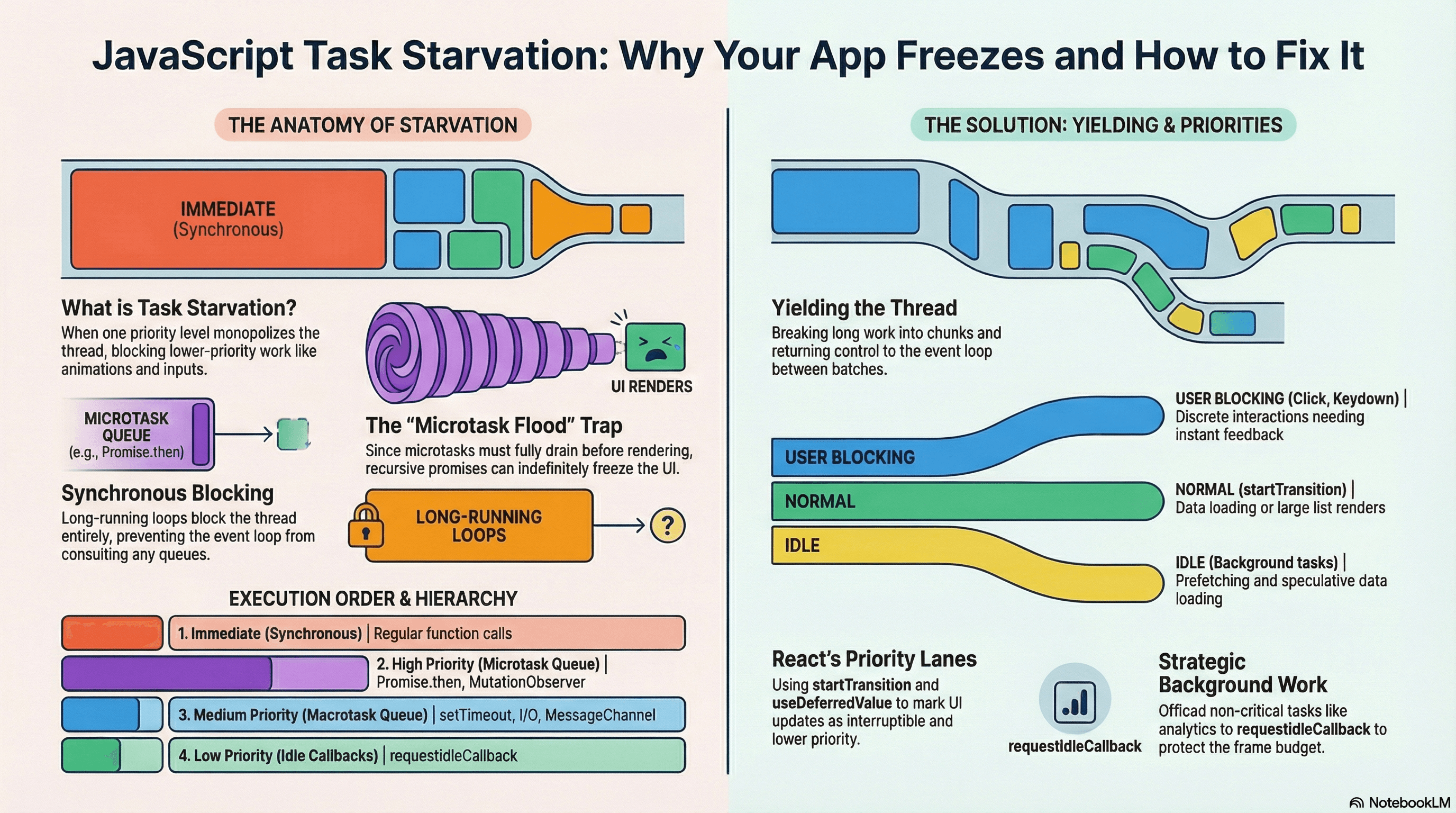
Overview
The event loop doesn't just run tasks — it runs them in a priority order. When your app is under load, that order determines whether users experience a fast, responsive UI or a frozen one.
Task starvation is what happens when work at one priority level monopolizes the thread, preventing lower-priority work from ever executing. The result shows up as dropped frames, unresponsive inputs, delayed network callbacks, and broken animations.
This article builds directly on the event loop fundamentals from the previous article. If the basic macrotask/microtask distinction is new to you, read that one first. Here we go deeper: how the browser's own scheduler works, how React's scheduler maps onto it, and how to write code that yields correctly so all priorities get their fair share of the thread.
How It Works
The Priority Stack
JavaScript's runtime maintains multiple queues, each with a different level of urgency:
| Queue | Examples | When It Runs |
|---|---|---|
| Synchronous | Any regular function call | Immediately, before anything async |
process.nextTick (Node.js) | process.nextTick(fn) | Before Promise microtasks |
| Microtask queue | Promise.then, queueMicrotask, MutationObserver | After each task, fully drained |
| Animation callbacks | requestAnimationFrame | Before paint, ~60fps |
| Macrotask queue | setTimeout, setInterval, I/O, MessageChannel | One per event loop iteration |
| Idle callbacks | requestIdleCallback | Only when browser has spare time |
The event loop cycle after every macrotask looks like this:
[Macrotask completes]
        ↓
[Drain ALL microtasks]
        ↓
[requestAnimationFrame callbacks, if a frame is due]
        ↓
[Browser renders if needed]
        ↓
[requestIdleCallback, if time remains]
        ↓
[Next macrotask]
Starvation happens when any level in this chain never finishes — preventing everything below it from running.
How Starvation Actually Happens
Two common patterns cause starvation:
Microtask flooding — a microtask that continuously queues another microtask. Since the microtask queue must fully drain before any macrotask (or render) runs, the render step and all timer callbacks wait forever.
Long synchronous work — a for loop processing 200,000 records blocks the thread entirely. No queue is even consulted while synchronous code runs. The UI freezes for the duration.
The key insight: yielding is the fix for both. You break long work into chunks and hand control back to the event loop between chunks, giving other priorities a chance to run.
The Browser Scheduler
Modern browsers have their own internal task scheduler that goes beyond the basic two-queue model. The Scheduling API (scheduler.postTask) exposes this with three named priorities:
"user-blocking"— must respond immediately (input handling, critical UI)"user-visible"— important but can wait a frame (rendering new content)"background"— analytics, logging, non-critical prefetching
This is still relatively new and not universally supported — but it reflects how browsers think about work internally.
React's Scheduler
React ships its own scheduler package (scheduler) that assigns internal priority lanes to updates:
| React Priority | Triggered By | Examples |
|---|---|---|
| Immediate | Synchronous forced updates | flushSync |
| User Blocking | Discrete user interaction | Click, keydown |
| Normal | Data loading, transitions | startTransition, useTransition |
| Low | Deferred work | useDeferredValue |
| Idle | Prefetching, speculative | Background data loading |
In React's concurrent model, lower-priority renders can be interrupted when higher-priority work arrives. A typing update (User Blocking) will pause an in-progress list re-render (Normal) and resume it afterward. But — crucially — this only works if the low-priority render yields back to the scheduler periodically. React handles this internally when you use startTransition or useDeferredValue.
startTransition marks work as interruptible, not non-blocking. React can
pause and restart it, but the underlying JavaScript still runs on the main
thread. For truly heavy CPU computation, you still need to chunk it manually
or move it to a Web Worker.
Code Examples
Example 1: Microtask Flooding Starves Macrotasks
// ❌ The setTimeout callback will never fire
function microtaskFlood(): void {
  // Each call queues itself as a new microtask — the queue never empties
  Promise.resolve().then(microtaskFlood);
}

setTimeout(() => {
  console.log("This never prints — macrotask is permanently starved");
}, 0);

microtaskFlood();
Example 2: Chunking Long Synchronous Work
Without chunking, filtering a large dataset blocks the thread for the full duration. With chunking, control returns to the event loop between batches.
// ❌ Synchronous — blocks the thread entirely until done
function filterProductsBlocking(products: Product[], query: string): Product[] {
  return products.filter((p) =>
    p.name.toLowerCase().includes(query.toLowerCase()),
  );
}

// ✅ Chunked — yields to the event loop between batches
async function filterProductsChunked(
  products: Product[],
  query: string,
  chunkSize = 500,
): Promise<Product[]> {
  const results: Product[] = [];

  for (let i = 0; i < products.length; i += chunkSize) {
    const chunk = products.slice(i, i + chunkSize);

    for (const product of chunk) {
      if (product.name.toLowerCase().includes(query.toLowerCase())) {
        results.push(product);
      }
    }

    // Yield to the macrotask queue — allows renders, input events, and
    // timers to run between chunks. setTimeout(resolve, 0) is the most
    // compatible way to do this.
    await new Promise<void>((resolve) => setTimeout(resolve, 0));
  }

  return results;
}
Example 3: React — startTransition for Interruptible Renders
// components/ProductSearch.tsx
"use client";

import { useState, useTransition } from "react";

interface Product {
  id: string;
  name: string;
  price: number;
}

interface Props {
  products: Product[];
}

export function ProductSearch({ products }: Props) {
  const [query, setQuery] = useState("");
  const [filtered, setFiltered] = useState<Product[]>(products);
  const [isPending, startTransition] = useTransition();

  function handleSearch(e: React.ChangeEvent<HTMLInputElement>) {
    const value = e.target.value;

    // Input update is immediate — User Blocking priority
    setQuery(value);

    // Filtering the list is marked as lower priority — Normal/Transition
    // React can interrupt this work if the user types again before it finishes
    startTransition(() => {
      const result = products.filter((p) =>
        p.name.toLowerCase().includes(value.toLowerCase()),
      );
      setFiltered(result);
    });
  }

  return (
    <div>
      <input
        value={query}
        onChange={handleSearch}
        placeholder="Search products..."
      />
      {/* Show a visual hint while the transition is pending */}
      {isPending && <span>Updating results...</span>}
      <ul style={{ opacity: isPending ? 0.6 : 1 }}>
        {filtered.map((p) => (
          <li key={p.id}>
            {p.name} — ${p.price}
          </li>
        ))}
      </ul>
    </div>
  );
}
Example 4: useDeferredValue for Derived Expensive Renders
useDeferredValue is the read-side complement to startTransition. Use it when you receive a value from outside and want to defer the expensive computation that depends on it.
// components/SearchResults.tsx
"use client";

import { useState, useDeferredValue, memo } from "react";

interface Product {
  id: string;
  name: string;
}

// Wrapping in memo ensures the deferred render only re-runs
// when deferredQuery actually changes — not on every render
const ProductList = memo(function ProductList({
  query,
  products,
}: {
  query: string;
  products: Product[];
}) {
  const filtered = products.filter((p) =>
    p.name.toLowerCase().includes(query.toLowerCase()),
  );

  return (
    <ul>
      {filtered.map((p) => (
        <li key={p.id}>{p.name}</li>
      ))}
    </ul>
  );
});

export function SearchResults({ products }: { products: Product[] }) {
  const [query, setQuery] = useState("");

  // deferredQuery lags behind query — the input stays snappy,
  // the list re-renders at lower priority
  const deferredQuery = useDeferredValue(query);
  const isStale = query !== deferredQuery;

  return (
    <div>
      <input
        value={query}
        onChange={(e) => setQuery(e.target.value)}
        placeholder="Search..."
      />
      <div style={{ opacity: isStale ? 0.6 : 1 }}>
        <ProductList query={deferredQuery} products={products} />
      </div>
    </div>
  );
}
Example 5: requestIdleCallback for Background Work
Use idle callbacks for work that genuinely doesn't need to happen on any schedule — analytics, prefetching, logging.
// utils/analytics.ts

interface AnalyticsEvent {
  name: string;
  properties: Record<string, unknown>;
}

// Buffer events in memory and flush during idle time
const eventBuffer: AnalyticsEvent[] = [];

export function trackEvent(name: string, properties: Record<string, unknown>) {
  eventBuffer.push({ name, properties });

  // Schedule a flush during idle time — won't compete with user interactions
  requestIdleCallback(
    (deadline) => {
      // deadline.timeRemaining() tells us how many ms the browser has available
      while (deadline.timeRemaining() > 1 && eventBuffer.length > 0) {
        const event = eventBuffer.shift()!;
        sendToAnalyticsService(event); // assume this is a fast sync call or batched
      }
    },
    { timeout: 2000 }, // force execution after 2s even if never idle
  );
}

function sendToAnalyticsService(event: AnalyticsEvent) {
  navigator.sendBeacon("/api/analytics", JSON.stringify(event));
}
Example 6: Node.js — Yielding Between Batches in a Background Script
// scripts/migrate-data.ts
import { readFile } from "node:fs/promises";

async function migrateInBatches(rows: string[]): Promise<void> {
  const BATCH_SIZE = 500;

  for (let i = 0; i < rows.length; i += BATCH_SIZE) {
    const batch = rows.slice(i, i + BATCH_SIZE);

    await processBatch(batch);

    // setImmediate yields to Node's event loop check phase.
    // This allows pending I/O callbacks (incoming HTTP requests, file reads)
    // to run between batches — keeps the server responsive during migration.
    await new Promise<void>((resolve) => setImmediate(resolve));

    console.log(`Migrated rows ${i}–${i + BATCH_SIZE - 1}`);
  }
}

async function processBatch(rows: string[]): Promise<void> {
  // Simulate async DB insert
  await new Promise((resolve) => setTimeout(resolve, 5));
}
In Node.js, prefer setImmediate over setTimeout(fn, 0) for yielding
between batches. setImmediate runs in the check phase of Node's event loop —
after I/O callbacks but without the minimum timer delay that setTimeout
adds.
Real-World Use Cases
E-commerce search with large client-side catalogs. A product search page filters 50,000 SKUs client-side. Without yielding, every keystroke triggers a synchronous filter that locks the UI for 200–400ms. Users see input lag and dropped frames. The fix: wrap the filter in startTransition so React schedules it at lower priority. The input updates instantly; the list catches up a frame or two later. Users perceive the UI as fast even though the same work is happening.
Background data migration in Node.js. A migration script processes millions of database rows. Run synchronously in a for loop, it starves the event loop and blocks all health check endpoints — causing load balancers to mark the server as unhealthy and pull it from rotation. Yielding with setImmediate between batches keeps the HTTP server responsive throughout the migration.
Analytics and logging. User interaction tracking shouldn't compete with the frame budget. Buffering events and flushing during requestIdleCallback ensures analytics work only runs when the browser would otherwise be idle — no impact on INP or FID scores.
Common Mistakes / Gotchas
1. Treating startTransition as a Web Worker substitute.
startTransition makes React's render interruptible — it doesn't move computation off the main thread. A 500ms JavaScript filter inside a transition still blocks for 500ms; React just has the option to restart it later. For genuinely heavy CPU work, use a Web Worker.
2. Forgetting memo with useDeferredValue.
Without memo, useDeferredValue still causes the deferred component to re-render on every parent render — nullifying the optimization. Always pair useDeferredValue with memo on the component that consumes the deferred value.
3. Using requestIdleCallback for time-sensitive work.
requestIdleCallback may not fire for seconds during heavy load, and on some mobile browsers it fires very infrequently. It's for genuinely deferrable background work. Don't use it for anything the user might be waiting on. Always set a timeout option as a safety net.
4. Confusing setTimeout(fn, 0) with setImmediate (Node.js).
setTimeout(fn, 0) has a minimum delay (~1ms browser, ~1ms Node.js) and runs in the timers phase. setImmediate runs in the check phase — after I/O callbacks and before timers on the next iteration. For yielding between I/O-heavy batches in Node.js, setImmediate is more predictable.
5. Recursive process.nextTick in Node.js.
process.nextTick has higher priority than Promise microtasks. A recursive nextTick chain starves not just macrotasks but also Promises. This is an easy way to freeze a Node.js server. If you need to yield in Node.js, prefer setImmediate.
Summary
Task starvation happens when work at one priority level never yields, blocking lower-priority work from running. The browser and Node.js maintain layered queues — from microtasks at the top to idle callbacks at the bottom — each with different scheduling guarantees. In React, concurrent features like startTransition and useDeferredValue let you express priority in terms of what users notice first, not just what runs first. The universal fix for starvation is yielding: breaking long work into chunks and returning control to the event loop between chunks via setTimeout, setImmediate, or requestIdleCallback. startTransition handles yielding inside React's renderer but does not move work off the main thread.
Interview Questions
Q1. What is task starvation and what causes it in JavaScript?
Task starvation is when lower-priority tasks never get CPU time because higher-priority work never stops queuing. In JavaScript, it most commonly happens in two ways: recursive microtask chains (where each microtask queues another microtask, preventing the macrotask queue and rendering from ever running), and long synchronous operations (where a blocking for loop or heavy computation holds the main thread for hundreds of milliseconds, preventing all other work).
Q2. What is the difference between startTransition and moving work to a Web Worker?
startTransition marks a React state update as lower priority, making the resulting render interruptible by higher-priority updates like user input. The JavaScript computation still runs on the main thread — it just runs at lower React priority. A Web Worker actually executes code on a separate OS thread, truly in parallel with the main thread. For heavy computation (image processing, large data parsing, complex filtering), a Web Worker is the correct tool. startTransition is for making React renders less disruptive, not for offloading computation.
Q3. When would you use requestIdleCallback and what's the risk of relying on it?
requestIdleCallback schedules work to run when the browser is idle — between frames when there's leftover time. It's appropriate for non-critical background tasks like analytics flushing, prefetching, or logging. The risk is that it may not fire for seconds during heavy user interaction or on resource-constrained devices, and on some mobile browsers it fires very infrequently. Always provide a timeout option so the work eventually runs even if the browser is never truly idle.
Q4. What does useDeferredValue do and why must it be paired with memo?
useDeferredValue returns a version of a value that lags behind its source during concurrent renders. React renders the current (non-deferred) value at high priority and the deferred value at lower priority — keeping the UI responsive while expensive derived renders catch up. Without memo, the component consuming the deferred value re-renders every time the parent renders regardless of whether the deferred value changed, which eliminates the performance benefit entirely. memo ensures the deferred component only re-renders when its deferred prop actually changes.
Q5. In a Node.js background script that processes millions of rows, why should you yield between batches and what's the right way to do it?
Without yielding, the script holds the event loop continuously, blocking all I/O callbacks — including incoming HTTP requests to health check endpoints. Load balancers interpret this as the server being unhealthy and may remove it from rotation. Yielding gives pending I/O callbacks a chance to run between batches. In Node.js, setImmediate is the correct choice — it runs in the check phase of the event loop, after I/O callbacks, without the minimum timer delay that setTimeout(fn, 0) adds.
Q6. How does React's concurrent scheduler know which update to prioritize?
React assigns internal priority lanes to updates based on how they were triggered. Discrete user interactions (clicks, keypresses) get User Blocking priority. Updates wrapped in startTransition get Transition priority. useDeferredValue operates at an even lower priority. When a higher-priority update arrives during a lower-priority render, React can pause the render mid-way, process the urgent update, and then resume the lower-priority work. This is what "concurrent rendering" means — not parallel execution, but interruptible rendering based on priority.
Event Loop
How the JavaScript engine executes code, how the call stack works, and how the event loop coordinates macrotasks and microtasks to handle async behavior on a single thread.
Promise Combinators
How Promise.all, Promise.allSettled, Promise.any, and Promise.race work, when to use each, and how errors propagate differently through every combinator.