Content Security Policy
Browser-enforced allowlists that restrict which scripts, styles, and resources can load — per-request nonces, hash-based CSP, strict-dynamic, frame-ancestors, base-uri, SRI for CDN scripts, Trusted Types integration, and a CSP migration workflow.
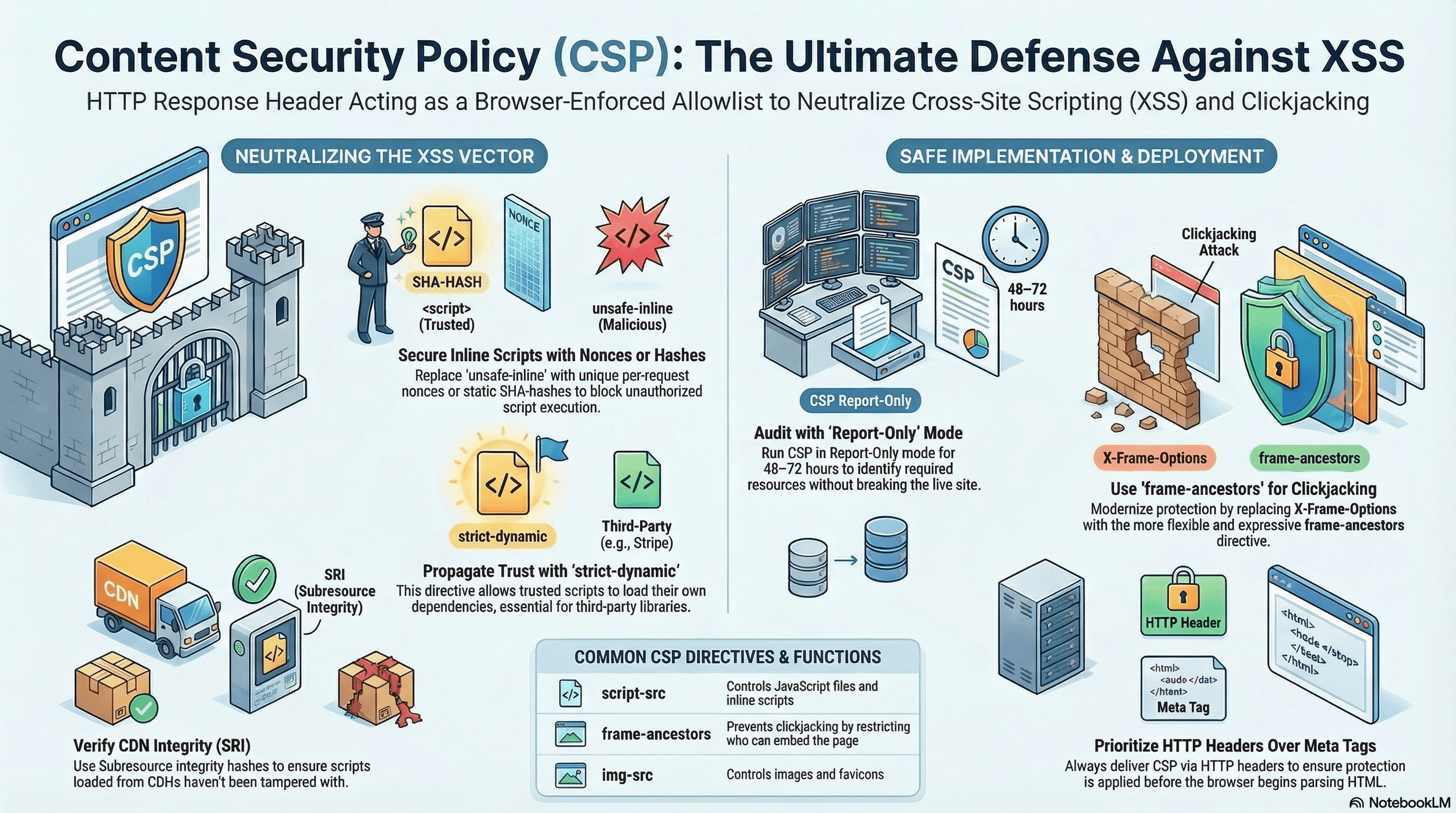
Overview
Content Security Policy (CSP) is an HTTP response header that tells the browser which resources it is allowed to load and execute on a given page. It's the most effective defence against XSS after it has bypassed input validation and output encoding — because even if a malicious script tag is injected into your HTML, the browser won't execute it if it doesn't come from an approved source.
CSP is delivered via the Content-Security-Policy header (or Content-Security-Policy-Report-Only for monitoring without enforcement). The <meta> tag alternative works for some directives but is less secure — it's parsed after the browser has already begun loading resources in the <head>.
How It Works
CSP is a collection of directives, each governing a resource type:
| Directive | Controls |
|---|---|
default-src | Fallback for all resource types not explicitly listed |
script-src | JavaScript files and inline scripts |
style-src | CSS files and inline styles |
img-src | Images |
font-src | Web fonts |
connect-src | fetch, XHR, WebSocket, EventSource |
frame-src | <iframe> content |
frame-ancestors | Who can embed this page in an iframe (clickjacking) |
base-uri | Restricts <base> href (base tag injection attack) |
form-action | Where <form> can submit |
object-src | Plugins (<object>, <embed>) |
upgrade-insecure-requests | Upgrades HTTP subresource requests to HTTPS |
Inline Script Problem
Inline scripts (<script>alert(1)</script>) are the primary XSS vector. CSP blocks them by default. Two safe ways to allow specific inline scripts:
Nonces — a random token generated per request, included in both the header and the script tag. An injected script without the nonce is blocked.
Hashes — a SHA-256/384/512 hash of the script content, included in the header. Only that exact script body is allowed; any modification changes the hash and blocks it.
Code Examples
Nonce-Based CSP in Next.js (Recommended)
// middleware.ts
import { NextRequest, NextResponse } from "next/server";

export function middleware(req: NextRequest) {
  // Fresh nonce per request — predictable nonces are useless
  const nonce = Buffer.from(crypto.randomUUID()).toString("base64");

  const csp = [
    "default-src 'self'",
    `script-src 'self' 'nonce-${nonce}' 'strict-dynamic'`,
    // strict-dynamic: trust scripts loaded BY a nonced script (e.g. Stripe.js dynamically inserts scripts)
    // Without strict-dynamic, those dynamically inserted scripts are blocked
    `style-src 'self' 'nonce-${nonce}'`,
    "img-src 'self' blob: data: https:",
    "font-src 'self'",
    "connect-src 'self' https://api.example.com wss://realtime.example.com",
    "frame-src https://js.stripe.com", // allow Stripe payment iframe
    "frame-ancestors 'none'", // prevent this page from being embedded anywhere
    "base-uri 'self'", // block <base href="https://attacker.com">
    "form-action 'self'", // forms can only submit to same origin
    "object-src 'none'", // block Flash/plugins entirely
    "upgrade-insecure-requests", // auto-upgrade http:// subresources to https://
    `report-uri /api/csp-report`, // send violations here
  ].join("; ");

  const requestHeaders = new Headers(req.headers);
  requestHeaders.set("x-nonce", nonce); // pass nonce to Server Components
  requestHeaders.set("content-security-policy", csp);

  const response = NextResponse.next({ request: { headers: requestHeaders } });
  response.headers.set("content-security-policy", csp);

  return response;
}

export const config = {
  matcher: ["/((?!_next/static|_next/image|favicon.ico|api/csp-report).*)"],
};
// app/layout.tsx — read nonce and apply to trusted inline scripts
import { headers } from "next/headers";
export default async function RootLayout({
children,
}: {
children: React.ReactNode;
}) {
const nonce = (await headers()).get("x-nonce") ?? "";
return (
<html lang="en">
<head>
{/* Inline script with matching nonce — executed; injected scripts without nonce — blocked */}
<script
nonce={nonce}
dangerouslySetInnerHTML={{
__html: `window.__APP_CONFIG__ = ${JSON.stringify({
apiUrl: process.env.NEXT_PUBLIC_API_URL,
env: process.env.NEXT_PUBLIC_ENV,
})};`,
}}
/>
</head>
<body>{children}</body>
</html>
);
}Hash-Based CSP (Static Inline Scripts)
When an inline script never changes, use a hash instead of a nonce — no per-request generation needed:
# Generate SHA-256 hash of your inline script content
echo -n "window.__APP_ENV__ = 'production';" | openssl dgst -sha256 -binary | openssl base64
# Output: jU3jSE/2mIPGYkzCMVDpRpQHJLNkk8A9PX1s7GVvgMk=
// next.config.ts — static CSP with hash (no nonce needed)
const nextConfig = {
async headers() {
return [
{
source: "/(.*)",
headers: [
{
key: "Content-Security-Policy",
// The hash must match the script content exactly — any change breaks it
value:
"script-src 'self' 'sha256-jU3jSE/2mIPGYkzCMVDpRpQHJLNkk8A9PX1s7GVvgMk=' 'strict-dynamic'; object-src 'none';",
},
],
},
];
},
};Use hashes for truly static scripts (analytics init, feature flags injected at build time). Use nonces for scripts that change per request or contain dynamic values.
Subresource Integrity (SRI) for CDN Scripts
When loading scripts from a CDN, integrity= ensures the browser verifies the file hasn't been tampered with:
// app/layout.tsx — SRI for a CDN-hosted script
export default function RootLayout({
  children,
}: {
  children: React.ReactNode;
}) {
  return (
    <html>
      <head>
        {/* integrity: SHA-384 hash of the file content — browser rejects any mismatch */}
        {/* crossOrigin: required for SRI to work on cross-origin resources */}
        <script
          src="https://cdnjs.cloudflare.com/ajax/libs/lodash.js/4.17.21/lodash.min.js"
          integrity="sha512-WFN04846sdKMIP5LKNphMaWzU7YpMyCU245etK3g/2ARYbPK9Ub18eG+ljU96qKRCWh+quCY7yefSmlkQw1ANQ=="
          crossOrigin="anonymous"
          referrerPolicy="no-referrer"
        />
      </head>
      <body>{children}</body>
    </html>
  );
}
Generate SRI hashes:
# Generate for a local file
cat lodash.min.js | openssl dgst -sha384 -binary | openssl base64 -A

# Or use the SRI Hash Generator online: https://www.srihash.org/
# Or via curl:
curl -s https://cdnjs.cloudflare.com/ajax/libs/lodash.js/4.17.21/lodash.min.js \
  | openssl dgst -sha384 -binary | openssl base64 -A
When SRI is active and your script-src doesn't include unsafe-inline, a compromised CDN serving a modified file is blocked — the hash mismatch prevents execution.
Trusted Types Integration with CSP
CSP can enforce Trusted Types alongside other restrictions:
// middleware.ts — combine nonce-based script CSP with Trusted Types
const csp = [
  `script-src 'self' 'nonce-${nonce}' 'strict-dynamic'`,
  // Enforce Trusted Types — all string-to-DOM assignments must go through a policy
  "require-trusted-types-for 'script'",
  // Allow only these named policies to be created
  "trusted-types sanitize-html nextjs",
].join("; ");
frame-ancestors vs X-Frame-Options
frame-ancestors in CSP is the modern replacement for X-Frame-Options. It's more expressive and supports multiple allowed origins:
// Allow embedding only from your own domain and a specific partner
"frame-ancestors 'self' https://partner.example.com";

// Block embedding everywhere (clickjacking prevention)
"frame-ancestors 'none'";

// Equivalent X-Frame-Options (less flexible — one value only)
response.headers.set("X-Frame-Options", "DENY");
Use frame-ancestors in CSP. Keep X-Frame-Options: DENY as a fallback for very old browsers (IE 11 and below) that don't support CSP frame-ancestors.
CSP Violation Reporting Endpoint
// app/api/csp-report/route.ts
import { NextRequest, NextResponse } from "next/server";

export async function POST(req: NextRequest) {
  try {
    const body = await req.json();
    const report = body["csp-report"] ?? body; // format differs by browser

    // Log to your observability platform
    console.warn("[CSP Violation]", {
      blockedUri: report["blocked-uri"],
      violatedDirective: report["violated-directive"],
      documentUri: report["document-uri"],
      lineNumber: report["line-number"],
      sourceFile: report["source-file"],
    });

    // In production: send to Sentry, Datadog, or a custom endpoint
  } catch {
    // Malformed report body — ignore
  }

  return new NextResponse(null, { status: 204 });
}
The browser sends a POST with Content-Type: application/csp-report on every violation.
CSP Migration Workflow
Don't enforce CSP on a live codebase without auditing first — you'll break things:
Step 1: Report-Only mode
Content-Security-Policy-Report-Only: <policy>; report-uri /api/csp-report

→ Violations are logged but not blocked.
→ Monitor for 48–72 hours across all user flows.

Step 2: Triage violations
→ Legitimate inline scripts → add nonces
→ Third-party domains → add to allowlist
→ `unsafe-inline` in old code → refactor to external files or nonces
→ Unexpected sources → investigate (could be malicious)

Step 3: Switch to enforcement
Content-Security-Policy: <tuned-policy>; report-uri /api/csp-report

→ Keep report-uri active — enforcement violations still need monitoring.
Real-World Use Case
E-commerce storefront with Stripe. Stripe.js loads from https://js.stripe.com and dynamically inserts an iframe for payment input. CSP must: allow js.stripe.com in script-src, allow https://js.stripe.com in frame-src for the payment iframe, block all other iframes (frame-ancestors 'none'), use strict-dynamic so Stripe's dynamically inserted scripts are trusted, and use nonces for the application's own inline scripts. SRI on any CDN-loaded scripts (fonts, analytics) ensures a compromised CDN doesn't deliver malicious payloads.
Common Mistakes / Gotchas
1. unsafe-inline in script-src. Completely disables XSS protection for scripts — attackers can inject arbitrary inline scripts. The fix is always nonces or hashes, not the shortcut.
2. Static nonces. A nonce that doesn't change per request is functionally equivalent to no nonce. An attacker who inspects the HTML once can reuse the nonce in injected scripts. Generate with crypto.randomUUID() in middleware on every request.
3. Missing strict-dynamic. Without it, scripts dynamically inserted by a nonced script (e.g. Stripe, Google Analytics) are blocked. strict-dynamic propagates trust from a nonced script to any script it loads.
4. frame-ancestors not replacing X-Frame-Options. X-Frame-Options only supports DENY, SAMEORIGIN, or a single ALLOW-FROM origin. frame-ancestors supports multiple origins and wildcards. Set both for legacy browser coverage, but rely on frame-ancestors for correctness.
5. Setting CSP via <meta> tag. The meta tag is parsed after the HTML parser has already begun loading resources — scripts in <head> before the meta tag may execute before the policy is applied. Always use the HTTP header.
Summary
CSP enforces resource loading allowlists at the browser level, blocking XSS execution even when injection occurs. In Next.js App Router, generate a cryptographically random nonce per request in middleware, pass it to Server Components via a custom header, and apply it to trusted inline scripts. Always include strict-dynamic alongside nonces so dynamically inserted scripts are trusted. Use frame-ancestors 'none' to prevent clickjacking, base-uri 'self' to block base-tag injection, and object-src 'none' to eliminate the plugin attack surface. Add SRI integrity= hashes to CDN-loaded scripts. Use Report-Only mode for at least 48 hours before switching to enforcement, and keep a report-uri endpoint active in production to monitor violations continuously.
Interview Questions
Q1. What is strict-dynamic in CSP and when is it required?
strict-dynamic modifies how trust propagates in script-src. Normally, CSP evaluates every script tag against the allowlist — each script needs either a matching nonce, a matching hash, or a matching origin. strict-dynamic relaxes this: any script that is loaded by a script already trusted (via nonce or hash) is automatically trusted, regardless of its origin or whether it's inline. This is essential for third-party scripts like Stripe.js or Google Analytics that dynamically insert additional <script> tags at runtime. Without strict-dynamic, those dynamically inserted scripts are blocked even though the parent script was nonced. strict-dynamic also makes explicit origin allowlists in script-src redundant — hashes and nonces become the sole trust mechanism, which is more precise.
Q2. What is the difference between nonce-based and hash-based CSP, and when should you use each?
Both allow specific inline scripts without unsafe-inline. A nonce is a random per-request value included in both the CSP header and the script's nonce= attribute. It works for dynamic content because the script body can change as long as the nonce matches. A hash is a SHA-256/384/512 digest of the exact script body, included in the CSP header. The browser computes the hash of the inline script and matches it. Hashes work only when the script content is completely static — any change in whitespace, quotes, or values breaks the hash. Use nonces for scripts that include dynamic values (environment config, per-user data) rendered server-side. Use hashes for truly static scripts (analytics init snippets, feature detection) that never change.
Q3. What is Subresource Integrity (SRI) and how does it protect against CDN compromise?
SRI allows the browser to verify the cryptographic integrity of a fetched resource before executing it. You generate a SHA-256/384/512 hash of the resource content and include it in the integrity= attribute on the <script> or <link> tag. When the browser fetches the resource, it computes the hash of the received bytes and compares it to the declared hash. If they don't match, the browser refuses to execute the resource. This protects against CDN compromise scenarios — if a CDN is breached and a malicious version of a library is served, the hash mismatch prevents it from running in your users' browsers. SRI requires crossOrigin="anonymous" for cross-origin resources.
Q4. Why is frame-ancestors preferred over X-Frame-Options for clickjacking protection?
X-Frame-Options supports only three values: DENY, SAMEORIGIN, and the deprecated ALLOW-FROM uri (which only allows one origin). Browsers have inconsistent support for ALLOW-FROM, and multiple origins cannot be specified. frame-ancestors in CSP is more expressive: it accepts 'none', 'self', multiple specific origins, and scheme-based wildcards (https:). It also participates in the CSP violation reporting mechanism, so blocked framing attempts can be logged. Modern browsers prefer frame-ancestors over X-Frame-Options when both are present. The recommended practice is to set both — frame-ancestors 'none' in CSP for compliant browsers and X-Frame-Options: DENY as a fallback for older browsers.
Q5. What is the base-uri directive and what attack does it prevent?
<base href="https://attacker.com"> sets the base URL for all relative URLs in the document. If an attacker can inject this element (through HTML injection that doesn't execute script), all subsequent relative <script src="...">, <a href="...">, and form submissions resolve against the attacker's domain. The base-uri directive restricts where <base> elements can point. base-uri 'self' allows only same-origin base URLs; base-uri 'none' blocks all <base> elements. Because base tag injection can redirect resources and form submissions without triggering script-src, it's a CSP bypass vector that base-uri specifically addresses.
Q6. What is the recommended workflow for rolling out CSP on a production application that doesn't have it yet?
Start with Report-Only mode: send Content-Security-Policy-Report-Only with a restrictive policy and a report-uri endpoint. This logs all violations without blocking anything — you can see every resource your application loads and every inline script it uses without breaking production. Monitor violations for 48–72 hours covering all user flows (authenticated, checkout, admin). Triage: add nonces to legitimate inline scripts, add third-party domains to the appropriate src directives, refactor eval() usage, audit external scripts. Tune the policy until violations drop to only unexpected sources. Switch to enforcement mode with Content-Security-Policy (keeping report-uri active). Continue monitoring — new violations after deployment indicate either a CSP misconfiguration or a genuine injection attempt.
CSRF vs XSS Mitigation
How CSRF and XSS attacks work mechanically — stored, reflected, and DOM-based XSS variants, mutation XSS, React's default encoding, CSRF defenses with SameSite cookies and double-submit tokens, and a layered mitigation strategy.
Trusted Types
The browser API that prevents DOM-based XSS by requiring all strings assigned to dangerous sinks to pass through a named policy — createHTML, createScript, createScriptURL, the nextjs policy name, @types/trusted-types, and a Report-Only migration workflow.