Trusted Types
The browser API that prevents DOM-based XSS by requiring all strings assigned to dangerous sinks to pass through a named policy — createHTML, createScript, createScriptURL, the nextjs policy name, @types/trusted-types, and a Report-Only migration workflow.
Overview
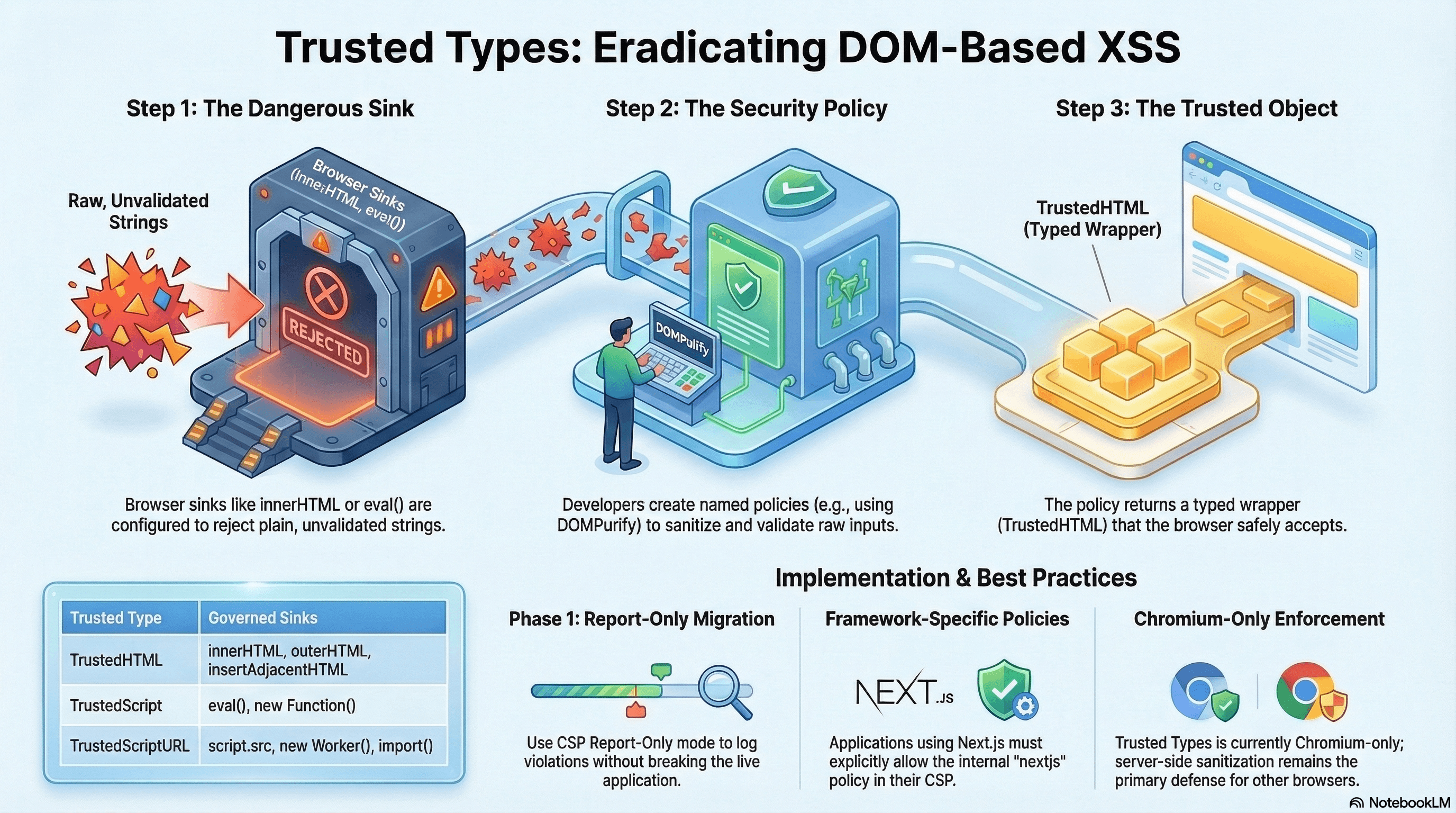
Trusted Types is a browser security API that prevents the most common class of DOM-based XSS: raw string injection into dangerous sinks like innerHTML, eval, new Function, script.src, and document.write.
Without Trusted Types, any JavaScript string can be written into these sinks directly. A single unsanitized variable flowing to innerHTML becomes a stored XSS vector. Trusted Types makes this category of bug impossible at the browser level: sinks now require typed wrappers (TrustedHTML, TrustedScript, TrustedScriptURL) that can only be created by named, developer-defined policies.
It's enforced via a CSP directive, supported in all Chromium-based browsers (Chrome, Edge, Opera), and is a defence-in-depth layer on top of sanitization and CSP.
How It Works
The browser maintains a policy registry. A policy is an object with optional methods:
createHTML(input: string) → string— wraps sanitized HTML forinnerHTML/outerHTMLcreateScript(input: string) → string— wraps script content foreval/new FunctioncreateScriptURL(input: string) → string— wraps a URL forscript.src/import()
When a script attempts to assign a plain string to a dangerous sink with enforcement active, the browser throws a TypeError. When it assigns a TrustedHTML / TrustedScript / TrustedScriptURL object, the assignment proceeds.
Enforcement is activated by the CSP directive:
Content-Security-Policy: require-trusted-types-for 'script'You can also restrict which policy names are valid:
Content-Security-Policy: require-trusted-types-for 'script'; trusted-types sanitize-html nextjsOnly policies named sanitize-html and nextjs can be created; any other name throws.
Code Examples
Install TypeScript Support
npm install --save-dev @types/trusted-typesThis adds TrustedHTML, TrustedScript, TrustedScriptURL, and TrustedTypePolicyFactory types to TypeScript.
createHTML — Sanitized HTML for innerHTML
// lib/trusted-types.ts
import DOMPurify from "dompurify";

// Create the policy once at module init — not per-render
const htmlPolicy = trustedTypes.createPolicy("sanitize-html", {
  createHTML(input: string): string {
    // DOMPurify strips malicious tags, attributes, and event handlers
    return DOMPurify.sanitize(input, {
      ALLOWED_TAGS: ["p", "b", "i", "em", "strong", "a", "ul", "li", "br"],
      ALLOWED_ATTR: ["href", "rel"],
      FORCE_HTTPS: true, // reject javascript: and data: hrefs
    });
  },
});

export function safeInnerHTML(element: Element, html: string): void {
  // TypeScript: TrustedHTML is the return type — assignment accepted
  element.innerHTML = htmlPolicy.createHTML(html) as unknown as string;
  // The `as unknown as string` cast is a TypeScript workaround — the DOM API type
  // declarations haven't fully integrated Trusted Types yet in all versions
}
// components/RichContent.tsx
"use client";
import { useEffect, useRef } from "react";
import { safeInnerHTML } from "@/lib/trusted-types";
export function RichContent({ html }: { html: string }) {
const ref = useRef<HTMLDivElement>(null);
useEffect(() => {
if (ref.current) {
// ✅ Goes through DOMPurify policy — plain string assignment would throw
safeInnerHTML(ref.current, html);
}
}, [html]);
return <div ref={ref} />;
}createScript — Trusted Script Content
The createScript sink governs eval(), new Function(), and similar execution contexts:
// lib/trusted-types.ts
const scriptPolicy = trustedTypes.createPolicy("safe-eval", {
  createScript(input: string): string {
    // Validate the script is from a known safe source before allowing eval
    // In practice, you should almost never use eval — this is for legacy migration
    if (!input.startsWith("/* SAFE-EVALUATED */")) {
      throw new TypeError(`createScript: untrusted script content`);
    }
    return input;
  },
});

// Usage — instead of eval(expression):
function safeEval(code: string): unknown {
  // This will throw if Trusted Types is enforced and the code doesn't pass the policy
  return eval(
    scriptPolicy.createScript(
      `/* SAFE-EVALUATED */ ${code}`,
    ) as unknown as string,
  );
}
eval() and new Function() are dangerous by nature and should be avoided
entirely in new code. The createScript policy exists primarily to help
migrate legacy code that uses them. If your codebase uses eval, the correct
goal is to eliminate it — not just gate it behind a policy.
createScriptURL — Trusted Script URLs
Governs script.src, new Worker(url), import(url), and ServiceWorkerRegistration.register(url):
// lib/trusted-types.ts
const ALLOWED_SCRIPT_ORIGINS = new Set([
  "https://js.stripe.com",
  "https://cdn.example.com",
  location.origin,
]);

const urlPolicy = trustedTypes.createPolicy("safe-script-url", {
  createScriptURL(url: string): string {
    const parsed = new URL(url, location.origin);

    if (!ALLOWED_SCRIPT_ORIGINS.has(parsed.origin)) {
      throw new TypeError(
        `createScriptURL: blocked URL from untrusted origin: ${parsed.origin}`,
      );
    }

    return url;
  },
});

// Usage — dynamically loading a script
export function loadScript(src: string): Promise<void> {
  return new Promise((resolve, reject) => {
    const script = document.createElement("script");
    // ✅ Validated against allowlist — plain string assignment would throw
    script.src = urlPolicy.createScriptURL(src) as unknown as string;
    script.onload = () => resolve();
    script.onerror = () => reject(new Error(`Failed to load: ${src}`));
    document.head.appendChild(script);
  });
}
Checking for Trusted Types Support
Trusted Types is Chromium-only. Always guard before calling:
// lib/trusted-types.ts

// Type guard — checks both existence and that it's the full factory, not a stub
export function isTrustedTypesSupported(): boolean {
  return (
    typeof window !== "undefined" &&
    "trustedTypes" in window &&
    typeof window.trustedTypes?.createPolicy === "function"
  );
}

// Helper: create policy if supported, otherwise return a pass-through
export function createSafePolicy(
  name: string,
  options: TrustedTypePolicyOptions,
): TrustedTypePolicy | null {
  if (!isTrustedTypesSupported()) return null;
  return trustedTypes.createPolicy(name, options);
}

// Typed utility for innerHTML assignment with fallback
export function assignHTML(
  element: Element,
  html: string,
  policy: TrustedTypePolicy | null,
): void {
  if (policy) {
    element.innerHTML = (policy as any).createHTML(html);
  } else {
    // Fallback for non-Chromium: still sanitize, just without the policy wrapper
    element.innerHTML = DOMPurify.sanitize(html);
  }
}
Next.js Framework Policy Name
Next.js injects inline scripts for hydration, routing, and image optimization. When Trusted Types enforcement is active, these scripts must be produced through a policy. Next.js internally uses a policy named "nextjs". Include it in your CSP:
// middleware.ts
const csp = [
  `script-src 'self' 'nonce-${nonce}' 'strict-dynamic'`,
  "require-trusted-types-for 'script'",
  // Allow both your app's policy and Next.js's internal policy
  "trusted-types sanitize-html safe-script-url nextjs",
].join("; ");
If you see TrustedTypes violation reports in the console mentioning
"nextjs" as the blocked policy name, it means Next.js's framework code is
trying to create a policy that isn't on your allowlist. Add nextjs to the
trusted-types CSP directive value.
Report-Only Migration Workflow
Never enable Trusted Types enforcement on a codebase that hasn't been audited:
// Phase 1: Report-Only — log violations, block nothing
// middleware.ts
const csp = [
  // Report-Only: violations logged but NOT blocked
  "Content-Security-Policy-Report-Only",
  "require-trusted-types-for 'script'",
  "trusted-types sanitize-html nextjs",
  "report-uri /api/csp-report",
].join("; ");

// In the response:
response.headers.set(
  "Content-Security-Policy-Report-Only",
  "require-trusted-types-for 'script'; trusted-types sanitize-html nextjs; report-uri /api/csp-report",
);
// Phase 2: Review violations from /api/csp-report
// Each violation shows:
// - source-file: which JS file triggered it
// - line-number: the exact line
// - violated-directive: which sink was used
// Common violations to fix:
// 1. element.innerHTML = string → wrap with createHTML policy
// 2. eval(code) → refactor to avoid eval
// 3. script.src = url → wrap with createScriptURL policy
// 4. document.write(html) → refactor entirely (never use document.write)// Phase 3: Fix all violations, then switch to enforcement
response.headers.set(
"Content-Security-Policy",
"require-trusted-types-for 'script'; trusted-types sanitize-html nextjs; report-uri /api/csp-report",
);Real-World Use Case
SaaS rich-text editor. Users write formatted content stored as HTML. The frontend fetches this HTML and renders it with innerHTML in a preview pane. Without Trusted Types, a stored XSS payload in the database executes the moment any user views the content.
With Trusted Types: (1) require-trusted-types-for 'script' is enforced. (2) All innerHTML assignments must go through the sanitize-html policy backed by DOMPurify. (3) A developer who writes element.innerHTML = apiResponse directly gets an immediate TypeError in both development and production — not a silent XSS. (4) The policy centralises the sanitization logic: change DOMPurify's allowed tags in one place and it applies everywhere. (5) Report-Only mode surfaced three legacy innerHTML assignments in old utility files that weren't caught in code review.
Common Mistakes / Gotchas
1. Enabling enforcement before auditing. require-trusted-types-for 'script' will immediately break any existing code that uses innerHTML, eval, script.src, or document.write with plain strings. Use Report-Only for at least a week before enforcing.
2. Creating a default policy that passes strings through. A default policy is a global fallback — any string-to-sink assignment without a policy creates an implicit trusted value via default. This nullifies the protection. The default policy exists only as an emergency migration escape hatch, not a permanent solution.
3. Thinking Trusted Types is cross-browser. As of 2025, Trusted Types enforcement is only in Chromium-based browsers. Firefox and Safari silently ignore the CSP directives. Server-side sanitization and output encoding remain essential for full coverage.
4. Not adding nextjs to the policy allowlist. Next.js creates an internal "nextjs" policy for its own script injections. Without it in trusted-types <policylist>, Next.js hydration and routing scripts throw errors.
5. Forgetting that Workers also need createScriptURL. new Worker('/worker.js') requires createScriptURL when Trusted Types is enforced. If you use web workers, service workers, or SharedWorker, wrap their URLs through a createScriptURL policy.
Summary
Trusted Types prevents DOM-based XSS at the browser level by requiring all assignments to dangerous sinks to pass through a named, validated policy. createHTML wraps DOMPurify-sanitized content for innerHTML; createScript gates eval() and new Function(); createScriptURL validates dynamic script loading and worker registration. Enforcement is Chromium-only — always keep server-side sanitization as the primary defence. Use Report-Only mode to surface all sink violations before enforcing. Include nextjs in your trusted-types CSP directive for Next.js framework compatibility. Install @types/trusted-types for TypeScript support. Trusted Types is a defence-in-depth layer that turns XSS injection into an immediate visible error instead of a silent data exfiltration.
Interview Questions
Q1. What is a Trusted Types policy and what are the three types of trusted values it can produce?
A Trusted Types policy is an object created via trustedTypes.createPolicy(name, options). It has up to three methods: createHTML(input) produces a TrustedHTML object for assignment to sinks like innerHTML, outerHTML, and insertAdjacentHTML; createScript(input) produces a TrustedScript for eval() and new Function(); createScriptURL(input) produces a TrustedScriptURL for script.src, new Worker(), import(), and ServiceWorkerRegistration.register(). The policy function receives the raw string and must return a string (optionally modified/validated). If the policy throws, the assignment is blocked. The browser only accepts these typed wrappers at enforced sinks — a plain string throws a TypeError.
Q2. What is the default Trusted Types policy and why should you avoid it in production?
When Trusted Types is enforced, any string assignment to a dangerous sink that doesn't use a named policy throws. The default policy is a special fallback: if trustedTypes.createPolicy("default", ...) exists, any string-to-sink assignment that would otherwise throw instead goes through the default policy's handler. This prevents breakage on legacy code during migration. The danger: a default policy that returns its input unchanged — createHTML: (s) => s — effectively re-enables the raw string assignment for all sinks in the entire application. It nullifies Trusted Types protection while making enforcement appear to be on. Use default only as a temporary migration tool with logging to identify violations, then eliminate it.
Q3. Why is Trusted Types described as a defence-in-depth layer rather than a standalone XSS defence?
Trusted Types enforcement is only supported in Chromium-based browsers (Chrome, Edge). Firefox and Safari silently ignore require-trusted-types-for. This means all users of non-Chromium browsers receive no Trusted Types protection. Additionally, Trusted Types only catches DOM sink assignments that occur in JavaScript — it doesn't protect against server-side reflected or stored XSS where the script content is injected directly into the HTML response. Server-side sanitization (sanitize-html, DOMPurify on the server), output encoding, and CSP script-src allowlists remain essential for full protection. Trusted Types is highly effective as an additional layer on top of these: in Chromium browsers it makes injection immediately visible as a runtime error rather than silent data exfiltration.
Q4. What is the nextjs policy name and why does Next.js need it?
Next.js generates inline scripts for hydration state, client-side routing, image optimization, and other framework internals. When Trusted Types enforcement is active and trusted-types <policylist> restricts which policy names can be created, Next.js must create a policy named "nextjs" to produce the TrustedHTML/TrustedScript values for its own injections. If "nextjs" is not in the CSP trusted-types value, Next.js's trustedTypes.createPolicy("nextjs", ...) call throws, breaking hydration and routing. You must include nextjs in trusted-types: trusted-types sanitize-html nextjs. The same applies to other frameworks — Angular uses "angular", React currently doesn't require a specific named policy but may in future versions.
Q5. How do you handle new Worker(url) and new SharedWorker(url) when Trusted Types is enforced?
Worker constructors take a URL string for the worker script. When require-trusted-types-for 'script' is active, passing a plain string to new Worker() throws — it requires a TrustedScriptURL. You must wrap the URL through a createScriptURL policy that validates the origin: ts const workerPolicy = trustedTypes.createPolicy("safe-worker", { createScriptURL: (url) => { const origin = new URL(url, location.origin).origin; if (origin !== location.origin) throw new Error("Blocked"); return url; }}); new Worker(workerPolicy.createScriptURL("/workers/compute.js") as unknown as string). The same applies to new SharedWorker() and navigator.serviceWorker.register(). Always validate that worker URLs are same-origin unless you explicitly need cross-origin workers.
Q6. How does the Report-Only workflow for Trusted Types differ from the enforcement workflow?
In Report-Only mode, Content-Security-Policy-Report-Only: require-trusted-types-for 'script' logs all violations to the report-uri endpoint but does not block any assignments. The application continues to function normally. Each violation report contains the source file and line number where the unsafe sink assignment occurred, the violated directive (require-trusted-types-for), and the document URI. This lets you audit all existing innerHTML, eval, script.src usages across your codebase without breaking production. Once you've wrapped each legitimate sink in an appropriate policy and eliminated illegitimate ones, switch to enforcement mode with Content-Security-Policy. Keep report-uri active in enforcement mode — new violations in production may indicate either a missed sink during migration or a genuine injection attempt.
Content Security Policy
Browser-enforced allowlists that restrict which scripts, styles, and resources can load — per-request nonces, hash-based CSP, strict-dynamic, frame-ancestors, base-uri, SRI for CDN scripts, Trusted Types integration, and a CSP migration workflow.
Secrets Management
Keeping API keys, tokens, and credentials out of source control and client bundles — server-only boundaries, t3-env startup validation, gitleaks pre-commit scanning, detecting bundle leaks, Doppler/HashiCorp Vault integration, and secret rotation strategies.