Secrets Management
Keeping API keys, tokens, and credentials out of source control and client bundles — server-only boundaries, t3-env startup validation, gitleaks pre-commit scanning, detecting bundle leaks, Doppler/HashiCorp Vault integration, and secret rotation strategies.
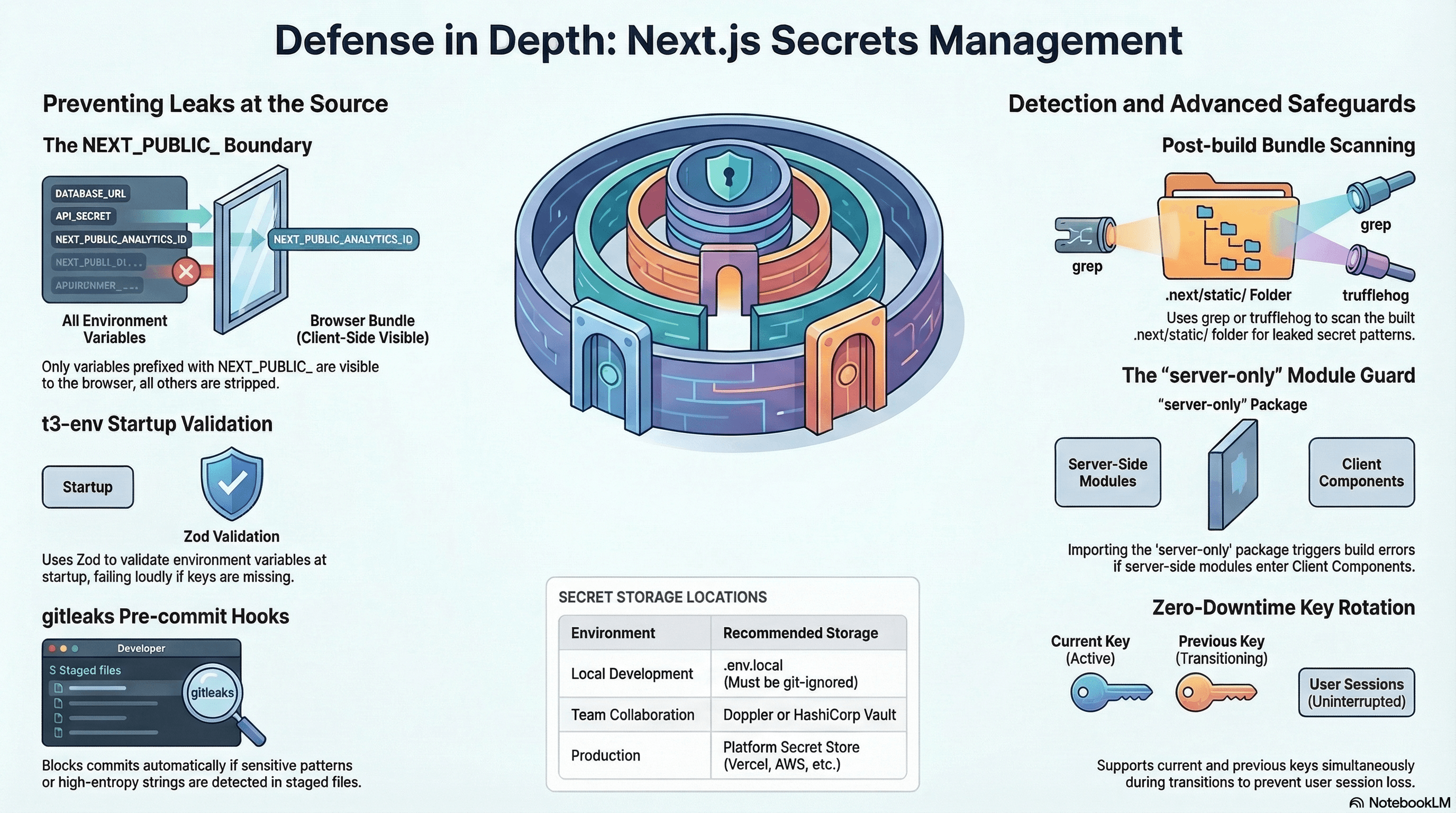
Overview
A "secret" is any value that must not be exposed to end users or version control: API keys, database connection strings, JWT signing keys, OAuth client secrets, and service credentials. In a Next.js application, the build process bundles JavaScript that ships to browsers. A secret that ends up in that bundle is readable by anyone with DevTools open.
Secrets management ensures sensitive values are stored outside source control, loaded only in server-side contexts, never serialized into the client bundle, and rotated on a defined schedule.
How It Works
The NEXT_PUBLIC_ Rule
Next.js distinguishes two categories of environment variables at build time:
Server-only: No NEXT_PUBLIC_ prefix. Available in Server Components, Route Handlers, Server Actions, and middleware. Stripped from the client bundle.
Client-exposed: NEXT_PUBLIC_ prefix. Inlined into the client JavaScript bundle. Visible to all users.
The rule: if it's a secret, it must have no NEXT_PUBLIC_ prefix and must never be used in a Client Component or imported code path.
At runtime, Next.js reads from:
.env.local(local dev — git-ignored).env.development/.env.production(committed defaults, no secrets)- The deployment platform's secret store (Vercel, Railway, Fly.io)
- External secrets managers (Doppler, HashiCorp Vault, AWS Secrets Manager)
Code Examples
Correct Server-Only Secret Access
// app/dashboard/page.tsx — Server Component, never shipped to browser
import "server-only"; // hard build error if imported by a Client Component

export default async function DashboardPage() {
  const userData = await fetch("https://api.internal.example.com/users/me", {
    headers: {
      // INTERNAL_API_KEY has no NEXT_PUBLIC_ prefix — stays server-side
      Authorization: `Bearer ${process.env.INTERNAL_API_KEY}`,
    },
    cache: "no-store",
  }).then((r) => r.json());

  return <h1>Hello, {userData.name}</h1>;
}
// lib/db.ts — database module with server-only guard
import "server-only"; // prevents accidental client-side import
import { Pool } from "pg";
// DATABASE_URL is a server-only secret — the Pool is never serialised to the client
export const db = new Pool({
connectionString: process.env.DATABASE_URL,
max: 10,
});Environment Validation with t3-env
npm install @t3-oss/env-nextjs zod// src/env.ts — validate all secrets at build/startup time
import { createEnv } from "@t3-oss/env-nextjs";
import { z } from "zod";
export const env = createEnv({
server: {
DATABASE_URL: z.string().url(),
STRIPE_SECRET_KEY: z.string().startsWith("sk_"),
RESEND_API_KEY: z.string().min(1),
JWT_SIGNING_SECRET: z.string().min(32), // enforce minimum key length
CSRF_SECRET: z.string().min(32),
},
client: {
NEXT_PUBLIC_APP_URL: z.string().url(),
NEXT_PUBLIC_STRIPE_PUBLISHABLE_KEY: z.string().startsWith("pk_"),
},
runtimeEnv: {
DATABASE_URL: process.env.DATABASE_URL,
STRIPE_SECRET_KEY: process.env.STRIPE_SECRET_KEY,
RESEND_API_KEY: process.env.RESEND_API_KEY,
JWT_SIGNING_SECRET: process.env.JWT_SIGNING_SECRET,
CSRF_SECRET: process.env.CSRF_SECRET,
NEXT_PUBLIC_APP_URL: process.env.NEXT_PUBLIC_APP_URL,
NEXT_PUBLIC_STRIPE_PUBLISHABLE_KEY:
process.env.NEXT_PUBLIC_STRIPE_PUBLISHABLE_KEY,
},
skipValidation: !!process.env.SKIP_ENV_VALIDATION,
emptyStringAsUndefined: true, // treat "" as missing
});// Usage — always import from env.ts, never process.env directly
import { env } from "@/src/env";
const stripe = new Stripe(env.STRIPE_SECRET_KEY, { apiVersion: "2024-04-10" });If any required server variable is missing, t3-env throws at startup with a clear error message — not silently at the moment a user triggers the affected route.
The server-only Package
npm install server-only// lib/stripe.ts
import "server-only"; // build-time error if imported in a Client Component
import Stripe from "stripe";
import { env } from "@/src/env";
// Instantiate once — the Stripe object holds the secret key in memory
export const stripe = new Stripe(env.STRIPE_SECRET_KEY, {
apiVersion: "2024-04-10",
});If a developer imports @/lib/stripe from a "use client" file, Next.js throws a build error:
Error: You're importing a component that needs server-only. That only works in a Server Component....env.local Setup
# .env.local — NEVER commit this file
# .gitignore must include: .env.local, .env*.local

# Server-only secrets (no NEXT_PUBLIC_ prefix)
DATABASE_URL=postgresql://user:password@localhost:5432/mydb
STRIPE_SECRET_KEY=sk_test_...
RESEND_API_KEY=re_...
JWT_SIGNING_SECRET=super-secret-minimum-32-chars-long
CSRF_SECRET=another-secret-minimum-32-chars-long

# Public config (safe to expose — not sensitive)
NEXT_PUBLIC_APP_URL=http://localhost:3000
NEXT_PUBLIC_STRIPE_PUBLISHABLE_KEY=pk_test_...
Pre-Commit Secret Scanning with gitleaks
Catch secrets before they enter the repository:
# Install gitleaks (macOS/Linux)
brew install gitleaks
# Or via GitHub Releases for other platforms

# Scan the entire git history
gitleaks detect --source . --report-format json --report-path leaks-report.json

# Scan only staged changes (for pre-commit hook)
gitleaks protect --staged
# .git/hooks/pre-commit — install as a git hook
#!/bin/sh
gitleaks protect --staged --exit-code 1
if [ $? -ne 0 ]; then
echo "❌ gitleaks detected potential secrets in staged files. Commit blocked."
exit 1
fiOr use lefthook for cross-platform hook management:
# lefthook.yml
pre-commit:
  commands:
    scan-secrets:
      run: gitleaks protect --staged --exit-code 1
npm install --save-dev lefthook
npx lefthook installDetecting Accidental Bundle Leaks
Even without NEXT_PUBLIC_, a secret can end up in the client bundle if:
- A Server Component passes it as a prop to a Client Component
- A module with
import "server-only"is missing and gets bundled
Scan the built output for known secret patterns:
# After next build, search the .next/static directory for known prefixes
# Stripe secret keys start with sk_live_ or sk_test_
grep -r "sk_live_\|sk_test_" .next/static/ 2>/dev/null

# Database connection strings
grep -r "postgresql://" .next/static/ 2>/dev/null

# Generic high-entropy strings (requires trufflehog)
npx trufflehog filesystem .next/static/ --only-verified
Add to CI as a post-build check:
# .github/workflows/ci.yml
- name: Check for secrets in built bundle
  run: |
    if grep -r "sk_live_\|sk_test_\|postgresql://" .next/static/ 2>/dev/null; then
      echo "❌ Secret pattern found in client bundle"
      exit 1
    fi
    echo "✅ No secrets found in client bundle"
External Secrets Management — Doppler
For teams, store secrets in a vault instead of per-developer .env.local files:
# Install Doppler CLI
brew install dopplerhq/cli/doppler

# Login and link project
doppler login
doppler setup

# Inject secrets into a local dev command
doppler run -- npm run dev

# Inject into Next.js build
doppler run -- npm run build
In GitHub Actions (Doppler → CI):
# .github/workflows/deploy.yml
- name: Fetch secrets from Doppler
  uses: dopplerhq/secrets-fetch-action@v1.3.0
  id: doppler
  with:
    doppler-token: ${{ secrets.DOPPLER_TOKEN }}
    inject-env-vars: true

- name: Build
  run: npm run build
  # Secrets from Doppler are now available as env vars
Secret Rotation Strategy
// lib/key-rotation.ts
// Pattern: support both current and previous key for zero-downtime rotation

const CURRENT_JWT_SECRET = process.env.JWT_SIGNING_SECRET!;
const PREVIOUS_JWT_SECRET = process.env.JWT_SIGNING_SECRET_PREVIOUS ?? null;

export async function verifyWithRotation(token: string): Promise<JwtPayload> {
  // Try current key first
  try {
    return await verifyJwt(token, CURRENT_JWT_SECRET);
  } catch {
    // Fall back to previous key (tokens signed before rotation)
    if (PREVIOUS_JWT_SECRET) {
      return await verifyJwt(token, PREVIOUS_JWT_SECRET);
    }
    throw new Error("Invalid token");
  }
}

// Rotation procedure:
// 1. Generate new key
// 2. Deploy with: JWT_SIGNING_SECRET=<new>, JWT_SIGNING_SECRET_PREVIOUS=<old>
//    → New tokens use new key; existing tokens still verify against old
// 3. After token max-age expires (e.g. 15 min), remove PREVIOUS key
// 4. Deploy with only: JWT_SIGNING_SECRET=<new>
Real-World Use Case
SaaS with Stripe. Stripe requires two values: sk_live_... (server-only, creates charges) and pk_live_... (client-safe, initialises Stripe.js). A developer accidentally adds NEXT_PUBLIC_STRIPE_SECRET_KEY=sk_live_... to .env.local and uses it in a Client Component.
Defence layers: (1) gitleaks pre-commit hook scans staged files and blocks the commit if it detects sk_live_. (2) t3-env schema defines STRIPE_SECRET_KEY in the server block — if accessed from client code, the build fails with a clear error. (3) Post-build CI step greps .next/static/ for sk_live_ patterns. (4) import "server-only" in lib/stripe.ts throws a build error if that module is ever imported client-side. Four independent layers, each catching the mistake before production.
Common Mistakes / Gotchas
1. NEXT_PUBLIC_ prefix on secrets because you need them in a Client Component. Fetch the data server-side and pass only the result as a prop — never the key itself.
2. Logging secrets in error handlers. console.error("Request failed", req.headers) includes the Authorization header. Log only status codes and non-sensitive metadata.
3. Hardcoding secrets in source code for "just development". Even private repositories leak: former contributors, misconfigured visibility, third-party integrations with repo access. Rotate anything that touched source code.
4. Passing secrets through URL query parameters. A debug route like /api/debug?key=${env.SECRET} lands in server logs, browser history, and Referer headers. Never put secrets in URLs.
5. Not auditing what process.env is accessed in client-side code. The Next.js bundler statically replaces process.env.NEXT_PUBLIC_* at build time. A variable like process.env["STRIPE_SECRET_KEY"] (dynamic access) may behave unexpectedly — verify with the bundle leak scan.
Summary
Secrets belong exclusively in server-side code. In Next.js, omitting NEXT_PUBLIC_ keeps a variable out of the client bundle; import "server-only" provides a hard module boundary that throws at build time if violated. Validate all required secrets at startup with t3-env and Zod so misconfiguration fails loudly on deploy, not silently when a user triggers the affected route. Use gitleaks in pre-commit hooks to prevent secrets from entering source control. Scan built output with grep or trufflehog as a post-build CI gate. Store secrets in a vault (Doppler, HashiCorp Vault, AWS Secrets Manager) for team environments. Implement zero-downtime rotation by supporting both current and previous keys during the transition window.
Interview Questions
Q1. What is the difference between NEXT_PUBLIC_ and server-only environment variables in Next.js?
NEXT_PUBLIC_ variables are inlined into the client JavaScript bundle at build time — their values become string literals in every JavaScript chunk sent to browsers. They're intended for non-sensitive configuration like a public API base URL or a publishable Stripe key. Variables without the prefix are available only in server-side contexts: Server Components, Route Handlers, Server Actions, and middleware. The Next.js build process strips them from client bundles. A secret accidentally prefixed with NEXT_PUBLIC_ is exposed to every user who opens DevTools — regardless of where in the code it's used. The import "server-only" package adds an additional module-level guard: importing that module from a Client Component causes a build-time error.
Q2. What is t3-env and what problem does it solve over manual process.env access?
t3-env (from the T3 stack) provides a typed, validated environment variable schema using Zod. Instead of accessing process.env.STRIPE_SECRET_KEY directly (which returns string | undefined and may be missing), you define a schema specifying which variables are required, their types, and validation rules (z.string().startsWith("sk_")). At build time and server startup, t3-env validates all variables against the schema and throws with a clear error if any are missing or malformed. This catches misconfiguration at deploy time — when it's easy to fix — instead of at runtime when a user hits the affected route. It also enforces the NEXT_PUBLIC_ boundary: server variables declared in the server block are verified to never appear in client code.
Q3. How does gitleaks work and when in the development workflow should it run?
gitleaks scans source code and git history for high-entropy strings and known secret patterns (API key formats for AWS, Stripe, GitHub, etc.) using a pattern database. It operates in two modes: detect scans the entire git history including all commits; protect --staged scans only the currently staged files in the git working directory. The latter is used as a pre-commit hook: before a commit is created, gitleaks protect --staged runs and exits with a non-zero code if a secret pattern is found, blocking the commit. This is the earliest intervention point — before the secret enters the repository history. Running it in CI as well (gitleaks detect) provides a secondary check for secrets that may have been committed before the hook was installed.
Q4. Why is it insufficient to just rely on NEXT_PUBLIC_ naming conventions to keep secrets server-side?
The naming convention prevents a specific failure mode (accidental prefix), but doesn't prevent: (1) a developer passing a secret from a Server Component as a prop to a Client Component (the value is serialised as JSON in the page HTML and visible in the source); (2) a module that reads a secret being imported in a client-side code path because import "server-only" wasn't added; (3) a secret being logged, embedded in error messages, or passed through a URL. The naming convention is a build-time bundling rule, not a runtime access control. Defence in depth requires: server-only imports, t3-env validation, post-build bundle scanning, and pre-commit secret detection — each catching a different failure mode.
Q5. What is zero-downtime secret rotation and how do you implement it for JWTs?
When rotating a JWT signing secret, existing tokens signed with the old key are immediately invalid if you switch to the new key atomically — all logged-in users are logged out. Zero-downtime rotation maintains both keys simultaneously for a transition window equal to the token's max-age. Set JWT_SIGNING_SECRET=<new> and JWT_SIGNING_SECRET_PREVIOUS=<old>. The verification function tries the new key first; on failure, falls back to the previous key. New tokens are signed with the new key; existing tokens verify against either. After the token max-age window expires (e.g. 15 minutes for access tokens, 30 days for refresh tokens), all valid tokens were either signed with the new key or expired. Remove JWT_SIGNING_SECRET_PREVIOUS and deploy — rotation complete with no user impact.
Q6. How do you detect if a secret has accidentally been included in the Next.js client bundle?
After running next build, the client bundle is in .next/static/. Scan it for known secret patterns: grep -r "sk_live_\|sk_test_\|postgresql://" .next/static/. For broader scanning of high-entropy strings, use trufflehog filesystem .next/static/ --only-verified. Add this as a post-build CI step that fails the pipeline if any patterns match — this catches accidental exposure before deployment. A common root cause is a Server Component passing process.env.SECRET_KEY directly as a prop value to a Client Component: Next.js serialises Server Component props into the page HTML as JSON, making the secret visible in the page source even though the variable itself has no NEXT_PUBLIC_ prefix.
Trusted Types
The browser API that prevents DOM-based XSS by requiring all strings assigned to dangerous sinks to pass through a named policy — createHTML, createScript, createScriptURL, the nextjs policy name, @types/trusted-types, and a Report-Only migration workflow.
Prototype Pollution
How prototype pollution injects properties onto Object.prototype through deep-merge, query string parsers, and JSON.parse — guarded merge with a denylist, structuredClone as a safe copy, JSON.parse reviver for key filtering, qs parser fix, Object.hasOwn vs hasOwnProperty, and real CVEs.