Supply Chain Risks
Protecting your project from dependency supply chain attacks — lockfile hygiene, npm audit, Socket proactive scanning, Subresource Integrity for CDN scripts, package.json overrides for transitive vulnerability patching, npm provenance attestations, GitHub Dependabot, and SBOM generation.
Overview
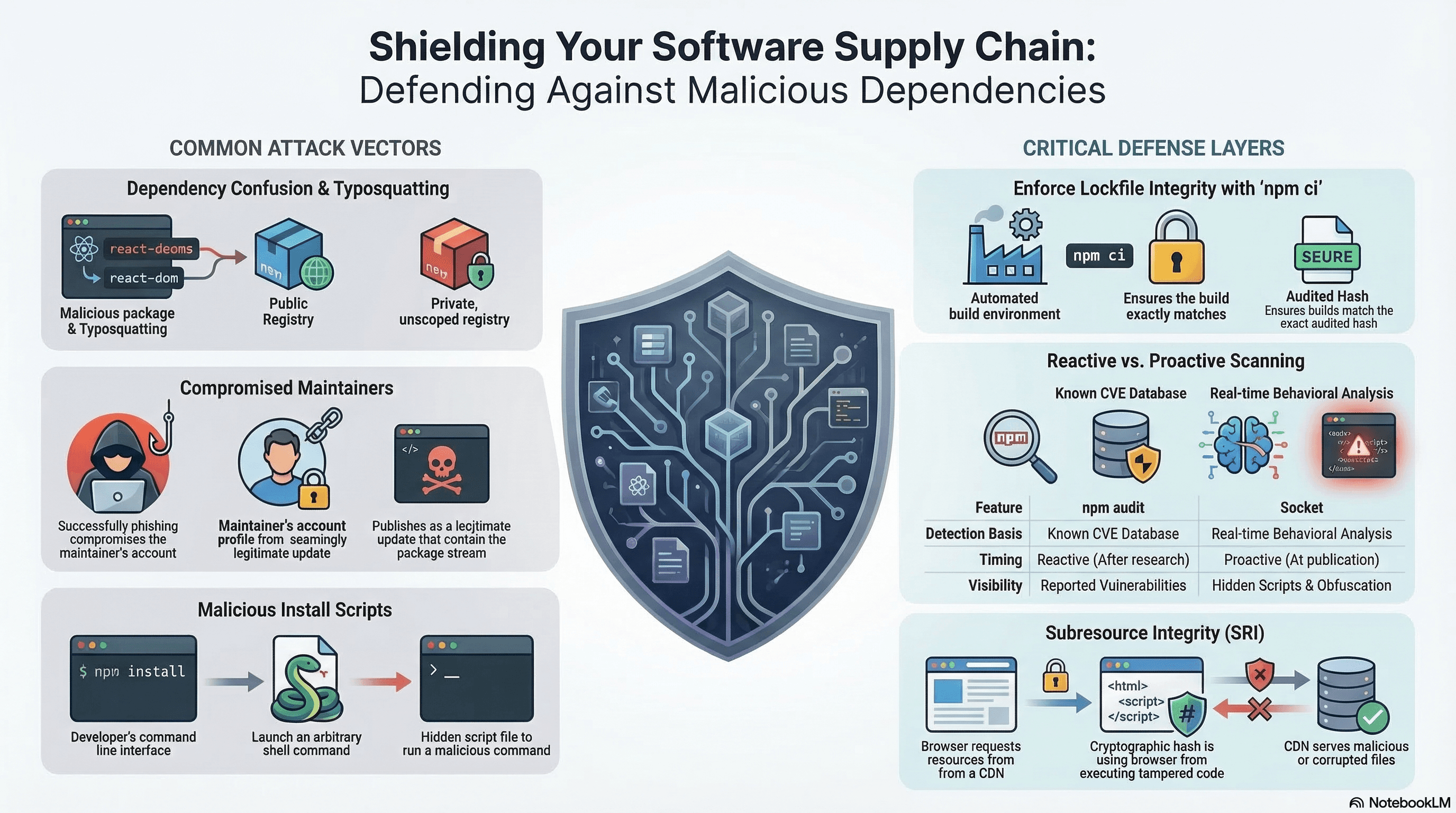
Every npm install pulls in code written by strangers. A single compromised or malicious package anywhere in your dependency tree can exfiltrate secrets, inject malicious scripts into your build output, or exploit your users. This is a supply chain attack — targeting the software you depend on, not your code directly.
Supply chain hygiene reduces blast radius through: lockfile integrity, automated vulnerability scanning, proactive behavioural analysis, runtime resource integrity checks, and keeping your dependency graph as small and audited as possible.
How It Works
Attack Vectors
Typosquatting: lodahs, express-js, react-dom-components — packages that mimic trusted names. Developers mistype or mistake them for the real package.
Dependency confusion: You publish @mycompany/auth to an internal registry. An attacker publishes a malicious @mycompany/auth to the public npm registry at a higher version number. Without registry scoping, npm resolves the public one.
Compromised maintainer: A legitimate package's npm account is taken over (phished, leaked credentials) and a malicious version is published. The package history is clean; only the latest version is poisoned.
Malicious install scripts: preinstall/postinstall scripts execute arbitrary shell commands the moment you run npm install. A legitimate package may add these in a new version.
Protestware / intentional sabotage: A maintainer deliberately introduces harmful code (e.g. the colors/faker incident, the es5-ext case with a war-related payload).
The Lockfile as Security Infrastructure
package-lock.json, pnpm-lock.yaml, yarn.lock pin every package to an exact version and a content hash. If the published package is tampered with after the lockfile was generated, the hash won't match and npm ci fails. But only if the lockfile is committed to source control and npm ci — not npm install — is used in CI.
Code Examples
npm ci and npm audit in CI
# .github/workflows/ci.yml
name: CI

on: [push, pull_request]

jobs:
  security:
    runs-on: ubuntu-latest
    steps:
      - uses: actions/checkout@v4

      - uses: actions/setup-node@v4
        with:
          node-version: 22
          cache: "npm"

      - name: Install with frozen lockfile
        run: npm ci # fails if package.json and package-lock.json are out of sync

      - name: Security audit
        run: npm audit --audit-level=high # fail CI on high/critical CVEs only

      - name: Proactive supply chain scan (Socket)
        run: npx @socketsecurity/cli scan --strict .
        # Detects new install scripts, obfuscated code, suspicious network calls
        # Catches issues BEFORE a CVE is filed
Always use npm ci in CI/CD pipelines — never npm install. npm ci
enforces the lockfile exactly and fails if it's out of sync. npm install
silently updates the lockfile, defeating its integrity guarantee.
Subresource Integrity (SRI) for CDN Scripts
When your HTML loads scripts or styles from a CDN, the CDN itself is an attack surface. SRI lets the browser verify the cryptographic hash of the received file before executing it:
// app/layout.tsx — SRI on CDN-loaded scripts
export default function RootLayout({
  children,
}: {
  children: React.ReactNode;
}) {
  return (
    <html lang="en">
      <head>
        {/* integrity: browser rejects the script if the hash doesn't match */}
        {/* crossOrigin="anonymous": required for SRI on cross-origin resources */}
        <script
          src="https://cdnjs.cloudflare.com/ajax/libs/lodash.js/4.17.21/lodash.min.js"
          integrity="sha512-WFN04846sdKMIP5LKNphMaWzU7YpMyCU245etK3g/2ARYbPK9Ub18eG+ljU96qKRCWh+quCY7yefSmlkQw1ANQ=="
          crossOrigin="anonymous"
          referrerPolicy="no-referrer"
        />

        {/* SRI for a stylesheet */}
        <link
          rel="stylesheet"
          href="https://cdnjs.cloudflare.com/ajax/libs/normalize/8.0.1/normalize.min.css"
          integrity="sha512-NhSC1YmyruXifcj/KFRWoC561YpHpc5Jtzgvbuzx5VozKpWvQ+4nXholtQTqefy/XiR8Jkn76yCG1bqb6G4f3A=="
          crossOrigin="anonymous"
        />
      </head>
      <body>{children}</body>
    </html>
  );
}
Generate SRI hashes:
# For a URL directly
curl -s https://cdnjs.cloudflare.com/ajax/libs/lodash.js/4.17.21/lodash.min.js \
  | openssl dgst -sha512 -binary | openssl base64 -A
# Prefix the output with "sha512-"

# For a local file
cat lodash.min.js | openssl dgst -sha384 -binary | openssl base64 -A
# Prefix with "sha384-"

# Using the online tool
# https://www.srihash.org/ — paste URL, get integrity attribute
If a CDN is compromised and serves a modified version of a library, SRI causes the browser to block it silently — protecting your users even though the CDN is a third party you don't control.
package.json Overrides — Patching Transitive Vulnerabilities
When a transitive dependency (a dependency of your dependency) has a known CVE and the top-level package hasn't updated yet, overrides lets you force a patched version:
// package.json
{
  "dependencies": {
    "some-package": "^2.0.0" // depends on vulnerable-lib@1.0.0
  },
  "overrides": {
    // Force vulnerable-lib to a patched version across the entire tree
    "vulnerable-lib": "^1.2.5",

    // Override only when required by a specific package
    "some-package": {
      "vulnerable-lib": "^1.2.5"
    }
  }
}
# pnpm equivalent
# pnpm-workspace.yaml or package.json:
{
"pnpm": {
"overrides": {
"vulnerable-lib": "^1.2.5"
}
}
}
# Yarn resolutions (yarn.lock equivalent)
{
"resolutions": {
"vulnerable-lib": "^1.2.5"
}
}overrides forces a version that may not be API-compatible with what the
parent package expects. After adding an override, run your full test suite to
confirm nothing broke. Document the override and the associated CVE in a
comment.
// Documented override with context
{
  "overrides": {
    // CVE-2024-XXXXX: semver < 7.5.2 ReDoS vulnerability
    // Remove when lodash updates its semver dependency
    "lodash>semver": ">=7.5.2"
  }
}
GitHub Dependabot Configuration
Dependabot automatically opens PRs to update vulnerable dependencies:
# .github/dependabot.yml
version: 2
updates:
  # npm dependencies
  - package-ecosystem: "npm"
    directory: "/"
    schedule:
      interval: "weekly" # check every week
      day: "monday"
      time: "09:00"
      timezone: "Europe/London"
    open-pull-requests-limit: 5 # limit noisy PRs
    groups:
      # Group minor/patch updates for dev dependencies into one PR
      dev-dependencies:
        dependency-type: "development"
        update-types: ["minor", "patch"]
    ignore:
      # Don't auto-update Next.js — managed manually
      - dependency-name: "next"
        update-types: ["version-update:semver-major"]

  # GitHub Actions dependencies
  - package-ecosystem: "github-actions"
    directory: "/"
    schedule:
      interval: "weekly"
Disabling Install Scripts
Not every package needs to run shell commands at install time. Disable globally, whitelist as needed:
# .npmrc
ignore-scripts=true
# Packages that need native bindings must be rebuilt after install
npm ci
npm rebuild sharp esbuild @next/swc-linux-x64-gnuFor scoped script disabling (pnpm):
# .pnpmfile.cjs
function readPackage(pkg) {
  // Block lifecycle scripts from all packages except explicitly trusted ones
  const TRUSTED = new Set(["esbuild", "sharp", "@next/swc-linux-x64-gnu"]);
  if (!TRUSTED.has(pkg.name)) {
    delete pkg.scripts?.preinstall;
    delete pkg.scripts?.postinstall;
    delete pkg.scripts?.install;
  }
  return pkg;
}

module.exports = { hooks: { readPackage } };
npm Provenance Attestations
Since npm 9.5, packages can be published with provenance attestations — cryptographic proof that the package was built from a specific source commit via a specific CI workflow. Verifiable with:
# Check provenance for an installed package
npm audit signatures

# Output shows:
# audited 847 packages in 2s
# 847 packages have verified registry signatures
# 12 packages have verified attestations

# Check a specific package's provenance
npm pack --dry-run --json some-package | jq '.[0].attestations'
When publishing your own packages with provenance:
# .github/workflows/publish.yml
- name: Publish with provenance
  run: npm publish --provenance --access public
  env:
    NODE_AUTH_TOKEN: ${{ secrets.NPM_TOKEN }}
    # Provenance requires OIDC token from GitHub Actions
Prefer packages that publish with provenance — it makes supply chain attacks detectable because the npm registry stores the attestation and any discrepancy between the published artifact and the source code is cryptographically verifiable.
SBOM Generation
A Software Bill of Materials is an inventory of all components and their versions — useful for security audits, compliance, and vulnerability tracking:
# Generate SBOM in CycloneDX format using cdxgen
npm install -g @cyclonedx/cdxgen

# Generate from package-lock.json
cdxgen -t nodejs -o sbom.json

# Generate in SPDX format
cdxgen -t nodejs --format spdx-json -o sbom.spdx.json
# CI: generate and upload SBOM as a build artifact
- name: Generate SBOM
run: npx @cyclonedx/cdxgen -t nodejs -o sbom.json
- name: Upload SBOM
uses: actions/upload-artifact@v4
with:
name: sbom
path: sbom.json
retention-days: 90Scoping Private Registries to Prevent Dependency Confusion
# .npmrc — always scope private packages to your internal registry
# Without this, npm may resolve @mycompany/auth from the public registry
@mycompany:registry=https://npm.your-internal-registry.example.com
//npm.your-internal-registry.example.com/:_authToken=${NPM_INTERNAL_TOKEN}

# For all other packages, use the public registry
registry=https://registry.npmjs.org
Real-World Use Case
Monorepo SaaS platform. A widely used transitive dependency (event-stream pattern) is compromised — a new maintainer publishes a version with a postinstall script that reads environment variables and exfiltrates them to an external server.
Defence layers fire in sequence: (1) Socket CI scan detects the new postinstall script as a behavioral red flag before any CVE is filed. (2) ignore-scripts=true in .npmrc means the malicious script never executes, even if the package is installed. (3) npm ci in CI ensures no developer has manually installed a modified version. (4) npm audit catches the CVE once it's published. (5) A package.json override pins the compromised package to the last clean version while waiting for a fix. (6) Dependabot opens a PR when a clean version is available.
Common Mistakes / Gotchas
1. Gitignoring the lockfile. The lockfile is security infrastructure — commit it, review changes in PRs, and never delete it. Regenerating it silently resolves to the latest versions, bypassing integrity guarantees.
2. npm install in CI. Silently updates the lockfile on version range resolution. Use npm ci exclusively in automated environments.
3. Ignoring npm audit as noise. Audit low-severity findings on a schedule. Low-severity vulnerabilities can chain with others, and severity ratings can be upgraded retroactively.
4. Loading CDN scripts without SRI. A CDN compromise without SRI protects no one. Generate SRI hashes for every CDN resource and pin them in the HTML.
5. Not scoping private package registries. Without .npmrc scoping, @mycompany/ packages fall through to the public registry on internal registry failure — a dependency confusion attack vector.
Summary
Dependency supply chain attacks target the packages you depend on, not your code. Commit and enforce the lockfile with npm ci. Run npm audit --audit-level=high in CI to catch known CVEs. Layer in Socket for proactive behavioural detection before CVEs exist. Use SRI integrity= attributes on all CDN-loaded resources. Use package.json overrides to patch transitive vulnerabilities without waiting for the parent package. Configure Dependabot for automated update PRs. Disable install scripts in sensitive environments with ignore-scripts=true. Scope private package registries in .npmrc to prevent dependency confusion. Prefer packages that publish with npm provenance attestations — they provide cryptographic linkage between the published artifact and the source commit.
Interview Questions
Q1. What is a dependency confusion attack and how do you prevent it?
Dependency confusion exploits how package managers resolve packages when both a private internal registry and the public npm registry are configured. If you use @mycompany/auth from an internal registry, an attacker can publish a malicious package with the same name to the public npm registry at a higher version number. When the package manager resolves @mycompany/auth, it may prefer the public registry's higher version. Prevention: explicitly scope all private packages to your internal registry in .npmrc — @mycompany:registry=https://your-internal-registry.com. Without this scope rule, the package manager may fall through to the public registry when the internal one is unavailable, or may check both and prefer the higher version from the public one.
Q2. What does npm ci do differently from npm install and why does it matter for security?
npm ci installs packages exclusively from package-lock.json — it does not resolve version ranges or update the lockfile. If package.json and package-lock.json are out of sync, it fails with an error. It also deletes node_modules before installing, ensuring a clean state. npm install resolves version ranges in package.json, may update the lockfile to newer resolving versions, and works with a partially populated node_modules. In CI, npm install can silently install a different set of packages than what was originally locked — potentially installing a newer version that introduced a vulnerability or behavioural change. npm ci ensures what was audited and tested locally is exactly what deploys to production.
Q3. What is Subresource Integrity (SRI) and what threat does it mitigate?
SRI adds a integrity= attribute to <script> and <link> tags containing a base64-encoded cryptographic hash (SHA-256/384/512) of the resource content. When the browser fetches the resource, it computes the hash of the received bytes and compares it to the declared value. A mismatch causes the browser to block the resource and log an error. The threat it mitigates: CDN compromise. If a CDN is breached and the attacker replaces your loaded library with a malicious version (or injects a keylogger into it), the hash won't match — the browser won't execute it. This provides integrity verification for external resources that are outside your direct control, turning a silent compromise into a visible block.
Q4. What is the overrides field in package.json and when should you use it?
The overrides field (npm 8.3+) forces all instances of a package in the dependency tree to resolve to a specific version, regardless of what parent packages request. It's used to patch transitive vulnerabilities: when package-a depends on vulnerable-lib@1.0.0 which has a known CVE, and package-a hasn't released an update, you add "overrides": { "vulnerable-lib": "^1.2.5" } to force the patched version. This is a manual intervention — test thoroughly because the forced version may not be compatible with package-a's expectations. Always document the override with the associated CVE and remove it once the parent package updates. The equivalent in pnpm is pnpm.overrides and in Yarn is resolutions.
Q5. What is npm provenance and what security guarantee does it provide?
npm provenance is a cryptographic attestation published alongside a package that links the published artifact to a specific source repository, branch, and CI workflow run. When a package is published with npm publish --provenance from a GitHub Actions workflow, npm records the OIDC token from GitHub's attestation service. Anyone can verify with npm audit signatures that a package was built from the declared source commit on the declared CI system. If an attacker compromises an npm account and publishes a malicious version, provenance verification will either be absent (suspicious) or fail (if they attempt to forge it). It enables the npm registry and users to detect when published code doesn't match the claimed source — making supply chain attacks cryptographically detectable rather than invisible.
Q6. What is the difference between npm audit and Socket, and why do you need both?
npm audit is reactive: it cross-references your installed packages against the National Vulnerability Database (NVD) and npm advisory database. It only reports packages with published CVEs — it has zero visibility into packages that were just compromised, are newly malicious, or contain suspicious code that hasn't yet been researched and assigned a CVE. Socket is proactive and behavioural: it analyses what packages actually do — do they have new install scripts? Do they make network requests at install time? Do they contain obfuscated code? Do they access environment variables or the filesystem unexpectedly? Socket can flag a compromised package within hours of publication, long before a CVE exists. The two tools are complementary: npm audit provides the industry-standard CVE database check; Socket provides early warning on zero-day supply chain attacks.
Prototype Pollution
How prototype pollution injects properties onto Object.prototype through deep-merge, query string parsers, and JSON.parse — guarded merge with a denylist, structuredClone as a safe copy, JSON.parse reviver for key filtering, qs parser fix, Object.hasOwn vs hasOwnProperty, and real CVEs.
Overview
Measurable, user-impacting performance — from individual Core Web Vitals metrics to budgets and CI enforcement.