Animation Performance
How the browser's compositor thread enables jank-free animations with transform and opacity, why other properties cause layout or paint, how to use the Web Animations API, and how to handle reduced-motion preferences.
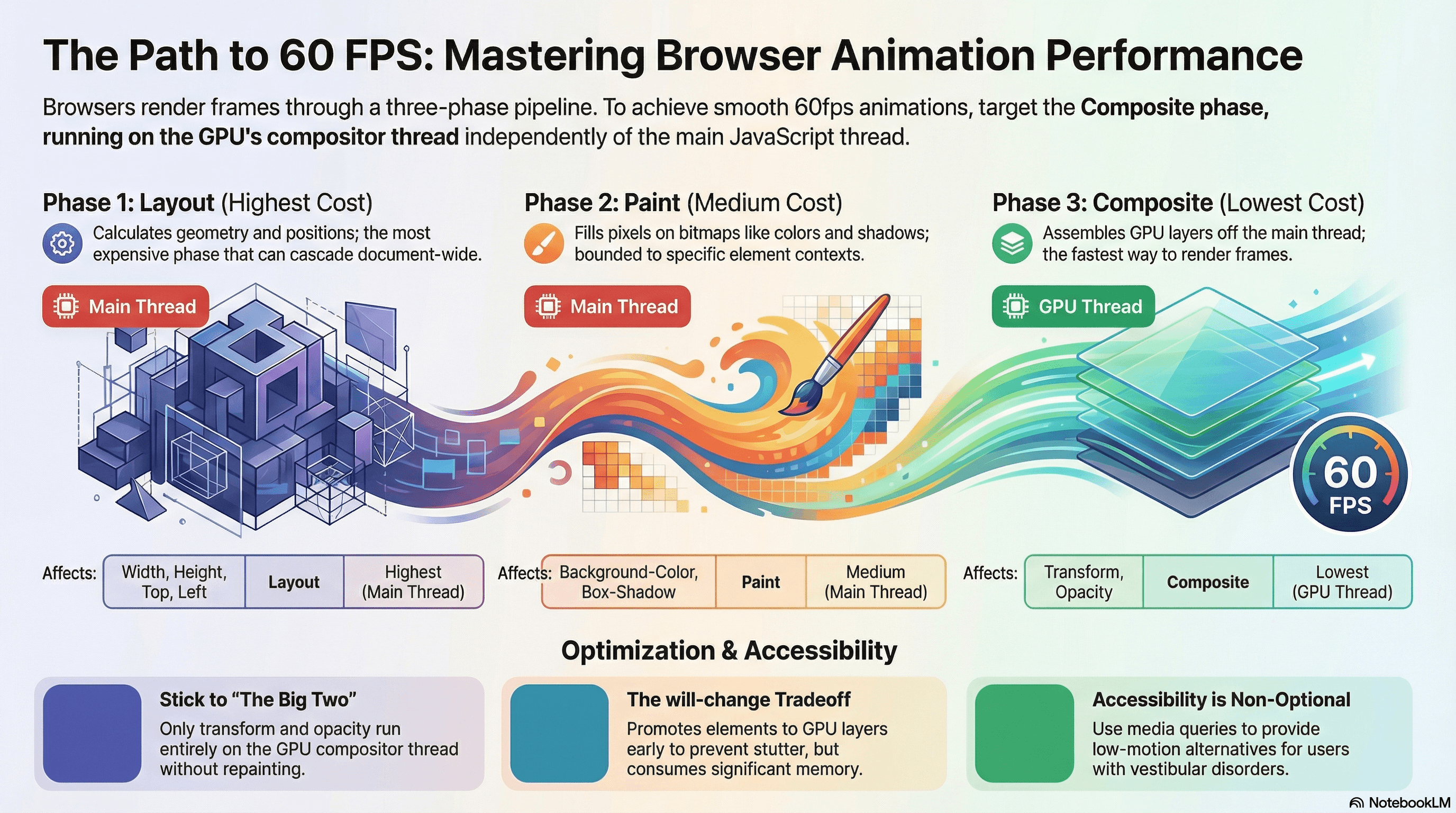
Overview
A smooth animation requires the browser to produce a new frame every ~16ms (60fps). Every frame, the browser runs some combination of layout, paint, and composite. Animations that only trigger the composite phase run entirely on the GPU compositor thread — independently of the main JavaScript thread — and stay smooth even when JavaScript is busy. Animations that trigger layout or paint run on the main thread and compete directly with your JavaScript for frame time.
The two CSS properties that are compositor-only are transform and opacity. Everything else — width, height, top, left, background-color, box-shadow, border-radius — triggers at minimum a paint, and geometric properties like width and top trigger a full layout recalculation on every frame.
This article covers the compositor pipeline, will-change, the Web Animations API, the @starting-style rule for enter animations, and prefers-reduced-motion — the accessibility requirement that's still routinely forgotten.
How It Works
The Three-Phase Rendering Pipeline
The browser renders in phases. Each phase is more expensive than the one after it:
| Phase | What it does | Cost |
|---|---|---|
| Layout | Calculates geometry — width, height, position for all affected elements | Highest — can cascade through the entire document |
| Paint | Fills pixels on a bitmap — colors, text, borders, shadows | Medium — bounded to the affected element and its stacking context |
| Composite | Assembles GPU texture layers onto the screen | Lowest — runs on the compositor thread, off the main thread |
Animating a property that only requires composite means the browser skips layout and paint entirely for each frame. The GPU handles it — no main thread involvement.
Why transform and opacity are special:
transform moves, scales, rotates, or skews elements by manipulating a GPU texture that was already painted. The pixels inside the element don't change — only the texture's position or scale changes. No repaint needed.
opacity changes how transparently a GPU texture is composited. Again, the pixels don't change — just the blending factor. No repaint needed.
Every other property changes what the pixels look like (background-color, box-shadow) or how much space an element occupies (width, height). These require a repaint at minimum, and geometric changes require a layout recalculation first.
Layer Promotion and will-change
For transform and opacity animations to run on the compositor thread, the element must be on its own GPU layer (a separate texture). The browser can promote elements to their own layer automatically during an active animation, but this promotion itself has a one-time cost — a potential first-frame stutter.
will-change is a hint to promote the layer before the animation starts:
.modal {
  will-change: transform, opacity;
  /* The GPU layer is allocated when the page loads,
     so the first frame of the open animation has no promotion cost */
}
The tradeoff: every promoted layer consumes GPU memory (a full texture of its painted content). Promoting too many elements — especially large ones — exhausts GPU memory on mobile devices and can make compositing slower, not faster.
The rule: promote only elements that are about to animate and that you've verified are causing first-frame jank without the promotion.
Code Examples
CSS Transitions — Compositor-Only vs Layout-Triggering
/* ❌ Layout-triggering — costs a full layout recalculation per frame */
.panel {
  transition:
    width 300ms ease,
    height 300ms ease;
}
.panel:hover {
  width: 320px;
  height: 240px;
}

/* ❌ Paint-triggering — costs a repaint per frame */
.card {
  transition: box-shadow 300ms ease;
}
.card:hover {
  box-shadow: 0 8px 24px rgb(0 0 0 / 0.15);
}
/* ✅ Compositor-only — zero layout, zero paint, smooth GPU animation */
.panel {
transition:
transform 300ms ease,
opacity 300ms ease;
}
.panel--hidden {
transform: translateY(8px);
opacity: 0;
}
.panel--visible {
transform: translateY(0);
opacity: 1;
}
/* ✅ Box-shadow trick — animate opacity of a pseudo-element's shadow */
/* The pseudo-element's shadow is static; only opacity transitions */
.card {
position: relative;
}
.card::after {
content: "";
position: absolute;
inset: 0;
border-radius: inherit;
box-shadow: 0 8px 24px rgb(0 0 0 / 0.15);
opacity: 0;
transition: opacity 300ms ease;
/* pointer-events: none so the pseudo-element doesn't block clicks */
pointer-events: none;
}
.card:hover::after {
opacity: 1;
}Web Animations API (WAAPI)
The Web Animations API gives programmatic control over animations with the same performance characteristics as CSS animations — compositor-thread execution for transform and opacity.
// lib/animate.ts — reusable animation utilities

/**
 * Fade and slide an element in from below.
 * Returns the Animation object so callers can await .finished or cancel early.
 */
export function fadeSlideIn(
  element: HTMLElement,
  options?: KeyframeAnimationOptions,
): Animation {
  return element.animate(
    [
      // Keyframe 0: starting state
      { transform: "translateY(12px)", opacity: 0 },
      // Keyframe 1: ending state
      { transform: "translateY(0px)", opacity: 1 },
    ],
    {
      duration: 250,
      easing: "cubic-bezier(0.16, 1, 0.3, 1)", // spring-like ease-out
      fill: "forwards", // retain the end state when animation completes
      ...options,
    },
  );
}

/**
 * Collapse an element's height from its current height to zero.
 * Uses WAAPI instead of CSS transition because height: auto can't be
 * CSS-transitioned — this approach captures the real height first.
 */
export function collapseHeight(element: HTMLElement): Animation {
  const startHeight = element.offsetHeight; // one read, before any writes

  return element.animate(
    [
      { height: `${startHeight}px`, overflow: "hidden" },
      { height: "0px", overflow: "hidden" },
    ],
    {
      duration: 200,
      easing: "ease-in",
      fill: "forwards",
    },
  );
}
// components/NotificationToast.tsx
"use client";
import { useEffect, useRef } from "react";
import { fadeSlideIn } from "@/lib/animate";
interface ToastProps {
message: string;
onDismiss: () => void;
}
export function NotificationToast({ message, onDismiss }: ToastProps) {
const toastRef = useRef<HTMLDivElement>(null);
useEffect(() => {
const el = toastRef.current;
if (!el) return;
// Check prefers-reduced-motion before animating (JS equivalent of CSS @media)
const reducedMotion = window.matchMedia(
"(prefers-reduced-motion: reduce)",
).matches;
if (!reducedMotion) {
const animation = fadeSlideIn(el);
// Auto-dismiss after 3 seconds
const timer = setTimeout(async () => {
// Reverse the animation for exit
const exitAnimation = el.animate(
[
{ transform: "translateY(0px)", opacity: 1 },
{ transform: "translateY(-8px)", opacity: 0 },
],
{ duration: 200, easing: "ease-in", fill: "forwards" },
);
await exitAnimation.finished;
onDismiss();
}, 3000);
return () => {
clearTimeout(timer);
animation.cancel();
};
} else {
// Reduced motion: skip animation, just auto-dismiss
const timer = setTimeout(onDismiss, 3000);
return () => clearTimeout(timer);
}
}, [onDismiss]);
return (
<div
ref={toastRef}
className="fixed bottom-4 right-4 bg-gray-900 text-white px-4 py-3 rounded-lg shadow-lg"
role="status"
aria-live="polite"
>
{message}
</div>
);
}@starting-style — Native CSS Enter Animations
@starting-style (Chrome 117+, Safari 17.5+, Firefox 129+) defines the initial state of an element before its first style is applied. This enables enter animations using pure CSS transitions — no JavaScript, no visibility toggle hacks:
/* Dialog enter animation — pure CSS */
dialog {
  /* End state (open) — what the dialog animates TO */
  transform: translateY(0);
  opacity: 1;
  transition:
    transform 300ms ease,
    opacity 300ms ease,
    /* Also transition the display property (Chrome 116+ feature) */ display
      300ms allow-discrete,
    overlay 300ms allow-discrete;
}

/* Exit state — closed dialog */
dialog:not([open]) {
  transform: translateY(12px);
  opacity: 0;
  display: none;
}

/* Enter state — what the dialog animates FROM on first paint */
@starting-style {
  dialog[open] {
    transform: translateY(12px);
    opacity: 0;
  }
}

/* Reduced motion: disable enter/exit animations */
@media (prefers-reduced-motion: reduce) {
  dialog {
    transition: none;
  }
}
// components/NativeDialog.tsx
"use client";
import { useRef } from "react";
export function NativeDialog({
open,
onClose,
children,
}: {
open: boolean;
onClose: () => void;
children: React.ReactNode;
}) {
const dialogRef = useRef<HTMLDialogElement>(null);
// Sync React state with native dialog open attribute
if (dialogRef.current) {
if (open && !dialogRef.current.open) {
dialogRef.current.showModal();
} else if (!open && dialogRef.current.open) {
dialogRef.current.close();
}
}
return (
/*
The @starting-style CSS above handles the enter animation.
No JS animation code needed — the browser handles it via CSS transition
triggered by the open attribute being set by showModal().
*/
<dialog ref={dialogRef} onClose={onClose} className="modal">
{children}
</dialog>
);
}prefers-reduced-motion — The Accessibility Requirement
Some users experience vestibular disorders, seizures, or motion sensitivity. The OS-level "reduce motion" preference is surfaced to CSS via @media (prefers-reduced-motion: reduce) and to JavaScript via window.matchMedia.
This is not optional. Animation without a reduced-motion alternative is an accessibility failure.
/* globals.css — global reduced-motion defaults */

/*
  Disable all transitions and animations for users who prefer no motion.
  This is a catch-all safe default. Override selectively for animations
  that are meaningful and low-motion even when reduced.
*/
@media (prefers-reduced-motion: reduce) {
  *,
  *::before,
  *::after {
    animation-duration: 0.01ms !important;
    animation-iteration-count: 1 !important;
    transition-duration: 0.01ms !important;
    scroll-behavior: auto !important;
  }
}
/* A more nuanced approach — provide a low-motion alternative */
.slide-in {
/* Default: slide + fade */
animation: slide-fade-in 300ms ease forwards;
}
@keyframes slide-fade-in {
from {
transform: translateY(12px);
opacity: 0;
}
to {
transform: translateY(0);
opacity: 1;
}
}
@media (prefers-reduced-motion: reduce) {
.slide-in {
/* Reduced motion: fade only — no spatial movement */
animation: fade-in 150ms ease forwards;
}
}
@keyframes fade-in {
from {
opacity: 0;
}
to {
opacity: 1;
}
}// components/AnimatedList.tsx
"use client";
import { useEffect, useRef } from "react";
export function AnimatedList({ items }: { items: string[] }) {
const listRef = useRef<HTMLUListElement>(null);
useEffect(() => {
const list = listRef.current;
if (!list) return;
// Read the OS-level preference
const prefersReduced = window.matchMedia(
"(prefers-reduced-motion: reduce)",
).matches;
const listItems = list.querySelectorAll<HTMLLIElement>("li");
listItems.forEach((item, index) => {
item.animate(
prefersReduced
? // Reduced: fade only, no stagger
[{ opacity: 0 }, { opacity: 1 }]
: // Full: slide + fade with staggered delay
[
{ transform: "translateX(-12px)", opacity: 0 },
{ transform: "translateX(0)", opacity: 1 },
],
{
duration: prefersReduced ? 150 : 250,
delay: prefersReduced ? 0 : index * 40, // stagger disabled for reduced
fill: "forwards",
easing: "ease-out",
},
);
});
}, [items]);
return (
<ul ref={listRef}>
{items.map((item) => (
<li key={item} style={{ opacity: 0 }}>
{item}
</li>
))}
</ul>
);
}Profiling — Verifying Compositor Thread Execution
// Verify an animation is running on the compositor thread (not causing main thread jank)
// Run this in the browser console while the animation plays

// Method 1: Performance panel
// DevTools → Performance → Record → Trigger animation → Stop
// Look at the "Compositor" thread row (below Main)
// If your animation appears there, it's off the main thread ✓
// If it's only in the "Main" thread, it's causing main thread work ✗

// Method 2: Rendering panel
// DevTools → More Tools → Rendering → Enable "Paint flashing"
// Green overlays appear wherever the browser repaints
// If your animating element flashes green on every frame, it's repainting ✗
// If no flash, it's compositor-only ✓

// Method 3: Layers panel
// DevTools → More Tools → Layers
// Promoted elements appear as separate entries with their own textures
// Verify only the elements you intend to promote are listed

// Method 4: Web Animations API inspection
const animations = document.getAnimations();
animations.forEach((anim) => {
  console.log({
    id: anim.id || "(unnamed)",
    // compositeOperation: how this animation composites with others
    composite: anim.effect?.composite,
    // playState: "running" | "paused" | "finished" | "idle"
    playState: anim.playState,
  });
});
Real-World Use Case
Slide-out navigation drawer. Initial implementation: animated right: -300px → right: 0. This triggers layout on every frame — the browser recalculates the width available to the main content area on every animation tick.
After refactoring to transform: translateX(300px) → transform: translateX(0): the drawer occupies no layout space (it's a fixed-position element), the transform runs entirely on the compositor thread, and will-change: transform on the drawer element ensures the GPU layer is promoted before the first open, eliminating the first-frame stutter. The animation goes from 45fps (with dropped frames) to a locked 60fps — measurable in the Performance panel.
Hover card elevation. Animating box-shadow on hover causes a repaint per frame. Replaced with the pseudo-element opacity technique: the shadow is always present on ::after at full opacity, then fades in via opacity: 0 → 1 on hover. Since only opacity transitions, the animation is compositor-only — zero repaints during the hover.
Common Mistakes / Gotchas
1. Applying will-change to everything.
will-change: transform on 50 elements allocates 50 separate GPU textures simultaneously. On a mobile device with limited GPU memory, this causes GPU memory swapping — which is significantly slower than just painting on the CPU. Promote only elements with imminent, high-frequency animations.
2. Using top/left with position: absolute for movement.
This is the single most common animation performance mistake in CSS. top and left are geometric properties that trigger layout. transform: translate() achieves identical visual output with compositor-only cost.
3. Animating border-radius on large elements.
border-radius triggers a repaint on every frame when animated. On large elements, the repaint area is large — expensive on mobile. Use clip-path with a circle instead, which can sometimes be compositor-optimized, or avoid animating border-radius entirely.
4. Forgetting fill: "forwards" in the Web Animations API.
Without fill: "forwards", a WAAPI animation returns the element to its initial state when it finishes — the final state disappears. Always specify fill: "forwards" for animations that should persist their end state, or apply the final state as a CSS class after .finished resolves.
5. Not respecting prefers-reduced-motion.
Omitting a reduced-motion alternative is an accessibility failure that affects users with vestibular disorders and motion sensitivity. The global * override pattern is an acceptable baseline; providing a low-motion alternative (fade-only instead of slide-and-fade) is the better approach.
6. Animating multiple box-shadow values via CSS var().
Transitioning between two box-shadow values that use CSS custom properties works — but only if the values are explicitly defined, not computed. The browser can't interpolate between var(--shadow-a) and var(--shadow-b) if the vars resolve to different formats. Use the pseudo-element opacity technique instead.
Summary
The compositor thread runs independently of the main JavaScript thread and handles transform and opacity animations without layout or paint involvement. Every other CSS property that changes geometry or pixel appearance requires main-thread work per frame. will-change promotes an element to its own GPU layer ahead of animation to eliminate first-frame promotion cost, but overuse exhausts GPU memory. The Web Animations API provides programmatic animation control with the same compositor-thread performance as CSS transitions. @starting-style enables pure-CSS enter animations on elements that were previously display: none. prefers-reduced-motion is an accessibility requirement — always provide a low-motion or no-motion alternative for users who need it.
Interview Questions
Q1. Why are transform and opacity the only CSS properties that animate on the compositor thread?
The compositor thread works with pre-painted GPU textures. transform repositions, scales, or rotates a texture without changing its pixels — the browser just applies a matrix to an already-rendered image. opacity changes the blending factor when compositing a texture — again, no pixel changes needed. Every other CSS property changes what the pixels look like (background-color, box-shadow) or changes how much layout space the element occupies (width, height, top). Both require either a repaint (new pixels) or a layout recalculation (new geometry) before compositing — which must happen on the main thread. This is why transform: translateX() is always preferable to animating left for the same visual result.
Q2. What does will-change actually do and when should you add or remove it?
will-change hints to the browser that the element will change, allowing it to promote the element to its own GPU compositing layer before the change occurs. Without it, the browser may promote the element mid-animation — the promotion itself causes a one-time paint that can drop the first frame. Add will-change when: an element has a frequent, interactive animation (drawer, tooltip, modal) and you've profiled a first-frame stutter without it. Remove it (or set will-change: auto) when: the animation is infrequent (hover on a static card), after the animation completes for one-shot animations, or on any element that you're promoting "just in case." Every promoted layer consumes GPU memory equal to the full painted size of the element — promoting 50 large elements simultaneously can exhaust GPU memory on mobile devices.
Q3. What is @starting-style and what problem does it solve?
Before @starting-style, CSS transitions couldn't animate elements from display: none to visible because the initial state was invisible and CSS couldn't define "what the element looked like before it existed." The workaround was JavaScript: show the element, trigger a reflow, apply the animation class. @starting-style defines the style an element should have on its very first render — before the browser applies its initial styles. This lets you write a CSS transition whose starting state (opacity: 0, transform: translateY(12px)) and ending state (opacity: 1, transform: translateY(0)) are both defined in pure CSS, and the browser handles the enter animation automatically when the element is added to the DOM or display: none is removed.
Q4. How do you handle height: auto transitions — animating to an unknown height?
CSS cannot transition from or to height: auto because auto is not a calculable starting or ending value. The Web Animations API solves this cleanly: read the element's offsetHeight before the animation (one forced layout, acceptable), then animate from that pixel value to 0 (or vice versa) with explicit keyframes. Using fill: "forwards" retains the end state. An alternative CSS-only approach is transitioning max-height instead of height — set max-height: 0 → max-height: 500px, but this animates at the rate of max-height change, not actual height change, making the easing feel wrong at most values. The WAAPI approach with a measured start height is more accurate.
Q5. Why is prefers-reduced-motion an accessibility requirement and not just a nice-to-have?
Vestibular disorders affect the inner ear and brain's processing of spatial information. Animations that involve large movements, parallax effects, or rapid transitions can trigger vertigo, nausea, dizziness, or headaches in users with vestibular disorders — with effects lasting hours. WCAG 2.1 Success Criterion 2.3.3 ("Animation from Interactions") requires that motion animation triggered by interaction can be disabled, with AAA conformance. Users signal their preference via their OS settings, which browsers expose via prefers-reduced-motion: reduce. Ignoring this preference excludes and potentially harms real users. The minimum implementation is the * animation/transition override; the better implementation provides a semantically meaningful alternative animation (fade without movement) rather than just turning all animation off.
Q6. How would you animate a list where items slide in sequentially (staggered) and still respect reduced motion?
For full animation: use the Web Animations API to iterate over list items, calling element.animate() with a delay that increments by 40–60ms per item — creating the stagger. The keyframes use transform: translateX(-12px) → translateX(0) and opacity: 0 → 1. For reduced motion: check window.matchMedia("(prefers-reduced-motion: reduce)").matches before applying animations. If reduced, use only opacity: 0 → 1 with zero delay (no stagger, no movement). This gives motion-sensitive users a functional, accessible experience (elements still fade in as visual feedback) without spatial movement. Set style="opacity: 0" as the initial inline style on all items so they start invisible even before the JS runs, preventing a flash of all items before the animation begins.
Layout Thrashing
Why alternating DOM reads and writes forces synchronous reflows, how to identify thrashing with DevTools, and how to eliminate it with read-write batching, requestAnimationFrame, and ResizeObserver.
Theming & Design Tokens
How design tokens create a single source of truth for visual values, how CSS custom properties enable runtime theming, how to structure a three-tier token hierarchy, and how to manage multi-brand token systems with Style Dictionary.