Layout Thrashing
Why alternating DOM reads and writes forces synchronous reflows, how to identify thrashing with DevTools, and how to eliminate it with read-write batching, requestAnimationFrame, and ResizeObserver.
Overview
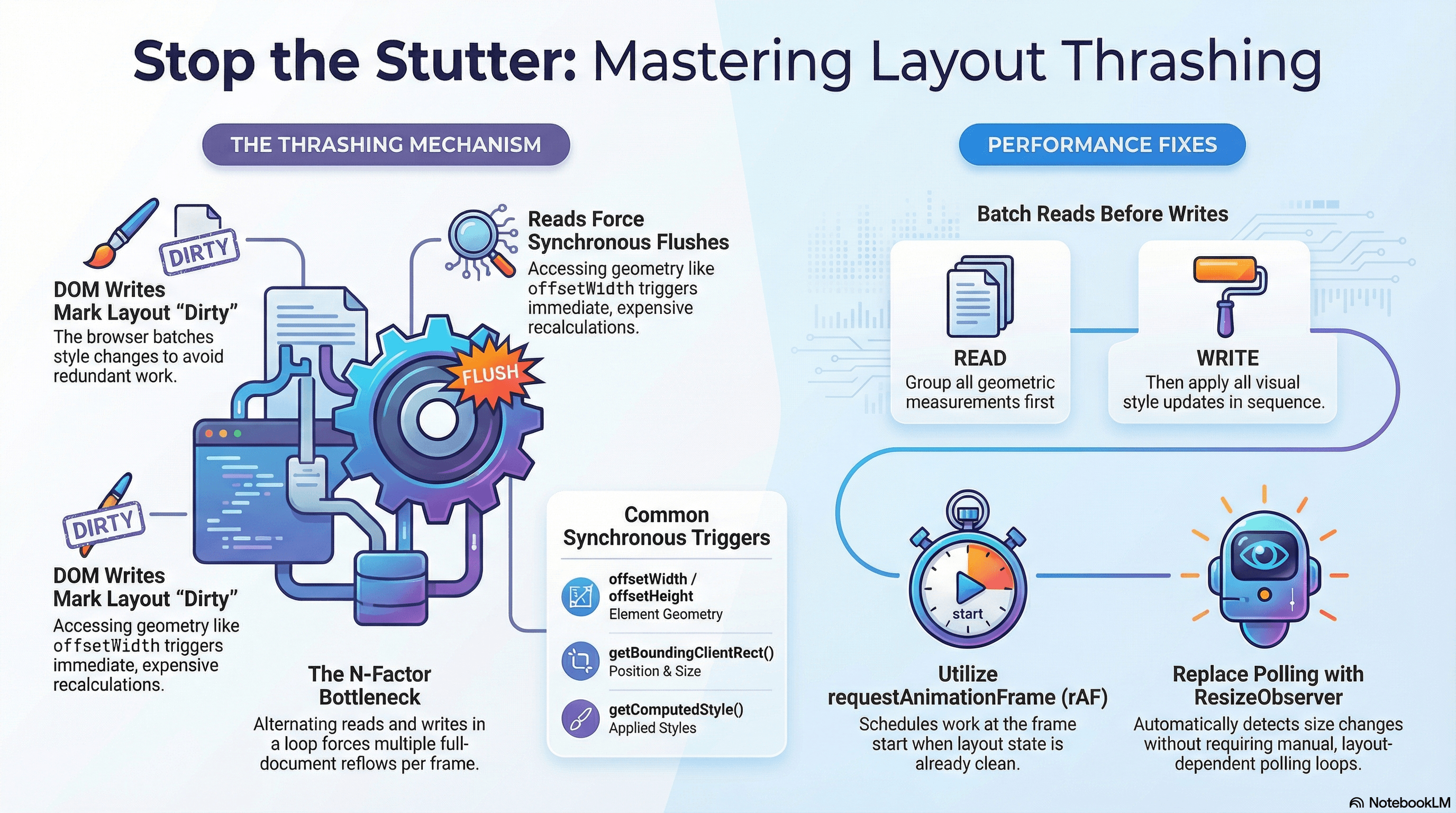
Layout thrashing is what happens when JavaScript repeatedly forces the browser to recalculate layout within a single frame. Every time you read a geometric property after writing to the DOM, the browser must synchronously flush all pending style changes and recompute layout to give you an accurate value. Do this in a loop and you've created a pattern where the browser spends the entire frame recalculating layout — with nothing left for painting or responding to user input.
The result is dropped frames and sluggish interactions that are often hard to attribute because the code looks innocent: a simple loop, a few style changes, some offset reads. The problem only becomes visible under profiling, which is why understanding the mechanism matters more than memorizing a rule.
How It Works
Why the Browser Batches Writes
The browser is optimized for the case where JavaScript makes a burst of DOM changes followed by a rendering phase. It batches style invalidations — when you set element.style.width = "200px", the browser marks the element's layout as "dirty" but doesn't immediately recalculate anything. It waits until the end of the JavaScript task (or until you force it) to do the actual layout work.
This batching is why writing to many elements in sequence is cheap: one batch of layout recalculations at the end, not N individual recalculations.
Why Reads Force Synchronous Layout
When you ask the browser for a layout measurement — offsetWidth, offsetHeight, getBoundingClientRect(), scrollTop, clientHeight, and others — the browser cannot return a stale value. If there are pending style changes that haven't been applied yet, those changes might affect the measurement. So the browser synchronously flushes all pending changes and recalculates layout before returning the value.
This is called a forced synchronous layout (or forced reflow). It's a single expensive operation when it happens once. It becomes thrashing when it happens N times in a loop because you're alternating reads and writes:
Write: element.style.width = "200px"  → marks layout dirty
Read:  element.offsetWidth             → forces sync layout (expensive)
Write: element.style.width = result   → marks layout dirty again
Read:  element.offsetWidth             → forces sync layout again
...× N
Each read-after-write costs the full layout recalculation of the affected subtree (or in worst cases, the entire document).
Properties That Force Layout
Reading any of these after a DOM write causes a forced synchronous layout:
Geometry:         offsetWidth, offsetHeight, offsetTop, offsetLeft
                  offsetParent, clientWidth, clientHeight, clientTop, clientLeft
                  scrollWidth, scrollHeight, scrollTop, scrollLeft

Bounding box:     getBoundingClientRect(), getClientRects()

Scroll:           scrollTop, scrollLeft (read)
                  element.scrollIntoView()

Other:            getComputedStyle()
                  innerWidth, innerHeight (window)
                  window.scrollY, window.scrollX
                  document.scrollingElement
                  focus() (forces layout in some browsers)
Writing to layout-affecting properties (width, height, padding, margin, top, left, transform) marks layout dirty. Any subsequent read from the list above forces a flush.
Code Examples
The Thrashing Pattern and the Batch Fix
// ❌ Layout thrashing — reads and writes interleaved in a loop
function resizeCardsExpensive(cards: HTMLElement[]) {
  cards.forEach((card) => {
    // READ — forces a synchronous layout flush because style was just written
    const currentHeight = card.offsetHeight;

    // WRITE — marks layout dirty
    card.style.height = `${currentHeight * 1.5}px`;

    // Each iteration: one forced layout, one write
    // 100 cards → 100 forced layouts
  });
}
// ✅ Batch reads before writes — one layout recalculation total
function resizeCardsEfficient(cards: HTMLElement[]) {
// Phase 1: Read all values (at most one layout flush for the batch)
const heights = cards.map((card) => card.offsetHeight);
// Phase 2: Write all values (no reads → no forced layouts)
cards.forEach((card, i) => {
card.style.height = `${heights[i] * 1.5}px`;
});
}The requestAnimationFrame Flush Pattern
requestAnimationFrame schedules work at the start of the next frame — after the browser has committed the current frame's rendering. Any layout reads inside a rAF callback see a fresh, already-committed layout state, so you're not forcing a layout on top of pending work.
// components/useParallelHeights.ts
"use client";

import { useEffect, useRef } from "react";

/**
 * Makes all cards in a grid the same height as the tallest card.
 * Uses rAF to avoid reading layout synchronously during a write cycle.
 */
export function useEqualHeights(
  containerRef: React.RefObject<HTMLElement | null>,
) {
  useEffect(() => {
    const container = containerRef.current;
    if (!container) return;

    let rafId: number;

    function equalize() {
      const cards = Array.from(
        container!.querySelectorAll<HTMLElement>(".card"),
      );

      // Reset heights to let natural height determine the max
      // Write phase 1
      cards.forEach((card) => {
        card.style.height = "auto";
      });

      // Schedule the read → write in the NEXT rAF so the browser has
      // committed the "auto" heights before we measure
      rafId = requestAnimationFrame(() => {
        // Read phase — layout is already up to date from previous frame
        const maxHeight = Math.max(...cards.map((card) => card.offsetHeight));

        // Write phase 2 — no reads follow, no forced layout
        cards.forEach((card) => {
          card.style.height = `${maxHeight}px`;
        });
      });
    }

    equalize();

    // Re-equalize when container resizes
    const resizeObserver = new ResizeObserver(equalize);
    resizeObserver.observe(container);

    return () => {
      cancelAnimationFrame(rafId);
      resizeObserver.disconnect();
    };
  }, [containerRef]);
}
ResizeObserver — Replacing Layout Read Loops
A common pattern that causes thrashing is polling element dimensions to respond to layout changes. ResizeObserver eliminates the polling entirely: it fires a callback when an element's size changes, after the browser has already computed the new layout.
// components/AdaptivePanel.tsx
"use client";

import { useEffect, useRef, useState } from "react";

/**
 * A panel that shows a compact layout below 400px and
 * a full layout at or above 400px — based on its own width,
 * not the viewport (this is the Container Query equivalent in JS).
 */
export function AdaptivePanel({ children }: { children: React.ReactNode }) {
  const panelRef = useRef<HTMLDivElement>(null);
  const [isCompact, setIsCompact] = useState(false);

  useEffect(() => {
    const panel = panelRef.current;
    if (!panel) return;

    /*
      ResizeObserver fires after the browser has committed the new layout.
      The entry.contentRect provides the element's new dimensions —
      no forced layout recalculation, no polling.
    */
    const observer = new ResizeObserver((entries) => {
      for (const entry of entries) {
        const width = entry.contentRect.width;
        setIsCompact(width < 400);
      }
    });

    observer.observe(panel);
    return () => observer.disconnect();
  }, []);

  return (
    <div
      ref={panelRef}
      className={isCompact ? "panel panel--compact" : "panel panel--full"}
    >
      {children}
    </div>
  );
}
FastDOM Pattern — Library-Level Batching
For complex cases with many disparate components reading and writing layout, the FastDOM pattern centralizes read/write batching across the entire frame:
// lib/fastdom.ts
// A lightweight read/write scheduler — same pattern as the fastdom library

type Task = () => void;

const reads: Task[] = [];
const writes: Task[] = [];
let scheduled = false;

function scheduleFlush() {
  if (!scheduled) {
    scheduled = true;
    requestAnimationFrame(flush);
  }
}

function flush() {
  // Execute all reads first — browser layout is up to date
  const currentReads = reads.splice(0);
  currentReads.forEach((task) => task());

  // Then execute all writes — no more reads, no forced layouts
  const currentWrites = writes.splice(0);
  currentWrites.forEach((task) => task());

  scheduled = false;

  // If either phase scheduled new tasks, flush again next frame
  if (reads.length || writes.length) {
    scheduleFlush();
  }
}

export const fastdom = {
  /**
   * Schedule a DOM read. Runs before any writes in the same frame.
   */
  read(task: Task) {
    reads.push(task);
    scheduleFlush();
  },

  /**
   * Schedule a DOM write. Runs after all reads in the same frame.
   */
  write(task: Task) {
    writes.push(task);
    scheduleFlush();
  },
};
// Usage — coordinates reads and writes across unrelated components
import { fastdom } from "@/lib/fastdom";
function updateCardLayout(card: HTMLElement) {
// Schedule the read
fastdom.read(() => {
const height = card.offsetHeight;
// Schedule the write — guaranteed to run after ALL reads
fastdom.write(() => {
card.style.minHeight = `${height}px`;
});
});
}
// Even if updateCardLayout is called from 50 different places,
// all reads are batched before all writes in the same animation frameDiagnosing Thrashing in Chrome DevTools
// Open Chrome DevTools → Performance tab → Record
// Interact with the page → Stop recording
// Look in the flame chart for:
//
// 1. "Recalculate Style" blocks followed immediately by "Layout" blocks
//    — each pair is a forced synchronous layout
//
// 2. Purple "Layout" blocks inside JavaScript call stacks
//    — these are synchronous layouts caused by JS reads
//
// 3. "Forced reflow" warnings in the console (enable via:
//    DevTools → Performance → More tools → Layout → Force reflow warnings)

// You can also detect thrashing programmatically:
const observer = new PerformanceObserver((list) => {
  for (const entry of list.getEntries()) {
    if (entry.entryType === "longtask" && entry.duration > 50) {
      console.warn(
        `Long task detected: ${entry.duration.toFixed(0)}ms — possible layout thrash`,
      );
    }
  }
});

observer.observe({ type: "longtask", buffered: true });
Real-World Use Case
Drag-and-drop reordering in a task list. On each mousemove event, the drag handler reads the positions of all list items to determine which item the dragged card is over, then updates the dragged card's transform. A naive implementation reads getBoundingClientRect() for all items inside the same event handler that wrote the card's transform — classic thrashing.
The fix: cache item positions at drag start (one batch read when the drag begins), update only the dragged card's transform on mousemove (no reads during the move), and refresh the cached positions only when a reorder actually occurs. The mousemove handler becomes a pure write with no reads — no forced layouts during the drag, no jank.
Scroll-linked animations. A parallax effect reads window.scrollY and writes element.style.transform on every scroll event. Since scrollY is a layout read, this is one forced layout per scroll event — at 60fps that's 60 forced layouts per second. Moving the animation to a requestAnimationFrame loop that reads scrollY once at the top and then writes all transform values in one pass reduces this to zero forced layouts (the rAF read happens after the browser has already committed scroll position for the frame).
Common Mistakes / Gotchas
1. Reading layout properties in event handlers that also write.
The most common thrashing site: click, input, or mousemove handlers that both change styles and read dimensions. Move the read before the write, or defer it to a requestAnimationFrame callback.
2. Using getComputedStyle() as a safe alternative to offsetWidth.
getComputedStyle() also forces a synchronous layout. It reads the computed style after all pending style changes are applied — which requires a layout flush. It's equally "dangerous" in a read-write loop.
3. Polling with setInterval for size changes.
setInterval(() => { if (el.offsetWidth !== lastWidth) { ... } }, 100) is 10 forced layouts per second even when nothing changes. Replace with ResizeObserver, which fires only when dimensions actually change and does so after layout has been committed.
4. Triggering layout in React useLayoutEffect carelessly.
useLayoutEffect runs synchronously after DOM mutations but before the browser paints. Reading layout in useLayoutEffect is intentional and sometimes necessary (measuring elements before first paint). But reading layout in useLayoutEffect and inside useEffect of the same component produces two separate forced layouts in the same commit. Consolidate layout reads into useLayoutEffect and side-effect-only work into useEffect.
5. Forgetting that CSS animations can still read layout.
Animating transform is compositor-only and has no layout impact. But scrollTop reads during a CSS animation, or JavaScript that reads offsetHeight to animate an element, still forces layout. The animation being CSS-based doesn't protect reads triggered by JavaScript running at the same time.
Summary
Layout thrashing occurs when JavaScript alternates between reading geometric properties and writing to the DOM, forcing the browser to synchronously recalculate layout multiple times per frame instead of batching updates. The fix is always the same: batch all reads before all writes. requestAnimationFrame provides a clean frame boundary for the read-then-write pattern in animation loops. ResizeObserver eliminates layout polling entirely by delivering resize notifications after the browser has committed layout. The FastDOM pattern centralizes read/write scheduling across components when thrashing is caused by independent code paths that each mix reads and writes. Use the Performance panel in Chrome DevTools to identify forced synchronous layouts (purple "Layout" blocks inside JavaScript call stacks) and trace them to their source.
Interview Questions
Q1. What is a forced synchronous layout and why does it happen?
A forced synchronous layout happens when JavaScript reads a geometric property (like offsetWidth, getBoundingClientRect(), or getComputedStyle()) while there are pending style changes that haven't been applied yet. The browser cannot return a stale measurement, so it synchronously flushes all pending style mutations and recomputes layout before returning the value. This is expensive because layout recalculation — computing the geometry of the entire affected subtree — is not a trivial operation. When this happens inside a loop that also writes, each iteration forces a layout flush, making the total cost proportional to N × layout-recalculation-time instead of a single recalculation at the end of the frame.
Q2. Which JavaScript APIs cause a forced synchronous layout?
Reading any property or calling any method that returns layout-dependent information causes a forced sync layout if there are pending style changes: offsetWidth, offsetHeight, offsetTop, offsetLeft, offsetParent, clientWidth, clientHeight, clientTop, clientLeft, scrollWidth, scrollHeight, scrollTop (read), scrollLeft (read), getBoundingClientRect(), getClientRects(), getComputedStyle(), innerWidth/innerHeight (window), window.scrollY/window.scrollX, focus() (in some browsers), and element.scrollIntoView(). The common thread: any property whose value is determined by layout.
Q3. How does requestAnimationFrame help prevent layout thrashing?
requestAnimationFrame schedules a callback at the start of the next animation frame — after the browser has committed the current frame's layout and paint. When your rAF callback runs, the layout is in a clean, committed state. Reads at the top of a rAF callback don't force a synchronous flush because there are no pending style changes to flush yet. This makes the read-then-write pattern safe: read all measurements at the start of rAF (no forced layout because nothing is dirty), then write all style changes (marks dirty, but no subsequent reads force a flush). The browser does its single batch recalculation at the end of the frame, not inside your code.
Q4. Why is ResizeObserver preferable to setInterval for detecting size changes?
setInterval polling reads layout properties on every tick — at 100ms intervals, that's 10 forced layout flushes per second regardless of whether anything has changed, as background overhead on every page using it. ResizeObserver is event-driven: the browser fires the callback only when an element's content box actually changes size, and it does so after layout has been committed for the frame — the callback receives already-computed contentRect values with no forced layout required. It's both more efficient (zero overhead when nothing changes) and more accurate (sub-frame timing vs 100ms polling resolution).
Q5. What is the FastDOM pattern and when would you use it?
FastDOM is a read/write scheduler that batches DOM reads and writes across disparate code paths within a single animation frame. All fastdom.read() tasks are executed before any fastdom.write() tasks in the same frame, regardless of the order they were registered. This prevents thrashing when many independent components each mix reads and writes — without FastDOM, component A's write followed by component B's read creates a forced layout even though both are unrelated. Use FastDOM (or a similar scheduler) when you can't easily refactor interleaved reads and writes — for example, in large codebases with many independent UI components that each manage their own layout reads. In greenfield code, prefer designing components to separate reads and writes explicitly rather than relying on a scheduler.
Q6. How would you diagnose layout thrashing on a production page using DevTools?
Open Chrome DevTools → Performance tab → Click Record → Interact with the page (trigger the suspected slow interaction) → Stop recording. In the flame chart, look for the pattern: a JavaScript call stack (yellow) that contains a purple "Layout" block immediately following a "Recalculate Style" block — this indicates a forced synchronous layout caused by a JS read. Each occurrence is one forced layout. Many occurrences in rapid succession is thrashing. To find the source: click the Layout block, which shows the stack trace pointing to the JS line that triggered the forced flush — usually an offsetWidth read or getBoundingClientRect() call. Then trace back up the stack to find the write that preceded it. The fix is always to move the read before the write or defer it to the next requestAnimationFrame.
Container Queries
How CSS container queries decouple component responsiveness from the viewport — enabling truly reusable components that adapt their layout based on the size of their nearest containment context rather than the browser window.
Animation Performance
How the browser's compositor thread enables jank-free animations with transform and opacity, why other properties cause layout or paint, how to use the Web Animations API, and how to handle reduced-motion preferences.