Responsive Design Strategies
Container queries, fluid typography with clamp(), logical properties, dynamic viewport units, and the :has() selector — the modern CSS tools that replace brittle breakpoint-heavy layouts.
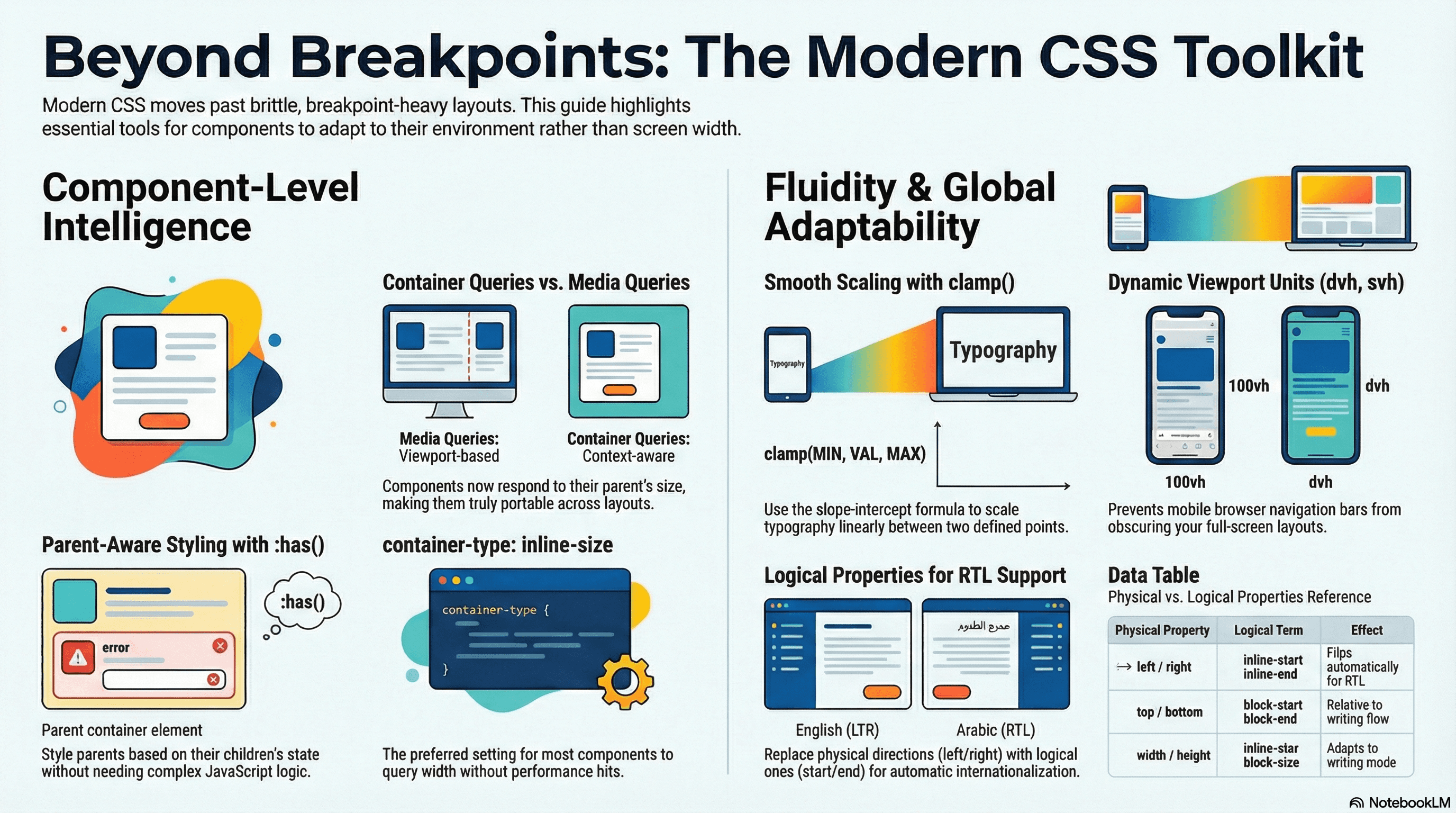
Overview
Responsive design has evolved far beyond viewport-width breakpoints and max-width: 768px media queries. The fundamental problem with viewport-based responsive design is that it ties component layout to global viewport state — making components context-aware in exactly one dimension (screen width) when what you really need is components that adapt to their available space regardless of where they're placed.
Modern CSS provides a toolkit that solves this properly: container queries let components respond to their container's size rather than the viewport; fluid typography with clamp() eliminates stepped breakpoints entirely; logical properties replace directional (left/right) with flow-relative (start/end) properties for internationalization; dynamic viewport units (dvh, svh, lvh) fix the mobile browser chrome problem that made 100vh unreliable; and the :has() selector enables parent-aware styles that were previously impossible in CSS.
How It Works
Container Queries vs Media Queries
The core limitation of media queries: they respond to viewport dimensions, not component context. A card component with @media (min-width: 768px) behaves identically whether it's in a full-width hero or a 300px sidebar — even though in the sidebar it should use its narrow layout at any viewport width.
Container queries solve this by creating a containment context on a parent element. Children can query that container's size:
/* Establish a containment context on the wrapper */
.card-wrapper {
  container-type: inline-size; /* enables width-based queries */
  container-name: card; /* optional, for unambiguous targeting */
}

/* The card queries its container, not the viewport */
@container card (min-width: 480px) {
  .card {
    display: flex;
    flex-direction: row;
  }
}
The browser measures the .card-wrapper element. The card's layout adapts based on the actual space available — the same component can stack in a 300px sidebar and flow side-by-side in a 800px main column on the same page at the same viewport width.
container-type values:
inline-size— enables queries on the inline (typically width) axis. Most common — prefer this oversizeunless you need height queriessize— enables queries on both axes. Has a performance cost because height containment requires the browser to skip children in layout
Fluid Typography — clamp() Mechanics
clamp(min, preferred, max) sets a value that scales smoothly between floor and ceiling. The preferred value drives the scaling:
font-size: clamp(1rem, 2.5vw, 1.5rem);
/*
  Below ~640px viewport: font is capped at 1rem
  Above ~960px viewport: font is capped at 1.5rem
  Between: scales linearly with viewport width (2.5vw)
*/
The problem with guessing the vw coefficient is that it's hard to know the transition points intuitively. The slope-intercept formula lets you define exact start and end breakpoints:
Given:
  minWidth = 320px,  maxWidth = 1240px  (viewport range)
  minSize  = 16px,   maxSize  = 24px    (size range)

slope     = (maxSize - minSize) / (maxWidth - minWidth)
          = (24 - 16) / (1240 - 320) = 8 / 920 ≈ 0.0087

intercept = minSize - slope × minWidth
          = 16 - 0.0087 × 320 ≈ 13.22

clamp() = clamp(16px, 13.22px + 0.87vw, 24px)
In CSS with custom properties:
:root {
  --fluid-min-width: 320;
  --fluid-max-width: 1240;
  --fluid-min-size: 16;
  --fluid-max-size: 24;

  --fluid-slope: calc(
    (var(--fluid-max-size) - var(--fluid-min-size)) /
      (var(--fluid-max-width) - var(--fluid-min-width))
  );
  --fluid-intercept: calc(
    var(--fluid-min-size) - var(--fluid-slope) * var(--fluid-min-width)
  );

  --text-body: clamp(
    calc(var(--fluid-min-size) * 1px),
    calc(var(--fluid-intercept) * 1px + var(--fluid-slope) * 100vw),
    calc(var(--fluid-max-size) * 1px)
  );
}
Logical Properties
Physical properties (margin-left, padding-right, border-top) are tied to physical directions. Logical properties (margin-inline-start, padding-inline-end, border-block-start) are relative to writing direction — they automatically flip for RTL text.
/* Physical — breaks in RTL */
.card {
  margin-left: 1rem;
  padding-right: 1.5rem;
}

/* Logical — works in LTR and RTL automatically */
.card {
  margin-inline-start: 1rem;
  padding-inline-end: 1.5rem;
}
The logical property axis mapping:
| Physical | Logical (LTR) | Logical term |
|---|---|---|
left / right | start / end | inline-start / inline-end |
top / bottom | start / end | block-start / block-end |
width | inline-size | |
height | block-size |
Shorthands: margin-inline = left+right, margin-block = top+bottom, inset-inline = left+right together.
Dynamic Viewport Units
100vh doesn't account for the mobile browser's retractable address bar and navigation controls. When the bars are visible, 100vh is taller than the visual viewport — content is hidden behind the controls.
The three new viewport units solve this:
| Unit | Description | Use when |
|---|---|---|
dvh / dvw | Dynamic — matches the visual viewport after browser chrome retracts | Layouts that should fill visible space |
svh / svw | Small — the viewport when browser chrome is fully visible (minimum viewport) | Critical content that must always be visible |
lvh / lvw | Large — the viewport when browser chrome is fully hidden (maximum viewport) | Decorative backgrounds, non-critical layouts |
The :has() Selector
:has() enables parent-aware and sibling-aware styles that were previously impossible in pure CSS. It selects an element if it contains a matching descendant:
/* Card with an image uses a different layout than one without */
.card:has(img) {
  display: grid;
  grid-template-columns: 200px 1fr;
}
.card:not(:has(img)) {
  display: block;
}

/* Form field shows error state when it contains an invalid input */
.field:has(input:invalid) label {
  color: var(--color-feedback-error);
}
.field:has(input:invalid) {
  border-color: var(--color-feedback-error);
}

/* Navigation with more than 5 items uses a different layout */
nav:has(li:nth-child(6)) {
  flex-wrap: wrap;
}
Code Examples
Container Query — Adaptive Product Card
// app/products/page.tsx — Server Component
// The same ProductCard component works in a full grid, a sidebar, and a featured slot
import Image from "next/image";

interface Product {
  id: string;
  name: string;
  price: number;
  imageUrl: string;
  description: string;
}

export function ProductCard({ product }: { product: Product }) {
  return (
    /*
      The .card-wrapper establishes the containment context.
      The card itself queries this wrapper, not the viewport.
      This component can be dropped into any layout column and
      will adapt to the available space automatically.
    */
    <div className="card-wrapper">
      <article className="card">
        <div className="card-image">
          <Image
            src={product.imageUrl}
            alt={product.name}
            fill
            sizes="(max-width: 640px) 100vw, 50vw"
            className="object-cover"
          />
        </div>
        <div className="card-content">
          <h2 className="card-title">{product.name}</h2>
          <p className="card-description">{product.description}</p>
          <p className="card-price">${product.price}</p>
          <button className="btn-primary">Add to cart</button>
        </div>
      </article>
    </div>
  );
}
/* globals.css */
/* Step 1: establish the containment context on the wrapper */
.card-wrapper {
container-type: inline-size;
container-name: product-card;
}
/* Step 2: default (narrow) layout — stack image above content */
.card {
display: grid;
grid-template-rows: auto 1fr;
border-radius: var(--radius-lg);
overflow: hidden;
background: var(--color-bg-surface);
box-shadow: var(--shadow-sm);
}
.card-image {
position: relative;
aspect-ratio: 4 / 3;
}
.card-content {
padding: var(--space-4);
display: flex;
flex-direction: column;
gap: var(--space-2);
}
.card-description {
display: none; /* hidden in narrow layout */
}
/* Step 3: wide layout — image beside content when container ≥ 480px */
@container product-card (min-width: 480px) {
.card {
grid-template-rows: unset;
grid-template-columns: 200px 1fr;
}
.card-image {
aspect-ratio: unset; /* let the grid track control height */
}
.card-description {
display: block; /* visible in wide layout */
}
}
/* Step 4: large layout — bigger image when container ≥ 700px */
@container product-card (min-width: 700px) {
.card {
grid-template-columns: 320px 1fr;
}
.card-content {
padding: var(--space-6);
}
}Fluid Type Scale
/* tokens/typography.css */
:root {
  /*
    A full fluid type scale using the slope-intercept method.
    Each size scales smoothly between 320px and 1240px viewport.
    Generated with Utopia.fyi — verify values with the tool rather than hand-calculating.
  */

  /* xs: 12px → 14px */
  --text-xs: clamp(0.75rem, 0.71rem + 0.18vw, 0.875rem);

  /* sm: 14px → 16px */
  --text-sm: clamp(0.875rem, 0.84rem + 0.18vw, 1rem);

  /* base: 16px → 18px */
  --text-base: clamp(1rem, 0.96rem + 0.18vw, 1.125rem);

  /* lg: 18px → 20px */
  --text-lg: clamp(1.125rem, 1.08rem + 0.18vw, 1.25rem);

  /* xl: 20px → 24px */
  --text-xl: clamp(1.25rem, 1.16rem + 0.36vw, 1.5rem);

  /* 2xl: 24px → 32px */
  --text-2xl: clamp(1.5rem, 1.32rem + 0.71vw, 2rem);

  /* 3xl: 30px → 48px */
  --text-3xl: clamp(1.875rem, 1.5rem + 1.61vw, 3rem);

  /* 4xl: 36px → 64px */
  --text-4xl: clamp(2.25rem, 1.71rem + 2.32vw, 4rem);
}
// components/Hero.tsx — Server Component
export function Hero({ title, subtitle }: { title: string; subtitle: string }) {
return (
<section className="hero">
{/*
font-size uses var(--text-4xl) — scales from 36px to 64px
across the viewport range. No media query breakpoints needed.
The heading is always proportionally sized to the viewport.
*/}
<h1 className="hero-title">{title}</h1>
<p className="hero-subtitle">{subtitle}</p>
</section>
);
}.hero {
padding-block: var(--space-12);
text-align: center;
max-inline-size: 60ch; /* logical equivalent of max-width */
margin-inline: auto; /* logical equivalent of margin: 0 auto */
}
.hero-title {
font-size: var(--text-4xl);
font-weight: var(--font-weight-bold);
line-height: var(--line-height-tight);
color: var(--color-text-primary);
}
.hero-subtitle {
font-size: var(--text-lg);
color: var(--color-text-secondary);
margin-block-start: var(--space-4); /* logical margin-top */
}Dynamic Viewport Units for Mobile Layouts
/* globals.css */

/* Hero that fills the visible viewport, not the full document viewport */
.full-viewport-hero {
  /*
    dvh: dynamic viewport height — excludes browser chrome when it's visible.
    The hero always fills what the user can actually see.

    ⚠️ dvh causes reflow when chrome retracts — use only for intentional full-screen layouts.
    For most layouts, svh (small viewport, chrome always visible) is safer.
  */
  min-block-size: 100dvh;
  display: grid;
  place-items: center;
}

/* Safe area for sticky footers — always visible regardless of chrome state */
.sticky-footer {
  position: sticky;
  inset-block-end: 0; /* logical bottom */

  /*
    svh: always uses the smaller (chrome-visible) viewport height.
    Content positioned relative to svh is always visible even with
    the browser's address bar showing.
  */
  min-block-size: calc(100svh - 90vh);
}

/* Tall decorative background that fills maximum possible space */
.decorative-bg {
  /*
    lvh: large viewport height (chrome hidden).
    Use for decorative elements that can safely be partially obscured.
  */
  block-size: 100lvh;
}
:has() for Context-Aware Components
/* globals.css */

/* Form field — error state driven by native validation */
.field:has(input:invalid:not(:placeholder-shown)) {
  --input-border: var(--color-feedback-error);
  --label-color: var(--color-feedback-error);
}

.field:has(input:invalid:not(:placeholder-shown)) .field-error-message {
  display: block; /* show error message when input is invalid and touched */
}

/* Navigation — collapse to hamburger when there are more than 5 links */
.nav-list:has(li:nth-child(6)) {
  /* More than 5 items: switch to overflow menu pattern */
  --nav-overflow: visible;
}
.nav-list:not(:has(li:nth-child(6))) .nav-overflow-toggle {
  display: none; /* hide hamburger when ≤ 5 items */
}

/* Article layout — widen when there's no aside */
.article-layout:not(:has(aside)) .article-content {
  max-inline-size: 72ch; /* wider reading width when no sidebar */
  margin-inline: auto;
}
.article-layout:has(aside) .article-content {
  max-inline-size: unset; /* constrained by grid when aside is present */
}

/* Card — image-adjacent layout when card contains an image */
.card:has(img) {
  display: grid;
  grid-template-columns: 160px 1fr;
  align-items: start;
}
// components/FormField.tsx — works with has() styles automatically
export function FormField({
label,
name,
type = "text",
required,
error,
}: {
label: string;
name: string;
type?: string;
required?: boolean;
error?: string;
}) {
return (
/*
The .field div is the :has() target.
When its input:invalid:not(:placeholder-shown), the CSS above
applies error styling automatically — no JS state needed.
*/
<div className="field">
<label htmlFor={name} className="field-label">
{label}
{required && <span aria-hidden="true"> *</span>}
</label>
<input
id={name}
name={name}
type={type}
required={required}
className="field-input"
aria-describedby={error ? `${name}-error` : undefined}
aria-invalid={error ? true : undefined}
/>
{/* This element is shown/hidden by :has() — no React state toggle */}
<p id={`${name}-error`} className="field-error-message" role="alert">
{error}
</p>
</div>
);
}Named Container Queries for Nested Layouts
/* Nested containment — outer and inner containers with explicit names */

.sidebar {
  container-type: inline-size;
  container-name: sidebar;
}

.main-content {
  container-type: inline-size;
  container-name: main;
}

/* Without names, @container targets the nearest ancestor container —
   this would break if .widget is nested inside another container */
@container sidebar (min-width: 250px) {
  .widget {
    /* applies only when inside .sidebar at ≥ 250px */
  }
}

@container main (min-width: 600px) {
  .widget {
    /* applies only when inside .main-content at ≥ 600px */
  }
}
Real-World Use Case
Design system component library. A <Card> component needs to be usable in: a full-width hero (≥1200px available), a 3-column product grid (~380px per card), a 2-column feature section (~600px per card), and a sidebar widget (~260px). With viewport media queries, the card would need context-specific overrides in every layout's stylesheet — the card component is no longer self-contained.
With container queries: the card defines its own responsive behavior at specific container widths (@container (min-width: 480px), @container (min-width: 700px)). Any layout that places the card in a container with container-type: inline-size gets adaptive behavior automatically. The component library ships a complete, self-describing component with no assumptions about global layout context.
Internationalisation for Arabic/Hebrew support. Migrating to logical properties (margin-inline-start, padding-inline-end, inset-inline) with dir="rtl" on the root element provides correct mirroring for right-to-left scripts without any component changes — the CSS logical properties automatically flip their physical direction based on the writing mode.
Common Mistakes / Gotchas
1. Setting container-type on the element you're styling, not its parent.
The element querying its container must be a descendant of the container — it can't query its own size. The containment context must be set on a wrapper element.
/* ❌ Wrong — .card can't query itself */
.card {
  container-type: inline-size;
}
@container (min-width: 480px) {
  .card {
    flex-direction: row;
  }
}

/* ✅ Correct — query the parent's size */
.card-wrapper {
  container-type: inline-size;
}
@container (min-width: 480px) {
  .card {
    flex-direction: row;
  }
}
2. Using container-type: size when inline-size is sufficient.
size queries both width and height. Height containment means the element's height doesn't depend on its children — the browser skips child measurement during layout, which has a performance cost. Use inline-size unless you specifically need height-based container queries.
3. Guessing vw values in clamp() without calculating transition points.
clamp(1rem, 4vw, 2rem) — at what viewport width does 4vw equal 1rem? (1rem = 16px, 4vw = 16px at 400px viewport). If your mobile breakpoint is 375px, the clamp is already at its minimum before small phones. Use the slope-intercept formula or a generator (Utopia.fyi) for precise values.
4. Not naming container contexts in nested layouts.
Unnamed @container queries target the nearest ancestor with container-type. In nested layouts where a component appears inside multiple containers, unnamed queries match the wrong container. Name all container contexts explicitly: container-name: sidebar.
5. Using dvh for non-full-screen elements.
dvh recalculates as the browser chrome appears and disappears — elements using dvh reflow when the user scrolls (as the address bar retracts). This is intentional for full-screen hero sections but jarring for inline elements. Use svh for elements that should be stable regardless of chrome state.
6. Forgetting that :has() requires careful specificity management.
:has() with complex selectors adds up specificity quickly. :has(.error-state .field input:invalid) has high specificity and will override lower-specificity rules in unexpected ways. Keep :has() selectors simple and test overrides carefully.
Summary
Container queries decouple component layout from global viewport state — components respond to their available space, not the screen size. They require container-type: inline-size on a parent wrapper, and explicit container-name values in nested layouts to prevent ambiguity. Fluid typography with clamp() eliminates stepped breakpoints by scaling values smoothly across a defined viewport range — use the slope-intercept formula for precision. Logical properties (inline-start/end, block-start/end) replace physical directional properties and automatically flip for RTL text. Dynamic viewport units (dvh, svh, lvh) provide reliable full-screen layouts on mobile where 100vh includes browser chrome. :has() enables parent-aware and context-aware styles — card layout based on presence of an image, form field error state from native validation — without JavaScript state management.
Interview Questions
Q1. What is the fundamental limitation of media queries for component-level responsive design?
Media queries respond to the viewport's dimensions, not the component's context. A card component with @media (min-width: 768px) { .card { flex-direction: row } } will apply that layout at 768px regardless of whether the card is in a 300px sidebar (where it shouldn't switch to row) or a 900px main column (where it should). You end up with context-specific overrides in every layout's stylesheet — the card component is no longer self-describing or portable. Container queries solve this by letting the card query the width of its parent container, making the same component definition work correctly in any layout without overrides.
Q2. Why can't you set container-type on the element that's doing the querying?
CSS container queries require the queried element to be a descendant of the container. An element cannot query its own intrinsic size because that would create a circular dependency: the element's layout depends on a query result that depends on the element's layout. The browser would need to resolve the layout to answer the query, and the answer would change the layout, requiring another resolution — an infinite loop. The rule is therefore structural: container-type on the parent, @container queries in the children.
Q3. How does the slope-intercept formula work for clamp() and why is it better than guessing the vw value?
The slope is the rate of size change per viewport-width unit: (maxSize - minSize) / (maxWidth - minWidth). The intercept is the size at viewport width zero: minSize - slope × minWidth. Together they define a linear equation size = slope × vw + intercept that passes exactly through the min-size/min-width point and the max-size/max-width point. Using these as the preferred value in clamp() guarantees the exact sizes at the exact viewport widths you specify. Guessing a vw value produces a fluid size but with unknown transition points — you don't know at what viewport width the clamp hits its min or max, making it hard to verify the design is correct at real device widths.
Q4. What are the three dynamic viewport units and when do you use each?
svh (small viewport height) represents the viewport when browser chrome is fully visible — the minimum usable viewport. Use it for elements that must always be visible regardless of chrome state. lvh (large viewport height) represents the viewport when browser chrome is fully hidden — the maximum viewport. Use it for decorative, non-critical content that can be partially obscured. dvh (dynamic viewport height) matches the actual visual viewport, recomputing as the chrome appears and disappears. Use it for full-screen hero sections that should fill the visible area — but note that it causes reflow when the chrome state changes, so it's only appropriate for intentional full-screen layouts.
Q5. What does :has() enable that wasn't possible with previous CSS selectors?
Previous CSS selectors could only select elements based on their ancestors, their own attributes, or their siblings that came after them. There was no way to select a parent based on its children, or a previous sibling based on what follows it. :has() provides "parent-aware" selection: .card:has(img) selects cards that contain images, enabling different layout for image vs non-image cards — purely in CSS. This was previously only achievable with JavaScript (detecting whether a child exists, then adding a class to the parent). It also enables context-driven form validation styling (.field:has(input:invalid) to style the entire field wrapper including its label), responsive navigation (:has(li:nth-child(6)) to detect overflow), and many other patterns that previously required JavaScript state management.
Q6. How do logical properties support internationalisation and what's the migration path from physical properties?
Logical properties map to physical directions based on the document's writing mode and direction. With dir="ltr", margin-inline-start maps to margin-left. With dir="rtl" (Arabic, Hebrew), margin-inline-start maps to margin-right — the same code automatically mirrors the layout. Physical properties (margin-left) always map to the same physical direction regardless of writing mode, requiring explicit overrides ([dir="rtl"] .el { margin-left: 0; margin-right: 1rem; }). For migration: replace directional physical properties with their logical equivalents systematically — left/right → inline-start/inline-end, top/bottom → block-start/block-end, width → inline-size, height → block-size. Use the inset-inline shorthand for left + right together and inset-block for top + bottom. Browser support for logical properties is universal in modern browsers.
Theming & Design Tokens
How design tokens create a single source of truth for visual values, how CSS custom properties enable runtime theming, how to structure a three-tier token hierarchy, and how to manage multi-brand token systems with Style Dictionary.
Scroll-Driven Animations
How the CSS scroll-driven animations specification replaces JavaScript scroll listeners and IntersectionObserver for animation purposes, linking CSS animations to scroll progress or element visibility with compositor-thread performance and no main-thread involvement.