Theming & Design Tokens
How design tokens create a single source of truth for visual values, how CSS custom properties enable runtime theming, how to structure a three-tier token hierarchy, and how to manage multi-brand token systems with Style Dictionary.
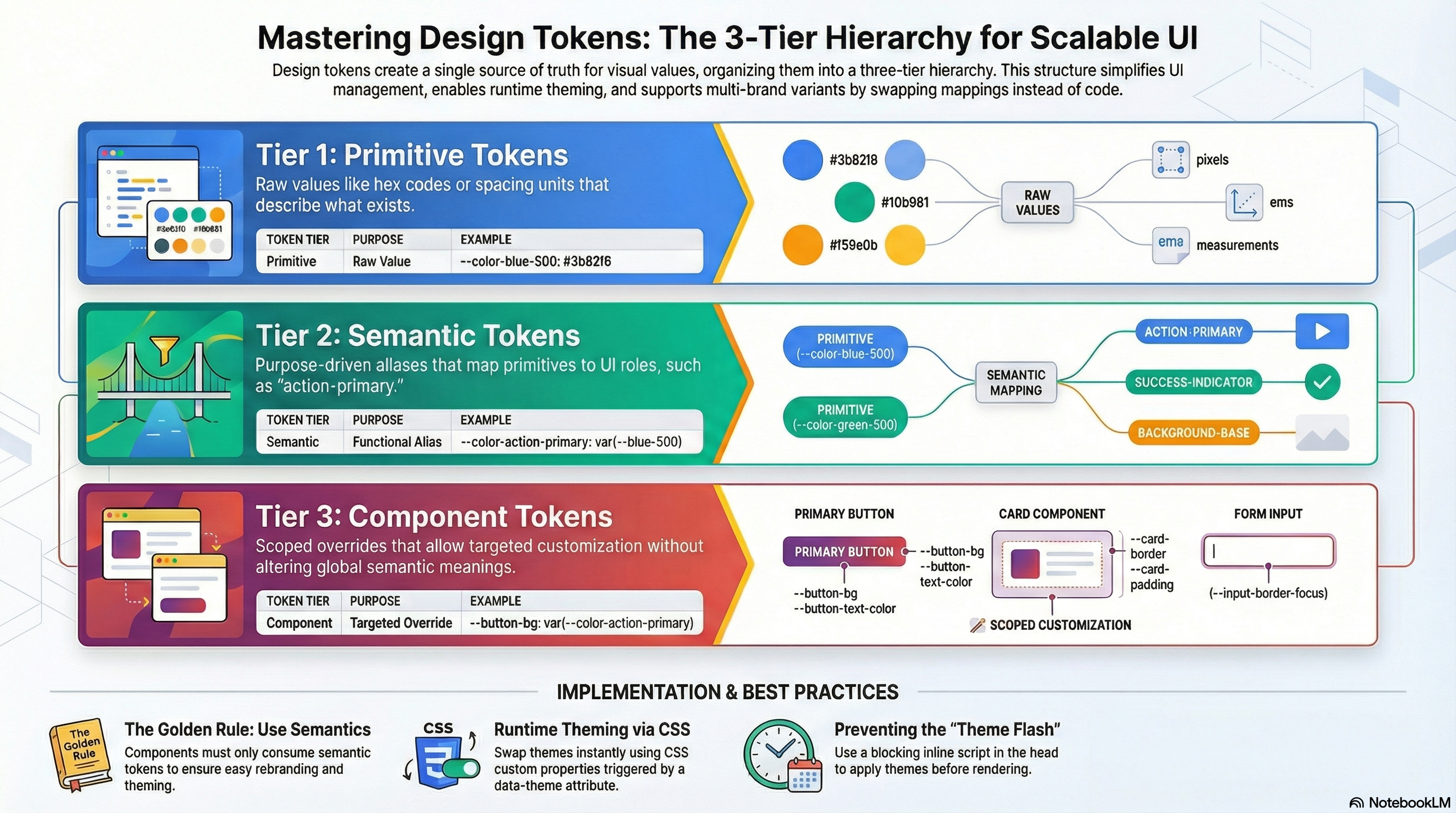
Overview
Design tokens are the named, platform-agnostic values that define your UI's visual language — colors, spacing, typography, border radii, shadows, and more. Instead of scattering #3b82f6 or 1.5rem across hundreds of component files, you define them once and reference them everywhere by name. When the design needs to change, you change one value in one place.
Theming builds on top of tokens by allowing those named values to swap at runtime — for dark mode, brand variants, user-customizable interfaces, or white-label products — without touching any component logic. The component always reads var(--color-action-primary). The theme controls what that resolves to.
Together, tokens and theming create a single source of truth, make design changes a one-line diff instead of a cross-repo hunt, and let designers and engineers speak the same language about visual properties.
How It Works
The Three-Tier Token Hierarchy
A well-structured token system has three layers. Each layer has a distinct role:
Tier 1 — Primitive tokens: Raw values with no semantic meaning. They describe what exists.
--color-blue-500: #3b82f6
--color-blue-700: #1d4ed8
--space-4: 1rem
--radius-md: 0.5rem
Tier 2 — Semantic tokens: Aliases that map primitives to purposes. They describe what a value is for. Components consume only semantic tokens, never primitives.
--color-action-primary:       var(--color-blue-500)
--color-action-primary-hover: var(--color-blue-700)
--color-text-primary:         var(--color-neutral-900)
Tier 3 — Component tokens (optional): Component-scoped overrides that allow targeted customization without touching semantic tokens.
--button-bg:           var(--color-action-primary)
--button-bg-hover:     var(--color-action-primary-hover)
--button-border-radius: var(--radius-md)
The layering rule: components always consume semantic tokens, never primitives. When you want to change what "primary action color" means — because the brand changed from blue to indigo — you update the semantic token's mapping. Every component that reads --color-action-primary gets the new value automatically.
When theming (dark mode, brand variants), you only change semantic token mappings — never primitives. Both light and dark themes share the same primitive tokens; they differ only in which primitive each semantic token resolves to.
How CSS Custom Properties Enable Runtime Theming
CSS custom properties cascade like any other CSS property. Setting them on a parent element makes them available to all descendants via var(). Changing which set is active is as simple as swapping a data-theme attribute:
[data-theme="light"]  --color-bg-base: var(--color-neutral-50)   → #f8fafc
[data-theme="dark"]   --color-bg-base: var(--color-neutral-900)  → #0f172a

Button:               background: var(--color-bg-base)   ← always the same reference
The component reads var(--color-bg-base). The theme determines the resolved value. Zero JavaScript in the component to handle theming — just CSS inheritance.
OKLCH for perceptually uniform colors. Modern color systems use OKLCH (oklch(lightness chroma hue)) instead of hex or HSL. OKLCH is perceptually uniform — the same chroma and lightness change produces the same perceived change regardless of hue. This makes generating accessible, balanced color ramps much more predictable than hex or HSL.
Code Examples
Complete Three-Tier Token Setup
/* tokens/primitives.css — raw values, no semantic meaning */
:root {
  /* Colors */
  --color-blue-400: #60a5fa;
  --color-blue-500: #3b82f6;
  --color-blue-600: #2563eb;
  --color-blue-700: #1d4ed8;

  --color-neutral-50: #f8fafc;
  --color-neutral-100: #f1f5f9;
  --color-neutral-200: #e2e8f0;
  --color-neutral-700: #334155;
  --color-neutral-800: #1e293b;
  --color-neutral-900: #0f172a;

  --color-red-500: #ef4444;
  --color-red-700: #b91c1c;
  --color-green-500: #22c55e;
  --color-green-700: #15803d;

  /* Spacing */
  --space-1: 0.25rem;
  --space-2: 0.5rem;
  --space-3: 0.75rem;
  --space-4: 1rem;
  --space-6: 1.5rem;
  --space-8: 2rem;
  --space-12: 3rem;

  /* Typography */
  --font-size-sm: 0.875rem;
  --font-size-base: 1rem;
  --font-size-lg: 1.125rem;
  --font-size-xl: 1.25rem;
  --font-size-2xl: 1.5rem;
  --font-weight-normal: 400;
  --font-weight-medium: 500;
  --font-weight-semibold: 600;
  --font-weight-bold: 700;
  --line-height-tight: 1.25;
  --line-height-normal: 1.5;

  /* Radii */
  --radius-sm: 0.25rem;
  --radius-md: 0.5rem;
  --radius-lg: 0.75rem;
  --radius-xl: 1rem;
  --radius-full: 9999px;

  /* Shadows */
  --shadow-sm: 0 1px 2px rgb(0 0 0 / 0.05);
  --shadow-md: 0 4px 6px -1px rgb(0 0 0 / 0.1), 0 2px 4px -2px rgb(0 0 0 / 0.1);
  --shadow-lg:
    0 10px 15px -3px rgb(0 0 0 / 0.1), 0 4px 6px -4px rgb(0 0 0 / 0.1);
}
/* tokens/semantic.css — purpose-mapped aliases */
/* Light theme (default) */
:root,
[data-theme="light"] {
/* Backgrounds */
--color-bg-base: var(--color-neutral-50);
--color-bg-surface: #ffffff;
--color-bg-muted: var(--color-neutral-100);
--color-bg-subtle: var(--color-neutral-200);
/* Text */
--color-text-primary: var(--color-neutral-900);
--color-text-secondary: var(--color-neutral-700);
--color-text-disabled: var(--color-neutral-400, #94a3b8);
/* Actions */
--color-action-primary: var(--color-blue-500);
--color-action-primary-hover: var(--color-blue-600);
--color-action-primary-text: #ffffff;
/* Feedback */
--color-feedback-error: var(--color-red-500);
--color-feedback-success: var(--color-green-500);
/* Borders */
--color-border: var(--color-neutral-200);
--color-border-focus: var(--color-blue-500);
}
/* Dark theme — only semantic mappings change */
[data-theme="dark"] {
--color-bg-base: var(--color-neutral-900);
--color-bg-surface: var(--color-neutral-800);
--color-bg-muted: #1a2234;
--color-bg-subtle: #243044;
--color-text-primary: var(--color-neutral-50);
--color-text-secondary: var(--color-neutral-200);
--color-text-disabled: var(--color-neutral-700);
--color-action-primary: var(--color-blue-400);
--color-action-primary-hover: var(--color-blue-500);
--color-action-primary-text: var(--color-neutral-900);
--color-feedback-error: #fca5a5; /* lighter red for dark bg */
--color-feedback-success: #86efac; /* lighter green for dark bg */
--color-border: var(--color-neutral-700);
--color-border-focus: var(--color-blue-400);
}/* tokens/components.css — optional component-level tokens */
/* Button tokens — allow targeted customization without semantic changes */
:root {
--button-bg: var(--color-action-primary);
--button-bg-hover: var(--color-action-primary-hover);
--button-text: var(--color-action-primary-text);
--button-radius: var(--radius-md);
--button-padding-x: var(--space-4);
--button-padding-y: var(--space-2);
--button-font-weight: var(--font-weight-medium);
/* Input tokens */
--input-border: var(--color-border);
--input-border-focus: var(--color-border-focus);
--input-bg: var(--color-bg-surface);
--input-text: var(--color-text-primary);
--input-radius: var(--radius-md);
}Components Consuming Tokens
// components/Button.tsx — consumes component tokens only
export function Button({
  children,
  variant = "primary",
  ...props
}: React.ButtonHTMLAttributes<HTMLButtonElement> & {
  variant?: "primary" | "ghost";
}) {
  return (
    <button
      style={
        variant === "ghost"
          ? {
              background: "transparent",
              color: "var(--color-action-primary)",
              border: "1px solid var(--color-border)",
            }
          : undefined
      }
      className={variant === "primary" ? "btn-primary" : "btn-ghost"}
      {...props}
    >
      {children}
    </button>
  );
}
/* globals.css */
.btn-primary {
background: var(--button-bg);
color: var(--button-text);
border-radius: var(--button-radius);
padding: var(--button-padding-y) var(--button-padding-x);
font-weight: var(--button-font-weight);
border: none;
cursor: pointer;
transition: background 150ms ease;
}
.btn-primary:hover {
background: var(--button-bg-hover);
}Theme Switching with React
// contexts/ThemeContext.tsx
"use client";

import {
  createContext,
  useContext,
  useEffect,
  useState,
  type ReactNode,
} from "react";

type Theme = "light" | "dark" | "system";

interface ThemeContextValue {
  theme: Theme;
  resolvedTheme: "light" | "dark"; // the actual applied theme ("system" resolved)
  setTheme: (theme: Theme) => void;
}

const ThemeContext = createContext<ThemeContextValue | null>(null);

export function ThemeProvider({ children }: { children: ReactNode }) {
  const [theme, setThemeState] = useState<Theme>("system");
  const [resolvedTheme, setResolvedTheme] = useState<"light" | "dark">("light");

  useEffect(() => {
    // Read stored preference or default to "system"
    const stored = (localStorage.getItem("theme") as Theme) || "system";
    setThemeState(stored);
  }, []);

  useEffect(() => {
    const systemDark = window.matchMedia("(prefers-color-scheme: dark)");

    function applyTheme(t: Theme) {
      const resolved =
        t === "system" ? (systemDark.matches ? "dark" : "light") : t;
      // Setting data-theme on <html> makes all semantic tokens cascade globally
      document.documentElement.setAttribute("data-theme", resolved);
      setResolvedTheme(resolved);
    }

    applyTheme(theme);

    // Update if OS preference changes while "system" is selected
    const handler = () => {
      if (theme === "system") applyTheme("system");
    };
    systemDark.addEventListener("change", handler);
    return () => systemDark.removeEventListener("change", handler);
  }, [theme]);

  function setTheme(t: Theme) {
    setThemeState(t);
    localStorage.setItem("theme", t);
  }

  return (
    <ThemeContext.Provider value={{ theme, resolvedTheme, setTheme }}>
      {children}
    </ThemeContext.Provider>
  );
}

export function useTheme() {
  const ctx = useContext(ThemeContext);
  if (!ctx) throw new Error("useTheme must be used inside ThemeProvider");
  return ctx;
}
// components/ThemeToggle.tsx
"use client";
import { useTheme } from "@/contexts/ThemeContext";
export function ThemeToggle() {
const { resolvedTheme, setTheme } = useTheme();
return (
<button
onClick={() => setTheme(resolvedTheme === "dark" ? "light" : "dark")}
aria-label={`Switch to ${resolvedTheme === "dark" ? "light" : "dark"} mode`}
className="theme-toggle"
>
{resolvedTheme === "dark" ? "☀" : "☾"}
</button>
);
}Multi-Brand Tokens with Style Dictionary
For large design systems serving multiple brands, a build tool like Style Dictionary generates platform-appropriate token output (CSS, JSON, iOS Swift, Android Kotlin) from a single source of truth:
// tokens/brands/acme/color.json — brand-specific primitive overrides
{
  "color": {
    "brand": {
      "50": { "value": "#eff6ff" },
      "500": { "value": "#3b82f6" },
      "600": { "value": "#2563eb" },
      "700": { "value": "#1d4ed8" }
    }
  }
}
// tokens/semantic/color.json — semantic mappings (shared across brands)
{
"color": {
"action": {
"primary": {
"value": "{color.brand.500}",
"comment": "Primary interactive color — buttons, links, focus rings"
},
"primary-hover": {
"value": "{color.brand.600}"
}
}
}
}// style-dictionary.config.js
import StyleDictionary from "style-dictionary";
// Generate tokens for each brand
const brands = ["acme", "globex", "initech"];
brands.forEach((brand) => {
const sd = new StyleDictionary({
source: [
`tokens/brands/${brand}/*.json`, // brand-specific primitives
"tokens/semantic/*.json", // shared semantic mappings
"tokens/components/*.json", // shared component tokens
],
platforms: {
css: {
transformGroup: "css",
prefix: "token",
buildPath: `dist/tokens/${brand}/`,
files: [
{
destination: "tokens.css",
format: "css/variables",
options: { outputReferences: true }, // emit var() references, not resolved values
},
],
},
},
});
sd.buildAllPlatforms();
});
// Output: dist/tokens/acme/tokens.css, dist/tokens/globex/tokens.css, etc.
// Each file contains CSS custom properties with brand-specific color values
// but identical semantic and component token names across all brandsPreventing Flash of Wrong Theme (FOBT)
Without a server-aware theme strategy, the page briefly renders in the default (light) theme before JavaScript reads localStorage and applies the correct theme. This causes a visible flash.
// app/layout.tsx — inject a blocking script to apply theme before first paint
export default function RootLayout({
  children,
}: {
  children: React.ReactNode;
}) {
  return (
    <html lang="en" suppressHydrationWarning>
      <head>
        {/*
          This script runs synchronously before anything renders.
          It reads localStorage and sets data-theme on <html> immediately.
          suppressHydrationWarning on <html> prevents React from warning
          about the data-theme mismatch between server and client.
        */}
        <script
          dangerouslySetInnerHTML={{
            __html: `
              (function() {
                try {
                  var stored = localStorage.getItem('theme');
                  var prefersDark = window.matchMedia('(prefers-color-scheme: dark)').matches;
                  var theme = stored === 'dark' || stored === 'light'
                    ? stored
                    : (prefersDark ? 'dark' : 'light');
                  document.documentElement.setAttribute('data-theme', theme);
                } catch (e) {}
              })();
            `,
          }}
        />
      </head>
      <body>{children}</body>
    </html>
  );
}
Real-World Use Case
White-label SaaS platform. The platform serves 12 enterprise clients, each with their own brand colors, border radius preferences, and typography. Without a token system, each brand required a separate CSS file with hundreds of overrides spread across component files — hard to maintain and prone to drift.
After migrating to a three-tier token system with Style Dictionary: primitive token files per brand (color.brand.500 = each brand's primary color), semantic tokens shared across all brands (same names, different primitive references), component tokens shared across all brands. Building a new brand requires only a tokens/brands/<newbrand>/color.json file. The component codebase is completely unchanged.
Dark mode rollout. All components consumed semantic tokens from the beginning. Adding dark mode was a single CSS block: a [data-theme="dark"] rule that redefined each semantic token's value. Zero component changes. The dark mode shipped in one PR that touched only the token CSS file.
Common Mistakes / Gotchas
1. Components consuming primitive tokens directly.
background: var(--color-blue-500) in a component bypasses the semantic layer. When the brand changes from blue to indigo, every component that used --color-blue-500 directly must be updated. Components should only consume semantic tokens.
2. Semantic tokens that map to hardcoded values instead of primitives.
--color-action-primary: #3b82f6 instead of --color-action-primary: var(--color-blue-500) breaks the reference chain. If you later rename or adjust --color-blue-500, --color-action-primary doesn't update. Always resolve semantic tokens to primitive tokens, not to raw values.
3. Applying theme via class instead of data-attribute.
Using .dark class for theming is common but creates a specificity conflict: .dark .btn must be more specific than .btn, leading to selector nesting everywhere. Using [data-theme="dark"] as an attribute selector has specificity (0, 1, 0) — the same as a class — but more clearly communicates intent and doesn't conflict with utility class patterns.
4. Not handling flash of wrong theme (FOBT).
If theme preference is stored in localStorage or a cookie and applied via JavaScript, there's a render-before-JS window where the default theme shows. The solution is a blocking inline <script> in <head> that reads the preference and applies data-theme synchronously, before the browser paints.
5. Defining too many component tokens too early.
Component tokens add indirection. They're valuable when you genuinely need to allow customization at the component level (a Button color override without changing global action color). Don't create them speculatively — add component tokens when a real customization need arises, not upfront for every component.
Summary
Design tokens create a named, platform-agnostic source of truth for visual values. A three-tier hierarchy — primitives (raw values), semantic tokens (purpose-mapped aliases), and component tokens (targeted overrides) — enables theming by changing only the semantic layer without touching components. CSS custom properties implement this in the browser via cascade inheritance: setting data-theme on a root element makes all theme-variant tokens available to all descendants. For multi-brand systems, Style Dictionary generates platform-appropriate token output from a single JSON source, letting brand customization live entirely in token files rather than component code. Prevent the flash of wrong theme with a blocking inline script that applies the stored theme preference synchronously before first paint.
Interview Questions
Q1. What is the three-tier design token hierarchy and why is each tier necessary?
Tier 1 (primitives) are raw values with no semantic meaning — --color-blue-500: #3b82f6. They describe what exists in the design palette. Tier 2 (semantic) maps primitives to purposes — --color-action-primary: var(--color-blue-500). They describe what a value is for. Tier 3 (component) provides scoped overrides — --button-bg: var(--color-action-primary). Each tier is necessary for different reasons: primitives let you change a color globally in one place; semantic tokens let components be agnostic about which specific color they use (only caring about purpose), making theming and rebranding a change to one file; component tokens enable targeted customization without modifying global semantics — you can make one product's button color different without affecting every other use of the primary action color.
Q2. How do CSS custom properties enable runtime theming and what are their limitations?
CSS custom properties cascade through the DOM like any other CSS property. Defining them on a parent element (like [data-theme="dark"] on <html>) makes them available to all descendants via var(). Switching the theme is as simple as changing document.documentElement.dataset.theme. No JavaScript runs inside components — the CSS cascade handles the token resolution automatically. The limitations: custom properties can't be used in media query conditions (you can't write @media (min-width: var(--breakpoint-md))), they don't scope to a subtree in the way Shadow DOM does (they cascade and inherit normally), and they can't be type-checked at compile time without additional tooling like vanilla-extract's createThemeContract.
Q3. What is Style Dictionary and what problem does it solve at scale?
Style Dictionary is a build tool that takes design tokens defined in JSON (or YAML) and generates platform-appropriate output files — CSS custom properties, JSON for JavaScript, Swift constants for iOS, XML for Android. It solves two problems at scale: first, maintaining a single source of truth for tokens that need to be used on multiple platforms (web, iOS, Android, design tools). Without it, teams duplicate token values across platforms and they drift. Second, for multi-brand systems, it allows brand-specific primitive overrides to flow through the same semantic and component token structure, generating separate CSS files per brand from a shared semantic definition. Changes to semantic token structure propagate automatically to all brands.
Q4. Why should components consume semantic tokens and never primitive tokens?
Components that consume primitive tokens (var(--color-blue-500)) are coupled to a specific color. When the brand palette changes — blue becomes indigo, the primary action becomes purple — every component using --color-blue-500 must be individually updated. Components that consume semantic tokens (var(--color-action-primary)) only care about purpose, not specific value. Changing the brand is then a change to the semantic token's mapping: --color-action-primary: var(--color-indigo-500). Every component automatically gets the new color. The semantic layer is also what makes theming possible — dark mode simply redefines which primitive --color-action-primary resolves to, without any component changes.
Q5. What causes the flash of wrong theme (FOBT) and how do you prevent it?
FOBT occurs because theme preference is stored in localStorage (a client-side API) and applied via JavaScript — but JavaScript runs after the browser has already received the HTML and begun painting. There's a window between "HTML received" and "JS executed" where the page renders in the default theme. The solution is a blocking inline <script> tag in <head> — before any CSS or HTML content is parsed — that synchronously reads localStorage and applies the correct data-theme attribute. Because it's synchronous and in <head>, it runs before the browser paints any content. The suppressHydrationWarning on <html> prevents React from warning about the data-theme attribute being set by the script before React's hydration.
Q6. How would you structure tokens for a product that needs both light/dark mode and multi-brand support simultaneously?
The cleanest architecture separates brand (color palette shape) from mode (light/dark variant of that palette). Primitive tokens are brand-specific: each brand defines its own --color-brand-500, --color-brand-600, etc. Semantic tokens reference primitives and have mode variants: [data-theme="light"] { --color-action-primary: var(--color-brand-500) } and [data-theme="dark"] { --color-action-primary: var(--color-brand-400) }. Brand is applied by loading the brand-specific primitive token file (or class). Mode is applied via data-theme attribute. The two dimensions are independent — you can have Brand A in dark mode, Brand B in light mode, or any combination. Style Dictionary builds separate primitive token files per brand but shares the semantic and component token definitions across all brands.
Animation Performance
How the browser's compositor thread enables jank-free animations with transform and opacity, why other properties cause layout or paint, how to use the Web Animations API, and how to handle reduced-motion preferences.
Responsive Design Strategies
Container queries, fluid typography with clamp(), logical properties, dynamic viewport units, and the :has() selector — the modern CSS tools that replace brittle breakpoint-heavy layouts.