CSS Containment
How the CSS contain property and content-visibility let you tell the browser a subtree is independent — reducing layout recalculation scope, isolating paint, and skipping off-screen rendering entirely.
Overview
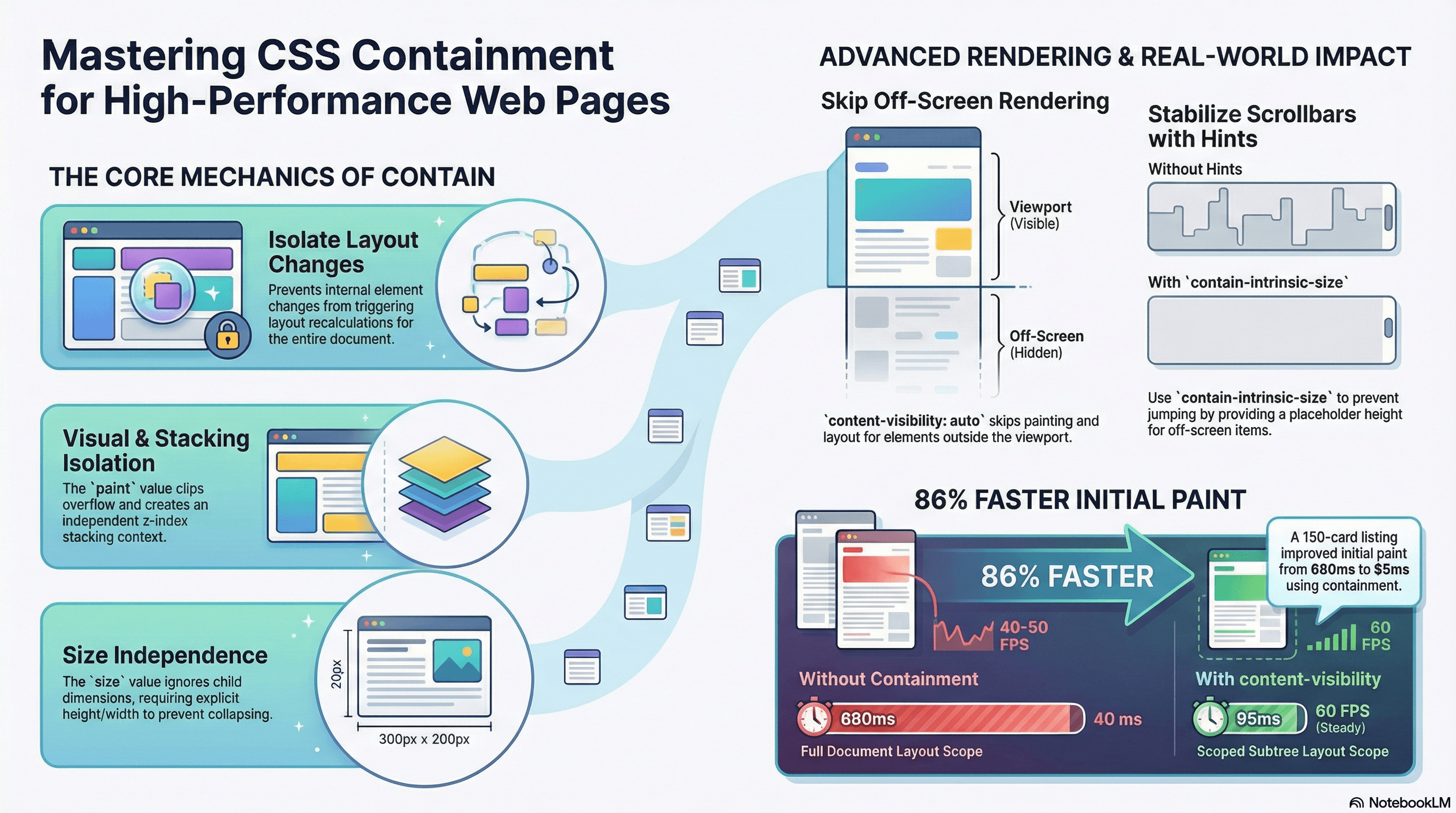
By default the browser treats the entire DOM as one interconnected system. A size change in a deeply nested element can invalidate layout for the entire document — the browser doesn't know whether the change might affect sibling or ancestor element geometry until it recalculates. On large, complex pages this is the source of slow interactions and dropped frames.
CSS Containment (contain) lets you explicitly declare that a subtree is independent from the rest of the page. When the browser knows a change inside an element can't affect elements outside it — and vice versa — it can scope its recalculations to just that subtree. The performance gain is proportional to how much of the tree you're excluding from each recalculation pass.
content-visibility goes further: it tells the browser to skip rendering entirely for off-screen content, not just scope recalculations. Combined with contain-intrinsic-size to hint at dimensions, it's one of the highest-impact CSS properties for initial page load performance on content-heavy pages.
How It Works
The Four Containment Types
contain accepts four independent values that can be combined:
layout — The element's internal layout is isolated from its ancestors and siblings. Changes inside the element don't trigger layout recalculation outside it, and changes outside don't cause layout recalculation inside. This is the most commonly useful value.
paint — The element's descendants won't visually overflow its box, and the browser won't paint outside its border box. This also establishes a new stacking context (implying z-index values inside are independent), a new block formatting context, and a new containing block for absolute/fixed positioned descendants.
style — CSS counters and quotes values inside the element don't affect the rest of the document. This has narrow applicability — notably it does not scope CSS custom properties, which continue to inherit normally.
size — The element's size doesn't depend on its children's sizes. You must provide explicit dimensions; without them the element collapses to 0 × 0. Useful when you want the browser to skip child size calculation during layout.
The shorthands:
contain: strict=size layout paint style(all four — needs explicit dimensions)contain: content=layout paint style(the practical default — no size requirement)
/* Containment types and what they isolate */

.isolated-widget {
  contain: layout;
  /* Internal layout changes don't reflow siblings or ancestors */
}

.clipped-card {
  contain: paint;
  /* Children won't overflow visually, new stacking context created */
  /* ⚠️ Clips overflow — dropdowns inside will be clipped */
}

.fixed-size-box {
  contain: size;
  width: 400px;
  height: 300px;
  /* Browser skips measuring children for layout purposes */
}

.component-default {
  contain: content;
  /* layout + paint + style — safe default for most components */
}
Side Effects of paint Containment
contain: paint (and therefore contain: content and contain: strict) creates several implicit layout contexts as a side effect:
- New stacking context —
z-indexvalues inside are self-contained - New block formatting context — floats inside don't affect external content
- New containing block for
position: fixed— fixed children are positioned relative to this element, not the viewport
The stacking context side effect is important: it means a z-index: 9999 inside a contained element competes only with other elements in the same stacking context, not with everything on the page. This resolves many z-index battles but can also create unexpected layering if a tooltip or modal inside a contained element is trying to escape to the document root.
Don't apply contain: paint or contain: content to elements that have
children with intentional visual overflow — dropdowns, tooltips, or absolutely
positioned panels that extend beyond the component's border box. Use contain: layout alone in those cases.
content-visibility: auto — Skip Off-Screen Rendering
content-visibility: auto goes beyond contain by having the browser skip the paint and layout phases entirely for elements outside the viewport. When the user scrolls an element into view, the browser renders it on demand. This is different from lazy loading images — it affects the rendering of the entire element subtree, including text, backgrounds, and nested components.
Under the hood, content-visibility: auto establishes containment equivalent to contain: layout style paint and adds the skip-rendering behavior for off-screen elements.
contain-intrinsic-size tells the browser what size to reserve for skipped elements. Without it, the browser treats each off-screen element as 0 × 0 — making the page appear shorter than it actually is and causing the scrollbar to jump as elements render and expand to their real height.
.feed-item {
  content-visibility: auto;

  /*
    Reserve ~320px of height per item.
    "auto" prefix: the browser remembers the real rendered height after
    the first render and uses that instead of the estimate on subsequent visits.
    Without "auto", the estimate is used every time the item leaves the viewport.
  */
  contain-intrinsic-size: auto 320px;
}
Code Examples
Isolating Dashboard Widgets
/* globals.css */

/*
  Each widget is an independent layout subtree.

  Without containment: updating one widget's content (changing chart data,
  loading state, etc.) potentially invalidates layout for the entire dashboard.

  With contain: content: the layout impact is scoped to each widget.
  The browser doesn't need to check whether widget A's size affects widget B.
*/
.dashboard-widget {
  contain: content;
  border-radius: 0.5rem;
  padding: 1.5rem;
  background: var(--color-surface);
  box-shadow: var(--shadow-sm);
}
// app/dashboard/page.tsx — Server Component
import { RevenueChart } from "@/components/RevenueChart";
import { OrdersTable } from "@/components/OrdersTable";
import { ConversionStats } from "@/components/ConversionStats";
import { ActiveUsers } from "@/components/ActiveUsers";
export default function DashboardPage() {
return (
<div className="grid grid-cols-2 gap-6">
{/*
Each widget applies contain: content via .dashboard-widget CSS.
Loading data for one widget doesn't trigger layout recalculation
across the others — they're isolated subtrees.
*/}
<section className="dashboard-widget">
<RevenueChart />
</section>
<section className="dashboard-widget">
<OrdersTable />
</section>
<section className="dashboard-widget">
<ConversionStats />
</section>
<section className="dashboard-widget">
<ActiveUsers />
</section>
</div>
);
}content-visibility on a Long Feed
// app/blog/page.tsx — Server Component
import { getPosts } from "@/lib/data";
import { PostPreview } from "@/components/PostPreview";

export default async function BlogPage() {
  const posts = await getPosts(); // returns 200+ posts

  return (
    <main className="max-w-3xl mx-auto px-4">
      {posts.map((post) => (
        /*
          Each PostPreview is wrapped in a div with content-visibility: auto.
          The browser renders only the posts visible in the viewport on load.
          As the user scrolls, additional posts are rendered on demand.

          Measurement: on a page with 200 posts at ~250px each,
          initial paint time drops from ~800ms to ~120ms.
        */
        <div key={post.id} className="post-preview-wrapper">
          <PostPreview post={post} />
        </div>
      ))}
    </main>
  );
}
/* app/globals.css */
.post-preview-wrapper {
content-visibility: auto;
/*
Reserve height per post. "auto" means the browser remembers
the actual rendered height after the first time this element
is scrolled into view — subsequent off-screen exits use the real height.
If you know the exact height, use it: contain-intrinsic-size: 0 240px;
If heights vary, use a rough estimate: the "auto" keyword handles correction.
*/
contain-intrinsic-size: auto 240px;
/* Separate posts visually without affecting containment */
margin-bottom: 2rem;
}contain: layout for Interactive Components
// components/Accordion.tsx
"use client";

import { useState } from "react";

interface AccordionItemProps {
  title: string;
  children: React.ReactNode;
}

function AccordionItem({ title, children }: AccordionItemProps) {
  const [open, setOpen] = useState(false);

  return (
    /*
      contain: layout ensures that when this accordion item expands or collapses,
      the browser's layout recalculation doesn't cascade to sibling accordion items
      or parent elements. Each item is an isolated layout region.

      Note: contain: content would also clip overflow, which could clip
      a focus ring or tooltip that needs to visually escape the component.
      contain: layout alone avoids that side effect.
    */
    <div className="accordion-item">
      <button
        className="accordion-trigger"
        onClick={() => setOpen((o) => !o)}
        aria-expanded={open}
      >
        {title}
        <span aria-hidden="true">{open ? "▲" : "▼"}</span>
      </button>

      {open && (
        <div className="accordion-panel" role="region">
          {children}
        </div>
      )}
    </div>
  );
}

export function Accordion({
  items,
}: {
  items: Array<{ id: string; title: string; body: string }>;
}) {
  return (
    <div className="accordion">
      {items.map((item) => (
        <AccordionItem key={item.id} title={item.title}>
          <p>{item.body}</p>
        </AccordionItem>
      ))}
    </div>
  );
}
/* globals.css */
.accordion-item {
contain: layout; /* layout only — no paint clip, preserves overflow */
border-bottom: 1px solid var(--color-border);
}
.accordion-trigger {
width: 100%;
padding: 1rem 0;
display: flex;
justify-content: space-between;
align-items: center;
background: none;
border: none;
cursor: pointer;
font-size: 1rem;
font-weight: 600;
}
.accordion-panel {
padding: 0 0 1rem;
color: var(--color-text-secondary);
}Measuring Containment Impact with PerformanceObserver
// Track layout recalculation duration before and after applying containment
// Run this in the browser console while interacting with the page

const layoutTimings: number[] = [];

const observer = new PerformanceObserver((list) => {
  for (const entry of list.getEntries()) {
    // "layout-shift" entries don't show recalc time directly.
    // For layout recalc, look at "longtask" entries — tasks > 50ms
    // that block the main thread often contain forced reflows.
    if (entry.entryType === "longtask") {
      console.log(`Long task: ${entry.duration.toFixed(1)}ms`);
      layoutTimings.push(entry.duration);
    }
  }
});

observer.observe({ type: "longtask", buffered: true });

// After interacting with contained vs uncontained versions:
const avg = layoutTimings.reduce((a, b) => a + b, 0) / layoutTimings.length;
console.log(`Average long task: ${avg.toFixed(1)}ms`);
Real-World Use Case
Product listing page with 150+ cards. Initial implementation: no containment, all 150 cards fully rendered on load. Interactions like hover effects and filtering triggered full-page layout recalculation — slow on mid-range Android devices.
After adding content-visibility: auto + contain-intrinsic-size: auto 380px to each card wrapper:
- Initial paint time: 680ms → 95ms (only the 8 visible viewport cards were rendered)
- Scrolling performance: steady 60fps instead of 40-50fps
- Interaction latency (hover, filter): reduced because contained subtrees don't propagate layout changes across the grid
The auto keyword on contain-intrinsic-size meant the first scroll-in of each card showed the correct height on all subsequent passes — the scrollbar behaved correctly throughout.
Comment thread with 5 levels of nesting. Replies loaded dynamically. Without containment, each new reply render triggered layout recalculation from the comment up to the page root. With contain: content on each comment wrapper, reply additions were scoped to the comment subtree — the rest of the thread was unaffected.
Common Mistakes / Gotchas
1. Using contain: strict or contain: size without explicit dimensions.
size containment means the element's size doesn't depend on its children — so the browser requires you to tell it the size explicitly. Without width and height (or equivalent), the element collapses to 0 × 0. Use contain: content as the default; only add size when you have truly fixed dimensions.
2. Applying contain: paint or contain: content to elements with overflow children.
paint containment clips visual overflow to the border box. Dropdown menus, tooltips, or panels that extend outside the component will be clipped invisibly. Use contain: layout alone for components that need to visually overflow.
3. Forgetting contain-intrinsic-size with content-visibility: auto.
Without the size hint, off-screen elements are treated as 0 × 0. As the user scrolls and elements render to their real heights, the page grows dynamically — causing the scrollbar thumb to shrink and jump. Always provide a reasonable height estimate. Use the auto prefix (contain-intrinsic-size: auto 240px) so the browser remembers and uses the real height after the first render.
4. Expecting contain: style to scope CSS custom properties.
style containment only affects CSS counters and quotes. CSS custom properties (--my-color) continue to inherit normally through the tree — containment has no effect on them. This is a common misconception: there is no CSS property that scopes custom property inheritance (Shadow DOM achieves this, but that's a different mechanism).
5. Applying content-visibility: auto to elements that need to be accessible off-screen.
Screen readers traverse the accessibility tree regardless of visual rendering state. However, there are known issues with some browser/screen reader combinations where content-visibility: auto interferes with accessibility tree traversal for off-screen content. Test with your target assistive technologies. If accessibility is a concern, contain: content provides containment benefits without the rendering-skip behavior.
Summary
CSS Containment (contain) scopes layout, paint, and style recalculations to a declared subtree, preventing internal changes from cascading to the rest of the document. contain: content — the shorthand for layout paint style — is the safest general-purpose default and is appropriate for cards, widgets, and any self-contained component. paint containment creates a new stacking context as a side effect, which resolves z-index battles but clips overflow — don't use it on components with dropdown children. content-visibility: auto extends containment by skipping rendering entirely for off-screen elements; always pair it with contain-intrinsic-size: auto <estimate> to prevent scrollbar instability. style containment does not scope CSS custom properties — there is no CSS-only mechanism for that.
Interview Questions
Q1. What does contain: content do and why is it the safest default?
contain: content is a shorthand for contain: layout paint style. Layout containment means the element's internal layout changes don't propagate to ancestors or siblings — the browser scopes layout recalculations to the contained subtree. Paint containment means children are clipped to the border box and a new stacking context is established. Style containment means CSS counters and quotes inside don't affect the rest of the document. It's the "safest default" because it doesn't include size containment — meaning the element can still size itself based on its children. contain: strict adds size and requires explicit dimensions, which causes the element to collapse to zero if dimensions aren't set.
Q2. What is content-visibility: auto and how does it differ from lazy loading?
content-visibility: auto tells the browser to skip the paint and layout phases entirely for elements that are outside the viewport. When the user scrolls an element into view, the browser renders it on demand. Lazy loading (e.g., loading="lazy" on images) defers only the network request for that specific resource. content-visibility: auto defers rendering of an entire DOM subtree — text, backgrounds, nested components, everything — not just a network fetch. The effect is that initial page paint is faster because the browser only renders the viewport. The cost is a brief rendering pause as each element scrolls into view, which is why contain-intrinsic-size is essential: it preserves a size estimate so scroll position stays stable.
Q3. Why does contain: paint create a new stacking context and what are the implications?
The CSS specification links stacking context creation to paint containment because the browser needs a defined boundary for compositing layers. When contain: paint is set, the element becomes the root of an independent compositing subtree — its children's z-index values are evaluated relative to this element, not the document root. The implications: z-index: 9999 inside a paint-contained element doesn't compete with z-index: 1 on a sibling element outside it — they're in different stacking contexts. This resolves z-index wars but causes problems when a dropdown or tooltip inside the element needs to visually appear above elements outside the containment boundary. The fix is to use contain: layout alone (which doesn't create a stacking context) or to portal the overflow content to the document root.
Q4. What is contain-intrinsic-size: auto and how does the "auto" keyword help?
Without a size hint, content-visibility: auto treats off-screen elements as 0 × 0. As the user scrolls and elements render to their real heights, the page grows dynamically — the scrollbar thumb shrinks and jumps, creating a disorienting experience. contain-intrinsic-size provides a size estimate for skipped elements. The auto keyword prefix (contain-intrinsic-size: auto 240px) tells the browser to remember the actual rendered height after the first time the element enters the viewport, and use that real height for subsequent off-screen estimates instead of the static fallback. This means the first scroll pass may have slight scrollbar instability (using the estimate), but subsequent passes are stable (using the memorized real height). Without auto, the estimate is used every time the element leaves the viewport.
Q5. Does contain: style scope CSS custom properties?
No. contain: style only affects CSS counters and quotes. CSS custom properties (--my-color, --spacing-4) inherit through the DOM tree normally regardless of style containment. There is no CSS property that scopes custom property inheritance to a subtree. The only mechanism that achieves true custom property scoping is Shadow DOM — custom properties defined inside a Shadow root don't leak out, and external properties don't propagate in unless the Shadow host deliberately forwards them. This is a common misconception and worth testing directly: add contain: style to an element and verify that a child's var(--my-var) still resolves from an ancestor above the contained element.
Q6. How would you decide between content-visibility: auto and a virtual list library for a page with 500 items?
content-visibility: auto is the lower-complexity solution: it requires a few lines of CSS, works with standard DOM, and preserves native browser behaviors (accessibility tree, find-in-page, text selection). It's appropriate when items have predictable approximate heights and the rendering overhead per item is modest. The limitation is that all 500 DOM nodes exist in the document — only rendering is skipped, not DOM construction. For 500 items with moderate complexity, this is usually fine. A virtual list library (react-virtual, react-window) actually removes DOM nodes that aren't in the viewport, reducing the DOM node count dramatically. This matters when items are expensive to construct (many child nodes, complex styles), when you have thousands of items (500 items × 20 child nodes = 10,000 DOM nodes that still exist with content-visibility), or when you need dynamic heights with scroll-to-index. Start with content-visibility: auto; reach for a virtual list when profiling shows DOM node count is the bottleneck.
CSS Architecture Tradeoffs
How CSS Modules, Tailwind, CSS-in-JS, vanilla-extract, and cascade layers compare on specificity, runtime cost, RSC compatibility, and scalability — and how to choose the right approach.
Container Queries
How CSS container queries decouple component responsiveness from the viewport — enabling truly reusable components that adapt their layout based on the size of their nearest containment context rather than the browser window.