Authentication Flows
OAuth 2.0 Authorization Code Flow with PKCE, JWT structure and storage tradeoffs, session cookies, refresh token rotation with reuse detection, silent refresh, and Auth.js v5 integration in Next.js App Router.
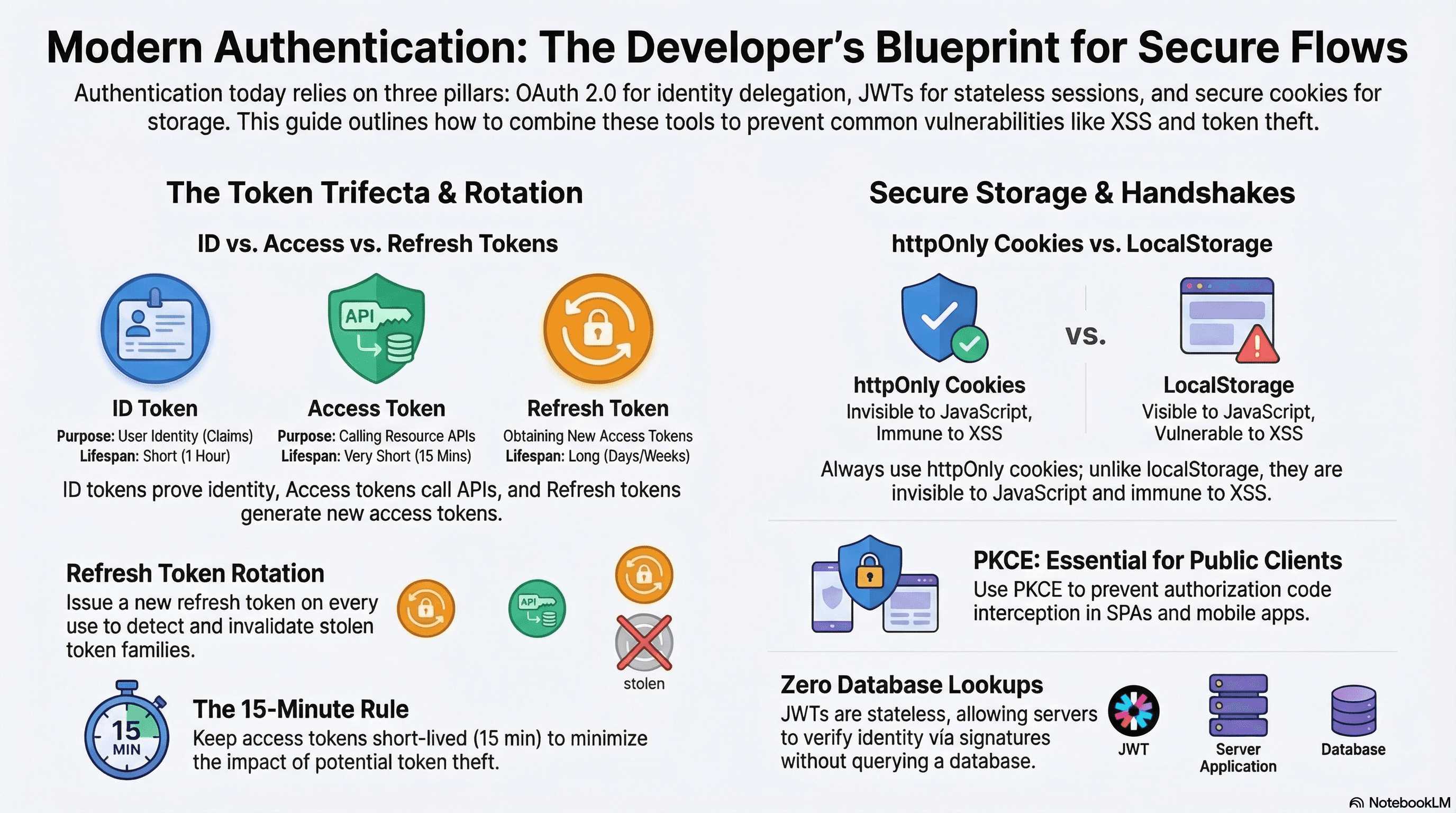
Overview
Authentication is the process of verifying who a user is. Three patterns dominate web applications: OAuth 2.0 (delegating login to Google, GitHub, etc.), JWTs (stateless, self-contained tokens), and session cookies (server-managed state). In practice, most applications combine all three — OAuth for the login handshake, a session cookie for the web app, and JWTs for API access.
Understanding each flow mechanically — not just how to configure a library — is essential for diagnosing auth bugs, making correct security decisions, and integrating systems that don't share a database.
How It Works
OAuth 2.0 Authorization Code Flow with PKCE
OAuth 2.0 is an authorization framework — it delegates login to a trusted third-party provider. The Authorization Code Flow is the correct flow for web applications. PKCE (Proof Key for Code Exchange) is a required extension for public clients (SPAs, mobile apps) where the client_secret cannot be stored securely.
1. Client generates:
   code_verifier  = random 43–128 char string
   code_challenge = BASE64URL(SHA256(code_verifier))

2. Client redirects to provider:
   GET /authorize?
     client_id=...
     redirect_uri=https://app.example.com/api/auth/callback
     response_type=code
     scope=openid email profile
     state=<random nonce>
     code_challenge=<BASE64URL(SHA256(verifier))>
     code_challenge_method=S256

3. User authenticates with provider; provider redirects back:
   GET /api/auth/callback?code=<auth_code>&state=<nonce>

4. Server exchanges code for tokens (back-channel):
   POST /token
     code=<auth_code>
     code_verifier=<original verifier>
     client_id=...
     redirect_uri=...
   ← { access_token, id_token, refresh_token, expires_in }

5. Server validates id_token, upserts user, creates local session
PKCE prevents authorization code interception attacks: if the code is stolen in transit, the attacker can't exchange it without the code_verifier — which only the original client holds.
id_token vs access_token vs refresh_token
These are frequently conflated:
| Token | Purpose | Audience | Expiry |
|---|---|---|---|
id_token | Prove user identity (who they are) | Your app | Short (1h) |
access_token | Call APIs on behalf of the user | Resource servers | Short (15m–1h) |
refresh_token | Obtain new access tokens without re-login | Auth server only | Long (days–weeks) |
The id_token is a JWT containing identity claims (sub, email, name). Your server verifies its signature and uses the sub (subject) as a stable user identifier. The access_token is passed to resource APIs as Bearer <token> — it should not be stored long-term. The refresh_token is used server-side to silently refresh the access token — it must never be exposed to client-side JavaScript.
JWTs — Structure and Storage
A JWT has three parts, base64url-encoded and joined by dots:
eyJhbGciOiJIUzI1NiIsInR5cCI6IkpXVCJ9   ← Header: algorithm + type
.eyJ1c2VySWQiOiJ1c3JfMTIzIiwiZXhwIjoxNzAwMDAwfQ  ← Payload: claims
.HMAC_SHA256_signature                              ← Signature: integrity proof
The server verifies the signature using a secret (HMAC) or public key (RSA/ECDSA). Valid signature means the token wasn't tampered with. No database lookup required — JWTs are stateless.
JWT storage options and tradeoffs:
| Storage | XSS risk | CSRF risk | Notes |
|---|---|---|---|
localStorage | ⚠️ High (JS readable) | ✅ None | JS can steal on XSS |
sessionStorage | ⚠️ High | ✅ None | Lost on tab close |
httpOnly cookie | ✅ None (JS can't read) | ⚠️ Requires SameSite | Best option for web apps |
| Memory (React state) | ✅ None | ✅ None | Lost on refresh — needs silent refresh |
httpOnly cookies are the correct storage for web apps: JavaScript cannot read them (mitigates XSS token theft), and SameSite=Lax prevents CSRF.
Code Examples
OAuth 2.0 with PKCE — Route Handlers
// app/api/auth/login/route.ts
import { cookies } from "next/headers";
import { redirect } from "next/navigation";

export async function GET() {
  // Generate PKCE verifier and challenge
  const verifier = generateCodeVerifier(); // 43–128 random chars
  const challenge = await generateCodeChallenge(verifier); // BASE64URL(SHA256(verifier))
  const state = crypto.randomUUID();

  const cookieStore = await cookies();

  // Store verifier and state server-side — never expose verifier to client JS
  cookieStore.set("pkce_verifier", verifier, {
    httpOnly: true,
    secure: true,
    sameSite: "lax",
    maxAge: 60 * 10, // 10 minutes to complete the flow
    path: "/api/auth",
  });
  cookieStore.set("oauth_state", state, {
    httpOnly: true,
    secure: true,
    sameSite: "lax",
    maxAge: 60 * 10,
    path: "/api/auth",
  });

  const params = new URLSearchParams({
    client_id: process.env.GITHUB_CLIENT_ID!,
    redirect_uri: `${process.env.NEXT_PUBLIC_APP_URL}/api/auth/callback`,
    response_type: "code",
    scope: "openid email profile",
    state,
    code_challenge: challenge,
    code_challenge_method: "S256",
  });

  redirect(`https://github.com/login/oauth/authorize?${params}`);
}

// Helpers
function generateCodeVerifier(): string {
  const array = new Uint8Array(32);
  crypto.getRandomValues(array);
  return btoa(String.fromCharCode(...array))
    .replace(/\+/g, "-")
    .replace(/\//g, "_")
    .replace(/=/g, "");
}

async function generateCodeChallenge(verifier: string): Promise<string> {
  const encoder = new TextEncoder();
  const data = encoder.encode(verifier);
  const digest = await crypto.subtle.digest("SHA-256", data);
  return btoa(String.fromCharCode(...new Uint8Array(digest)))
    .replace(/\+/g, "-")
    .replace(/\//g, "_")
    .replace(/=/g, "");
}
// app/api/auth/callback/route.ts
import { cookies } from "next/headers";
import { redirect } from "next/navigation";
import { db } from "@/lib/db";
export async function GET(req: Request) {
const { searchParams } = new URL(req.url);
const code = searchParams.get("code");
const returnedState = searchParams.get("state");
const cookieStore = await cookies();
const storedState = cookieStore.get("oauth_state")?.value;
const codeVerifier = cookieStore.get("pkce_verifier")?.value;
// Validate state parameter — prevents CSRF on the OAuth flow itself
if (!returnedState || returnedState !== storedState) {
return new Response("Invalid state — possible CSRF attack", {
status: 403,
});
}
if (!code || !codeVerifier) {
return new Response("Missing code or verifier", { status: 400 });
}
// Exchange code for tokens (back-channel — client_secret never leaves server)
const tokenRes = await fetch("https://github.com/login/oauth/access_token", {
method: "POST",
headers: { "Content-Type": "application/json", Accept: "application/json" },
body: JSON.stringify({
client_id: process.env.GITHUB_CLIENT_ID,
client_secret: process.env.GITHUB_CLIENT_SECRET,
code,
redirect_uri: `${process.env.NEXT_PUBLIC_APP_URL}/api/auth/callback`,
code_verifier: codeVerifier, // PKCE: proves we initiated the request
}),
});
const { access_token } = await tokenRes.json();
// Fetch user identity
const userRes = await fetch("https://api.github.com/user", {
headers: { Authorization: `Bearer ${access_token}` },
});
const githubUser = await userRes.json();
// Upsert user and create local session
const user = await db.user.upsert({
where: { githubId: String(githubUser.id) },
create: {
githubId: String(githubUser.id),
email: githubUser.email,
name: githubUser.name,
},
update: { name: githubUser.name },
});
// Clear PKCE cookies — single-use
cookieStore.delete("pkce_verifier");
cookieStore.delete("oauth_state");
// Set session cookie
cookieStore.set("__Host-session", user.id, {
httpOnly: true,
secure: true,
sameSite: "lax",
path: "/",
maxAge: 60 * 60 * 24 * 7, // 7 days
});
redirect("/dashboard");
}JWT Issuance and Verification
// lib/jwt.ts
import { SignJWT, jwtVerify } from "jose"; // jose: pure JS JWT library

const JWT_SECRET = new TextEncoder().encode(process.env.JWT_SECRET!);

export interface JwtPayload {
  userId: string;
  role: "user" | "admin";
}

// Sign a short-lived access token
export async function signAccessToken(payload: JwtPayload): Promise<string> {
  return new SignJWT(payload)
    .setProtectedHeader({ alg: "HS256" })
    .setIssuedAt()
    .setExpirationTime("15m") // 15-minute access token
    .setAudience("api.example.com")
    .setIssuer("auth.example.com")
    .sign(JWT_SECRET);
}

// Verify and decode — throws on invalid/expired token
export async function verifyAccessToken(token: string): Promise<JwtPayload> {
  const { payload } = await jwtVerify(token, JWT_SECRET, {
    audience: "api.example.com",
    issuer: "auth.example.com",
  });
  return payload as unknown as JwtPayload;
}
Refresh Token Rotation with Reuse Detection
Short-lived access tokens require a refresh mechanism. Refresh token rotation issues a new refresh token on every use — and detects reuse (a sign of theft):
// lib/auth/refresh.ts
import { db } from "@/lib/db";
import { signAccessToken } from "@/lib/jwt";

export async function rotateRefreshToken(incomingToken: string) {
  const stored = await db.refreshToken.findUnique({
    where: { token: incomingToken },
    include: { user: true },
  });

  // Token not found — already used or never existed
  if (!stored) {
    throw new Error("Invalid refresh token");
  }

  if (stored.used) {
    // Reuse detected — a token that was already consumed is being presented again.
    // This indicates the token family was compromised. Revoke ALL tokens for this user.
    await db.refreshToken.deleteMany({ where: { userId: stored.userId } });
    throw new Error("Refresh token reuse detected — all sessions revoked");
  }

  if (new Date() > stored.expiresAt) {
    await db.refreshToken.delete({ where: { id: stored.id } });
    throw new Error("Refresh token expired");
  }

  // Mark old token as used (invalidate it)
  await db.refreshToken.update({
    where: { id: stored.id },
    data: { used: true },
  });

  // Issue new refresh token
  const newRefreshToken = crypto.randomUUID();
  await db.refreshToken.create({
    data: {
      token: newRefreshToken,
      userId: stored.userId,
      used: false,
      expiresAt: new Date(Date.now() + 30 * 24 * 60 * 60 * 1000), // 30 days
    },
  });

  // Issue new access token
  const accessToken = await signAccessToken({
    userId: stored.userId,
    role: stored.user.role,
  });

  return { accessToken, refreshToken: newRefreshToken };
}
// app/api/auth/refresh/route.ts
import { cookies } from "next/headers";
import { NextResponse } from "next/server";
import { rotateRefreshToken } from "@/lib/auth/refresh";
export async function POST() {
const cookieStore = await cookies();
const refreshToken = cookieStore.get("__Host-refresh")?.value;
if (!refreshToken) {
return NextResponse.json({ error: "No refresh token" }, { status: 401 });
}
try {
const { accessToken, refreshToken: newRefreshToken } =
await rotateRefreshToken(refreshToken);
// Rotate the refresh token cookie
cookieStore.set("__Host-refresh", newRefreshToken, {
httpOnly: true,
secure: true,
sameSite: "lax",
path: "/api/auth", // only sent to auth endpoints
maxAge: 30 * 24 * 60 * 60,
});
// Access token returned in response body — stored in memory by the client
return NextResponse.json({ accessToken });
} catch (err) {
// Reuse detected or token invalid — clear cookies and force re-login
cookieStore.delete("__Host-refresh");
cookieStore.delete("__Host-session");
return NextResponse.json(
{ error: (err as Error).message },
{ status: 401 },
);
}
}Silent Refresh — Keeping Access Tokens Fresh
The client stores the access token in memory (React state or a module variable) and silently refreshes it before expiry:
// lib/auth/token-manager.ts
"use client"; // this module only runs in the browser

let accessToken: string | null = null;
let refreshTimer: ReturnType<typeof setTimeout> | null = null;
const REFRESH_BEFORE_EXPIRY_MS = 60_000; // refresh 1 minute before expiry

export function setAccessToken(token: string, expiresInSeconds: number) {
  accessToken = token;

  if (refreshTimer) clearTimeout(refreshTimer);

  // Schedule silent refresh before the token expires
  const refreshIn = expiresInSeconds * 1000 - REFRESH_BEFORE_EXPIRY_MS;
  if (refreshIn > 0) {
    refreshTimer = setTimeout(silentRefresh, refreshIn);
  }
}

export function getAccessToken(): string | null {
  return accessToken;
}

async function silentRefresh(): Promise<void> {
  try {
    const res = await fetch("/api/auth/refresh", { method: "POST" });
    if (!res.ok) {
      // Refresh failed — redirect to login
      accessToken = null;
      window.location.href = "/login";
      return;
    }
    const { accessToken: newToken } = await res.json();
    setAccessToken(newToken, 15 * 60); // new 15-minute token
  } catch {
    accessToken = null;
    window.location.href = "/login";
  }
}

// Authenticated fetch — automatically attaches the in-memory access token
export async function authFetch(
  url: string,
  init?: RequestInit,
): Promise<Response> {
  const token = getAccessToken();
  return fetch(url, {
    ...init,
    headers: {
      ...init?.headers,
      ...(token && { Authorization: `Bearer ${token}` }),
    },
  });
}
Auth.js v5 — Next.js App Router Integration
Auth.js (formerly NextAuth) v5 is the standard library for authentication in Next.js App Router applications:
npm install next-auth@beta// auth.ts — root of the repo, next to app/
import NextAuth from "next-auth";
import GitHub from "next-auth/providers/github";
import Google from "next-auth/providers/google";
import { PrismaAdapter } from "@auth/prisma-adapter";
import { db } from "@/lib/db";
export const { handlers, auth, signIn, signOut } = NextAuth({
adapter: PrismaAdapter(db),
providers: [
GitHub({
clientId: process.env.AUTH_GITHUB_ID!,
clientSecret: process.env.AUTH_GITHUB_SECRET!,
}),
Google({
clientId: process.env.AUTH_GOOGLE_ID!,
clientSecret: process.env.AUTH_GOOGLE_SECRET!,
}),
],
session: { strategy: "database" }, // or "jwt" for stateless
callbacks: {
session({ session, user }) {
session.user.id = user.id; // extend session with user.id
return session;
},
},
});// app/api/auth/[...nextauth]/route.ts
import { handlers } from "@/auth";
export const { GET, POST } = handlers;// app/dashboard/page.tsx — Server Component
import { auth } from "@/auth";
import { redirect } from "next/navigation";
export default async function DashboardPage() {
const session = await auth();
if (!session) redirect("/login");
return <h1>Welcome, {session.user?.name}</h1>;
}// components/SignInButton.tsx — Client Component
"use client";
import { signIn, signOut } from "next-auth/react";
export function SignInButton({ isLoggedIn }: { isLoggedIn: boolean }) {
return isLoggedIn ? (
<button onClick={() => signOut()}>Sign Out</button>
) : (
<button onClick={() => signIn("github")}>Sign In with GitHub</button>
);
}Auth.js v5 uses the AUTH_SECRET environment variable (replacing
NEXTAUTH_SECRET) and works natively in Edge Runtime. Always set
AUTH_SECRET to a random 32-byte secret generated with openssl rand -base64 32.
Real-World Use Case
Multi-tenant SaaS. GitHub OAuth handles login (Authorization Code + PKCE). Auth.js manages the OAuth dance, user upsert, and database session. A 15-minute JWT access token is issued for API calls — stored in memory on the client, never in localStorage. The refresh token (30-day expiry) lives in an httpOnly; SameSite=Lax; __Host-refresh cookie. Silent refresh runs 60 seconds before expiry. Refresh token rotation with reuse detection catches stolen tokens — if a refresh token is used twice, all sessions for that user are revoked immediately and they're redirected to login. Admin routes use a separate short-lived __Host-admin token issued after 2FA verification, Strict SameSite to prevent it from being carried on any cross-site request.
Common Mistakes / Gotchas
1. Storing JWTs in localStorage. XSS can steal tokens from localStorage. Use httpOnly cookies — JavaScript can't read them even if XSS code runs.
2. Not validating the state parameter. Skipping state validation on the OAuth callback opens a CSRF vector where an attacker tricks a user into completing an OAuth flow with the attacker's account (account takeover). Always validate.
3. Long-lived access tokens without rotation. A 24-hour JWT cannot be revoked. If stolen, the attacker has 24 hours. Keep access tokens at 15 minutes. Use refresh token rotation to maintain session length without long access token lifetimes.
4. Not handling the silent refresh race condition. If the access token expires and two concurrent API calls trigger silentRefresh simultaneously, you'll get two refresh requests. The second will fail (the first already rotated the token). Use a single in-flight refresh promise:
let refreshPromise: Promise<void> | null = null;

async function silentRefresh(): Promise<void> {
  if (refreshPromise) return refreshPromise; // deduplicate concurrent refresh calls
  refreshPromise = doRefresh().finally(() => {
    refreshPromise = null;
  });
  return refreshPromise;
}
5. Conflating authentication with authorization. OAuth tells you who the user is. What they're allowed to do is a separate concern. After OAuth, check the user's roles in your own database.
Summary
OAuth 2.0 Authorization Code Flow with PKCE is the correct flow for web apps — it protects against authorization code interception and doesn't require storing client_secret on the client. JWTs should be short-lived (15 minutes) and stored in httpOnly cookies — never localStorage. Refresh tokens enable long sessions without long access token lifetimes; rotation with reuse detection provides automatic session revocation on token theft. Silent refresh keeps the in-memory access token fresh without user interaction. Auth.js v5 handles the OAuth dance, user upsert, session management, and database adapter integration for Next.js App Router applications.
Interview Questions
Q1. What is PKCE and why is it required for OAuth in public clients?
PKCE (Proof Key for Code Exchange) prevents authorization code interception attacks. A public client — a browser-based SPA or mobile app — cannot securely store a client_secret (it's in the source code or the binary, accessible to attackers). Without PKCE, an intercepted authorization code could be exchanged for tokens by anyone. With PKCE, the client generates a random code_verifier, computes code_challenge = SHA256(verifier), and sends the challenge in the authorization request. When exchanging the code for tokens, it sends the original verifier. The authorization server verifies that SHA256(verifier) === challenge — only the original requester possesses the verifier, making a stolen code useless to an attacker who doesn't have it.
Q2. What is refresh token rotation and how does reuse detection work?
Refresh token rotation issues a new refresh token every time an old one is used to obtain a new access token. The old token is immediately invalidated. If a refresh token is presented that has already been used (marked as consumed in the database), it indicates the token family was compromised — either the original legitimate client's token was stolen and used, or the stolen token was used first and the legitimate client is now presenting the "used" token. The correct response to reuse detection is to revoke the entire token family — all refresh tokens for that user — forcing re-authentication. This limits the damage of a stolen refresh token: the attacker gets at most one new access token before the legitimate client's next refresh attempt triggers detection and revokes everything.
Q3. What is the difference between id_token, access_token, and refresh_token in an OAuth/OIDC flow?
The id_token (OpenID Connect) is a JWT that proves user identity — it contains claims about who the user is (sub, email, name). Your server validates its signature and uses sub as the stable user identifier. It's for your application to consume, not to send to resource APIs. The access_token is a credential for calling APIs on the user's behalf — it's presented as Bearer <token> to resource servers. It should be short-lived. The refresh_token is a long-lived credential used only to obtain new access tokens from the authorization server — it must never leave your server, never be sent to resource APIs, and must be stored securely (in an httpOnly cookie or encrypted server-side store).
Q4. Why should JWTs be stored in httpOnly cookies rather than localStorage?
localStorage is readable by any JavaScript running on the same origin. If your application has an XSS vulnerability — even via a third-party script, a compromised dependency, or a DOM injection bug — an attacker can execute localStorage.getItem("token") and exfiltrate the JWT. The attacker then has the token until it expires, regardless of what the user does. httpOnly cookies cannot be read by JavaScript — the document.cookie API and localStorage API have no access to them. The browser attaches them automatically to requests to the matching domain. An XSS attacker cannot read the token, only trigger requests that carry it — a much narrower attack surface, further constrained by SameSite=Lax.
Q5. What is the silent refresh race condition and how do you prevent it?
When an access token expires, the client's silent refresh fires. If two concurrent API calls both detect the expired token and both call the refresh endpoint, the first call succeeds and rotates the refresh token. The second call presents the now-invalid old refresh token — rotation's reuse detection kicks in, revokes all sessions, and logs the user out. The fix: deduplicate concurrent refresh calls using a shared promise. When the first refresh starts, store the in-flight promise in a module-level variable. Any subsequent refresh call checks if a refresh is already in flight and awaits the existing promise instead of starting a new one. Once the promise resolves, all callers get the new token from the single successful refresh.
Q6. How does Auth.js v5 differ from NextAuth v4 for Next.js App Router?
Auth.js v5 is a complete rewrite designed for the App Router's server-first model. Key differences: the configuration is in a root auth.ts file that exports auth(), signIn(), signOut(), and handlers — instead of v4's [...nextauth]/route.ts configuration. auth() can be called directly in Server Components, Server Actions, Route Handlers, and middleware without additional setup. It runs in Edge Runtime by default, making it suitable for Middleware-based session checks without cold start overhead. AUTH_SECRET replaces NEXTAUTH_SECRET. The session strategy defaults to "database" (Prisma/Drizzle adapter) or "jwt" for stateless deployments. Client-side useSession() and signIn()/signOut() from next-auth/react continue to work as before.
SameSite Cookie Modes
Strict, Lax, and None — how each mode controls cross-site cookie sending, the Partitioned (CHIPS) attribute for third-party contexts, __Host- and __Secure- cookie prefixes, the eTLD+1 same-site calculation, and how Chrome 80 and Safari ITP changed the defaults.
REST vs GraphQL vs tRPC
A practical comparison of REST, GraphQL, and tRPC — N+1 prevention with DataLoader, persisted queries, OpenAPI spec generation with zod-openapi, tRPC subscriptions, REST versioning strategies, and a decision framework for choosing the right paradigm.