CORS & Preflight
How the browser's Cross-Origin Resource Sharing mechanism works — simple vs non-simple requests, the preflight handshake, credentialed requests, Access-Control-Expose-Headers, Private Network Access, the null origin edge case, and a DevTools debugging workflow.
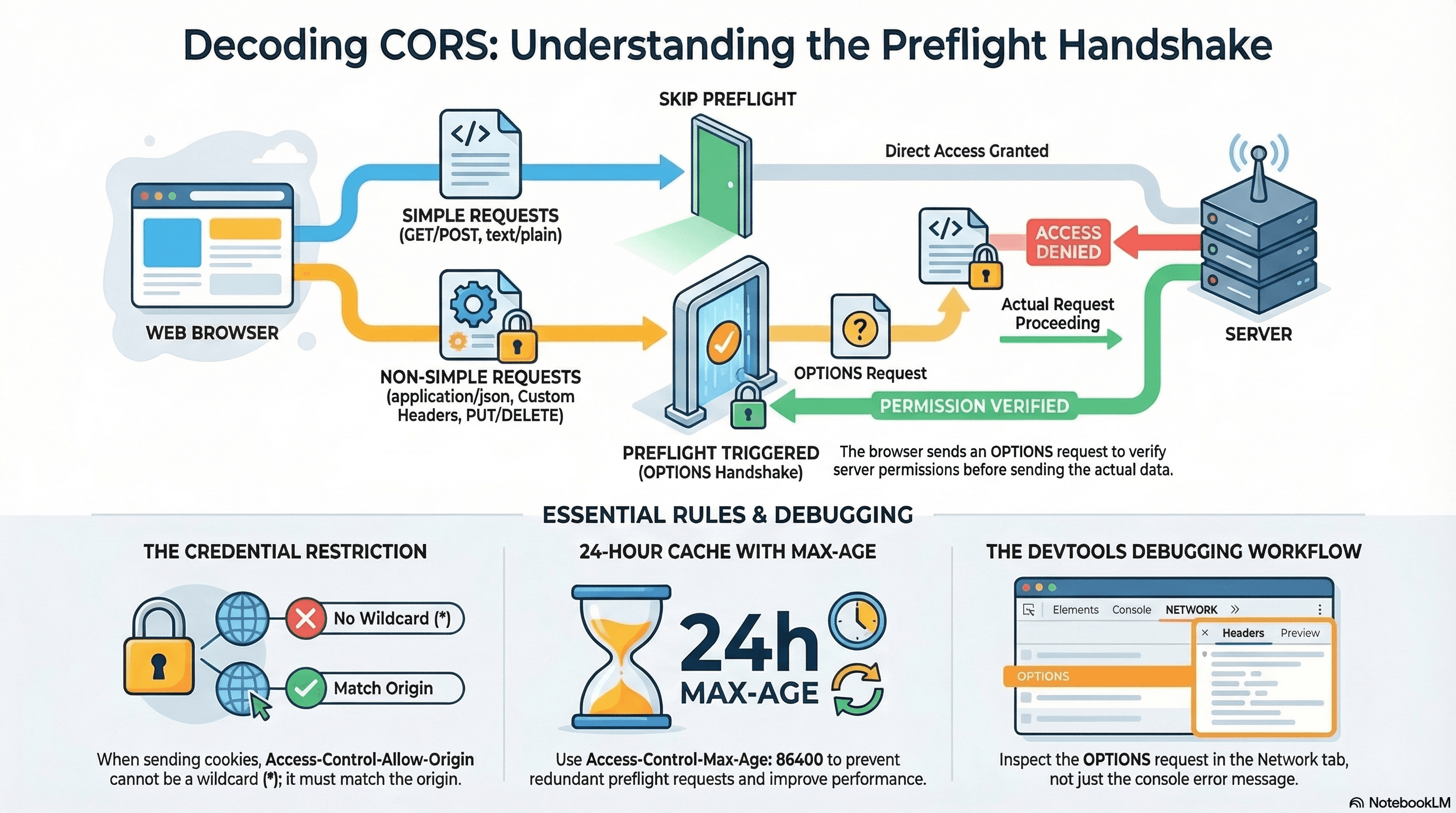
Overview
CORS (Cross-Origin Resource Sharing) is a browser security mechanism that restricts which cross-origin HTTP requests a page is allowed to make. When your frontend at https://app.example.com calls an API at https://api.example.com, the browser enforces CORS — even though both are on example.com.
A preflight request is an automatic OPTIONS request the browser sends before a non-simple cross-origin request to ask the server: "Are you willing to accept this?" If the server doesn't respond correctly, the browser blocks the real request and logs a CORS error — even if the server actually processed it fine.
CORS errors are browser-enforced, not server-enforced. The server may return 200 OK and the browser still blocks the response if the headers are wrong.
How It Works
Same-Origin Policy and CORS
The Same-Origin Policy (SOP) is the underlying browser rule: scripts from one origin may not read responses from a different origin. Two URLs share an origin only if all three of scheme, host, and port match exactly.
https://app.example.com   vs   https://api.example.com  → DIFFERENT origin (different host)
https://app.example.com   vs   http://app.example.com   → DIFFERENT origin (different scheme)
https://app.example.com   vs   https://app.example.com:8080 → DIFFERENT origin (different port)
https://app.example.com   vs   https://app.example.com  → SAME origin ✓
CORS is the mechanism that allows servers to relax SOP for specific trusted origins by adding Access-Control-Allow-Origin headers. Without CORS headers, SOP blocks the response — the request reaches the server, but the browser hides the response from the script.
Simple vs Non-Simple Requests
A request is simple when it meets all of:
- Method:
GET,POST, orHEAD - Headers: only
Accept,Accept-Language,Content-Language,Content-Type,Range Content-Type: onlytext/plain,multipart/form-data,application/x-www-form-urlencoded
Simple requests are sent directly — no preflight. Any other combination triggers a preflight.
Preflight triggers:
- Any custom header (
Authorization,X-Api-Key,X-Request-Id) Content-Type: application/json- Methods:
PUT,PATCH,DELETE
The Preflight Flow
Browser                                    Server
   |                                          |
   |── OPTIONS /api/orders ─────────────────>|
   |   Origin: https://app.example.com        |
   |   Access-Control-Request-Method: POST    |
   |   Access-Control-Request-Headers: Authorization, Content-Type
   |                                          |
   |<── 204 No Content ──────────────────────|
   |   Access-Control-Allow-Origin: https://app.example.com
   |   Access-Control-Allow-Methods: GET, POST, PUT, DELETE
   |   Access-Control-Allow-Headers: Authorization, Content-Type
   |   Access-Control-Max-Age: 86400          |
   |                                          |
   |── POST /api/orders ──────────────────── >|   (actual request)
   |   Authorization: Bearer <token>          |
   |   Content-Type: application/json         |
Access-Control-Max-Age: 86400 caches the preflight result for 24 hours — the browser skips the OPTIONS request on subsequent calls to the same endpoint within that window.
Code Examples
Correct CORS Middleware in Next.js
// middleware.ts
import { NextRequest, NextResponse } from "next/server";

const ALLOWED_ORIGINS = new Set([
  "https://app.example.com",
  "https://admin.example.com",
]);

export function middleware(req: NextRequest) {
  const origin = req.headers.get("origin") ?? "";
  const isAllowed = ALLOWED_ORIGINS.has(origin);

  // Handle preflight
  if (req.method === "OPTIONS") {
    return new NextResponse(null, {
      status: 204,
      headers: {
        "Access-Control-Allow-Origin": isAllowed ? origin : "",
        "Access-Control-Allow-Methods":
          "GET, POST, PUT, PATCH, DELETE, OPTIONS",
        "Access-Control-Allow-Headers":
          "Content-Type, Authorization, X-Request-Id",
        "Access-Control-Max-Age": "86400",
        ...(isAllowed && { "Access-Control-Allow-Credentials": "true" }),
      },
    });
  }

  const response = NextResponse.next();

  if (isAllowed) {
    response.headers.set("Access-Control-Allow-Origin", origin);
    response.headers.set("Access-Control-Allow-Credentials", "true");
    // Expose custom response headers the client needs to read
    response.headers.set(
      "Access-Control-Expose-Headers",
      "X-Request-Id, X-RateLimit-Remaining",
    );
  }

  return response;
}

export const config = { matcher: "/api/:path*" };
Access-Control-Expose-Headers — Reading Custom Response Headers
By default, CORS only allows the browser to read safe response headers: Cache-Control, Content-Language, Content-Length, Content-Type, Expires, Last-Modified, Pragma. Any custom header the server sets is invisible to client JavaScript unless explicitly exposed:
// app/api/orders/route.ts
import { NextResponse } from "next/server";

export async function POST(req: Request) {
  const order = await createOrder(await req.json());

  return NextResponse.json(order, {
    headers: {
      "Access-Control-Allow-Origin": "https://app.example.com",
      // Without this, client JS cannot read X-Request-Id or X-Order-Id
      "Access-Control-Expose-Headers": "X-Request-Id, X-Order-Id",
      "X-Request-Id": crypto.randomUUID(),
      "X-Order-Id": order.id,
    },
  });
}
// Client: read the exposed header
const response = await fetch("https://api.example.com/api/orders", {
method: "POST",
headers: {
"Content-Type": "application/json",
Authorization: `Bearer ${token}`,
},
body: JSON.stringify(orderData),
});
// Without Expose-Headers, both of these return null
const requestId = response.headers.get("X-Request-Id"); // ✅ readable
const orderId = response.headers.get("X-Order-Id"); // ✅ readableCredentialed Requests — Cookies Across Origins
By default, cross-origin fetch does not send cookies. To include cookies in a cross-origin request, both sides must opt in:
// Client: opt in to sending credentials (cookies, Authorization headers, TLS certs)
const response = await fetch("https://api.example.com/api/profile", {
  credentials: "include", // ← send cookies cross-origin
});
// Server: must explicitly allow credentials — wildcard origin is FORBIDDEN with credentials
return NextResponse.json(data, {
headers: {
// ❌ NEVER use * with credentials — browser rejects it
// "Access-Control-Allow-Origin": "*",
// ✅ Must echo the specific requesting origin
"Access-Control-Allow-Origin": "https://app.example.com",
"Access-Control-Allow-Credentials": "true",
},
});Access-Control-Allow-Origin: * and Access-Control-Allow-Credentials: true
are mutually exclusive. The browser rejects responses that combine them. You
must echo the specific requesting origin when credentials are involved — never
use the wildcard.
Private Network Access (Chrome)
Chrome's Private Network Access spec adds a preflight for requests from public internet origins to private network addresses (localhost, 192.168.x.x, 10.x.x.x). These requests must include an additional header in the preflight request and response:
Preflight request from https://app.example.com → http://localhost:3000:
  Access-Control-Request-Private-Network: true

Required preflight response:
  Access-Control-Allow-Private-Network: true
// Local dev server — handle Private Network Access preflight
if (req.method === "OPTIONS") {
return new NextResponse(null, {
status: 204,
headers: {
"Access-Control-Allow-Origin": req.headers.get("origin") ?? "",
"Access-Control-Allow-Methods": "GET, POST",
"Access-Control-Allow-Headers": "Content-Type",
// Required when the request includes Access-Control-Request-Private-Network
"Access-Control-Allow-Private-Network": "true",
},
});
}This affects any hosted web app calling localhost — including local development proxies, browser extensions, and IoT device management UIs served from the public internet.
The null Origin — Sandboxed Iframes and file://
Some contexts send Origin: null instead of a real origin:
- Sandboxed iframes (
<iframe sandbox>withoutallow-same-origin) - Pages loaded from
file:// data:URIs- Some redirects in older browsers
// Handling null origin safely
export function middleware(req: NextRequest) {
  const origin = req.headers.get("origin");

  // ❌ Never reflect "null" — it would match any null-origin context including malicious ones
  if (origin === "null") {
    return new NextResponse(null, { status: 403 });
  }

  if (!origin || !ALLOWED_ORIGINS.has(origin)) {
    return NextResponse.next(); // no CORS headers — SOP applies
  }

  // ... normal CORS handling
}
Never set Access-Control-Allow-Origin: null. It allows any sandboxed iframe
— including malicious ones embedded in an attacker's page — to read your API
responses.
DevTools Debugging Workflow
When you see a CORS error:
-
Open Network tab → find the failing request. Look for the
OPTIONSpreflight first (filtered by "Method: OPTIONS"). -
Inspect the preflight response headers:
- Is
Access-Control-Allow-Originpresent and correct? - Does
Access-Control-Allow-Headersinclude the headers the request is sending? - Does
Access-Control-Allow-Methodsinclude the request method? - Is the status
204or200? (4xxmeans the server rejected the preflight)
- Is
-
If there's no preflight request — the request is simple (no custom headers, non-JSON content type). The CORS header is missing on the actual response, not the preflight.
-
Console error anatomy:
"has been blocked by CORS policy: No 'Access-Control-Allow-Origin' header"→ server isn't returning the header at all"The 'Access-Control-Allow-Origin' header has a value that is not equal to the supplied origin"→ server is returning the wrong origin (often hardcoded to a different value)"credentials flag is true, but the 'Access-Control-Allow-Credentials' header is ''"→ server is missingAllow-Credentials
-
Test the server response directly:
# Simulate a preflight — check what headers the server actually returns
curl -X OPTIONS https://api.example.com/api/orders \
  -H "Origin: https://app.example.com" \
  -H "Access-Control-Request-Method: POST" \
  -H "Access-Control-Request-Headers: Authorization, Content-Type" \
  -v 2>&1 | grep -i "access-control"
Real-World Use Case
Headless checkout. The storefront at https://shop.example.com calls https://api.example.com/api/orders with Content-Type: application/json and Authorization: Bearer <token> — both trigger a preflight. The API must respond to OPTIONS with Allow-Methods: POST, Allow-Headers: Authorization, Content-Type, and Allow-Credentials: true (because cookies carry the cart session). Without Expose-Headers: X-Order-Id, the storefront can't read the newly created order ID from the response header and falls back to parsing the response body. A 24-hour Max-Age ensures the preflight fires once per session, not on every order submission.
Common Mistakes / Gotchas
1. Allow-Origin: * with credentials. Combining the wildcard with Allow-Credentials: true is spec-invalid. The browser rejects it silently. Always echo the specific origin.
2. Forgetting to handle OPTIONS separately. CORS middleware must intercept OPTIONS before it reaches route handlers. If your route handler only handles GET/POST, preflight requests hit a 404 or 405 and block the real request.
3. Debugging the wrong request. CORS errors appear in the console against the actual request URL, but the problem is usually in the OPTIONS preflight response. Always check the OPTIONS request in the Network tab first.
4. Omitting Access-Control-Max-Age. Without it, the browser sends a preflight before every non-simple request in the same session — doubling your API request count for all non-simple calls.
5. Not handling the null origin. Reflecting Origin: null back as Allow-Origin: null permits any sandboxed iframe to read your API. Treat null as an untrusted origin.
Summary
CORS is the browser-enforced mechanism for relaxing the Same-Origin Policy — it's entirely header-driven and only enforced by browsers, not servers. Non-simple requests trigger an OPTIONS preflight that must return the correct Access-Control-Allow-* headers before the browser sends the actual request. Credentialed requests (credentials: 'include') require the specific origin to be echoed — never the wildcard — and Allow-Credentials: true. Custom response headers are hidden from client JS unless listed in Allow-Expose-Headers. Private Network Access adds an extra header requirement for public → private address requests. Always debug CORS by inspecting the OPTIONS preflight response headers in DevTools, not just the console error message.
Interview Questions
Q1. What is the difference between the Same-Origin Policy and CORS?
The Same-Origin Policy is the browser's fundamental security rule: scripts from one origin cannot read responses from a different origin. It's always on and not configurable. CORS is the mechanism that allows servers to explicitly relax SOP for specific trusted origins by including Access-Control-Allow-Origin (and related headers) in responses. Without CORS headers, SOP blocks the response. With correct CORS headers, the browser allows the cross-origin script to read the response. Importantly, SOP never prevents the request from being sent — it only prevents the response from being read. The server receives the request regardless; the browser just hides the response from the script.
Q2. When does a request trigger a CORS preflight and when doesn't it?
A "simple" request — GET/POST/HEAD with only standard headers and Content-Type of text/plain, multipart/form-data, or application/x-www-form-urlencoded — does not trigger a preflight. Any deviation triggers one: adding Content-Type: application/json, adding an Authorization header, or using PUT/PATCH/DELETE. The practical implication: nearly every REST API call from a browser triggers a preflight because they use JSON bodies (application/json) and authorization headers. The OPTIONS preflight request fires before the actual request and must return the correct Access-Control-Allow-* headers, otherwise the real request is blocked.
Q3. Why can't you use Access-Control-Allow-Origin: * with credentialed requests?
The wildcard * means "any origin" — if the browser allowed cookies to be sent to any origin that says "I accept all origins," a malicious website could make authenticated API calls on behalf of any logged-in user by simply including credentials: 'include' in a fetch call. The browser would send the user's cookies to the attacker's endpoint, which responds with Allow-Origin: *. To prevent this, the spec requires that when credentials: 'include' is used, the server must echo the specific requesting origin — not the wildcard. The browser validates this: if the response has Allow-Origin: * but the request had credentials, the response is blocked regardless of the wildcard.
Q4. What is Access-Control-Expose-Headers and why is it needed?
By default, browser JavaScript can only read a small set of "safe" response headers from cross-origin requests: Cache-Control, Content-Language, Content-Length, Content-Type, Expires, Last-Modified, Pragma. Any other header the server sets — custom headers like X-Request-Id, X-Order-Id, X-RateLimit-Remaining — returns null when the client calls response.headers.get(). Access-Control-Expose-Headers is a response header that explicitly lists which additional headers the browser is allowed to expose to JavaScript. Without it, you'd have to embed all metadata in the response body, which conflates envelope data with payload data.
Q5. What is Private Network Access and which requests does it affect?
Private Network Access (formerly CORS-RFC1918) is a Chrome security spec that adds an extra check when a request originates from a public internet page and targets a private network address — localhost, 127.0.0.1, RFC 1918 ranges like 192.168.x.x, 10.x.x.x, 172.16-31.x.x. The spec requires a preflight for such requests, and the preflight must include Access-Control-Request-Private-Network: true in the request and Access-Control-Allow-Private-Network: true in the response. This prevents malicious websites from probing or exploiting local network devices (routers, IoT devices, local dev servers) through a logged-in user's browser. It affects any hosted web app that calls localhost — including many development proxy setups and internal tooling.
Q6. How do you debug a CORS error effectively?
Start in DevTools Network tab, not the console. The console error tells you what was blocked but not why. Find the OPTIONS preflight request for the failing URL — filter by method "OPTIONS". Inspect the response headers of the preflight: is Access-Control-Allow-Origin present and matching the request's Origin? Does Access-Control-Allow-Headers include all the request headers (especially Authorization and Content-Type)? Does Access-Control-Allow-Methods include the request method? If there's no OPTIONS request, the request is simple — look at the actual response headers. Use curl with the Origin, Access-Control-Request-Method, and Access-Control-Request-Headers headers to simulate the preflight directly and see the raw server response without browser interference.
HTTP/3 & QUIC
How HTTP/3 eliminates transport-layer head-of-line blocking by running over QUIC — 0-RTT session resumption, connection migration, BBR congestion control, HTTPS DNS SVCB records, UDP firewall fallback, and how to verify the protocol in production.
SameSite Cookie Modes
Strict, Lax, and None — how each mode controls cross-site cookie sending, the Partitioned (CHIPS) attribute for third-party contexts, __Host- and __Secure- cookie prefixes, the eTLD+1 same-site calculation, and how Chrome 80 and Safari ITP changed the defaults.