Client-Side Rate Limiting
Handling 429 responses gracefully — exponential backoff with full/equal jitter, token bucket vs leaky bucket models, in-flight request deduplication, X-RateLimit header standards, priority queue patterns, and proactive client-side throttling.
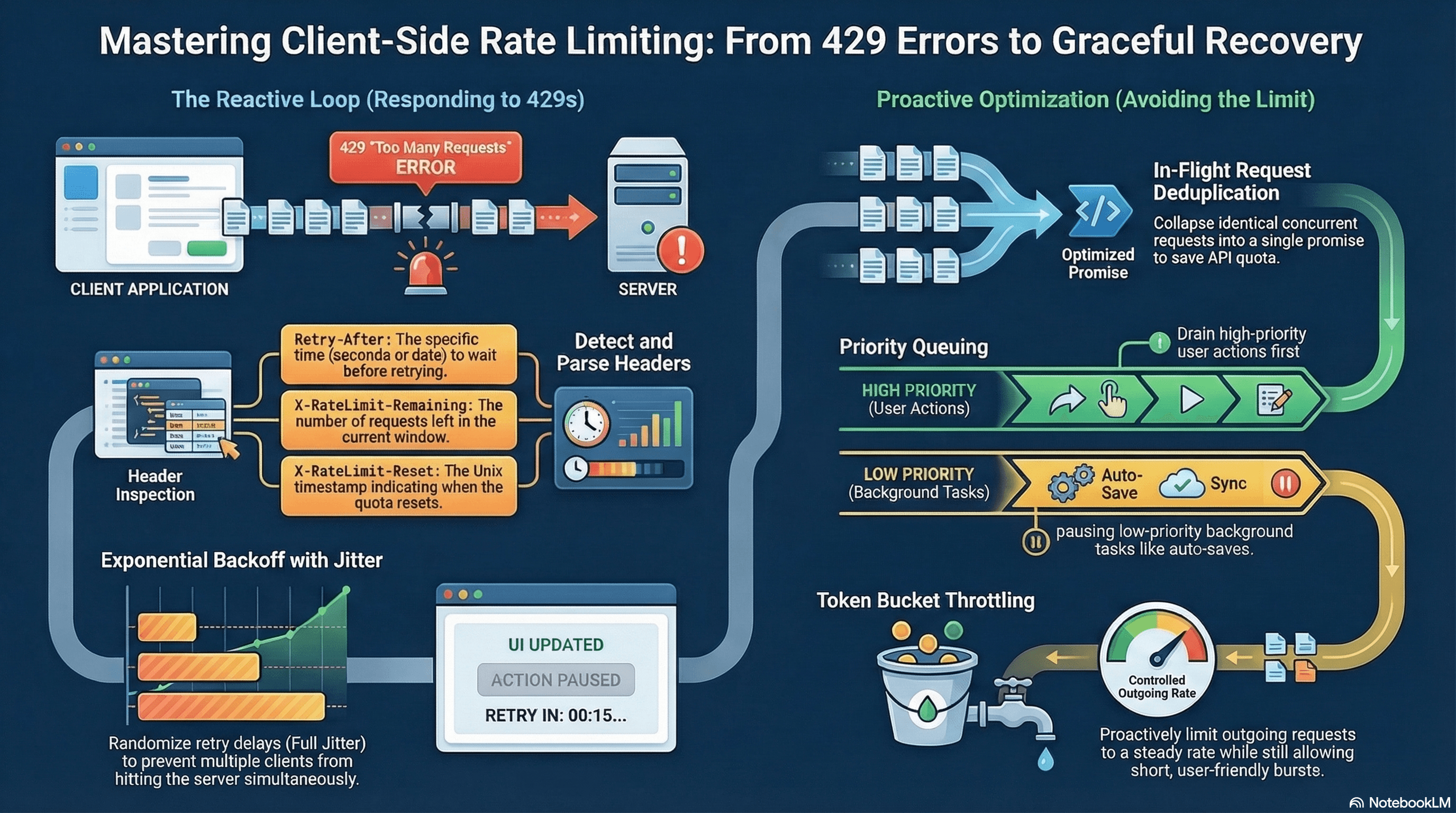
Overview
Rate limiting is a server mechanism that caps how many requests a client can make within a time window. When exceeded, the server returns 429 Too Many Requests. Client-side rate limit awareness means your frontend detects 429 responses and reacts correctly — backing off, retrying with jitter, deduplicating in-flight requests, and giving users clear feedback — without hammering the API further.
Without it: UI freezes, a cascade of failed requests, and a wasted quota window. With it: graceful degradation, automatic recovery, and users who understand what's happening.
How It Works
When a rate limit is exceeded, the server returns:
HTTP/1.1 429 Too Many Requests
Retry-After: 30
X-RateLimit-Limit: 100
X-RateLimit-Remaining: 0
X-RateLimit-Reset: 1700000060
Your client must:
- Detect
status === 429 - Read
Retry-After(seconds) orX-RateLimit-Reset(Unix timestamp) to know when to retry - Back off — do not retry immediately
- Prevent new requests during the rate-limit window
- Surface the constraint clearly to the user
Backoff Strategies
Fixed backoff — wait a constant N seconds. Simple. Doesn't prevent synchronized retries from multiple clients hitting the server at exactly the same time after the wait.
Exponential backoff — wait base × 2^attempt — 1s, 2s, 4s, 8s. Better, but still synchronizes retries from multiple clients.
Exponential backoff with full jitter (recommended) — randomize within the exponential window to spread retries across time:
delay = random(0, min(cap, base × 2^attempt))Exponential backoff with equal jitter — split the wait: half is guaranteed, half is random:
delay = (cap / 2) + random(0, min(cap, base × 2^attempt) / 2)Equal jitter guarantees a minimum wait (avoids near-zero retries) while still spreading the load. Full jitter provides maximum spread. AWS recommends full jitter for distributed systems; equal jitter for cases where a minimum wait is required.
Code Examples
Core Fetch Wrapper with 429 Handling
// lib/api/client.ts

export class RateLimitError extends Error {
  constructor(
    public retryAfterSeconds: number,
    public resetAt?: Date,
  ) {
    super(`Rate limited. Retry after ${retryAfterSeconds}s.`);
    this.name = "RateLimitError";
  }
}

export class ApiError extends Error {
  constructor(
    public status: number,
    message: string,
  ) {
    super(message);
    this.name = "ApiError";
  }
}

export async function apiFetch<T>(
  url: string,
  options?: RequestInit,
): Promise<T> {
  const response = await fetch(url, options);

  if (response.status === 429) {
    // Parse Retry-After: can be seconds (number) or HTTP date string
    const retryAfterHeader = response.headers.get("Retry-After");
    const resetHeader = response.headers.get("X-RateLimit-Reset");

    let retryAfterSeconds = 60; // safe default
    let resetAt: Date | undefined;

    if (retryAfterHeader) {
      // Retry-After can be a number of seconds OR an HTTP date string
      const parsed = Number(retryAfterHeader);
      if (!isNaN(parsed)) {
        retryAfterSeconds = parsed;
      } else {
        // HTTP date format: "Fri, 21 Feb 2026 12:00:00 GMT"
        const date = new Date(retryAfterHeader);
        if (!isNaN(date.getTime())) {
          retryAfterSeconds = Math.max(
            0,
            Math.ceil((date.getTime() - Date.now()) / 1000),
          );
          resetAt = date;
        }
      }
    } else if (resetHeader) {
      // X-RateLimit-Reset is typically a Unix timestamp (seconds)
      const resetTimestamp = Number(resetHeader) * 1000;
      if (!isNaN(resetTimestamp)) {
        retryAfterSeconds = Math.max(
          0,
          Math.ceil((resetTimestamp - Date.now()) / 1000),
        );
        resetAt = new Date(resetTimestamp);
      }
    }

    throw new RateLimitError(retryAfterSeconds, resetAt);
  }

  if (!response.ok) {
    const text = await response.text().catch(() => "");
    throw new ApiError(response.status, text || `HTTP ${response.status}`);
  }

  return response.json() as Promise<T>;
}
Exponential Backoff with Full Jitter
// lib/api/retry.ts
import { apiFetch, RateLimitError, ApiError } from "./client";

const RETRYABLE_STATUS = new Set([429, 500, 502, 503, 504]);

interface RetryOptions {
  maxAttempts?: number;
  baseDelayMs?: number;
  capMs?: number; // maximum delay cap
}

// Full jitter: random(0, min(cap, base * 2^attempt))
function fullJitterDelay(
  attempt: number,
  baseMs: number,
  capMs: number,
): number {
  const exponential = baseMs * Math.pow(2, attempt); // 1s, 2s, 4s, 8s...
  const upper = Math.min(capMs, exponential); // cap at e.g. 30s
  return Math.random() * upper; // random in [0, upper]
}

// Equal jitter: (cap/2) + random(0, min(cap, base * 2^attempt) / 2)
function equalJitterDelay(
  attempt: number,
  baseMs: number,
  capMs: number,
): number {
  const exponential = Math.min(capMs, baseMs * Math.pow(2, attempt));
  return exponential / 2 + Math.random() * (exponential / 2);
}

export async function fetchWithRetry<T>(
  url: string,
  options?: RequestInit,
  { maxAttempts = 4, baseDelayMs = 1000, capMs = 30_000 }: RetryOptions = {},
): Promise<T> {
  for (let attempt = 0; attempt < maxAttempts; attempt++) {
    try {
      return await apiFetch<T>(url, options);
    } catch (err) {
      const isLastAttempt = attempt === maxAttempts - 1;

      if (isLastAttempt) throw err;

      if (err instanceof RateLimitError) {
        // Respect the server's Retry-After — override backoff calculation
        const waitMs = err.retryAfterSeconds * 1000;
        await sleep(waitMs);
        continue;
      }

      if (err instanceof ApiError && !RETRYABLE_STATUS.has(err.status)) {
        // 4xx errors (except 429) are not retryable — client error, not transient
        throw err;
      }

      // Transient error: use equal jitter backoff
      const delayMs = equalJitterDelay(attempt, baseDelayMs, capMs);
      await sleep(delayMs);
    }
  }

  throw new Error("Unreachable");
}

const sleep = (ms: number) => new Promise((r) => setTimeout(r, ms));
In-Flight Request Deduplication
Prevent multiple identical concurrent requests — e.g., three components all mount and call GET /api/user/profile simultaneously:
// lib/api/dedup.ts

// Map from request key → in-flight Promise
const inFlight = new Map<string, Promise<unknown>>();

export async function dedupedFetch<T>(
  key: string, // cache key: usually url + JSON.stringify(options?.body)
  fetcher: () => Promise<T>,
): Promise<T> {
  // If an identical request is already in flight, share its promise
  const existing = inFlight.get(key);
  if (existing) return existing as Promise<T>;

  const promise = fetcher().finally(() => {
    // Remove from map when settled so the next call fires a fresh request
    inFlight.delete(key);
  });

  inFlight.set(key, promise);
  return promise;
}
// Usage: deduplicate profile fetches across concurrent components
export async function getUserProfile(userId: string) {
return dedupedFetch(`user:${userId}`, () =>
apiFetch<UserProfile>(`/api/users/${userId}`),
);
}React Hook with Rate Limit UI State
// hooks/useRateLimitedAction.ts
"use client";

import { useState, useCallback, useRef } from "react";
import { fetchWithRetry, RateLimitError } from "@/lib/api/retry";

interface ActionState {
  loading: boolean;
  error: string | null;
  rateLimited: boolean;
  secondsLeft: number;
}

export function useRateLimitedAction<T>(fetcher: () => Promise<T>) {
  const [state, setState] = useState<ActionState>({
    loading: false,
    error: null,
    rateLimited: false,
    secondsLeft: 0,
  });
  const countdownRef = useRef<ReturnType<typeof setInterval> | null>(null);

  const execute = useCallback(async (): Promise<T | null> => {
    if (state.rateLimited || state.loading) return null;

    setState((s) => ({ ...s, loading: true, error: null }));

    try {
      const result = await fetcher();
      setState({
        loading: false,
        error: null,
        rateLimited: false,
        secondsLeft: 0,
      });
      return result;
    } catch (err) {
      if (err instanceof RateLimitError) {
        let secondsLeft = err.retryAfterSeconds;

        setState({
          loading: false,
          error: null,
          rateLimited: true,
          secondsLeft,
        });

        // Live countdown — updates UI every second
        countdownRef.current = setInterval(() => {
          secondsLeft -= 1;
          if (secondsLeft <= 0) {
            clearInterval(countdownRef.current!);
            setState({
              loading: false,
              error: null,
              rateLimited: false,
              secondsLeft: 0,
            });
          } else {
            setState((s) => ({ ...s, secondsLeft }));
          }
        }, 1000);
      } else {
        setState((s) => ({
          ...s,
          loading: false,
          error: err instanceof Error ? err.message : "Request failed",
        }));
      }
      return null;
    }
  }, [fetcher, state.rateLimited, state.loading]);

  return { ...state, execute };
}
// app/ai/page.tsx
"use client";
import { useRateLimitedAction } from "@/hooks/useRateLimitedAction";
export default function AiPage() {
const { loading, rateLimited, secondsLeft, error, execute } =
useRateLimitedAction(() =>
fetch("/api/ai/generate", { method: "POST" }).then((r) => r.json()),
);
return (
<div>
<button
onClick={execute}
disabled={loading || rateLimited}
className="rounded bg-indigo-600 px-4 py-2 text-white disabled:opacity-50"
>
{loading
? "Generating…"
: rateLimited
? `Wait ${secondsLeft}s`
: "Generate"}
</button>
{rateLimited && (
<p className="mt-2 text-sm text-amber-600">
Rate limit reached — retrying automatically in {secondsLeft} seconds.
</p>
)}
{error && <p className="mt-2 text-sm text-red-600">{error}</p>}
</div>
);
}Proactive Client-Side Token Bucket Throttle
Don't wait to be told 429 — proactively throttle outgoing requests to stay within the known limit:
// lib/api/token-bucket.ts

export class TokenBucket {
  private tokens: number;
  private lastRefill: number;

  constructor(
    private capacity: number, // max tokens in the bucket
    private refillRate: number, // tokens added per second
  ) {
    this.tokens = capacity;
    this.lastRefill = Date.now();
  }

  // Refill tokens based on elapsed time since last call
  private refill() {
    const now = Date.now();
    const elapsed = (now - this.lastRefill) / 1000; // seconds
    this.tokens = Math.min(
      this.capacity,
      this.tokens + elapsed * this.refillRate,
    );
    this.lastRefill = now;
  }

  // Returns true if a token was consumed; false if bucket is empty
  tryConsume(tokens = 1): boolean {
    this.refill();
    if (this.tokens >= tokens) {
      this.tokens -= tokens;
      return true;
    }
    return false;
  }

  // Wait until a token is available, then consume it
  async consume(tokens = 1): Promise<void> {
    this.refill();
    if (this.tokens >= tokens) {
      this.tokens -= tokens;
      return;
    }
    // Calculate wait time: (needed - available) / refillRate
    const needed = tokens - this.tokens;
    const waitMs = (needed / this.refillRate) * 1000;
    await new Promise((r) => setTimeout(r, waitMs));
    this.tokens -= tokens;
  }
}

// Usage: max 10 requests/second, burst up to 20
const bucket = new TokenBucket(20, 10);

export async function throttledFetch<T>(
  url: string,
  options?: RequestInit,
): Promise<T> {
  await bucket.consume(); // waits if bucket is empty
  return apiFetch<T>(url, options);
}
Priority Queue — High and Low Priority Requests
When rate-limited, process high-priority requests (user-initiated) before low-priority ones (background prefetch):
// lib/api/priority-queue.ts

type Priority = "high" | "low";

interface QueueItem<T> {
  priority: Priority;
  fetcher: () => Promise<T>;
  resolve: (value: T) => void;
  reject: (reason: unknown) => void;
}

class PriorityFetchQueue {
  private highQueue: QueueItem<unknown>[] = [];
  private lowQueue: QueueItem<unknown>[] = [];
  private processing = false;

  enqueue<T>(priority: Priority, fetcher: () => Promise<T>): Promise<T> {
    return new Promise<T>((resolve, reject) => {
      const item = { priority, fetcher, resolve, reject } as QueueItem<T>;

      if (priority === "high") {
        this.highQueue.push(item as QueueItem<unknown>);
      } else {
        this.lowQueue.push(item as QueueItem<unknown>);
      }

      this.processQueue();
    });
  }

  private async processQueue() {
    if (this.processing) return;
    this.processing = true;

    while (this.highQueue.length > 0 || this.lowQueue.length > 0) {
      // Always drain high-priority queue first
      const item = this.highQueue.shift() ?? this.lowQueue.shift();
      if (!item) break;

      try {
        const result = await item.fetcher();
        item.resolve(result);
      } catch (err) {
        if (err instanceof RateLimitError) {
          // Put item back at front of its queue and wait
          if (item.priority === "high") {
            this.highQueue.unshift(item);
          } else {
            this.lowQueue.unshift(item);
          }
          await sleep(err.retryAfterSeconds * 1000);
        } else {
          item.reject(err);
        }
      }
    }

    this.processing = false;
  }
}

export const fetchQueue = new PriorityFetchQueue();

// Usage
export function priorityFetch<T>(
  url: string,
  priority: Priority = "high",
): Promise<T> {
  return fetchQueue.enqueue(priority, () => apiFetch<T>(url));
}
X-RateLimit Header Standards
No universal standard exists, but these are the most common conventions:
| Header | Value | Meaning |
|---|---|---|
Retry-After | seconds or HTTP date | When to retry after 429 |
X-RateLimit-Limit | number | Total requests allowed per window |
X-RateLimit-Remaining | number | Requests remaining in current window |
X-RateLimit-Reset | Unix timestamp | When the window resets |
X-RateLimit-Policy | string | Human-readable policy name |
RateLimit (IETF draft) | limit=100, remaining=23, reset=30 | Consolidated header (proposed standard) |
GitHub, Stripe, Twilio, and OpenAI all follow this pattern with minor variations. Always read Retry-After first (standardized in RFC 6585), then X-RateLimit-Reset as a fallback.
Real-World Use Case
AI generation dashboard. Users trigger expensive LLM API calls. The API allows 20 requests/minute per user. The token bucket throttles to 1 request every 3 seconds proactively — avoiding 429 under normal use. When a user hits the limit anyway (rapid consecutive requests), the RateLimitError is caught, the generate button disables with a live countdown, and the request is queued. High-priority user-initiated calls are processed before low-priority background calls (auto-save preview). Retry with equal jitter ensures retries from multiple browser tabs don't all hit the API at the same instant after the window resets.
Common Mistakes / Gotchas
1. Ignoring Retry-After in favor of a fixed delay. The server tells you exactly when to retry. Always read the header first. A fixed 3-second retry on a 60-second window wastes 19 more requests.
2. Retrying non-retryable errors. 401 Unauthorized means your token is invalid. 403 Forbidden means you lack permission. 422 Unprocessable Entity means you sent bad data. None of these are transient — retrying them doesn't help and wastes quota. Only retry 429 and 5xx.
3. Not disabling the trigger UI during rate limiting. If the button stays enabled, users click it again, generating more 429s and resetting backoff state. Disable the control and show the countdown.
4. Parallel retries after a 429. Multiple in-flight requests that all hit 429 will all start their own retry timers, creating a synchronized burst when the window resets. Use request deduplication and a priority queue to serialize retries through a single path.
5. Assuming Retry-After is always a number. Some APIs return it as an HTTP date string ("Fri, 21 Feb 2026 12:00:00 GMT"). Parse it as a Date when Number(header) returns NaN.
Summary
Client-side rate limit handling starts with correctly parsing 429 responses and reading Retry-After or X-RateLimit-Reset. Exponential backoff with full or equal jitter spreads retries over time and prevents synchronized thundering herds. In-flight request deduplication collapses concurrent identical requests into one. The token bucket model proactively throttles before hitting the server limit. A priority queue processes user-initiated requests before background prefetch when bandwidth is constrained. Always disable triggering UI controls during rate-limited windows and surface the countdown to the user.
Interview Questions
Q1. What is the difference between exponential backoff with full jitter and equal jitter, and when do you use each?
Both add randomness to prevent synchronized retries from multiple clients. Full jitter randomizes the entire delay: random(0, min(cap, base × 2^attempt)). The delay can be near-zero, which gives maximum spread but doesn't guarantee any minimum wait. Equal jitter splits the delay: half is the deterministic exponential component, half is random — (cap/2) + random(0, min(cap, base × 2^attempt) / 2). Equal jitter guarantees a minimum wait equal to half the cap, which prevents near-zero delays in cases where a minimum cooldown is required (e.g., database reconnection). AWS recommends full jitter for distributed retry systems to maximize spread; use equal jitter when you need a minimum wait before retrying.
Q2. Why should you only retry on 429 and 5xx status codes, not all errors?
4xx errors (except 429) indicate a client-side problem: 401 means authentication failed, 403 means insufficient permission, 404 means the resource doesn't exist, 422 means validation failed. These are not transient conditions — retrying them doesn't resolve the underlying problem and wastes API quota. 429 is explicitly "try again later" — transient by definition. 5xx errors are server-side failures that may be transient (overloaded server, temporary outage). 500/502/503/504 are worth retrying with backoff. Retrying 401 would hammer an authentication endpoint and possibly trigger account lockout; retrying 422 would keep sending invalid data.
Q3. What is the token bucket algorithm and how does it differ from a fixed rate limit?
A token bucket maintains a count of available "tokens" up to a capacity. Each request consumes one token. Tokens refill at a fixed rate (e.g., 10/second, up to capacity 20). The key property: bursting is allowed up to the bucket capacity. A user can fire 20 requests immediately (consuming the full bucket), then requests are rate-limited to 10/second. This mirrors how most real-world APIs work — they allow a burst, then enforce the sustained rate. A fixed rate limit would reject every request beyond 1 per 100ms immediately, with no allowance for burst. The token bucket model is more user-friendly for legitimate burst scenarios (loading a page that triggers 15 simultaneous API calls) while still enforcing the sustained rate limit.
Q4. What is in-flight request deduplication and why does it matter for rate limits?
When multiple components mount simultaneously and each independently calls the same API endpoint (e.g., GET /api/user/profile), without deduplication each fires a separate HTTP request. Three components = three requests, consuming three units of rate limit quota for the same data. In-flight deduplication maintains a map from request key to the in-flight Promise. When a second call arrives for the same key while the first is pending, it receives the same Promise — no new HTTP request fires. When the Promise settles, it's removed from the map so the next call gets fresh data. This reduces rate limit consumption, reduces server load, and eliminates duplicate network round-trips for identical concurrent requests.
Q5. How do you handle the case where Retry-After is an HTTP date string instead of a number of seconds?
Retry-After is specified in RFC 7231 as either a delay-seconds value (30) or an HTTP-date string (Fri, 21 Feb 2026 12:00:00 GMT). Parse defensively: try Number(header) first — if it returns NaN, the header is a date string. Then new Date(header).getTime() parses the HTTP-date. Compute seconds remaining: Math.ceil((date.getTime() - Date.now()) / 1000). Clamp to zero to handle clock skew (a date slightly in the past should produce 0 seconds, not a negative retry). Always have a fallback default (e.g., 60 seconds) for when the header is absent or unparseable — some APIs return 429 with no headers at all.
Q6. How does a priority queue improve rate limit handling in a complex frontend application?
In an application with both user-initiated actions (clicking "Submit") and background operations (prefetching suggestions, auto-saving drafts), all requests share the same rate limit quota. Without prioritization, auto-save calls consuming the last few tokens before a user clicks Submit causes the user-facing action to hit 429 — frustrating for the user. A priority queue separates requests into high and low priority lanes. High-priority (user-initiated) requests always drain first. When a 429 is received, the queue pauses and retries only after the reset window — but high-priority requests jump the queue ahead of any queued background work. The result: user-facing operations are maximally protected from rate limiting caused by background activity.
REST vs GraphQL vs tRPC
A practical comparison of REST, GraphQL, and tRPC — N+1 prevention with DataLoader, persisted queries, OpenAPI spec generation with zod-openapi, tRPC subscriptions, REST versioning strategies, and a decision framework for choosing the right paradigm.
WebSockets vs SSE vs Long Polling
How the three real-time communication strategies work at the protocol level — the WebSocket upgrade handshake and frame format, SSE's text/event-stream spec with Last-Event-ID reconnection, long polling's hold-and-release cycle, binary WebSocket data, exponential backoff, scalability tradeoffs, and a decision framework for choosing correctly.