WebSockets vs SSE vs Long Polling
How the three real-time communication strategies work at the protocol level — the WebSocket upgrade handshake and frame format, SSE's text/event-stream spec with Last-Event-ID reconnection, long polling's hold-and-release cycle, binary WebSocket data, exponential backoff, scalability tradeoffs, and a decision framework for choosing correctly.
Overview
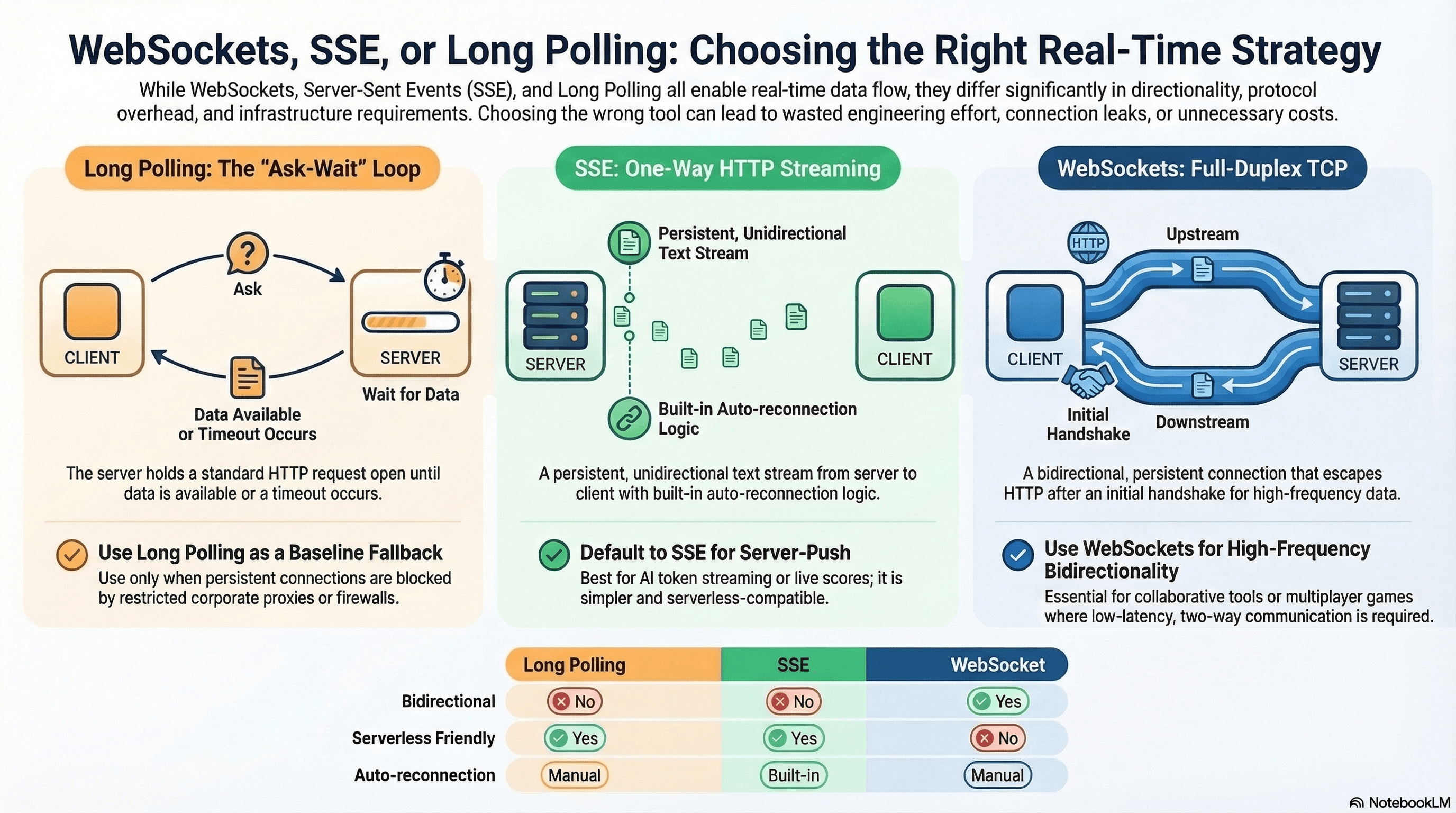
When you need data to flow between server and client in real time — chat messages, live scores, stock tickers, AI token streaming, progress bars — you have three primary tools: WebSockets, Server-Sent Events (SSE), and Long Polling. They solve the same surface-level problem but with very different tradeoffs around complexity, directionality, infrastructure compatibility, and scalability.
Choosing the wrong one leads to wasted engineering effort, connection leaks, or unnecessary infrastructure cost. The key distinction: Long Polling is plain HTTP request-response in a loop. SSE is a persistent one-way HTTP stream from server to client. WebSockets are a persistent bidirectional TCP connection that escapes HTTP entirely after the initial handshake.
How It Works
Long Polling
The client sends a normal HTTP request. Instead of responding immediately, the server holds the request open until it has data to send (or a timeout elapses). When it responds, the client immediately fires another request. It's a loop of "ask → wait → respond → repeat."
Client:  GET /events  ──────────────────────────────► Server
                                                       (holds request open)
Server:  ◄────────────── 200 OK { event: "new-message" }
Client:  GET /events  ──────────────────────────────► Server
                                                       (holds again...)
Server:  ◄────────────── 200 OK { event: "user-joined" }
Client:  GET /events  ──────────────────────────────► Server
                                                       (timeout after 30s)
Server:  ◄────────────── 204 No Content
Client:  GET /events  ──────────────────────────────► (immediately re-polls)
Each cycle is a complete HTTP request-response — full headers, cookies, connection negotiation. There's no special protocol; it works through every proxy, load balancer, and firewall. The cost is overhead: repeated TCP handshakes (unless Connection: keep-alive is used), redundant headers on every cycle, and a constant baseline of open connections on the server even when nothing is happening.
The server typically holds requests for 20–30 seconds before timing out with an empty response. This prevents proxy timeouts (most proxies kill idle connections after 30–60 seconds) while keeping the polling loop alive.
Server-Sent Events (SSE)
The client opens one HTTP connection using the EventSource API. The server responds with Content-Type: text/event-stream and keeps the connection open, pushing newline-delimited text events down the stream indefinitely.
Client:  GET /stream  ──────────────────────────────► Server
         Accept: text/event-stream
Server:  ◄──── HTTP/1.1 200 OK
         Content-Type: text/event-stream
         Cache-Control: no-cache
         Connection: keep-alive

         data: {"score": 1}\n\n
         data: {"score": 2}\n\n
         event: goal\ndata: {"scorer": "Player 7"}\n\n
         id: 42\ndata: {"score": 3}\n\n
         (connection stays open indefinitely)
Traffic flows one direction only: server → client. The SSE spec (part of the HTML Living Standard) defines a structured text format with four field types:
| Field | Purpose |
|---|---|
data: | The event payload. Multiple data: lines are joined with newlines. |
event: | Named event type. Default is "message" if omitted. |
id: | Sets lastEventId. Sent on reconnection via Last-Event-ID header. |
retry: | Tells the browser how many ms to wait before auto-reconnecting. |
Events are terminated by a blank line (\n\n). This is critical — a single \n is a field separator within an event, \n\n marks the end of an event.
Auto-reconnection is built into the spec. If the connection drops, the browser automatically reconnects after the retry interval (default ~3 seconds) and sends a Last-Event-ID header with the last received id: value. The server can use this to resume from where the client left off — no client-side reconnection logic needed.
WebSockets
A full-duplex, persistent connection over TCP. The browser sends an HTTP Upgrade request; the server responds with 101 Switching Protocols. From that point, the connection leaves HTTP entirely — both sides exchange frames over a raw TCP connection.
Client:  GET /ws  HTTP/1.1
         Upgrade: websocket
         Connection: Upgrade
         Sec-WebSocket-Key: dGhlIHNhbXBsZSBub25jZQ==
         Sec-WebSocket-Version: 13
         ────────────────────────────────────────► Server

Server:  ◄──── HTTP/1.1 101 Switching Protocols
         Upgrade: websocket
         Connection: Upgrade
         Sec-WebSocket-Accept: s3pPLMBiTxaQ9kYGzzhZRbK+xOo=

         [TCP connection is now a WebSocket — HTTP is done]

Client:  ◄──── Frame: "user joined"
Client:  Frame: "hello"  ──────────────────────► Server
Server:  ◄──── Frame: "hello back"
Client:  Frame: [binary: 0x89 0x00]  ──────────► Server  (ping)
Server:  ◄──── Frame: [binary: 0x8A 0x00]        (pong)
The Sec-WebSocket-Key / Sec-WebSocket-Accept exchange is not authentication — it's a handshake verification to prevent non-WebSocket servers from accidentally accepting the upgrade. The server concatenates the key with a magic GUID, SHA-1 hashes it, and base64-encodes the result.
Frame types in the WebSocket protocol (RFC 6455):
| Opcode | Type | Purpose |
|---|---|---|
0x1 | Text | UTF-8 text payload |
0x2 | Binary | Arbitrary binary data (ArrayBuffer, Blob) |
0x8 | Close | Initiates connection close handshake |
0x9 | Ping | Heartbeat sent by either side |
0xA | Pong | Response to ping — browsers handle this automatically |
WebSockets support both text and binary data natively. Client-to-server frames are always masked (XOR'd with a random 4-byte key) to prevent cache poisoning attacks on intermediary proxies.
Protocol Comparison
                    Long Polling         SSE              WebSocket
Direction:          client → server      server → client  bidirectional
Transport:          HTTP (repeated)      HTTP (streaming)  TCP (after upgrade)
Connection:         new per cycle        persistent        persistent
Binary data:        via base64 in JSON   text only         native binary frames
Auto-reconnect:     manual               built-in          manual
Browser API:        fetch                EventSource       WebSocket
Through proxies:    always               usually           sometimes blocked
Serverless:         works                works             requires persistent server
Max connections:    HTTP/1.1: 6/origin   HTTP/1.1: 6/origin  no HTTP limit
                    HTTP/2: 100+ streams HTTP/2: 100+ streams
The 6-connection-per-origin limit in HTTP/1.1 applies to both SSE and long polling. If you open 6 SSE connections to the same origin, no other HTTP requests (images, API calls, scripts) can be made until one closes. HTTP/2 multiplexes all streams over a single connection, effectively removing this limit.
Code Examples
Long Polling — With Exponential Backoff and Resumption
// app/api/poll/route.ts
import { NextRequest, NextResponse } from "next/server";

// In production: replace with Redis pub/sub, a database cursor, or a message queue
const events: { id: string; message: string; timestamp: number }[] = [];

export async function GET(req: NextRequest) {
  const lastId = req.nextUrl.searchParams.get("lastId");
  const timeout = 25_000; // Hold for 25s max (under typical proxy timeout)

  // Check for new events since lastId
  const since = lastId
    ? events.findIndex((e) => e.id === lastId) + 1
    : 0;
  const pending = events.slice(since);

  if (pending.length > 0) {
    return NextResponse.json({ events: pending });
  }

  // Hold the request open until a new event arrives or timeout
  const result = await Promise.race([
    new Promise<typeof pending>((resolve) => {
      const check = setInterval(() => {
        const newEvents = events.slice(since);
        if (newEvents.length > 0) {
          clearInterval(check);
          resolve(newEvents);
        }
      }, 100);

      setTimeout(() => {
        clearInterval(check);
        resolve([]);
      }, timeout);
    }),
  ]);

  return NextResponse.json({ events: result });
}
// components/NotificationPoller.tsx
"use client";
import { useEffect, useState, useRef } from "react";
export function NotificationPoller() {
const [notifications, setNotifications] = useState<string[]>([]);
const lastIdRef = useRef<string | null>(null);
useEffect(() => {
let active = true;
let backoff = 1000; // Start at 1s, max 30s
async function poll() {
while (active) {
try {
const url = lastIdRef.current
? `/api/poll?lastId=${lastIdRef.current}`
: "/api/poll";
const res = await fetch(url);
if (!res.ok) throw new Error(`HTTP ${res.status}`);
const data = await res.json();
backoff = 1000; // Reset backoff on success
if (data.events.length > 0) {
const messages = data.events.map(
(e: { message: string }) => e.message,
);
setNotifications((prev) => [...prev, ...messages]);
lastIdRef.current = data.events.at(-1).id;
}
} catch {
// Exponential backoff: 1s → 2s → 4s → 8s → 16s → 30s (capped)
await new Promise((r) => setTimeout(r, backoff));
backoff = Math.min(backoff * 2, 30_000);
}
}
}
poll();
return () => {
active = false;
};
}, []);
return (
<ul>
{notifications.map((n, i) => (
<li key={i}>{n}</li>
))}
</ul>
);
}SSE — Named Events, Last-Event-ID, and Custom Retry
// app/api/live-score/route.ts
export async function GET(req: Request) {
  const encoder = new TextEncoder();

  // Resume from where the client left off after a reconnection
  const lastEventId = req.headers.get("Last-Event-ID");
  let score = lastEventId ? parseInt(lastEventId, 10) : 0;

  const stream = new ReadableStream({
    async start(controller) {
      // Tell the browser to reconnect after 2 seconds if the connection drops
      controller.enqueue(encoder.encode("retry: 2000\n\n"));

      const interval = setInterval(() => {
        score++;

        // Named event with an ID for resumption
        const payload = [
          `id: ${score}`,
          `event: score-update`,
          `data: ${JSON.stringify({ score, timestamp: Date.now() })}`,
          "",
          "", // blank line terminates the event
        ].join("\n");

        controller.enqueue(encoder.encode(payload));

        if (score >= 90) {
          // Send a named "final" event before closing
          const final = `event: match-end\ndata: ${JSON.stringify({ finalScore: score })}\n\n`;
          controller.enqueue(encoder.encode(final));
          clearInterval(interval);
          controller.close();
        }
      }, 1000);
    },
  });

  return new Response(stream, {
    headers: {
      "Content-Type": "text/event-stream",
      "Cache-Control": "no-cache, no-transform",
      Connection: "keep-alive",
      // Prevent Nginx from buffering the stream
      "X-Accel-Buffering": "no",
    },
  });
}
// components/LiveScore.tsx
"use client";
import { useEffect, useState } from "react";
export function LiveScore() {
const [score, setScore] = useState(0);
const [status, setStatus] = useState<"live" | "ended">("live");
useEffect(() => {
const source = new EventSource("/api/live-score");
// Listen for named "score-update" events
source.addEventListener("score-update", (e) => {
const { score } = JSON.parse(e.data);
setScore(score);
});
// Listen for the "match-end" event
source.addEventListener("match-end", (e) => {
const { finalScore } = JSON.parse(e.data);
setScore(finalScore);
setStatus("ended");
source.close(); // No need to reconnect after the match ends
});
source.onerror = () => {
// EventSource reconnects automatically — this fires on every reconnection attempt
// Only close if the match has ended
if (status === "ended") source.close();
};
return () => source.close();
}, [status]);
return (
<div>
<p>Score: {score}</p>
{status === "ended" && <p>Match ended</p>}
</div>
);
}SSE — AI Token Streaming (OpenAI-Style)
This is the most common SSE pattern in production today — streaming LLM tokens to the client:
// app/api/chat/route.ts
export async function POST(req: Request) {
  const { messages } = await req.json();
  const encoder = new TextEncoder();

  const stream = new ReadableStream({
    async start(controller) {
      // Call the LLM API with streaming enabled
      const response = await fetch("https://api.openai.com/v1/chat/completions", {
        method: "POST",
        headers: {
          "Content-Type": "application/json",
          Authorization: `Bearer ${process.env.OPENAI_API_KEY}`,
        },
        body: JSON.stringify({
          model: "gpt-4o",
          messages,
          stream: true,
        }),
      });

      const reader = response.body!.getReader();
      const decoder = new TextDecoder();

      while (true) {
        const { done, value } = await reader.read();
        if (done) break;

        // Forward each SSE chunk from the upstream API to the client
        const chunk = decoder.decode(value, { stream: true });
        controller.enqueue(encoder.encode(chunk));
      }

      controller.close();
    },
  });

  return new Response(stream, {
    headers: {
      "Content-Type": "text/event-stream",
      "Cache-Control": "no-cache, no-transform",
      "X-Accel-Buffering": "no",
    },
  });
}
// components/ChatStream.tsx
"use client";
import { useState } from "react";
export function ChatStream() {
const [response, setResponse] = useState("");
const [loading, setLoading] = useState(false);
async function send(prompt: string) {
setLoading(true);
setResponse("");
const res = await fetch("/api/chat", {
method: "POST",
headers: { "Content-Type": "application/json" },
body: JSON.stringify({
messages: [{ role: "user", content: prompt }],
}),
});
const reader = res.body!.getReader();
const decoder = new TextDecoder();
while (true) {
const { done, value } = await reader.read();
if (done) break;
const text = decoder.decode(value, { stream: true });
// Parse SSE lines: "data: {...}\n\n"
const lines = text.split("\n").filter((l) => l.startsWith("data: "));
for (const line of lines) {
const json = line.slice(6); // Remove "data: " prefix
if (json === "[DONE]") continue;
const parsed = JSON.parse(json);
const token = parsed.choices?.[0]?.delta?.content ?? "";
setResponse((prev) => prev + token);
}
}
setLoading(false);
}
return (
<div>
<button onClick={() => send("Explain closures in JavaScript")} disabled={loading}>
Ask
</button>
<p>{response}</p>
</div>
);
}WebSockets — With Reconnection, Heartbeat, and Binary Data
// server/ws-server.ts (standalone Node.js with the `ws` package)
import { WebSocketServer, WebSocket } from "ws";

const wss = new WebSocketServer({ port: 8080 });

// Heartbeat: detect dead connections
const HEARTBEAT_INTERVAL = 30_000;

wss.on("connection", (socket) => {
  let isAlive = true;

  socket.on("pong", () => {
    isAlive = true;
  });

  const heartbeat = setInterval(() => {
    if (!isAlive) {
      // Client didn't respond to the last ping — terminate
      socket.terminate();
      return;
    }
    isAlive = false;
    socket.ping();
  }, HEARTBEAT_INTERVAL);

  socket.on("message", (raw, isBinary) => {
    if (isBinary) {
      // Handle binary data (e.g., file uploads, audio chunks)
      console.log(`Received ${raw.length} bytes of binary data`);
      return;
    }

    const { type, payload } = JSON.parse(raw.toString());

    if (type === "chat-message") {
      // Broadcast to all connected clients except sender
      const outgoing = JSON.stringify({ type: "chat-message", payload });
      wss.clients.forEach((client) => {
        if (client !== socket && client.readyState === WebSocket.OPEN) {
          client.send(outgoing);
        }
      });
    }
  });

  socket.on("close", () => {
    clearInterval(heartbeat);
  });

  socket.on("error", (err) => {
    console.error("WebSocket error:", err.message);
    clearInterval(heartbeat);
  });
});
// hooks/useWebSocket.ts — reusable hook with auto-reconnect
"use client";
import { useEffect, useRef, useCallback, useState } from "react";
interface UseWebSocketOptions {
url: string;
onMessage: (data: unknown) => void;
maxRetries?: number;
}
export function useWebSocket({ url, onMessage, maxRetries = 10 }: UseWebSocketOptions) {
const wsRef = useRef<WebSocket | null>(null);
const retriesRef = useRef(0);
const [status, setStatus] = useState<"connecting" | "open" | "closed">("connecting");
const connect = useCallback(() => {
const ws = new WebSocket(url);
wsRef.current = ws;
setStatus("connecting");
ws.onopen = () => {
setStatus("open");
retriesRef.current = 0; // Reset retries on successful connection
};
ws.onmessage = (e) => {
onMessage(JSON.parse(e.data));
};
ws.onclose = (e) => {
setStatus("closed");
wsRef.current = null;
// Don't reconnect on intentional close (code 1000) or max retries
if (e.code === 1000 || retriesRef.current >= maxRetries) return;
// Exponential backoff: 1s → 2s → 4s → ... → 30s
const delay = Math.min(1000 * 2 ** retriesRef.current, 30_000);
retriesRef.current++;
setTimeout(connect, delay);
};
ws.onerror = () => {
ws.close(); // Triggers onclose → reconnect
};
}, [url, onMessage, maxRetries]);
useEffect(() => {
connect();
return () => {
wsRef.current?.close(1000, "Component unmounted");
};
}, [connect]);
const send = useCallback((data: unknown) => {
if (wsRef.current?.readyState === WebSocket.OPEN) {
wsRef.current.send(JSON.stringify(data));
}
}, []);
return { send, status };
}// components/ChatRoom.tsx
"use client";
import { useState, useCallback } from "react";
import { useWebSocket } from "@/hooks/useWebSocket";
export function ChatRoom() {
const [messages, setMessages] = useState<string[]>([]);
const [draft, setDraft] = useState("");
const handleMessage = useCallback((data: unknown) => {
const { payload } = data as { type: string; payload: string };
setMessages((prev) => [...prev, payload]);
}, []);
const { send, status } = useWebSocket({
url: "ws://localhost:8080",
onMessage: handleMessage,
});
function handleSend() {
if (draft.trim() === "") return;
send({ type: "chat-message", payload: draft });
setMessages((prev) => [...prev, draft]); // Optimistic local append
setDraft("");
}
return (
<div>
<p>Status: {status}</p>
<ul>
{messages.map((m, i) => (
<li key={i}>{m}</li>
))}
</ul>
<input
value={draft}
onChange={(e) => setDraft(e.target.value)}
onKeyDown={(e) => e.key === "Enter" && handleSend()}
/>
<button onClick={handleSend} disabled={status !== "open"}>
Send
</button>
</div>
);
}Decision Framework
| Criterion | Long Polling | SSE | WebSocket |
|---|---|---|---|
| Server → client only | ✅ | ✅ | ✅ (overkill) |
| Bidirectional communication | ❌ | ❌ | ✅ |
| Works in serverless (Vercel, CF) | ✅ | ✅ | ❌ |
| Works through all proxies/firewalls | ✅ | ✅ (most) | ❌ (sometimes) |
| Auto-reconnection | Manual | Built-in | Manual |
| Binary data | ❌ (base64) | ❌ (text) | ✅ (native) |
| Message frequency > 10/sec | ❌ | ✅ | ✅ |
| Infrastructure complexity | None | None | High |
| HTTP caching / CDN compatible | ✅ | ❌ | ❌ |
| Sticky sessions required | ❌ | ❌ | ✅ |
Default to SSE for server-push scenarios. Reach for WebSockets only when you genuinely need bidirectional, high-frequency, low-latency communication. Use long polling only as a fallback for constrained environments where persistent connections are blocked.
Real-World Use Case
AI chat product with collaborative editing. The AI response stream uses SSE — the server pushes tokens via text/event-stream, the client renders them incrementally, and if the connection drops mid-response, Last-Event-ID resumes from the last received token without restarting the generation. This works on Vercel's serverless infrastructure with zero additional setup. The collaborative document editor (where multiple users edit the same canvas simultaneously) uses WebSockets — cursor positions, text insertions, and selection changes flow bidirectionally at 60fps, requiring the low-latency full-duplex connection that only WebSockets provide. An admin dashboard behind a corporate proxy that blocks WebSocket upgrades uses long polling as a fallback to show live deployment status — it works through every proxy because it's plain HTTP.
Common Mistakes / Gotchas
1. Using WebSockets when SSE is enough. WebSockets are harder to scale (stateful connections, sticky sessions required for horizontal scaling), harder to proxy (the Upgrade request fails through many corporate proxies and older CDNs), and require separate always-on infrastructure in serverless environments. If data flows only server → client, SSE is simpler, uses standard HTTP, works in serverless, and gets auto-reconnect for free.
Vercel, Cloudflare Workers, and most serverless platforms support SSE natively
via streaming Response. WebSocket support is limited or requires a separate
always-on service like a dedicated VM, Durable Objects, or a managed WebSocket
provider.
2. Forgetting to clean up connections. Every EventSource and WebSocket opened without a corresponding .close() on component unmount leaks a connection. In React, always return a cleanup function from useEffect. A leaked EventSource continues receiving events and triggering state updates on an unmounted component — causing the "Can't perform a React state update on an unmounted component" warning and wasting bandwidth.
useEffect(() => {
  const source = new EventSource("/api/stream");
  source.onmessage = (e) => setData(JSON.parse(e.data));
  return () => source.close(); // ✅ required
}, []);
3. Not handling reconnection in long polling. If a long-poll request fails (network blip, server restart), a naive implementation crashes the poll loop. Always wrap in try/catch with exponential backoff. Without backoff, a server outage triggers hundreds of rapid-fire requests per second from every connected client — a self-inflicted DDoS.
4. Ignoring Last-Event-ID in SSE handlers. The browser sends Last-Event-ID on reconnection, but many SSE server implementations ignore it and replay all events from the beginning (or miss events entirely). Always set id: fields in your SSE stream and handle the Last-Event-ID request header to resume correctly.
5. Blocking the event loop in SSE handlers. If your SSE route handler does a synchronous expensive computation before writing to the stream, the entire stream stalls. Keep stream handlers async and non-blocking; offload heavy work to a worker thread or background queue.
6. Assuming WebSockets work through all proxies. Corporate proxies, some CDNs, and older load balancers silently drop or reject WebSocket upgrade requests. Always have a fallback strategy — either use a library like Socket.IO that handles transport negotiation, or offer SSE/long polling as degraded alternatives.
7. Not implementing heartbeats for WebSockets. Without periodic ping/pong frames, dead connections (client silently disconnected, network changed) stay open on the server indefinitely, consuming resources. The ws library doesn't send pings by default — you must implement them. Browsers automatically respond to server pings with pongs, but you need to detect missing pongs server-side to clean up dead connections.
8. Opening too many SSE connections on HTTP/1.1. The browser enforces a 6-connection-per-origin limit on HTTP/1.1. Each EventSource consumes one of those slots permanently. Three SSE connections to the same origin leave only three slots for all other requests. Ensure your server supports HTTP/2 (which multiplexes all streams over one connection) or consolidate multiple event streams into a single SSE endpoint with named events.
Summary
Long polling is the compatibility baseline — it's plain HTTP and works anywhere, but it's inefficient for high-frequency updates and requires manual reconnection with backoff. SSE is the sweet spot for most real-time server-push scenarios: it's HTTP-native, auto-reconnects with Last-Event-ID resumption, works in serverless environments, requires no client beyond EventSource, and is exactly what powers AI token streaming in production. WebSockets are the right tool when you genuinely need bidirectional, high-frequency, low-latency communication — but they come with real infrastructure costs: sticky sessions, heartbeat management, proxy compatibility issues, and no serverless support. Default to SSE, reach for WebSockets only when the bidirectional requirement is clear, and use long polling only as a fallback for constrained environments.
Interview Questions
Q1. How does the SSE auto-reconnection mechanism work, and what role does Last-Event-ID play?
When an SSE connection drops — network failure, server restart, timeout — the browser's EventSource implementation automatically reconnects after a configurable delay (set by the retry: field in the stream, default ~3 seconds). On reconnection, the browser sends a Last-Event-ID HTTP header containing the id: value of the last event it successfully received. The server reads this header and can resume the stream from that point, ensuring the client doesn't miss events during the disconnection window. This requires the server to set meaningful id: fields on events and maintain enough state (or use a persistent log like Redis Streams or Kafka) to replay events after a given ID. Without id: fields, the browser sends an empty Last-Event-ID and the server has no way to know where the client left off.
Q2. Why are WebSockets harder to scale horizontally than SSE, and what infrastructure is required?
WebSocket connections are stateful — the server maintains an open TCP connection per client with application state (user identity, room membership, subscription filters). When you add a second server behind a load balancer, a client's WebSocket connection is pinned to one specific server. If user A on server 1 sends a chat message to user B on server 2, server 1 must relay that message to server 2 — requiring a pub/sub backplane (Redis Pub/Sub, NATS, or a message broker). The load balancer must use sticky sessions (IP hash or cookie-based) to ensure the WebSocket upgrade request and subsequent frames all reach the same server. SSE connections are also stateful, but they're standard HTTP — load balancers, CDNs, and reverse proxies handle them without special configuration. And since SSE is server-to-client only, there's no need to relay client messages between servers unless you're combining SSE with separate POST endpoints.
Q3. What is the WebSocket frame masking requirement and why does it exist?
The WebSocket spec (RFC 6455) requires all frames sent from client to server to be masked — XOR'd with a random 32-bit key included in the frame header. This was introduced to prevent cache poisoning attacks on intermediary proxies. Without masking, an attacker could craft a WebSocket message that looks like a valid HTTP response to a transparent proxy, causing the proxy to cache malicious content for a legitimate URL. The random mask ensures WebSocket frame payloads never accidentally match HTTP response patterns that a proxy might cache. Server-to-client frames are not masked because the server is trusted to not poison its own caches. Browsers handle masking automatically — you never see it in application code.
Q4. When should you choose SSE over WebSockets for a real-time feature, and what are the concrete tradeoffs?
Choose SSE when data flows only from server to client: live scores, notification feeds, AI token streaming, CI/CD build logs, stock tickers. SSE advantages: works over standard HTTP (no Upgrade negotiation), works in serverless environments (Vercel, Cloudflare Workers), auto-reconnects with Last-Event-ID resumption, no sticky sessions required, works through all HTTP proxies and CDNs, and the EventSource API is simpler than the WebSocket API. SSE limitations: text-only (no native binary), server-to-client only (the client must use separate fetch/POST calls for client-to-server communication), and the HTTP/1.1 six-connection limit can be a constraint without HTTP/2. Choose WebSockets only when you need bidirectional communication at high frequency — collaborative editing, multiplayer games, trading terminals — where the overhead of separate POST requests for client-to-server messages would be too slow or too chatty.
Q5. How does long polling differ from regular polling, and what makes it "long"?
Regular (short) polling sends a request at fixed intervals — every 5 seconds, for example — regardless of whether there's new data. Most responses are empty, wasting bandwidth and server resources. Long polling flips the pattern: the client sends a request and the server holds it open until new data is available or a timeout elapses (typically 20–30 seconds). The response arrives only when there's something to deliver. The client immediately sends a new request to re-enter the waiting state. The "long" refers to the held-open request duration, not the polling interval. Long polling provides near-real-time delivery (latency is close to zero when data arrives while a request is pending) with the compatibility of plain HTTP — no special protocols, no upgrade handshake, no proxy issues. The cost: each held request consumes a server thread or connection slot, repeated HTTP headers on every cycle add overhead, and implementing reliable message ordering and deduplication requires additional logic that SSE handles automatically.
Q6. What is the HTTP/1.1 six-connection limit and how does it affect SSE and long polling?
Browsers enforce a maximum of 6 concurrent HTTP/1.1 connections per origin (scheme + host + port). Each open EventSource (SSE) or pending long-poll fetch permanently occupies one of these 6 slots for as long as the connection is alive. If you open 4 SSE connections and 2 long-poll connections to the same origin, you've exhausted all 6 slots — no further HTTP requests (API calls, image loads, script fetches) can be made until a connection closes. This is a hard browser limit, not configurable. HTTP/2 solves this by multiplexing all requests over a single TCP connection as independent streams — you can have hundreds of concurrent SSE connections with no contention. The practical fix: ensure your server supports HTTP/2 (most modern servers and CDNs do), or consolidate multiple SSE streams into a single connection using named events (event: score-update, event: notification, etc.) to multiplex logically distinct streams over one EventSource.
Client-Side Rate Limiting
Handling 429 responses gracefully — exponential backoff with full/equal jitter, token bucket vs leaky bucket models, in-flight request deduplication, X-RateLimit header standards, priority queue patterns, and proactive client-side throttling.
Navigation API
The modern browser API purpose-built for SPA navigation — replacing History API workarounds with first-class navigation interception, deterministic history traversal, transition tracking, and full entry inspection.