Navigation API
The modern browser API purpose-built for SPA navigation — replacing History API workarounds with first-class navigation interception, deterministic history traversal, transition tracking, and full entry inspection.
Overview
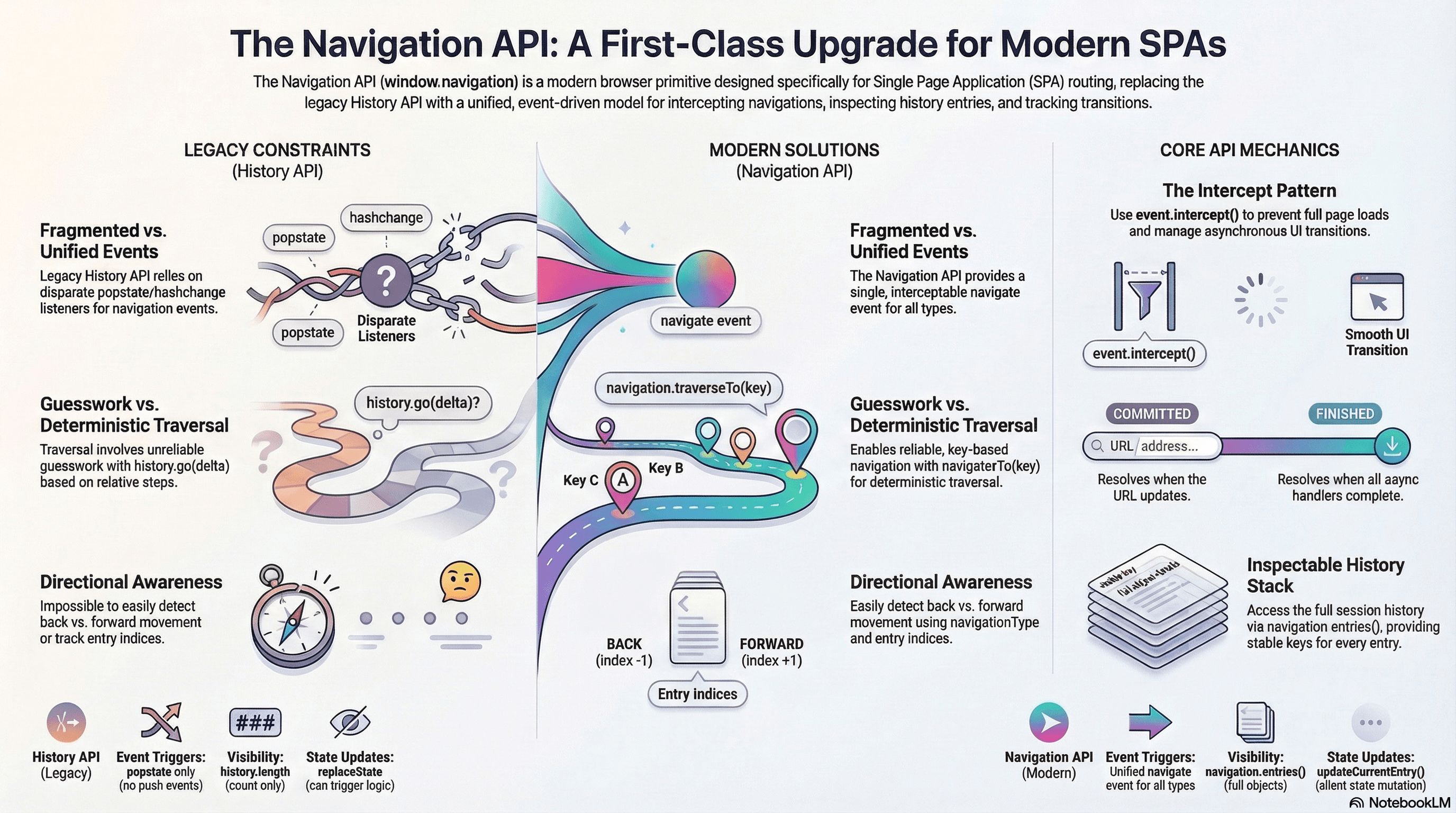
The Navigation API is a browser API (available on window.navigation) designed specifically for single-page application routing. It replaces the decades-old History.pushState() / popstate pattern that SPAs have relied on since HTML5, providing a unified, event-driven model for intercepting navigations, inspecting history entries, and tracking in-flight transitions.
The History API was never designed for SPA routing. It was created for managing session history in multi-page applications — pushState was a mechanism for updating the URL without a page reload, and popstate fired only on back/forward traversals (not on pushState calls themselves). SPAs had to layer workarounds on top: wrapping pushState in custom functions that manually dispatched events, monkey-patching the History API, and maintaining parallel routing state because history.state was the only way to attach data and history.length was the only visibility into the stack. The Navigation API was built to solve all of these problems as a first-class browser primitive.
The result is an API where every navigation — link clicks, form submissions, navigation.navigate() calls, and back/forward button presses — fires a single navigate event that can be intercepted, redirected, or cancelled. History entries are fully inspectable objects with stable keys. Traversal is deterministic. And in-flight transitions are trackable with promises.
How It Works
navigation.navigate()
Programmatic navigation is done through navigation.navigate(url, options). It returns a { committed, finished } object — two promises that resolve when the navigation has committed (URL updated) and when it has fully finished (all intercept handlers resolved).
const { committed, finished } = navigation.navigate("/dashboard", {
  // State attached to the new history entry — like history.state but structured-cloneable
  state: { scrollPosition: 0, filter: "active" },
  // Transient info passed to the navigate event handler — not persisted in history
  info: { trigger: "sidebar-click" },
  // "push" (default) or "replace"
  history: "push",
});

// committed resolves once the URL bar updates
await committed;

// finished resolves once all intercept() handlers complete
await finished;
The state property is persisted with the history entry and retrievable via entry.getState(). The info property is ephemeral — it's available on the NavigateEvent during that navigation only and is not stored anywhere. This distinction is critical: use state for data that should survive a session restore (scroll position, form step), and info for data that only matters during the transition itself (animation direction, trigger source).
NavigateEvent and intercept()
Every navigation — whether triggered by navigation.navigate(), a link click, a form submission, or the browser back/forward buttons — fires a navigate event on the navigation object. This is the single interception point that replaces the fragmented popstate / hashchange / link-click-handler pattern.
navigation.addEventListener("navigate", (event: NavigateEvent) => {
  // event.navigationType: "push" | "replace" | "reload" | "traverse"
  // event.destination: { url, key, id, index, getState(), sameDocument }
  // event.canIntercept: boolean — false for cross-origin navigations
  // event.userInitiated: boolean — true for link clicks / form submits
  // event.hashChange: boolean — true if only the hash changed
  // event.info: the transient info passed via navigate()
  // event.downloadRequest: string | null — non-null if it's a download

  if (!event.canIntercept) return;

  const url = new URL(event.destination.url);

  event.intercept({
    // The async handler replaces the default navigation behavior
    async handler() {
      const content = await fetchPageContent(url.pathname);
      document.getElementById("app")!.innerHTML = content;
    },
    // Focus behavior: "after-transition" (default) or "manual"
    focusReset: "after-transition",
    // Scroll behavior: "after-transition" (default) or "manual"
    scroll: "after-transition",
  });
});
Calling event.intercept() tells the browser: "I'm handling this navigation — don't do a full page load." The browser still updates the URL immediately (commit phase), but the handler async function controls what happens during the transition. If the handler throws, the navigation is considered failed and navigation.transition.finished rejects.
The navigationType property distinguishes the four kinds of navigation: push (new entry), replace (replacing current entry), reload (same URL reload), and traverse (back/forward/traverseTo). This eliminates the guesswork that plagued History API routers — there was no reliable way to distinguish a push from a traverse with popstate.
navigation.entries()
Unlike history.length (which only gives a count and is capped at 50 in most browsers), navigation.entries() returns the full ordered array of NavigationHistoryEntry objects for the current navigation session.
const entries = navigation.entries();

entries.forEach((entry) => {
  console.log(entry.url);    // Full URL of this entry
  console.log(entry.key);    // Stable across session — survives replace operations
  console.log(entry.id);     // Unique to this specific entry — changes on replace
  console.log(entry.index);  // Position in the entries array
  console.log(entry.sameDocument); // Whether this entry was a same-document navigation
  console.log(entry.getState()); // The state associated with this entry
});
Two identifiers matter: key is stable — it identifies a "slot" in the history list and survives navigation.navigate(url, { history: "replace" }). id is unique per entry — a replace creates a new id in the same key slot. Use key for traversal (navigation.traverseTo(key)) and id for tracking whether a specific entry still exists.
navigation.currentEntry
The current history entry is always available via navigation.currentEntry. It's a NavigationHistoryEntry with the same properties as entries from navigation.entries().
// Read state without parsing — getState() returns the structured clone
const state = navigation.currentEntry?.getState() as { filter: string } | undefined;

// Listen for state changes on the current entry
navigation.currentEntry?.addEventListener("dispose", () => {
  // Fires when this entry is removed from the history list
  // (e.g., navigating forward from a replaced entry)
});
The currentEntry also fires a dispose event when it's no longer reachable in the history — useful for cleanup of resources tied to specific entries.
navigation.back() / navigation.forward() / navigation.traverseTo(key)
Traversal methods return { committed, finished } promise pairs, just like navigate(). Unlike history.back() (which is fire-and-forget and you have no idea when the navigation completes), these are awaitable.
// Go back one entry — rejects if there's no previous entry
const { finished } = navigation.back();
await finished;

// Go forward one entry
await navigation.forward().finished;

// Traverse to a specific entry by its stable key
// This is the killer feature: deterministic traversal to any entry
const targetEntry = navigation.entries().find(
  (e) => new URL(e.url).pathname === "/settings"
);
if (targetEntry) {
  await navigation.traverseTo(targetEntry.key).finished;
}
traverseTo(key) is what makes the Navigation API fundamentally more powerful than the History API for traversal. With the History API, going to a specific entry required calculating history.go(delta) — and you couldn't know the delta because you couldn't inspect the entries. With traverseTo, you reference entries by their stable key, which works even if the user has navigated to other pages in between.
navigation.updateCurrentEntry()
To update the state of the current entry without triggering a navigation (no navigate event fires), use updateCurrentEntry():
// Persist scroll position or UI state without navigating
navigation.updateCurrentEntry({
  state: {
    ...navigation.currentEntry?.getState() as object,
    scrollY: window.scrollY,
    sidebarOpen: true,
  },
});
This replaces the pattern of history.replaceState(newState, "", location.href) — which was confusingly named (it "replaces" the entry, not just the state) and could inadvertently interact with router logic that listened for state changes.
Transition Tracking
While a navigation is in progress (the intercept() handler is running), navigation.transition is a NavigationTransition object:
navigation.addEventListener("navigate", (event) => {
  event.intercept({
    async handler() {
      // navigation.transition is now available
      console.log(navigation.transition?.navigationType); // "push", "traverse", etc.
      console.log(navigation.transition?.from);           // The entry we're leaving
      // navigation.transition.finished is a promise that resolves when this handler completes

      await loadPage(event.destination.url);
    },
  });
});

// External code can also check transition state
if (navigation.transition) {
  showLoadingIndicator();
  await navigation.transition.finished;
  hideLoadingIndicator();
}
This solves a persistent SPA problem: knowing whether a navigation is in progress and when it finishes. With the History API, routers had to maintain their own isNavigating state and manually resolve promises — the Navigation API provides this natively.
Browser Support
The Navigation API is currently supported only in Chromium-based browsers (Chrome 102+, Edge 102+, Opera 88+). It is not available in Firefox or Safari as of early 2026. Any production use must include a History API fallback path or be limited to Chromium-only environments (Electron, PWAs targeting Chrome).
Feature detection is straightforward:
const supportsNavigationAPI = "navigation" in window;Do not assume the Navigation API is available. Always feature-detect and fall back to the History API. Major SPA frameworks (React Router, Next.js, SvelteKit) have not yet adopted the Navigation API as their primary routing mechanism, so the ecosystem still runs on History API primitives.
Code Examples
Basic SPA Router with Navigation Interception
// router.ts — Minimal SPA router using the Navigation API
type RouteHandler = (params: { url: URL; state: unknown }) => Promise<string>;

const routes = new Map<string, RouteHandler>();

export function defineRoute(pattern: string, handler: RouteHandler) {
  routes.set(pattern, handler);
}

export function initRouter(outletId: string) {
  const outlet = document.getElementById(outletId)!;

  navigation.addEventListener("navigate", (event) => {
    // Only intercept same-origin, non-download navigations
    if (!event.canIntercept || event.hashChange || event.downloadRequest) return;

    const url = new URL(event.destination.url);
    const handler = routes.get(url.pathname);

    if (!handler) return; // Let the browser handle unknown routes (404 page)

    event.intercept({
      async handler() {
        const html = await handler({
          url,
          state: event.destination.getState(),
        });
        outlet.innerHTML = html;
      },
      // Let the browser handle scroll restoration automatically
      scroll: "after-transition",
      focusReset: "after-transition",
    });
  });
}

// Usage
defineRoute("/", async () => "<h1>Home</h1>");
defineRoute("/about", async ({ url }) => {
  const res = await fetch(`/api/about`);
  const data = await res.json();
  return `<h1>${data.title}</h1><p>${data.body}</p>`;
});
initRouter("app");
Scroll Restoration and Loading States with Transition Tracking
// Save scroll position before leaving a page
navigation.addEventListener("navigate", (event) => {
  if (event.navigationType === "push" || event.navigationType === "replace") {
    // Persist scroll position on the entry we're leaving
    navigation.updateCurrentEntry({
      state: {
        ...navigation.currentEntry?.getState() as object,
        scrollY: window.scrollY,
      },
    });
  }

  if (!event.canIntercept) return;

  event.intercept({
    // Use manual scroll so we can restore position ourselves
    scroll: "manual",
    async handler() {
      await renderPage(event.destination.url);

      if (event.navigationType === "traverse") {
        // Restore saved scroll position on back/forward
        const state = event.destination.getState() as { scrollY?: number } | null;
        window.scrollTo(0, state?.scrollY ?? 0);
      } else {
        // Scroll to top on new navigations
        window.scrollTo(0, 0);
      }
    },
  });
});

// Loading indicator driven by transition tracking
const loadingBar = document.getElementById("loading-bar")!;

navigation.addEventListener("navigatesuccess", () => {
  loadingBar.classList.remove("active");
});

navigation.addEventListener("navigateerror", (event) => {
  loadingBar.classList.remove("active");
  console.error("Navigation failed:", event.error);
});

navigation.addEventListener("navigate", (event) => {
  if (event.canIntercept) {
    loadingBar.classList.add("active");
  }
});
Back/Forward Detection
With the History API, detecting whether the user pressed back or forward was essentially impossible — popstate fired for both with no directional information. With the Navigation API, it's trivial:
navigation.addEventListener("navigate", (event) => {
  if (event.navigationType !== "traverse") return;

  const fromIndex = navigation.currentEntry!.index;
  const toIndex = event.destination.index;

  if (toIndex < fromIndex) {
    console.log("User is going BACK");
    // Trigger slide-right animation
  } else {
    console.log("User is going FORWARD");
    // Trigger slide-left animation
  }
});
This comparison works because index reflects the position in the entries array. A lower index means the user is going backward in history. This is reliable — index values are maintained by the browser and always consistent with navigation.entries().
React Hook with History API Fallback
// useNavigation.ts — Wraps the Navigation API with History API fallback
import { useCallback, useEffect, useSyncExternalStore } from "react";

type NavigationState = Record<string, unknown>;

function getSnapshot(): string {
  return window.location.pathname + window.location.search;
}

function subscribe(callback: () => void): () => void {
  if ("navigation" in window) {
    // Navigation API: currententrychange fires on every URL change
    navigation.addEventListener("currententrychange", callback);
    return () => navigation.removeEventListener("currententrychange", callback);
  }

  // History API fallback: popstate only fires on traversal, not pushState
  // So we also need to patch pushState and replaceState
  window.addEventListener("popstate", callback);

  const originalPush = history.pushState.bind(history);
  const originalReplace = history.replaceState.bind(history);

  history.pushState = (...args) => {
    originalPush(...args);
    callback();
  };
  history.replaceState = (...args) => {
    originalReplace(...args);
    callback();
  };

  return () => {
    window.removeEventListener("popstate", callback);
    history.pushState = originalPush;
    history.replaceState = originalReplace;
  };
}

export function useNavigation() {
  const pathname = useSyncExternalStore(subscribe, getSnapshot, getSnapshot);

  const navigate = useCallback(
    (url: string, options?: { replace?: boolean; state?: NavigationState }) => {
      if ("navigation" in window) {
        navigation.navigate(url, {
          state: options?.state,
          history: options?.replace ? "replace" : "push",
        });
      } else {
        // History API fallback
        const method = options?.replace ? "replaceState" : "pushState";
        history[method](options?.state ?? null, "", url);
      }
    },
    [],
  );

  const getState = useCallback((): NavigationState | undefined => {
    if ("navigation" in window) {
      return navigation.currentEntry?.getState() as NavigationState | undefined;
    }
    return history.state as NavigationState | undefined;
  }, []);

  const back = useCallback(async () => {
    if ("navigation" in window) {
      await navigation.back().finished;
    } else {
      history.back();
    }
  }, []);

  const forward = useCallback(async () => {
    if ("navigation" in window) {
      await navigation.forward().finished;
    } else {
      history.forward();
    }
  }, []);

  return { pathname, navigate, getState, back, forward };
}
Real-World Use Case
SPA with animated page transitions using Navigation API + View Transitions API. A content-heavy SPA (documentation site, e-commerce product pages) wants smooth cross-fade or slide transitions between pages. Without the Navigation API, this required framework-specific transition libraries that maintained their own navigation state, intercepted link clicks manually, and coordinated between the router and the animation system.
With the Navigation API and the View Transitions API (document.startViewTransition), the entire system collapses into a single navigate event handler:
navigation.addEventListener("navigate", (event) => {
  if (!event.canIntercept || event.navigationType === "reload") return;

  // Determine animation direction for traversals
  const direction =
    event.navigationType === "traverse"
      ? event.destination.index < navigation.currentEntry!.index
        ? "slide-right"
        : "slide-left"
      : "crossfade";

  event.intercept({
    async handler() {
      const html = await fetch(event.destination.url).then((r) => r.text());
      const parser = new DOMParser();
      const doc = parser.parseFromString(html, "text/html");
      const newContent = doc.getElementById("content")!.innerHTML;

      // Set CSS custom property for animation direction
      document.documentElement.dataset.transition = direction;

      // View Transitions API handles the visual transition
      const transition = document.startViewTransition(() => {
        document.getElementById("content")!.innerHTML = newContent;
      });

      await transition.finished;
    },
    // Manual scroll — we want the transition to complete first
    scroll: "manual",
  });
});
/* Slide animations controlled by data attribute */
::view-transition-old(root) {
animation: fade-out 200ms ease-out;
}
::view-transition-new(root) {
animation: fade-in 200ms ease-in;
}
[data-transition="slide-left"] ::view-transition-old(root) {
animation: slide-out-left 300ms ease-out;
}
[data-transition="slide-left"] ::view-transition-new(root) {
animation: slide-in-right 300ms ease-in;
}
[data-transition="slide-right"] ::view-transition-old(root) {
animation: slide-out-right 300ms ease-out;
}
[data-transition="slide-right"] ::view-transition-new(root) {
animation: slide-in-left 300ms ease-in;
}The Navigation API provides the interception point and directional awareness (back vs forward), while the View Transitions API provides the visual animation. Neither API alone solves the problem — together they eliminate the need for framework-specific transition libraries entirely.
Common Mistakes / Gotchas
1. Forgetting to check event.canIntercept. Cross-origin navigations and some browser-initiated navigations set canIntercept to false. Calling event.intercept() on these throws an InvalidStateError. Always guard with if (!event.canIntercept) return; before calling intercept().
2. Assuming the Navigation API is available everywhere. Firefox and Safari do not support it. Any code using navigation.addEventListener without a feature check ("navigation" in window) will crash in those browsers. Production routers need a History API fallback path.
3. Confusing key and id on history entries. key is a stable slot identifier that survives replace operations — use it for traverseTo(). id is unique per entry and changes when an entry is replaced. Using id for traversal will fail after a replace, because the old id no longer exists even though the key slot does.
4. Not awaiting finished before assuming navigation is complete. navigation.navigate() returns { committed, finished }. The URL updates at committed, but the intercept handler may still be loading data. Code that reads navigation.currentEntry.getState() or updates the UI should await finished to ensure the transition is complete.
5. Intercepting navigations you should not. Download navigations (event.downloadRequest !== null), hash-only changes when you don't handle anchors (event.hashChange), and form submissions that should go to the server should all be allowed to proceed normally. Over-intercepting breaks browser-native behaviors that users expect.
6. Using intercept() without handling errors. If the handler function passed to intercept() throws or returns a rejected promise, the navigation fails and navigation.transition.finished rejects. Without a navigateerror listener, this failure is silent — the URL may have already updated (committed) but the page content never loaded, leaving the user on a blank or stale page.
Summary
The Navigation API (window.navigation) is a purpose-built browser API for SPA routing that replaces the History API workarounds SPAs have relied on for over a decade. It provides a single navigate event that fires for all navigation types (link clicks, programmatic navigation, back/forward, form submissions), event.intercept() for async transition handling, full history inspection via navigation.entries() with stable key identifiers for deterministic traversal via traverseTo(key), transition tracking via navigation.transition with a finished promise, and updateCurrentEntry() for state mutation without navigation. It distinguishes push, replace, reload, and traverse navigation types — making back/forward detection trivial where it was impossible with the History API. Browser support is currently limited to Chromium (Chrome 102+), requiring feature detection and History API fallback for cross-browser production use.
Interview Questions
Q1. Why was the Navigation API created when the History API already existed?
The History API was designed for session history management in traditional multi-page applications, not SPA routing. Its fundamental limitations for SPAs include: pushState() does not fire any event (so routers must wrap it or monkey-patch it), popstate only fires on traversals (not pushes), history.length provides no way to inspect individual entries (just a count), history.go(delta) requires knowing the exact offset to a target entry (impossible without tracking entries manually), and there's no way to distinguish back from forward navigation. The Navigation API solves all of these: every navigation fires a navigate event, entries are fully inspectable, traversal is key-based, and navigationType provides the direction. It turns SPA routing from a collection of workarounds into a first-class browser capability.
Q2. What is the difference between committed and finished in the Navigation API?
navigation.navigate() and traversal methods return { committed, finished } — two promises representing distinct phases. committed resolves when the browser has updated the URL bar and the navigation.currentEntry has changed. This happens synchronously-ish at the start of navigation. finished resolves when the intercept() handler's async function has completed — meaning all data has been fetched and the DOM has been updated. Code that depends on the URL being updated can await committed. Code that depends on the navigation being fully complete (content rendered, state persisted) must await finished. If the handler throws, finished rejects while committed may have already resolved — meaning the URL changed but the page content failed to load.
Q3. How does the Navigation API make back/forward detection possible?
The NavigateEvent includes event.navigationType (which is "traverse" for back/forward) and event.destination.index (the position in the entries array). By comparing event.destination.index with navigation.currentEntry.index, you can determine direction: a lower destination index means the user is going back, a higher index means forward. This was impossible with the History API because popstate fired for both directions with no directional metadata, and history.state only contained whatever the developer had manually stored — there was no index or position information.
Q4. Explain the difference between key and id on a NavigationHistoryEntry.
Every NavigationHistoryEntry has two identifiers. key is a stable identifier for a "slot" in the history list — it persists even when the entry is replaced via navigation.navigate(url, { history: "replace" }). Think of key as the column in a spreadsheet — replace changes the cell content but the column stays. id is unique to the specific entry — a replace creates a new entry with a new id in the same key slot. Use key for navigation.traverseTo(key) because it refers to a stable position. Use id when you need to know if a specific version of an entry still exists (for example, to detect if the entry was replaced since you last saw it).
Q5. How would you implement progressive enhancement with the Navigation API?
Feature-detect with "navigation" in window. If available, register a navigate event listener with intercept() for SPA routing. If unavailable, fall back to the History API: pushState / replaceState for navigation, popstate for traversal detection, and monkey-patched pushState to emit events. The key architectural decision is to abstract navigation behind a common interface (a navigate(url, options) function and a URL subscription) so application code never references window.navigation or history directly. This pattern allows the Navigation API to handle all edge cases (form submissions, download detection, transition tracking) in supported browsers while the History API path handles the baseline routing. Frameworks like React Router could adopt this by using the Navigation API internally where available without changing their public API.
Q6. What happens if the intercept() handler throws an error?
When the async function passed to event.intercept({ handler }) throws or returns a rejected promise, the navigation is considered failed. The finished promise (from navigation.navigate() or navigation.back(), etc.) rejects with the same error. The navigateerror event fires on the navigation object with the error available as event.error. Critically, the URL may have already updated — committed resolves before the handler runs, so the browser URL bar shows the new URL even though the page content never loaded. This means error handling is mandatory: a navigateerror listener should display an error state, redirect to a fallback, or revert the navigation. Without it, users see a stale page with a mismatched URL.
WebSockets vs SSE vs Long Polling
How the three real-time communication strategies work at the protocol level — the WebSocket upgrade handshake and frame format, SSE's text/event-stream spec with Last-Event-ID reconnection, long polling's hold-and-release cycle, binary WebSocket data, exponential backoff, scalability tradeoffs, and a decision framework for choosing correctly.
Overview
The attack vectors and mitigations most relevant to frontend engineers — from active exploits and browser-enforced policy headers, through code-level injection defences, to secrets hygiene and supply chain integrity.