HTTP/3 & QUIC
How HTTP/3 eliminates transport-layer head-of-line blocking by running over QUIC — 0-RTT session resumption, connection migration, BBR congestion control, HTTPS DNS SVCB records, UDP firewall fallback, and how to verify the protocol in production.
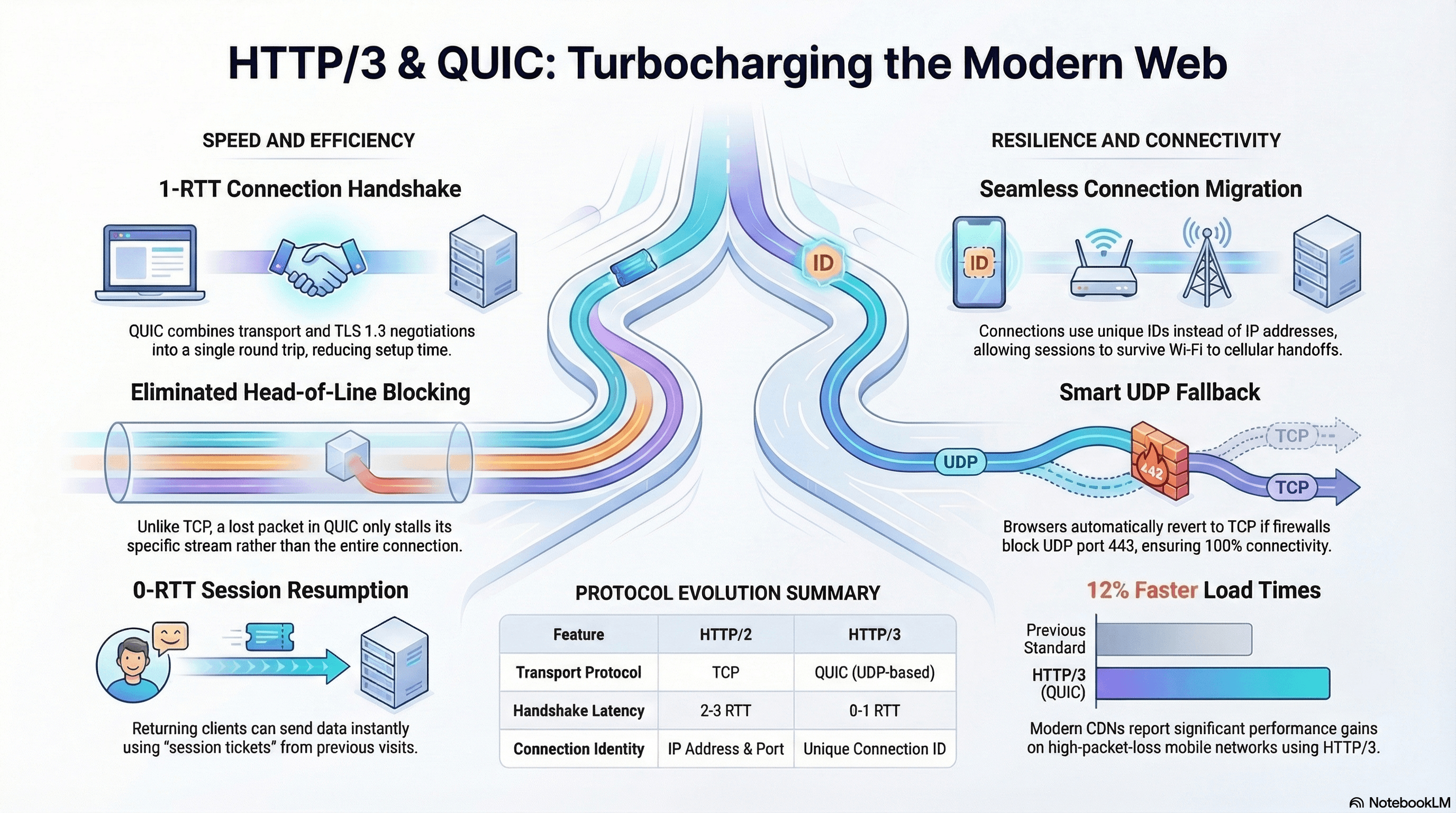
Overview
HTTP/3 is the third major version of HTTP. Unlike HTTP/1.1 and HTTP/2 — both of which run over TCP — HTTP/3 runs over QUIC, a transport protocol built on UDP. This shift resolves fundamental TCP limitations that hurt web performance: head-of-line blocking at the transport layer, slow connection setup, and poor behavior on lossy mobile networks.
QUIC was developed by Google, standardized by the IETF (RFC 9000), and underpins HTTP/3 (RFC 9114). As of 2025, all major browsers support it and it's in production at Google, Cloudflare, Meta, and most modern CDNs.
How It Works
The Protocol Stack
HTTP/2 stack:
HTTP/2
TLS 1.3
TCP
IP
HTTP/3 stack:
HTTP/3
QUIC  ←  TLS 1.3 built in
UDP
IP
QUIC collapses the transport and security layers. TLS 1.3 is baked directly into the QUIC handshake — there's no separate TLS negotiation step.
Connection Setup: 1-RTT vs 0-RTT
A brand-new QUIC connection completes in 1 RTT — TLS and transport parameters are negotiated in a single round trip, compared to TCP+TLS 1.3's combined 2 RTT minimum.
0-RTT session resumption: When a client reconnects to a known server, it can send application data immediately with the very first packet — before the handshake completes — using a Pre-Shared Key (PSK) from the prior session stored as a session ticket.
First connection (1-RTT):
  Client → Server:  ClientHello + QUIC transport params
  Server → Client:  ServerHello + certificate + session ticket
  Client → Server:  Finished
  [connection ready]

Resumption (0-RTT):
  Client → Server:  ClientHello + 0-RTT data (request already inside)
  Server → Client:  ServerHello + response
  [response arrives before handshake fully completes]
0-RTT data is replay-vulnerable. If a network attacker captures a 0-RTT
packet, they can replay it to the server. Never use 0-RTT for non-idempotent
requests (POST, PATCH, DELETE). Safe for GET requests only. Servers must
treat 0-RTT data as potentially replayed and reject non-idempotent operations
in that window.
Multiplexing Without Head-of-Line Blocking
HTTP/2 multiplexed requests over a single TCP connection, but TCP treats the connection as a single ordered byte stream. If one packet is lost, all streams stall while TCP waits for retransmission — this is transport-layer HOL blocking.
HTTP/2 over TCP — one lost packet blocks ALL streams:
  Stream 1: ████████ LOST ▒▒▒▒ ████████  ← waiting for retransmit
  Stream 2: ████████ ▒▒▒▒▒▒▒▒▒▒ ████████  ← stalled
  Stream 3: ████████ ▒▒▒▒▒▒▒▒▒▒ ████████  ← stalled

HTTP/3 over QUIC — streams are independent:
  Stream 1: ████████ LOST → retransmit  ← only this stream stalls
  Stream 2: █████████████████████████  ← unaffected
  Stream 3: █████████████████████████  ← unaffected
QUIC multiplexes streams at the protocol level. Each stream manages its own ordering and retransmission. A lost packet on stream 1 does not block streams 2 or 3.
Connection Migration
TCP identifies connections by a 4-tuple: (src IP, src port, dst IP, dst port). When a mobile user switches from Wi-Fi to cellular, their IP changes — the TCP connection drops and requires a full handshake.
QUIC identifies connections by a Connection ID — an opaque value in every QUIC packet header that survives IP changes. The same QUIC connection continues after a network switch with no user-visible interruption.
BBR Congestion Control
QUIC implements congestion control in user space, not the kernel. This enables faster iteration than TCP's kernel-based algorithms. Most production QUIC deployments use BBR (Bottleneck Bandwidth and RTT) — a model-based algorithm that estimates network bandwidth and RTT rather than waiting for packet loss as a signal (unlike CUBIC, which reacts to loss).
BBR maintains throughput closer to the actual network capacity on high-bandwidth, lossy links — exactly the conditions of mobile networks — which is why QUIC+BBR performs measurably better than TCP+CUBIC on degraded connections.
Code Examples
Alt-Svc Header — Advertising HTTP/3 Support
The browser learns about HTTP/3 via the Alt-Svc response header on a prior HTTP/1.1 or HTTP/2 connection:
// server.ts — HTTPS server advertising HTTP/3 support
import { createServer } from "node:https";
import { readFileSync } from "node:fs";

const server = createServer(
  {
    key: readFileSync("./certs/key.pem"),
    cert: readFileSync("./certs/cert.pem"),
  },
  (req, res) => {
    // ma=86400: browser may cache this Alt-Svc entry for 24 hours
    // If HTTP/3 fails, browser falls back to HTTP/2 automatically
    res.setHeader("Alt-Svc", 'h3=":443"; ma=86400');
    res.writeHead(200, { "Content-Type": "application/json" });
    res.end(JSON.stringify({ ok: true }));
  },
);

server.listen(443);
The ma (max-age) parameter controls how long the browser caches the Alt-Svc entry. Set it to at least 3600 (1 hour) in production to avoid repeated Alt-Svc discovery requests.
HTTPS DNS SVCB Records — First-Request HTTP/3
Alt-Svc requires a prior HTTP/1.1 or HTTP/2 response — the very first request to a new origin never uses HTTP/3. HTTPS DNS records (RFC 9460) solve this by advertising ALPN protocols in DNS:
; DNS zone file — HTTPS SVCB record advertising h3 and h2
_https._tcp.example.com.  300  IN  HTTPS  1 . alpn=h3,h2
When the browser resolves example.com, it also fetches the HTTPS record and learns HTTP/3 is available — allowing the first request to attempt HTTP/3 directly, bypassing the Alt-Svc discovery step.
Cloudflare, Fastly, and Vercel configure this automatically. For self-managed DNS, add the HTTPS record to your zone and confirm with:
# Verify HTTPS DNS record
dig _https._tcp.example.com HTTPS +short

# Or using newer syntax
dig example.com HTTPS +short
Caddy — HTTP/3 with Zero Configuration
Caddy enables HTTP/3 automatically when HTTPS is active:
# Caddyfile
example.com {
  reverse_proxy localhost:3000

  # Explicitly enable all protocol versions
  servers {
    protocols h1 h2 h3
  }
}
# Verify HTTP/3 is being served
curl -sI --http3 https://example.com | grep -i "alt-svc\|protocol"
# Check the protocol used for a request
curl -w "%{http_version}" -o /dev/null -s https://example.com
# Output: 3 = HTTP/3, 2 = HTTP/2Verifying the Protocol in Next.js
In a Server Component, read proxy headers set by Cloudflare or your CDN:
// app/debug/page.tsx
import { headers } from "next/headers";

export default async function DebugPage() {
  const headersList = await headers();

  return (
    <pre className="p-4 font-mono text-sm">
      {JSON.stringify(
        {
          // Cloudflare sets x-forwarded-proto to "https" or "http"
          protocol: headersList.get("x-forwarded-proto"),
          // Some CDNs set this to indicate the upstream protocol version
          via: headersList.get("via"),
          // Cloudflare-specific — the CF PoP that served the request
          cfRay: headersList.get("cf-ray"),
        },
        null,
        2,
      )}
    </pre>
  );
}
Resource Timing API — Detecting the Protocol Client-Side
The PerformanceResourceTiming API exposes nextHopProtocol for every resource fetch — not just navigation:
// components/ProtocolMonitor.tsx
"use client";

import { useEffect } from "react";

export function ProtocolMonitor() {
  useEffect(() => {
    const observer = new PerformanceObserver((list) => {
      for (const entry of list.getEntries()) {
        const resource = entry as PerformanceResourceTiming;
        if (resource.nextHopProtocol) {
          console.log(
            `${resource.name.split("/").pop()} → ${resource.nextHopProtocol}`,
            // e.g. "main.js → h3", "api/products → h2"
          );
        }
      }
    });

    // Observe all resource types including navigation, fetch, script, image
    observer.observe({ type: "resource", buffered: true });
    observer.observe({ type: "navigation", buffered: true });

    return () => observer.disconnect();
  }, []);

  return null;
}
nextHopProtocol values: "h3" (HTTP/3), "h2" (HTTP/2), "http/1.1" (HTTP/1.1), "" (cross-origin resources that block timing via CORP headers).
UDP Firewall Fallback
QUIC runs on UDP port 443. Many corporate firewalls and older network equipment block or rate-limit UDP. Browsers handle this gracefully via Happy Eyeballs-style fallback: they attempt HTTP/3 and, if UDP is blocked (typically detected within ~100ms), fall back to HTTP/2 or HTTP/1.1 over TCP automatically. No application-level handling is needed.
Monitor fallback rates in your RUM data: if a high percentage of users show nextHopProtocol: "h2" on a domain that supports HTTP/3, they're likely behind a UDP-blocking network.
Real-World Use Case
Mobile e-commerce on flaky networks. A user browsing a product catalog on cellular switches between towers repeatedly. With HTTP/2 over TCP, each network switch triggers a new TCP+TLS handshake — 200–400ms of added latency per switch, visible as loading gaps. With HTTP/3 + QUIC, the Connection ID survives IP changes and streams continue uninterrupted. The 40 parallel asset requests (images, JS chunks, fonts) use independent QUIC streams — one lost packet for one image doesn't stall the script or font fetches. Cloudflare reports ~12% faster load times on high-packet-loss connections with HTTP/3 enabled.
Common Mistakes / Gotchas
1. Assuming HTTP/3 is used on the first request. The browser learns about HTTP/3 from Alt-Svc on a prior response. The first visit to a new origin uses HTTP/2 or HTTP/1.1. Use HTTPS DNS SVCB records to enable HTTP/3 on the first request.
2. Using 0-RTT for non-idempotent requests. 0-RTT data is replay-vulnerable. A captured 0-RTT packet can be replayed by an attacker to re-execute the request. Only safe for GET and other idempotent operations. Servers must reject mutations in the 0-RTT window.
3. Not setting ma on Alt-Svc. Without ma, the browser doesn't cache the Alt-Svc entry — every session rediscovers HTTP/3 via a prior HTTP/2 response. Set ma=86400 for a 24-hour cache.
4. Relying on nextHopProtocol for cross-origin resources. Cross-origin resources that don't opt into timing exposure via Timing-Allow-Origin return an empty string for nextHopProtocol. Only same-origin resources or resources with the timing header show the protocol.
Summary
HTTP/3 runs over QUIC — a UDP-based transport that eliminates transport-layer head-of-line blocking, collapses TLS and transport setup into one RTT, and survives IP changes via Connection IDs. 0-RTT session resumption eliminates handshake latency for returning clients, but must never be used for non-idempotent requests. BBR congestion control outperforms TCP's CUBIC on lossy mobile links. Browsers discover HTTP/3 via Alt-Svc headers or HTTPS DNS SVCB records; UDP-blocking firewalls trigger automatic fallback to TCP with no application-level handling. Use PerformanceResourceTiming.nextHopProtocol to verify which protocol each resource actually used.
Interview Questions
Q1. How does QUIC eliminate transport-layer head-of-line blocking when HTTP/2 already had multiplexing?
HTTP/2 multiplexes multiple request streams over a single TCP connection, but TCP itself is a single ordered byte stream. If one TCP packet is lost, the OS must wait for its retransmission before delivering any subsequent data — even data belonging to completely unrelated streams. All streams stall regardless of whether they depend on the lost packet. QUIC implements streams at the protocol layer, independent of the underlying UDP datagrams. A lost packet affects only the QUIC stream that owns that data; other streams continue receiving and processing their packets without waiting. This is the fundamental advantage: stream independence is built into the transport, not layered on top of a byte-stream transport that doesn't understand the concept.
Q2. What is 0-RTT session resumption and what is its security limitation?
When a client reconnects to a server it previously connected to, it can use a session ticket (a pre-shared key provided by the server in the prior session) to send application data in the very first QUIC packet — before the handshake completes. This eliminates the 1 RTT cost of connection setup for returning clients. The security limitation: 0-RTT data is replay-vulnerable. A network attacker who captures a 0-RTT packet can replay it to the server, which would re-execute the embedded request. Servers cannot distinguish a legitimate first request from a replayed one in the 0-RTT window. This makes 0-RTT safe only for idempotent operations like GET requests where replaying has no harmful effect. State-mutating requests must not be sent in 0-RTT data, and servers should enforce this at the application layer.
Q3. What is QUIC's Connection ID and why does it enable connection migration?
TCP identifies a connection by its 4-tuple: source IP, source port, destination IP, destination port. When any element changes — e.g., a mobile device switches from Wi-Fi to cellular, changing its IP — the TCP connection drops and requires a full new handshake. QUIC includes a Connection ID field in every packet header: an opaque identifier assigned during the handshake that has no relationship to IP addresses or ports. The server maps the Connection ID to connection state independently of the network path. When the client's IP changes, it starts sending packets from the new address with the same Connection ID. The server recognizes the Connection ID, updates the path, and the connection continues without interruption — no handshake, no user-visible latency.
Q4. What is an HTTPS DNS SVCB record and how does it improve on Alt-Svc?
Alt-Svc advertises HTTP/3 support in a response header — which means the browser must complete at least one HTTP/2 request to a new origin before it knows HTTP/3 is available. The very first request to a new origin always uses HTTP/2 or HTTP/1.1. HTTPS DNS SVCB records (RFC 9460) embed protocol information in DNS. When the browser resolves a hostname, it queries for HTTPS records in the same DNS lookup that returns the IP address. An alpn=h3,h2 parameter tells the browser HTTP/3 is supported before any HTTP connection is made. The browser can attempt HTTP/3 on the very first request, skipping the Alt-Svc discovery step entirely.
Q5. Why does HTTP/3 use UDP instead of TCP, and how does reliability work?
QUIC implements reliability itself in user space rather than relying on TCP's kernel-level reliability. QUIC uses unique, monotonically increasing packet numbers (never reused, unlike TCP sequence numbers) which makes loss detection unambiguous — there's no ambiguity about whether an acknowledgment refers to the original transmission or a retransmit. Each QUIC stream has its own flow control and retransmission logic, independent of other streams. Using UDP as the base gives QUIC full control: it can implement optimized congestion control (BBR rather than CUBIC), connection migration, and stream multiplexing without being constrained by the TCP state machine that's been frozen in OS kernels for decades.
Q6. How do you monitor whether HTTP/3 is actually being used in production?
Use PerformanceResourceTiming.nextHopProtocol via a PerformanceObserver on the client — it returns "h3" for HTTP/3, "h2" for HTTP/2, "http/1.1" for HTTP/1.1. Aggregate this in your RUM (Real User Monitoring) pipeline to get the protocol distribution across real users. Track the fallback rate (users getting "h2" on a domain that serves Alt-Svc: h3) — a high fallback rate indicates UDP-blocking corporate networks or firewalls. On the CDN side, Cloudflare's analytics break down requests by protocol. Server-side: if your Node.js server is behind a CDN, the CDN sets via or x-forwarded-proto headers; read these in Server Components or middleware to log protocol usage.
Overview
The network layer between your frontend and the server — HTTP evolution, browser security policies, authentication flows, API design paradigms, and client-side resilience patterns.
CORS & Preflight
How the browser's Cross-Origin Resource Sharing mechanism works — simple vs non-simple requests, the preflight handshake, credentialed requests, Access-Control-Expose-Headers, Private Network Access, the null origin edge case, and a DevTools debugging workflow.