SameSite Cookie Modes
Strict, Lax, and None — how each mode controls cross-site cookie sending, the Partitioned (CHIPS) attribute for third-party contexts, __Host- and __Secure- cookie prefixes, the eTLD+1 same-site calculation, and how Chrome 80 and Safari ITP changed the defaults.
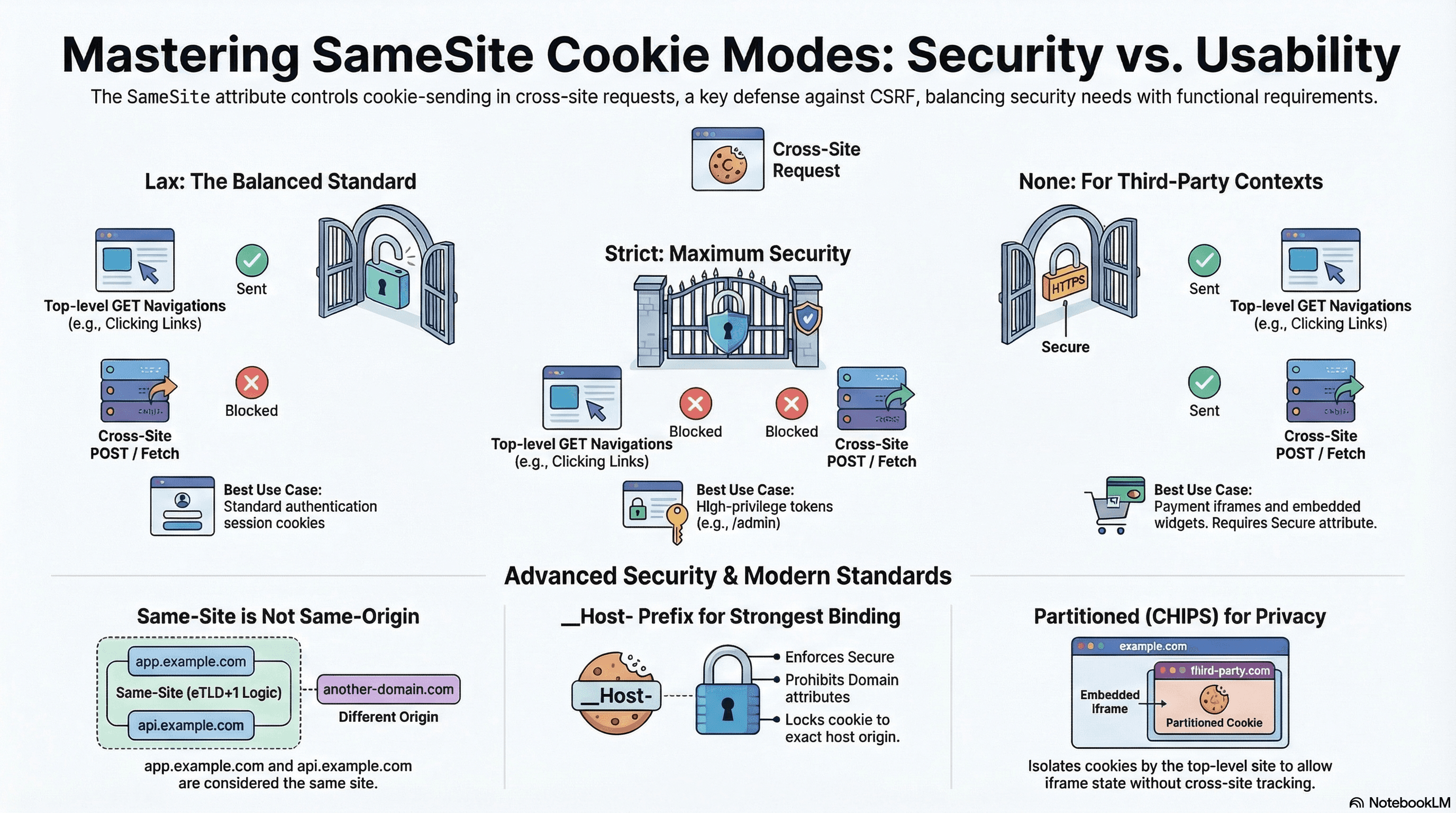
Overview
The SameSite attribute on HTTP cookies controls whether a cookie is sent on cross-site requests. It's the primary browser-level defense against Cross-Site Request Forgery (CSRF) and also determines how cookies behave in third-party contexts — embedded iframes, OAuth redirects, payment widgets.
Three modes: Strict never sends cookies cross-site, Lax sends them on top-level navigations but not subresource requests, None always sends them (requires Secure). Every cookie you set should declare an explicit SameSite value — browser defaults have changed across versions and are not stable.
How It Works
"Same-Site" vs "Same-Origin"
These are frequently confused. Same-origin requires an exact match of scheme, host, and port. Same-site uses the eTLD+1 (effective top-level domain + one label) — the registrable domain — and ignores subdomains and ports.
eTLD+1 examples:
  https://app.example.com     → eTLD+1 = example.com
  https://api.example.com     → eTLD+1 = example.com  ← SAME SITE as above
  https://example.co.uk       → eTLD+1 = example.co.uk (co.uk is an eTLD)
  https://evil.example.com    → eTLD+1 = example.com  ← same site, different subdomain

Cross-site examples:
  https://app.example.com  →  https://api.different.com  ← cross-site
  https://app.example.com  →  https://example.io         ← cross-site (different TLD)
app.example.com and api.example.com are same-site — SameSite=Strict cookies will be sent between them. Cross-origin (different port or subdomain) is not the same as cross-site.
The Three Modes
Strict — cookie is never sent on any cross-site request, including top-level navigations. A user arriving from an email link or a password manager redirect won't have the cookie attached on that first request — the app sees them as unauthenticated even if they just authenticated.
Lax — cookie is sent on top-level same-site navigations (GET via link click, browser address bar) but withheld on cross-site subresource requests (fetch, <img>, <form> POST, iframes). This is the Chrome default for cookies without an explicit SameSite attribute since Chrome 80.
None — cookie is always sent, including in cross-site iframes and fetch calls. Requires Secure — browsers silently drop None cookies without it.
Request Type                   Strict  Lax   None
────────────────────────────── ──────  ───   ────
Same-site (any)                  ✅    ✅     ✅
Cross-site top nav GET           ❌    ✅     ✅
Cross-site fetch / POST          ❌    ❌     ✅
Cross-site iframe / image        ❌    ❌     ✅
Chrome 80 and the Lax-by-Default Change
Before Chrome 80 (February 2020), cookies without SameSite were treated as SameSite=None — sent on all requests including cross-site. Chrome 80 changed the default to SameSite=Lax. Cookies without an explicit attribute are now treated as Lax in Chrome, Edge, and Firefox. Safari applies similar restrictions under ITP (see below).
Practical impact: any third-party cookie (payment widget, chat embed, analytics) that relied on implicit cross-site sending broke unless explicitly updated to SameSite=None; Secure.
Code Examples
Session Cookie — Lax (Correct Default)
// app/api/auth/login/route.ts
import { cookies } from "next/headers";
import { NextResponse } from "next/server";

export async function POST(req: Request) {
  const { email, password } = await req.json();
  const token = await createSessionToken(email, password);

  if (!token) {
    return NextResponse.json({ error: "Invalid credentials" }, { status: 401 });
  }

  const cookieStore = await cookies();
  cookieStore.set("session", token, {
    httpOnly: true, // inaccessible to JS — mitigates XSS theft
    secure: true, // HTTPS only
    sameSite: "lax", // sent on top-level nav; blocked on cross-site POST/fetch
    path: "/",
    maxAge: 60 * 60 * 24 * 7, // 7 days
  });

  return NextResponse.json({ ok: true });
}
Lax is the right default for auth session cookies — it blocks CSRF (cross-site form POST/fetch can't carry the cookie) while preserving usability (clicking an email link to your app lands authenticated).
High-Privilege Token — Strict
// app/api/admin/elevate/route.ts
import { cookies } from "next/headers";
import { NextResponse } from "next/server";

export async function POST(req: Request) {
  const { mfaCode } = await req.json();
  const elevationToken = await verifyMfaAndCreateToken(mfaCode);

  const cookieStore = await cookies();
  cookieStore.set("admin_token", elevationToken, {
    httpOnly: true,
    secure: true,
    sameSite: "strict", // NEVER sent cross-site, not even on link-click navigation
    path: "/admin", // only sent on /admin/* paths
    maxAge: 60 * 30, // 30-minute window
  });

  return NextResponse.json({ elevated: true });
}
Strict is appropriate when even a top-level cross-site navigation shouldn't carry the cookie. A user clicking a link from an external site to /admin won't have admin_token attached — they'll need to re-authenticate within the admin section.
Third-Party Widget — None
// app/api/widget/init/route.ts — embedded on external merchant sites
export async function GET() {
  const response = NextResponse.json({ initialized: true });

  response.cookies.set("widget_session", crypto.randomUUID(), {
    httpOnly: true,
    secure: true, // mandatory with SameSite=None — browser rejects without it
    sameSite: "none", // must be sent in cross-site iframe context
    path: "/widget",
    maxAge: 60 * 60,
  });

  return response;
}
SameSite=None without Secure is silently dropped by browsers — no error,
the cookie just doesn't exist. Always pair them. In local development, use
https://localhost (via mkcert) rather than http://localhost to test
None cookies.
Cookie Prefixes — __Host- and __Secure-
Cookie prefixes are a browser-enforced security mechanism that prevents subdomain injection attacks — a subdomain setting a cookie that applies to the parent domain:
__Secure- prefix:
- Cookie must be set with
Secureattribute - Must be set over HTTPS
- Does not restrict
DomainorPath
cookieStore.set("__Secure-session", token, {
  httpOnly: true,
  secure: true, // required — browser rejects __Secure- without it
  sameSite: "lax",
  path: "/",
});
__Host- prefix (strongest):
- Must have
Secure - Must NOT have a
Domainattribute (bound to the exact host, not subdomains) - Must have
Path=/
cookieStore.set("__Host-csrf", csrfToken, {
  httpOnly: true,
  secure: true, // required
  sameSite: "strict",
  path: "/", // required — must be /
  // domain: intentionally omitted — __Host- forbids it
});
__Host- provides the strongest binding: the cookie is only sent to the exact origin that set it, preventing a compromised subdomain from hijacking the session by setting a same-named cookie on the parent domain.
Partitioned Cookies (CHIPS)
CHIPS (Cookies Having Independent Partitioned State) allows cross-site cookies in a third-party iframe context while preventing cross-site tracking by partitioning cookie storage by top-level site:
// Partitioned cookie: stored separately per top-level site
// merchant-a.com embedding your widget gets a different cookie jar
// than merchant-b.com embedding the same widget
response.cookies.set("widget_state", sessionId, {
  httpOnly: true,
  secure: true,
  sameSite: "none",
  path: "/",
  // Partitioned attribute: tells the browser to key this cookie by top-level site
  // In Next.js, set it via the raw Set-Cookie header until framework support lands
});

// Set-Cookie: widget_state=abc; SameSite=None; Secure; Partitioned
response.headers.set(
  "Set-Cookie",
  `widget_state=${sessionId}; SameSite=None; Secure; Partitioned; Path=/; HttpOnly`,
);
Partitioned cookies solve the third-party cookie deprecation problem: they continue to work in iframes without enabling cross-site tracking because the same cookie cannot be read from different top-level contexts.
Reading and Guarding Cookies in Middleware
// middleware.ts — validate session cookie before protected routes
import { NextRequest, NextResponse } from "next/server";

export function middleware(req: NextRequest) {
  const session = req.cookies.get("__Host-session");

  if (!session?.value && req.nextUrl.pathname.startsWith("/dashboard")) {
    const url = req.nextUrl.clone();
    url.pathname = "/login";
    url.searchParams.set("next", req.nextUrl.pathname);
    return NextResponse.redirect(url);
  }

  return NextResponse.next();
}

export const config = {
  matcher: ["/dashboard/:path*", "/admin/:path*"],
};
Safari ITP — None Cookies in Safari
Safari's Intelligent Tracking Prevention (ITP) applies additional restrictions on top of SameSite=None; Secure:
- In Safari,
SameSite=Nonecookies in cross-site iframes are blocked by default (Storage Access API must be used to request access) - Cookies set by cross-site redirects may be partitioned or blocked after 7 days
document.cookieset from a first-party context may be capped at 7-day expiry if the domain has been identified as a potential tracker
// For iframes requiring cookie access in Safari, request Storage Access
// This must be called from within the iframe on user gesture
async function requestCookieAccess() {
  if (!document.hasStorageAccess || !document.requestStorageAccess) {
    return; // Not Safari — no-op
  }

  const hasAccess = await document.hasStorageAccess();
  if (!hasAccess) {
    // Requires user gesture (button click) — cannot be called silently
    await document.requestStorageAccess();
  }
}
Real-World Use Case
SaaS platform with three cookie types. Main auth session (__Host-session, Lax) — sent on navigation from marketing pages, blocked on cross-site POST. Admin 2FA elevation token (__Host-admin, Strict, Path=/admin) — never carried on any external link, only sent on direct /admin navigations from the same origin. Embedded checkout widget (widget_state, None; Secure; Partitioned) — works in merchant iframes, partitioned per merchant site, survives Chrome's third-party cookie deprecation.
Common Mistakes / Gotchas
1. SameSite=None without Secure. Silently dropped. No warning. The cookie never exists. Always pair with Secure.
2. Using Strict for the main auth session. A user clicking your app link from an email, password manager, or OAuth redirect lands unauthenticated — the cookie isn't sent on that cross-site navigation. Use Lax for auth sessions.
3. Confusing cross-site with cross-origin. app.example.com and api.example.com are same-site (same eTLD+1). SameSite=Strict cookies flow freely between them. CORS is what restricts cross-origin reads — SameSite is a different axis entirely.
4. Lax doesn't prevent all CSRF. Lax blocks cross-site POST/fetch, but cross-site GET navigations still carry the cookie. Never perform state mutations on GET endpoints.
5. Not using __Host- for CSRF tokens. A CSRF token in a regular cookie can be overwritten by a subdomain if the Domain attribute is set. Using __Host-csrf prevents any subdomain from injecting a fake token.
Summary
SameSite=Lax is the correct default for auth session cookies — it blocks cross-site CSRF while preserving navigation UX. Strict is appropriate for high-privilege tokens where cross-site navigation is explicitly not allowed. None (always with Secure) is for genuinely cross-site contexts like payment iframes and embedded widgets — pair with Partitioned to survive third-party cookie deprecation. __Host- prefix provides the strongest security binding: enforces Secure, prohibits Domain, and requires Path=/. Same-site is calculated by eTLD+1, not origin — app.example.com and api.example.com are same-site. Chrome 80 changed the no-attribute default to Lax; always set SameSite explicitly rather than relying on browser defaults.
Interview Questions
Q1. What is the difference between "same-site" and "same-origin" in the context of cookies?
Same-origin requires an exact match of scheme, host, and port — https://app.example.com and https://api.example.com are different origins (different host). Same-site uses the eTLD+1 (effective top-level domain + one label), the registrable domain. app.example.com and api.example.com share the same eTLD+1 (example.com) — they are same-site. SameSite cookies flow freely between them. The distinction matters practically: CORS restricts cross-origin response reading, while SameSite restricts cross-site cookie sending. A request from app.example.com to api.example.com is cross-origin (CORS applies) but same-site (SameSite=Strict cookies are sent).
Q2. Why is SameSite=Lax the correct default for auth session cookies rather than Strict?
Strict means the cookie is never sent on any cross-site request — including top-level navigations from external sites. When a user clicks your app link in an email, a Slack message, or a password manager, that's a cross-site top-level navigation — Strict cookies are not sent. The server sees the user as unauthenticated and redirects to login, frustrating the user who was already logged in. OAuth redirect callbacks are also cross-site top-level navigations — Strict would break them. Lax sends cookies on top-level GET navigations but blocks cross-site subresource requests (the CSRF vectors). This preserves usability — users land authenticated from external links — while blocking the primary CSRF attack surface.
Q3. What is the __Host- cookie prefix and what security guarantee does it provide?
__Host- is a browser-enforced cookie name prefix. Cookies with this prefix are required by the browser to have: Secure (HTTPS only), no Domain attribute (bound to the exact host, not subdomains), and Path=/. If any of these requirements are missing, the browser silently rejects the cookie. The security guarantee: a cookie named __Host-session can only be set by the exact origin that owns it — not by a subdomain. This prevents a compromised subdomain from setting __Host-session on the parent domain to hijack sessions. For comparison, a regular session cookie with Domain=example.com can be set or overwritten by evil.example.com if that subdomain is ever compromised.
Q4. What is SameSite=None; Partitioned (CHIPS) and why was it introduced?
Third-party cookies (SameSite=None; Secure) allow a cross-site service (analytics, chat, checkout iframe) to maintain state across all sites that embed it — the same cookie jar is shared. This enables cross-site tracking: a tracker embedded on 100 sites can correlate the same user across all of them by reading the same cookie. Browsers are deprecating unpartitioned third-party cookies. CHIPS (Cookies Having Independent Partitioned State) partitions the cookie jar by top-level site: a widget_session cookie set when embedded on merchant-a.com is stored separately from the same cookie when embedded on merchant-b.com. The widget maintains state per embedding site but cannot correlate users across sites. The Partitioned attribute opts into this behavior.
Q5. What happened in Chrome 80 that broke many third-party cookies?
Before Chrome 80, cookies without an explicit SameSite attribute were treated as SameSite=None — sent on all requests including cross-site iframes and fetch calls. Chrome 80 (released February 2020) changed the default to SameSite=Lax for cookies without an explicit attribute. Any third-party service that relied on implicit cross-site cookie sending — payment widgets, social login buttons, analytics, embedded iframes — had their cookies silently blocked unless they were updated to explicitly declare SameSite=None; Secure. This broke a large number of third-party integrations, especially those that hadn't been actively maintained. The fix was straightforward: add SameSite=None; Secure — but it required coordination across all affected services.
Q6. How does Safari's ITP affect SameSite=None cookies and what is the Storage Access API?
Safari's Intelligent Tracking Prevention classifies domains it believes are tracking users and applies additional restrictions. Even with SameSite=None; Secure, cross-site cookies in iframes from classified tracker domains are blocked in Safari by default — the SameSite=None attribute alone is not sufficient to permit them. The Storage Access API (document.requestStorageAccess()) allows an iframe to request permission to access its first-party cookies in a cross-site context. It must be called in response to a user gesture (a button click inside the iframe), and the browser may show a permission prompt. Once granted, the iframe can read its cookies as if it were a first-party context. This is the intended path for legitimate cross-site embedded services — chat widgets, payment forms — that need cookie access in Safari.
CORS & Preflight
How the browser's Cross-Origin Resource Sharing mechanism works — simple vs non-simple requests, the preflight handshake, credentialed requests, Access-Control-Expose-Headers, Private Network Access, the null origin edge case, and a DevTools debugging workflow.
Authentication Flows
OAuth 2.0 Authorization Code Flow with PKCE, JWT structure and storage tradeoffs, session cookies, refresh token rotation with reuse detection, silent refresh, and Auth.js v5 integration in Next.js App Router.