Data Fetching Patterns
The mental models behind TanStack Query and SWR — cache keys, deduplication, background revalidation, prefetching with SSR hydration, parallel and dependent queries, and when to use a client cache versus a Server Component fetch.
Overview
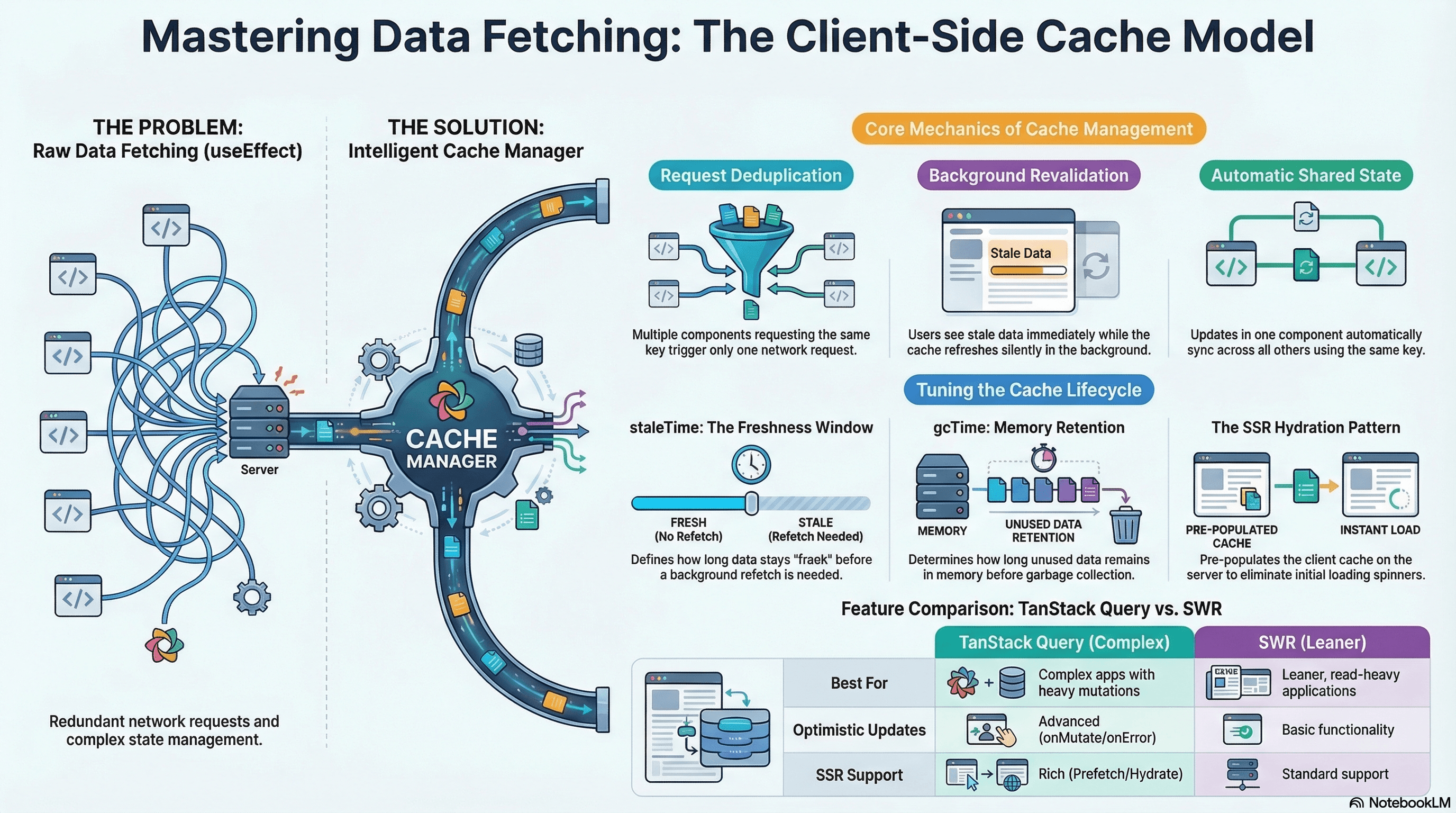
Client-side data fetching is not just fetch() inside useEffect. The moment you care about loading states, caching, deduplication, background refresh, optimistic updates, and cache invalidation — you are building a client-side cache. TanStack Query and SWR exist because that cache is hard to build correctly, and teams kept rebuilding it badly.
This article covers the underlying mechanics both libraries implement, the patterns that matter most in production (prefetching, SSR hydration, parallel and dependent queries), how SWR compares to TanStack Query, and when to skip the client cache entirely in favor of a Server Component fetch.
How It Works
The Client-Side Cache Model
Every serious data fetching library is built around a cache keyed by request identity. When a component mounts and requests data, the library checks the cache first. Fresh entry → return immediately, no network request. Stale or missing → fetch, store, notify subscribers.
This solves three problems that raw useEffect fetching cannot:
Deduplication — If 10 components simultaneously request ['user', 42], the library fires one request and delivers the result to all 10 when it resolves.
Background revalidation — Return the cached (stale) value immediately so the UI renders without a spinner, then fetch a fresh copy and update silently when it arrives.
Shared state without a global store — Two useQuery({ queryKey: ['user', 42] }) calls in different parts of the tree are automatically synchronized — one mutation invalidates the cache and both update.
Cache Keys
The cache key is the identity of a request. In TanStack Query it's an array; in SWR it's a string or function. Keys must be deterministic (same logical request → same key), specific (different requests → different keys), and must not contain unstable references (no inline objects or arrays).
// ✅ Primitive values — stable and deterministic
useQuery({ queryKey: ["user", userId] });
useQuery({ queryKey: ["products", category, page, sort] });

// ❌ Inline object — new reference every render → infinite refetch loop
useQuery({ queryKey: ["user", { id: userId }] });
Stale Time vs Cache Time
staleTime — how long cached data is considered fresh. During this window, no background refetch happens. After it expires, the next component mount or window focus triggers a background refresh while showing the stale value immediately.
gcTime (formerly cacheTime) — how long unused data stays in memory before garbage collection. A query unmounted for less than gcTime can remount and render instantly from cache before refetching.
Request resolves → FRESH for staleTime (no background fetch)
                 → STALE after staleTime (background fetch on next mount/focus)
                 → EVICTED after gcTime with no active subscribers
Code Examples
TanStack Query Setup
// app/providers.tsx
"use client";

import { QueryClient, QueryClientProvider } from "@tanstack/react-query";
import { ReactQueryDevtools } from "@tanstack/react-query-devtools";
import { useState, type ReactNode } from "react";

export function ReactQueryProvider({ children }: { children: ReactNode }) {
  // Create inside useState — each server-side render gets a fresh client
  // A module-level QueryClient is shared across all SSR requests → data leaks between users
  const [queryClient] = useState(
    () =>
      new QueryClient({
        defaultOptions: {
          queries: {
            staleTime: 60 * 1000, // 1 min fresh window — reduces unnecessary refetches
            retry: 2,
            refetchOnWindowFocus: true,
          },
        },
      }),
  );

  return (
    <QueryClientProvider client={queryClient}>
      {children}
      {process.env.NODE_ENV === "development" && <ReactQueryDevtools />}
    </QueryClientProvider>
  );
}
Parallel Queries — Independent Data at the Same Time
// hooks/use-product-page.ts
import { useQueries } from "@tanstack/react-query";

// useQueries fires all queries in parallel — total time = slowest query, not sum
export function useProductPage(productId: string, userId: string | null) {
  const results = useQueries({
    queries: [
      {
        queryKey: ["product", productId],
        queryFn: async () => {
          const res = await fetch(`/api/products/${productId}`);
          if (!res.ok) throw new Error("Failed to fetch product");
          return res.json();
        },
        staleTime: 5 * 60 * 1000,
      },
      {
        queryKey: ["inventory", productId],
        queryFn: async () => {
          const res = await fetch(`/api/products/${productId}/inventory`);
          if (!res.ok) throw new Error("Failed to fetch inventory");
          return res.json();
        },
        staleTime: 30 * 1000,
        refetchInterval: 60 * 1000, // poll every 60s — inventory changes frequently
      },
      {
        queryKey: ["user-purchases", userId, productId],
        queryFn: async () => {
          const res = await fetch(
            `/api/users/${userId}/purchases?productId=${productId}`,
          );
          if (!res.ok) throw new Error("Failed to fetch history");
          return res.json();
        },
        enabled: !!userId, // skip if no user logged in
      },
    ],
  });

  const [product, inventory, purchaseHistory] = results;
  return {
    product: product.data,
    inventory: inventory.data,
    purchaseHistory: purchaseHistory.data,
    isLoading: results.some((r) => r.isLoading),
    isError: results.some((r) => r.isError),
  };
}
Dependent Queries — Sequential Fetch When B Needs A's Data
// hooks/use-user-orders.ts
import { useQuery } from "@tanstack/react-query";

export function useUserOrders() {
  // Step 1: fetch the authenticated user
  const userQuery = useQuery({
    queryKey: ["me"],
    queryFn: async () => {
      const res = await fetch("/api/me");
      if (!res.ok) throw new Error("Not authenticated");
      return res.json() as Promise<{ id: string; name: string }>;
    },
  });

  // Step 2: fetch orders — only runs after userId is available
  const ordersQuery = useQuery({
    queryKey: ["orders", userQuery.data?.id],
    queryFn: async () => {
      const res = await fetch(`/api/users/${userQuery.data!.id}/orders`);
      if (!res.ok) throw new Error("Failed to fetch orders");
      return res.json();
    },
    enabled: !!userQuery.data?.id, // prevents the query from running prematurely
  });

  return {
    user: userQuery.data,
    orders: ordersQuery.data,
    isLoading: userQuery.isLoading || ordersQuery.isLoading,
    isError: userQuery.isError || ordersQuery.isError,
  };
}
Dependent queries are a sequential waterfall. If possible, pass the required
value from a Server Component layout (which can await Promise.all(...) on
the server), so both queries can run in parallel on the client.
Prefetching + SSR Hydration
This pattern pre-populates the TanStack Query cache on the server so the page renders with data on initial load — no loading spinners:
// app/products/page.tsx — Server Component prefetches into QueryClient
import {
  dehydrate,
  HydrationBoundary,
  QueryClient,
} from "@tanstack/react-query";
import { ProductList } from "@/components/ProductList";

async function fetchProducts(category: string) {
  const res = await fetch(
    `${process.env.API_URL}/products?category=${category}`,
    { next: { revalidate: 60 } },
  );
  if (!res.ok) throw new Error("Failed to fetch products");
  return res.json();
}

export default async function ProductsPage({
  searchParams,
}: {
  searchParams: { category?: string };
}) {
  const category = searchParams.category ?? "all";
  const queryClient = new QueryClient();

  // Pre-populate the cache on the server — same queryKey the client component uses
  await queryClient.prefetchQuery({
    queryKey: ["products", category],
    queryFn: () => fetchProducts(category),
  });

  // dehydrate: serialize the populated cache to JSON
  // HydrationBoundary: delivers the serialized cache to the client
  // On the client, TanStack Query rehydrates — cache is already populated
  return (
    <HydrationBoundary state={dehydrate(queryClient)}>
      <ProductList category={category} />
    </HydrationBoundary>
  );
}
// components/ProductList.tsx
"use client";
import { useQuery } from "@tanstack/react-query";
type Product = { id: string; name: string; price: number };
export function ProductList({ category }: { category: string }) {
const { data: products, isLoading } = useQuery({
queryKey: ["products", category],
queryFn: async () => {
const res = await fetch(`/api/products?category=${category}`);
if (!res.ok) throw new Error("Failed to fetch products");
return res.json() as Promise<Product[]>;
},
staleTime: 60 * 1000,
});
// Initial load: cache already populated from server prefetch — no loading state shown
// After staleTime: background refetch runs silently
if (isLoading) return <div>Loading…</div>;
return (
<ul>
{products?.map((p) => (
<li key={p.id}>
{p.name} — ${p.price}
</li>
))}
</ul>
);
}Mutations with Cache Invalidation
// hooks/use-create-product.ts
import { useMutation, useQueryClient } from "@tanstack/react-query";

export function useCreateProduct() {
  const queryClient = useQueryClient();

  return useMutation({
    mutationFn: async (payload: {
      name: string;
      price: number;
      category: string;
    }) => {
      const res = await fetch("/api/products", {
        method: "POST",
        headers: { "Content-Type": "application/json" },
        body: JSON.stringify(payload),
      });
      if (!res.ok) throw new Error("Failed to create product");
      return res.json();
    },
    onSuccess: (newProduct) => {
      // Invalidate all product list queries — they'll refetch on next render
      queryClient.invalidateQueries({ queryKey: ["products"] });

      // Pre-populate the individual product entry — no extra request needed
      queryClient.setQueryData(["product", newProduct.id], newProduct);
    },
  });
}
SWR — Leaner Alternative
// npm install swr

import useSWR from "swr";
import useSWRMutation from "swr/mutation";

const fetcher = (url: string) =>
  fetch(url).then((r) => {
    if (!r.ok) throw new Error("Request failed");
    return r.json();
  });

// Basic query — equivalent to useQuery with string key
export function useProduct(id: string) {
  const { data, error, isLoading } = useSWR(
    id ? `/api/products/${id}` : null, // null disables (like enabled: false)
    fetcher,
    {
      revalidateOnFocus: true,
      dedupingInterval: 60_000, // SWR equivalent of staleTime
      keepPreviousData: true, // show previous data while new data loads
    },
  );
  return { product: data, isLoading, isError: !!error };
}

// Mutation
export function useUpdateProduct(id: string) {
  return useSWRMutation(
    `/api/products/${id}`,
    async (
      url: string,
      { arg }: { arg: { name?: string; price?: number } },
    ) => {
      const res = await fetch(url, {
        method: "PATCH",
        headers: { "Content-Type": "application/json" },
        body: JSON.stringify(arg),
      });
      if (!res.ok) throw new Error("Update failed");
      return res.json();
    },
  );
}
TanStack Query vs SWR: TanStack Query is the better default for complex applications — richer mutation lifecycle (onMutate/onError/onSettled for optimistic updates), useQueries for parallel queries, prefetchQuery + dehydrate/hydrate for SSR, infinite scroll, surgical setQueryData cache updates. SWR is lighter-weight and sufficient for simpler fetch-and-cache use cases where bundle size matters.
Real-World Use Case
Notification feed with SSR and real-time updates. The notification page is server-rendered — prefetchQuery on the server pre-populates the TanStack Query cache with the first page of notifications. On the client: no loading spinner, instant display. refetchInterval: 30_000 polls for new notifications silently in the background. When the user marks all as read, onSuccess invalidates both ['notifications'] and the ['notification-count'] queries — the badge in the header and the list both update with fresh data. No global store. No useEffect. No manual loading state management.
Common Mistakes / Gotchas
1. Creating QueryClient at module level. In SSR, a module-level client is shared across all requests — one user's data leaks into another's. Always create inside useState.
2. Unstable cache keys. Inline objects create a new reference every render and trigger infinite refetch loops. Use primitives: ["user", userId], not ["user", { id: userId }].
3. staleTime: 0 (the default) causing excessive refetches. Every component mount triggers a background refetch. Set a meaningful staleTime for data that doesn't change by the second — this is the single biggest performance win for most TanStack Query setups.
4. Invalidating too broadly. queryClient.invalidateQueries() with no key invalidates everything — all visible components refetch simultaneously, creating a waterfall of spinners. Always specify the exact keys the mutation affects.
5. Forgetting enabled: false guards. A queryFn that uses ! to assert a non-null value (userId!) will throw if enabled doesn't properly guard. Always pair enabled: !!value with non-null assertions in the queryFn.
Summary
TanStack Query and SWR are client-side cache managers — not fetch wrappers. Their core value is deduplication (one network request for many components), background revalidation (stale data shown immediately, fresh data applied silently), and cache invalidation on mutation. Cache keys are the identity of a request — deterministic, specific, primitive values. staleTime controls the fresh window; gcTime controls memory retention after unmount. prefetchQuery + dehydrate/hydrate delivers server-rendered pages with a pre-populated client cache — no initial loading spinners. Use parallel useQueries for independent data; enabled for dependent queries. For static data that only shapes the initial render, skip the client cache and fetch in a Server Component.
Interview Questions
Q1. What is deduplication in TanStack Query and how does it work mechanically?
When multiple components call useQuery with the same cache key simultaneously, TanStack Query fires exactly one network request and delivers the result to all subscribers. Mechanically: each useQuery call creates a QueryObserver that subscribes to a Query object in the QueryCache. The Query object tracks whether a fetch is already in-flight — if it is, new observers wait for the existing Promise rather than starting new requests. The result: a page with 10 components needing the current user's data makes one request, not 10. This is the primary reason to prefer TanStack Query over raw useEffect + fetch — deduplication requires no coordination from the developer.
Q2. What is the difference between staleTime and gcTime in TanStack Query?
staleTime is about freshness — how long after a successful fetch the data is considered current. During this window, component mounts and window focus events don't trigger background refetches. After it expires, the data is "stale" — still shown immediately (no loading spinner), but a background refetch starts. gcTime (formerly cacheTime) is about memory — how long unused data stays in the cache after its last subscriber unmounts. A component that unmounts keeps its cache entry for gcTime so that remounting shows the value instantly before refetching. The defaults are staleTime: 0 (always stale) and gcTime: 5 minutes. Setting a meaningful staleTime is the most impactful TanStack Query optimization for most apps.
Q3. How does the prefetchQuery + dehydrate + HydrationBoundary SSR pattern work?
On the server: a fresh QueryClient is created, prefetchQuery is called with the same cache key the client will use — this populates the server-side cache with awaited data. dehydrate(queryClient) serializes the populated cache to a JSON-safe object. HydrationBoundary embeds this serialized state in the rendered HTML. On the client: when TanStack Query initializes, HydrationBoundary reads the serialized state and populates the client-side cache before any component renders. When a Client Component calls useQuery with the matching key, the cache is already populated — no loading state, no initial network request. After staleTime expires, a background refetch runs silently.
Q4. Why are dependent queries a performance problem and how can you avoid the waterfall?
Dependent queries run sequentially: request B can't start until request A resolves. With network latency of 100ms each, two dependent queries take 200ms minimum. The pattern is unavoidable when B genuinely requires A's response data (e.g., you don't know the user's ID until you fetch /api/me). Avoidance strategies: if the required value is available higher in the component tree, pass it as a prop down to the component making both queries — enabling both to run in parallel. In Next.js App Router, a Server Component layout can await Promise.all([fetchUser(), fetchOrders(userId)]) in parallel on the server and pass both as props to Client Components, eliminating the client-side waterfall entirely.
Q5. When should you use TanStack Query over SWR and vice versa?
TanStack Query is the better default for complex applications: richer mutation lifecycle (onMutate for optimistic updates, onError for rollback, onSettled for cleanup), useQueries for typed parallel queries, prefetchQuery + dehydrate/hydrate for SSR, infinite scroll queries, fine-grained setQueryData for surgical cache updates, and a larger ecosystem. SWR is lighter-weight and more opinionated — it's sufficient for simpler fetch-and-cache scenarios where bundle size matters and optimistic mutations aren't needed. Both implement the same core patterns (deduplication, stale-while-revalidate, cache invalidation). Choose SWR for lean, read-heavy apps; TanStack Query for apps with complex mutation workflows, SSR requirements, or advanced caching needs.
Q6. Why is a module-level QueryClient dangerous in Next.js App Router SSR?
JavaScript modules are cached at the process level in Node.js. A QueryClient created at module level is a singleton shared across all HTTP requests to the server. When User A's request populates the cache with their private profile data, and User B's request arrives before the cache entry expires, User B's render reads User A's data from the shared cache — a data privacy violation. The fix: create the QueryClient inside useState(() => new QueryClient()) in the provider component. Each React render tree gets its own fresh client instance. In App Router, each request renders a new tree — so each request gets a fresh QueryClient with no shared state between users.
URL as State
How to encode UI state in the URL for shareability and server rendering — using Next.js searchParams, the nuqs library for type-safe params, Zod for validation, and push vs replace routing.
Race Conditions in UI State
How async operations resolving out of order corrupt displayed state, and the three patterns that prevent it — AbortController, ignore flags, and sequence counters — plus how TanStack Query eliminates this class of bug automatically.