State Boundaries
How to decide what lives in local state, server state, or global client state — and the patterns that prevent global stores from becoming re-render bottlenecks.
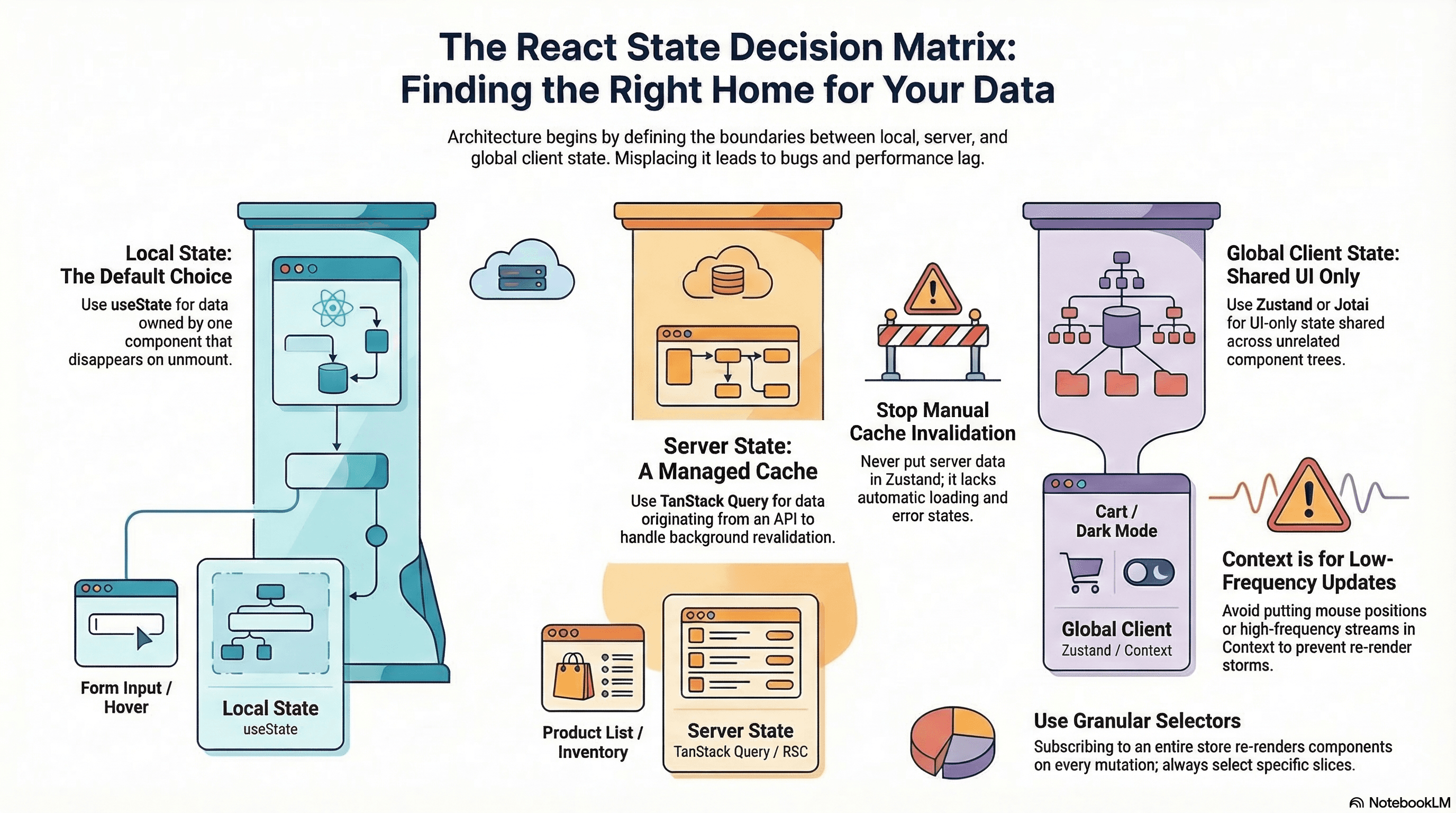
Overview
Every piece of state has a natural home. Put state in the wrong home and you get stale data (server state in a global store), unnecessary re-renders (high-frequency updates in Context), prop-drilling (local state hoisted too high), or an unmaintainable global store (everything in Zustand because it was easy).
There are three distinct categories of state with different tools, different ownership, and different lifetimes. Understanding the boundary between them is the most important architectural decision in a React application.
How It Works
Local State
useState and useReducer are scoped to a component tree. The state disappears when the component unmounts. Default to this. If a piece of state is owned by one component and no sibling or parent needs it, keep it local.
Good candidates: form input values, toggle open/closed state, hover effects, wizard step tracking, accordion expanded state, multi-step form data before submission.
Server State
Data that originates in a database or API. The client holds a cache — the server is the source of truth. In Next.js App Router, React Server Components fetch data directly on the server, which often eliminates client-side server state entirely for read-heavy data. For interactive data that needs to stay fresh, TanStack Query manages the cache: deduplication, background revalidation, stale-while-revalidate.
Never put server data in a Zustand store. Doing so means manually implementing loading states, error states, refetching on focus, cache invalidation on mutation — work TanStack Query already does correctly.
Global Client State
Shared UI state with no server representation — purely client-side. Theme (dark/light), sidebar collapsed, shopping cart (pre-checkout), notification preferences, multi-select state across unrelated component trees. Tools: Zustand for complex state with actions, Jotai for fine-grained atomic state, React Context for low-frequency configuration.
The Decision Tree
Is this data fetched from a server/database?
  ├─ YES → Is it read-only or rarely mutated by the client?
  │         ├─ YES → React Server Component fetch (no client state needed)
  │         └─ NO  → TanStack Query / SWR with mutations
  └─ NO  → Is it needed by genuinely unrelated component subtrees?
            ├─ YES → Global client state (Zustand, Jotai)
            └─ NO  → Local state (useState / useReducer), or lift to common parent
Code Examples
Local State — Ephemeral Form Input
// components/SearchBar.tsx
"use client";

import { useState } from "react";

// query only matters within this component — keep it local
export function SearchBar({ onSearch }: { onSearch: (q: string) => void }) {
  const [query, setQuery] = useState("");

  return (
    <form
      onSubmit={(e) => {
        e.preventDefault();
        onSearch(query);
      }}
    >
      <input
        value={query}
        onChange={(e) => setQuery(e.target.value)}
        placeholder="Search…"
      />
      <button type="submit">Search</button>
    </form>
  );
}
Server State — TanStack Query with Mutations
// hooks/use-product.ts
import { useQuery, useMutation, useQueryClient } from "@tanstack/react-query";

interface Product {
  id: string;
  name: string;
  price: number;
  stock: number;
}

export function useProduct(id: string) {
  return useQuery({
    queryKey: ["product", id],
    queryFn: async () => {
      const res = await fetch(`/api/products/${id}`);
      if (!res.ok) throw new Error("Failed to fetch product");
      return res.json() as Promise<Product>;
    },
    staleTime: 5 * 60 * 1000, // fresh for 5 minutes — no background refetch during this window
  });
}

export function useUpdateProduct(id: string) {
  const queryClient = useQueryClient();

  return useMutation({
    mutationFn: async (patch: Partial<Product>) => {
      const res = await fetch(`/api/products/${id}`, {
        method: "PATCH",
        headers: { "Content-Type": "application/json" },
        body: JSON.stringify(patch),
      });
      if (!res.ok) throw new Error("Update failed");
      return res.json();
    },
    onSuccess: () => {
      // Invalidate and refetch — cache reflects server truth
      queryClient.invalidateQueries({ queryKey: ["product", id] });
      queryClient.invalidateQueries({ queryKey: ["products"] }); // update list too
    },
  });
}
Global Client State — Zustand with Middleware
// lib/stores/app-store.ts
import { create } from "zustand";
import { devtools, persist, subscribeWithSelector } from "zustand/middleware";
import { immer } from "zustand/middleware/immer";

interface AppStore {
  // UI state only — no server data here
  sidebarOpen: boolean;
  theme: "light" | "dark" | "system";
  notifications: Array<{ id: string; message: string; type: "info" | "error" }>;

  setSidebar: (open: boolean) => void;
  setTheme: (theme: AppStore["theme"]) => void;
  addNotification: (n: Omit<AppStore["notifications"][0], "id">) => void;
  removeNotification: (id: string) => void;
}

export const useAppStore = create<AppStore>()(
  devtools(
    // Redux DevTools support — time-travel debugging
    persist(
      // localStorage persistence across sessions
      subscribeWithSelector(
        // fine-grained subscriptions without selectors
        immer((set) => ({
          // Immer for ergonomic updates
          sidebarOpen: false,
          theme: "system",
          notifications: [],

          setSidebar: (open) =>
            set((state) => {
              state.sidebarOpen = open;
            }),

          setTheme: (theme) =>
            set((state) => {
              state.theme = theme;
            }),

          addNotification: (n) =>
            set((state) => {
              state.notifications.push({ ...n, id: crypto.randomUUID() });
            }),

          removeNotification: (id) =>
            set((state) => {
              state.notifications = state.notifications.filter(
                (n) => n.id !== id,
              );
            }),
        })),
      ),
      {
        name: "app-store", // localStorage key
        // Only persist theme and sidebar — don't persist notifications
        partialize: (state) => ({
          theme: state.theme,
          sidebarOpen: state.sidebarOpen,
        }),
      },
    ),
  ),
);
// Granular selectors — each component re-renders only when its slice changes
const sidebarOpen = useAppStore((s) => s.sidebarOpen); // re-renders on sidebar toggle
const theme = useAppStore((s) => s.theme); // re-renders on theme change
const notifCount = useAppStore((s) => s.notifications.length); // re-renders on count changeContext Splitting — Preventing Unnecessary Re-renders
React Context re-renders every consumer when its value changes. For state with different update frequencies, split into separate contexts:
// ❌ One large context — theme change triggers re-render of all cart consumers
const AppContext = createContext<{
  theme: string;
  cart: CartItem[];
  user: User | null;
}>({ theme: "light", cart: [], user: null });

// ✅ Split by update frequency
// ThemeContext changes rarely — safe for many consumers
const ThemeContext = createContext<{
  theme: string;
  setTheme: (t: string) => void;
}>({ theme: "light", setTheme: () => {} });

// CartContext changes on every add/remove — only cart-related components consume it
const CartContext = createContext<{
  items: CartItem[];
  addItem: (item: CartItem) => void;
}>(null!);

// UserContext changes on auth events only
const UserContext = createContext<{ user: User | null }>(null!);
// app/layout.tsx — providers nest, consumers only subscribe to what they need
export default function RootLayout({
children,
}: {
children: React.ReactNode;
}) {
return (
<ThemeProvider>
<UserProvider>
<CartProvider>{children}</CartProvider>
</UserProvider>
</ThemeProvider>
);
}useSyncExternalStore — Subscribing to External State
When you need to subscribe to state from outside React (browser APIs, third-party stores, legacy state managers), useSyncExternalStore is the correct API. It handles server rendering and concurrent mode correctly:
// hooks/use-network-status.ts — subscribing to browser online/offline events
"use client";

import { useSyncExternalStore } from "react";

function subscribe(callback: () => void) {
  window.addEventListener("online", callback);
  window.addEventListener("offline", callback);
  return () => {
    window.removeEventListener("online", callback);
    window.removeEventListener("offline", callback);
  };
}

function getSnapshot(): boolean {
  return navigator.onLine;
}
function getServerSnapshot(): boolean {
  return true;
} // assume online during SSR

export function useNetworkStatus() {
  return useSyncExternalStore(subscribe, getSnapshot, getServerSnapshot);
}
// hooks/use-window-width.ts — subscribing to window resize
import { useSyncExternalStore } from "react";
let width = typeof window !== "undefined" ? window.innerWidth : 1200;
function subscribeToResize(callback: () => void) {
const handler = () => {
width = window.innerWidth;
callback();
};
window.addEventListener("resize", handler);
return () => window.removeEventListener("resize", handler);
}
export function useWindowWidth() {
return useSyncExternalStore(
subscribeToResize,
() => width,
() => 1200, // server fallback
);
}Jotai — Atomic Global State
Jotai's model: small atoms (individual pieces of state) compose into larger derived atoms. Components subscribe only to the atoms they need — no global re-renders:
// lib/atoms/ui.ts
import { atom } from "jotai";
import { atomWithStorage } from "jotai/utils";

// Primitive atoms — sources of truth
export const sidebarOpenAtom = atom(false);
export const themeAtom = atomWithStorage<"light" | "dark" | "system">(
  "theme",
  "system",
);

// Derived atoms — computed from primitives
export const isMobileLayoutAtom = atom((get) => {
  // Could read other atoms here
  return !get(sidebarOpenAtom);
});
// components/Sidebar.tsx — subscribes only to sidebarOpenAtom
import { useAtom } from "jotai";
import { sidebarOpenAtom } from "@/lib/atoms/ui";
export function Sidebar() {
const [isOpen, setOpen] = useAtom(sidebarOpenAtom);
return (
<aside className={isOpen ? "w-64" : "w-0"}>
<button onClick={() => setOpen(false)}>Close</button>
{/* nav links */}
</aside>
);
}Real-World Use Case
E-commerce product detail page with four pieces of state:
- Product data (title, description, price) — RSC fetch. Read-only, no client state needed.
- Inventory count (updates frequently, users interact) — TanStack Query with
staleTime: 30_000andrefetchOnWindowFocus: true. Stays fresh during the session. - Selected size and color —
useStatelocal to theProductOptionscomponent. Ephemeral, disappears when the user navigates away. - Cart contents — Zustand with
persistmiddleware. Shared between the product page CTA and the cart icon in the header — genuinely unrelated subtrees.
Each piece of state is in exactly the right home. No global store is polluted with server data. No Context is used for high-frequency cart updates. No useEffect fetches data that should be in an RSC.
Common Mistakes / Gotchas
1. Putting server data in a global Zustand store. This means manually implementing cache invalidation, loading states, error states, background refresh — work TanStack Query does better. Use TanStack Query for any data that lives on a server.
2. Using Context for high-frequency updates. Context re-renders every consumer on every value change. Mouse position, scroll offset, WebSocket message streams — none of these belong in Context. Use Zustand with granular selectors or useSyncExternalStore.
3. Making everything global out of prop-drilling fear. The correct response to prop-drilling is usually to lift state to the nearest common ancestor, or to use React's Context for low-frequency configuration. Not everything needs a global store.
4. Not using Zustand selectors. Subscribing to the entire store (const store = useStore()) re-renders the component on any store mutation — even mutations to slices the component doesn't use. Always select a specific slice.
5. Forgetting server snapshots in useSyncExternalStore. The third argument (getServerSnapshot) is required for SSR. Without it, React logs a warning and the server and client may diverge. Return a safe default (typically the "offline" or minimum state).
Summary
Local state is the default — keep state as close as possible to where it's used. Server state (any data that lives in a database) belongs in React Server Components for reads and TanStack Query for interactive, frequently-invalidated data — never in a global store. Global client state is for UI state shared by genuinely unrelated component trees with no server representation: Zustand for complex stores with actions and middleware, Jotai for fine-grained atomic state. Split Context by update frequency to prevent unnecessary re-renders. useSyncExternalStore is the correct API for subscribing to external state sources (browser APIs, third-party stores) in a way that works with concurrent mode and SSR.
Interview Questions
Q1. What are the three categories of React state and what tool belongs to each?
Local state is owned by one component and disappears when it unmounts — useState and useReducer. Server state is data from a database or API; the client holds a cache with the server as source of truth — React Server Components for reads, TanStack Query or SWR for interactive/frequently-invalidated data. Global client state is shared UI state with no server representation — Zustand or Jotai for complex cases, React Context for low-frequency configuration. The most important principle: don't mix categories. Server data in a Zustand store forces you to re-implement cache invalidation. Non-server data in TanStack Query adds unnecessary network overhead.
Q2. Why should you never put server data in a Zustand store?
Zustand (and Redux, and any global store) has no concept of: request deduplication (multiple components fetching the same data triggering one request), background revalidation (showing stale data immediately, refreshing in the background), stale-while-revalidate behavior, cache invalidation on mutation (knowing which queries to refetch when data changes), automatic refetch on window focus/network reconnect, loading and error states per query. TanStack Query implements all of these correctly. Putting server data in Zustand means manually re-implementing all of them — badly, with more bugs, in more code. The result is a store that grows indefinitely and requires imperative cache invalidation spread across mutation handlers.
Q3. Why does React Context cause performance problems for high-frequency updates?
When Context's value prop changes, React re-renders every component that calls useContext with that context — regardless of whether the specific part of the value they use changed. If a context provides { theme, cart, user } and cart updates on every add/remove, all consumers — even those only using theme — re-render. The solutions: (1) split into separate contexts by update frequency, (2) use Zustand with granular selectors (components only re-render when their selected slice changes), (3) use Jotai atoms (each atom is an independent subscription). Context is appropriate for low-frequency configuration (theme, locale) read by many components. It's the wrong tool for high-frequency updates.
Q4. What is useSyncExternalStore and when do you use it?
useSyncExternalStore is a React hook for subscribing to external state sources — anything outside React's state system. It takes three arguments: subscribe (a function that registers a listener and returns an unsubscribe function), getSnapshot (returns the current value), and getServerSnapshot (returns a safe value during SSR). It handles concurrent mode correctly — React can synchronously read the snapshot when needed without tearing (different parts of the UI showing different snapshots of the same external state). Use it for: browser APIs (online/offline, media queries, window size), third-party state managers that aren't React-native, and custom pub/sub systems. Before React 18, the pattern was useEffect + useState which could tear under concurrent mode.
Q5. How do Zustand selectors prevent unnecessary re-renders and how should you structure them?
Zustand uses === equality by default to determine whether a component should re-render when the store changes. A selector like (s) => s.cart.items.length returns a number — the component only re-renders when the number changes. A selector like (s) => s.cart returns an object — the component re-renders whenever the cart slice changes (even if items didn't). Structure selectors to return the minimum slice that determines re-render: primitives (numbers, strings, booleans) for scalar state, and memoize selectors that return derived objects using useShallow from Zustand or a custom equality function. Never subscribe to the entire store object — useStore() with no selector re-renders on every mutation.
Q6. How does Jotai's atomic model differ from Zustand's slice model for global state?
Zustand uses a single store object with slices. Components subscribe to selected slices. The subscription granularity is limited to what selectors can extract from the single store. Jotai uses independent atoms — each atom is its own store. Components subscribe to individual atoms and re-render only when those specific atoms change. Derived atoms compose from other atoms and update only when their sources change. This makes Jotai's re-render granularity finer by default — a component reading sidebarOpenAtom never re-renders due to themeAtom changing, without any selector configuration. Jotai is well-suited for many small independent state values; Zustand is well-suited for complex state with many related actions and middleware (devtools, persist, immer).
Memoization Pitfalls
When useMemo, useCallback, and React.memo help versus when they silently break due to stale closures or unstable dependencies — and how React 19's useEffectEvent and the React Compiler change the picture.
URL as State
How to encode UI state in the URL for shareability and server rendering — using Next.js searchParams, the nuqs library for type-safe params, Zod for validation, and push vs replace routing.