Memoization Pitfalls
When useMemo, useCallback, and React.memo help versus when they silently break due to stale closures or unstable dependencies — and how React 19's useEffectEvent and the React Compiler change the picture.
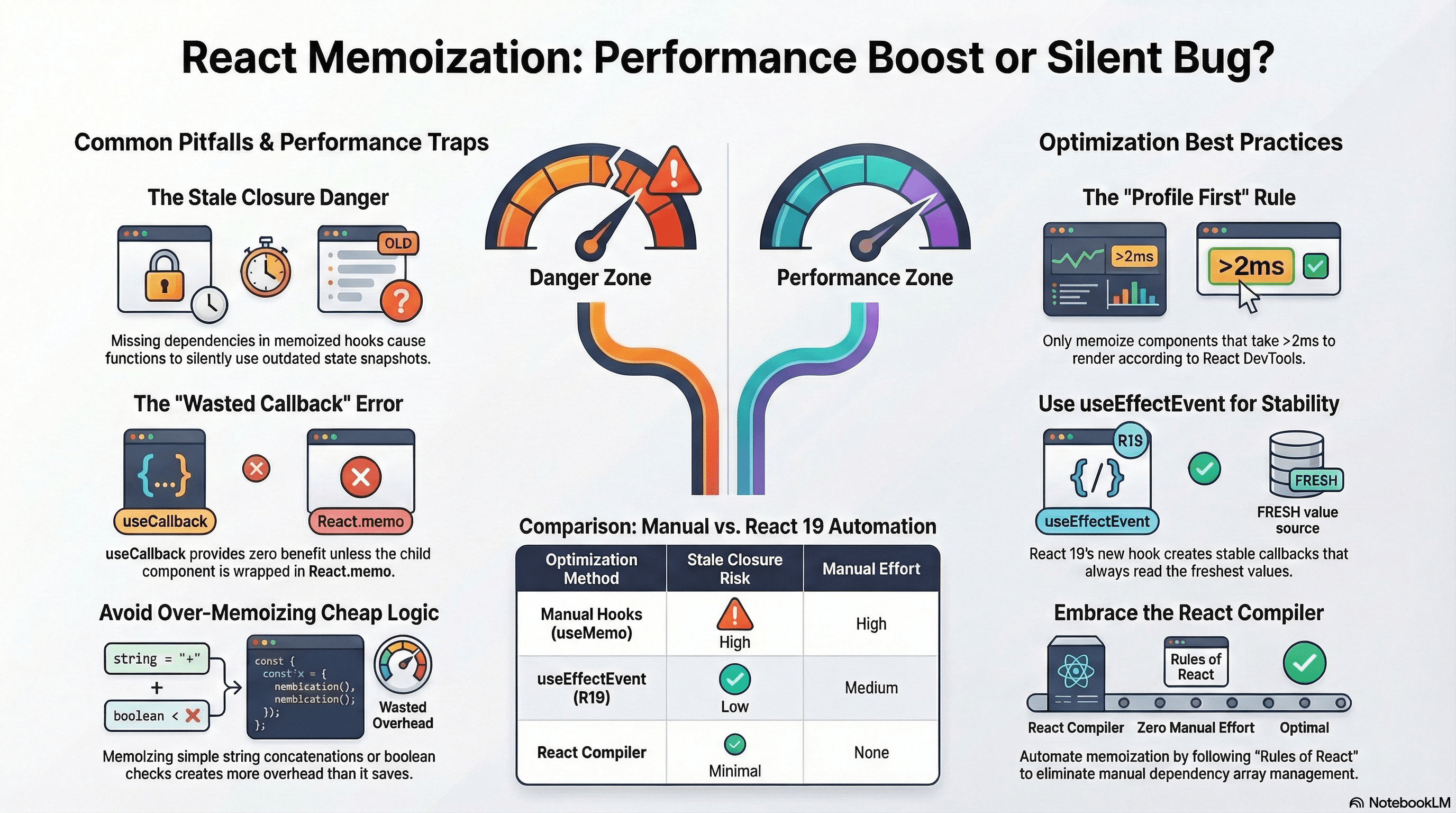
Overview
Memoization in React caches computed values or function references so React skips expensive recalculations on re-renders. Used correctly, it reduces unnecessary work. Used incorrectly, it introduces stale closure bugs that silently operate on outdated data, wastes memory on cache entries that never help, and sometimes makes rendering slower due to dependency comparison overhead.
The most dangerous pitfall is the stale closure: a memoized function or value captures a snapshot of variables from a previous render and silently uses outdated state. The most common waste is memoizing cheap computations where the memoization overhead exceeds the computation itself.
How It Works
Closures and Memoization
Every function in JavaScript forms a closure over the scope where it was defined. Each render creates a new scope with fresh state and props. useCallback and useMemo prevent recreation across renders — useful for referential stability, dangerous when the dependency array is incomplete.
function Counter() {
  const [count, setCount] = useState(0);

  // Without memo: new function every render — always captures current count
  function logCount() {
    console.log(count); // always current
  }

  // With useCallback and empty deps: same function forever — always captures count = 0
  const logCountMemo = useCallback(() => {
    console.log(count); // stale after first render
  }, []); // ← missing count
}
When a dependency is missing from the array, the memoized value silently uses the value from the render when it was last created — not the current render. This is the stale closure problem.
When Memoization Actually Helps
Three cases where memoization provides real value:
- Expensive derivation —
useMemofor a computation that takes measurable time (filtering thousands of records, graph traversal, complex aggregation) - Referential stability for memo'd children —
useCallbackwhen a function is passed to aReact.memo-wrapped child; without it, the child re-renders anyway because it sees a new function reference - Stable references in dependency arrays —
useMemo/useCallbackto prevent cascading re-renders or infinite effect loops when objects/functions are used as effect dependencies
Code Examples
The Classic Stale Closure
"use client";

import { useState, useCallback } from "react";

export default function SearchForm() {
  const [query, setQuery] = useState("");
  const [results, setResults] = useState<string[]>([]);

  // ❌ Stale closure — query is always "" (value at mount)
  const handleSearch = useCallback(async () => {
    const data = await fetch(`/api/search?q=${query}`).then((r) => r.json());
    setResults(data);
  }, []); // query not in deps — always uses the initial value

  // ✅ Fix: add query to dependency array
  const handleSearchFixed = useCallback(async () => {
    const data = await fetch(`/api/search?q=${query}`).then((r) => r.json());
    setResults(data);
  }, [query]); // recreates when query changes — always current

  return (
    <div>
      <input value={query} onChange={(e) => setQuery(e.target.value)} />
      <button onClick={handleSearchFixed}>Search</button>
      <ul>
        {results.map((r) => (
          <li key={r}>{r}</li>
        ))}
      </ul>
    </div>
  );
}
Enable the react-hooks/exhaustive-deps ESLint rule and treat it as an error,
not a warning. It catches the majority of stale closure bugs at write time.
Stale Closure in setInterval
"use client";

import { useState, useEffect } from "react";

export function LiveTimer() {
  const [seconds, setSeconds] = useState(0);

  useEffect(() => {
    const id = setInterval(() => {
      // ❌ seconds is always 0 — stale closure from mount
      setSeconds(seconds + 1);
    }, 1000);
    return () => clearInterval(id);
  }, []); // interval callback captured seconds = 0 at mount

  // ✅ Functional updater — React provides current value, no closure needed
  useEffect(() => {
    const id = setInterval(() => {
      setSeconds((prev) => prev + 1); // prev is always current
    }, 1000);
    return () => clearInterval(id);
  }, []);

  return <p>Elapsed: {seconds}s</p>;
}
useEffectEvent — Stable Callbacks That Read Fresh Values (React 19)
React 19 stabilizes useEffectEvent (previously an experimental hook). It creates a callback that is always stable (never recreated) but always reads the current values of its closed-over variables — solving the memoization dilemma between stability and freshness:
"use client";

import { useState, useEffect, useEffectEvent } from "react";

export function Analytics({ pageId }: { pageId: string }) {
  const [userId, setUserId] = useState<string | null>(null);
  const [sessionId] = useState(() => crypto.randomUUID());

  // useEffectEvent: stable reference, always reads current userId and sessionId
  // The function is NOT a dependency of any effect — it's an "event handler" for effects
  const trackView = useEffectEvent((event: string) => {
    if (!userId) return;
    // Reads the CURRENT userId and sessionId on every call — never stale
    fetch("/api/analytics", {
      method: "POST",
      body: JSON.stringify({ event, userId, sessionId, pageId }),
    });
  });

  useEffect(() => {
    // trackView is stable — no need to list userId or sessionId as deps
    // This effect only re-runs when pageId changes
    trackView("page_view");

    const handleClick = (e: MouseEvent) => {
      trackView("click");
    };
    document.addEventListener("click", handleClick);
    return () => document.removeEventListener("click", handleClick);
  }, [pageId]); // ✅ trackView is NOT a dep — it's an event, not reactive data

  return null;
}
useEffectEvent is for functions that are called by effects but shouldn't
trigger effects to re-run. Don't use it for callbacks passed to child
components — use useCallback with proper deps for those.
The pre-React-19 equivalent uses a manually maintained ref:
// Pre-React 19 pattern (still valid, more verbose)
const userIdRef = useRef(userId);
useEffect(() => {
  userIdRef.current = userId;
}, [userId]);

const trackEvent = useCallback((event: string) => {
  fetch("/api/analytics", {
    body: JSON.stringify({ event, userId: userIdRef.current }),
  });
}, []); // stable — reads fresh value via ref
React.memo with Custom Comparator
By default, React.memo does a shallow (reference) comparison of all props. You can provide a custom comparator when you need deeper equality or want to ignore some props:
import { memo } from "react";

type ChartProps = {
  data: number[];
  label: string;
  onHover?: (index: number) => void; // callback that changes on every parent render
  // We don't care about onHover for re-render decisions
};

// ✅ Custom comparator: re-render only when data or label changes
// Ignore onHover — its reference changes but the behavior is equivalent
const Chart = memo(
  function Chart({ data, label, onHover }: ChartProps) {
    return (
      <div>
        <h3>{label}</h3>
        {/* expensive chart rendering */}
      </div>
    );
  },
  (prevProps, nextProps) => {
    // Return true to SKIP re-render (props are "equal" for our purposes)
    // Return false to RE-RENDER
    return (
      prevProps.label === nextProps.label &&
      prevProps.data.length === nextProps.data.length &&
      prevProps.data.every((v, i) => v === nextProps.data[i])
    );
  },
);
Custom comparators are a sharp tool. A comparator that returns true too
aggressively (over-skipping re-renders) causes stale UI. When in doubt, rely
on structural sharing to provide stable references rather than writing custom
comparison logic.
Over-Memoization — When It Makes Things Worse
// ❌ Pointless — string concatenation is trivially cheap
// useMemo adds: closure creation, dependency array allocation, cached value storage
// All more expensive than just doing the concatenation
const fullName = useMemo(
  () => `${firstName} ${lastName}`,
  [firstName, lastName],
);

// ✅ Just compute it
const fullName = `${firstName} ${lastName}`;

// ❌ useCallback without React.memo on the child — the callback is stable
// but the child re-renders anyway because memo isn't applied
function Parent() {
  const handleClick = useCallback(() => doSomething(), []);
  return <ChildComponent onClick={handleClick} />; // re-renders on every Parent render
}

// ✅ Only meaningful when the child is wrapped in React.memo
const MemoizedChild = memo(ChildComponent);
function Parent() {
  const handleClick = useCallback(() => doSomething(), []);
  return <MemoizedChild onClick={handleClick} />; // bails out correctly
}
The React Compiler — Automatic Memoization (React 19+)
The React Compiler (previously "React Forget") automatically inserts useMemo and useCallback at compile time based on static analysis of your component. It eliminates the need to manually reason about memoization for most cases:
// You write:
function ProductList({ products, category }: { products: Product[]; category: string }) {
  const filtered = products.filter((p) => p.category === category);
  const sorted   = [...filtered].sort((a, b) => a.name.localeCompare(b.name));

  return <ul>{sorted.map((p) => <li key={p.id}>{p.name}</li>)}</ul>;
}

// Compiler outputs (approximately):
function ProductList({ products, category }) {
  const filtered = useMemo(() => products.filter((p) => p.category === category), [products, category]);
  const sorted   = useMemo(() => [...filtered].sort(...), [filtered]);
  return <ul>{sorted.map((p) => <li key={p.id}>{p.name}</li>)}</ul>;
}
The compiler handles dependency tracking automatically — no manual dep arrays, no stale closure risk for the cases it covers. It requires components to follow the Rules of React (no mutation, no side effects in render). As of React 19, the compiler is in beta — verify its stability for your project before adopting.
Profiling Before Memoizing
Memoization without measurement is premature optimization. Use React DevTools Profiler to identify actual render bottlenecks:
// Wrap expensive components in Profiler to measure render time
import { Profiler, type ProfilerOnRenderCallback } from "react";

const onRender: ProfilerOnRenderCallback = (id, phase, actualDuration) => {
  if (actualDuration > 16) {
    // slower than 60fps frame budget
    console.warn(`${id} took ${actualDuration.toFixed(1)}ms to ${phase}`);
  }
};

export function AnalyticsDashboard() {
  return (
    <Profiler id="AnalyticsDashboard" onRender={onRender}>
      <ExpensiveChart />
      <DataTable />
    </Profiler>
  );
}
The rule: memoize only after profiling shows an actual bottleneck. For most components in most apps, React's rendering is fast enough without manual memoization.
Real-World Use Case
Analytics dashboard with 50 chart components. Each chart receives a data prop (an array of numbers) and an onDrillDown callback. Without memoization: the parent state updates on a 5-second polling interval, causing all 50 charts to re-render even when most data hasn't changed.
With proper memoization: useCallback stabilizes onDrillDown (same reference across polls). React.memo on each chart bails out when data reference is unchanged. Structural sharing in the data fetch update ensures only changed chart data gets a new array reference. Result: only 3–5 charts re-render per poll instead of 50.
The compiler, when available, handles this automatically — but understanding the underlying mechanics is essential for diagnosing cases the compiler misses.
Common Mistakes / Gotchas
1. Incomplete dependency arrays causing stale closures. The exhaustive-deps ESLint rule catches this. Enable it as an error.
2. Using useCallback without React.memo on the child. Without React.memo, the child re-renders regardless — useCallback is wasted overhead.
3. Memoizing cheap computations. String concatenation, boolean checks, array length comparisons. The memoization overhead (closure creation, comparison work) exceeds the computation cost.
4. Inline object/array literals bypassing React.memo.
// ❌ New object on every render — memo is bypassed
<Chart config={{ color: "blue", width: 400 }} />;

// ✅ Stable reference
const chartConfig = useMemo(() => ({ color: "blue", width: 400 }), []);
<Chart config={chartConfig} />;
5. Over-aggressive custom comparators. A comparator that skips re-renders when data has actually changed causes stale UI. Custom comparators are hard to maintain. Prefer stable references via structural sharing over custom comparison logic.
Summary
Memoization is a targeted performance tool, not a default. Stale closures — the primary pitfall — occur when a memoized function reads state or props that aren't in its dependency array. The fix is always to complete the dependency array or use the functional updater form for state setters. useEffectEvent (React 19) creates stable callbacks that always read fresh values — solving the stability-vs-freshness dilemma for effect callbacks. React.memo only helps when paired with stable prop references; useCallback only helps when the child uses React.memo. The React Compiler automates memoization for components following the Rules of React, but understanding the underlying mechanics remains essential for debugging. Always profile before memoizing — most components don't need it.
Interview Questions
Q1. What is the stale closure problem in React memoization and why does it occur?
When you memoize a function with useCallback (or a value with useMemo), it captures the closed-over variables from the scope of the render where it was created. If those variables change in later renders but the memoized value isn't recreated (because the dependency array didn't include them), the function still operates on the old captured values — a stale closure. It occurs because memoization intentionally prevents recreation across renders; the dependency array is supposed to list every value the memoized code reads. An incomplete dependency array means the memoized code sees a stale snapshot. The exhaustive-deps ESLint rule catches missing dependencies at write time.
Q2. What is useEffectEvent and what problem does it solve that useRef used to solve?
useEffectEvent (React 19) creates a callback that is stable (never recreated, so it doesn't need to be in effect dependency arrays) but always reads the current values of its closed-over variables at call time. This solves the case where you want to call a function from an effect that reads current state, but you don't want that state to be a dependency (which would re-run the effect). Before useEffectEvent, the pattern was: store the latest value in a useRef, update the ref in a separate useEffect, then read from the ref inside the stable callback. useEffectEvent makes this a first-class React primitive — it's explicitly for functions that are "called by" effects but shouldn't "trigger" effects to re-run.
Q3. When does useCallback provide no benefit?
useCallback stabilizes a function reference. It provides no benefit when: the child component doesn't use React.memo (it re-renders anyway), the function is used as an effect dependency but the effect body doesn't actually care about the function's identity (the effect would re-run either way), or the function is called inline in JSX event handlers without being passed to a child component. The most common waste: const handleClick = useCallback(() => doThing(), []) passed to a plain (non-memo'd) child component. The stable reference has no consumer — the child re-renders regardless.
Q4. How does the React Compiler eliminate manual memoization?
The React Compiler performs static analysis on component code and automatically inserts useMemo and useCallback at compile time — wherever React's rendering semantics would allow skipping work. It tracks which variables are "reactive" (derived from props or state) and which are "stable" (won't change between renders), building the correct dependency arrays automatically. This eliminates both the manual burden of adding deps and the risk of missing them (stale closures). The requirement: components must follow the Rules of React — no mutations, no side effects in render, no conditional hook calls. For code that meets these rules, the compiler effectively makes manual memoization unnecessary for most use cases.
Q5. What's the right way to use React.memo with a custom comparator and what are the risks?
The custom comparator in React.memo(Component, areEqual) receives previous and next props and returns true to skip re-rendering, false to re-render. Use it when: a prop's reference changes on every parent render but its semantic content doesn't change (e.g., an event handler that always does the same thing regardless of reference), or when a prop contains an array and you want element-level comparison rather than reference comparison. The risks: a comparator that returns true too aggressively causes stale UI (the component doesn't update when it should); the comparator adds logic that must be maintained when prop types change. Prefer stable references via structural sharing over custom comparators — they're simpler and safer.
Q6. How do you diagnose whether a component needs memoization?
Use React DevTools Profiler. Record a typical user interaction, look at the flame chart for components that render frequently and take measurable time (actualDuration in the profiler callback). A component spending >2ms per render and rendering on every keystroke or state change is a candidate. Before adding React.memo: verify the component receives stable props already (if props change legitimately, memoization won't help). After adding React.memo: re-profile to confirm it's actually bailing out. Common false positives: a component that looks expensive but renders in <0.5ms (memoization overhead is comparable), or a component that's memoized but receives unstable prop references so it re-renders anyway. The profiler's "why did this render?" panel shows exactly which props changed.
Immutable Data Patterns
How structural sharing makes immutable updates efficient, why referential equality drives React's rendering model, Immer for deep updates, and Immer middleware for Zustand.
State Boundaries
How to decide what lives in local state, server state, or global client state — and the patterns that prevent global stores from becoming re-render bottlenecks.