Race Conditions in UI State
How async operations resolving out of order corrupt displayed state, and the three patterns that prevent it — AbortController, ignore flags, and sequence counters — plus how TanStack Query eliminates this class of bug automatically.
Overview
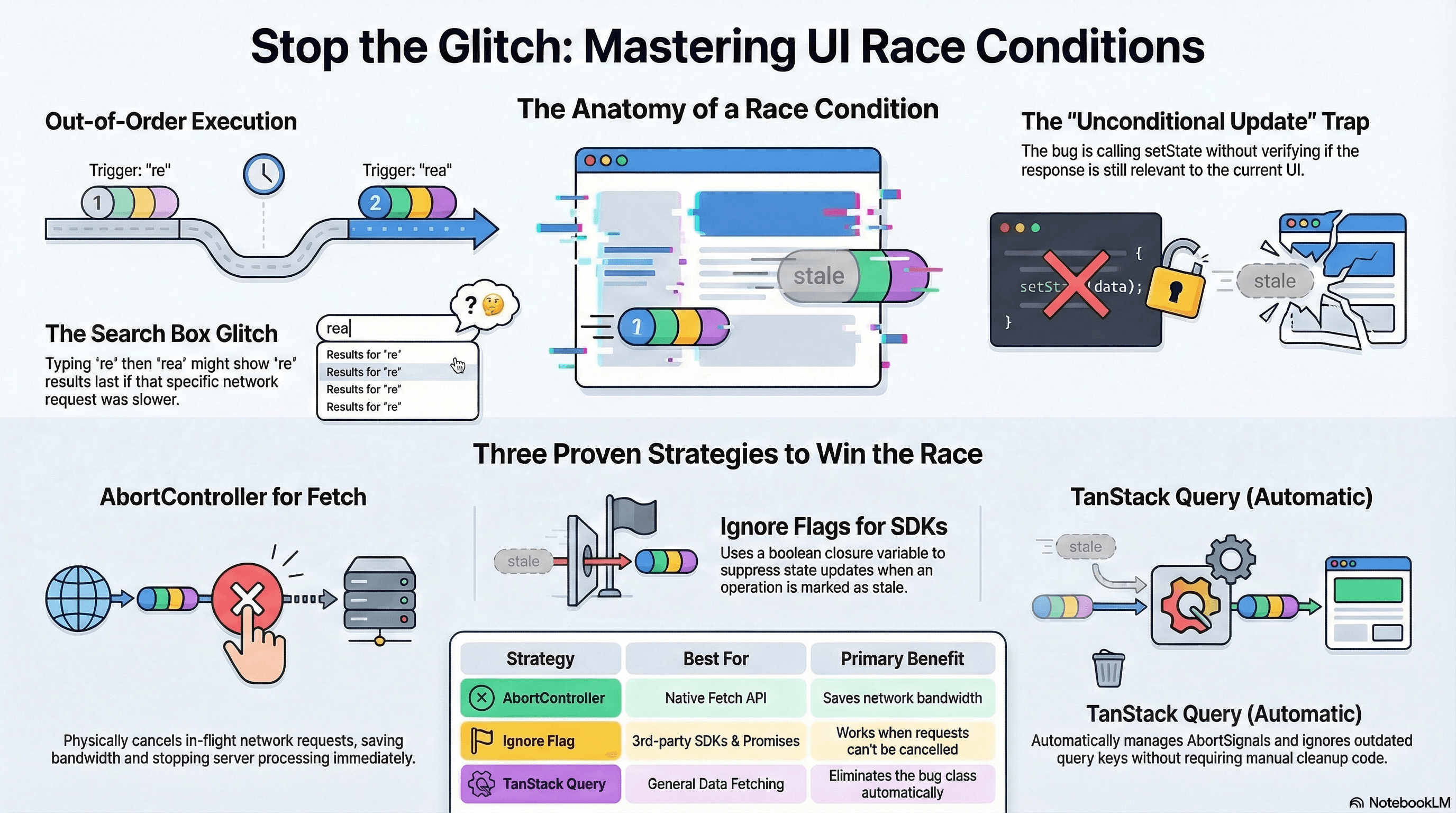
A race condition in UI state happens when two or more async operations are in-flight simultaneously and the order in which they complete — not the order in which they were triggered — determines what your UI shows. The result is stale data overwriting fresh data, loading spinners that never resolve, or UI flickering between states.
This is one of the most common bugs in frontend applications. It almost always appears around data fetching triggered by user input, where the user acts faster than the network responds.
How It Works
The Classic Scenario
A user types in a search box. Each keystroke triggers a fetch. If requests resolve out of order, earlier results can overwrite later ones:
User types "re"  → Fetch A starts (slow server, takes 400ms)
User types "rea" → Fetch B starts (fast cache hit, takes 50ms)

Fetch B resolves → UI shows results for "rea" ✅
Fetch A resolves → UI shows results for "re"  ❌ stale data wins
The bug is not in the fetch itself. It's in unconditionally calling setState when any fetch resolves, without checking whether that response is still the one the UI needs.
The Three Fixes
AbortController — cancel the previous fetch when a new one starts. The network request is actually cancelled, saving bandwidth. Only works with the Fetch API and APIs that accept AbortSignal.
Ignore flag — mark the previous async operation as stale using a closure variable. The request completes, but its setState call is suppressed. Works for any async operation — SDK calls, setTimeout, third-party Promises.
Sequence counter / reducer — track which async operation is the most recently triggered using a monotonically increasing ID. Only operations matching the current ID are allowed to update state. Pairs naturally with useReducer.
Code Examples
Pattern 1: AbortController (Fetch-Native Cancellation)
"use client";

import { useState, useEffect } from "react";

interface SearchResult {
  id: string;
  title: string;
}

export function SearchResults({ query }: { query: string }) {
  const [results, setResults] = useState<SearchResult[]>([]);
  const [isLoading, setLoading] = useState(false);
  const [error, setError] = useState<string | null>(null);

  useEffect(() => {
    if (!query.trim()) {
      setResults([]);
      return;
    }

    const controller = new AbortController();
    setLoading(true);
    setError(null);

    async function search() {
      try {
        const res = await fetch(`/api/search?q=${encodeURIComponent(query)}`, {
          signal: controller.signal, // link this fetch to the controller
        });

        if (!res.ok) throw new Error(`Search failed: ${res.status}`);

        const data = await res.json();
        setResults(data);
      } catch (err) {
        // AbortError is expected when the effect cleans up — it's not a real error
        if (err instanceof Error && err.name === "AbortError") return;
        setError("Search failed. Please try again.");
      } finally {
        setLoading(false);
      }
    }

    search();

    // Cleanup: abort the previous fetch when query changes or component unmounts
    return () => controller.abort();
  }, [query]);

  if (isLoading) return <p>Searching…</p>;
  if (error) return <p role="alert">{error}</p>;
  return (
    <ul>
      {results.map((r) => (
        <li key={r.id}>{r.title}</li>
      ))}
    </ul>
  );
}
Pattern 2: Ignore Flag (Non-Fetch Async Work)
When you can't abort the underlying operation (third-party SDK, non-fetch Promises), use an ignore flag scoped inside the effect:
"use client";

import { useState, useEffect } from "react";

interface UserProfile {
  id: string;
  name: string;
  avatarUrl: string;
}

export function ProfileCard({ userId }: { userId: string }) {
  const [profile, setProfile] = useState<UserProfile | null>(null);

  useEffect(() => {
    // MUST be declared inside the effect — each effect run gets its own flag
    let ignored = false;

    async function loadProfile() {
      // SDK call — no AbortSignal support
      const data = await thirdPartySDK.getUser(userId);

      if (!ignored) {
        // Only set state if this effect run hasn't been superseded
        setProfile(data);
      }
    }

    loadProfile();

    return () => {
      ignored = true; // mark this run as stale when userId changes or component unmounts
    };
  }, [userId]);

  if (!profile) return <div className="animate-pulse h-16 bg-muted rounded" />;
  return (
    <div className="flex items-center gap-3">
      <img
        src={profile.avatarUrl}
        alt={profile.name}
        className="h-10 w-10 rounded-full"
      />
      <p>{profile.name}</p>
    </div>
  );
}
The ignored flag must be declared inside the useEffect callback. If
declared outside, all effect runs share the same variable — setting it in one
cleanup will suppress all pending operations, not just the stale one.
Pattern 3: useReducer with Sequence Counter
For complex async state (loading + data + error all changing together), useReducer with a sequence counter prevents partial updates and race conditions simultaneously:
"use client";

import { useReducer, useEffect } from "react";

interface Product {
  id: string;
  name: string;
  price: number;
}

type State =
  | { status: "idle" }
  | { status: "loading"; sequence: number }
  | { status: "success"; data: Product[]; sequence: number }
  | { status: "error"; message: string; sequence: number };

type Action =
  | { type: "FETCH_START"; sequence: number }
  | { type: "FETCH_SUCCESS"; sequence: number; data: Product[] }
  | { type: "FETCH_ERROR"; sequence: number; message: string };

function reducer(state: State, action: Action): State {
  switch (action.type) {
    case "FETCH_START":
      return { status: "loading", sequence: action.sequence };

    case "FETCH_SUCCESS":
      // Only apply if this is the most recent request
      if (state.status !== "loading" || state.sequence !== action.sequence) {
        return state; // stale response — discard
      }
      return {
        status: "success",
        data: action.data,
        sequence: action.sequence,
      };

    case "FETCH_ERROR":
      if (state.status !== "loading" || state.sequence !== action.sequence) {
        return state; // stale error — discard
      }
      return {
        status: "error",
        message: action.message,
        sequence: action.sequence,
      };
  }
}

export function ProductGrid({ category }: { category: string }) {
  const [state, dispatch] = useReducer(reducer, { status: "idle" });
  // Sequence counter in a ref — doesn't trigger re-renders when incremented
  const sequenceRef = { current: 0 };

  useEffect(() => {
    const sequence = ++sequenceRef.current; // increment for this fetch
    dispatch({ type: "FETCH_START", sequence });

    fetch(`/api/products?category=${category}`)
      .then((r) => {
        if (!r.ok) throw new Error(`HTTP ${r.status}`);
        return r.json();
      })
      .then((data) => dispatch({ type: "FETCH_SUCCESS", sequence, data }))
      .catch((err) => {
        if (err.name !== "AbortError") {
          dispatch({ type: "FETCH_ERROR", sequence, message: err.message });
        }
      });
  }, [category]);

  if (state.status === "idle" || state.status === "loading")
    return <div>Loading…</div>;
  if (state.status === "error") return <p role="alert">{state.message}</p>;
  return (
    <ul>
      {state.data.map((p) => (
        <li key={p.id}>
          {p.name} — ${p.price}
        </li>
      ))}
    </ul>
  );
}
Debounce + AbortController — Combining Both Fixes
For search inputs where you want to reduce request frequency and cancel stale requests:
"use client";

import { useState, useEffect, useRef } from "react";

export function LiveSearch() {
  const [inputValue, setInputValue] = useState("");
  const [results, setResults] = useState<string[]>([]);
  const controllerRef = useRef<AbortController | null>(null);
  const debounceRef = useRef<ReturnType<typeof setTimeout>>(null);

  useEffect(() => {
    if (!inputValue.trim()) {
      setResults([]);
      return;
    }

    // Clear previous debounce timer
    if (debounceRef.current) clearTimeout(debounceRef.current);

    debounceRef.current = setTimeout(async () => {
      // Abort the previous request before starting a new one
      controllerRef.current?.abort();
      controllerRef.current = new AbortController();

      try {
        const res = await fetch(
          `/api/search?q=${encodeURIComponent(inputValue)}`,
          {
            signal: controllerRef.current.signal,
          },
        );
        if (!res.ok) throw new Error("Search failed");
        setResults(await res.json());
      } catch (err) {
        if (err instanceof Error && err.name !== "AbortError") {
          console.error("Search error:", err);
        }
      }
    }, 300); // 300ms debounce — only fires after user pauses typing

    return () => {
      if (debounceRef.current) clearTimeout(debounceRef.current);
    };
  }, [inputValue]);

  return (
    <div>
      <input
        value={inputValue}
        onChange={(e) => setInputValue(e.target.value)}
        placeholder="Type to search…"
      />
      <ul>
        {results.map((r) => (
          <li key={r}>{r}</li>
        ))}
      </ul>
    </div>
  );
}
TanStack Query — Automatic Race Condition Prevention
TanStack Query solves the entire class of race conditions automatically. When a query key changes (e.g., ["search", query] changing with each input), TanStack Query:
- Starts the new fetch
- Cancels any in-flight request for the previous key (via AbortSignal)
- Ignores any response arriving after the key has changed
"use client";

import { useState } from "react";
import { useQuery } from "@tanstack/react-query";

export function TanStackSearch() {
  const [query, setQuery] = useState("");

  const { data: results, isLoading } = useQuery({
    queryKey: ["search", query], // key changes with every query change
    queryFn: async ({ signal }) => {
      // signal is automatically managed by TanStack Query
      if (!query.trim()) return [];
      const res = await fetch(`/api/search?q=${encodeURIComponent(query)}`, {
        signal,
      });
      if (!res.ok) throw new Error("Search failed");
      return res.json() as Promise<string[]>;
    },
    enabled: query.trim().length > 0,
    staleTime: 30 * 1000, // cache search results for 30s
    placeholderData: (prev) => prev, // keep previous results while new ones load
  });

  return (
    <div>
      <input
        value={query}
        onChange={(e) => setQuery(e.target.value)}
        placeholder="Search…"
      />
      {isLoading && <p>Searching…</p>}
      <ul>
        {results?.map((r) => (
          <li key={r}>{r}</li>
        ))}
      </ul>
    </div>
  );
}
TanStack Query passes an AbortSignal into every queryFn via the context argument ({ signal }). When the query key changes, the previous query is automatically aborted. No manual cleanup, no ignore flags, no sequence counters.
Server Components — Avoiding the Problem Entirely
For data that doesn't require client-side interactivity, use a Server Component. Server-side fetching happens in a single synchronous render — there's no concurrent fetch lifecycle to manage:
// app/products/[id]/page.tsx — no race conditions possible
export default async function ProductPage({
  params,
}: {
  params: { id: string };
}) {
  const product = await fetch(`https://api.example.com/products/${params.id}`, {
    next: { revalidate: 60 },
  }).then((r) => r.json());

  return (
    <main>
      <h1>{product.name}</h1>
    </main>
  );
}
Real-World Use Case
User dropdown with order history. A dropdown lets admins select a user from a list — selecting a user loads their orders. With rapid clicking between users, a slow response for User A can overwrite the just-loaded response for User B. The AbortController pattern cancels the User A request when User B is selected. If the API uses a non-cancellable SDK, the ignore flag pattern suppresses the stale response. TanStack Query handles this automatically when userId is part of the query key — changing the key cancels the previous query.
Common Mistakes / Gotchas
1. Assuming fetch requests resolve in trigger order. Network latency is non-deterministic. A request started 500ms ago can resolve after one started 100ms ago. Never assume "the last fetch I started will be the last to finish."
2. Not handling AbortError separately. When you abort a fetch, it throws an AbortError. If your catch block calls setError unconditionally, the user sees a spurious error message. Always check err.name !== 'AbortError' before setting error state.
3. Declaring the ignore flag outside the effect. The ignored flag must be scoped inside the useEffect callback — each effect run must get its own flag. A shared variable across runs means cleaning up one run silently suppresses all others.
4. Applying AbortController to non-fetch async work. controller.abort() only cancels fetch calls that received the signal. SDK calls, setTimeout, and third-party Promises are not cancelled by aborting — use the ignore flag for those.
5. Forgetting that loading state races too. It's not just the data that races — setLoading(false) from a stale request can prematurely hide a spinner while the current request is still in-flight. Manage loading state within the same guarded block as the data state.
Summary
Race conditions occur when multiple async operations compete to update the same state and the last-to-resolve wins regardless of relevance. The three fixes: AbortController for native fetch cancellation, ignore flags for non-cancellable async work, and sequence counters (with useReducer) for complex state with loading/error/data transitions. Combining debounce with AbortController reduces request frequency while still cancelling stale in-flight requests. TanStack Query solves the entire class automatically by passing an AbortSignal to every queryFn and ignoring responses for outdated query keys. Server Components sidestep the problem entirely by moving fetching out of the client lifecycle.
Interview Questions
Q1. Describe the race condition that occurs in a search component and how it manifests.
A user types "re" — Fetch A starts. Before it resolves, they type "rea" — Fetch B starts. Fetch B (a cache hit) resolves in 50ms showing "rea" results. Fetch A (a slow database query) resolves in 400ms and calls setState with "re" results — overwriting the more recent "rea" results. The user sees results for a query they are no longer typing. The bug is unconditionally calling setState when any fetch resolves, without checking whether that response is still the one the UI wants.
Q2. What is the difference between the AbortController and ignore flag patterns?
AbortController with signal actually cancels the in-flight network request — the browser sends a network-level cancel and the server may stop processing it. The AbortError thrown by the aborted fetch must be caught and handled separately from real errors. The ignore flag does not cancel the request — it completes, but the setState call is suppressed via a closure variable. AbortController is the better choice for fetch calls (saves bandwidth, stops server processing). The ignore flag is the only option for non-fetch async work (SDK calls, third-party Promises) that doesn't accept AbortSignal.
Q3. Why must the ignore flag be declared inside the useEffect callback?
Each invocation of the useEffect callback creates a new closure scope. The ignore flag must be in this scope so each effect run has its own independent flag. If declared outside the callback (e.g., as a component-level variable), all effect runs share the same flag. When cleanup runs for one effect run and sets ignored = true, the shared flag also suppresses the still-active effect run — the current request's state update is never applied. The scoped variable ensures that only the specific run being cleaned up is marked as stale.
Q4. How does TanStack Query prevent race conditions without any explicit cleanup code?
TanStack Query passes an AbortSignal as signal in the queryFn context argument. This signal is linked to the query's lifecycle. When the query key changes (e.g., user typed a new search query), TanStack Query creates a new query for the new key and aborts the previous one via the signal. Any fetch call that received the signal is automatically cancelled, throwing an AbortError that TanStack Query handles internally. Additionally, responses arriving for outdated query keys are ignored — the cache is only updated by the current key's response. This eliminates the entire class of fetch race conditions without any cleanup code in the component.
Q5. When should you use a useReducer sequence counter instead of an ignore flag?
Use a sequence counter with useReducer when multiple pieces of state must change atomically in response to async operations (loading state + data + error state), and you need a guarantee that partial updates from stale responses are impossible. The reducer's guard (if (state.sequence !== action.sequence) return state) ensures that even if a stale response dispatches an action, the reducer discards it without affecting state. This is more explicit than an ignore flag (where forgetting to check ignored before any setState call is a bug) and enforces correct transitions through the type system. Use it for complex async state machines; use the ignore flag for simpler single-value updates.
Q6. How does combining debounce and AbortController improve search performance?
Debounce delays the fetch until the user pauses typing — reducing request frequency. Without AbortController, requests that escape the debounce window (the user paused briefly then resumed) can still race. AbortController ensures that even if multiple requests were fired (e.g., the user paused twice), only the most recent one commits its result. Together: debounce reduces the number of requests sent, AbortController ensures only the latest response is applied. Neither alone is complete: debounce alone means a slow stale response can still win; AbortController alone without debounce still fires a request on every keystroke (wasteful for fast typists).
Data Fetching Patterns
The mental models behind TanStack Query and SWR — cache keys, deduplication, background revalidation, prefetching with SSR hydration, parallel and dependent queries, and when to use a client cache versus a Server Component fetch.
Optimistic UI & Rollback
Showing immediate feedback before server confirmation — useOptimistic for Server Actions, TanStack Query onMutate/onError/onSettled for client mutations, concurrent mutation handling, and rollback for drag-and-drop interactions.