URL as State
How to encode UI state in the URL for shareability and server rendering — using Next.js searchParams, the nuqs library for type-safe params, Zod for validation, and push vs replace routing.
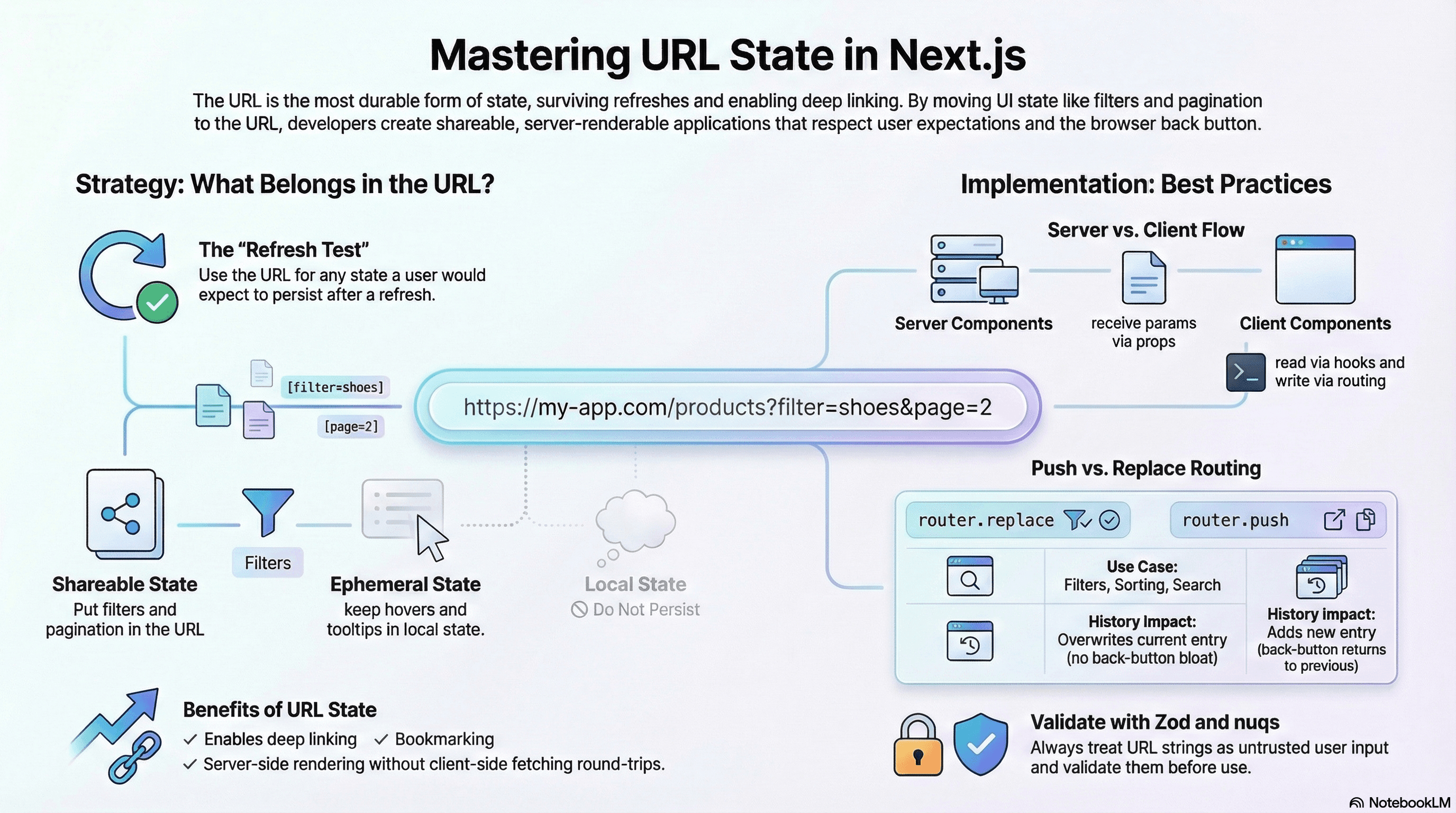
Overview
The URL is the most durable form of state in a web application. It survives page refreshes, can be shared between users, persists through browser sessions, enables deep linking, and allows the back button to work as users expect. When UI state that users care about isn't in the URL — active filters, search queries, pagination, selected tabs, sort order — those users lose their place on every refresh and can't share views with colleagues.
The cost of URL state is a small increase in complexity: reading from searchParams instead of local state, writing to the URL instead of calling a setter. For any state a user might want to bookmark or share, it's worth it.
How It Works
When to Use URL State
Not all state belongs in the URL. Use URL state for:
- Search queries and filters
- Pagination (current page, page size)
- Sort order and direction
- Selected tabs (when navigation between them is meaningful)
- Modal open/closed state (when the modal content is shareable)
- Date range selections
Keep in local state:
- Hover and focus states
- Form input values before submission
- UI animations in progress
- Ephemeral tooltips
The Next.js Model
In Next.js App Router, URL state flows in two directions:
Server Components receive searchParams as a prop — the URL is parsed server-side and passed directly, enabling server-rendered pages with URL-driven content without any client-side fetching.
Client Components read via useSearchParams() and write via useRouter() — updates trigger a navigation that re-renders Server Components with the new params.
// Server Component — reads searchParams directly (no client state needed)
export default async function ProductsPage({
  searchParams,
}: {
  searchParams: { category?: string; page?: string; sort?: string };
}) {
  const category = searchParams.category ?? "all";
  const page = Number(searchParams.page ?? "1");
  const sort = searchParams.sort ?? "newest";

  const products = await db.product.findMany({
    where: category !== "all" ? { category } : undefined,
    orderBy: sort === "price" ? { price: "asc" } : { createdAt: "desc" },
    skip: (page - 1) * 20,
    take: 20,
  });

  return <ProductList products={products} page={page} sort={sort} />;
}
Code Examples
mergeSearchParams Utility
// lib/search-params.ts

/**
 * Merges partial updates into existing search params.
 * Preserves params not mentioned in the update.
 * Setting a value to null removes the param.
 */
export function mergeSearchParams(
  current: URLSearchParams | ReadonlyURLSearchParams,
  updates: Record<string, string | number | boolean | null>,
): string {
  const next = new URLSearchParams(current.toString());

  for (const [key, value] of Object.entries(updates)) {
    if (value === null) {
      next.delete(key); // remove param
    } else {
      next.set(key, String(value)); // set or update
    }
  }

  // Reset to page 1 when filters change (unless page is explicitly in updates)
  if (!("page" in updates) && Object.keys(updates).some((k) => k !== "page")) {
    // Caller can opt out by explicitly setting page in updates
  }

  return next.toString();
}
// components/CategoryFilter.tsx
"use client";
import { useRouter, useSearchParams, usePathname } from "next/navigation";
import { mergeSearchParams } from "@/lib/search-params";
export function CategoryFilter({ categories }: { categories: string[] }) {
const router = useRouter();
const searchParams = useSearchParams();
const pathname = usePathname();
const active = searchParams.get("category") ?? "all";
function selectCategory(category: string) {
const qs = mergeSearchParams(searchParams, {
category: category === "all" ? null : category,
page: null, // reset pagination when filter changes
});
// replace: filter changes don't need back-button history
router.replace(`${pathname}?${qs}`);
}
return (
<nav className="flex gap-2">
{["all", ...categories].map((cat) => (
<button
key={cat}
onClick={() => selectCategory(cat)}
aria-pressed={active === cat}
className={[
"px-3 py-1 rounded-full text-sm capitalize",
active === cat
? "bg-blue-600 text-white"
: "bg-gray-100 text-gray-700",
].join(" ")}
>
{cat}
</button>
))}
</nav>
);
}nuqs — Type-Safe Search Params
nuqs provides a useState-like API for URL search params — with type coercion, validation, and batch updates:
// npm install nuqs

// app/shop/page.tsx — wrap with NuqsAdapter in the layout
// app/layout.tsx
import { NuqsAdapter } from "nuqs/adapters/next/app";

export default function RootLayout({
  children,
}: {
  children: React.ReactNode;
}) {
  return (
    <html lang="en">
      <body>
        <NuqsAdapter>{children}</NuqsAdapter>
      </body>
    </html>
  );
}
// components/ShopFilters.tsx
"use client";
import {
parseAsString,
parseAsInteger,
parseAsStringLiteral,
useQueryState,
useQueryStates,
} from "nuqs";
const SORT_OPTIONS = ["newest", "price-asc", "price-desc", "rating"] as const;
// Reading/writing individual params
export function SearchInput() {
const [query, setQuery] = useQueryState("q", parseAsString.withDefault(""));
return (
<input
value={query}
onChange={(e) => setQuery(e.target.value || null)} // null removes from URL
placeholder="Search products…"
/>
);
}
// Reading/writing multiple params atomically (single history entry)
export function ShopFilters() {
const [filters, setFilters] = useQueryStates({
category: parseAsString.withDefault("all"),
page: parseAsInteger.withDefault(1),
sort: parseAsStringLiteral(SORT_OPTIONS).withDefault("newest"),
minPrice: parseAsInteger, // optional — undefined when not set
maxPrice: parseAsInteger, // optional — undefined when not set
});
function resetFilters() {
// All cleared in one URL update — one history entry, one re-render
setFilters({
category: null,
page: null,
sort: null,
minPrice: null,
maxPrice: null,
});
}
return (
<div>
<select
value={filters.sort}
onChange={(e) =>
setFilters({
sort: e.target.value as (typeof SORT_OPTIONS)[number],
page: 1, // reset page when sort changes — atomic update
})
}
>
{SORT_OPTIONS.map((s) => (
<option key={s} value={s}>
{s}
</option>
))}
</select>
<input
type="number"
placeholder="Min price"
value={filters.minPrice ?? ""}
onChange={(e) =>
setFilters({
minPrice: e.target.value ? Number(e.target.value) : null,
})
}
/>
<button onClick={resetFilters}>Clear all filters</button>
<p>
Page {filters.page} — Category: {filters.category}
</p>
</div>
);
}Zod Validation of URL Params
URL params are always strings — users can put anything in the URL. Validate and parse with Zod before using:
// lib/product-search-params.ts
import { z } from "zod";

const SORT_VALUES = ["newest", "price-asc", "price-desc", "rating"] as const;

export const productSearchParamsSchema = z.object({
  q: z.string().max(200).optional(),
  category: z.string().max(50).optional(),
  page: z.coerce.number().int().min(1).max(1000).default(1),
  sort: z.enum(SORT_VALUES).default("newest"),
  minPrice: z.coerce.number().min(0).optional(),
  maxPrice: z.coerce.number().max(100_000).optional(),
});

export type ProductSearchParams = z.infer<typeof productSearchParamsSchema>;
// app/shop/page.tsx — Server Component validates before using
import { productSearchParamsSchema } from "@/lib/product-search-params";
export default async function ShopPage({
searchParams,
}: {
searchParams: Record<string, string | string[] | undefined>;
}) {
// Parse and validate — malformed params get defaults, not 500 errors
const parsed = productSearchParamsSchema.safeParse(searchParams);
if (!parsed.success) {
// Invalid params — use defaults rather than showing an error page
const defaults = productSearchParamsSchema.parse({});
return <ShopContent params={defaults} />;
}
const { q, category, page, sort, minPrice, maxPrice } = parsed.data;
const products = await db.product.findMany({
where: {
...(q ? { name: { contains: q, mode: "insensitive" } } : {}),
...(category ? { category } : {}),
price: {
...(minPrice !== undefined ? { gte: minPrice } : {}),
...(maxPrice !== undefined ? { lte: maxPrice } : {}),
},
},
orderBy:
sort === "price-asc"
? { price: "asc" }
: sort === "price-desc"
? { price: "desc" }
: sort === "rating"
? { rating: "desc" }
: { createdAt: "desc" },
skip: (page - 1) * 20,
take: 20,
});
return <ShopContent params={parsed.data} products={products} />;
}push vs replace — Choosing Correctly
"use client";

import { useRouter } from "next/navigation";

export function PaginationControls({
  currentPage,
  totalPages,
}: {
  currentPage: number;
  totalPages: number;
}) {
  const router = useRouter();

  function goToPage(page: number) {
    const params = new URLSearchParams(window.location.search);
    params.set("page", String(page));

    // replace: filter/sort/pagination changes the user can re-do with forward button
    // Each page click doesn't need its own back-button entry
    router.replace(`?${params.toString()}`);
  }

  function goToTab(tab: string) {
    // push: meaningful navigation between tabs — back button should return to previous tab
    router.push(`?tab=${tab}`);
  }

  return (
    <div className="flex gap-2">
      {Array.from({ length: totalPages }, (_, i) => i + 1).map((page) => (
        <button
          key={page}
          onClick={() => goToPage(page)}
          aria-current={page === currentPage ? "page" : undefined}
          className={page === currentPage ? "font-bold" : ""}
        >
          {page}
        </button>
      ))}
    </div>
  );
}Rule: Use replace for filters, sorting, and pagination (the user doesn't want a history entry per filter click). Use push for tab changes and meaningful navigational context switches (the user expects the back button to return to the previous tab).
Real-World Use Case
E-commerce product listing with URL-driven filters. The URL https://shop.example.com/products?category=shoes&maxPrice=100&sort=price-asc&page=2 fully describes the UI state. A customer support agent can paste this exact URL for a user to find what they're looking for. A user can bookmark a filtered search. The analytics team can track which filter combinations are popular from server logs — no client-side events needed. The server renders the filtered products directly from searchParams without any client-side filtering round-trip. Sharing a filtered view works because all state is in the URL.
Common Mistakes / Gotchas
1. Mutating useSearchParams() directly. It returns a read-only URLSearchParams object. Calling .set() or .delete() throws. Always create a copy first: new URLSearchParams(searchParams.toString()).
2. Using push for every param update. Each router.push() adds a history entry. Clicking through 10 filter combinations creates 10 back-button steps — users expect one back-button press to leave the filter page, not to undo each filter one by one. Use replace for filter state changes.
3. Not handling invalid URL params gracefully. Users can manually edit URLs. ?page=abc or ?sort=invalid must not cause a 500 error. Validate with Zod and fall back to defaults for invalid values.
4. Suspense boundary required for useSearchParams. In Next.js App Router, useSearchParams() in a Client Component requires the component to be wrapped in a <Suspense> boundary — otherwise Next.js throws a build warning and the page may not work correctly with static generation.
5. Not resetting pagination when filters change. When a user changes a category filter, the current page number may now be out of range. Always reset page to 1 when any filter changes. With nuqs's useQueryStates, you can do this atomically in a single URL update.
Summary
URL state makes UI state shareable, bookmarkable, and server-renderable. In Next.js App Router, Server Components receive searchParams directly and can fetch exactly what the URL describes without client-side state. Client Components write to the URL via router.replace() (for filter changes) or router.push() (for meaningful navigational changes). The mergeSearchParams utility prevents filter updates from clobbering unrelated params. nuqs provides a useState-like API with type coercion, making URL state as ergonomic as local state. Zod validates params before use — URL params are user input and must be treated as untrusted. Always reset pagination when filters change.
Interview Questions
Q1. When should state live in the URL vs local component state?
URL state is appropriate when the state represents something the user might want to share, bookmark, or return to after a refresh: search queries, filters, pagination, sort order, selected tabs (when tab content is meaningfully different), date ranges. Local state is appropriate for ephemeral, interaction-driven state that disappears when the user navigates: hover states, form values before submission, animation progress, tooltip visibility. The test: "Would the user be frustrated if this state was lost on refresh?" If yes, it belongs in the URL.
Q2. How does Next.js App Router handle URL params differently in Server vs Client Components?
Server Components receive searchParams as a prop — the URL is parsed on the server at request time and passed directly to the component. This enables server-side rendering with URL-driven data: the Server Component fetches the right data based on the params without any client-side round-trip. Client Components use useSearchParams() to read the current URL params reactively — the hook subscribes to URL changes and re-renders when params change. Client Components write to the URL via useRouter(). The key difference: Server Components can use searchParams for database queries; Client Components use them for reactive UI state.
Q3. What is nuqs and what problem does it solve over manual URL manipulation?
nuqs provides typed, validated useState-like hooks for URL search params. Without it, reading a number from a URL requires: searchParams.get("page"), parsing with parseInt, handling the null case, handling NaN, providing a default. nuqs's parseAsInteger.withDefault(1) handles all of this. useQueryStates updates multiple params atomically in one URL update (one history entry, one Server Component re-render), whereas manual updates would require building a URLSearchParams object, calling .set() for each param, and navigating. nuqs also handles edge cases like: removing a param when its value equals the default (keeping URLs clean), server-side rendering compatibility, and shallow routing vs server navigation.
Q4. Why must URL params be validated before use and how does Zod help?
URL params are user input — they can be anything. ?page=abc, ?sort=malicious-value, ?minPrice=-999999 are all valid URLs that users can construct or that could arrive from external sources. Using them without validation means: passing NaN to pagination logic, sending unsanitized values to database queries, causing runtime errors from unexpected data types. Zod's z.coerce.number() converts string params to numbers and rejects non-numeric values, z.enum() limits values to allowed options, z.string().max(200) prevents excessively long query strings. The .safeParse() approach returns either valid parsed data or a validation error — your code handles both paths explicitly rather than crashing.
Q5. When should you use router.push vs router.replace for URL state updates?
Use router.replace when the URL change doesn't represent a meaningful navigation the user would want to undo individually: filter changes, sort order, pagination, typing in a search box. If the user changed the category filter 5 times, they don't expect 5 back-button presses to undo each change. Use router.push when the URL change represents meaningful navigation the user might want to return to: switching between main application tabs, navigating to a detail page, completing a wizard step. The mental model: push adds a history entry (back button goes back one step), replace overwrites the current entry (back button goes to wherever the user was before the filter session started).
Q6. What's the Suspense boundary requirement for useSearchParams in Next.js and why?
Next.js App Router supports static site generation (SSG) for pages that don't need per-request dynamic data. When a Client Component uses useSearchParams(), it reads the current URL — which is dynamic and only known at request time. If the component is in a statically generated page, this creates a conflict: the static HTML doesn't know the URL params. Next.js resolves this by requiring useSearchParams() consumers to be wrapped in <Suspense> — the static HTML is generated with the Suspense fallback, and the component hydrates on the client where the URL is available. Without the Suspense boundary, Next.js throws a build warning and falls back to dynamic rendering for the entire page, losing the performance benefits of static generation.
State Boundaries
How to decide what lives in local state, server state, or global client state — and the patterns that prevent global stores from becoming re-render bottlenecks.
Data Fetching Patterns
The mental models behind TanStack Query and SWR — cache keys, deduplication, background revalidation, prefetching with SSR hydration, parallel and dependent queries, and when to use a client cache versus a Server Component fetch.