Optimistic UI & Rollback
Showing immediate feedback before server confirmation — useOptimistic for Server Actions, TanStack Query onMutate/onError/onSettled for client mutations, concurrent mutation handling, and rollback for drag-and-drop interactions.
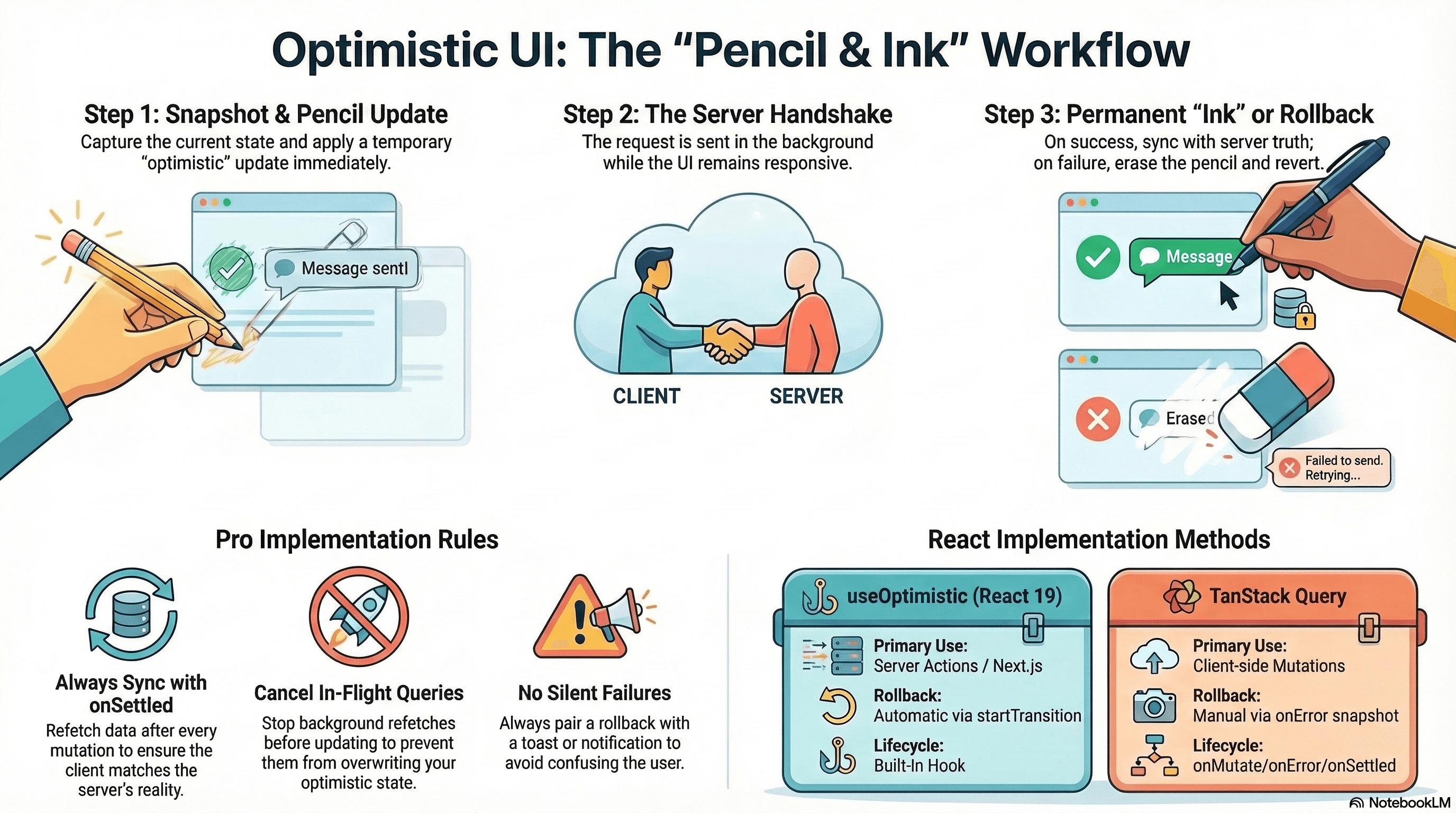
Overview
Optimistic UI is the practice of updating the interface immediately on user interaction — before the server confirms the change. If the server succeeds, the optimistic update becomes permanent. If the server fails, you roll back to the last confirmed state and surface the error.
Done correctly, it makes applications feel instantaneous. Done incorrectly, it leaves the UI in an inconsistent state on errors or creates conflicts when multiple optimistic mutations overlap.
How It Works
The pattern requires two things: a temporary state layer that overlays the confirmed state while the request is in-flight, and a rollback path that reverts to the confirmed state cleanly on failure.
Think of it like writing in pencil over ink. The pencil layer is visible immediately. If approved, the ink is redrawn to match. If rejected, the pencil is erased — the ink underneath is unchanged.
In React the two mechanisms are:
useOptimistic(React 19) — a built-in hook that manages the temporary overlay automatically within astartTransitioncontext. Designed for Server Actions.- TanStack Query
onMutate/onError/onSettled— mutation lifecycle hooks that give full control over cache manipulation for client-side mutations.
Code Examples
useOptimistic with Server Actions (React 19 / Next.js App Router)
// app/actions/todo-actions.ts
"use server";

import { db } from "@/lib/db";
import { revalidatePath } from "next/cache";

export async function addTodo(text: string) {
  const todo = await db.todo.create({ data: { text, done: false } });
  revalidatePath("/todos");
  return todo;
}

export async function toggleTodo(id: string, done: boolean) {
  const todo = await db.todo.update({ where: { id }, data: { done } });
  revalidatePath("/todos");
  return todo;
}
// app/todos/todo-list.tsx
"use client";
import { useOptimistic, useState, useTransition, useRef } from "react";
import { addTodo, toggleTodo } from "@/app/actions/todo-actions";
type Todo = { id: string; text: string; done: boolean; pending?: boolean };
export function TodoList({ initialTodos }: { initialTodos: Todo[] }) {
const [todos, setTodos] = useState<Todo[]>(initialTodos);
const [error, setError] = useState<string | null>(null);
const [isPending, startTransition] = useTransition();
const formRef = useRef<HTMLFormElement>(null);
// useOptimistic creates a temporary overlay on top of `todos`
// The second argument is the "updater" — how to apply an optimistic action to the current state
const [optimisticTodos, applyOptimistic] = useOptimistic(
todos,
(
current: Todo[],
action:
| { type: "add"; text: string }
| { type: "toggle"; id: string; done: boolean },
) => {
if (action.type === "add") {
return [
...current,
{
id: `temp-${Date.now()}`,
text: action.text,
done: false,
pending: true,
},
];
}
if (action.type === "toggle") {
return current.map((t) =>
t.id === action.id ? { ...t, done: action.done, pending: true } : t,
);
}
return current;
},
);
function handleAdd(formData: FormData) {
const text = formData.get("text") as string;
if (!text.trim()) return;
formRef.current?.reset();
setError(null);
startTransition(async () => {
applyOptimistic({ type: "add", text }); // show immediately
try {
const created = await addTodo(text);
setTodos((prev) => [...prev, created]); // confirm with real record
} catch {
setError("Failed to add todo. Please try again.");
// useOptimistic auto-reverts when the transition ends with an error
}
});
}
function handleToggle(id: string, currentDone: boolean) {
setError(null);
startTransition(async () => {
applyOptimistic({ type: "toggle", id, done: !currentDone });
try {
const updated = await toggleTodo(id, !currentDone);
setTodos((prev) => prev.map((t) => (t.id === id ? updated : t)));
} catch {
setError("Failed to update todo.");
}
});
}
return (
<div>
{error && (
<p role="alert" className="text-red-600 text-sm mb-2">
{error}
</p>
)}
<ul className="mb-4">
{optimisticTodos.map((todo) => (
<li
key={todo.id}
className={`flex items-center gap-2 ${todo.pending ? "opacity-60" : ""}`}
>
<input
type="checkbox"
checked={todo.done}
onChange={() => handleToggle(todo.id, todo.done)}
disabled={todo.pending} // prevent double-toggling while pending
/>
<span className={todo.done ? "line-through text-gray-500" : ""}>
{todo.text}
</span>
{todo.pending && (
<span className="text-xs text-gray-400">saving…</span>
)}
</li>
))}
</ul>
<form ref={formRef} action={handleAdd}>
<input
name="text"
placeholder="New todo"
className="border rounded px-2 py-1"
/>
<button
type="submit"
disabled={isPending}
className="ml-2 px-3 py-1 bg-blue-600 text-white rounded"
>
Add
</button>
</form>
</div>
);
}TanStack Query: onMutate / onError / onSettled — Full Lifecycle
The three mutation callbacks give you precise control over the cache during the request lifecycle:
// hooks/use-toggle-like.ts
import { useMutation, useQueryClient } from "@tanstack/react-query";

interface Post {
  id: string;
  title: string;
  likeCount: number;
  likedByUser: boolean;
}

export function useToggleLike(postId: string) {
  const queryClient = useQueryClient();

  return useMutation({
    mutationFn: async () => {
      const res = await fetch(`/api/posts/${postId}/like`, { method: "POST" });
      if (!res.ok) throw new Error("Failed to toggle like");
      return res.json() as Promise<{ likeCount: number; likedByUser: boolean }>;
    },

    // onMutate: runs synchronously before the request starts
    // Apply the optimistic update and return a snapshot for rollback
    onMutate: async () => {
      // 1. Cancel any in-flight refetches that would overwrite the optimistic update
      await queryClient.cancelQueries({ queryKey: ["post", postId] });

      // 2. Snapshot the current value for rollback
      const previousPost = queryClient.getQueryData<Post>(["post", postId]);

      // 3. Apply the optimistic update to the cache immediately
      queryClient.setQueryData<Post>(["post", postId], (old) => {
        if (!old) return old;
        return {
          ...old,
          likedByUser: !old.likedByUser,
          likeCount: old.likedByUser ? old.likeCount - 1 : old.likeCount + 1,
        };
      });

      // 4. Return snapshot — TanStack Query passes this to onError as `context`
      return { previousPost };
    },

    // onError: runs if the mutation fails — restore the snapshot
    onError: (_error, _variables, context) => {
      if (context?.previousPost) {
        queryClient.setQueryData(["post", postId], context.previousPost);
      }
    },

    // onSettled: runs after success OR error — always refetch to sync with server truth
    onSettled: () => {
      // Ensures the cache reflects actual server state regardless of optimistic/error path
      queryClient.invalidateQueries({ queryKey: ["post", postId] });
    },
  });
}
// components/LikeButton.tsx
"use client";
import { useToggleLike } from "@/hooks/use-toggle-like";
import { useQuery } from "@tanstack/react-query";
export function LikeButton({ postId }: { postId: string }) {
const { data: post } = useQuery({
queryKey: ["post", postId],
queryFn: () => fetchPost(postId),
});
const { mutate: toggleLike, isPending } = useToggleLike(postId);
if (!post) return null;
return (
<button
onClick={() => toggleLike()}
disabled={isPending}
aria-pressed={post.likedByUser}
className={`flex items-center gap-1 px-3 py-1 rounded-full text-sm ${
post.likedByUser
? "bg-red-100 text-red-600"
: "bg-gray-100 text-gray-600"
}`}
>
{post.likedByUser ? "♥" : "♡"} {post.likeCount}
</button>
);
}Concurrent Mutations — Preventing Conflicts
When a user can trigger the same mutation multiple times before the first one resolves (e.g., rapidly clicking a like button), each call creates a new in-flight mutation. Without guards, the optimistic state gets applied multiple times:
// hooks/use-toggle-like-safe.ts — prevents concurrent toggles
import { useMutation, useQueryClient } from "@tanstack/react-query";
import { useRef } from "react";

export function useToggleLikeSafe(postId: string) {
  const queryClient = useQueryClient();
  const inFlightRef = useRef(false); // guards against concurrent mutations

  return useMutation({
    mutationFn: async () => {
      if (inFlightRef.current) throw new Error("Mutation already in flight");

      inFlightRef.current = true;
      try {
        const res = await fetch(`/api/posts/${postId}/like`, {
          method: "POST",
        });
        if (!res.ok) throw new Error("Failed to toggle like");
        return res.json();
      } finally {
        inFlightRef.current = false;
      }
    },
    onMutate: async () => {
      await queryClient.cancelQueries({ queryKey: ["post", postId] });
      const previousPost = queryClient.getQueryData(["post", postId]);
      queryClient.setQueryData(["post", postId], (old: any) => ({
        ...old,
        likedByUser: !old?.likedByUser,
        likeCount: old?.likedByUser ? old.likeCount - 1 : old.likeCount + 1,
      }));
      return { previousPost };
    },
    onError: (_err, _vars, context) => {
      queryClient.setQueryData(["post", postId], context?.previousPost);
    },
    onSettled: () => {
      queryClient.invalidateQueries({ queryKey: ["post", postId] });
    },
  });
}
Drag-and-Drop Rollback
Drag-and-drop moves require snapshot storage at drag start, not at mutation start:
"use client";

import { useState, useRef } from "react";
import { useMutation, useQueryClient } from "@tanstack/react-query";

type Task = {
  id: string;
  title: string;
  column: "todo" | "in-progress" | "done";
};

export function useKanbanBoard() {
  const queryClient = useQueryClient();
  const snapshotRef = useRef<Task[] | null>(null);

  const moveMutation = useMutation({
    mutationFn: async ({
      taskId,
      column,
    }: {
      taskId: string;
      column: Task["column"];
    }) => {
      const res = await fetch(`/api/tasks/${taskId}/move`, {
        method: "PATCH",
        headers: { "Content-Type": "application/json" },
        body: JSON.stringify({ column }),
      });
      if (!res.ok) throw new Error("Failed to move task");
      return res.json();
    },
    onError: () => {
      // Restore the snapshot taken at drag start
      if (snapshotRef.current) {
        queryClient.setQueryData(["tasks"], snapshotRef.current);
        snapshotRef.current = null;
      }
    },
    onSettled: () => {
      queryClient.invalidateQueries({ queryKey: ["tasks"] });
    },
  });

  function onDragStart() {
    // Snapshot before any visual changes — ensures rollback goes to pre-drag state
    snapshotRef.current = queryClient.getQueryData<Task[]>(["tasks"]) ?? null;
  }

  function onDrop(taskId: string, column: Task["column"]) {
    // Apply optimistic move immediately for visual feedback
    queryClient.setQueryData<Task[]>(
      ["tasks"],
      (old) => old?.map((t) => (t.id === taskId ? { ...t, column } : t)) ?? [],
    );
    // Fire the server mutation
    moveMutation.mutate({ taskId, column });
  }

  return { onDragStart, onDrop, isPending: moveMutation.isPending };
}
Real-World Use Case
Project management board. A user drags a task card from "In Progress" to "Done." The card visually snaps to the Done column immediately (queryClient.setQueryData applies the optimistic update). If the server rejects the move (e.g., the user doesn't have permission, or the task has a blocking dependency), onError restores the snapshot and a toast notification explains why. onSettled refetches regardless — if another user moved the card between the drag start and the server response, the refetch shows the correct final state. The UX feels instantaneous in the success case and recovers cleanly in the error case.
Common Mistakes / Gotchas
1. Not wrapping useOptimistic calls in startTransition. useOptimistic only reverts automatically when the enclosing startTransition callback throws or rejects. Without startTransition, automatic revert doesn't trigger — you'd have to manage rollback manually.
2. Forgetting cancelQueries before applying the optimistic update. If a background refetch is in-flight when you call setQueryData, the refetch result can arrive and overwrite your optimistic update. await queryClient.cancelQueries(...) stops in-flight refetches first.
3. Not calling onSettled to sync with server state. After an optimistic mutation — success or error — calling invalidateQueries in onSettled ensures the cache reflects actual server state. Skipping onSettled means your cache could permanently diverge from reality if the server applied a different transformation than the client assumed.
4. Using the optimistic temporary ID for follow-up mutations. The temporary ID (e.g., crypto.randomUUID()) assigned to an optimistic item is not the real database ID. Never use it to fire edit or delete mutations before the server confirmation arrives.
5. Silent rollbacks without user feedback. Auto-revert with no feedback is confusing — the action "silently failed." Always pair a rollback with an error message, toast, or other visible indication.
Summary
Optimistic UI shows UI changes immediately and reverts cleanly on failure. useOptimistic (React 19) manages the temporary state overlay automatically within startTransition for Server Actions. TanStack Query's onMutate/onError/onSettled lifecycle gives precise control for client-side mutations: onMutate snapshots and applies the optimistic update, onError restores the snapshot, onSettled refetches to sync with server truth. For drag-and-drop, snapshot at drag start rather than mutation start. Prevent concurrent mutations on the same resource with an in-flight guard. Always surface rollbacks to the user — silent reverts erode trust.
Interview Questions
Q1. How does useOptimistic work and what guarantees does it provide?
useOptimistic creates a temporary overlay on top of a "confirmed" state value. It accepts the current confirmed state and an updater function. When you call applyOptimistic(action), it applies the updater to produce the optimistic (temporary) version — this is what renders. The overlay is automatically reverted when the enclosing startTransition callback settles: on success, the underlying confirmed state (updated via setState) replaces the overlay; on error, the overlay is discarded and the confirmed state shows unchanged. The guarantee: the confirmed state (your useState value) is never modified by useOptimistic — it's always the last server-confirmed snapshot, and the overlay exists only during the transition.
Q2. What are the three TanStack Query mutation lifecycle callbacks and when does each run?
onMutate runs synchronously before the mutationFn starts — use it to cancel in-flight refetches, snapshot the current cache state, and apply the optimistic update. It returns a context object that TanStack Query passes to onError and onSettled. onError runs if the mutationFn throws — use it to restore the snapshot from the context returned by onMutate. onSettled runs after the mutation completes (success or error) — use it to call invalidateQueries to sync the cache with server state regardless of outcome. This three-phase structure ensures the cache is always in a consistent state: either optimistically updated, rolled back, or refetched.
Q3. Why must you await queryClient.cancelQueries(...) before applying an optimistic update?
When you call setQueryData to apply an optimistic update, the cache immediately shows the new value. But if a background refetch is in-flight for the same key, the refetch's response arrives after your optimistic update and overwrites it — the optimistic change vanishes. cancelQueries sends an abort signal to any in-flight queries for the specified key, stopping them before they can overwrite the optimistic state. Without this step, optimistic updates flicker or disappear unpredictably when background refetches are active.
Q4. Why is onSettled with invalidateQueries important even after a successful mutation?
Your optimistic update is based on client-side assumptions about what the server will do. The server might: apply additional transformations, trigger side effects that affect related data, or return a slightly different result than your assumption. onSettled with invalidateQueries refetches after every mutation — success or error — ensuring the cache reflects actual server state. Skipping it means your optimistic assumption permanently replaces server truth if it differs. For simple cases (like a count increment), the optimistic and server values usually match; for complex cases (like order processing with discounts and tax), the server value may differ significantly from your client assumption.
Q5. How do you handle concurrent optimistic mutations on the same resource?
When a user can trigger the same mutation multiple times before the first resolves (e.g., rapidly toggling a like button), each mutation call applies an optimistic update — the state flips multiple times and the rollback path becomes unpredictable. Solutions: (1) disable the UI element while a mutation is isPending — the simplest fix; (2) use an inFlight ref to guard the mutationFn — throw if a mutation is already running; (3) use debouncing to collapse rapid clicks into one mutation. The correct approach depends on the UX: a like button should disable while pending; a form should show a loading state; a counter should debounce rapid clicks.
Q6. For drag-and-drop, why should the rollback snapshot be taken at drag start rather than in onMutate?
onMutate in TanStack Query runs just before the mutationFn starts — after the user has already dropped the card and the optimistic UI update has been applied. If you snapshot in onMutate, you're snapshotting the already-optimistically-updated state. When onError restores this snapshot, it restores the post-drop state, not the pre-drag state — the "rollback" is a no-op. Snapshotting at drag start (via onDragStart) captures the state before any UI changes. The onError rollback then correctly returns the board to exactly how it looked before the user began dragging.
Race Conditions in UI State
How async operations resolving out of order corrupt displayed state, and the three patterns that prevent it — AbortController, ignore flags, and sequence counters — plus how TanStack Query eliminates this class of bug automatically.
Idempotent UI Actions
How to design UI actions that produce the same result regardless of how many times they fire — client-side guards, server-side idempotency keys, React Strict Mode as an idempotency test, and why both layers are required.