Concurrent Rendering
How React's concurrent rendering model works — priority lanes, time slicing, interruptible renders, useTransition, useDeferredValue, and how to keep UIs responsive under heavy update load.
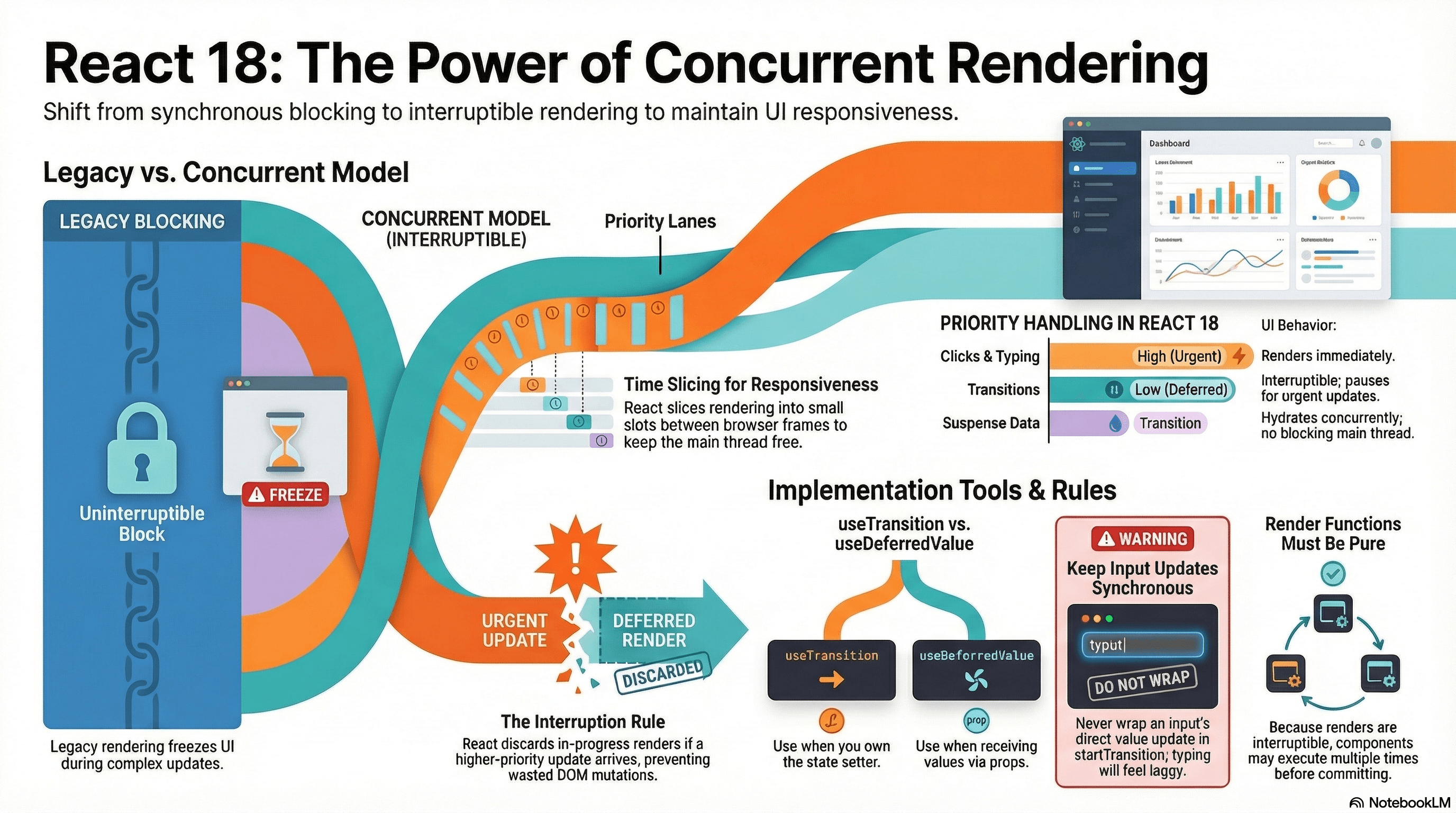
Overview
Before React 18, rendering was synchronous and blocking. Once React started rendering a component tree, it ran to completion before the browser could do anything else — including responding to user input. On slow devices or with complex trees, this produced visibly frozen UIs: a user types in a search box, the filter computation takes 200ms, and every keystroke feels laggy because the input can't update until the render finishes.
Concurrent Rendering is React's solution. It lets React interrupt, pause, resume, and discard rendering work based on priority. Urgent updates — typing, clicking, pressing — are never blocked by expensive low-priority renders. The page stays responsive, and wasted work is thrown away rather than committed.
This isn't a new API you call directly. It's a capability unlocked by the concurrent root (createRoot, which Next.js App Router uses automatically) and surfaced through specific hooks: useTransition, useDeferredValue, and Suspense.
How It Works
The Legacy Synchronous Model
In React 17 and earlier, every state update triggered a synchronous, uninterruptible render:
setState() called
  ↓
React renders full component tree (blocking — nothing else runs)
  ↓
React commits result to DOM
  ↓
Browser can respond to events again
For a simple state update this is fine. For filtering a 10,000-item list on every keystroke, the render takes tens of milliseconds — during which the browser's event loop is blocked, the input doesn't update, and the UI appears frozen.
The Concurrent Model: Priority Lanes
React 18's concurrent scheduler assigns every update to a lane — a priority bucket. Updates in higher-priority lanes preempt lower-priority lanes:
SyncLane            — flushMouseEvents, flushSync() — runs synchronously
InputContinuousLane — keystrokes, scroll events — runs on next microtask
DefaultLane         — normal setState, fetch results — runs on next task
TransitionLane      — useTransition updates — interruptible, can be discarded
IdleLane            — prefetching, background work — runs when nothing else is pending
When a TransitionLane render is in progress and a InputContinuousLane update arrives, React pauses the transition, commits the urgent update, and restarts the transition render from scratch with the latest state. The discarded transition render was never committed — no wasted DOM mutations.
Time Slicing
React doesn't render a transition update in one long blocking chunk. It yields back to the browser between small units of work, checking whether a higher-priority update has arrived. If one has, the current work is paused. If not, the next chunk runs.
This is why concurrent rendering is sometimes called time slicing — React slices the rendering work into time slots that fit between browser frames, keeping the main thread available for input events.
Frame 1:  [Input event handler] [React: render chunk A] [yield to browser]
Frame 2:  [React: render chunk B] [yield to browser]
Frame 3:  [New input event! Discard transition, render urgent update]
Frame 4:  [Restart transition render with new state]
What "Interruptible" Actually Means
Interruption means React throws away the work-in-progress fiber tree and starts over. This has an important implication: render functions may execute multiple times for a single committed update. A component inside a transition might render twice — once as part of the interrupted attempt, and once as part of the restarted attempt.
This is why render functions must be pure and side-effect free. Any side effect in the render body (API calls, mutations, analytics tracking) may fire more than once. The only safe place for side effects is useEffect or event handlers.
useTransition vs useDeferredValue
Both defer low-priority work, but they're used in different situations:
useTransition— you own the state setter. You wrap the expensivesetStatecall instartTransition. You get anisPendingboolean to show a loading indicator.useDeferredValue— you don't own the state setter (the value comes from a prop or context). You pass the value throughuseDeferredValueto get a version that lags behind when the system is under load.
useTransition  → wrap the write  → setResults(filter(query))
useDeferredValue → wrap the read → const deferredQuery = useDeferredValue(query)
Code Examples
useTransition — Keeping Input Responsive During Expensive Renders
// app/search/page.tsx
"use client";

import { useState, useTransition, memo } from "react";

// ---- Data setup ----
const ALL_PRODUCTS = Array.from({ length: 10_000 }, (_, i) => ({
  id: i,
  name: `Product ${i} - ${["Laptop", "Phone", "Tablet", "Monitor", "Keyboard"][i % 5]}`,
}));

function filterProducts(query: string) {
  // Deliberately expensive — forces React to slice work across frames
  return ALL_PRODUCTS.filter((p) =>
    p.name.toLowerCase().includes(query.toLowerCase()),
  );
}

// ---- Component ----
export default function SearchPage() {
  const [query, setQuery] = useState("");
  const [results, setResults] = useState(ALL_PRODUCTS);
  const [isPending, startTransition] = useTransition();

  function handleChange(e: React.ChangeEvent<HTMLInputElement>) {
    const value = e.target.value;

    // ✅ Urgent: update the controlled input value synchronously
    // This runs in InputContinuousLane — the input always feels instant
    setQuery(value);

    // ✅ Non-urgent: filtering is expensive — defer it as a transition
    // If the user types again before this completes, React discards
    // this render and starts over with the new value
    startTransition(() => {
      setResults(filterProducts(value));
    });
  }

  return (
    <div>
      <input
        value={query}
        onChange={handleChange}
        placeholder="Search 10,000 products..."
        className="border rounded p-2 w-full mb-3"
      />

      {/* isPending is true while the transition render is in progress */}
      <p className="text-sm text-gray-500 mb-2">
        {isPending
          ? "Updating results..."
          : `${results.length.toLocaleString()} results`}
      </p>

      {/*
        Apply visual dimming while isPending — the list shows the previous
        results (never a blank) while the new results are being computed
      */}
      <div
        style={{ opacity: isPending ? 0.6 : 1, transition: "opacity 150ms" }}
      >
        <ProductList items={results.slice(0, 50)} />
      </div>
    </div>
  );
}

// memo prevents ProductList from re-rendering if items reference is unchanged
const ProductList = memo(function ProductList({
  items,
}: {
  items: typeof ALL_PRODUCTS;
}) {
  return (
    <ul>
      {items.map((item) => (
        <li key={item.id} className="py-1 border-b text-sm">
          {item.name}
        </li>
      ))}
    </ul>
  );
});
useDeferredValue — When You Don't Own the State
Use this when the expensive component receives its value as a prop or from context and you can't wrap the setter in startTransition:
// app/dashboard/page.tsx
"use client";

import { useState, useDeferredValue, memo } from "react";

interface DataPoint {
  label: string;
  value: number;
}

// Simulates a chart component that's expensive to render
const HeavyChart = memo(function HeavyChart({
  data,
  metric,
}: {
  data: DataPoint[];
  metric: string;
}) {
  // Expensive computation happens here — renders slowly intentionally
  const processed = data.map((d) => ({
    ...d,
    computed: d.value * (metric === "revenue" ? 1.2 : 1.0),
  }));

  return (
    <div>
      <h3>{metric} chart</h3>
      {/* Render a large number of data points */}
      {processed.slice(0, 100).map((d) => (
        <div key={d.label} className="flex justify-between text-sm py-0.5">
          <span>{d.label}</span>
          <span>{d.computed.toFixed(2)}</span>
        </div>
      ))}
    </div>
  );
});

const METRICS = ["revenue", "sessions", "conversions", "retention"];
const MOCK_DATA: DataPoint[] = Array.from({ length: 500 }, (_, i) => ({
  label: `Day ${i + 1}`,
  value: Math.random() * 1000,
}));

export default function DashboardPage() {
  const [metric, setMetric] = useState("revenue");

  // useDeferredValue gives HeavyChart a version of metric that lags
  // behind when the system is under load. The dropdown updates
  // instantly; the chart re-renders when React has capacity.
  const deferredMetric = useDeferredValue(metric);

  // When metric !== deferredMetric, a transition is in progress
  const isStale = metric !== deferredMetric;

  return (
    <div>
      <select
        value={metric}
        onChange={(e) => setMetric(e.target.value)}
        className="border rounded p-2 mb-4"
      >
        {METRICS.map((m) => (
          <option key={m} value={m}>
            {m.charAt(0).toUpperCase() + m.slice(1)}
          </option>
        ))}
      </select>

      {/* Chart renders with the deferred value — never blocks the select */}
      <div style={{ opacity: isStale ? 0.6 : 1, transition: "opacity 150ms" }}>
        <HeavyChart data={MOCK_DATA} metric={deferredMetric} />
      </div>
    </div>
  );
}
startTransition for Route-Level Navigation
Navigation updates can also be wrapped in transitions when you want to show the current page while the next one loads:
// components/NavLink.tsx
"use client";

import { useTransition } from "react";
import { useRouter } from "next/navigation";

interface NavLinkProps {
  href: string;
  children: React.ReactNode;
}

export function NavLink({ href, children }: NavLinkProps) {
  const router = useRouter();
  const [isPending, startTransition] = useTransition();

  function handleClick(e: React.MouseEvent) {
    e.preventDefault();

    // Wrap navigation in a transition — the current page stays visible
    // while the next page's Server Components fetch their data.
    // isPending shows a loading indicator without a blank screen.
    startTransition(() => {
      router.push(href);
    });
  }

  return (
    <a
      href={href}
      onClick={handleClick}
      style={{ opacity: isPending ? 0.6 : 1 }}
      aria-busy={isPending}
    >
      {isPending ? `${children} (loading…)` : children}
    </a>
  );
}
Suspense as a Concurrent Boundary
Suspense integrates with the concurrent scheduler. When a component suspends (throws a Promise), React catches it in the work-in-progress tree, renders the nearest fallback from the committed tree, and continues rendering the rest of the page. When the promise resolves, React picks up the suspended work as a transition — interruptible, concurrently hydrated:
// app/profile/[id]/page.tsx
import { Suspense } from "react";

// Both components are async Server Components that fetch independently.
// React renders whichever finishes first — neither blocks the other.
async function UserCard({ userId }: { userId: string }) {
  const user = await fetch(`/api/users/${userId}`).then((r) => r.json());
  return (
    <div className="card">
      <h2>{user.name}</h2>
      <p>{user.bio}</p>
    </div>
  );
}

async function ActivityFeed({ userId }: { userId: string }) {
  const activity = await fetch(`/api/users/${userId}/activity`).then((r) =>
    r.json(),
  );
  return (
    <ul>
      {activity.map((item: { id: string; text: string }) => (
        <li key={item.id}>{item.text}</li>
      ))}
    </ul>
  );
}

export default function ProfilePage({ params }: { params: { id: string } }) {
  return (
    <div className="grid grid-cols-2 gap-4">
      {/* Independent concurrent boundaries — neither blocks the other */}
      <Suspense fallback={<div className="skeleton h-24 animate-pulse" />}>
        <UserCard userId={params.id} />
      </Suspense>

      <Suspense fallback={<div className="skeleton h-48 animate-pulse" />}>
        <ActivityFeed userId={params.id} />
      </Suspense>
    </div>
  );
}
Measuring Responsiveness Impact
// Use the Long Animation Frame API (Chrome 116+) to detect
// frames blocked by non-concurrent rendering patterns
const observer = new PerformanceObserver((list) => {
  for (const entry of list.getEntries()) {
    if (entry.duration > 50) {
      // > 50ms = definitely janky on a 60fps display
      console.warn(
        `Long animation frame: ${entry.duration.toFixed(1)}ms`,
        // blockingDuration shows how long the main thread was truly blocked
        `blocking: ${(entry as any).blockingDuration?.toFixed(1) ?? "N/A"}ms`,
      );
    }
  }
});

observer.observe({ type: "long-animation-frame", buffered: true });

// To verify that useTransition is working:
// 1. Record a Performance trace while typing in your search input
// 2. Look for the input update task — should be <8ms (single frame)
// 3. Look for the transition render task — should be chunked across frames
//    If it's one long block, the transition isn't working as expected
Real-World Use Case
Filterable product catalog. A product page renders 500 cards. As the user types in the filter input, the visible list re-renders. Without concurrent rendering: each keystroke triggers a 80ms synchronous render, the input lags by 80ms per character, and fast typists see characters dropped.
With useTransition: the input updates synchronously in <2ms (just a setState). The 80ms filter render runs as a transition — interruptible and deferred. If the user types the next character before the previous filter finishes, React discards the in-progress render and restarts with the latest query. The input always feels instant. The results update to the final query after typing pauses.
Tab switching with heavy panels. A settings page has 5 tabs, each rendering a complex form or data table. Without transitions, clicking a tab causes a visible 100-200ms blank while React renders the new panel. With startTransition wrapping the tab state update: the previous tab stays visible while React renders the new one in the background. The isPending flag shows a subtle loading indicator on the tab label. The transition feels instant because users see real content the entire time.
Common Mistakes / Gotchas
1. Wrapping the input's own value update in startTransition.
startTransition defers the work inside it. If you defer setQuery(value) (the input's controlled value), the input itself becomes laggy — the exact problem you're trying to solve. Only wrap the expensive downstream work. The input update must remain synchronous.
// ❌ Input becomes laggy — both updates are deferred
startTransition(() => {
  setQuery(value); // ← this should NOT be in startTransition
  setResults(filter(value));
});

// ✅ Input is urgent, filtering is deferred
setQuery(value);
startTransition(() => setResults(filter(value)));
2. Putting side effects in the render body expecting them to run once.
Concurrent rendering may render a component multiple times before committing — abandoned renders from interrupted transitions produce render-phase executions that never commit. API calls, analytics tracking, and mutations in the render body will fire for each attempt. Side effects belong in useEffect (runs only after commit) or event handlers (user-triggered).
3. Using isPending from useTransition as a data-loading indicator.
isPending is true while React is working on the transition render — it has nothing to do with network requests. If your transition also triggers a data fetch, use Suspense or separate loading state for the fetch status. isPending is only for "React is still computing the new render."
4. Expecting useDeferredValue to reduce how often a component renders.
useDeferredValue doesn't skip renders — it schedules them at lower priority. The component with the deferred value renders at least twice when the value changes: once with the stale value (immediate, shows old content) and once with the new value (deferred, interruptible). Combine useDeferredValue with memo to avoid re-rendering the expensive component during the first (stale) pass.
5. Using useTransition in Server Components.
useTransition is a client-side hook that manages React's concurrent scheduler. It has no meaning on the server and will throw if used in a Server Component. Server-side loading states are handled through Suspense boundaries and streaming, not useTransition.
6. Forgetting that startTransition requires the callback to be synchronous.
The function you pass to startTransition must be synchronous — it schedules synchronous state updates. You cannot await inside startTransition itself. If you need to await a promise before setting state, await it first, then call startTransition with the result.
// ❌ await inside startTransition — doesn't work
startTransition(async () => {
  const data = await fetchData(); // ← this breaks the transition
  setResults(data);
});

// ✅ await outside, startTransition for the state update
const data = await fetchData();
startTransition(() => setResults(data));
Summary
Concurrent Rendering is React's ability to interrupt, pause, and reprioritize rendering work so urgent user interactions are never blocked by expensive background renders. It works through a priority lane system: urgent updates (input, clicks) are assigned high-priority lanes and render synchronously; expensive updates wrapped in startTransition are assigned low-priority TransitionLanes and can be interrupted by higher-priority work. Time slicing breaks long renders into small chunks that yield to the browser between frames. useTransition is the primary API — wrap expensive setState calls in startTransition, use isPending to show a loading indicator, and keep the direct input update synchronous. useDeferredValue solves the same problem when you don't own the state setter. Render functions must be pure because concurrent rendering may execute them multiple times before committing.
Interview Questions
Q1. What problem does concurrent rendering solve and how does it solve it?
Before React 18, rendering was synchronous and uninterruptible — once React started rendering a state update, the main thread was blocked until it finished. On expensive renders (large lists, complex trees), this caused input lag because the browser couldn't process events during the render. Concurrent rendering solves this by assigning updates to priority lanes. Urgent updates (keystrokes, clicks) are assigned high-priority lanes and render synchronously. Expensive updates wrapped in startTransition are assigned lower-priority TransitionLanes — React renders them in small interruptible chunks, yielding to the browser between each chunk and discarding the work if a higher-priority update arrives.
Q2. What is the difference between useTransition and useDeferredValue?
Both defer low-priority rendering work, but they're applied at different points. useTransition is used when you own the state setter — you wrap the expensive setState call in startTransition, which schedules it at low priority. You get an isPending boolean to reflect that the transition is in progress. useDeferredValue is used when you don't own the state setter — the value comes from a prop or context. You pass the value through useDeferredValue to receive a version that lags behind when the system is under load. useTransition controls the write; useDeferredValue controls the read. For maximum effect, combine useDeferredValue with memo so the expensive component only re-renders when the deferred value actually changes.
Q3. Why must you not wrap a controlled input's value update in startTransition?
startTransition schedules the work inside it at low priority — React may defer it until after the next frame or even later. If setQuery(value) (the update that makes the input display the typed character) is inside startTransition, the input's displayed value is deferred, causing exactly the input lag you're trying to prevent. Only the downstream expensive update (filtering, sorting, re-rendering a large list) should be deferred. The input's own state update must remain synchronous.
Q4. Why can concurrent rendering execute a component's render function multiple times before committing?
When a transition render is interrupted by a higher-priority update, React discards the work-in-progress fiber tree and starts the transition over with the latest state. The component functions that already executed in the abandoned pass ran but their results were never committed to the DOM — they're thrown away. When the transition restarts, those same components run again. This means any render phase execution (code running directly in the component function body) may fire once per render attempt, not just once per commit. Side effects must live in useEffect (which only fires after commit) or event handlers (which fire once per user action).
Q5. How does Suspense interact with concurrent rendering?
Suspense is a concurrent primitive — it only works correctly in concurrent mode. When a component throws a Promise (suspends), React catches it in the work-in-progress tree, renders the nearest <Suspense> fallback from the currently committed tree, and continues rendering the rest of the page. When the promise resolves, React resumes the suspended work as a transition — meaning it's interruptible and won't block urgent updates. Multiple <Suspense> boundaries hydrate concurrently rather than sequentially. Without concurrent mode, Suspense still catches thrown promises but cannot handle them as gracefully — the interruptibility and prioritization are lost.
Q6. A user reports that typing in a search box feels laggy on a large product catalog page. How would you diagnose and fix it?
First, record a Performance trace in Chrome DevTools while typing. If the input update task shows as a long block (>8ms), a synchronous render is blocking the input. If there's a separate long task for the list filter, useTransition isn't being used yet. The fix: separate the input value state from the filtered results state, set the input value synchronously (setQuery(value)), and wrap the expensive filter (setResults(filterProducts(value))) in startTransition. Add isPending to show a subtle "updating..." indicator so the user knows results are on their way. Optionally, also memoize the results list component to avoid re-rendering it when only the input value changes. After the fix, the Performance trace should show the input update completing in under 2ms, with the filter render appearing as interruptible chunks across subsequent frames.
RSC Rendering Model
How React Server Components work as a rendering system — the RSC Payload format, the two-tree model, how server and client outputs merge, and how RSC differs fundamentally from SSR.
Fiber Architecture
React's internal reconciliation engine — fiber nodes, double buffering, the work loop, how hooks are stored, and why the render phase must be pure.