Streaming SSR
How React 18 streams HTML to the browser in chunks using Suspense, how the server-to-client swap mechanism works under the hood, and how to structure components for maximum streaming benefit.
Overview
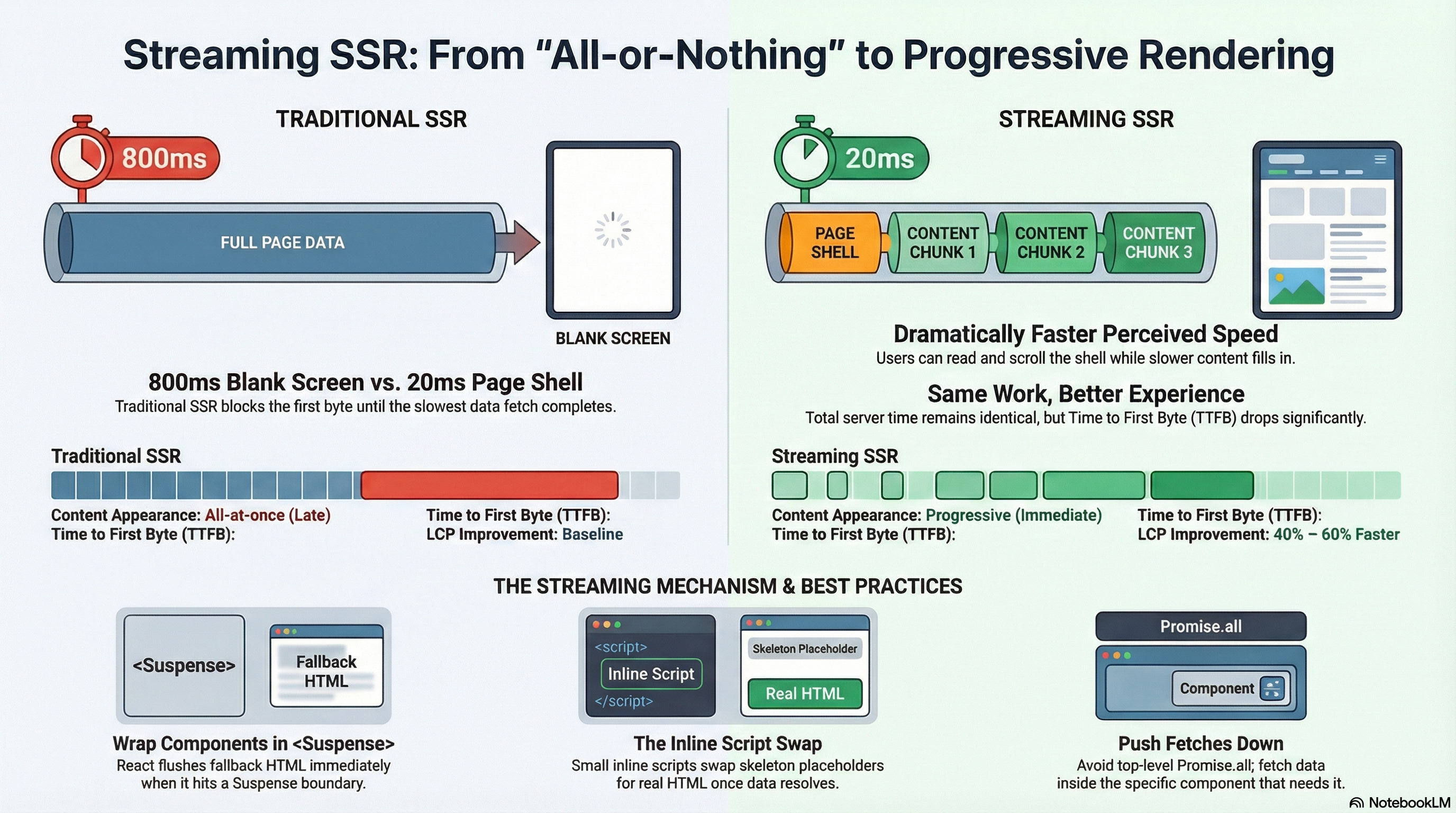
Traditional SSR has an all-or-nothing problem: the server must finish building the entire HTML document before it can send the first byte to the browser. If one data fetch takes 800ms, every user waits 800ms looking at a blank screen — even if 90% of the page was ready in 50ms.
Streaming SSR solves this by sending HTML in chunks as each piece becomes ready. The browser receives and renders content progressively — the page shell appears immediately, fast sections follow in milliseconds, and slower sections stream in as their data resolves. Users see content sooner, can start reading and scrolling earlier, and perceive the page as dramatically faster even when total server time is unchanged.
React 18 implements streaming SSR through renderToPipeableStream (Node.js) and renderToReadableStream (edge runtimes). Next.js App Router uses this automatically — you opt in to streaming by placing async Server Components inside <Suspense> boundaries.
This article covers how the streaming mechanism actually works at the protocol level, how to structure components for maximum benefit, and the tradeoffs that come with the approach.
How It Works
The Traditional SSR Problem
In traditional (non-streaming) SSR, the entire rendering pipeline must complete before the server sends a single byte:
Request arrives
    ↓
Fetch all data (serial or parallel)
    ↓  ← user waits here for the slowest fetch
Render full React tree to HTML string
    ↓
Send complete HTML document
    ↓
Browser receives HTML and starts parsing
With a 600ms slow query, TTFB is 600ms. Every user on every page visit pays that cost regardless of whether the slow section is above or below the fold.
How Streaming Works
Streaming flips this model. The server sends the HTML document incrementally using HTTP chunked transfer encoding — a standard HTTP/1.1 feature where the Content-Length header is omitted and the body is sent as a series of size-prefixed chunks, ending with a zero-length chunk.
React's streaming pipeline works as follows:
- The server starts rendering the React tree immediately
- When React encounters a
<Suspense>boundary wrapping a suspended component, it renders the fallback HTML and flushes it to the stream right away — the browser receives and displays the skeleton - React continues rendering the rest of the tree that isn't suspended
- When a suspended component's async work resolves, React renders it to HTML and appends it to the stream as a new chunk — along with a small inline
<script>tag - That
<script>tag instructs the already-loaded React runtime on the client to swap the skeleton placeholder out for the real content — without a full page reload
Server stream (time →):

[Shell HTML + skeleton A + skeleton B]   ← flushed immediately, TTFB ~20ms
        ↓
[Chunk: real content for A]              ← arrives at ~150ms
        ↓
[Chunk: real content for B + closing]   ← arrives at ~600ms
The browser starts rendering at 20ms instead of 600ms. Users see a skeleton immediately, then real content fills in progressively.
The Inline Script Swap Mechanism
When a streamed chunk arrives, it contains the HTML for the resolved content plus a small inline script:
<!-- Streamed chunk appended to the document body -->
<div hidden id="S:1">
  <!-- Real content HTML for the resolved Suspense boundary -->
  <ul>
    <li>Product A - $29</li>
    <li>Product B - $49</li>
  </ul>
</div>
<script>
  // React's internal swap: replace the placeholder with the real content
  $RC("B:1", "S:1");
</script>
The $RC function is React's internal replaceContent — it finds the <Suspense> placeholder in the DOM, replaces it with the streamed content, and removes both from the DOM. This happens synchronously when the script executes, with no visible flash.
The swap happens in the HTML stream itself — the browser's built-in HTML parser handles it as it arrives. No JavaScript framework bootstrap is required for the initial content replacement. The page is progressively enhanced even before React hydrates.
TTFB vs Total Page Load
Streaming improves Time to First Byte (TTFB) and First Contentful Paint (FCP) dramatically — the server starts sending immediately. It does not reduce the total data transferred or the time for all data fetches to complete. If a page has three data fetches taking 100ms, 300ms, and 800ms, streaming gets the first content to the browser in ~100ms but the full page still takes ~800ms. The user experience is much better, but the total server work is the same.
Code Examples
Basic Streaming Setup
// app/products/page.tsx
import { Suspense } from "react";

// Each async Server Component fetches its own data
// and suspends until it resolves

async function FeaturedBanner() {
  // Fast — hits a CDN-cached edge function
  const featured = await fetch("https://api.example.com/featured", {
    next: { revalidate: 300 },
  }).then((r) => r.json());

  return (
    <div className="featured-banner">
      <h2>{featured.headline}</h2>
      <p>{featured.subtext}</p>
    </div>
  );
}

async function ProductGrid() {
  // Slower — hits a database
  const products = await fetch("https://api.example.com/products", {
    next: { revalidate: 60 },
  }).then((r) => r.json());

  return (
    <ul className="product-grid">
      {products.map((p: { id: string; name: string; price: number }) => (
        <li key={p.id}>
          <strong>{p.name}</strong> — ${p.price}
        </li>
      ))}
    </ul>
  );
}

async function PersonalizedRecommendations() {
  // Slowest — calls an ML inference service
  const recs = await fetch("https://ml.example.com/recommendations", {
    cache: "no-store", // personalized — never cached
  }).then((r) => r.json());

  return (
    <aside>
      <h3>Recommended for you</h3>
      <ul>
        {recs.map((r: { id: string; name: string }) => (
          <li key={r.id}>{r.name}</li>
        ))}
      </ul>
    </aside>
  );
}

export default function ProductsPage() {
  return (
    <main>
      {/*
        FeaturedBanner streams in at ~30ms — users see something immediately.
        ProductGrid streams in at ~300ms.
        PersonalizedRecommendations streams in at ~800ms.

        Without streaming, the user would wait ~800ms to see ANYTHING.
        With streaming, they see the shell + banner at ~30ms.
      */}
      <Suspense fallback={<div className="skeleton h-24 animate-pulse" />}>
        <FeaturedBanner />
      </Suspense>

      <Suspense fallback={<ProductGridSkeleton />}>
        <ProductGrid />
      </Suspense>

      <Suspense fallback={<div className="skeleton h-48 animate-pulse" />}>
        <PersonalizedRecommendations />
      </Suspense>
    </main>
  );
}

function ProductGridSkeleton() {
  return (
    <ul className="product-grid">
      {Array.from({ length: 8 }).map((_, i) => (
        <li key={i} className="skeleton h-32 animate-pulse rounded" />
      ))}
    </ul>
  );
}
The Key Pattern: Push Fetches Down Into Components
The most common streaming anti-pattern is fetching all data at the top of the page. This re-creates the traditional SSR waterfall even with <Suspense> present.
// ❌ Anti-pattern — top-level Promise.all blocks everything
// The page waits for ALL three fetches before streaming ANY content
export default async function DashboardPage() {
  const [user, metrics, activity] = await Promise.all([
    fetchUser(), // 80ms
    fetchMetrics(), // 350ms
    fetchActivity(), // 720ms  ← everything blocked until this finishes
  ]);

  return (
    <div>
      <UserGreeting user={user} />
      <MetricsPanel metrics={metrics} />
      <ActivityFeed activity={activity} />
    </div>
  );
}
// ✅ Correct — each component fetches its own data and streams independently
// User greeting appears at ~80ms, metrics at ~350ms, activity at ~720ms
export default function DashboardPage() {
return (
<div>
<Suspense fallback={<GreetingSkeleton />}>
<UserGreeting />
</Suspense>
<Suspense fallback={<MetricsSkeleton />}>
<MetricsPanel />
</Suspense>
<Suspense fallback={<ActivitySkeleton />}>
<ActivityFeed />
</Suspense>
</div>
);
}
// Each component is responsible for its own data
async function UserGreeting() {
const user = await fetchUser(); // 80ms
return <h1>Welcome back, {user.name}</h1>;
}
async function MetricsPanel() {
const metrics = await fetchMetrics(); // 350ms
return <MetricsGrid data={metrics} />;
}
async function ActivityFeed() {
const activity = await fetchActivity(); // 720ms
return <FeedList items={activity} />;
}loading.tsx — Segment-Level Streaming Shorthand
Next.js provides loading.tsx as a file convention that automatically wraps the entire route segment in a <Suspense> boundary:
// app/dashboard/loading.tsx
// Automatically shown while app/dashboard/page.tsx is rendering on the server

export default function DashboardLoading() {
  return (
    <div className="dashboard-skeleton">
      <div className="skeleton h-10 w-56 mb-6 animate-pulse rounded" />
      <div className="grid grid-cols-3 gap-4 mb-6">
        {Array.from({ length: 3 }).map((_, i) => (
          <div key={i} className="skeleton h-24 animate-pulse rounded" />
        ))}
      </div>
      <div className="skeleton h-64 animate-pulse rounded" />
    </div>
  );
}
// app/dashboard/page.tsx
// This entire page is wrapped in a Suspense boundary by loading.tsx
export default async function DashboardPage() {
// All fetches run in parallel — the entire page appears once all resolve
const [user, metrics] = await Promise.all([fetchUser(), fetchMetrics()]);
return (
<div>
<h1>Welcome, {user.name}</h1>
<MetricsGrid data={metrics} />
</div>
);
}loading.tsx wraps the entire route segment in one boundary — good for a simple "show this skeleton until the whole page is ready" pattern. For fine-grained streaming where different sections appear at different times, use explicit <Suspense> boundaries inside the page component instead.
Streaming with Error Boundaries
Errors in streamed components need to be caught at the right level — an unhandled error after streaming has started can produce a broken partial HTML document:
// app/dashboard/page.tsx
import { Suspense } from "react";
import { ErrorBoundary } from "react-error-boundary";

export default function DashboardPage() {
  return (
    <div>
      {/* Always pair Suspense with an ErrorBoundary for streamed sections */}
      <ErrorBoundary
        fallback={
          <div className="error-card">
            Failed to load metrics. <a href="">Retry</a>
          </div>
        }
      >
        <Suspense fallback={<MetricsSkeleton />}>
          <MetricsPanel />
        </Suspense>
      </ErrorBoundary>

      <ErrorBoundary
        fallback={<div className="error-card">Activity feed unavailable.</div>}
      >
        <Suspense fallback={<ActivitySkeleton />}>
          <ActivityFeed />
        </Suspense>
      </ErrorBoundary>
    </div>
  );
}
In Next.js App Router, you can co-locate error.tsx with loading.tsx at the route segment level. error.tsx acts as an error boundary for the segment — but only for errors that occur during or after the initial server render. Always add <ErrorBoundary> around individual <Suspense> blocks for per-section error handling.
Measuring Streaming Impact
// Track TTFB and FCP to measure streaming benefit in production
import { onTTFB, onFCP, onLCP } from "web-vitals";

onTTFB((metric) => {
  // Good TTFB with streaming: < 200ms (server sends first chunk immediately)
  // Bad TTFB without streaming: equal to your slowest data fetch
  console.log("TTFB:", metric.value, "ms — rating:", metric.rating);
});

onFCP((metric) => {
  // FCP should closely follow TTFB when streaming the shell immediately
  console.log("FCP:", metric.value, "ms — rating:", metric.rating);
});

onLCP((metric) => {
  // LCP measures when the largest content element is painted.
  // With streaming, this is the key metric — does the main content
  // stream early enough to hit the ≤2.5s Good threshold?
  console.log("LCP:", metric.value, "ms — rating:", metric.rating);
});
Real-World Use Case
E-commerce product page. The page needs: the product shell (title, price, images — fast, ~20ms from cache), inventory and shipping estimates (~200ms from a fulfilment API), customer reviews (~500ms from a reviews service), and personalized "complete the look" recommendations (~900ms from an ML service).
Without streaming: TTFB is ~900ms. The user stares at a blank page for nearly a second on every product visit.
With streaming: the shell streams at ~20ms — title, price, and images appear immediately. The user can start evaluating the product. Inventory and shipping appear 200ms later. Reviews fill in at 500ms while the user is reading the description. Recommendations arrive last at 900ms — by which time the user has already had 880ms of useful interaction with the page.
The total server work is identical. But the user's first meaningful interaction happens 880ms sooner. LCP typically improves by 40–60% on pages with this data shape.
Common Mistakes / Gotchas
1. Fetching all data at the top of the page component.
await Promise.all([...]) at the top of a page component blocks the entire render until all promises resolve — re-creating the traditional SSR waterfall. The streaming benefit only activates when fetches are co-located in async Server Components that suspend independently. Push fetches down into the components that need them.
2. Putting multiple slow components inside one <Suspense> boundary.
A single boundary shows its fallback until every component inside it has resolved. If you put a 100ms component and an 800ms component in the same boundary, the 100ms component is invisible for 700ms while it waits. Each independently-slow section should have its own boundary.
3. Not providing error boundaries alongside Suspense.
An error thrown inside a <Suspense> boundary after streaming has started propagates to the nearest error boundary. Without one, the error can crash the surrounding layout or produce an incomplete document. Always pair <Suspense> with <ErrorBoundary> (or error.tsx) for any section that makes network calls.
4. Using loading.tsx as the only streaming mechanism.
loading.tsx gives segment-level streaming — the whole page shows the skeleton until everything is ready. For meaningful progressive streaming (different sections appearing at different times), use explicit <Suspense> boundaries inside the page component. loading.tsx is useful for simple pages; fine-grained Suspense is necessary for complex data-driven ones.
5. Expecting streaming to eliminate all perceived latency. Streaming front-loads visible content but doesn't reduce total fetch time. A 900ms ML service call still takes 900ms — the user just sees the rest of the page in the meantime. If a section the user expects to see immediately (like a product price) is behind a slow fetch, streaming won't help that section — you need to fix the underlying data latency or use a cached value.
6. Forgetting that cache: 'no-store' prevents streaming deduplication.
Next.js deduplicates identical fetch() calls during a single render. If two components call the same URL with the same cache settings, only one network request is made and the result is shared. But cache: 'no-store' opts out of this — two components calling the same URL with no-store will make two separate requests. Use the cache() function from React for request deduplication when you need fresh data without duplicate requests.
Summary
Streaming SSR uses HTTP chunked transfer encoding to send HTML progressively as each <Suspense>-wrapped section resolves, rather than waiting for the complete document. The server flushes the page shell and skeleton fallbacks immediately — giving the browser something to display within milliseconds — then streams real content as data becomes available, using inline scripts to swap placeholders for real HTML. TTFB and FCP improve dramatically because the server starts sending at the first resolved section rather than the last. The critical pattern is co-locating data fetches with the components that need them rather than hoisting all fetches to the page level — Promise.all at the top of a page component defeats streaming entirely. Always pair <Suspense> with <ErrorBoundary> for sections that make network calls, and use loading.tsx for simple segment-level fallbacks or explicit <Suspense> boundaries for fine-grained control.
Interview Questions
Q1. How does streaming SSR work at the protocol level?
Streaming SSR uses HTTP chunked transfer encoding — the Content-Length header is omitted and the response body is sent as a sequence of size-prefixed chunks. React's renderToPipeableStream (Node.js) and renderToReadableStream (edge) implement this. When React encounters a <Suspense> boundary wrapping a suspended component, it flushes the fallback HTML as a chunk immediately. When the suspended component resolves, React renders it and sends it as another chunk along with a small inline <script> that calls React's internal swap function to replace the skeleton placeholder with the real content — all while the HTML document is still being received.
Q2. Why does Promise.all at the top of a Next.js page component defeat streaming?
await Promise.all([...]) suspends the entire component until all promises settle. Since the page component is the root of the render tree, no HTML is produced until every fetch in the array resolves — the slowest fetch determines when the first byte is sent, identical to traditional SSR. Streaming only activates when individual async Server Components suspend independently inside their own <Suspense> boundaries. Each component then fetches its own data and streams its content as soon as it resolves, independent of other sections.
Q3. What is the difference between loading.tsx and explicit <Suspense> boundaries?
loading.tsx is a Next.js file convention that automatically wraps an entire route segment in a single <Suspense> boundary. The entire page shows the loading skeleton until everything inside it resolves — useful for simple pages where showing a full-page skeleton is appropriate. Explicit <Suspense> boundaries inside the page component give fine-grained control: different sections can have different fallbacks and stream independently at different times. For a dashboard with components that resolve at 100ms, 400ms, and 800ms, explicit boundaries let the 100ms content appear immediately rather than waiting for the 800ms content.
Q4. How does the server send streamed content and how does the browser swap it in?
When a suspended component resolves, React appends its HTML to the response stream inside a hidden <div> with a unique ID (id="S:1"), followed by an inline <script> tag calling React's internal $RC function. That function locates the corresponding <Suspense> placeholder in the DOM (identified by a comment node React inserted with a matching ID), replaces it with the streamed content, and cleans up both elements. This happens synchronously as the browser's HTML parser processes the script tag — before React has even hydrated. The swap requires no framework bootstrap and is essentially free.
Q5. What should you always pair with <Suspense> in a streaming context?
An <ErrorBoundary>. A <Suspense> boundary handles the "loading" state — it shows a fallback while awaiting resolution. It does nothing for errors. If an async Server Component throws after the stream has started, the error propagates upward. Without an error boundary, it can crash the surrounding layout or produce a broken partial document. In Next.js, error.tsx acts as a segment-level error boundary for the initial render, but you should add <ErrorBoundary> components around individual <Suspense> blocks for per-section error handling. The standard pattern is always <ErrorBoundary><Suspense>...</Suspense></ErrorBoundary>.
Q6. What is the relationship between streaming SSR, selective hydration, and Suspense?
<Suspense> is the shared primitive that enables both. On the server, <Suspense> boundaries are the units React uses to decide what to stream first — it flushes fallbacks immediately and streams real content as each boundary resolves. On the client, the same <Suspense> boundaries become independent hydration units — React 18 hydrates them concurrently rather than sequentially and prioritizes whichever boundary the user is interacting with. Streaming SSR improves how fast content reaches the browser. Selective hydration improves how fast that content becomes interactive. Both activate automatically in Next.js App Router when you use <Suspense> around async Server Components.
Hydration Strategies
The full spectrum of hydration strategies — from full hydration to partial hydration, selective hydration, and the islands architecture — and how React 18 implements them with Suspense boundaries.
SSR vs SSG vs ISR
The three core rendering strategies in Next.js — Server-Side Rendering, Static Site Generation, and Incremental Static Regeneration — what each one does, when to use it, and how to configure them in the App Router.