Paint vs Layout vs Composite
The three browser rendering phases in depth — what triggers each, why layout is the most expensive, how to push work to the cheap composite phase, and how to avoid layout thrashing.
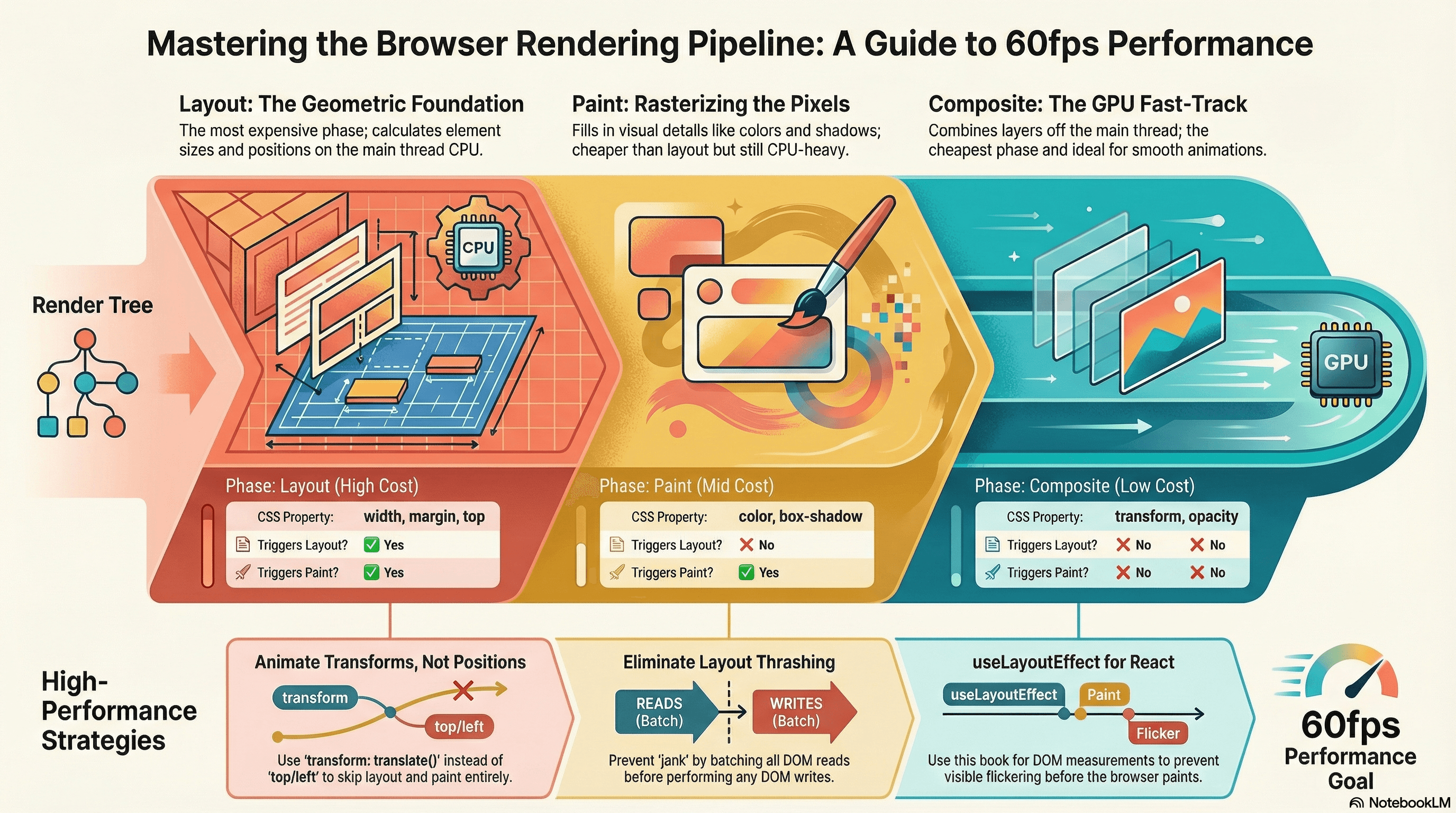
Overview
After the browser builds the render tree, it still has three more phases to go before pixels reach the screen: layout, paint, and composite. Understanding what each phase does, what triggers it, and what it costs is the foundation of CSS and animation performance work.
The core insight is that these three phases sit on a cost spectrum:
Layout (most expensive) → Paint (moderate) → Composite (cheapest)Every CSS property change or DOM mutation triggers a re-run of this pipeline starting at a specific phase. If you change width, you start at layout — all three phases run. If you change background-color, you start at paint — layout is skipped. If you change transform or opacity, you start at composite — layout and paint are both skipped, and the work happens entirely on the GPU.
Writing performant CSS and animations is largely about pushing work as far down this spectrum as possible.
This article also covers layout thrashing — a JavaScript pattern that forces repeated layout recalculations in the same frame and is one of the most impactful and fixable performance problems in interactive UIs.
How It Works
Layout (Reflow)
Layout is where the browser calculates the exact size and position of every node in the render tree. It starts from the root and flows down, computing each element's geometry based on its CSS, its parent's geometry, and its siblings.
Layout is expensive for several reasons:
- It's a tree operation — a change to one element can invalidate the geometry of its parent, siblings, and descendants
- It's synchronous on the main thread — nothing else can run while layout is in progress
- It can cascade — reading a layout property (like
offsetHeight) after a DOM mutation forces the browser to flush pending layout calculations immediately, even mid-frame
Properties that trigger layout when changed: width, height, padding, margin, border, top, left, right, bottom, font-size, line-height, display, position, flex-*, grid-*.
Paint
Once layout is complete, the browser rasterizes each node — computing what every pixel within each element's boundaries should look like. This includes background colors, borders, box shadows, text rendering, gradients, and images.
Paint is a CPU operation by default. It's significantly cheaper than layout because it doesn't require tree traversal — each element's paint is largely independent. However, painting large areas or complex effects (shadows, gradients, blur) can still be expensive, especially on mobile.
Properties that trigger paint but not layout: color, background-color, background-image, border-color, box-shadow, outline, text-decoration.
Composite
The browser splits the page into layers — think of Photoshop layers. In the composite phase, the GPU combines these layers into the final frame and sends it to the display. This happens entirely off the main thread on a separate compositor thread.
Because compositing happens on the GPU and off the main thread, it's the cheapest phase by a significant margin. Animations that only trigger compositing — transform and opacity — can run at 60fps even when the main thread is busy with JavaScript.
Properties that only trigger compositing: transform (translate, rotate, scale), opacity.
The Full Trigger Table
| Property | Layout | Paint | Composite |
|---|---|---|---|
width, height, padding, margin | ✅ | ✅ | ✅ |
top, left, right, bottom (positioned) | ✅ | ✅ | ✅ |
font-size, line-height | ✅ | ✅ | ✅ |
display, position | ✅ | ✅ | ✅ |
color, background-color | ❌ | ✅ | ✅ |
box-shadow, border-color | ❌ | ✅ | ✅ |
background-image | ❌ | ✅ | ✅ |
transform | ❌ | ❌ | ✅ |
opacity | ❌ | ❌ | ✅ |
The full reference for which CSS properties trigger which phases is at csstriggers.com. It's worth bookmarking when auditing animation performance.
Layout Thrashing
Layout thrashing is a JavaScript pattern that forces the browser to recalculate layout multiple times within a single frame. It happens when you alternate between writing to the DOM (which invalidates layout) and reading layout properties (which forces layout to flush immediately).
Write DOM → Read layout property → Write DOM → Read layout property → ...
         ↑ forced sync layout ↑              ↑ forced sync layout ↑
Each forced synchronous layout blocks the main thread and can push a frame past the 16ms budget, causing jank. In a loop over many elements, this can produce dozens of forced layouts per frame.
Code Examples
CSS Animation — Layout vs Composite
The most practical application of this knowledge: always animate transform instead of position properties.
/* ❌ Animating left/top triggers layout on every frame — expensive */
.card-bad {
  position: absolute;
  left: 0;
  transition: left 300ms ease;
}
.card-bad:hover {
  left: 20px; /* triggers layout → paint → composite on every frame */
}

/* ✅ Animating transform only triggers composite — free on the GPU */
.card-good {
  position: absolute;
  transform: translateX(0);
  transition: transform 300ms ease;
}
.card-good:hover {
  transform: translateX(20px); /* composite only — no layout, no paint */
}
/* ❌ Fade with visibility change triggers layout */
.modal-bad {
visibility: hidden;
opacity: 0;
transition: opacity 200ms ease;
}
.modal-bad.visible {
visibility: visible; /* triggers layout */
opacity: 1;
}
/* ✅ Fade with opacity and pointer-events only — composite phase */
.modal-good {
opacity: 0;
pointer-events: none;
transition: opacity 200ms ease;
}
.modal-good.visible {
opacity: 1; /* composite only */
pointer-events: auto;
}Avoiding Layout Thrashing in JavaScript
// ❌ Layout thrashing — reads and writes are interleaved
// Each offsetHeight read forces the browser to flush pending layout changes
function resizeElementsBad(elements: HTMLElement[]): void {
  elements.forEach((el) => {
    const height = el.offsetHeight; // READ — forces layout flush
    el.style.height = `${height * 2}px`; // WRITE — invalidates layout
    // Next iteration: READ again — another forced layout flush
  });
}

// ✅ Batch reads before writes — one layout calculation per frame
function resizeElementsGood(elements: HTMLElement[]): void {
  // Phase 1: read all layout values in one pass
  const heights = elements.map((el) => el.offsetHeight); // one layout flush

  // Phase 2: write all DOM mutations in one pass
  // No reads in this loop — layout is not forced again
  elements.forEach((el, i) => {
    el.style.height = `${heights[i] * 2}px`;
  });
}
Using requestAnimationFrame for Batched DOM Writes
When you need to read layout values and then write based on them, use requestAnimationFrame to ensure your writes happen at the start of the next frame after layout has been computed:
// Animate a counter value smoothly without causing layout thrashing
function animateCounter(
  element: HTMLElement,
  targetValue: number,
  duration: number,
): void {
  const startTime = performance.now();
  const startValue = parseInt(element.textContent || "0", 10);

  function update(currentTime: number): void {
    const elapsed = currentTime - startTime;
    const progress = Math.min(elapsed / duration, 1);

    // Easing function — smooth deceleration
    const eased = 1 - Math.pow(1 - progress, 3);
    const currentValue = Math.round(
      startValue + (targetValue - startValue) * eased,
    );

    // Write happens at the start of the frame — no forced layout
    element.textContent = currentValue.toString();

    if (progress < 1) {
      requestAnimationFrame(update);
    }
  }

  requestAnimationFrame(update);
}
Using will-change to Pre-Promote Elements to Compositor Layers
will-change hints to the browser that an element is about to be animated, allowing it to promote the element to its own compositor layer before the animation starts:
/* ✅ Pre-promotes the element to its own GPU layer.
   Use when you know an animation is about to start —
   not as a blanket performance optimization on all elements. */
.animated-card {
  will-change: transform;
}

/* Apply will-change dynamically when the animation is about to begin */
// Apply will-change just before animation starts, remove when done
function animateCard(card: HTMLElement): void {
// Hint to browser: this element is about to be transformed
card.style.willChange = "transform";
card.addEventListener(
"transitionend",
() => {
// Remove after animation completes — keeping will-change permanently
// wastes GPU memory for a layer that isn't being animated
card.style.willChange = "auto";
},
{ once: true },
);
// Trigger the animation
card.classList.add("card--expanded");
}Don't apply will-change to every element as a blanket optimization. Each
promoted layer consumes GPU memory. On memory-constrained devices,
over-promotion can actually make performance worse. Apply it selectively to
elements you know will animate, and remove it when the animation completes.
Identifying Layout Thrashing in DevTools
// This pattern produces a visible "Forced reflow" warning in Chrome DevTools
// Performance tab. Use it to verify you've fixed a thrashing issue.
function demonstrateThrashing(container: HTMLElement): void {
  const items = Array.from(container.querySelectorAll<HTMLElement>(".item"));

  console.time("thrashing");
  items.forEach((item) => {
    // Each pair of read + write forces a new layout calculation
    const w = item.offsetWidth; // READ
    item.style.width = `${w + 1}px`; // WRITE
  });
  console.timeEnd("thrashing");
}

// Fix: use FastDOM library or manual batch read/write separation
function fixedVersion(container: HTMLElement): void {
  const items = Array.from(container.querySelectorAll<HTMLElement>(".item"));

  // Batch all reads
  const widths = items.map((item) => item.offsetWidth);

  // Batch all writes in the same rAF to ensure single layout pass
  requestAnimationFrame(() => {
    items.forEach((item, i) => {
      item.style.width = `${widths[i] + 1}px`;
    });
  });
}
React — Avoiding Layout Thrashing with useLayoutEffect
In React, useEffect runs after paint — meaning DOM reads inside it happen after the browser has already committed the frame. useLayoutEffect runs synchronously after DOM mutations but before paint, which is the right timing for reading layout properties:
"use client";

import { useRef, useLayoutEffect, useState } from "react";

interface TooltipProps {
  targetRef: React.RefObject<HTMLElement>;
  content: string;
}

export function Tooltip({ targetRef, content }: TooltipProps) {
  const tooltipRef = useRef<HTMLDivElement>(null);
  const [position, setPosition] = useState({ top: 0, left: 0 });

  useLayoutEffect(() => {
    // Runs after DOM mutation but before paint — the correct time to
    // read layout and compute positioning without causing a visible flash
    if (!targetRef.current || !tooltipRef.current) return;

    const targetRect = targetRef.current.getBoundingClientRect();
    const tooltipRect = tooltipRef.current.getBoundingClientRect();

    setPosition({
      top: targetRect.top - tooltipRect.height - 8,
      left: targetRect.left + targetRect.width / 2 - tooltipRect.width / 2,
    });
  }, [targetRef]);

  return (
    <div
      ref={tooltipRef}
      style={{
        position: "fixed",
        top: position.top,
        left: position.left,
      }}
    >
      {content}
    </div>
  );
}
Use useLayoutEffect when you need to read DOM measurements and update state
or styles synchronously before the browser paints — tooltip positioning,
scroll synchronization, focus management. Use useEffect for everything else.
Running layout reads in useEffect can cause a visible one-frame flash
because the browser has already painted before your measurement runs.
Real-World Use Case
Notification list animations. A notification feed renders items that slide in from the right and fade out when dismissed. The naive approach animates right (a layout property) for the slide and sets display: none for the dismiss. This triggers layout on every animation frame and causes jank on long lists.
The correct approach: animate transform: translateX() for the slide (composite only) and animate opacity to 0 then use transitionend to set display: none after the animation completes (so layout only changes once, after the animation, not during it).
Data table row highlighting. A financial dashboard highlights rows when their values update. An early implementation read row.offsetTop to calculate highlight position, then wrote a new top position to a floating highlight element — inside a loop, for every updated row, on every data tick. This was textbook layout thrashing. Batching the reads before the writes eliminated 20+ forced layouts per frame and reduced the update cost from ~50ms to ~3ms.
Common Mistakes / Gotchas
1. Animating top/left instead of transform.
This is the single most common animation performance mistake. top and left trigger layout on every frame. transform: translate() achieves the same visual result entirely on the compositor — no layout, no paint, runs on the GPU. If your animation is janky, check this first.
2. Using width/height transitions instead of transform: scale().
Animating width or height triggers layout on every frame. transform: scale() achieves visually similar results via compositing. For expand/collapse animations, consider transform: scaleY() with transform-origin: top or clip-path animations that avoid layout.
3. Interleaving DOM reads and writes in loops.
The classic layout thrashing pattern. Always batch reads before writes. Libraries like fastdom enforce this separation automatically, or use the manual read-phase/write-phase pattern.
4. Applying will-change to everything.
will-change promotes elements to separate GPU layers, consuming GPU memory. Applying it to every div or using it "just in case" on static elements is counterproductive — it wastes resources and can degrade performance on memory-constrained devices.
5. Reading layout properties immediately after a DOM mutation in a loop.
Properties like offsetWidth, offsetHeight, getBoundingClientRect, scrollTop, clientHeight all force synchronous layout when read after a mutation. If you're reading these in a loop that also writes, you're thrashing. Move all reads before all writes.
6. Using useEffect for layout measurements in React.
useEffect runs after paint — the browser has already committed the frame to screen. Reading layout properties in useEffect and updating state causes a second render and a visible flash. Use useLayoutEffect for any measurement that needs to complete before the browser paints.
Summary
The browser renders through three phases after building the render tree: layout calculates geometry (most expensive, CPU, main thread), paint rasterizes pixels per layer (moderate, CPU), and composite combines GPU layers into the final frame (cheapest, GPU, off main thread). Every CSS change triggers the pipeline starting at a specific phase — properties like transform and opacity skip layout and paint entirely, running only on the compositor. Layout thrashing is the most impactful fixable performance problem in interactive UIs: it occurs when DOM reads and writes are interleaved in JavaScript, forcing repeated synchronous layout calculations within a single frame. The fix is always to batch reads before writes. In React, useLayoutEffect is the correct hook for reading DOM measurements before paint — useEffect runs after paint and causes visible flashes for positional updates.
Interview Questions
Q1. What are the three browser rendering phases and what does each one do?
Layout calculates the exact size and position of every element in the render tree — it runs on the main thread, is synchronous, and any change to geometry can invalidate the layout of surrounding elements. Paint rasterizes each element's pixels — filling in colors, borders, shadows, and text — and runs on the CPU per layer. Composite combines the painted layers on the GPU into the final frame. Each phase triggers the next, but CSS changes only trigger the pipeline starting at the phase relevant to that property. transform and opacity only trigger composite; background-color triggers paint and composite; width triggers all three.
Q2. Why should you animate transform instead of top/left?
top and left are layout properties. Changing them forces the browser to recalculate the geometry of the element and potentially its neighbors on every animation frame — triggering the full layout → paint → composite pipeline at 60fps. transform: translate() achieves the same visual movement but is handled entirely by the compositor thread on the GPU. It skips layout and paint completely. The visual result is identical but the performance difference is enormous — composite-only animations run smoothly even when the main thread is busy with JavaScript.
Q3. What is layout thrashing and how do you fix it?
Layout thrashing occurs when JavaScript alternates between writing to the DOM (which invalidates the current layout calculation) and reading layout properties like offsetHeight, getBoundingClientRect, or scrollTop (which force the browser to immediately flush and recalculate layout to return an accurate value). In a loop over many elements, this produces dozens of forced synchronous layout recalculations per frame, blocking the main thread and causing jank. The fix is to batch all reads before all writes — compute all layout measurements in one pass, then apply all DOM mutations in a second pass. No reads should happen after the first write.
Q4. What does will-change do and when should you use it?
will-change hints to the browser that an element's specified property is about to change, allowing it to promote the element to its own compositor layer before the animation begins. This avoids the cost of promoting mid-animation when the first frame would otherwise include layer creation overhead. Use it just before an animation starts and remove it when the animation ends — applying will-change permanently wastes GPU memory for elements that aren't currently animating. Never apply it blanket-style to many elements as a generic optimization.
Q5. What is the difference between useEffect and useLayoutEffect in the context of DOM measurements?
useLayoutEffect runs synchronously after React commits DOM mutations but before the browser paints. It's the correct hook for reading DOM measurements (like getBoundingClientRect) and applying positional updates, because the update happens before the browser renders the frame — no visible flash. useEffect runs after the browser has already painted. Reading layout properties and updating state in useEffect causes a second render that the user sees as a one-frame flash of incorrect positioning before the correct position is applied. For tooltip positioning, scroll synchronization, and any measurement-driven DOM update, useLayoutEffect is correct.
Q6. A CSS animation is dropping frames. How would you diagnose and fix it?
First, open the Chrome DevTools Performance tab and record while the animation runs. Look for long "Layout" blocks in the main thread flame chart — if layout is firing on every frame, the animation is triggering a layout property. Check the CSS: if animating top, left, width, height, or similar, switch to transform equivalent — translateX/Y for position, scaleX/Y for size. If the flame chart shows "Paint" on every frame but no layout, the animated property triggers paint — box-shadow and filter are common culprits. Switch to a composite-only approach or use will-change to promote to a layer. If the animation is already on transform/opacity but still janky, check for too many promoted layers overwhelming GPU memory, or a large element triggering expensive paint on promotion.
Render-Blocking Resources
What makes a resource render-blocking, how async and defer change script execution, how to defer non-critical CSS, and how to measure and eliminate blocking resources in production.
Browser Compositing Layers
How browsers split pages into GPU-accelerated compositor layers, what triggers layer promotion, how to use will-change correctly, and how to inspect layers in DevTools.