Hydration
How React attaches to server-rendered HTML, what hydration mismatches are and why they happen, the CPU cost of hydration, and how to structure components to minimize it.
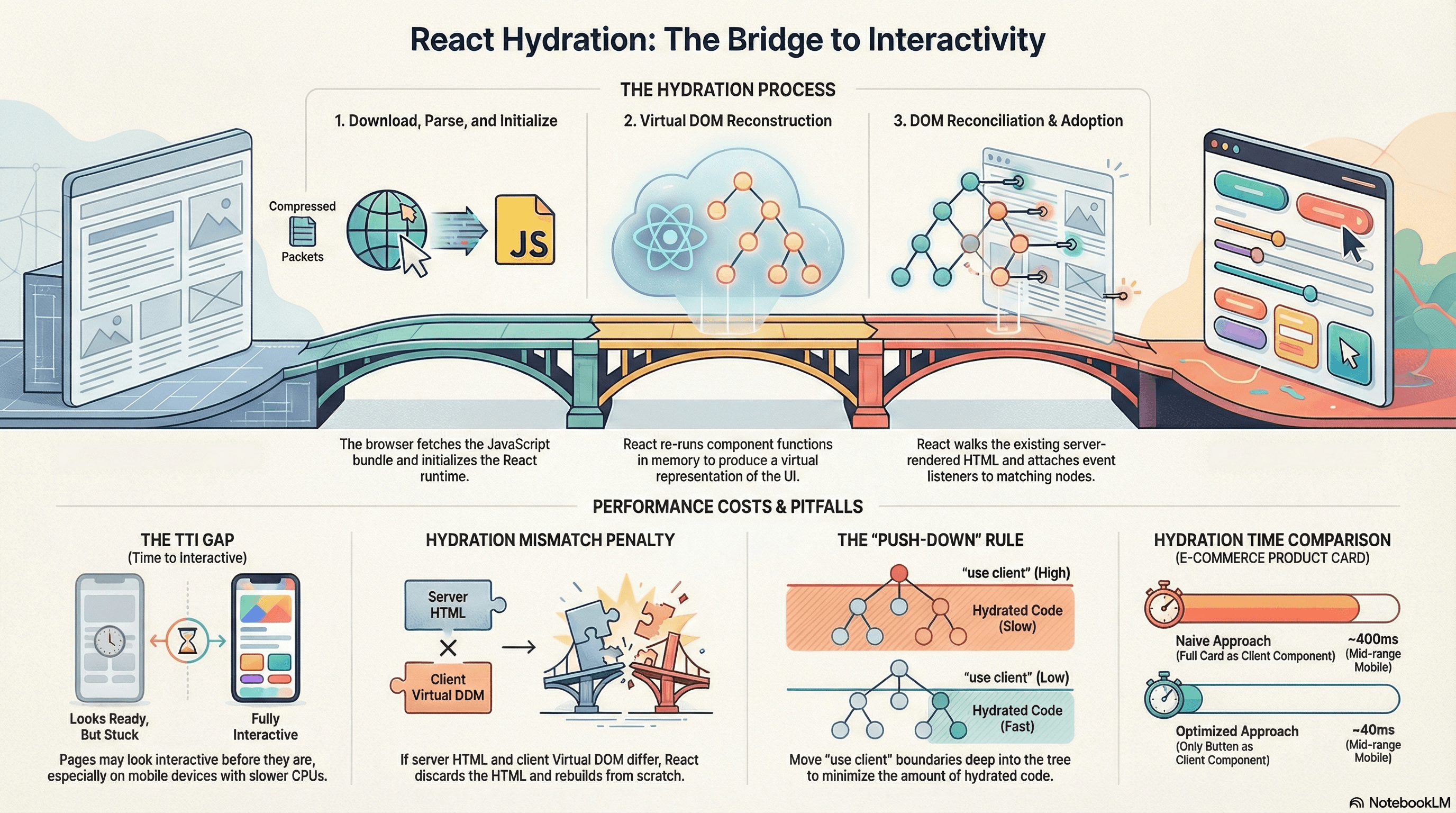
Overview
Hydration is the process by which React takes static HTML rendered on the server and makes it interactive on the client. The server sends a fully-formed HTML document — users see content immediately, before any JavaScript executes. React then downloads, parses, and executes on the client, walks the server-rendered DOM, and attaches event listeners and internal state to the existing nodes.
Done well, hydration gives you the best of both worlds: fast initial paint from server-rendered HTML and full React interactivity after the JavaScript loads. Done poorly — with too many client components, hydration mismatches, or excessive JavaScript — it's one of the most significant sources of poor Time to Interactive (TTI) scores.
Understanding hydration is essential before the next articles on hydration strategies (partial and selective) — those optimizations only make sense once you understand what the baseline hydration process looks like and what it costs.
How It Works
The Two-Phase Model
When React renders on the server, it produces HTML strings — a snapshot of what the UI should look like at a given moment. That HTML is sent to the browser and displayed immediately, with no JavaScript required to see it.
On the client, React then runs through a process called hydration:
- Download the JavaScript bundle — the full React runtime and your component code
- Parse and execute the bundle — React initializes
- Render the component tree in memory — React re-runs every component function to produce its virtual DOM representation
- Reconcile with the existing DOM — React walks the server-rendered HTML alongside its virtual DOM output, node by node, verifying they match
- Attach event listeners and state — for nodes that match, React adopts them rather than replacing them, attaching handlers and initializing state
The key insight: React does not rebuild the DOM from scratch during hydration. It walks the existing server-rendered DOM and adopts it — which is why hydration is faster than a client-only render, but still not free. Steps 1–3 all happen before the page becomes interactive.
Server                           Client
──────                           ──────
Render HTML ──── send ────────► Display HTML immediately (visible)
                                       ↓
                                 Download JS bundle
                                       ↓
                                 Execute JS + React init
                                       ↓
                                 Re-render component tree (in memory)
                                       ↓
                                 Walk DOM + attach listeners (interactive)
The Hydration Cost
Hydration is CPU work on the main thread. For every Client Component in your tree, React must:
- Re-run the component function
- Compute the virtual DOM output
- Compare it against the server-rendered HTML node
On a fast laptop this is imperceptible. On a mid-range mobile phone with a slow CPU, a large component tree can take 300–800ms — during which the page looks interactive (the HTML is visible) but isn't (no event listeners are attached yet). This gap between visually interactive and actually interactive is what Time to Interactive (TTI) measures.
This is the core motivation for the hydration strategies in the next article — reducing how much of the tree needs to be hydrated at all.
Hydration Mismatches
A hydration mismatch occurs when the virtual DOM React produces on the client doesn't match the HTML React produced on the server. When this happens, React discards the server-rendered HTML and rebuilds the affected subtree entirely from scratch — adding extra work and potentially causing a visible flash.
Common causes:
- Browser-only values rendered during initial render —
window.innerWidth,Date.now(),Math.random(),localStoragevalues - User timezone differences —
new Date().toLocaleDateString()returns different strings on server and client if they're in different timezones - Browser extensions — some extensions inject DOM nodes (ads, accessibility helpers) that React doesn't account for
- Incorrect HTML nesting — a
<div>inside a<p>is invalid HTML; browsers auto-correct it in ways that don't match React's virtual DOM - Conditional rendering based on server-only context — rendering different markup based on whether
typeof window !== 'undefined'
React 18 reports mismatches as console errors in development. In production, React attempts to recover by re-rendering the mismatched subtree on the client.
Code Examples
Basic Server Component + Client Component Split
The most fundamental hydration optimization: keep Server Components static, push 'use client' as far down the tree as possible.
// app/product/[slug]/page.tsx
// Server Component — renders on server, zero hydration cost

import { AddToCartButton } from "@/components/AddToCartButton";
import { WishlistButton } from "@/components/WishlistButton";

async function getProduct(slug: string) {
  const res = await fetch(`https://api.example.com/products/${slug}`, {
    next: { revalidate: 60 },
  });
  if (!res.ok) throw new Error("Product not found");
  return res.json();
}

export default async function ProductPage({
  params,
}: {
  params: { slug: string };
}) {
  const product = await getProduct(params.slug);

  return (
    <div className="product-page">
      {/* All of this is static HTML — zero hydration cost */}
      <h1>{product.name}</h1>
      <p className="price">${product.price}</p>
      <img src={product.imageUrl} alt={product.name} />
      <p className="description">{product.description}</p>

      {/* Only these two components hydrate — everything above is static */}
      <AddToCartButton productId={product.id} />
      <WishlistButton productId={product.id} />
    </div>
  );
}
// components/AddToCartButton.tsx
"use client"; // This boundary is what triggers hydration for this component
import { useState } from "react";
export function AddToCartButton({ productId }: { productId: string }) {
const [status, setStatus] = useState<"idle" | "loading" | "added">("idle");
async function handleClick() {
setStatus("loading");
await fetch("/api/cart", {
method: "POST",
body: JSON.stringify({ productId }),
headers: { "Content-Type": "application/json" },
});
setStatus("added");
}
return (
<button
onClick={handleClick}
disabled={status === "loading" || status === "added"}
>
{status === "idle" && "Add to Cart"}
{status === "loading" && "Adding..."}
{status === "added" && "Added ✓"}
</button>
);
}Avoiding Hydration Mismatches — Browser-Only Values
The most common mismatch cause: rendering a value that differs between server and client.
// ❌ Causes a hydration mismatch — server renders "Loading time..."
// but client renders the actual time, which doesn't match
"use client";

export function Timestamp() {
  // This runs on the server and on the client.
  // Server: new Date().toLocaleTimeString() → "12:00:00 AM" (server timezone)
  // Client: new Date().toLocaleTimeString() → "3:00:00 AM" (user timezone)
  // React sees a mismatch and discards the server HTML.
  return <span>Loaded at: {new Date().toLocaleTimeString()}</span>;
}
// ✅ Correct — server and client initial renders both produce the same output
"use client";
import { useState, useEffect } from "react";
export function Timestamp() {
// null on first render — matches the server's output (which also renders null)
const [time, setTime] = useState<string | null>(null);
useEffect(() => {
// Only runs on the client, after hydration is complete
// By this point, React has already reconciled — no mismatch possible
setTime(new Date().toLocaleTimeString());
}, []);
if (!time) {
return <span>Loading time...</span>;
}
return <span>Loaded at: {time}</span>;
}Avoiding Mismatches — Conditional Browser APIs
// ❌ typeof window check during render causes a mismatch
"use client";

export function ThemeIndicator() {
  // Server: typeof window === 'undefined' → renders "Server"
  // Client: typeof window === 'object' → renders "Browser"
  // Mismatch — React re-renders from scratch
  const env = typeof window !== "undefined" ? "Browser" : "Server";
  return <span>Running in: {env}</span>;
}
// ✅ Use useEffect to defer browser-only logic until after hydration
"use client";
import { useState, useEffect } from "react";
export function ThemeIndicator() {
const [theme, setTheme] = useState<string | null>(null);
useEffect(() => {
// window is safely accessible here — runs only after hydration
const prefersDark = window.matchMedia(
"(prefers-color-scheme: dark)",
).matches;
setTheme(prefersDark ? "dark" : "light");
}, []);
return <span>Theme: {theme ?? "detecting..."}</span>;
}suppressHydrationWarning — When It's Appropriate
Some elements intentionally render different content on server and client. Use suppressHydrationWarning only for these known, intentional cases:
"use client";

export function LocalDateTime() {
  return (
    // suppressHydrationWarning tells React: "I know this will differ
    // between server and client — don't warn, don't re-render"
    // Only appropriate for genuinely client-specific values like timestamps
    <time dateTime={new Date().toISOString()} suppressHydrationWarning>
      {new Date().toLocaleString()}
    </time>
  );
}
suppressHydrationWarning silences the warning for a single element only — it
does not suppress warnings for its children. Use it only for elements where
the server/client difference is intentional (timestamps, locale-specific
formatting). Never use it to silence a genuine mismatch that you haven't
diagnosed.
use client Boundary Scope — The Push-Down Rule
The most impactful hydration optimization is understanding that 'use client' marks a subtree boundary — every component below that boundary becomes a Client Component and gets included in hydration.
// ❌ Pushing 'use client' too high — the entire layout hydrates
// because of one button deep in the tree
"use client"; // This component and ALL its children are now Client Components

export function ProductLayout({
  product,
  children,
}: {
  product: Product;
  children: React.ReactNode;
}) {
  const [menuOpen, setMenuOpen] = useState(false);

  return (
    <div>
      {/* All of this hydrates even though it's purely static */}
      <h1>{product.name}</h1>
      <p>{product.description}</p>
      <img src={product.imageUrl} alt={product.name} />
      <nav>
        <button onClick={() => setMenuOpen(!menuOpen)}>Menu</button>
        {menuOpen && <DropdownMenu />}
      </nav>
      {children}
    </div>
  );
}
// ✅ Push 'use client' down to the interactive leaf — only the menu hydrates
// ProductLayout itself has no 'use client' — it's a Server Component
export function ProductLayout({
product,
children,
}: {
product: Product;
children: React.ReactNode;
}) {
return (
<div>
{/* Static — zero hydration cost */}
<h1>{product.name}</h1>
<p>{product.description}</p>
<img src={product.imageUrl} alt={product.name} />
<nav>
{/* Only this tiny component hydrates */}
<MenuButton />
</nav>
{children}
</div>
);
}// components/MenuButton.tsx
"use client"; // 'use client' lives here — the smallest possible boundary
import { useState } from "react";
export function MenuButton() {
const [menuOpen, setMenuOpen] = useState(false);
return (
<>
<button onClick={() => setMenuOpen(!menuOpen)}>Menu</button>
{menuOpen && <DropdownMenu />}
</>
);
}Measuring Hydration Cost
// Use the PerformanceObserver to measure when hydration completes.
// "react-hydration" is a custom mark React adds in development.
// For production, track TTI using the web-vitals library.

import { onTTFB, onFCP, onTTI } from "web-vitals";

// First Contentful Paint — when server HTML first appears
onFCP((metric) => {
  console.log("FCP:", metric.value, "ms");
});

// Time to Interactive — when hydration completes and page responds to input
// A large FCP→TTI gap indicates expensive hydration
onTTFB((metric) => {
  console.log("TTFB:", metric.value, "ms");
});
Real-World Use Case
E-commerce product listing page. A page shows 24 product cards, each with a title, image, price, and an "Add to Cart" button. The naive approach makes every card a Client Component — all 24 cards hydrate, including the static title, image, and price content that never changes.
The correct approach: the card container and static content stay as Server Components. Only the "Add to Cart" button is 'use client'. Hydration now processes 24 small buttons rather than 24 full cards — reducing hydration time from ~400ms to ~40ms on a mid-range mobile device.
Blog post with comment section. The blog post content (long article text, code blocks, author byline) is pure Server Component output — fast to paint, zero hydration cost. The comment form and vote buttons are client components. Wrapping the comment section in <Suspense> (covered in the next article) means even those client components don't block the initial page from becoming interactive.
Common Mistakes / Gotchas
1. Marking too many components 'use client'.
'use client' on a parent makes its entire subtree a Client Component. Developers reaching for useState often add 'use client' to a layout or page-level component, accidentally including large amounts of static content in the hydration bundle. Push 'use client' to the smallest component that actually needs interactivity.
2. Rendering non-deterministic values during the initial render.
Date.now(), Math.random(), window.innerWidth, user timezone — all of these differ between server and client. React will mismatch, log a warning, and re-render the subtree from scratch. Always defer these to useEffect or use server-side values that are serialized and passed as props.
3. Using typeof window !== 'undefined' in render logic.
This produces different output on server (where window is undefined) and client (where it exists). The fix is always to defer window-dependent logic to useEffect, where it only runs after hydration.
4. Using suppressHydrationWarning to silence unexplained mismatches.
It's tempting to add suppressHydrationWarning when you see a warning you can't immediately trace. This masks real bugs — the mismatch might indicate that the server and client are serving different data, not just different formatting. Diagnose first, suppress only when the difference is genuinely intentional.
5. Confusing hydration with SSR. SSR (Server-Side Rendering) is the process of generating the initial HTML on the server. Hydration is the separate client-side process of making that HTML interactive. You can have SSR without hydration (for purely static pages), and you can have hydration without SSR (though that's just client-side rendering with an extra step). They're related but distinct.
6. Not accounting for the TTI gap on mobile. Hydration is CPU-bound. On a fast desktop the gap between FCP (server HTML visible) and TTI (interactive after hydration) might be 100ms — imperceptible. On a slow mobile device the same page might take 600ms to hydrate, during which button clicks are silently dropped because no event listeners are attached. Always test your hydration performance on throttled CPU in DevTools.
Summary
Hydration is the client-side process where React attaches to server-rendered HTML — re-running component functions, building a virtual DOM, comparing it against the existing HTML, and attaching event listeners. It does not rebuild the DOM from scratch; it adopts the existing nodes. The cost is proportional to the number of Client Components in the tree — each one requires React to re-render and reconcile. Hydration mismatches occur when server and client output differ (due to browser-only APIs, timezone differences, or incorrect HTML nesting) and force React to rebuild the mismatched subtree. The primary optimization is pushing 'use client' boundaries as deep as possible so only genuinely interactive components hydrate. Hydration strategies — partial hydration, selective hydration, streaming — build on this foundation and are covered in the next article.
Interview Questions
Q1. What is hydration and how does it differ from client-side rendering?
Hydration is the process of making server-rendered HTML interactive on the client. The server produces a fully-formed HTML document that the browser displays immediately. React then runs on the client, re-renders the component tree in memory, walks the existing server-rendered DOM, and attaches event listeners and state without rebuilding the DOM nodes. Client-side rendering, by contrast, sends an empty HTML shell and builds the entire DOM in the browser from scratch — users see nothing until JavaScript executes. Hydration combines fast initial paint from SSR with full React interactivity, at the cost of a TTI gap while JavaScript downloads and hydration runs.
Q2. What causes a hydration mismatch and what does React do when one occurs?
A mismatch occurs when the virtual DOM React produces during client-side hydration doesn't match the HTML the server sent. Common causes: rendering browser-only values like Date.now() or window.innerWidth during initial render (the server doesn't have these), timezone-dependent date formatting, browser extensions injecting extra DOM nodes, invalid HTML nesting that browsers auto-correct differently than React expects, and typeof window !== 'undefined' checks producing different output on server and client. When a mismatch is detected, React logs a warning in development and discards the server-rendered HTML for the mismatched subtree, rebuilding it from scratch on the client — extra work that slows TTI.
Q3. How do you fix a component that causes a hydration mismatch due to rendering the current timestamp?
Initialize state to null so both server and client produce the same output on the first render. In useEffect, which only runs on the client after hydration completes, set the state to the actual timestamp. React reconciles first (both server and client produce the null/placeholder state), and then the effect fires and updates the displayed time. The key is that useEffect runs after React has finished its reconciliation pass, so the update is a normal state change rather than a hydration mismatch.
Q4. What does 'use client' actually do in Next.js App Router?
'use client' marks the component file as a boundary between Server and Client Components. The component it's in and everything it imports become Client Components — included in the JavaScript bundle sent to the browser and subject to hydration. Critically, it's a subtree boundary: all children of a 'use client' component are also client components unless they're passed as children props from a Server Component parent. The common mistake is marking a high-level layout component as 'use client' because it needs one small interactive element — this unnecessarily includes all the static content in the client bundle and hydration.
Q5. Why is the Time to Interactive (TTI) gap important and what affects its size?
TTI measures when the page actually responds to user input, as opposed to when it first appears (FCP). The gap between FCP and TTI is the hydration window — the page looks interactive but isn't. During this window, clicks on buttons produce no response because no event listeners are attached. The size of this gap is determined by: the size of the JavaScript bundle (download time), the number of Client Components (re-rendering all of them takes CPU time), and the CPU speed of the device. On desktop this gap might be 50–150ms. On mobile with throttled CPU it can be 500–1000ms. Reducing the number and size of Client Components directly reduces the TTI gap.
Q6. When is suppressHydrationWarning appropriate and when is it a red flag?
suppressHydrationWarning is appropriate on a single element where the server/client difference is genuinely intentional — a <time> displaying the current local time, a locale-specific number format, or content that depends on the user's timezone. It should only be used when you understand exactly why the content differs and have decided that's acceptable. It's a red flag when used to silence a mismatch you haven't diagnosed — the mismatch might indicate that server and client are serving different data (a caching issue, a race condition, inconsistent state), and silencing the warning hides the symptom without fixing the cause.
Browser Compositing Layers
How browsers split pages into GPU-accelerated compositor layers, what triggers layer promotion, how to use will-change correctly, and how to inspect layers in DevTools.
Hydration Strategies
The full spectrum of hydration strategies — from full hydration to partial hydration, selective hydration, and the islands architecture — and how React 18 implements them with Suspense boundaries.