Render Waterfalls
How render waterfalls form in server and client React, the N+1 request problem, how to break sequential chains with parallel fetches and preloading, and how to diagnose waterfalls in production.
Overview
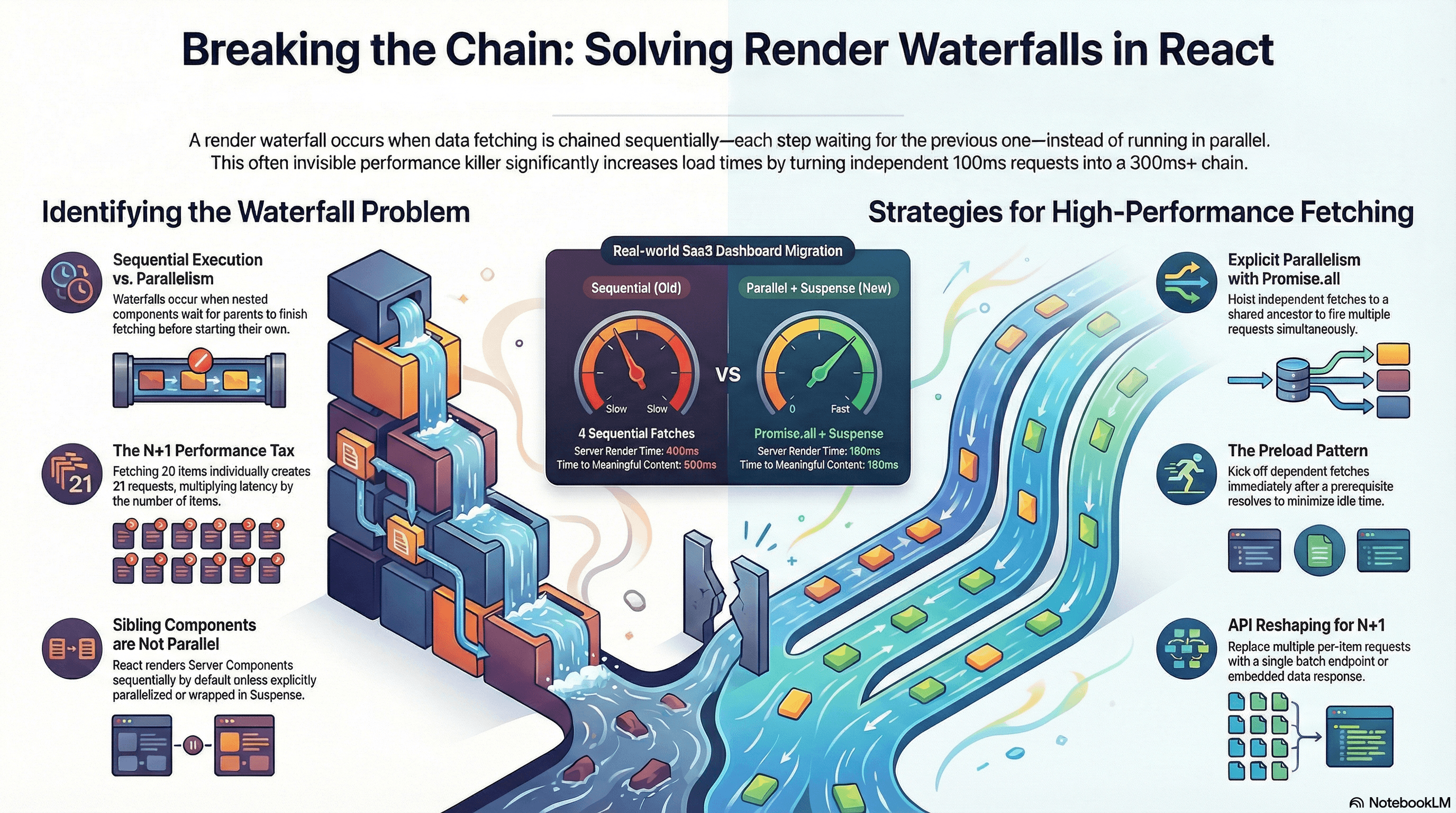
A render waterfall is what happens when data fetching or rendering is chained sequentially — each step waiting for the previous one before starting. Instead of fetching three independent resources in 200ms (the time of the slowest), you wait 600ms because each request blocks the next.
Waterfalls appear at every layer of a React application: on the server (async Server Components that await sequentially), on the client (useEffect chains and parent-before-child mounting order), and in the network (API calls that trigger additional API calls). They're one of the highest-impact performance problems in data-driven applications — and often invisible in development on fast machines and localhost APIs.
This article covers how waterfalls form at each layer, the N+1 problem, and every tool available for breaking them: Promise.all, fetch preloading, the React cache() function, parallel routes, and — for client-side data — React Query's parallel queries.
How It Works
The Anatomy of a Server-Side Waterfall
The most common server-side waterfall in Next.js App Router comes from nested async Server Components:
Request arrives
  ↓
UserProfile renders → awaits /api/me (120ms)
  ↓ (120ms later)
OrderList renders → awaits /api/orders (150ms)
  ↓ (150ms later)
OrderItems renders → awaits /api/items (180ms)
                                         Total: 450ms
Each component only starts fetching after its parent has finished fetching and rendered it into the tree. The browser (or Node.js server) makes requests one at a time, down the component hierarchy.
The root cause is co-location without coordination: fetch calls are scoped to individual components, so React has no visibility into the child's data needs until the parent renders.
The Anatomy of a Client-Side Waterfall
Client-side waterfalls are distinct from server-side ones and follow a different pattern:
Page loads — HTML arrives
  ↓
React mounts — Parent component renders
  ↓
useEffect fires in parent — fetches userId (80ms)
  ↓ (80ms later)
setState(userId) → child re-renders
  ↓
useEffect fires in child — fetches orders (150ms)
  ↓ (150ms later)
setState(orders) → grandchild mounts
  ↓
useEffect fires in grandchild — fetches items (180ms)
                                                 Total: 410ms after initial render
This pattern is endemic in older React codebases that use useEffect + setState for data fetching. Each level of the hierarchy adds a round trip.
The N+1 Problem
A specific and severe form of waterfall: fetching a list of items, then making an individual request for each item in the list.
fetch /api/posts        → returns 20 posts
fetch /api/users/1      → for post 1's author
fetch /api/users/2      → for post 2's author
fetch /api/users/3      → for post 3's author
... (17 more)
With 20 posts you make 21 requests. On a server with 50ms latency each, that's 1,050ms — even if you fire them all in parallel, you're still at 50ms (the round trip) × N. The real fix is data reshaping: an API endpoint that returns authors embedded in the post data, or a single /api/users?ids=1,2,3,... batch endpoint.
Sibling Server Components Are NOT Parallel by Default
A common misconception: two sibling async Server Components render in parallel automatically. They don't.
// ❌ These await sequentially — each waits for the previous to complete
export default async function Page() {
  const user = await fetchUser(); // 100ms
  const config = await fetchConfig(); // 80ms
  // Total: 180ms, not 100ms
}
React renders Server Components sequentially in the order they appear in the component tree unless you explicitly parallelize with Promise.all or separate them into independent <Suspense> boundaries.
Code Examples
Server-Side Waterfall vs Parallel Fix
// ❌ Waterfall — each component awaits before rendering its children
// app/dashboard/page.tsx

async function OrderList({ userId }: { userId: string }) {
  // Only starts fetching AFTER UserProfile finishes
  const orders = await fetch(`/api/orders?userId=${userId}`).then((r) =>
    r.json(),
  );
  return (
    <ul>
      {orders.map((o: { id: string; label: string }) => (
        <li key={o.id}>{o.label}</li>
      ))}
    </ul>
  );
}

async function UserProfile() {
  const user = await fetch("/api/me").then((r) => r.json()); // 120ms

  // OrderList fetch starts here — after UserProfile completes
  return (
    <div>
      <h1>{user.name}</h1>
      <OrderList userId={user.id} /> {/* nested: adds sequential latency */}
    </div>
  );
}

export default function DashboardPage() {
  return <UserProfile />;
  // Total: 120ms + 150ms = 270ms
}
// ✅ Parallel — hoist all independent fetches to the page, fire with Promise.all
// app/dashboard/page.tsx
async function fetchUser() {
return fetch("/api/me", { cache: "no-store" }).then((r) => r.json());
}
async function fetchOrders(userId: string) {
return fetch(`/api/orders?userId=${userId}`).then((r) => r.json());
}
async function fetchPayouts(userId: string) {
return fetch(`/api/payouts?userId=${userId}`).then((r) => r.json());
}
export default async function DashboardPage() {
// Step 1: only the userId is a genuine hard dependency
const user = await fetchUser(); // 120ms
// Step 2: everything else that only needs userId fires together
const [orders, payouts] = await Promise.all([
fetchOrders(user.id), // 150ms
fetchPayouts(user.id), // 200ms ← determines total (runs in parallel)
]);
// Total: 120ms + 200ms = 320ms (vs 120+150+200 = 470ms sequential)
return (
<div>
<h1>Welcome, {user.name}</h1>
<section>
<h2>Orders</h2>
<ul>
{orders.map((o: { id: string; label: string }) => (
<li key={o.id}>{o.label}</li>
))}
</ul>
</section>
<section>
<h2>Payouts</h2>
<ul>
{payouts.map((p: { id: string; amount: number }) => (
<li key={p.id}>${p.amount}</li>
))}
</ul>
</section>
</div>
);
}Preloading — Start Fetching Before You Await
When you have a genuine dependency chain (userId → orders), you can still minimize the waterfall by preloading the dependent fetch as early as possible — before the first await completes:
// lib/data.ts
import { cache } from "react";

// cache() memoizes per-request — calling these multiple times in one render
// only fires one network request each
export const getUser = cache(async () => {
  return fetch("/api/me", { cache: "no-store" }).then((r) => r.json());
});

export const getOrders = cache(async (userId: string) => {
  return fetch(`/api/orders?userId=${userId}`).then((r) => r.json());
});

export const getRecommendations = cache(async (userId: string) => {
  return fetch(`/api/recommendations?userId=${userId}`).then((r) => r.json());
});
// app/dashboard/page.tsx
import { getUser, getOrders, getRecommendations } from "@/lib/data";
// Preload function: kicks off fetch without awaiting — fire and forget
function preload(userId: string) {
// These calls start the network requests immediately.
// Because getOrders and getRecommendations are wrapped in cache(),
// the eventual await calls below will resolve from the in-flight
// requests rather than starting new ones.
void getOrders(userId);
void getRecommendations(userId);
}
export default async function DashboardPage() {
const user = await getUser(); // 120ms
// Start dependent fetches immediately after we have userId —
// don't wait for this component to return before kicking them off
preload(user.id);
// Fetch orders and recommendations — they've been running since preload()
// so effective additional wait is max(ordersTime, recsTime) - already elapsed
const [orders, recommendations] = await Promise.all([
getOrders(user.id),
getRecommendations(user.id),
]);
return (
<div>
<h1>Hi, {user.name}</h1>
{/* render orders and recommendations */}
</div>
);
}Suspense Boundaries for Independent Sections
When sections are genuinely independent — no shared data dependencies — <Suspense> boundaries let them stream in as they're ready without any coordinating Promise.all:
// app/seller/page.tsx
import { Suspense } from "react";

// Each component fetches its own data — they run in parallel
// because they're in separate Suspense boundaries, not nested
async function StoreProfile({ sellerId }: { sellerId: string }) {
  const profile = await fetch(`/api/sellers/${sellerId}`).then((r) => r.json());
  return (
    <div>
      <h2>{profile.storeName}</h2>
      <p>{profile.bio}</p>
    </div>
  );
}

async function RecentOrders({ sellerId }: { sellerId: string }) {
  const orders = await fetch(`/api/sellers/${sellerId}/orders`).then((r) =>
    r.json(),
  );
  return (
    <ul>
      {orders.map((o: { id: string; label: string; total: number }) => (
        <li key={o.id}>
          {o.label} — ${o.total}
        </li>
      ))}
    </ul>
  );
}

async function PendingPayouts({ sellerId }: { sellerId: string }) {
  const payouts = await fetch(`/api/sellers/${sellerId}/payouts/pending`).then(
    (r) => r.json(),
  );
  return <p>Pending: ${payouts.total}</p>;
}

async function ProductAnalytics({ sellerId }: { sellerId: string }) {
  // This is the slowest fetch — ML-backed analytics service
  const analytics = await fetch(`/api/sellers/${sellerId}/analytics`).then(
    (r) => r.json(),
  );
  return (
    <div>
      Views: {analytics.views} / Conversions: {analytics.conversions}%
    </div>
  );
}

export default async function SellerDashboard({
  params,
}: {
  params: { sellerId: string };
}) {
  return (
    <div className="grid grid-cols-2 gap-6">
      {/*
        Each boundary is independent — they all start fetching simultaneously.
        Fast ones stream in first; the slow analytics section streams in last.
        No single slow fetch holds up the others.
      */}
      <Suspense fallback={<div className="skeleton h-24 animate-pulse" />}>
        <StoreProfile sellerId={params.sellerId} />
      </Suspense>

      <Suspense fallback={<div className="skeleton h-24 animate-pulse" />}>
        <PendingPayouts sellerId={params.sellerId} />
      </Suspense>

      <Suspense fallback={<div className="skeleton h-48 animate-pulse" />}>
        <RecentOrders sellerId={params.sellerId} />
      </Suspense>

      {/* Analytics is slow — isolated so it doesn't hold up the rest */}
      <Suspense fallback={<div className="skeleton h-32 animate-pulse" />}>
        <ProductAnalytics sellerId={params.sellerId} />
      </Suspense>
    </div>
  );
}
Fixing N+1 — Batch Endpoint and DataLoader Pattern
// ❌ N+1 waterfall — one request per post author
async function PostList() {
  const posts = await fetch("/api/posts").then((r) => r.json());

  // This creates N additional fetches — one per post
  const postsWithAuthors = await Promise.all(
    posts.map(async (post: { id: string; authorId: string; title: string }) => {
      const author = await fetch(`/api/users/${post.authorId}`).then((r) =>
        r.json(),
      );
      return { ...post, author };
    }),
  );

  return (
    <ul>
      {postsWithAuthors.map((post) => (
        <li key={post.id}>
          {post.title} by {post.author.name}
        </li>
      ))}
    </ul>
  );
}
// ✅ Batch fetch — one request for all authors
async function PostListBatched() {
const posts = (await fetch("/api/posts").then((r) => r.json())) as Array<{
id: string;
authorId: string;
title: string;
}>;
// Collect unique author IDs
const authorIds = [...new Set(posts.map((p) => p.authorId))];
// One batch request for all authors
const authors = (await fetch(`/api/users?ids=${authorIds.join(",")}`).then(
(r) => r.json(),
)) as Array<{ id: string; name: string }>;
const authorMap = new Map(authors.map((a) => [a.id, a]));
return (
<ul>
{posts.map((post) => (
<li key={post.id}>
{post.title} by {authorMap.get(post.authorId)?.name ?? "Unknown"}
</li>
))}
</ul>
);
}// ✅ Even better — reshape the API to return embedded authors
// GET /api/posts?include=author
async function PostListEmbedded() {
// Server returns { id, title, author: { id, name } } — no second request
const posts = (await fetch("/api/posts?include=author").then((r) =>
r.json(),
)) as Array<{
id: string;
title: string;
author: { id: string; name: string };
}>;
return (
<ul>
{posts.map((post) => (
<li key={post.id}>
{post.title} by {post.author.name}
</li>
))}
</ul>
);
}Client-Side Waterfalls — React Query Parallel Queries
When using React Query for client-side data fetching, useQueries fires multiple queries simultaneously rather than sequentially:
// components/UserDashboard.tsx
"use client";

import { useQueries } from "@tanstack/react-query";

interface UserDashboardProps {
  userId: string;
}

export function UserDashboard({ userId }: UserDashboardProps) {
  // useQueries fires all queries in parallel — no sequential chain
  const results = useQueries({
    queries: [
      {
        queryKey: ["profile", userId],
        queryFn: () => fetch(`/api/users/${userId}`).then((r) => r.json()),
        staleTime: 5 * 60 * 1000, // 5 minutes
      },
      {
        queryKey: ["orders", userId],
        queryFn: () =>
          fetch(`/api/orders?userId=${userId}`).then((r) => r.json()),
        staleTime: 60 * 1000, // 1 minute
      },
      {
        queryKey: ["notifications", userId],
        queryFn: () =>
          fetch(`/api/notifications?userId=${userId}`).then((r) => r.json()),
        staleTime: 30 * 1000, // 30 seconds
      },
    ],
  });

  const [profileResult, ordersResult, notificationsResult] = results;

  // Show loading state if any critical query is still pending
  if (profileResult.isPending) {
    return <div className="skeleton h-48 animate-pulse" />;
  }

  if (profileResult.isError) {
    return <div className="error">Failed to load profile</div>;
  }

  return (
    <div>
      <h1>{profileResult.data.name}</h1>

      {ordersResult.isPending ? (
        <div className="skeleton h-24 animate-pulse" />
      ) : (
        <ul>
          {ordersResult.data?.map((o: { id: string; label: string }) => (
            <li key={o.id}>{o.label}</li>
          ))}
        </ul>
      )}

      {/* Notifications load independently — don't block the orders section */}
      {!notificationsResult.isPending && (
        <div className="notifications">
          {notificationsResult.data?.length} unread notifications
        </div>
      )}
    </div>
  );
}
Diagnosing Waterfalls with the Network Waterfall
// Use the PerformanceObserver to detect fetch sequences that suggest a waterfall
// — requests that start suspiciously close after a prior request ends

const fetchTimings: Array<{ name: string; start: number; end: number }> = [];

const observer = new PerformanceObserver((list) => {
  for (const entry of list.getEntries()) {
    const resource = entry as PerformanceResourceTiming;
    if (
      resource.initiatorType === "fetch" ||
      resource.initiatorType === "xmlhttprequest"
    ) {
      fetchTimings.push({
        name: resource.name,
        start: resource.startTime,
        end: resource.startTime + resource.duration,
      });
    }
  }
});

observer.observe({ type: "resource", buffered: true });

// After page load, analyze for sequential patterns
window.addEventListener("load", () => {
  const sorted = [...fetchTimings].sort((a, b) => a.start - b.start);

  for (let i = 1; i < sorted.length; i++) {
    const prev = sorted[i - 1];
    const curr = sorted[i];
    const gap = curr.start - prev.end;

    // If a request starts within 10ms of the previous one ending,
    // it's likely a waterfall — one triggered the next
    if (gap >= -5 && gap <= 10) {
      console.warn(
        `Possible waterfall: "${curr.name}" started ${gap.toFixed(0)}ms ` +
          `after "${prev.name}" ended`,
      );
    }
  }
});
Real-World Use Case
SaaS analytics dashboard. The page shows: account info, usage metrics, recent events, and a slow AI-powered insights panel. The initial implementation had each section as a Client Component with useEffect fetch chains. Page load involved four sequential fetches adding up to ~900ms — all blocked behind each other.
The fix was a two-step migration. First, the account info and usage metrics moved to async Server Components with Promise.all — reducing the server render from 400ms to the slowest individual fetch (180ms). Second, the slow AI insights panel was wrapped in <Suspense> with a skeleton — it streams in independently 600ms after the rest of the page is already visible. Total time-to-first-meaningful-content dropped from 900ms to 180ms.
Social feed with comments. A post list made one request per post to fetch the comment count — the N+1 problem. With 20 posts and 60ms per request, that was 1,200ms even in parallel. Moving to a single batch API endpoint (/api/posts?include=commentCount) eliminated the N+1 and reduced the fetch to 80ms total.
Common Mistakes / Gotchas
1. Assuming sibling async Server Components run in parallel.
They don't — React renders the component tree sequentially by default. Two sibling async components at the same level still await in the order they appear. Use Promise.all at the page level or separate <Suspense> boundaries to get genuine parallelism.
2. Fetching inside useEffect in child Client Components.
useEffect runs after mount. If a parent mounts, starts its useEffect fetch, receives data, then renders the child — the child's useEffect starts after the parent's data arrives. Every level of nesting adds a sequential round trip. Prefer Server Components for data fetching; pass data as props to Client Components that need interactivity.
3. Hoisting all fetches to the root layout.
Moving fetches up the tree is correct — but moving them all the way to app/layout.tsx blocks every single page under that layout on those fetches. Hoist only to the lowest common ancestor that needs the data, and use <Suspense> to isolate slow sections.
4. Solving N+1 with Promise.all instead of fixing the API.
Promise.all over N individual requests fires them in parallel but still makes N round trips. Each adds latency overhead and server load. The correct fix is a batch endpoint or embedding related data in the primary response. Promise.all with per-item requests is an acceptable intermediate fix, not the final solution.
5. Not using cache() when the same fetch is called from multiple components.
In a single server render, if two Server Components both call fetch("/api/me"), Next.js deduplicates fetch calls automatically. But for database calls or non-fetch async operations, there's no automatic deduplication. Use React's cache() function to memoize the result per request, so the function only executes once regardless of how many components call it.
6. Confusing network waterfalls with render waterfalls. A network waterfall (sequential HTTP requests) and a render waterfall (component tree depth causing sequential fetches) are related but distinct. A render waterfall always causes a network waterfall. But a network waterfall can also be caused by API design (N+1, redirects, auth handshakes) independent of React's rendering model. Both need to be audited — the Network tab in DevTools shows the timing, and the component tree shows where the sequential await chains are.
Summary
Render waterfalls form when data fetches are chained by component nesting — each component only starts fetching after its parent renders with data. The fix is to hoist independent fetches to the highest shared level and run them in parallel with Promise.all, or use <Suspense> boundaries to let genuinely independent sections stream concurrently. Sibling async Server Components are not parallel by default — parallelism must be explicit. The N+1 problem is a specific waterfall where a list triggers per-item requests; the fix is API batching or data embedding, not just parallelizing the N requests. Client-side waterfalls from useEffect chains are solved by moving data fetching to Server Components or using useQueries in React Query for parallel client-side fetches. Use the preload pattern to kick off dependent fetches immediately after their prerequisite resolves, before the current await completes.
Interview Questions
Q1. What is a render waterfall and how does it form in a React application?
A render waterfall forms when component nesting causes data fetches to execute sequentially — each component only starts fetching after its parent has fetched its data, rendered, and produced the child in the tree. A three-level chain of 100ms, 150ms, and 200ms fetches takes 450ms total instead of 200ms. The root cause is fetch co-location without coordination: each component's fetch is scoped locally, so React has no way to start child fetches before the parent renders. The fix is hoisting independent fetches to a shared ancestor and running them in parallel with Promise.all.
Q2. Do sibling async Server Components in Next.js App Router run in parallel?
No — they execute sequentially in the order they appear in the component tree. Two sibling async components at the same level still await one after the other unless you explicitly parallelize them. To achieve genuine parallelism you have three options: use Promise.all to fire their underlying fetch calls from a shared parent; place them in separate <Suspense> boundaries so React can render and stream them independently; or use Next.js parallel routes for completely independent page segments.
Q3. What is the N+1 problem and what is the correct fix?
The N+1 problem is fetching a list of N items and then making an additional request for each item — 1 list request plus N detail requests. Even with Promise.all parallelizing the N requests, you're still making N network round trips. The correct fix is at the API level: either a batch endpoint that accepts multiple IDs (/api/users?ids=1,2,3), or embedding the related data in the list response (GET /api/posts?include=author). Promise.all over N individual requests is an acceptable short-term improvement but isn't the final solution — it reduces latency to one round trip but still multiplies server load by N.
Q4. What is the preload pattern and when should you use it?
The preload pattern kicks off a dependent fetch immediately after its prerequisite resolves, before the current await is consumed by downstream logic. Instead of awaiting the user ID, then awaiting the page component function's return, then starting the dependent fetches — you call the fetch functions (wrapped in cache()) right after the user ID is available. Because cache() memoizes the result per request, the eventual await calls resolve from the in-flight requests. Use it when you have a genuine hard dependency (need userId before fetching orders) but want to minimize the wall clock time of the dependency chain.
Q5. How do useEffect chains create client-side waterfalls and what's the fix?
useEffect runs after the component mounts, which is after the parent has finished its own render cycle. If a parent fetches user data in useEffect, updates state, renders a child, and the child fetches order data in its own useEffect — each useEffect adds a full mount-then-fetch cycle to the chain. A three-level useEffect chain adds three sequential fetches after the initial HTML loads. The fix is to move data fetching to async Server Components where it executes on the server before any HTML is sent, or to use useQueries from React Query to fire all required queries in parallel from the top-level component.
Q6. How would you diagnose and fix a waterfall on a production page?
Start with the Chrome DevTools Network tab during a page load. Sort by start time and look for the "waterfall" visual — requests starting after earlier ones complete, stacked sequentially rather than running in parallel. Compare the start time of each fetch against the end time of the previous one: a gap of near-zero milliseconds suggests one triggered the other. Once you've identified the chain, look at the component tree: find the parent that renders the child that makes the second request, and hoist both fetches to a common ancestor with Promise.all. If the sections are independent, use <Suspense> boundaries instead of hoisting — that preserves streaming without creating a shared blocking fetch. For N+1 patterns (many similar requests to the same endpoint with different IDs), the fix is an API-level change to batch or embed the data.
Reconciliation Algorithm
How React diffs old and new fiber trees to compute the minimal set of DOM changes — the two heuristics, the two-pass list algorithm, bailout optimization, and the key prop mechanics.
View Transitions API
How the browser's native View Transitions API animates between DOM states — the snapshot mechanism, named element morphing, the ViewTransition object, cross-document transitions, and Next.js App Router integration.