Reconciliation Algorithm
How React diffs old and new fiber trees to compute the minimal set of DOM changes — the two heuristics, the two-pass list algorithm, bailout optimization, and the key prop mechanics.
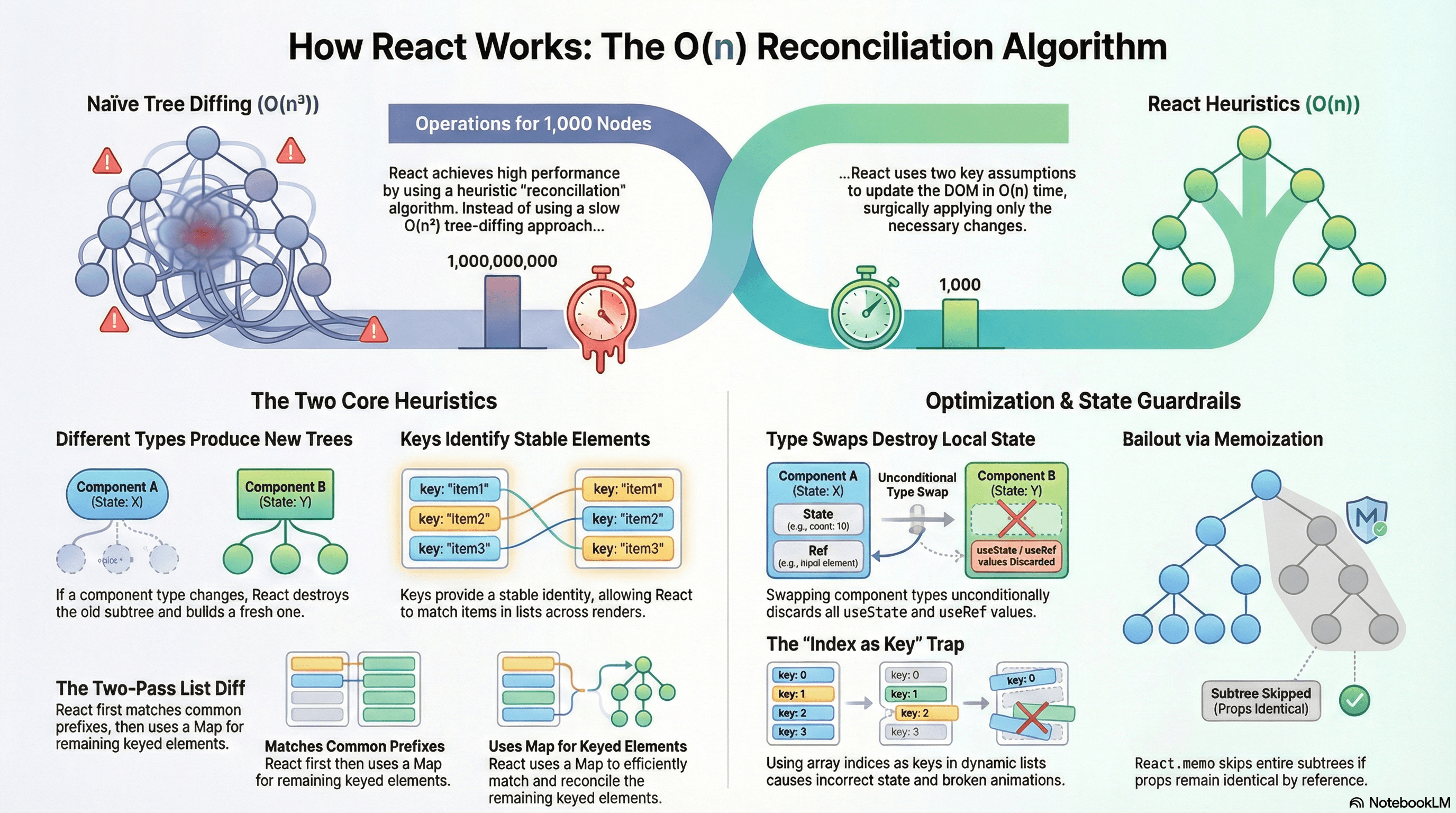
Overview
When state or props change, React doesn't immediately reach into the DOM and start mutating. Instead it re-runs your component functions, produces a new virtual representation of the UI, compares it against the previous one, and surgically applies only the differences to the real DOM.
This comparison process is reconciliation. The algorithm that performs the diff is what makes React fast at scale — a naïve comparison of two arbitrary trees has O(n³) complexity (enumerate all node pairs, check subtrees, find minimum edits). On a tree of 1,000 nodes that's a billion operations per update. React's heuristic algorithm runs in O(n) by making two key assumptions that hold for almost all real UIs.
This article covers exactly how the algorithm works, why the two heuristics are the correct tradeoffs, the two-pass list reconciliation algorithm, bailout optimization that skips subtrees, and the practical implications for writing correct and performant React code.
How It Works
Why Naïve Tree Diff Is Too Slow
The theoretically optimal algorithm for diffing two trees computes the tree edit distance — the minimum number of insertions, deletions, and moves to transform one tree into the other. This is a well-studied CS problem, and the best known algorithms are O(n³). On a React tree with 500 components, a single state update would require 125 million operations. React would be unusable.
React's O(n) heuristic achieves this speedup by sacrificing generality in two specific ways — both of which reflect real patterns in UI development.
Heuristic 1: Different Types Always Produce New Trees
When React compares two nodes at the same position in the tree and finds they have different types, it tears down the entire subtree rooted at the old node and builds a fresh one. It never tries to find a matching descendant deeper in the old subtree.
"Different type" means:
- A DOM element type changed:
<div>→<section> - A component type changed:
<UserCard>→<AdminCard>(different function references)
This heuristic eliminates a huge class of comparisons. When types match, React can reuse the existing fiber node and only update its props. When types differ, the teardown-and-rebuild is unconditional — React never needs to diff the subtrees.
The practical consequence: swapping component types destroys local state. The fiber node (which holds useState values and useRef contents) is discarded when the type changes.
Heuristic 2: Keys Identify List Elements Across Renders
When diffing lists of children, React needs to match old fiber nodes to new ones. Without any hint, it matches by position (index 0 to index 0, index 1 to index 1). This breaks when items are reordered, prepended, or inserted — React matches the wrong fibers and applies the wrong updates.
The key prop is the developer's mechanism for providing stable identity. When keys are present, React matches by key regardless of position change. When a key disappears, React unmounts that fiber. When a new key appears, React mounts a fresh fiber.
The Two-Pass List Reconciliation Algorithm
React's list diffing is worth understanding in detail because it explains several non-obvious performance characteristics. When reconciling a list of children, React uses a two-pass algorithm:
Pass 1 — Process the common prefix (in-order matches):
React iterates both the old and new lists simultaneously, comparing element at index i in the new list against the fiber at index i in the old list. If the key and type match, the fiber is updated in place. If there's a mismatch, Pass 1 ends.
Old list: [A, B, C, D]
New list: [A, B, X, D]
           ↑  ↑  ↑
           ✓  ✓  mismatch (B→X) — Pass 1 ends at index 2
Pass 2 — Handle remaining elements with a key map:
React builds a Map<key, Fiber> from the remaining old fibers. It then iterates the remaining new elements, looking up each in the map. If found, the fiber is reused (moved if necessary). If not found, a new fiber is created. Old fibers remaining in the map after iteration are deleted.
Remaining old fibers: { C: fiberC, D: fiberD }
Remaining new elements: [X, D]

Process X: not in map → create new fiber
Process D: found fiberD → reuse (move if needed)
After iteration: fiberC remains in map → delete
This two-pass algorithm is why prepending a single item to a long list is expensive without keys — Pass 1 mismatches at index 0, and Pass 2 processes the entire list through the map lookup. With keys, Pass 1 handles the unchanged suffix in one sweep.
Bailout — Skipping Subtrees That Haven't Changed
Reconciliation doesn't have to visit every node in the tree. React can bail out of a subtree if it can prove nothing changed:
React.memo— wraps a function component; React shallow-compares the previous and new props. If they're identical (by reference for objects), the component's render function is not called and its subtree is skipped entirely.useMemoanduseCallback— memoize values and functions so their references don't change when parent re-renders, enabling downstreammemobailouts.PureComponent— class component equivalent ofReact.memo.
Bailout is a reconciliation optimization — React still traverses the fiber tree to check, but a bailed-out subtree is not re-rendered and its DOM is not diffed.
Parent re-renders
  ↓
Child is wrapped in React.memo
  ↓
React shallow-compares props
  ↓ props unchanged (same references)
Child render function NOT called
Child's DOM NOT diffed
Code Examples
Type Change Destroys State — The Conditional Render Trap
// app/profile/page.tsx
"use client";

import { useState } from "react";

function EditorPanel() {
  const [draft, setDraft] = useState("My draft text...");

  return (
    <div>
      <h3>Edit Mode</h3>
      <textarea
        value={draft}
        onChange={(e) => setDraft(e.target.value)}
        className="w-full h-32 p-2 border rounded"
        placeholder="Write something..."
      />
      <p className="text-xs text-gray-500 mt-1">{draft.length} characters</p>
    </div>
  );
}

function ViewerPanel({ content }: { content: string }) {
  return (
    <div>
      <h3>View Mode</h3>
      <p className="p-2 text-gray-700">{content || "Nothing written yet."}</p>
    </div>
  );
}

export default function ProfilePanel() {
  const [isEditing, setIsEditing] = useState(false);

  return (
    <div className="border rounded p-4">
      <button
        onClick={() => setIsEditing((e) => !e)}
        className="mb-4 px-3 py-1 bg-blue-500 text-white rounded"
      >
        {isEditing ? "Done" : "Edit"}
      </button>

      {/*
        ❌ Problem: when isEditing flips, the component type at this
        tree position changes from EditorPanel to ViewerPanel (or vice versa).

        React's heuristic: different type = tear down and rebuild.
        EditorPanel's fiber — including its useState("My draft text...") —
        is destroyed. The user's draft is lost every time they toggle.
      */}
      {isEditing ? <EditorPanel /> : <ViewerPanel content="" />}
    </div>
  );
}
// ✅ Fix option 1: keep the same component type, control via props
function ContentPanel({ isEditing }: { isEditing: boolean }) {
const [draft, setDraft] = useState("My draft text...");
// State is preserved because the component type never changes
if (isEditing) {
return (
<textarea
value={draft}
onChange={(e) => setDraft(e.target.value)}
className="w-full h-32 p-2 border rounded"
/>
);
}
return <p className="p-2 text-gray-700">{draft}</p>;
}// ✅ Fix option 2: keep both mounted, toggle with CSS
// State survives because both fibers remain mounted
function ProfilePanelCss() {
const [isEditing, setIsEditing] = useState(false);
const [draft, setDraft] = useState("My draft text...");
return (
<div>
<button onClick={() => setIsEditing((e) => !e)}>
{isEditing ? "Done" : "Edit"}
</button>
{/* Both nodes mounted; display toggled — state preserved */}
<textarea
value={draft}
onChange={(e) => setDraft(e.target.value)}
className={
isEditing ? "block w-full h-32 p-2 border rounded" : "hidden"
}
/>
<p className={isEditing ? "hidden" : "block p-2 text-gray-700"}>
{draft}
</p>
</div>
);
}List Reconciliation — Keys and the Index Trap
// components/PriorityQueue.tsx
"use client";

import { useState } from "react";

interface Task {
  id: string;
  label: string;
  priority: number;
}

function TaskRow({ task }: { task: Task }) {
  // Each row has its own expanded state
  const [expanded, setExpanded] = useState(false);

  return (
    <li className="border-b py-2">
      <button
        onClick={() => setExpanded((e) => !e)}
        className="text-left w-full"
      >
        <span className="font-mono text-xs text-gray-400 mr-2">
          P{task.priority}
        </span>
        {task.label}
        {expanded && (
          <span className="ml-2 text-sm text-gray-500"> (details visible)</span>
        )}
      </button>
    </li>
  );
}

const INITIAL_TASKS: Task[] = [
  { id: "t-1", label: "Deploy hotfix", priority: 1 },
  { id: "t-2", label: "Write release notes", priority: 3 },
  { id: "t-3", label: "Update changelog", priority: 4 },
];

export function PriorityQueue() {
  const [tasks, setTasks] = useState(INITIAL_TASKS);

  function addUrgent() {
    setTasks((prev) => [
      { id: `t-${Date.now()}`, label: "🔥 Critical prod issue", priority: 0 },
      ...prev,
    ]);
  }

  function sortByPriority() {
    setTasks((prev) => [...prev].sort((a, b) => a.priority - b.priority));
  }

  return (
    <div>
      <div className="flex gap-2 mb-4">
        <button
          onClick={addUrgent}
          className="px-3 py-1 bg-red-500 text-white rounded text-sm"
        >
          Add Urgent
        </button>
        <button
          onClick={sortByPriority}
          className="px-3 py-1 bg-blue-500 text-white rounded text-sm"
        >
          Sort by Priority
        </button>
      </div>

      <ul>
        {tasks.map((task) => (
          /*
            ✅ key={task.id} — stable identity tied to the task, not position.

            When "Add Urgent" prepends a new task:
            - Pass 1: index 0 mismatches (new task vs t-1) → Pass 1 ends
            - Pass 2: remaining old fibers put in map by key
              New task not in map → create new fiber
              t-1, t-2, t-3 found → reuse fibers (with their expanded state intact)

            When "Sort by Priority" reorders:
            - All items move positions
            - React matches all by key → all fibers reused, state preserved

            If we used key={index} instead:
            - After prepend: index 0 maps t-1's fiber to the new task
              The new task would "inherit" t-1's expanded state — incorrect
            - After sort: every fiber gets reshuffled — all state scrambled
          */
          <TaskRow key={task.id} task={task} />
        ))}
      </ul>
    </div>
  );
}
Forced Remount with key — Intentional State Reset
Changing a component's key prop forces React to unmount the old fiber and mount a fresh one — explicit, intentional state reset.
// components/VideoPlayer.tsx
"use client";

import { useState } from "react";

// This component has internal state for playback position, volume, etc.
function VideoPlayer({ src }: { src: string }) {
  const [playing, setPlaying] = useState(false);
  const [volume, setVolume] = useState(0.8);

  return (
    <div>
      <video src={src} controls />
      <div className="flex items-center gap-2 mt-2">
        <button onClick={() => setPlaying((p) => !p)}>
          {playing ? "Pause" : "Play"}
        </button>
        <input
          type="range"
          min="0"
          max="1"
          step="0.1"
          value={volume}
          onChange={(e) => setVolume(Number(e.target.value))}
        />
      </div>
    </div>
  );
}

const VIDEOS = [
  { id: "intro", src: "/videos/intro.mp4", title: "Introduction" },
  { id: "deep-dive", src: "/videos/deep-dive.mp4", title: "Deep Dive" },
  { id: "recap", src: "/videos/recap.mp4", title: "Recap" },
];

export function VideoLibrary() {
  const [activeId, setActiveId] = useState("intro");
  const active = VIDEOS.find((v) => v.id === activeId)!;

  return (
    <div>
      <nav className="flex gap-2 mb-4">
        {VIDEOS.map((v) => (
          <button
            key={v.id}
            onClick={() => setActiveId(v.id)}
            className={v.id === activeId ? "font-bold underline" : ""}
          >
            {v.title}
          </button>
        ))}
      </nav>

      {/*
        key={active.id} tells React: each video is a distinct component instance.
        Switching videos unmounts the current VideoPlayer fiber and mounts a fresh one.
        The new video starts with playing=false and volume=0.8 — no carryover
        from the previous video's state.

        Without key (or key="video" — same every time):
        Same fiber is reused, just with a new src prop.
        The previous video's playing/volume state carries over to the new video.
      */}
      <VideoPlayer key={active.id} src={active.src} />
    </div>
  );
}
Bailout with React.memo — Skipping Reconciliation
// components/ProductCatalog.tsx
"use client";

import { useState, memo, useCallback } from "react";

interface Product {
  id: string;
  name: string;
  price: number;
}

// memo wraps ProductCard — React skips its render if props haven't changed
const ProductCard = memo(function ProductCard({
  product,
  onAddToCart,
}: {
  product: Product;
  onAddToCart: (id: string) => void;
}) {
  // In development, add a render counter to verify memoization works
  console.log(`ProductCard ${product.id} rendered`);

  return (
    <div className="border rounded p-4">
      <h3 className="font-semibold">{product.name}</h3>
      <p className="text-gray-600">${product.price}</p>
      <button
        onClick={() => onAddToCart(product.id)}
        className="mt-2 px-3 py-1 bg-green-500 text-white rounded text-sm"
      >
        Add to Cart
      </button>
    </div>
  );
});

const PRODUCTS: Product[] = [
  { id: "p-1", name: "Mechanical Keyboard", price: 149 },
  { id: "p-2", name: "Ergonomic Mouse", price: 79 },
  { id: "p-3", name: "4K Monitor", price: 499 },
];

export function ProductCatalog() {
  const [cartCount, setCartCount] = useState(0);
  const [searchQuery, setSearchQuery] = useState("");

  /*
    useCallback ensures onAddToCart has a stable reference.
    Without it: every ProductCatalog re-render produces a new function,
    memo's shallow prop comparison sees a new onAddToCart reference,
    and all ProductCard renders are not bailed out — memo is useless.

    With useCallback: same function reference across renders →
    memo's prop comparison passes → ProductCards are bailed out
    when only cartCount or searchQuery changed.
  */
  const handleAddToCart = useCallback((id: string) => {
    setCartCount((c) => c + 1);
    console.log(`Added ${id} to cart`);
  }, []); // stable reference — no dependencies

  const filtered = PRODUCTS.filter((p) =>
    p.name.toLowerCase().includes(searchQuery.toLowerCase()),
  );

  return (
    <div>
      <div className="flex items-center justify-between mb-4">
        <input
          value={searchQuery}
          onChange={(e) => setSearchQuery(e.target.value)}
          placeholder="Search products..."
          className="border rounded p-2 w-64"
        />
        <span className="text-sm text-gray-600">Cart: {cartCount} items</span>
      </div>

      <div className="grid grid-cols-3 gap-4">
        {filtered.map((product) => (
          <ProductCard
            key={product.id}
            product={product}
            onAddToCart={handleAddToCart}
          />
        ))}
      </div>
    </div>
  );
}
The Inner Component Trap — New Function Reference on Every Render
// ❌ InnerRow is redefined on every OuterList render — different type every time
// React remounts every InnerRow on every parent re-render, destroying all state
function OuterList({ items }: { items: string[] }) {
  const [filter, setFilter] = useState("");

  // This function is recreated on every OuterList render.
  // Its reference changes → React sees a new component type at each list position
  // → every row is unmounted and remounted → all row-level state is lost
  function InnerRow({ text }: { text: string }) {
    const [selected, setSelected] = useState(false);
    return (
      <li
        onClick={() => setSelected((s) => !s)}
        className={selected ? "bg-blue-100" : ""}
      >
        {text}
      </li>
    );
  }

  return (
    <div>
      <input value={filter} onChange={(e) => setFilter(e.target.value)} />
      <ul>
        {items
          .filter((i) => i.includes(filter))
          .map((item) => (
            <InnerRow key={item} text={item} />
          ))}
      </ul>
    </div>
  );
}

// ✅ Define InnerRow at module scope — stable function reference
// React reuses the same fiber across renders; selected state is preserved
function InnerRow({ text }: { text: string }) {
  const [selected, setSelected] = useState(false);
  return (
    <li
      onClick={() => setSelected((s) => !s)}
      className={selected ? "bg-blue-100" : ""}
    >
      {text}
    </li>
  );
}

function OuterListFixed({ items }: { items: string[] }) {
  const [filter, setFilter] = useState("");

  return (
    <div>
      <input value={filter} onChange={(e) => setFilter(e.target.value)} />
      <ul>
        {items
          .filter((i) => i.includes(filter))
          .map((item) => (
            <InnerRow key={item} text={item} />
          ))}
      </ul>
    </div>
  );
}
Real-World Use Case
Multi-step checkout form. Each step renders a different form section. A naive implementation uses {step === 1 ? <ShippingForm /> : <PaymentForm />}. When the user reaches step 2, React sees a type change, unmounts <ShippingForm>, and all the user's uncontrolled input state is lost. The fix: lift all form state to a parent component (or Zustand/Jotai store) so it survives the component swap, or use a single <CheckoutForm step={step} /> component that conditionally renders sections without changing type.
Virtualized list with row expansion. A data table renders 50 rows at a time, removing rows that scroll off screen. Without stable key props, when the visible window shifts, React matches old fibers to new rows by index — a row that was expanded at position 12 gets that state when a new row scrolls into position 12. With key={row.id}, each row's state follows its ID regardless of scroll position.
Common Mistakes / Gotchas
1. Using array index as key in dynamic lists.
Safe only for static, non-reorderable lists. For lists where items can be added, removed, or sorted, index keys cause React to match the wrong fibers — incorrect state, broken animations, stale inputs.
// ❌ Any prepend, reorder, or removal maps wrong state to wrong row
tasks.map((task, i) => <TaskRow key={i} task={task} />);

// ✅ Stable identity
tasks.map((task) => <TaskRow key={task.id} task={task} />);
2. Using Math.random() or Date.now() as keys.
A key that changes every render tells React to unmount and remount the component on every render — destroying state and creating unnecessary DOM churn. Keys must be stable across renders.
3. Expecting state to survive a component type swap. React uses the function reference (or string for DOM elements) as the type. Even two components that render identical JSX will cause a full remount if swapped at the same tree position — their references differ. Use a single component with a controlling prop instead.
4. Defining components inside render functions. A component defined inside another component's function body gets a new function reference on every parent render. React sees a new type at that tree position, unmounts the old fiber (destroying all state), and mounts fresh. Always define components at module scope.
5. Forgetting useCallback when passing handlers to memo-wrapped components.
React.memo does a shallow prop comparison. A function created inline (onClick={() => handleClick(id)}) is a new reference on every render. Memo sees a changed prop, bails out doesn't trigger, and the expensive component re-renders anyway. Wrap handlers in useCallback with the correct dependency array.
6. Using key to force remounts in performance-sensitive loops.
Intentional remount with key is correct for resetting a specific component when a semantic identity change occurs (new video, new form session). Using it in a tight loop or on a list to work around a stale state bug is a code smell — the underlying issue is usually state that should be derived from props, not stored locally.
Summary
React's reconciliation algorithm achieves O(n) complexity through two heuristics: different element types always produce a full subtree teardown, and key props provide stable list identity across renders. The two-pass list algorithm handles common-prefix matches in-order first, then uses a key map for remaining elements — making keyed moves cheap and unkeyed prepends expensive. Bailout via React.memo allows React to skip entire subtrees when props haven't changed, provided function prop references are stabilized with useCallback. Type swaps destroy local state; the fixes are using a single component type with a controlling prop, CSS-based visibility toggling, or lifting state out of the component. Inner component definitions create new function references on every render and must be moved to module scope. Intentional remount via key change is the idiomatic way to reset a component's state.
Interview Questions
Q1. Why is React's reconciliation algorithm O(n) rather than the optimal O(n³)?
The theoretically optimal tree diff — computing the minimum edit distance between two trees — is O(n³). React achieves O(n) by making two heuristic tradeoffs that hold for nearly all real UIs. First: when two elements at the same tree position have different types, React tears down the entire subtree and builds a fresh one — never searching for a potential match deeper in the old tree. This eliminates cross-level comparisons entirely. Second: when diffing lists, the key prop provides stable identity, allowing O(1) lookup for each element rather than O(n) search. Both heuristics sacrifice theoretical optimality for practical UI patterns — the cases they handle incorrectly (semantic moves across levels, list changes without keys) are rare or developer-preventable.
Q2. What happens when you swap two different component types at the same tree position?
React's first heuristic fires: different type = tear down and rebuild. The current fiber node and its entire subtree are unmounted — all useState values, useRef contents, and child component state are destroyed. A new fiber is mounted from scratch. This happens even if the two components render structurally identical JSX, because React uses the component function reference as the identity, not the output shape. The practical consequence is that conditional rendering like {isAdmin ? <AdminForm /> : <GuestForm />} destroys the form state every time isAdmin flips. The fix is a single component type with a controlling prop, or CSS-based visibility toggling.
Q3. How does React's two-pass list reconciliation work?
Pass 1 iterates old and new lists simultaneously from the start. At each index, if the key and type match, the fiber is updated. If there's a key or type mismatch, Pass 1 ends. Pass 2 builds a Map<key, Fiber> from the remaining old fibers, then iterates the remaining new elements. Each new element is looked up in the map — if found, the fiber is reused (and moved in the DOM if its position changed); if not, a new fiber is created. Old fibers remaining in the map after Pass 2 are deleted. This is why prepending to a long unkeyed list is expensive — Pass 1 mismatches at index 0 and Pass 2 processes the entire list. With keys, Pass 1 handles the unchanged suffix efficiently.
Q4. Why does React.memo fail to prevent re-renders when the parent passes an inline function?
React.memo performs a shallow comparison of previous and new props. A function defined inline in JSX (onClick={() => handleClick(id)}) creates a new function object on every render of the parent component — its reference changes even if its behavior is identical. When memo compares the old onClick reference with the new one using ===, they differ, so the bailout condition fails and the child re-renders. The fix is useCallback, which returns a stable function reference across renders (only changing when the dependency array changes). Without useCallback, React.memo is effectively useless for components that receive function props.
Q5. When is using key to force a remount appropriate, and when is it a red flag?
Intentional remount via key change is appropriate when a component represents a genuinely distinct instance — switching to a different video player, opening a form for a new entity, resetting a wizard to its initial step after completion. In these cases, the previous state is semantically invalid for the new context, and a clean slate is the correct behavior. It's preferable to complex useEffect reset logic. It's a red flag when used to work around stale state that should be derived from props — for example, if a component initializes local state from a prop and then the prop changes, using key to remount is papering over a design issue. The correct fix is making the component controlled (state flows from parent) or computing the derived value on each render.
Q6. Why does defining a component inside another component's render function cause bugs?
A component defined inside a function body is a new function object on every render of the outer component — JavaScript closures create new function references each time the outer function executes. React uses the component function reference as the type identifier. When the outer component re-renders, React compares the old type (the function from the previous render) against the new type (the function from the current render) — they're different references even though they're structurally identical. React's type heuristic fires: different type = unmount old fiber, mount new fiber. All local state in the inner component is destroyed on every re-render of the outer component. The fix is always to define components at module scope, where the function reference is created once and remains stable across renders.
Fiber Architecture
React's internal reconciliation engine — fiber nodes, double buffering, the work loop, how hooks are stored, and why the render phase must be pure.
Render Waterfalls
How render waterfalls form in server and client React, the N+1 request problem, how to break sequential chains with parallel fetches and preloading, and how to diagnose waterfalls in production.