View Transitions API
How the browser's native View Transitions API animates between DOM states — the snapshot mechanism, named element morphing, the ViewTransition object, cross-document transitions, and Next.js App Router integration.
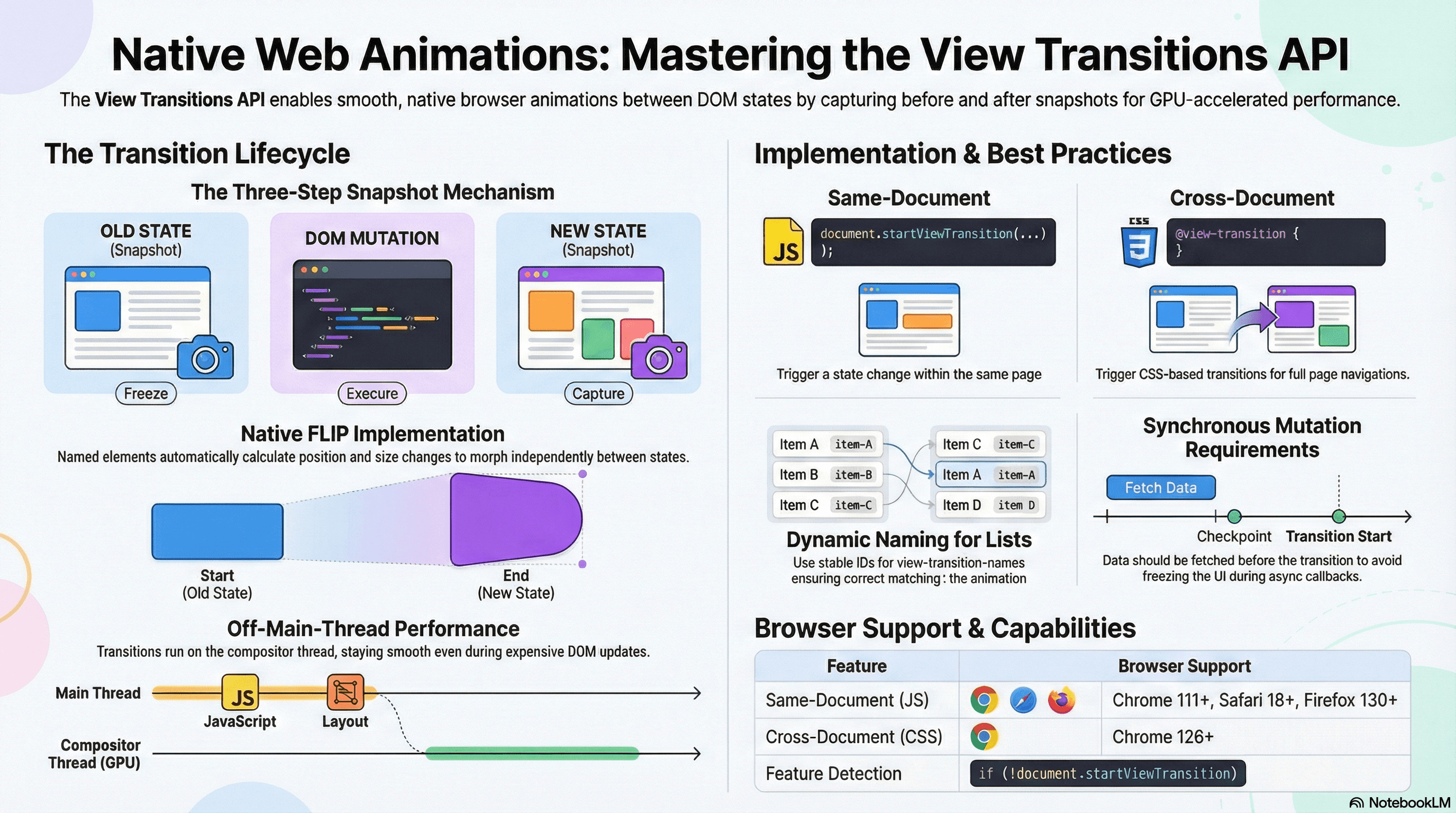
Overview
The View Transitions API lets the browser animate between two DOM states natively — without a JavaScript animation library, manual FLIP calculations, or fighting the browser's navigation model. You tell the browser a change is about to happen, it captures the current state, you make your change, it captures the new state, and it composites an animation between them on the GPU.
Before this API, smooth route transitions in a server-rendered or multi-page app required either fully owning the navigation model with a client-side router, or running a JavaScript animation library that re-implemented what the browser already knew how to do. The View Transitions API solves this at the platform level — the same mechanism that makes iOS and Android transitions feel native, exposed to the web.
The API has two forms. Same-document transitions are JavaScript-triggered (document.startViewTransition(callback)) and work in all modern browsers today. Cross-document transitions are CSS-triggered (@view-transition { navigation: auto }) and apply to normal page navigations — available in Chrome 126+ and progressively enhancing everywhere else.
How It Works
The Snapshot Mechanism
When you call document.startViewTransition(callback):
- The browser freezes the current page and takes a screenshot — a flat bitmap of the current visual state
- Your
callbackexecutes — this is where you mutate the DOM (update state, callrouter.push, swap content) - The browser takes a second screenshot of the new page state
- It creates a layered rendering: the old screenshot animates out, the new screenshot animates in, using CSS animations you can customize via
::view-transition-old(root)and::view-transition-new(root)pseudo-elements - The transition runs entirely on the compositor thread — off the main thread, smooth even during expensive DOM updates
call startViewTransition(callback)
  ↓
Browser captures current visual state → screenshot
  ↓
callback() runs — DOM mutates
  ↓
Browser captures new visual state → screenshot
  ↓
::view-transition-old(root) → old screenshot animates out
::view-transition-new(root) → new screenshot animates in
        ↕ simultaneously
Named elements morph: old position/size → new position/size
Named Transitions and the Browser's FLIP
When you assign view-transition-name: my-element to an element, you're telling the browser to animate that element independently — not as part of the page crossfade.
The browser finds the element with that name in both the old and new DOM states, records its bounding box and opacity in each state, and applies a FLIP animation (First, Last, Invert, Play):
- First: record the element's position and size in the old state
- Last: record the element's position and size in the new state
- Invert: apply a transform that makes it visually appear at the First position
- Play: animate the inversion to zero — the element smoothly transitions to the Last position
This is the same technique animation libraries like Framer Motion and GSAP implement in JavaScript — except the browser does it natively using compositor-only transforms, making it jank-free even on slow devices.
The ViewTransition Object
startViewTransition returns a ViewTransition object — not a plain Promise. It exposes three promises that let you coordinate with the transition lifecycle:
const transition = document.startViewTransition(() => {
  updateDOM();
});

// Resolves when the callback completes and new state is captured
// (before animation begins)
await transition.updateCallbackDone;

// Resolves when the transition animation completes
// (use to run code after the user sees the final state)
await transition.finished;

// Resolves when the animation is ready to start
// (use to customize animations that depend on computed positions)
await transition.ready;

// Skip the animation entirely (e.g., during testing or low-power mode)
transition.skipTransition();
Browser Pseudo-Elements
The View Transitions API exposes a layered tree of pseudo-elements you can target with CSS:
::view-transition                    ← root overlay (covers the entire page)
├── ::view-transition-group(root)    ← wraps the default page transition
│   ├── ::view-transition-image-pair(root)
│   │   ├── ::view-transition-old(root)   ← old screenshot
│   │   └── ::view-transition-new(root)   ← new screenshot
└── ::view-transition-group(my-card) ← for each named element
    └── ::view-transition-image-pair(my-card)
        ├── ::view-transition-old(my-card)
        └── ::view-transition-new(my-card)
Targeting these pseudo-elements is how you customize the animation — duration, easing, keyframes, or disabling specific named elements.
Code Examples
Basic Same-Document Transition
// components/ThemeToggle.tsx
"use client";

export function ThemeToggle() {
  function toggleTheme() {
    // Feature-detect before using — Safari 18+, all modern Chrome/Firefox
    if (!document.startViewTransition) {
      document.documentElement.classList.toggle("dark");
      return;
    }

    // The callback is the DOM mutation — keep it synchronous
    document.startViewTransition(() => {
      document.documentElement.classList.toggle("dark");
    });
  }

  return (
    <button
      onClick={toggleTheme}
      className="rounded p-2 hover:bg-muted"
      aria-label="Toggle theme"
    >
      ☀ / ☾
    </button>
  );
}
/* app/globals.css */
/* Default crossfade — the browser provides this if you don't override */
::view-transition-old(root),
::view-transition-new(root) {
animation-duration: 250ms;
animation-timing-function: ease-in-out;
}
/* Custom: circular reveal from top-right for theme toggle */
@keyframes reveal-circle {
from {
clip-path: circle(0% at 95% 5%);
}
to {
clip-path: circle(150% at 95% 5%);
}
}
/* Apply only the new state — old crossfades out, new reveals in */
::view-transition-new(root) {
animation: 400ms ease-out reveal-circle;
}
/* Always respect reduced-motion preference */
@media (prefers-reduced-motion: reduce) {
::view-transition-old(root),
::view-transition-new(root) {
animation: none;
}
}Named Transitions — Morphing a Card into a Detail Page
// app/products/page.tsx — product grid (Server Component)
import Link from "next/link";
import { getProducts } from "@/lib/data";

export default async function ProductsPage() {
  const products = await getProducts();

  return (
    <ul className="grid grid-cols-3 gap-6">
      {products.map((product) => (
        <li key={product.id}>
          <Link href={`/products/${product.id}`}>
            <img
              src={product.imageUrl}
              alt={product.name}
              width={400}
              height={300}
              className="w-full rounded-lg object-cover aspect-[4/3]"
              style={{
                // Each product gets a unique name — must be unique in the DOM
                // at the time the transition fires. IDs guarantee this.
                viewTransitionName: `product-image-${product.id}`,
              }}
            />
            <h2 className="mt-2 font-semibold">{product.name}</h2>
            <p className="text-gray-500">${product.price}</p>
          </Link>
        </li>
      ))}
    </ul>
  );
}
// app/products/[id]/page.tsx — product detail (Server Component)
import { getProduct } from "@/lib/data";
export default async function ProductDetailPage({
params,
}: {
params: { id: string };
}) {
const product = await getProduct(params.id);
return (
<div className="max-w-4xl mx-auto">
<img
src={product.imageUrl}
alt={product.name}
width={800}
height={600}
className="w-full rounded-xl object-cover"
style={{
// Same name as the grid thumbnail — browser morphs from card to hero
viewTransitionName: `product-image-${product.id}`,
}}
/>
<h1 className="mt-6 text-3xl font-bold">{product.name}</h1>
<p className="text-xl text-gray-600 mt-2">${product.price}</p>
<p className="mt-4 text-gray-700">{product.description}</p>
</div>
);
}/* app/globals.css */
/* Cross-document transitions — opt in with one line for same-origin navigations */
@view-transition {
navigation: auto;
}
/* The product image morphs via the browser's FLIP mechanism automatically.
Customize just the page-level crossfade for everything else: */
::view-transition-old(root) {
animation: 200ms ease-in fade-out;
}
::view-transition-new(root) {
animation: 200ms ease-out fade-in;
}
/* Named image transitions: let the browser handle the morph,
but customize the timing */
::view-transition-group(product-image) {
animation-duration: 350ms;
animation-timing-function: cubic-bezier(0.4, 0, 0.2, 1);
}
@keyframes fade-out {
to {
opacity: 0;
}
}
@keyframes fade-in {
from {
opacity: 0;
}
}
@media (prefers-reduced-motion: reduce) {
@view-transition {
navigation: none;
}
::view-transition-old(root),
::view-transition-new(root) {
animation: none;
}
}view-transition-name values must be unique across the entire document when
the transition fires. Two elements sharing a name causes both to be silently
skipped. Always generate names from stable entity IDs — never hardcode the
same string on multiple elements.
Using the ViewTransition Object
// components/QuickView.tsx
"use client";

import { useRef } from "react";

interface Product {
  id: string;
  name: string;
  imageUrl: string;
}

export function QuickViewModal({ product }: { product: Product }) {
  const modalRef = useRef<HTMLDialogElement>(null);

  async function openModal() {
    if (!document.startViewTransition) {
      modalRef.current?.showModal();
      return;
    }

    // startViewTransition returns a ViewTransition object
    const transition = document.startViewTransition(() => {
      modalRef.current?.showModal();
    });

    // Wait for the callback to finish (DOM mutation done, new state captured)
    // before adding a class that modifies the transition in progress
    await transition.updateCallbackDone;

    // Wait for animation to complete before allowing the next interaction
    try {
      await transition.finished;
      console.log("Transition complete — modal fully visible");
    } catch {
      // transition.finished rejects if skipTransition() was called
      console.log("Transition was skipped");
    }
  }

  async function closeModal() {
    if (!document.startViewTransition) {
      modalRef.current?.close();
      return;
    }

    const transition = document.startViewTransition(() => {
      modalRef.current?.close();
    });

    await transition.finished;
  }

  return (
    <>
      <button onClick={openModal}>Quick view</button>
      <dialog ref={modalRef} className="rounded-xl p-6 backdrop:bg-black/50">
        <img
          src={product.imageUrl}
          alt={product.name}
          style={{ viewTransitionName: `product-image-${product.id}` }}
          className="w-full rounded-lg"
        />
        <h2 className="mt-4 text-xl font-bold">{product.name}</h2>
        <button onClick={closeModal} className="mt-4">
          Close
        </button>
      </dialog>
    </>
  );
}
Next.js App Router — Client-Side Navigation Wrapper
For Next.js App Router's client-side router, wrap router.push with startViewTransition:
// hooks/useViewTransitionRouter.ts
"use client";

import { useRouter } from "next/navigation";
import { useCallback } from "react";

/**
 * Wraps Next.js router.push with startViewTransition.
 * Falls back to plain push in unsupported browsers.
 */
export function useViewTransitionRouter() {
  const router = useRouter();

  const push = useCallback(
    (href: string) => {
      if (typeof document === "undefined" || !document.startViewTransition) {
        router.push(href);
        return;
      }

      document.startViewTransition(() => {
        router.push(href);
      });
    },
    [router],
  );

  return { push };
}
// components/ProductCard.tsx
"use client";
import { useViewTransitionRouter } from "@/hooks/useViewTransitionRouter";
export function ProductCard({
product,
}: {
product: { id: string; name: string; price: number; imageUrl: string };
}) {
const { push } = useViewTransitionRouter();
return (
<div
className="cursor-pointer rounded-xl overflow-hidden border hover:shadow-lg transition-shadow"
onClick={() => push(`/products/${product.id}`)}
role="button"
tabIndex={0}
onKeyDown={(e) => e.key === "Enter" && push(`/products/${product.id}`)}
>
<img
src={product.imageUrl}
alt={product.name}
style={{ viewTransitionName: `product-image-${product.id}` }}
className="w-full object-cover aspect-[4/3]"
/>
<div className="p-4">
<h3 className="font-semibold">{product.name}</h3>
<p className="text-gray-500">${product.price}</p>
</div>
</div>
);
}/* app/globals.css — animate the page route change */
::view-transition-old(root) {
animation: 180ms ease-in slide-and-fade-out;
}
::view-transition-new(root) {
animation: 180ms ease-out slide-and-fade-in;
}
@keyframes slide-and-fade-out {
to {
opacity: 0;
transform: translateY(-8px);
}
}
@keyframes slide-and-fade-in {
from {
opacity: 0;
transform: translateY(8px);
}
}
/* Product image morphs via named transition — no extra CSS needed */
@media (prefers-reduced-motion: reduce) {
::view-transition-old(root),
::view-transition-new(root) {
animation: none;
}
}The Next.js team is working on first-class View Transitions support. Until it
ships, the useViewTransitionRouter hook pattern above is the established
workaround. Watch the Next.js changelog for unstable_viewTransition and
related APIs.
Debugging View Transitions in DevTools
// Temporarily slow down transitions for debugging
// Run this in the browser console to see what's happening frame-by-frame

document.addEventListener("click", async () => {
  if (!document.startViewTransition) return;

  const transition = document.startViewTransition(() => {
    // simulate a slow DOM update
    document.body.classList.toggle("alternate-layout");
  });

  // Log each phase
  transition.updateCallbackDone.then(() =>
    console.log("1. DOM updated — new state captured"),
  );

  transition.ready.then(() => console.log("2. Animation ready to start"));

  transition.finished
    .then(() => console.log("3. Animation complete"))
    .catch(() => console.log("3. Animation was skipped"));
});
/* Slow down all transitions temporarily for debugging */
/* Add this class to <html> during development */
.debug-transitions ::view-transition-old(root),
.debug-transitions ::view-transition-new(root) {
animation-duration: 3s !important;
}
/* Chrome DevTools: Animations panel → slow down animation playback globally */
/* Or: in the Performance panel, record while navigating to see the transition */Real-World Use Case
Product catalog with card-to-detail morphing. Users browse a grid of product cards. Clicking a card navigates to the detail page. Without transitions: abrupt visual jump — the user has no sense of spatial continuity between where they were and where they are.
With named view transitions on the product image: the thumbnail card's image smoothly morphs into the full-bleed hero image on the detail page. The rest of the page crossfades. The user perceives this as "zooming into" the card they clicked — a strong spatial metaphor that reduces cognitive load during navigation.
Implementation: view-transition-name: product-image-${id} on the <img> in both the grid and the detail page. @view-transition { navigation: auto } in the CSS. Zero JavaScript for the morphing animation — the browser handles it entirely.
Tab panel with animated content swap. A settings page has tabs: Profile, Security, Notifications. Clicking a tab swaps the panel content. With startViewTransition(() => setActiveTab(tab)): the old panel slides out, the new panel slides in. The tab labels don't animate (no view-transition-name on them). The panel content (view-transition-name: settings-panel) morphs independently.
Common Mistakes / Gotchas
1. Not feature-detecting before calling startViewTransition.
The API is supported in Chrome 111+, Safari 18+, and Firefox 130+. Older browsers and some environments (jsdom in tests) don't have it. Always check if (!document.startViewTransition) and fall back to the plain DOM update.
2. Using the same view-transition-name on multiple simultaneous elements.
If two elements share a name at the moment a transition fires, the browser silently skips both. This happens easily in lists when you hardcode the name or copy-paste it. Always generate names from stable IDs: viewTransitionName: `card-${item.id}` .
3. Awaiting data fetches inside the startViewTransition callback.
The callback should be a fast, synchronous DOM mutation. The browser won't finish capturing the new state until the callback's returned Promise resolves — so async callbacks delay the visual transition. Fetch data before calling startViewTransition, then apply it synchronously inside the callback.
// ❌ Delays the transition — fetch inside the callback
document.startViewTransition(async () => {
  const data = await fetchProduct(id);
  renderProduct(data);
});

// ✅ Fetch first, then transition synchronously
const data = await fetchProduct(id);
document.startViewTransition(() => {
  renderProduct(data);
});
4. Animating too many named elements simultaneously.
Each named element creates its own compositor layer during the transition. Assigning view-transition-name to every item in a 50-item list creates 50 GPU layers simultaneously — this can exhaust GPU memory on mid-range and low-end devices. Use named transitions selectively: only the element the user just interacted with, not the entire list.
5. Forgetting prefers-reduced-motion.
View transitions are animations. Users who set prefers-reduced-motion: reduce in their OS expect animations to be absent or minimal. Always include a @media (prefers-reduced-motion: reduce) block that either disables @view-transition { navigation: none } or sets animation durations to zero.
6. Using view-transition-name in SSR without accounting for hydration.
When using inline style={{ viewTransitionName: ... }} in a Next.js Server Component, the name is serialized to HTML as a CSS custom property. This is fine. The issue arises if you conditionally apply the name based on browser state before hydration — the server-rendered name and client-applied name can mismatch, triggering a hydration warning. Keep transition names unconditional and stable.
Summary
The View Transitions API provides a native browser mechanism to animate between DOM states using compositor-accelerated screenshots — no JavaScript animation library needed. document.startViewTransition(callback) captures the current visual state, runs your DOM mutation, captures the new state, and crossfades between them via customizable CSS pseudo-elements. Named transitions (view-transition-name) allow individual elements to morph independently between their old and new positions using the browser's built-in FLIP implementation. The ViewTransition object exposes updateCallbackDone, ready, and finished promises for lifecycle coordination. Cross-document transitions (@view-transition { navigation: auto }) apply to full page navigations with a single CSS rule. In Next.js App Router, wrap router.push with startViewTransition for client-side navigation transitions. Always feature-detect, keep transition callbacks synchronous, generate unique names from IDs, and add prefers-reduced-motion overrides.
Interview Questions
Q1. How does document.startViewTransition work under the hood?
When called, the browser freezes the current page rendering and captures a bitmap screenshot of the current visual state. Your callback executes — this mutates the DOM. The browser then captures a second screenshot of the new state. It creates a pseudo-element overlay (::view-transition) above all page content, with the old screenshot animating out and the new screenshot animating in — a default crossfade that runs entirely on the compositor thread, off the main thread. You can customize the animations by targeting ::view-transition-old(root) and ::view-transition-new(root) with CSS. The transition completes when the animations finish and the overlay is removed.
Q2. What is the FLIP technique and how does the View Transitions API use it for named elements?
FLIP stands for First, Last, Invert, Play — a technique for animating elements between positions without triggering layout. First: record the element's position and size before the change. Last: record the position and size after the change. Invert: apply a CSS transform that makes the element visually appear at its First position (even though the DOM has changed). Play: animate the inversion to zero — the element appears to move smoothly from First to Last. The View Transitions API implements FLIP natively for named elements: when an element with view-transition-name exists in both the old and new DOM, the browser automatically records both positions and composites the morph using transforms and opacity — no JavaScript required.
Q3. What does the ViewTransition object give you and when would you use its promises?
startViewTransition returns a ViewTransition object with three promises. updateCallbackDone resolves when the callback finishes and the new state is captured — use it to apply classes that affect the in-progress transition. ready resolves when the browser is about to start animating — use it if you need to read computed element positions for a custom animation that depends on the layout. finished resolves when the transition animation completes — use it to enable the next user interaction, fire an analytics event, or clean up state. skipTransition() cancels the animation immediately — useful in tests or when detecting prefers-reduced-motion programmatically.
Q4. What is the difference between same-document and cross-document view transitions?
Same-document transitions are triggered by JavaScript — document.startViewTransition(callback) — and animate changes within a single-page context. They're supported across all modern browsers (Chrome 111+, Safari 18+, Firefox 130+). Cross-document transitions animate full page navigations — clicking a link that loads a new page. They're opted in via a CSS rule (@view-transition { navigation: auto }) and require no JavaScript. They're currently Chrome 126+ only, with other browsers following. For a Next.js app with client-side routing, same-document transitions are the right tool. For a multi-page app or a Next.js app with standard link navigations, cross-document transitions give page animations with zero JavaScript.
Q5. Why must view-transition-name values be unique in the DOM?
During a transition, the browser matches elements by name between the old and new DOM states — one old element to one new element. If two elements share the same name when startViewTransition is called, the browser cannot determine which element in the old state corresponds to which in the new state. Its response is to skip the named transition for all conflicting elements silently — no error, no fallback, just no morph. In a product grid with 20 items, each img must have a name derived from its product ID (product-image-${id}) to guarantee uniqueness. Hardcoding the same name on multiple elements is always wrong.
Q6. What happens when the callback passed to startViewTransition is an async function?
The browser waits for the returned Promise to resolve before capturing the new state screenshot. If the callback awaits a fetch inside, the transition is blocked until the fetch completes — the old screenshot is frozen on screen while the user waits for data. This delays the visual transition and can make the page appear frozen. The correct pattern is to always fetch data before calling startViewTransition, then apply the result synchronously inside the callback. The callback should be a fast DOM mutation, not an async data-loading operation. If you do need an async callback (for unavoidable reasons), transition.ready won't resolve until after the callback's promise settles, so the animation starts late.
Render Waterfalls
How render waterfalls form in server and client React, the N+1 request problem, how to break sequential chains with parallel fetches and preloading, and how to diagnose waterfalls in production.
Image & Font Optimization
How next/image and next/font eliminate the two most common causes of LCP and CLS regressions — format conversion, srcset mechanics, fetchpriority, font self-hosting, and size-adjusted fallbacks.