Hydration Strategies
The full spectrum of hydration strategies — from full hydration to partial hydration, selective hydration, and the islands architecture — and how React 18 implements them with Suspense boundaries.
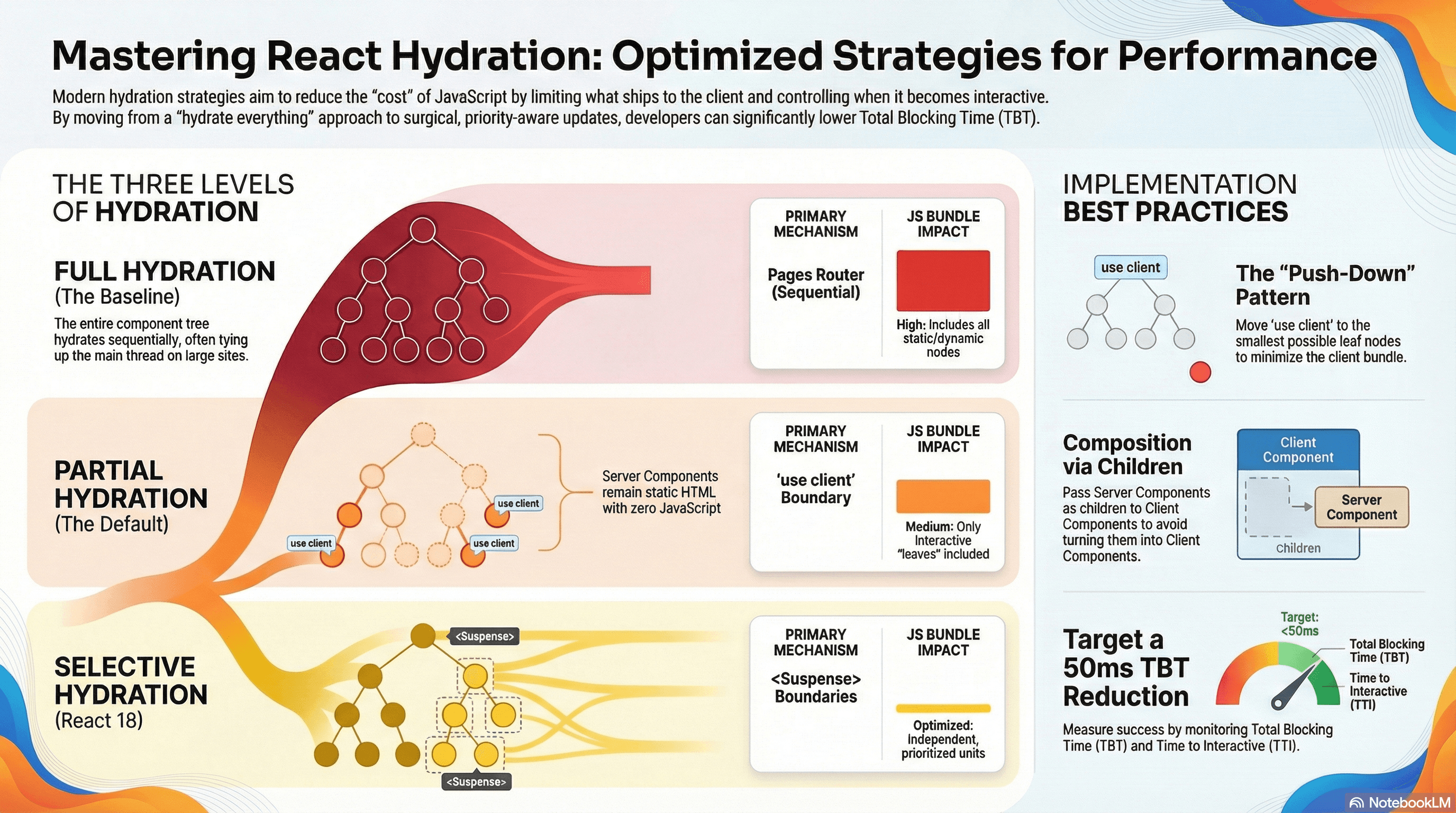
Overview
The previous article covered what hydration is and what it costs. This article covers what to do about that cost — the strategies available for reducing how much JavaScript ships and how much of the tree React hydrates on the client.
There's a spectrum of approaches, from the baseline to progressively more surgical:
Full hydration
  └── Hydrate the entire component tree on every page

Partial hydration
  └── Hydrate only Client Components — Server Components stay as static HTML

Selective hydration (React 18)
  └── Hydrate Suspense-wrapped subtrees independently, in priority order

Islands architecture
  └── Static HTML document with isolated, independently-bundled interactive regions
In Next.js App Router, you get partial hydration automatically through the Server/Client Component split, and selective hydration automatically when you use <Suspense> boundaries. Understanding all three levels lets you make deliberate decisions rather than accidentally hydrating more than you need to.
How It Works
Full Hydration — The Baseline
In a traditional React SSR setup (React 17, Next.js Pages Router), the entire component tree hydrates. React downloads the full JavaScript bundle, re-runs every component function, and walks every DOM node — including components that are purely static and never change.
This is why large content sites built on pre-App Router Next.js often have high Total Blocking Time (TBT) scores: the HTML loads fast, but hydrating the entire page (article bodies, navigation, footer, static cards) ties up the main thread for hundreds of milliseconds.
Partial Hydration — The App Router Default
Partial hydration means only Client Components hydrate. Server Components render to HTML on the server and contribute zero JavaScript to the client bundle — they never run on the client at all.
The split is expressed in code: 'use client' marks the boundary where client-side JavaScript begins. Everything outside that boundary stays on the server.
Page (Server Component)
  ├── Header (Server Component)      ← static HTML, never hydrates
  ├── ArticleBody (Server Component) ← static HTML, never hydrates
  └── CommentForm (Client Component) ← hydrates
        └── SubmitButton             ← inherits client boundary, hydrates
This isn't something you opt into — it's the default model of App Router. The optimization work is in how aggressively you push 'use client' toward leaf nodes.
Selective Hydration — React 18 + Suspense
Selective hydration is React 18's addition on top of partial hydration. Rather than hydrating all Client Components in a single sequential pass, React can:
- Hydrate multiple
<Suspense>-wrapped subtrees concurrently — not one at a time, in parallel - Prioritize a subtree the user is actively interacting with — if a user clicks a not-yet-hydrated component, React jumps to hydrate that boundary immediately, ahead of others
- Begin hydrating before the full HTML arrives — with Streaming SSR, React starts hydrating the chunks of HTML it has while the rest is still streaming in
Each <Suspense> boundary becomes an independent hydration unit. Without <Suspense>, all Client Components hydrate in one sequential pass. With it, React manages the order intelligently.
<Page>
  <Header />                    ← hydrates first (no boundary)
  <Suspense fallback={...}>
    <Sidebar />                 ← hydrates independently
  </Suspense>
  <Suspense fallback={...}>
    <CommentsSection />         ← hydrates independently
  </Suspense>                     ↑ user clicks here → prioritized immediately
</Page>
Islands Architecture
The islands pattern is a more radical version of partial hydration, implemented at the framework level (Astro, Fresh, Qwik). The page is fundamentally a static HTML document with isolated interactive regions ("islands") embedded in it. Each island is independently bundled and bootstraps its own framework runtime — there's no shared React runtime spanning the whole page.
Next.js App Router doesn't implement true islands (there's one shared React runtime), but the Server/Client Component model approximates the intent: static regions ship no JavaScript, interactive regions ship only what they need.
Code Examples
Partial Hydration — The Push-Down Pattern
The most impactful practice: push 'use client' to the smallest possible component.
// app/blog/[slug]/page.tsx
// Server Component — the entire article stays as static HTML

import { TableOfContents } from "@/components/TableOfContents";
import { ShareButton } from "@/components/ShareButton";
import { NewsletterSignup } from "@/components/NewsletterSignup";

async function getPost(slug: string) {
  const res = await fetch(`https://api.example.com/posts/${slug}`, {
    next: { revalidate: 3600 },
  });
  return res.json();
}

export default async function BlogPost({
  params,
}: {
  params: { slug: string };
}) {
  const post = await getPost(params.slug);

  return (
    <article>
      {/* All static — zero JS, zero hydration */}
      <h1>{post.title}</h1>
      <p className="byline">
        By {post.author} · {post.readTime} min read
      </p>

      {/* Small Client Component — only needs scroll position tracking */}
      <TableOfContents headings={post.headings} />

      {/* Full article body — potentially hundreds of DOM nodes, zero hydration cost */}
      <div dangerouslySetInnerHTML={{ __html: post.contentHtml }} />

      {/* Two small interactive islands at the bottom of the page */}
      <ShareButton url={post.url} title={post.title} />
      <NewsletterSignup />
    </article>
  );
}
// components/ShareButton.tsx
"use client"; // Only this component and its imports hydrate
import { useState } from "react";
interface ShareButtonProps {
url: string;
title: string;
}
export function ShareButton({ url, title }: ShareButtonProps) {
const [copied, setCopied] = useState(false);
async function handleShare() {
if (navigator.share) {
await navigator.share({ url, title });
} else {
await navigator.clipboard.writeText(url);
setCopied(true);
setTimeout(() => setCopied(false), 2000);
}
}
return (
<button onClick={handleShare}>
{copied ? "Link copied!" : "Share this post"}
</button>
);
}Selective Hydration — Suspense as Hydration Units
Wrap independently-hydrating sections in <Suspense>. React 18 hydrates each boundary concurrently and prioritizes whichever the user interacts with first.
// app/news/[id]/page.tsx
import { Suspense } from "react";
import { ArticleBody } from "@/components/ArticleBody";
import { CommentThread } from "@/components/CommentThread";
import { RelatedStories } from "@/components/RelatedStories";
import { LiveTicker } from "@/components/LiveTicker";

export default async function NewsArticle({
  params,
}: {
  params: { id: string };
}) {
  const article = await fetch(`/api/articles/${params.id}`).then((r) =>
    r.json(),
  );

  return (
    <main>
      {/* Primary content — hydrates first, no boundary needed */}
      <ArticleBody article={article} />

      {/*
        Each boundary is an independent hydration unit.
        React 18 hydrates these concurrently.

        If the user scrolls down and clicks "Reply" in CommentThread
        before it has hydrated, React immediately prioritizes it —
        jumping ahead of RelatedStories and LiveTicker.
      */}
      <Suspense fallback={<CommentsSkeleton />}>
        <CommentThread articleId={article.id} />
      </Suspense>

      <Suspense fallback={<StoriesSkeleton />}>
        <RelatedStories category={article.category} />
      </Suspense>

      <Suspense fallback={<TickerSkeleton />}>
        <LiveTicker topic={article.topic} />
      </Suspense>
    </main>
  );
}

// Skeletons that match the approximate dimensions of their content
// — prevents CLS when components hydrate and take up space
function CommentsSkeleton() {
  return <div className="animate-pulse h-48 bg-gray-100 rounded mt-8" />;
}
function StoriesSkeleton() {
  return <div className="animate-pulse h-32 bg-gray-100 rounded mt-6" />;
}
function TickerSkeleton() {
  return <div className="animate-pulse h-16 bg-gray-100 rounded mt-4" />;
}
Combining Selective Hydration with Code Splitting
Selective hydration controls when components hydrate. Code splitting controls how much JavaScript downloads. Together they compound:
// app/dashboard/page.tsx
import { Suspense } from "react";
import dynamic from "next/dynamic";

// The 200KB chart library is NOT in the initial bundle.
// It downloads only when this component is about to render.
// AND it hydrates independently via the Suspense boundary.
const HeavyAnalyticsChart = dynamic(
  () => import("@/components/HeavyAnalyticsChart"),
  {
    loading: () => <div className="animate-pulse h-64 bg-gray-100 rounded" />,
    ssr: true, // still server-render initial HTML for fast FCP
  },
);

// This component uses browser-only APIs — skip SSR entirely
const DataExportPanel = dynamic(() => import("@/components/DataExportPanel"), {
  loading: () => <div className="animate-pulse h-32 bg-gray-100 rounded" />,
  ssr: false,
});

export default function DashboardPage() {
  return (
    <div className="grid gap-6">
      {/* Critical content — in the initial bundle, hydrates first */}
      <MetricsSummary />

      {/* Code-split + independently hydrated via Suspense */}
      <Suspense
        fallback={<div className="animate-pulse h-64 bg-gray-100 rounded" />}
      >
        <HeavyAnalyticsChart />
      </Suspense>

      {/* Client-only (ssr: false) — no server HTML, loads on demand */}
      <Suspense
        fallback={<div className="animate-pulse h-32 bg-gray-100 rounded" />}
      >
        <DataExportPanel />
      </Suspense>
    </div>
  );
}
ssr: false in next/dynamic opts the component out of server rendering
entirely — the user sees the skeleton until the client renders it. Use this
only for components that genuinely can't run on the server (WebGL,
localStorage-initialized state, certain browser APIs). For components that
can server-render, ssr: false actively hurts FCP.
Passing Server Components Through Client Boundaries
Server Components can't be imported inside a Client Component, but they can be passed as children — letting you compose static and interactive content without pulling Server Components into the client bundle:
// app/products/page.tsx (Server Component)
import { FilterSidebar } from "@/components/FilterSidebar"; // Client Component
import { ProductGrid } from "@/components/ProductGrid"; // Server Component

export default async function ProductsPage() {
  const products = await fetchProducts();

  return (
    <div className="layout">
      {/*
        FilterSidebar is 'use client' — it manages filter state.
        ProductGrid is a Server Component — pure static HTML.

        We pass ProductGrid as children rather than importing it
        inside FilterSidebar. This keeps ProductGrid out of the
        client bundle and outside the hydration boundary entirely.
      */}
      <FilterSidebar>
        <ProductGrid products={products} />
      </FilterSidebar>
    </div>
  );
}
// components/FilterSidebar.tsx
"use client";
import { useState } from "react";
interface FilterSidebarProps {
children: React.ReactNode; // ProductGrid passes through here — stays server-only
}
export function FilterSidebar({ children }: FilterSidebarProps) {
const [activeFilters, setActiveFilters] = useState<string[]>([]);
function toggleFilter(filter: string) {
setActiveFilters((prev) =>
prev.includes(filter)
? prev.filter((f) => f !== filter)
: [...prev, filter],
);
}
return (
<div className="grid grid-cols-[240px_1fr] gap-6">
<aside>
<h2 className="font-semibold mb-3">Filters</h2>
{["In Stock", "On Sale", "New Arrivals"].map((label) => (
<label
key={label}
className="flex items-center gap-2 cursor-pointer mb-2"
>
<input
type="checkbox"
checked={activeFilters.includes(label)}
onChange={() => toggleFilter(label)}
/>
{label}
</label>
))}
</aside>
{/*
children (ProductGrid) renders here as static HTML.
FilterSidebar's state changes do not re-render ProductGrid —
it's outside the reactive boundary.
*/}
<main>{children}</main>
</div>
);
}Real-World Use Case
News article page. The article body is 2,000+ words of static HTML — headings, paragraphs, code blocks, pull quotes. Interactive elements: share button, bookmark toggle, comment thread, live related-stories ticker.
Without a hydration strategy, the entire page hydrates — including the static article body with thousands of DOM nodes. With partial hydration, only four components hydrate. With selective hydration, each is wrapped in <Suspense>: the share button and bookmark toggle hydrate within 80ms (small, simple), the comment thread hydrates while the user reads (has time), and the live ticker hydrates last. If the user scrolls directly to the comments before hydration completes, React prioritizes the comment thread immediately.
SaaS dashboard with a heavy chart library. The dashboard has metric summary cards (static server HTML), a filterable data table (Client Component), and an analytics chart powered by a 200KB charting library. Wrapping the chart in next/dynamic keeps the 200KB library out of the initial bundle. Wrapping it in <Suspense> means it hydrates independently. The summary cards and data table are interactive immediately while the chart loads in the background.
Common Mistakes / Gotchas
1. Not wrapping sections in <Suspense> and losing selective hydration.
Partial hydration (Server vs Client split) is automatic. Selective hydration is not — it only activates for subtrees wrapped in <Suspense>. Without boundaries, all Client Components hydrate sequentially in one pass. Add <Suspense> at meaningful UI seams to enable concurrent, priority-aware hydration.
2. Placing 'use client' on layout or wrapper components.
A layout with 'use client' makes every component it renders a Client Component — including purely static navigation links, headings, and footer text. This is the most common cause of over-hydration. Push 'use client' toward leaf components.
3. Importing a Server Component inside a Client Component.
Any file imported inside a 'use client' boundary becomes a Client Component. Pass Server Components as children from a Server Component parent instead — they render as static HTML without crossing the client bundle boundary.
4. Using <Suspense> without meaningful fallbacks.
An empty fallback (fallback={null}) causes layout shifts when the component mounts and takes up space. Use dimension-matched skeletons to prevent CLS.
5. Over-splitting with too many fine-grained <Suspense> boundaries.
Each boundary adds React overhead. Wrapping every button and input individually is counterproductive. Place boundaries at sections — comment threads, sidebars, modals — not around individual leaf components.
6. Assuming ssr: false is a performance optimization for all components.
ssr: false means no server-rendered HTML — users see the skeleton until the client renders the component. This is correct for components that genuinely can't server-render. For components that can, ssr: false makes FCP worse because the user sees a blank area instead of actual content while JavaScript loads.
Summary
Hydration strategies address the cost of making server-rendered HTML interactive. Partial hydration — the App Router default — means only 'use client' components hydrate; Server Components contribute static HTML with zero JavaScript. The primary lever is pushing 'use client' boundaries as deep as possible toward interactive leaf nodes. Selective hydration is React 18's addition: <Suspense> boundaries become independent hydration units that React hydrates concurrently and in user-interaction priority order. The two strategies compound — partial hydration reduces the total amount to hydrate, selective hydration controls the order and concurrency of what remains. Combine both with next/dynamic code splitting for maximum impact: the heavy components don't even download until needed, and when they do arrive they hydrate independently without blocking anything else.
Interview Questions
Q1. What is the difference between partial hydration and selective hydration?
Partial hydration is about what gets hydrated: only Client Components hydrate, Server Components stay as static HTML with zero client JavaScript. In Next.js App Router this is the default — 'use client' marks the boundary. Selective hydration is about when and in what order: React 18 hydrates <Suspense>-wrapped subtrees concurrently and prioritizes the subtree the user is actively interacting with, rather than hydrating everything sequentially. Partial hydration reduces the total hydration cost. Selective hydration distributes that cost intelligently across time. Both can and should be used together.
Q2. How does React 18 prioritize hydration when a user interacts with a not-yet-hydrated component?
React 18 tracks pending hydration work per <Suspense> boundary. When an interaction event (click, keypress) targets a not-yet-hydrated node, React immediately interrupts its current hydration work and prioritizes the <Suspense> boundary containing that node. It hydrates that boundary synchronously, attaches the event handler, replays the original event so the user's action completes, then resumes lower-priority hydration for the remaining boundaries. The user experiences a responsive interaction even though the rest of the page hasn't finished hydrating.
Q3. Why can't you import a Server Component inside a Client Component, and how do you work around it?
Any file imported inside a 'use client' boundary is included in the client bundle and becomes a Client Component — even if it was written without 'use client'. The workaround is composition via props: a Server Component parent renders both the Client Component and the Server Component, passing the latter as children. React renders the Server Component's static HTML alongside the Client Component's interactive output. The Server Component never crosses into the client bundle, never hydrates, and the Client Component still gets its children rendered correctly.
Q4. When should you add a <Suspense> boundary for selective hydration vs letting components hydrate normally?
Add <Suspense> at meaningful UI seams where subtrees are independently interactive, potentially slow to load, or where showing a skeleton is preferable to blocking the rest of the page. Good candidates: comment threads, sidebars with their own data, modals, heavy chart components, and sections below the fold. The decision rule: if this section being slow to hydrate would prevent users from interacting with other sections, it needs its own boundary. Don't wrap individual leaf components — the overhead of many fine-grained boundaries outweighs the benefit.
Q5. What is ssr: false in next/dynamic and when is it appropriate?
ssr: false opts a component out of server-side rendering — no HTML is generated on the server, and the user sees the loading fallback until the client renders it. It's appropriate for components that genuinely cannot run in Node.js: WebGL contexts, components that read from localStorage on initialization, or components that depend on browser APIs not available server-side. For most components that can server-render, ssr: false is a performance regression — the user sees a blank area instead of server-rendered content, which directly hurts FCP and LCP.
Q6. How do you measure whether a hydration strategy change actually improved performance?
The key metrics are Total Blocking Time (TBT) and Time to Interactive (TTI) — both measure the main-thread blocking cost of hydration. Use web-vitals to track these in production RUM. In the lab, use Chrome DevTools Performance tab: record a page load and look for long "Evaluate Script" and task blocks between FCP and the first input-responsive frame — those blocks are hydration cost. To verify bundle changes, use @next/bundle-analyzer to confirm that components you moved to Server Components are no longer in the client bundle. A TBT reduction of 50ms or more on a throttled mobile CPU is a meaningful win that will show up in field data.
Hydration
How React attaches to server-rendered HTML, what hydration mismatches are and why they happen, the CPU cost of hydration, and how to structure components to minimize it.
Streaming SSR
How React 18 streams HTML to the browser in chunks using Suspense, how the server-to-client swap mechanism works under the hood, and how to structure components for maximum streaming benefit.