RSC Rendering Model
How React Server Components work as a rendering system — the RSC Payload format, the two-tree model, how server and client outputs merge, and how RSC differs fundamentally from SSR.
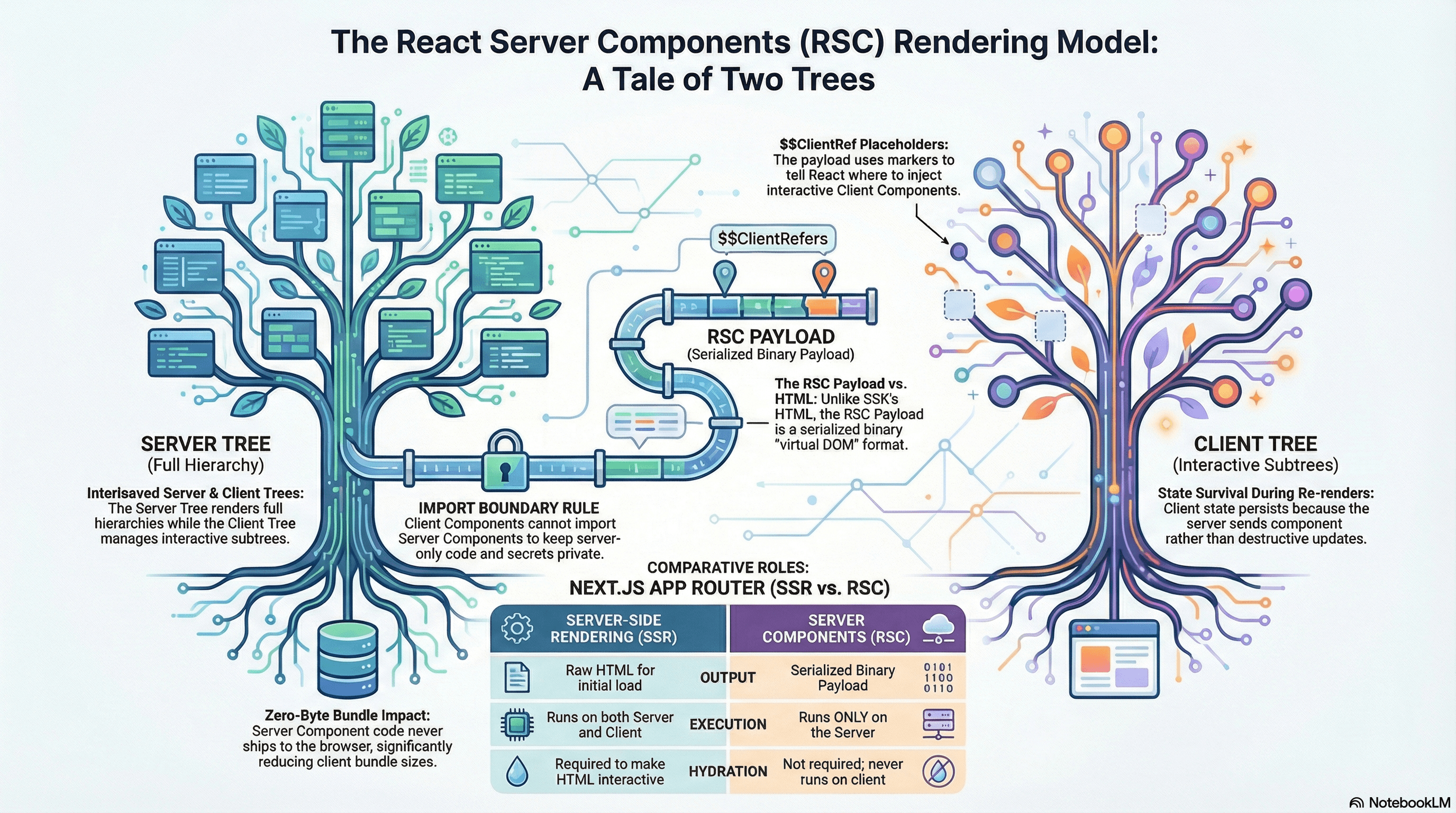
Overview
React Server Components (RSC) are one of the most significant architectural shifts in React's history — but the way they're usually explained ("components that run on the server") undersells how different the underlying model actually is.
This article is not about the RSC API ('use client', async components, server actions). That's covered in the Server Components article in the Component & UI Architecture section. This article is about the rendering model — the mechanical reality of what happens when React renders a component tree that contains both Server and Client Components.
Understanding this model answers questions that the API docs leave open: Why can't you import a Server Component inside a Client Component? Why does Next.js send two separate payloads (HTML and an RSC Payload) on first load? What exactly is the RSC Payload? How does a Client Component's state survive a server re-render? These questions only make sense once you understand the two-tree model RSC is built on.
How It Works
RSC Is Not SSR
The most important clarification first: RSC and SSR are different things that Next.js uses together.
- SSR means rendering React components to HTML on the server. Every React app with Next.js does SSR for the initial HTML. Crucially, SSR also runs the component code on the client to hydrate — the same component function runs twice.
- RSC means some components run only on the server, produce a special serialized output (not HTML), and never run on the client at all — not even for hydration.
The confusion arises because Next.js App Router does both: Server Components produce HTML (via SSR) for the initial load, and also produce RSC Payloads for subsequent client-side navigations. These are two different outputs from the same component tree.
First request (initial page load):
  Server renders RSC tree → HTML (for instant display)
                          + RSC Payload (for React to understand the tree structure)
  Both sent to browser

Client navigation (after initial load):
  Server renders RSC tree → RSC Payload only (HTML not needed — React handles DOM updates)
  Browser React runtime applies the diff
The RSC Payload
The RSC Payload is a compact, streamable binary format (loosely: a serialized virtual DOM for the server-rendered portions of the tree). It contains:
- The rendered output of every Server Component — as component props and element descriptors, not raw HTML
- Placeholders for Client Components — with their component reference, props, and a boundary marker
- References to the JavaScript modules needed for Client Components
It is NOT HTML. The client-side React runtime reads the RSC Payload to reconstruct the component tree in memory, then reconciles that with the actual DOM.
RSC Payload (simplified):
{
  type: "div",
  props: {
    children: [
      { type: "h1", props: { children: "Product Name" } },  // Server Component output
      { type: $$ClientRef, props: { productId: "123" } }    // Client Component placeholder
    ]
  }
}
The $$ClientRef placeholder tells the React runtime: "there's a Client Component here; load this JavaScript module and render it using these props."
The Two-Tree Model
At any given moment, React maintains two conceptual trees:
- The Server Tree — the full component hierarchy including Server Components, rendered on the server. Server Component output (their JSX) is in the RSC Payload.
- The Client Tree — the subtrees of Client Components, rendered and maintained in the browser. This is where
useState,useEffect, and event handlers live.
These trees interleave. A Server Component can render a Client Component (which becomes a placeholder in the RSC Payload). A Client Component can receive Server Component output as children props (which is already-rendered HTML/JSX in the payload). What a Client Component cannot do is import a Server Component — because the import graph crosses the server/client boundary in a direction the runtime can't support.
Server Tree (in RSC Payload)
  <Page>                          ← Server Component
    <Header />                    ← Server Component
    <ProductDetails>              ← Server Component
      [CLIENT: AddToCartButton]   ← Placeholder, props serialized
    </ProductDetails>
    <RecommendationSidebar />     ← Server Component
      [CLIENT: WishlistButton]    ← Placeholder
  </Page>

Client Tree (in browser)
  AddToCartButton (renders from placeholder + module load)
  WishlistButton (renders from placeholder + module load)
Client Component State Survives Server Re-renders
This is the most counterintuitive behavior in RSC: when a Server Component re-renders (due to a navigation, a server action completing, or a cache revalidation), the Client Components within it preserve their state.
This works because the RSC Payload carries placeholders with props — not rendered Client Component output. When React receives an updated RSC Payload, it reconciles the Server Component portions and updates the DOM for those, but treats the Client Component placeholders as "keep what's there, just update the props if they changed." The Client Component's useState values are untouched.
Server re-render triggered (e.g., new product loaded):

New RSC Payload arrives:
  <ProductDetails product={newProduct}>
    [CLIENT: AddToCartButton props={productId: "456"}]
  </ProductDetails>

React reconciliation:
  ✅ Updates <ProductDetails> DOM nodes with new product data
  ✅ Updates AddToCartButton's productId prop to "456"
  ✅ Preserves AddToCartButton's internal state (e.g., isAdded: false)
The Full Request Lifecycle in App Router
Browser request (first load)
    ↓
Next.js server renders the RSC tree:
  1. Executes all Server Components (data fetching, DB access)
  2. Encounters Client Components → records placeholders with props
  3. Serializes result as RSC Payload
  4. Also renders full HTML via renderToPipeableStream (for TTFB)
    ↓
Browser receives:
  - HTML stream (displayed immediately — fast FCP)
  - RSC Payload (inline in HTML or separate request)
  - JS bundles for Client Components (deferred)
    ↓
React hydrates:
  - Reads RSC Payload to reconstruct virtual tree
  - Matches virtual tree against existing HTML DOM
  - Loads Client Component JS modules
  - Attaches event handlers to Client Component DOM nodes
    ↓
Subsequent navigation (client-side):
  - React fetches RSC Payload for new route (not full HTML)
  - Applies diff to existing DOM — no full page reload
  - Client Component state preserved across server re-renders
Code Examples
Visualizing the Server/Client Split
// app/shop/page.tsx — Server Component (no 'use client')
// This component exists only on the server.
// Its code is never sent to the browser.

import { CartButton } from "@/components/CartButton"; // Client Component
import { db } from "@/lib/db"; // Only safe to import in Server Components

export default async function ShopPage() {
  // Direct DB access — no API route, no fetch, no client exposure
  const products = await db.product.findMany({
    where: { isPublished: true },
    orderBy: { createdAt: "desc" },
    take: 20,
  });

  return (
    <main>
      <h1>Shop</h1>
      {products.map((product) => (
        <div key={product.id} className="product-card">
          {/* Static Server Component output — goes into RSC Payload as JSX */}
          <h2>{product.name}</h2>
          <p>${product.price}</p>

          {/*
            CartButton is a Client Component.
            In the RSC Payload, this becomes a placeholder:
            { type: $$CartButtonRef, props: { productId: product.id } }

            The actual CartButton JS is not in the RSC Payload —
            it's a separate JS module the browser loads.
          */}
          <CartButton productId={product.id} />
        </div>
      ))}
    </main>
  );
}
// components/CartButton.tsx
"use client"; // This file and its imports go to the browser bundle
import { useState } from "react";
interface CartButtonProps {
productId: string;
}
export function CartButton({ productId }: CartButtonProps) {
// This state lives in the browser — it survives server re-renders
const [quantity, setQuantity] = useState(0);
const [adding, setAdding] = useState(false);
async function addToCart() {
setAdding(true);
await fetch("/api/cart", {
method: "POST",
body: JSON.stringify({ productId, quantity: 1 }),
headers: { "Content-Type": "application/json" },
});
setQuantity((q) => q + 1);
setAdding(false);
}
return (
<div>
{quantity > 0 && <span>{quantity} in cart</span>}
<button onClick={addToCart} disabled={adding}>
{adding ? "Adding..." : "Add to Cart"}
</button>
</div>
);
}What the RSC Payload Looks Like in Practice
You can inspect the RSC Payload in the browser's network tab. On any client-side navigation in a Next.js App Router app, look for requests to your page path with ?_rsc= query params or Accept: text/x-component headers.
// The RSC Payload is a line-delimited format.
// Each line is either a flight chunk or a reference.
// Simplified representation of what you'd see:

// Line 1: Root element descriptor
// 0:["$","div",null,{"className":"main","children":["$L1","$L2"]}]

// Line 2: Server Component output (Header)
// 1:["$","header",null,{"children":["$","h1",null,{"children":"Shop"}]}]

// Line 3: Client Component reference + props (CartButton)
// 2:["$","$L3",null,{"productId":"abc123"}]

// Line 4: Module reference for CartButton
// 3:{"id":"./components/CartButton.tsx","chunks":["cart-button-abc123.js"],"name":"CartButton"}
The $L prefix indicates a module reference — the browser will load cart-button-abc123.js and use the exported CartButton for that slot.
Server Actions — Mutations That Return RSC Updates
Server Actions are the mutation side of RSC. They run on the server, can mutate data, and return an updated RSC Payload that React applies as a diff:
// app/actions/cart.ts
"use server"; // This file only runs on the server

import { revalidatePath } from "next/cache";
import { db } from "@/lib/db";

export async function addToCart(productId: string, userId: string) {
  // Runs on the server — direct DB access, no API route needed
  await db.cartItem.upsert({
    where: { userId_productId: { userId, productId } },
    update: { quantity: { increment: 1 } },
    create: { userId, productId, quantity: 1 },
  });

  // Invalidate the cart server component — triggers RSC re-render
  // Client Components within the re-rendered tree keep their state
  revalidatePath("/shop");
}
// components/CartButton.tsx
"use client";
import { useTransition } from "react";
import { addToCart } from "@/app/actions/cart";
export function CartButton({
productId,
userId,
}: {
productId: string;
userId: string;
}) {
const [isPending, startTransition] = useTransition();
function handleClick() {
startTransition(async () => {
// Calls the server action — runs on server, returns RSC update
await addToCart(productId, userId);
// After revalidatePath, React receives a fresh RSC Payload
// and updates only the parts of the tree that changed
});
}
return (
<button onClick={handleClick} disabled={isPending}>
{isPending ? "Adding..." : "Add to Cart"}
</button>
);
}Why You Can't Import a Server Component into a Client Component
// ❌ This breaks the module boundary — StaticList becomes a Client Component

// components/FilterPanel.tsx
"use client";

// This import crosses the server/client boundary.
// StaticList's code (including its server-only imports like db) would need
// to be included in the client bundle — which is either impossible
// (if it imports server-only modules) or defeats the point of RSC.
import { StaticList } from "./StaticList"; // Server Component

export function FilterPanel() {
  const [filter, setFilter] = useState("all");
  return (
    <div>
      <select onChange={(e) => setFilter(e.target.value)}>...</select>
      <StaticList filter={filter} /> {/* ❌ */}
    </div>
  );
}
// ✅ Pass Server Component output as children from a Server Component parent
// app/products/page.tsx (Server Component)
import { FilterPanel } from "@/components/FilterPanel"; // Client Component
import { StaticList } from "@/components/StaticList"; // Server Component
export default async function ProductsPage() {
// StaticList is rendered here on the server — its output (JSX/HTML)
// is serialized into the RSC Payload and passed to FilterPanel
// as already-rendered children. FilterPanel never sees StaticList's code.
return (
<FilterPanel>
<StaticList /> {/* Rendered on server, passed as opaque children */}
</FilterPanel>
);
}// components/FilterPanel.tsx
"use client";
import { useState } from "react";
interface FilterPanelProps {
// children is the already-rendered StaticList output — opaque to FilterPanel
children: React.ReactNode;
}
export function FilterPanel({ children }: FilterPanelProps) {
const [filter, setFilter] = useState("all");
return (
<div>
<select value={filter} onChange={(e) => setFilter(e.target.value)}>
<option value="all">All</option>
<option value="in-stock">In Stock</option>
</select>
{/*
children renders here — it's the StaticList HTML from the server.
FilterPanel's state changes do not cause StaticList to re-render.
StaticList's code was never included in the client bundle.
*/}
{children}
</div>
);
}Inspecting RSC Behavior in the Network Tab
# How to observe RSC Payloads in Chrome DevTools:

# 1. Open DevTools → Network tab
# 2. Navigate to a page using client-side navigation (not a full reload)
#    e.g., click an internal link
# 3. Filter by "Fetch/XHR"
# 4. Look for requests to your page URL with header:
#    Accept: text/x-component
# 5. The response body is the RSC Payload — line-delimited flight format

# On initial page load, the RSC Payload is embedded in the HTML
# as an inline <script> with id="__NEXT_DATA__" or as a separate
# streamed resource depending on Next.js version.

# To see the payload clearly:
# Network → response → Preview tab shows the decoded flight chunks
Real-World Use Case
Product page with a cart sidebar. The product details (title, description, images) are Server Components — they read from a database and produce static HTML in the RSC Payload. The cart sidebar is a Client Component maintaining quantity state and running add/remove animations.
When the user navigates from one product to another, Next.js fetches the new RSC Payload. React updates the product details in the DOM, passes the new productId prop to the CartButton — but the CartButton's quantity state for the previous product isn't relevant anyway. More importantly: the user's cart sidebar state, like an open/closed animation state or a pending optimistic update, is preserved because the cart sidebar itself is a Client Component that React reconciles normally.
When the user adds a product using a Server Action, the action runs on the server, updates the database, calls revalidatePath, and React receives an updated RSC Payload. The cart item count in the header (a Server Component that reads the cart from the database) updates. The CartButton's isPending state, which was set to true during the action, is resolved to false — because it's Client Component state managed by useTransition.
Common Mistakes / Gotchas
1. Thinking RSC and SSR are the same thing. SSR renders components to HTML on the server and hydrates them on the client — the same component runs twice. RSC components run only on the server and are never hydrated. Next.js App Router uses both: Server Components produce both HTML (via SSR) and RSC Payloads, but the component code itself never ships to the browser.
2. Importing server-only modules in Client Components.
Server Components can import db, fs, secret API keys, and other server-only resources safely — they never reach the browser. Once you cross into 'use client', those imports would be bundled for the browser. Next.js will either error (if the import contains Node.js built-ins) or silently include sensitive code in the client bundle. Use the server-only package to make this mistake a build error rather than a runtime surprise.
// lib/db.ts
import "server-only"; // Build error if imported in a Client Component
export const db = createDbClient();
3. Expecting Server Component props to accept non-serializable values. RSC Payloads are serialized over the network. Server Component props that get passed to Client Components must be serializable — strings, numbers, plain objects, arrays. You cannot pass functions, class instances, or Symbols as props from a Server Component to a Client Component boundary. Event handlers defined in Server Components (which would require passing a function) are not possible — those belong in Client Components.
4. Confusing 'use server' with "this file is a Server Component."
'use server' marks a function as a Server Action — a function that can be called from Client Components but runs on the server. It does not make the file a Server Component. Server Components have no directive — the absence of 'use client' is what makes a component server-side by default.
5. Assuming Client Component state is lost on server re-renders.
It isn't — this is a key guarantee of the RSC model. When a server action or navigation triggers an RSC re-render, React receives a new RSC Payload and reconciles it against the existing Client Component tree. Client Component state is preserved unless the component's identity changes (different key prop) or the component is unmounted.
6. Over-fetching in Server Components with no deduplication.
In a single server render, multiple Server Components may call fetch for the same URL. Next.js deduplicates identical fetch calls with the same URL and cache key within a single render — but only for fetch. Direct database calls (via an ORM) are not deduplicated automatically. Use React's cache() function to memoize expensive server-side computations across a single request.
// lib/data.ts
import { cache } from "react";

// cache() memoizes this function per-request — multiple components
// calling getUser(id) in the same render only trigger one DB query
export const getUser = cache(async (id: string) => {
  return db.user.findUnique({ where: { id } });
});
Summary
React Server Components introduce a two-tree rendering model: a Server Tree rendered on the server and serialized as an RSC Payload, and a Client Tree rendered and maintained in the browser. The RSC Payload is not HTML — it's a serialized virtual DOM containing Server Component output and placeholders for Client Components. Next.js uses both SSR (to produce initial HTML for fast FCP) and RSC Payloads (for React to understand and update the tree structure). Server Components never run on the client — their code, their imports, and their secrets never reach the browser. Client Component state survives server re-renders because React reconciles RSC Payload updates against the existing Client tree rather than tearing it down. The server/client import restriction exists because module graphs must be coherent within each environment — the workaround is composition via children props from a Server Component parent.
Interview Questions
Q1. What is the RSC Payload and how does it differ from the HTML that SSR produces?
The RSC Payload is a serialized, line-delimited binary format that represents the component tree structure — Server Component output as element descriptors and props, and Client Components as module-reference placeholders with their props. It is not HTML. SSR produces HTML for the browser to display immediately. The RSC Payload is for the React runtime — it uses it to reconstruct the virtual tree in memory, reconcile it against the existing DOM, and know which Client Component JS modules to load. Next.js sends both on the initial load: HTML for fast display, RSC Payload for React's tree understanding. On subsequent client-side navigations, only the RSC Payload is fetched — no HTML needed, React handles the DOM updates.
Q2. Why does client component state survive a server re-render in RSC?
The RSC Payload contains placeholders for Client Components — not rendered output. When an updated RSC Payload arrives (from a navigation or server action revalidation), React reconciles the Server Component portions of the tree and updates those DOM nodes, but treats Client Component placeholders as "update props if changed, leave state alone." Client Component state — useState, useReducer, context values — is entirely managed in the browser and is untouched by the server re-render unless the component is unmounted (via a key change or removal from the tree).
Q3. Why can't you import a Server Component directly inside a Client Component?
JavaScript module graphs are resolved at build time in a single, coherent module system. A 'use client' file is included in the browser bundle. If it imports a Server Component, that component's code — including any server-only imports like db, fs, or secret API keys — would need to be bundled for the browser. This is either impossible (if the imports use Node.js built-ins) or a security violation (shipping secrets to the client). The module boundary must be respected: Client Components can only import other Client Components. Server Component output can be passed to Client Components as children props from a Server Component parent — the output is already-rendered JSX in the RSC Payload, not the component code itself.
Q4. What is the difference between 'use client' and 'use server'?
'use client' marks a file as a Client Component boundary — the file and everything it imports are included in the browser bundle and will be hydrated. 'use server' marks a file or function as a Server Action — a function that can be called from Client Component event handlers but executes on the server, with access to server-side resources. 'use server' does not make the file a Server Component. Server Components have no directive — they're server-side by default through the absence of 'use client'. Server Actions are the mutation mechanism; Server Components are the rendering mechanism.
Q5. What is cache() from React and why is it needed in Server Components?
cache() is a React function that memoizes the result of an async function per-request — multiple calls with the same arguments within a single server render return the cached result without re-executing. It's needed because multiple Server Components in the same render tree may independently call the same data-fetching function — for example, both <Header> and <Sidebar> might call getUser(userId). Without memoization, both calls hit the database. With cache(), the first call executes and the second returns the cached result. Next.js deduplicates fetch() calls automatically, but cache() is the explicit mechanism for database calls and other non-fetch async operations.
Q6. How does the RSC model affect bundle size compared to traditional SSR?
In traditional React SSR (React 17, Pages Router), all component code ships to the browser because every component must hydrate. A large markdown parser, a date formatting library, or an ORM used only for rendering static content still ends up in the client bundle. With RSC, Server Components and everything they import exclusively are never included in the client bundle. A 200KB markdown parser used in a Server Component contributes zero bytes to the browser download. Only Client Component code and its imports ship to the browser. This produces materially smaller bundles — a 50–80% reduction is achievable on content-heavy pages — directly improving Time to Interactive, Total Blocking Time, and download time on slow connections.
SSR vs SSG vs ISR
The three core rendering strategies in Next.js — Server-Side Rendering, Static Site Generation, and Incremental Static Regeneration — what each one does, when to use it, and how to configure them in the App Router.
Concurrent Rendering
How React's concurrent rendering model works — priority lanes, time slicing, interruptible renders, useTransition, useDeferredValue, and how to keep UIs responsive under heavy update load.